Digital Ocean Uploader Mobile helps users upload files directly from a Bubble mobile app to DigitalOcean Spaces with a simple interface. It supports gallery and file-manager selection, upload limits, and status tracking so users always know what is happening.
Access Key & Secret Key generated from your Digital Ocean console.
This plugin is designed specifically for the mobile version of the Bubble editor. To test the plugin on your mobile device, use the TestFlight app available at: https://testflight.apple.com/join/t65D5D6R
☝
Please note that the testing app is currently available for iOS only.
How to setup
Step 1 – Digital Ocean Account Creation
Create a DigitalOcean Account
Go to https://www.digitalocean.com and sign in or create a free account.
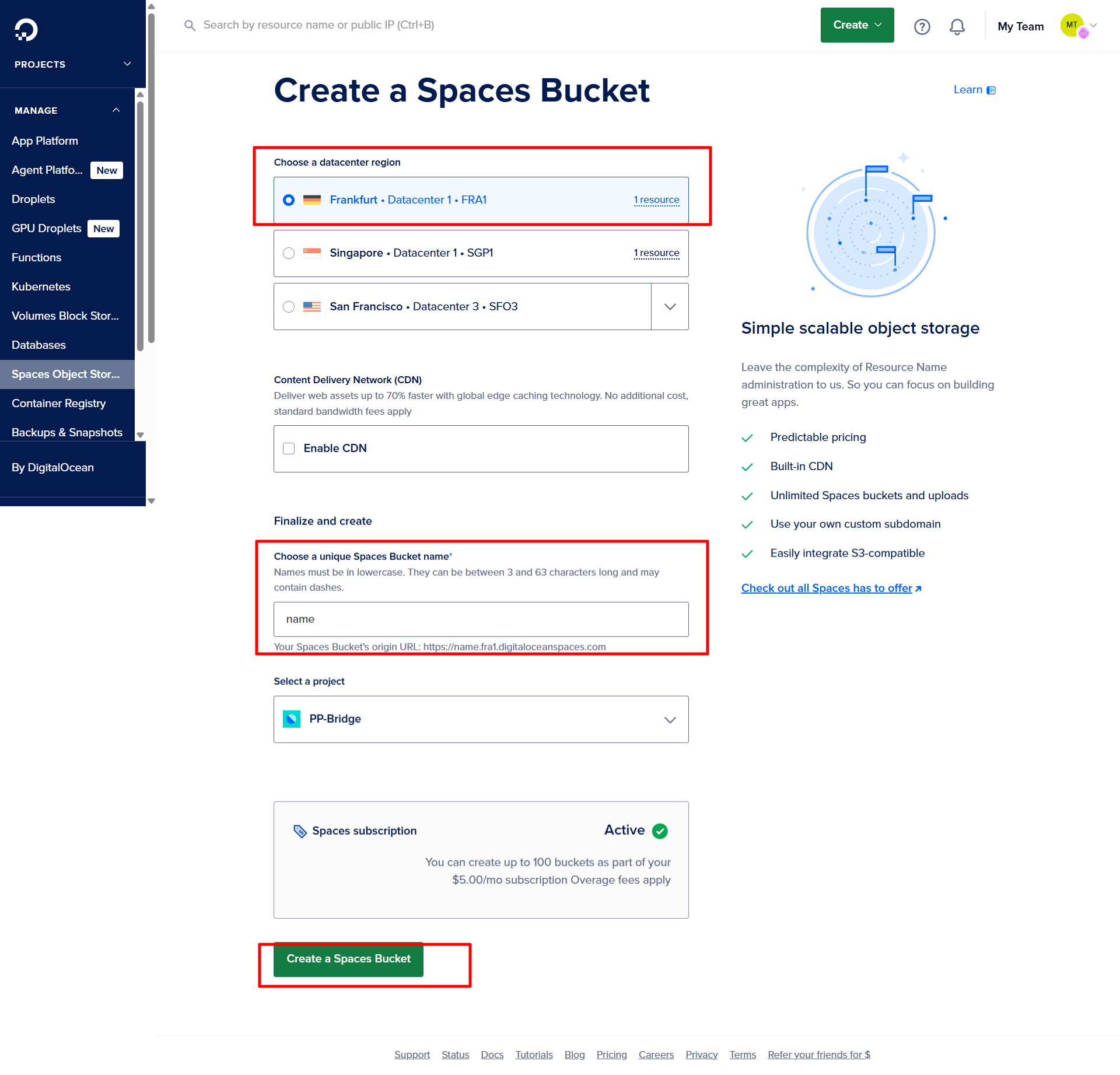
Create a New Space
From the DigitalOcean dashboard, go to the "Spaces" section.
Click "Create a Space".
Choose a datacenter region (e.g., AMS3, NYC3, etc.)
Set your Space name and choose if it should be public or private.
Click "Create a Space" to finish.
Set Permissions (Public or Private)
You can manage access at the file or folder level if your space is private.
For public access: set your file/folder permissions to "Public".
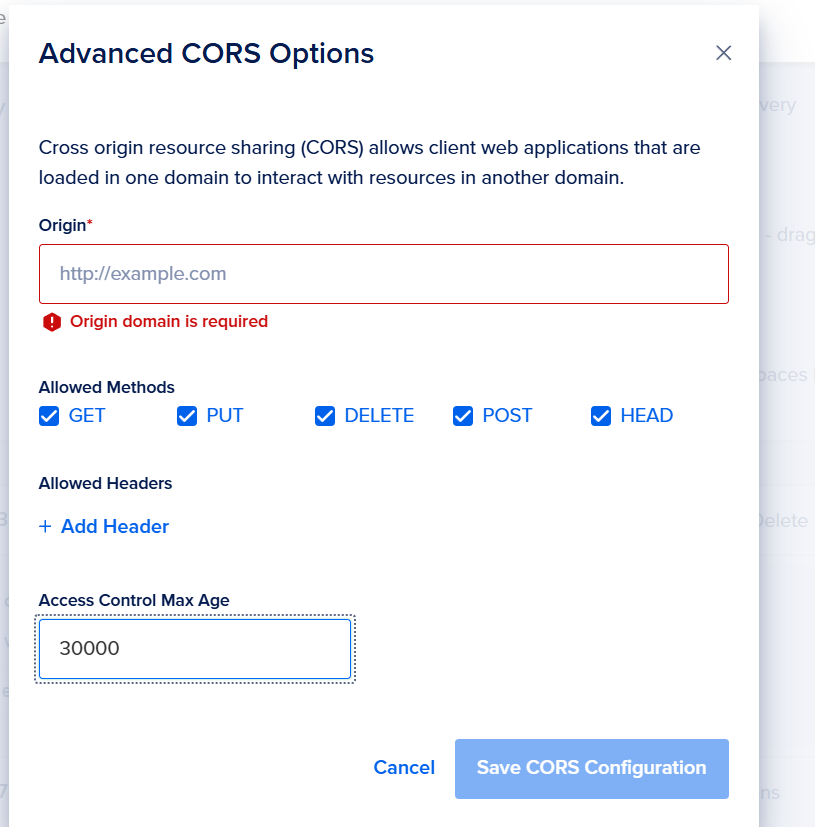
Enable CORS (Optional but Recommended)
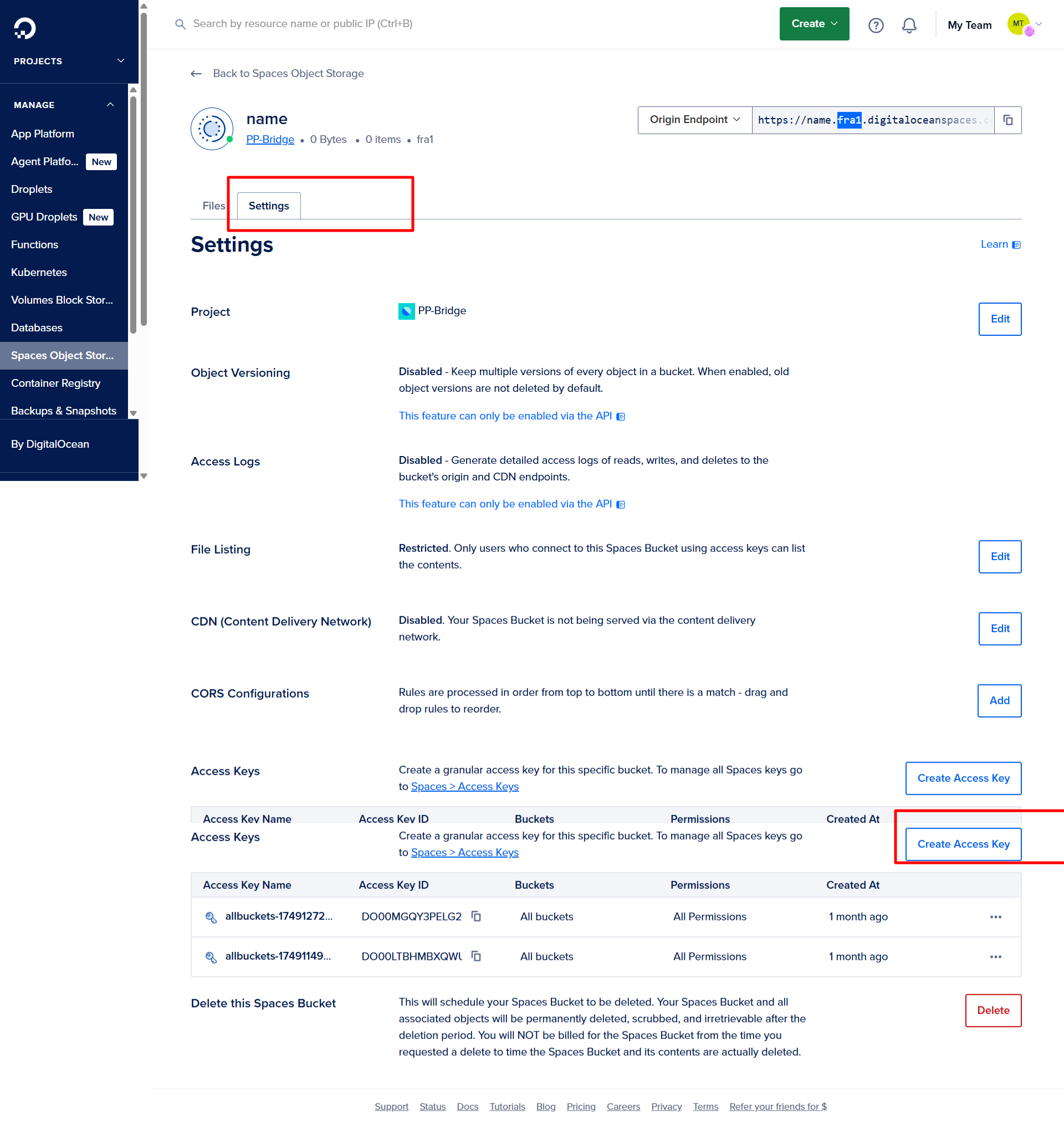
If your app is hosted on a different domain, add a CORS policy via the Settings tab of the Space.
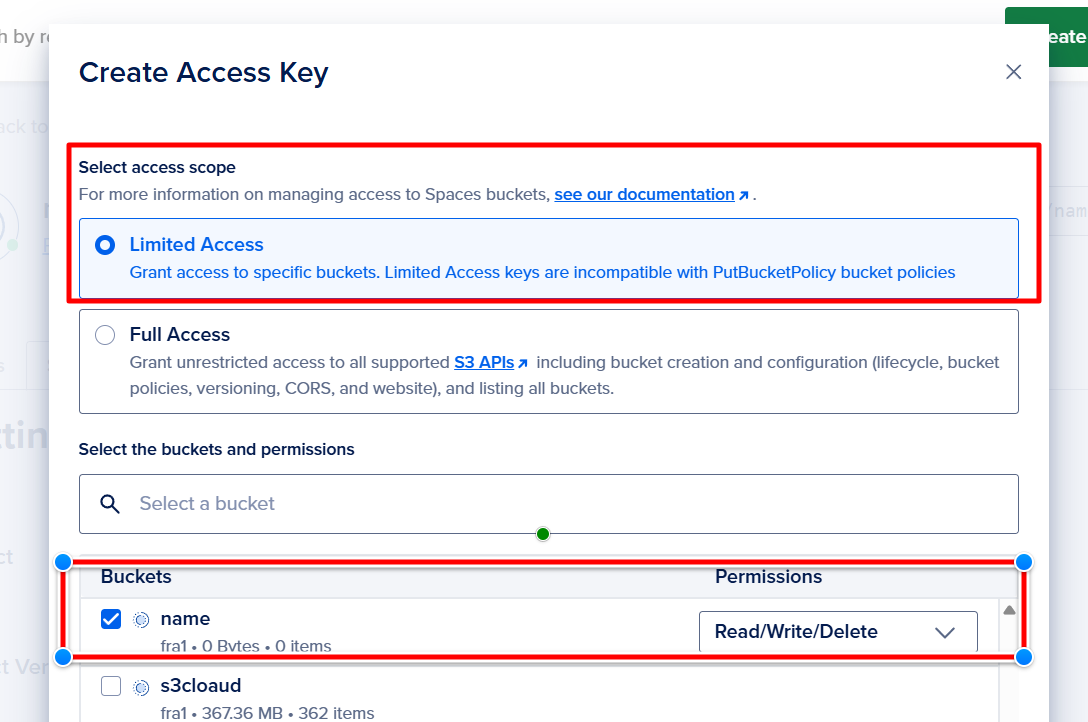
Create Access Keys
Go to API → Tokens/Keys
Under the Spaces access keys section, click "Generate New Key"
Set a name, then copy the resulting:
Access Key
Secret Key
Configure in Bubble
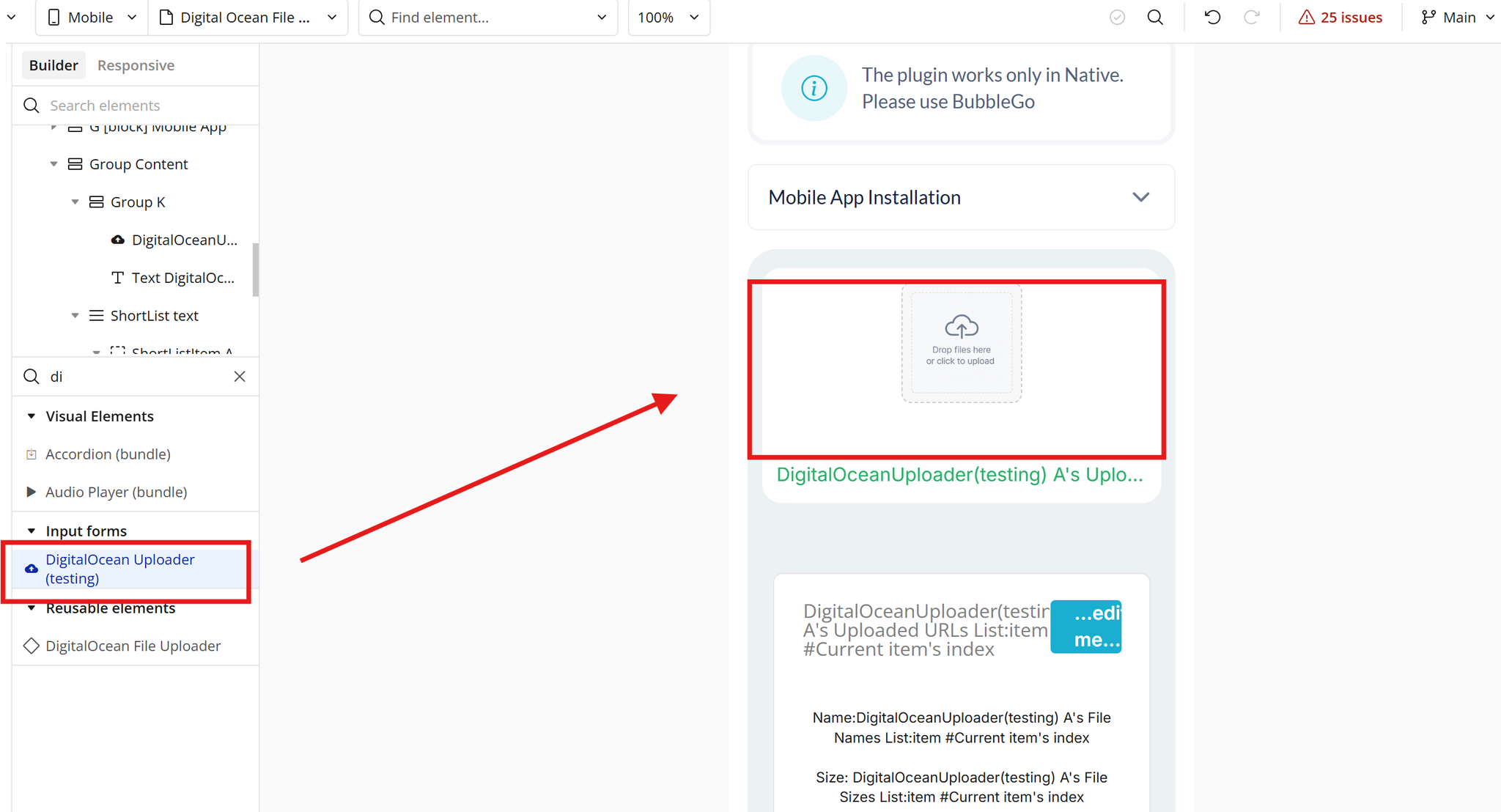
Place the Uploader on the Page
Drag the Uploader element onto your page.
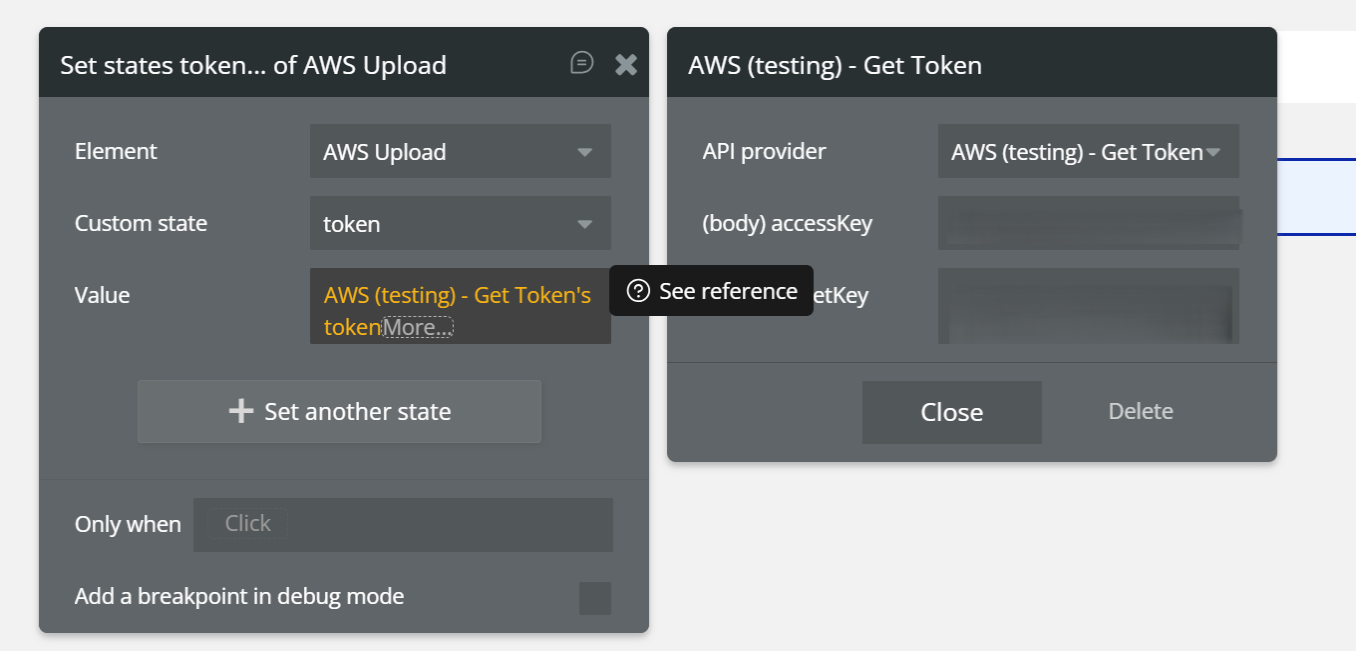
Generate and Save the Token
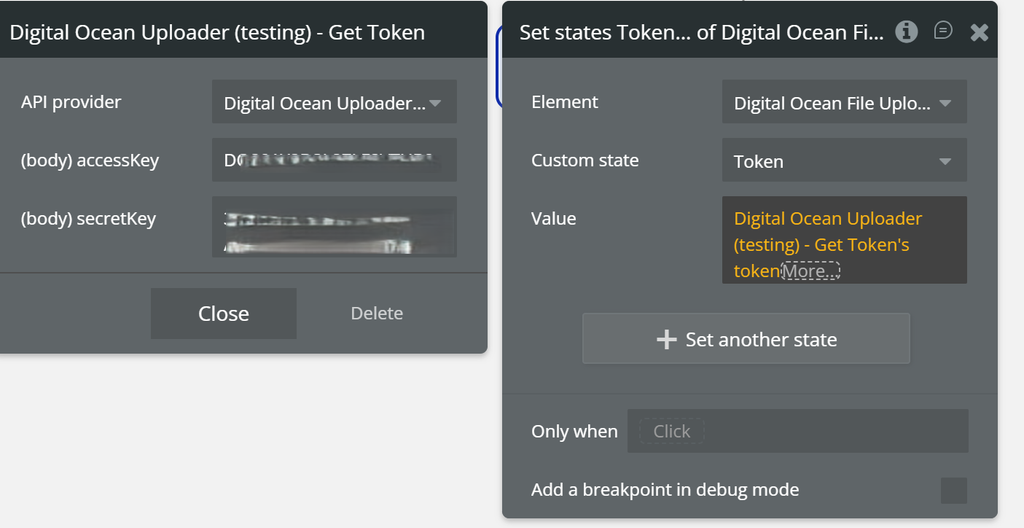
Event:When Page is Loaded
Actions:
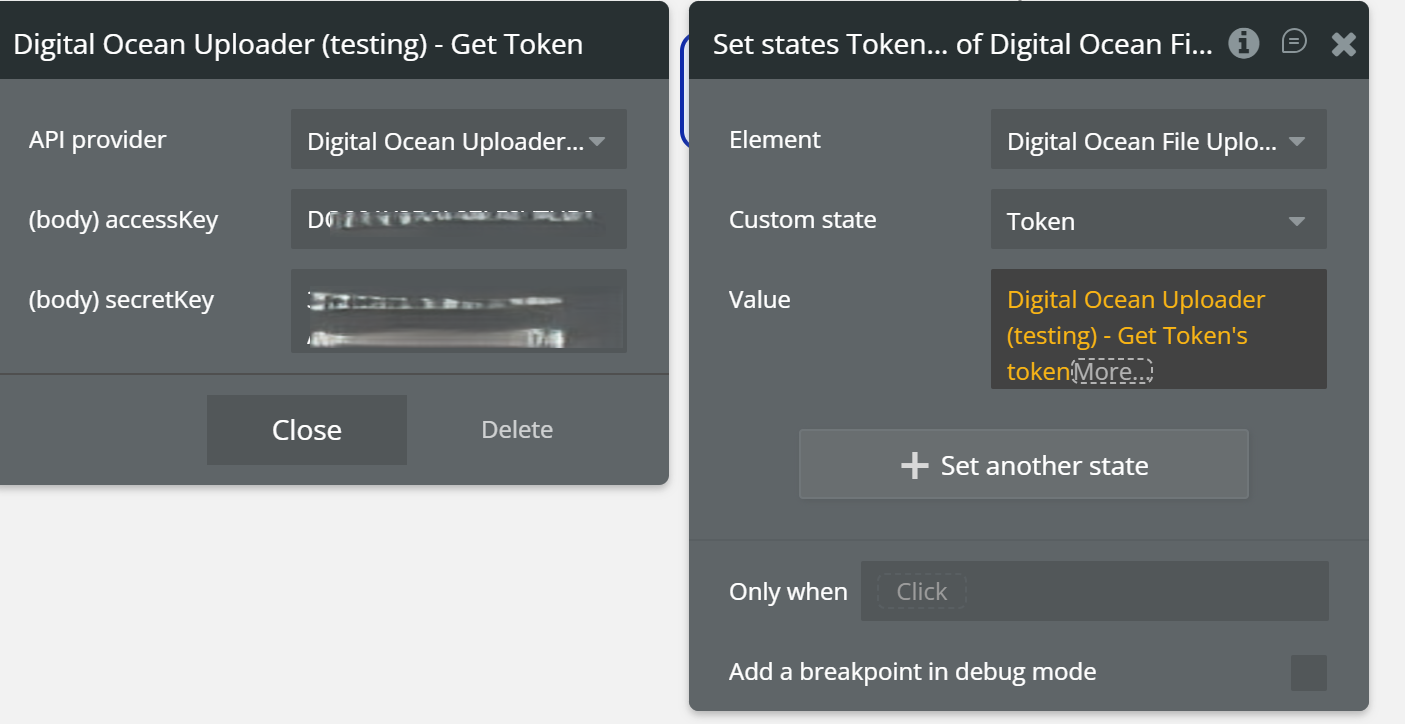
Digital Ocean – Get Token
Provide the required keys (Access Key, Secret Key)
Set state of an element
Element:Digital Ocean
Custom state:token
Value:Digital Ocean – Get Token's token
✅ Result:
The token is generated and stored in the uploader element.
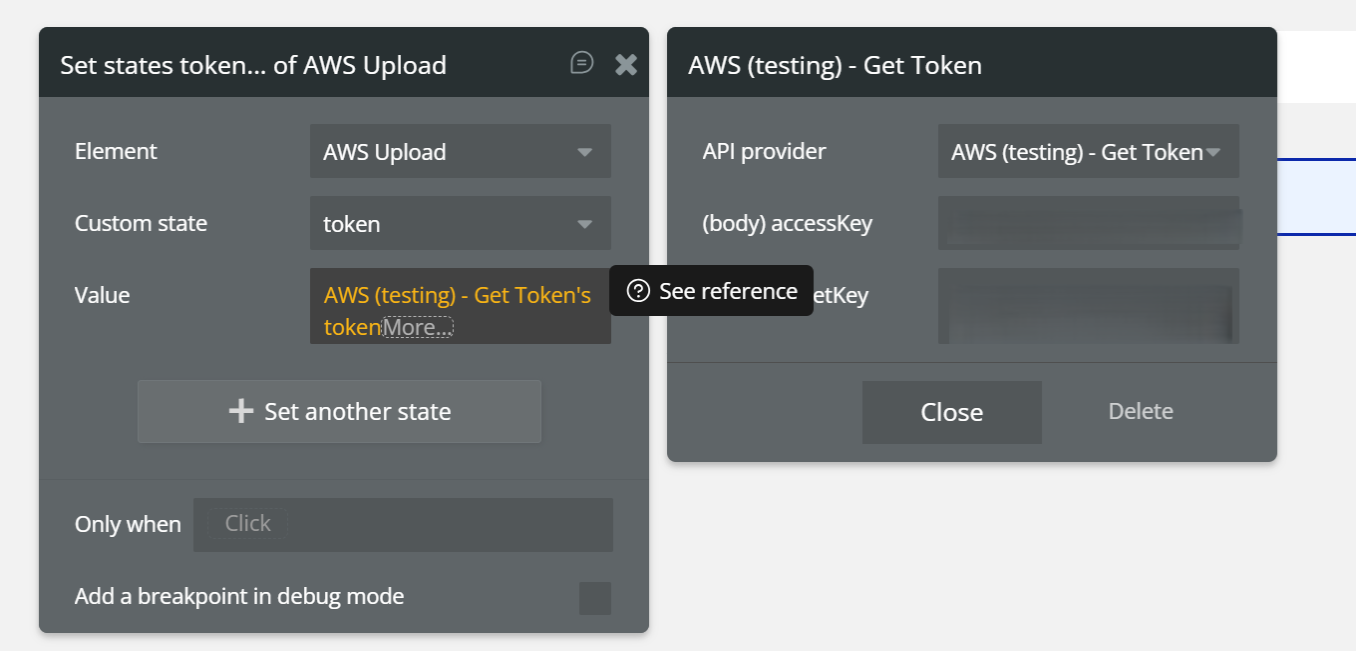
Event:When Page is Loaded
Actions:
Digital Ocean – Get Token
Provide the required keys (Access Key, Secret Key)
Set state of an element
Element:Digital Ocean
Custom state:token
Value:Digital Ocean – Get Token's token
✅ Result:
The token is generated and stored in the uploader element.
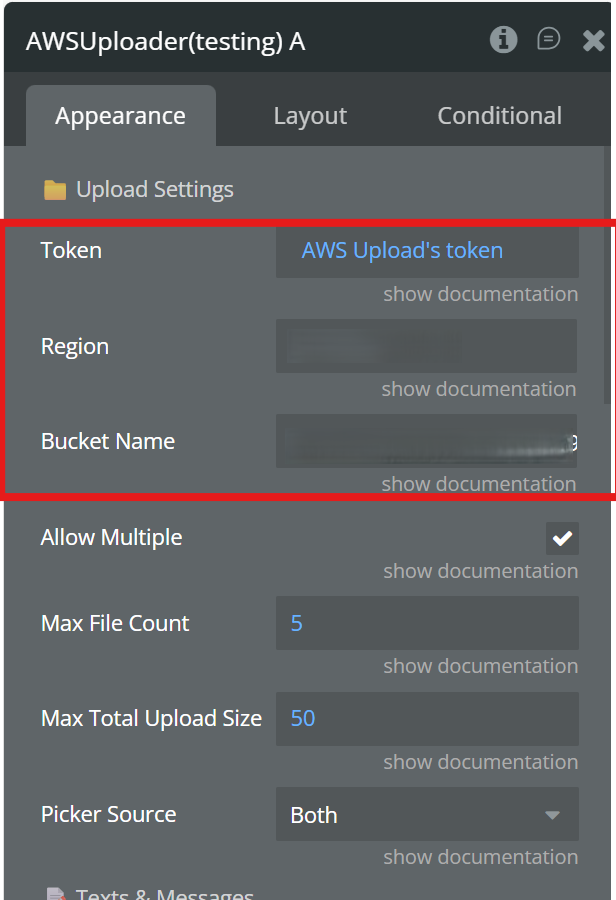
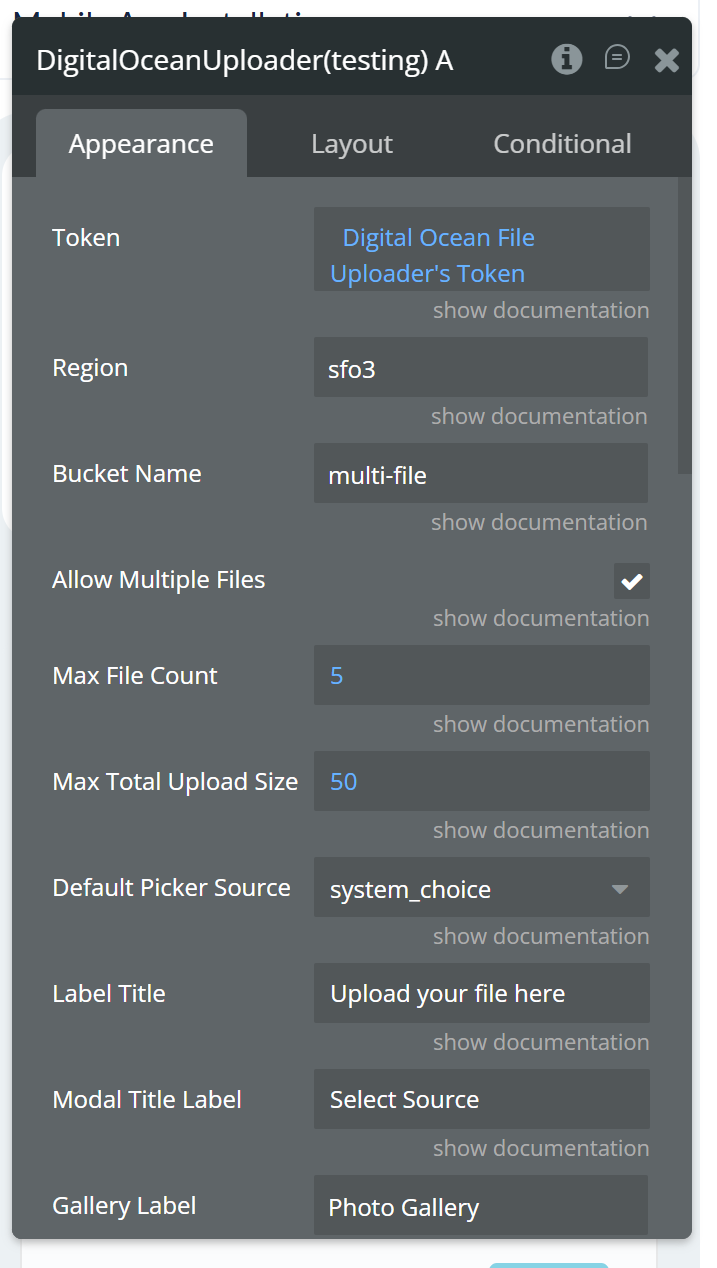
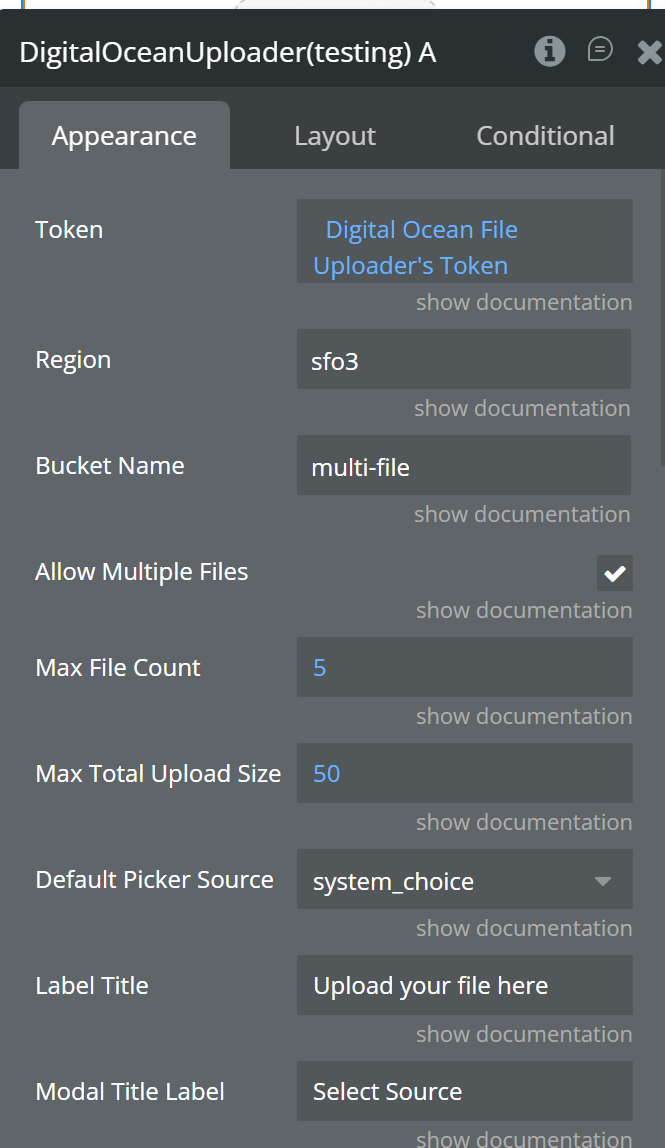
Configure the Uploader Element (Appearance Tab)
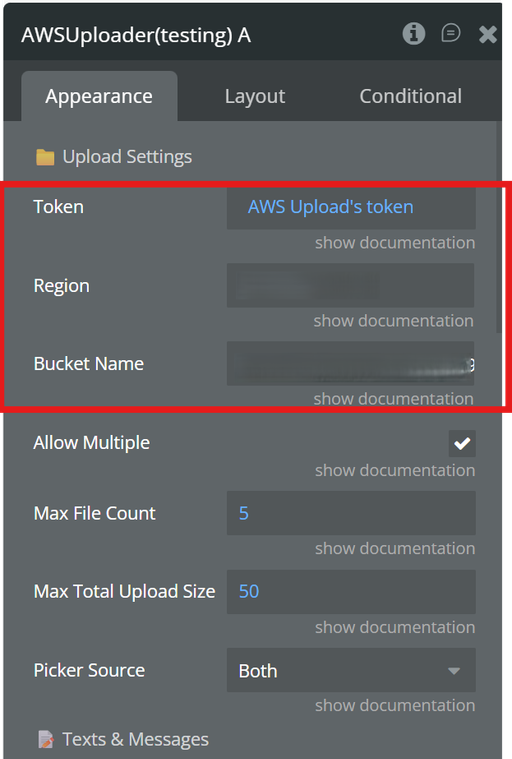
In the Digital Ocean Native File Uploader element, set:
Token:Digital Ocean token (dynamic)
Region: your S3 bucket region (e.g. us-east-1)
Bucket Name: your S3 bucket name
⚠️ These three fields are mandatory.
Upload Files
User Action:
User selects files using the uploader element.
What happens automatically:
The uploader uses the saved token
Requests pre-signed URLs
Uploads files directly to Digital Ocean
Plugin Element - DigitalOcean Uploader
This element gives your users a mobile-first upload zone that works with both gallery and file manager sources. It handles file picking, validation, presigned URL upload flow, and state publishing in one component. You can use it to build reliable upload experiences without writing custom native upload logic.
Fields
Name
Description
Type
Token
Authentication token used to authorize presign requests before upload starts.
Text
Region
DigitalOcean Spaces region used to build the storage endpoint.
Text
Bucket Name
Target bucket name where selected files are uploaded.
Text
Allow Multiple Files
Enables or disables selecting multiple files in one action.
Yes/No
Max File Count
Maximum number of files accepted in a selection/upload batch.
Number
Max Total Upload Size MB
Total size limit in MB for the selected files.
Number
Default Picker Source
Chooses default source: system choice modal, gallery, or file manager.
Text
Label Title
Main label shown in the upload box before upload starts.
Text
Modal Title Label
Title displayed in the source selection modal.
Text
Gallery Label
Button label for opening device photo gallery.
Text
File Manager Label
Button label for opening file manager/documents picker.
Text
Cancel Button Text
Text shown on cancel action in source modal.
Text
Border Color
Border color of the upload container.
Text
Border Radius
Corner radius of the upload container.
Number
Background Color
Background color of the upload container.
Text
Font Size
Font size for the upload label text.
Number
Font Color
Font color for the upload label text.
Text
Icon Color
Color used for idle/uploading icon.
Text
Expires In (sec)
Presigned URL validity period in seconds.
Number
Exposed States
Name
Description
Type
Uploaded URLs List
List of successfully uploaded file URLs.
List of Text
File Names List
List of uploaded file names.
List of Text
File Sizes List
List of uploaded file sizes in MB.
List of Number
File Types List
List of uploaded file MIME types.
List of Text
Upload Status Text
Current status message for upload flow and validations.
Text
Uploaded File Url
Last successfully uploaded file URL.
Text
Delete Urls List
List of delete URLs returned for uploaded files.
List of Text
Get Presign Urls List
List of presigned GET URLs returned for the uploaded files.
List of Text
Element Events
Name
Description
Upload Started
Triggered when upload flow begins.
Upload Finished
Triggered when upload completes successfully.
Upload Failed
Triggered when upload fails.
Upload Limit Exceeded
Triggered when selected file count is above allowed limit.
Upload Size Exceeded
Triggered when selected total size exceeds allowed limit.
Upload Canceled
Triggered when user cancels picker selection.
All Files Uploaded
Triggered when all selected files are uploaded successfully.
Element Actions
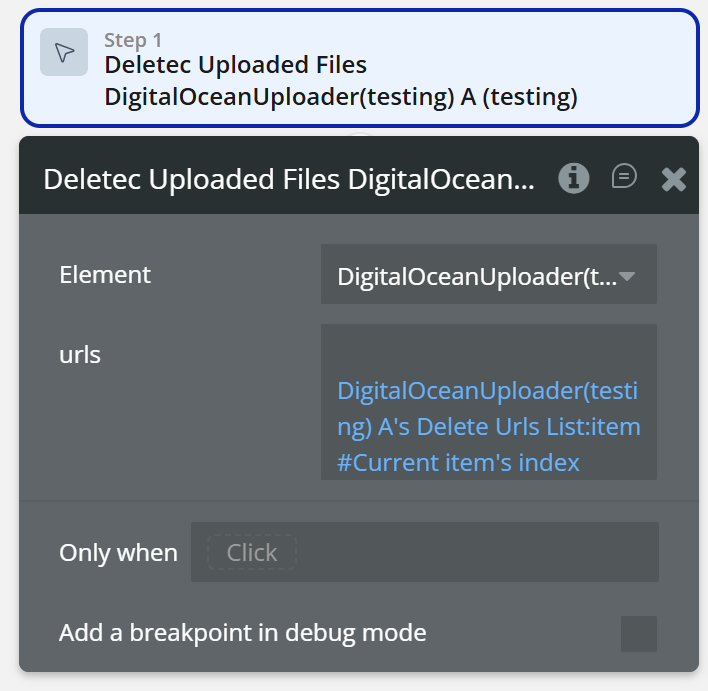
Deletec Uploaded Files
This action removes uploaded files using their delete URLs. It lets you clear previously uploaded files from storage and keep app data in sync. Use it when users replace files or when you need cleanup after a workflow step.
Fields:
Name
Description
Type
urls
Delete URL or list of delete URLs for files that should be removed.
text
Plugin Data / API Calls
Get Token
Parameters:
Name
Description
Type
accessKey
Spaces access key used to request a generated token.
Text
secretKey
Spaces secret key used together with access key for token generation.
Text
Return values:
Name
Description
Type
token
Generated token used in the uploader Token field for authenticated upload requests.
text
Workflow example
Generate a token, save it in the uploader state, configure the required element fields, and allow users to upload files to Digital Ocean.
Upload Files to Digital Ocean (Bubble Native)
Step 1 – Generate and Save the Token
Event:When Page is Loaded
Actions:
Digital Ocean – Get Token
Provide the required keys (Access Key, Secret Key)
Set state of an element
Element:Digital Ocean
Custom state:token
Value:Digital Ocean – Get Token's token
✅ Result:
The token is generated and stored in the uploader element.
Step 2 – Configure the Uploader Element
In the Digital Ocean Native File Uploader element, set:
Token:Digital Ocean token (dynamic)
Region: your Digital Oceanbucket region (e.g. us-east-1)