
✅
Demo to preview the settings
Introduction
Full OpenAI ChatGPT is a powerful Bubble plugin that allows you to securely and effortlessly integrate ChatGPT-style AI capabilities into your application. You can build intelligent chat experiences, AI support bots, content generation flows, and prompt-based automations—without exposing your OpenAI API key or writing complex backend logic.
The plugin provides full control over prompts, models, and Bubble workflows, while handling all OpenAI communication securely on the server side. Whether you need a simple AI chat or an advanced conversational system, Full OpenAI ChatGPT scales naturally with your product’s requirements.
Prerequisites
To use the Full OpenAI ChatGPT plugin, you must have:
- An active OpenAI account
- A valid OpenAI API Key
- Access to the Bubble Editor
You can create an OpenAI account and generate an API key here:
⚠️ Make sure your API key is stored securely and used only in the Plugin Settings, not in client-side elements or workflows.
📽️
Video tutorial on how to use the plugin: https://www.youtube.com/watch?v=t3CvdGYgawY
How to Setup
Step 1 – Install the Plugin
- Open Bubble Editor
- Go to the Plugins tab
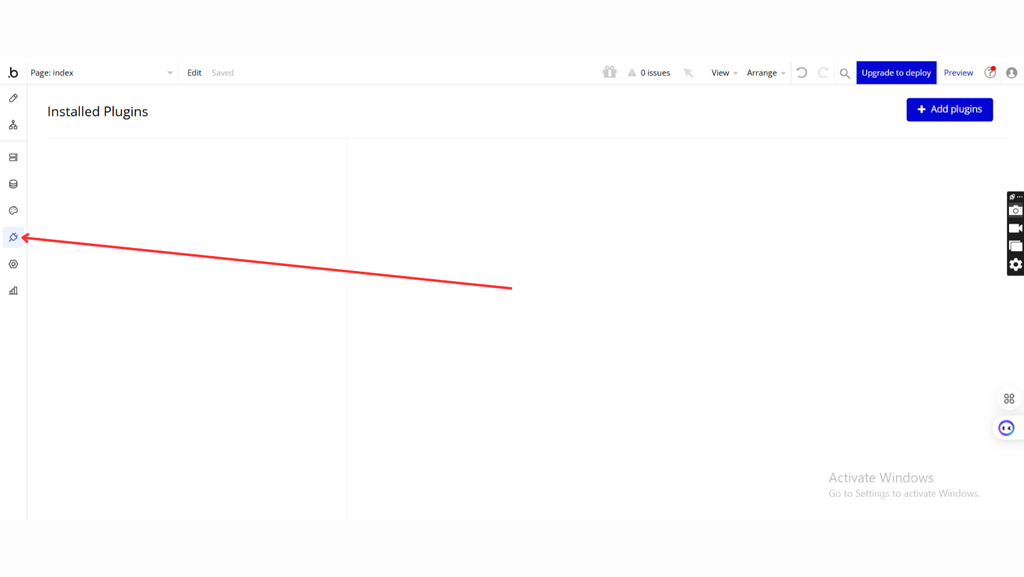
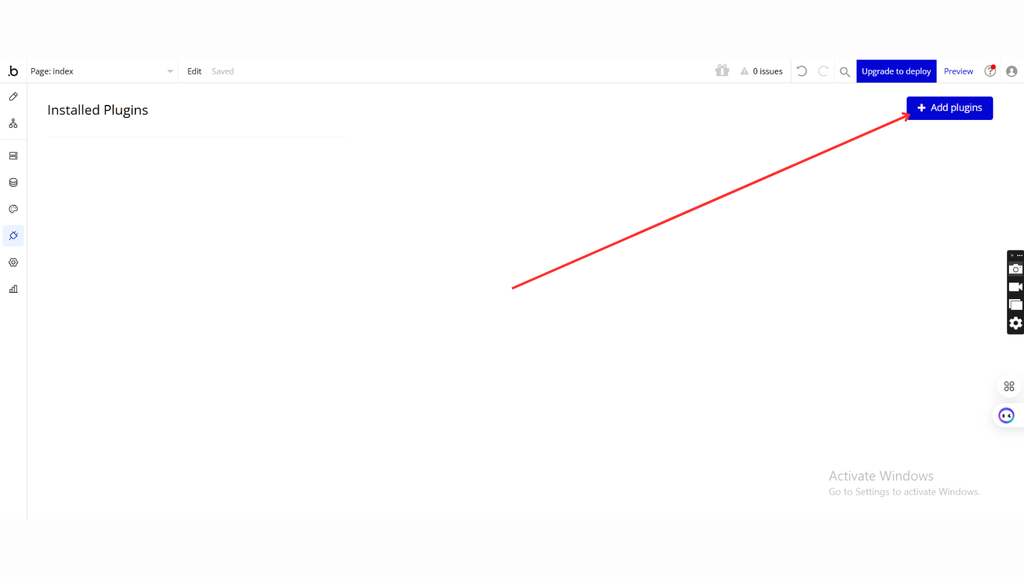
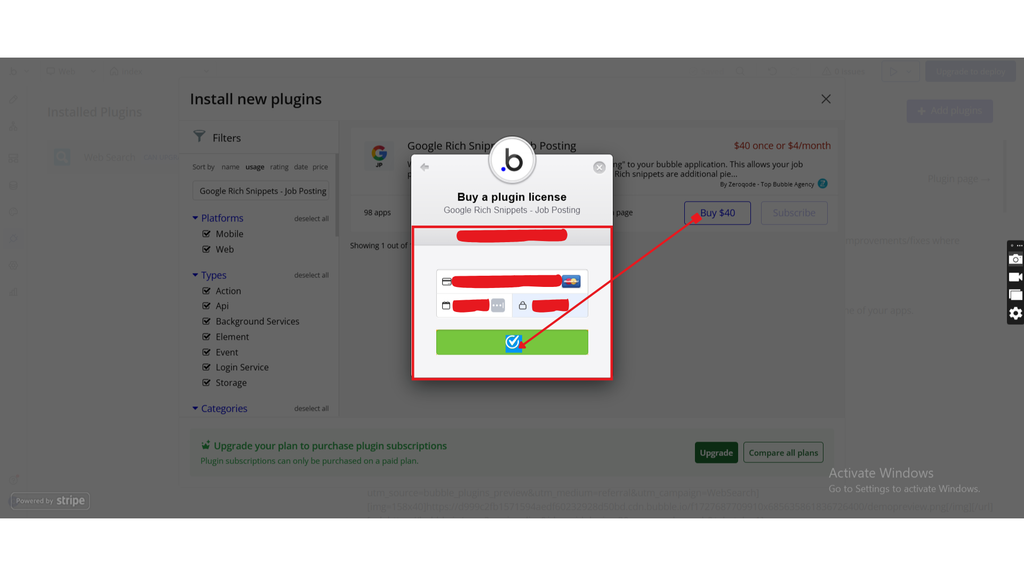
- Click Add plugins
- Search for OpenAI ChatGPT 5 + Full ChatGPT 4
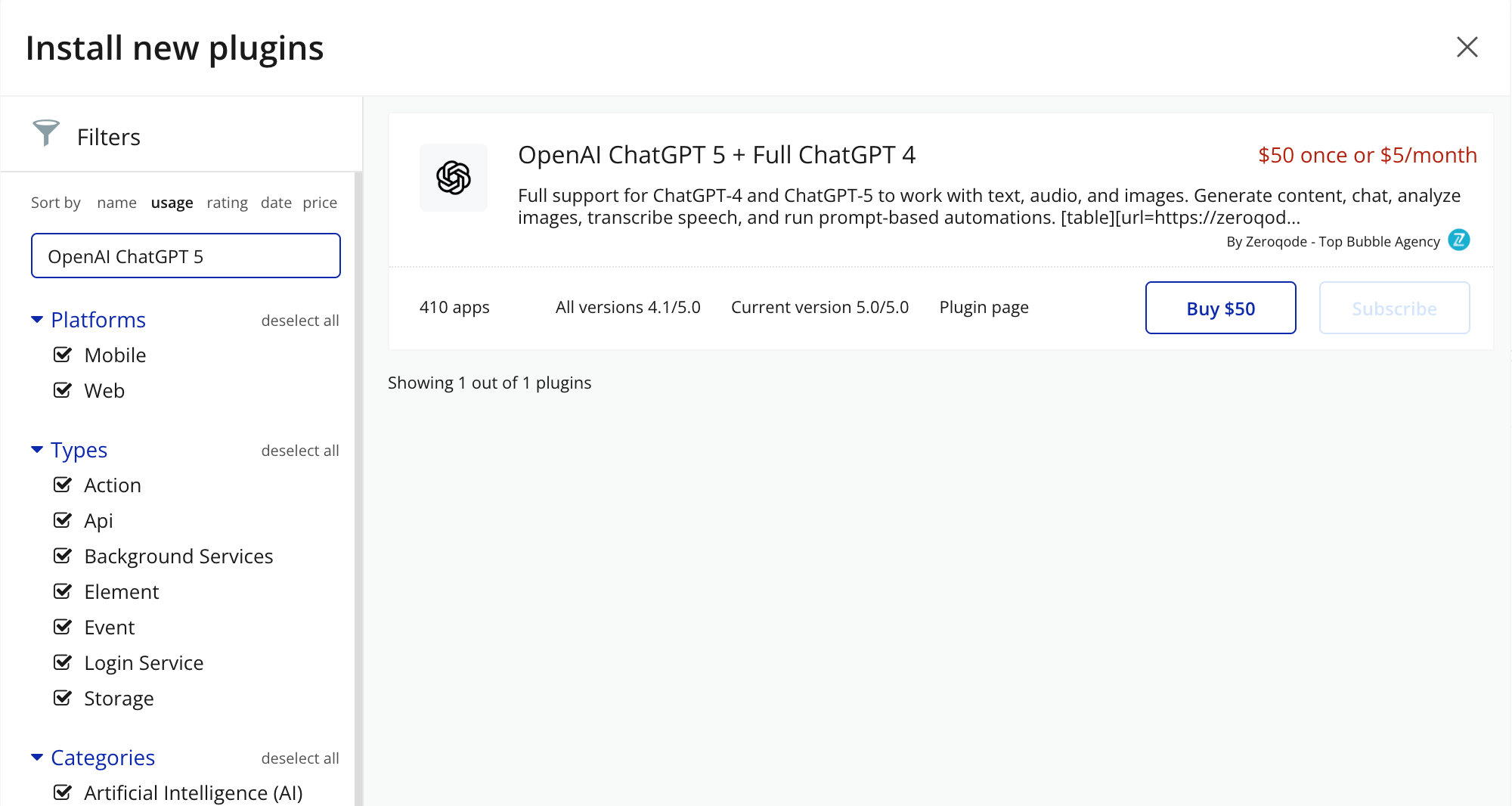
- Click Install (or Buy if paid)
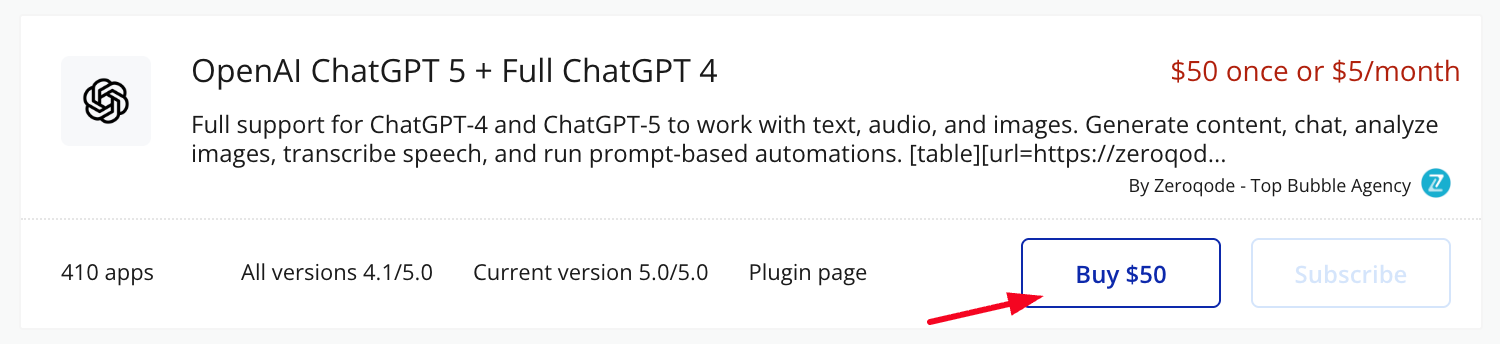
- Payment Information (For Paid Plugins)
- If the plugin is a paid one, fill in your payment details and make payment.
- Once installed, the plugin will appear under Installed Plugins.
Step 2 – Get OpenAI API Key
- Go to the OpenAI platform: 👉 https://platform.openai.com
- Sign in or create a new account
- From the main menu, open API Keys
- Click Create new secret key
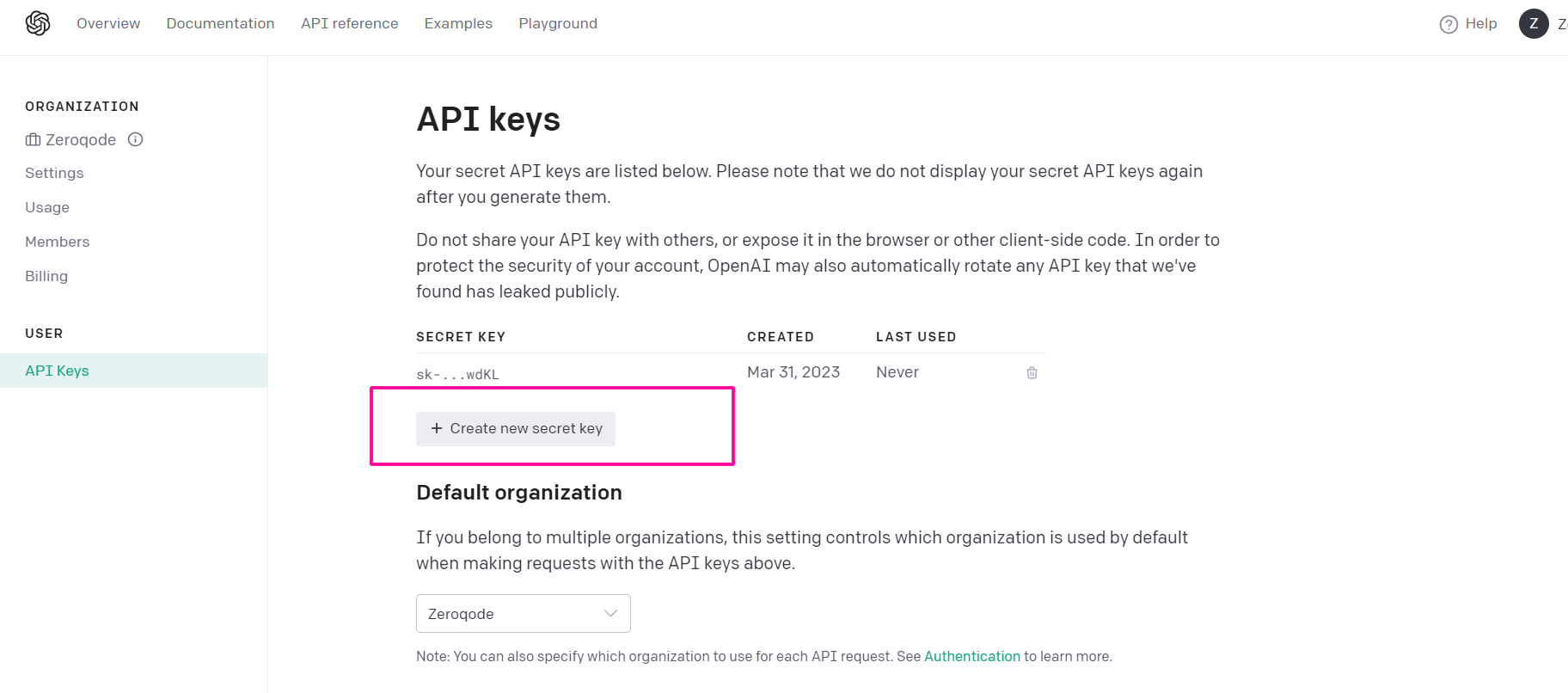
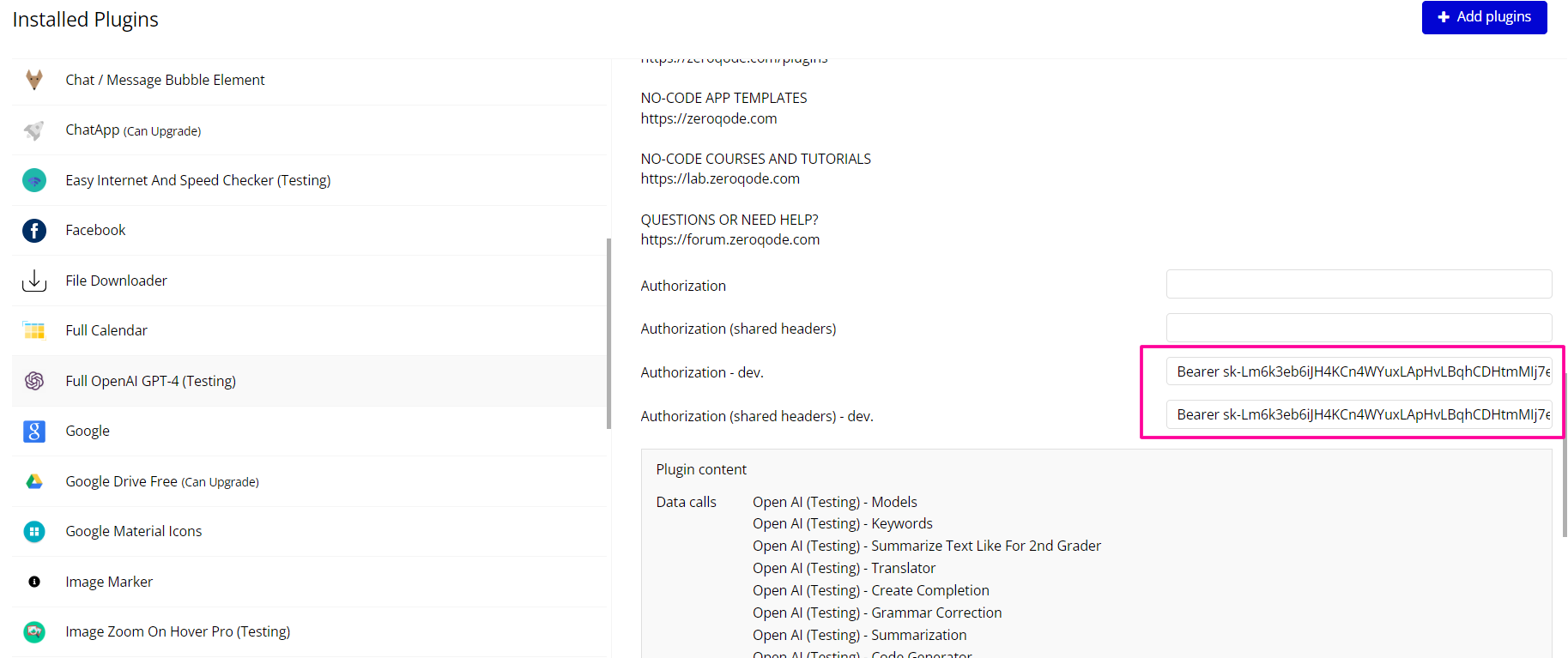
- Copy the key and set it to in the plugin settings with the word key “Bearer”
☝
Important:
- The API key is shown only once
- Do not share or expose it in client-side code
- Use the key only in Bubble Plugin Settings
Step 3– Configure Plugin Settings (Required)
- In Bubble Editor, go to Plugins
- Select Full OpenAI ChatGPT
- Open the Settings tab
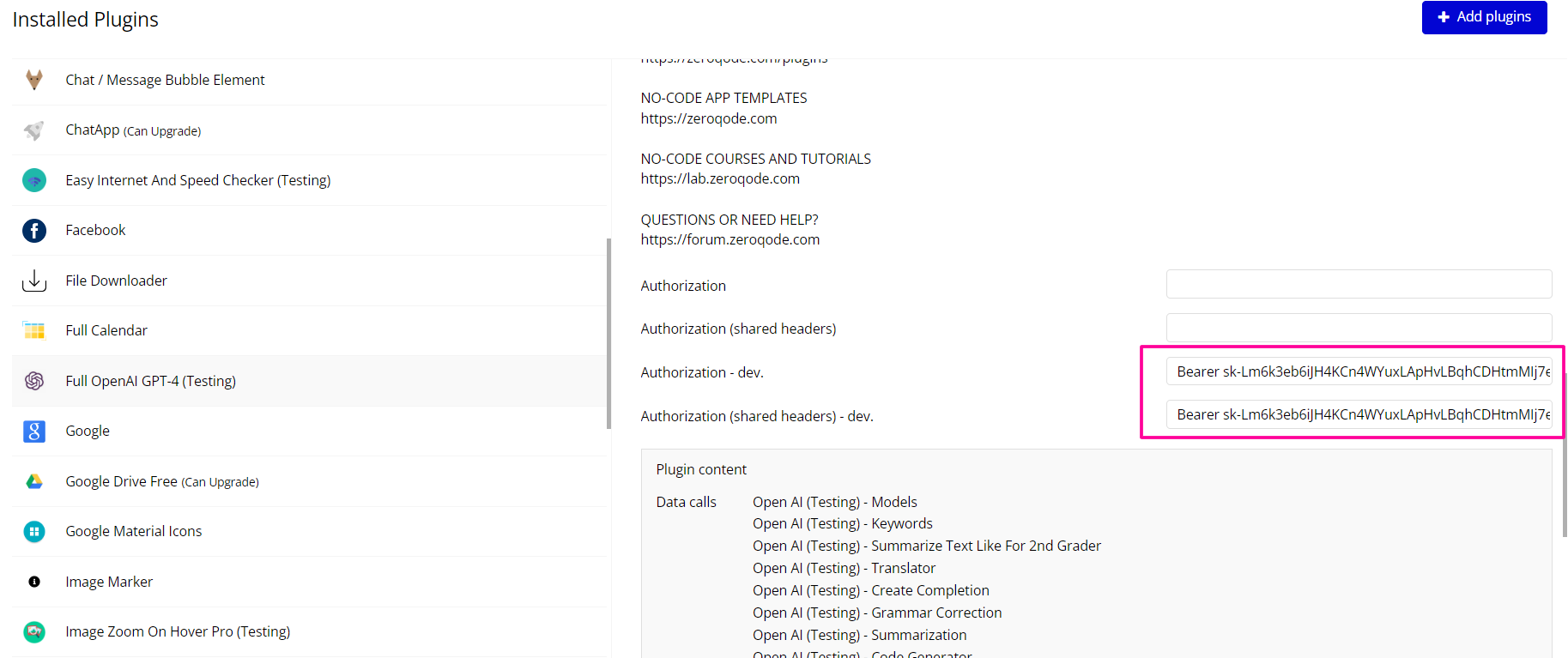
- Copy the key from OpenAI and set it to in the plugin settings with the word key “Bearer”
☝
Important: Never expose your API key in elements or workflows.
Plugin Data/Action Calls
Keywords
This action analyzes an input text and extracts relevant keywords from the content using an OpenAI model.
It does not generate free-form text or rewrite the content — it returns only the important keywords identified in the input.
It is ideal for:
- SEO & search
- automatic tagging
- content classification
- quick text analysis
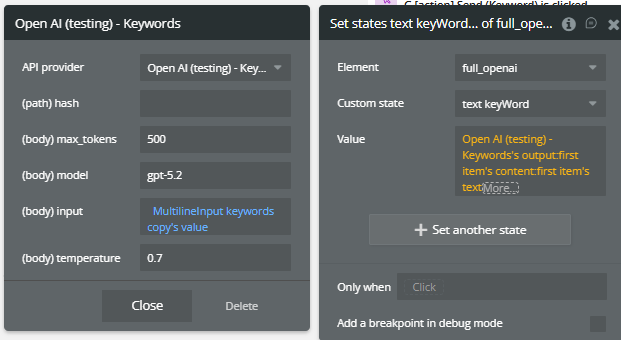
Fields:
Field | Description | Type |
(path) hash | hash is a field that receives a dynamic value, for example, the current time, to ensure that the calls are always updated | Text |
max_tokens | Maximum tokens for the output | Number |
model | OpenAI model used (e.g. gpt-5.2) | Text |
input | Text from which keywords are extracted | Text |
temperature | Output variability (recommended: 0–0.7) | Number |
Summarize text like for 2nd grader
This action takes a longer text and summarizes it using very simple language, suitable for a 2nd grade reading level.
The model simplifies vocabulary, keeps the main ideas, and removes unnecessary details.
It is ideal for:
- education
- simplified explanations
- easy-to-read summaries
- adapting content for children or non-technical audiences
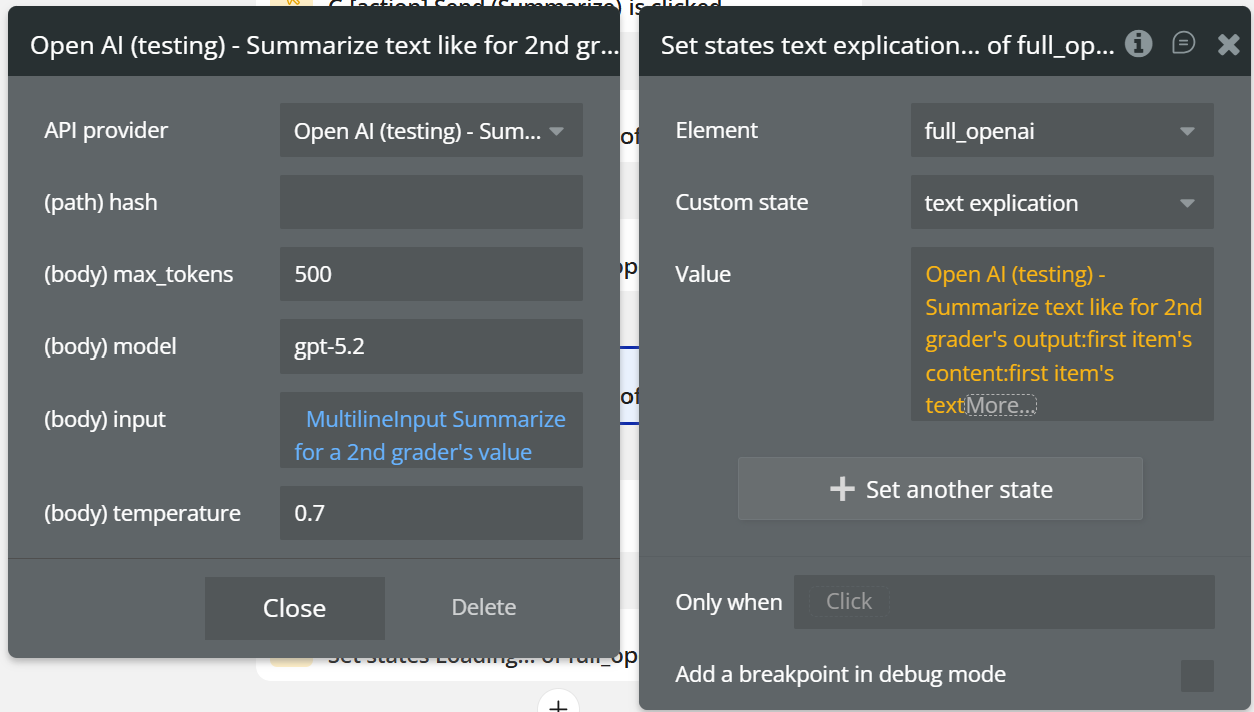
Field:
Name | Description | Type |
hash | hash is a field that receives a dynamic value, for example, the current time, to ensure that the calls are always updated | Text |
max_tokens | Maximum tokens for the output | Number |
model | OpenAI model used (e.g. gpt-5.2) | Text |
input | Text from which keywords are extracted | Text |
temperature | Output variability (recommended: 0–0.7) | Number |
Return values:
Name | Description | Type |
summary_text | Simplified summary for a 2nd grade reading level | Text |
raw_output | Full OpenAI response | JSON |
tokens_used | Number of tokens used | Number |
model_used | OpenAI model used | Text |
error_message | Error message, if the request fails | Text |
Translator
This action translates a given text from one language to another using an OpenAI model.
The input text is analyzed and automatically translated into the desired language, preserving the original meaning and structure.
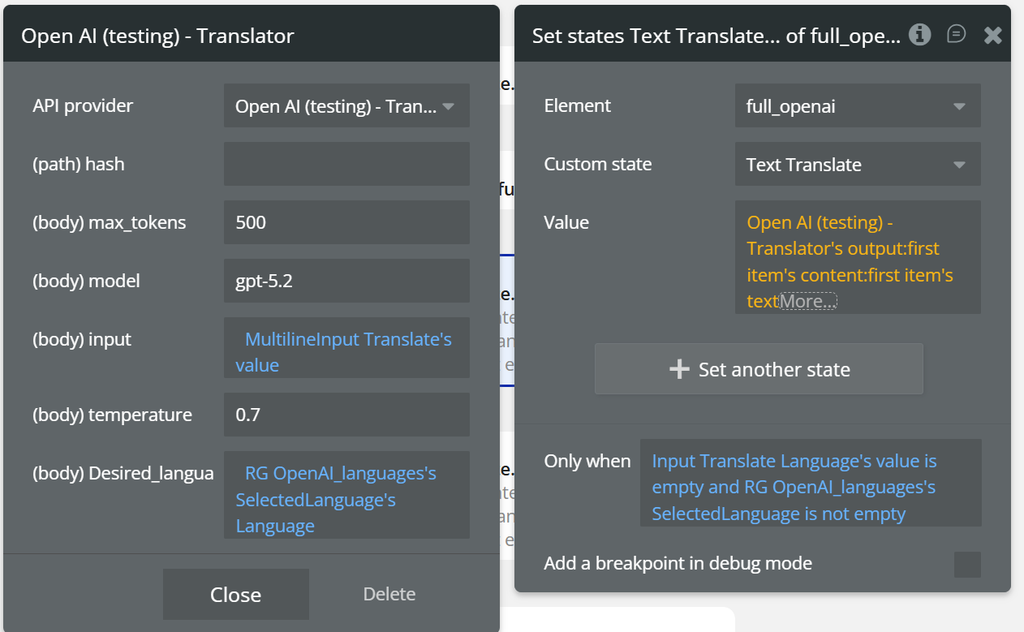
Field:
Name | Description | Type |
(path) hash | hash is a field that receives a dynamic value, for example, the current time, to ensure that the calls are always updated | Text |
(body) max_tokens | Maximum tokens for the translation | Number |
(body) model | OpenAI model used (e.g. gpt-5.2) | Text |
(body) input | Text to be translated | Text |
(body) temperature | Language variability (recommended: 0.3–0.7) | Number |
(body) desired_language | Target translation language (e.g. English, Romanian, German) | Text |
Return values:
Name | Description | Type |
translated_text | Translated text in the desired language | Text |
raw_output | Full OpenAI response | JSON |
tokens_used | Total number of tokens used | Number |
model_used | OpenAI model used | Text |
error_message | Error message, if the translation fails | Text |
Creates a completion
This action sends a text prompt to OpenAI and returns a free-form generated response (completion) based on the provided instruction. It is the most flexible action in the plugin and can be used for virtually any text generation use case.
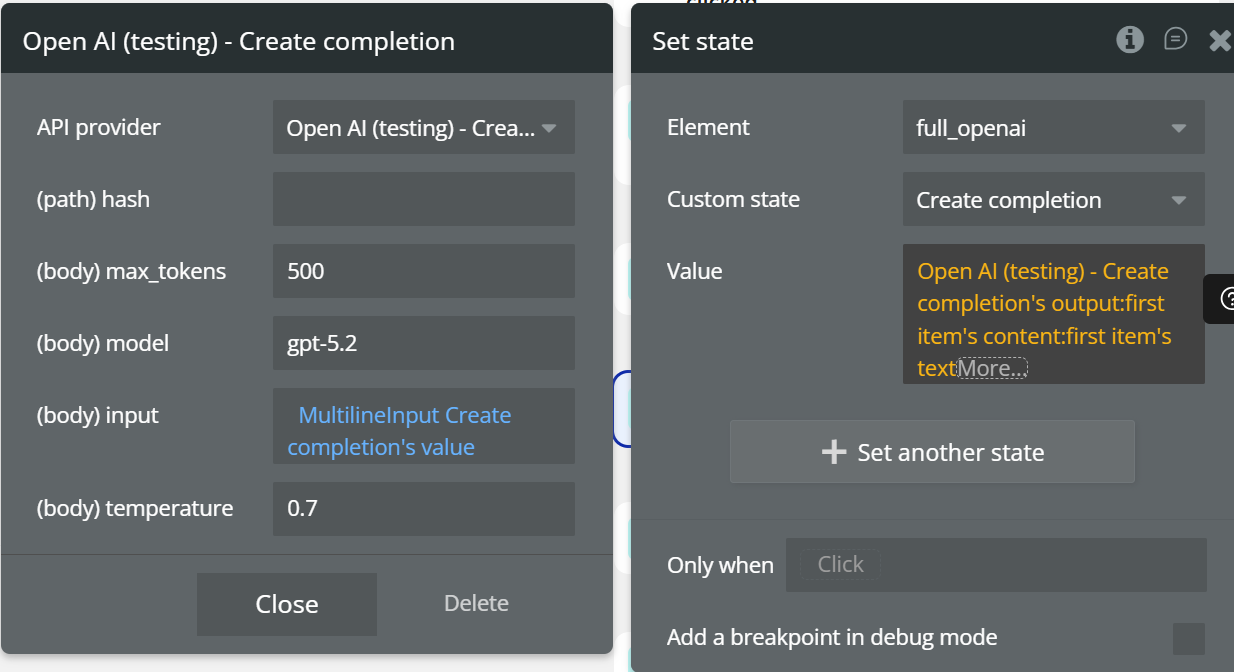
Fields:
Name | Description | Type |
(path) hash | hash is a field that receives a dynamic value, for example, the current time, to ensure that the calls are always updated | Text |
(body) max_tokens | Maximum number of generated tokens | Number |
(body) model | OpenAI model used (e.g. gpt-5.2) | Text |
(body) input | Prompt sent to OpenAI | Text |
(body) temperature | Controls creativity level | Number |
Return values:
Name | Description | Type |
completion_text | Generated text completion | Text |
raw_output | Full OpenAI response | JSON |
tokens_used | Total number of tokens used | Number |
model_used | OpenAI model used | Text |
error_message | Error message, if the request fails | Text |
Grammar correction
This action analyzes a text and corrects its grammar, while preserving the original meaning and intent.
The correction includes:
- grammar mistakes
- punctuation errors
- incorrect agreements
- unclear phrasing
The corrected text is returned in the specified language, without altering the original style.
It is ideal for:
- correcting user-generated content
- forms, messages, emails
- educational content
- multilingual applications
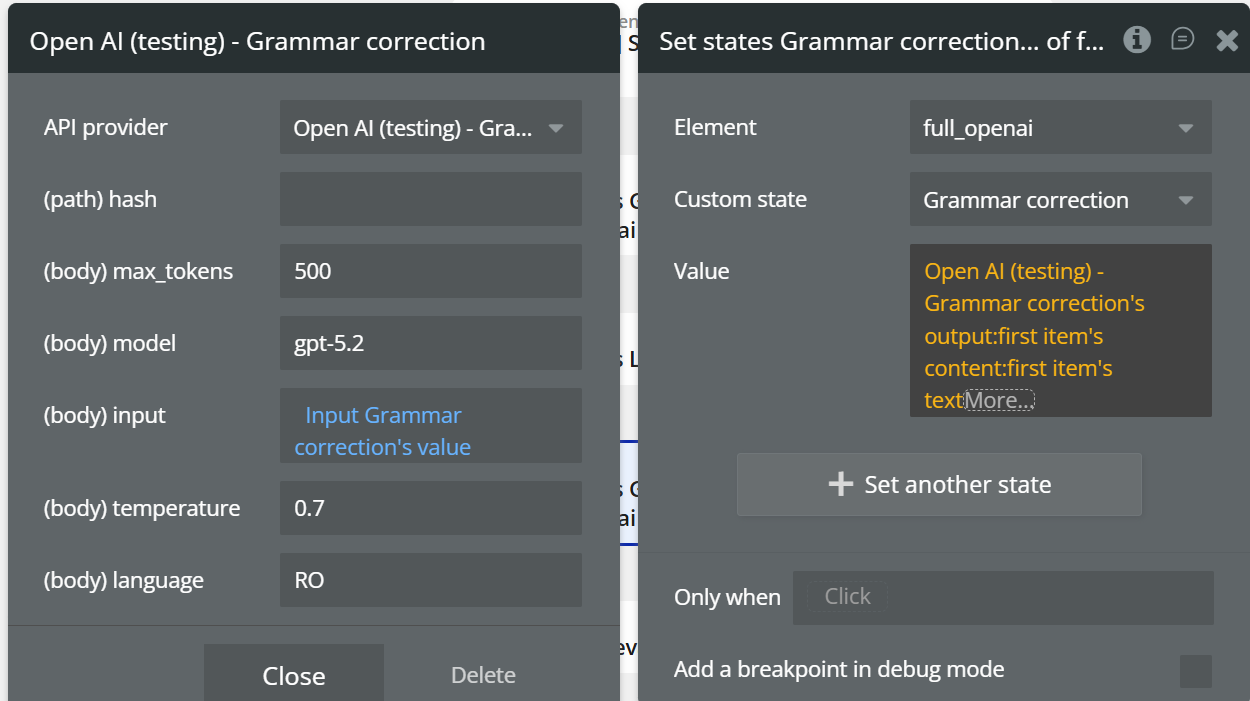
Fields:
Name | Description | Type |
(path) hash | hash is a field that receives a dynamic value, for example, the current time, to ensure that the calls are always updated | Text |
(body) max_tokens | Maximum tokens for the corrected text | Number |
(body) model | OpenAI model used (e.g. gpt-5.2) | Text |
(body) input | Text to be grammar-corrected | Text |
(body) temperature | Variation level (recommended: 0.3–0.7) | Number |
(body) language | Text language (e.g. EN, RO, DE) | Text |
Return values:
Name | Description | Type |
corrected_text | Grammar-corrected text | Text |
raw_output | Full OpenAI response | JSON |
tokens_used | Total number of tokens used | Number |
model_used | OpenAI model used | Text |
error_message | Error message, if the request fails | Text |
Summarization
This action takes a text and explains it in a simple and clear way, suitable for a 2nd grade reading level.
Unlike a summary, it does not shorten the text, but explains the ideas, rewriting them in an easy-to-understand manner.
It is ideal for:
- educational explanations
- simplifying complex content
- explaining technical or abstract concepts
- learning and support applications
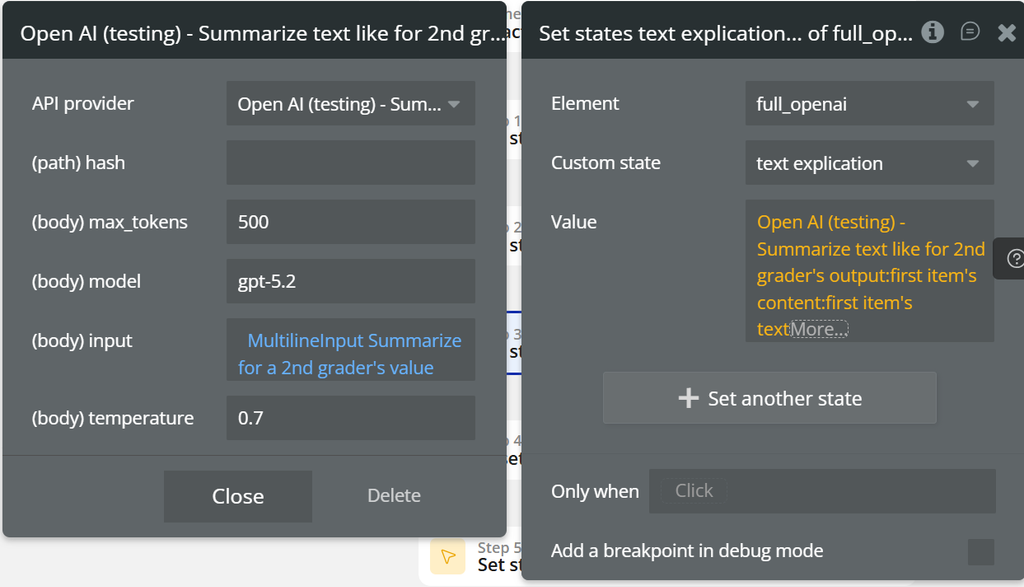
Fields:
Name | Description | Type |
(path) hash | Internal request identifier | Text |
(body) max_tokens | Maximum tokens for the explanation | Number |
(body) model | OpenAI model used (e.g. gpt-5.2) | Text |
(body) input | Text to be explained | Text |
(body) temperature | Explanation variability (recommended: 0.5–0.8) | Number |
Return values:
Name | Description | Type |
explained_text | Text explained in simple language | Text |
raw_output | Full OpenAI response | JSON |
tokens_used | Total number of tokens used | Number |
model_used | OpenAI model used | Text |
error_message | Error message, if the request fails | Text |
Chat
This action creates a chat-style conversation with OpenAI, allowing multiple message exchanges with conversation memory.
Unlike Create completion, this action is designed for ongoing dialogs, where previous context is preserved.
The
store = true option allows the model to retain conversation history, resulting in more coherent and contextual replies.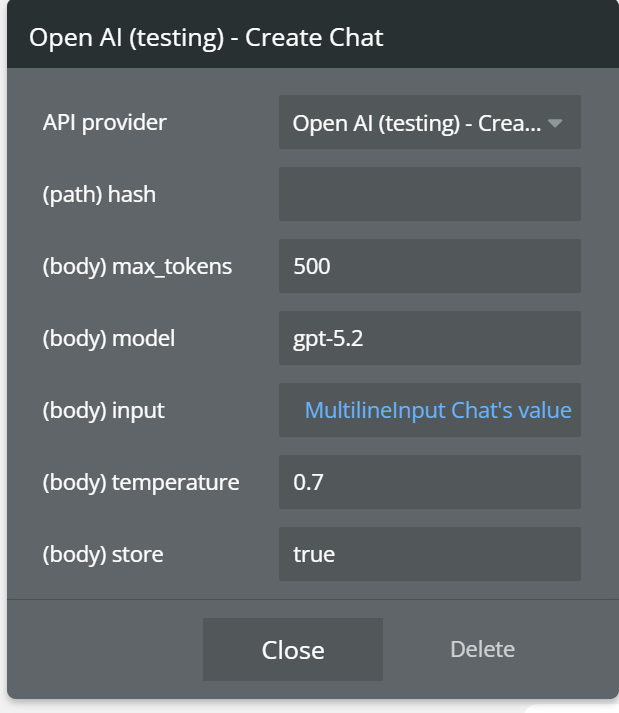
Fields:
Name | Description | Type |
hash | Dynamic value used to force request refresh | Text |
max_tokens | Maximum number of generated tokens | Number |
model | OpenAI model used | Text |
input | Text sent to OpenAI | Text |
temperature | Controls response creativity | Number |
Return values:
Name | Description | Type |
chat_response | AI response for the current message | Text |
conversation_id | Conversation ID (used for follow-up messages) | Text |
raw_output | Full OpenAI response | JSON |
tokens_used | Total number of tokens used | Number |
model_used | OpenAI model used | Text |
error_message | Error message, if the request fails | Text |
Code generator
This action generates source code based on a text prompt using an OpenAI model.
You can generate code for various programming languages, structures, functions, or implementation examples, depending on the provided prompt and language.
It is ideal for:
- code generation (JS, Python, PHP, etc.)
- rapid prototyping
- educational examples
- developer-focused automations
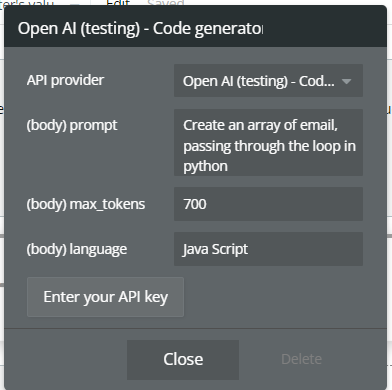
Fields:
Name | Description | Type |
hash | Dynamic value used to force request refresh and prevent caching | Text |
model | OpenAI model used to generate the code | Text |
prompt | Instruction used to generate the code | Text |
language | Target programming language (e.g. JavaScript, Python, PHP) | Text |
max_tokens | Maximum number of tokens generated in the output | Number |
temperature | Controls the creativity of the generated code | Number |
Return values:
Name | Description | Type |
generated_code | Code generated based on the prompt | Text |
raw_output | Full OpenAI response | JSON |
tokens_used | Total number of tokens used | Number |
model_used | OpenAI model used | Text |
error_message | Error message, if the request fails | Text |
Image Generations
This action generates original images based on a text prompt, using OpenAI’s image generation (DALL·E) module.
You can control image size and the number of generated images per request.
It is ideal for:
- AI image generation
- mockups and prototypes
- visual content for applications
- illustrations, banners, creative assets
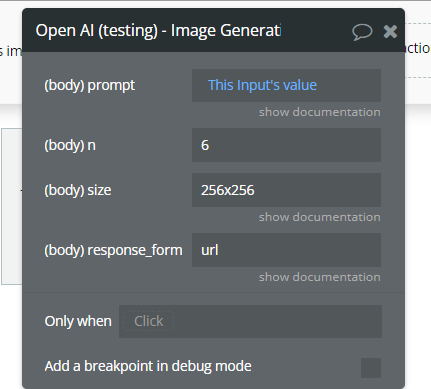
Fields:
Name | Description | Type |
Prompt | A text description of the desired image(s). The maximum length is 1000 characters | Text |
N | The number of images to generate. Must be between 1 and 10. | Integer
Optional
Defaults to 1 |
Size | The size of the generated images. Must be one of 256x256, 512x512, or 1024x1024. | Text
Optional
Defaults to 1024x1024 |
Response_format | The format in which the generated images are returned. Must be one of urlor b64_json. | Text
Optional
Defaults to url |
Return values:
Name | Description | Type |
image_urls | List of generated image URLs | List of Text |
images_base64 | Generated images in Base64 format (if b64_json) | List of Text |
raw_output | Full OpenAI response | JSON |
model_used | OpenAI model used for generation | Text |
error_message | Error message, if the request fails | Text |
Image Edits
The image edits endpoint allows you to edit and extend an image by uploading a mask. The transparent areas of the mask indicate where the image should be edited, and the prompt should describe the full new image, not just the erased area.
The uploaded image and mask must both be square PNG images less than 4MB in size and also must have the same dimensions as each other. The non-transparent areas of the mask are not used when generating the output, so they don’t necessarily need to match the original image like the example above.
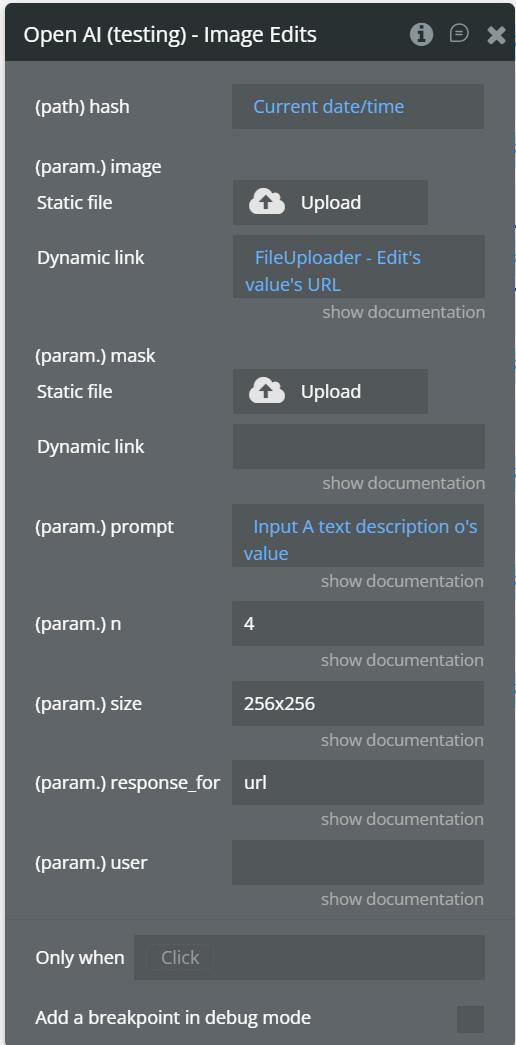
Fields:
Name | Description | Type |
image | The base image to be edited. Must be a supported image file (PNG, JPG, WEBP). Can also be a list of images. | File |
mask | Additional PNG image that defines the editable area. Fully transparent areas (alpha = 0) indicate where the edit will be applied. The dimensions must match the main image. | File |
prompt | Text description of the desired modification (what should be generated or changed in the masked area). Maximum length: 1000 characters. | Text |
size | Size of the generated image. Accepted values: 1024x1024, 1536x1024, 1024x1536. | Text |
model | OpenAI model used for image editing. | Text |
output_format | Format of the returned image. Common values: png, webp, jpeg. | Text |
quality | Quality of the generated image. Available values: low, medium, high. | Text |
Return values:
Name | Description | Type |
image | The base image to be edited. Must be a supported image file (PNG, JPG, WEBP). Can also be a list of images. | File |
mask | An additional PNG image that defines the editable area. Fully transparent areas (alpha = 0) indicate where the edit will be applied. The dimensions must match the main image. | File |
prompt | Text description of the desired modification (what should be generated or changed in the masked area). Maximum length: 1000 characters. | Text |
size | Size of the generated image. Accepted values: 1024x1024, 1536x1024, 1024x1536. | Text |
model | OpenAI model used for image editing. | Text |
output_format | Format of the returned image. Common values: png, webp, jpeg. | Text |
quality | Quality of the generated image. Available values: low, medium, high. | Text |
Image Variation
This action generates variations of an existing image, preserving the style and overall structure of the original image. Unlike Image Edits, it does not use a prompt or a mask — the model creates visual alternatives of the same image.
The original image is not modified; new images are generated instead.
It is ideal for:
- exploring visual alternatives
- design A/B testing
- generating creative variations
- quick iterations on the same image
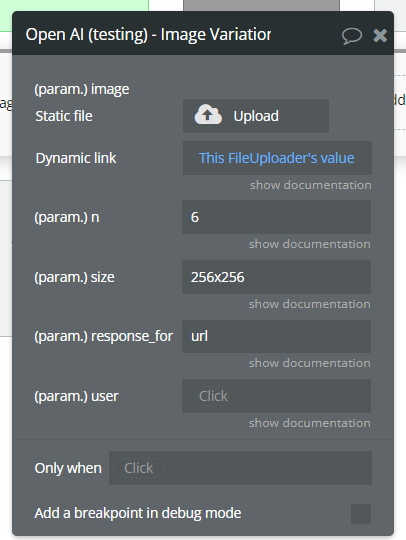
Fields:
Param Name | Description | Type |
Image | The image to edit. Must be a valid PNG file, less than 4MB, and square. If the mask is not provided, the image must have transparency, which will be used as the mask. | File |
N | The number of images to generate. Must be between 1 and 10. | Integer
Optional
Defaults to 1 |
Size | The size of the generated images. Must be one of 256x256, 512x512, or 1024x1024 for dall-e-2. Must be one of 1024x1024, 1792x1024, or 1024x1792 for dall-e-3 models. | Text
Optional
Defaults to 1024x1024 |
Response_format | The format in which the generated images are returned. Must be one of urlor b64_json. | Text
Optional
Defaults to url |
user | Identificator opțional al utilizatorului (tracking / logging) | Text
Optional |
Return Values:
Name | Description | Type |
image_urls | List of generated image URLs | List of Text |
images_base64 | Generated images in Base64 format (if b64_json) | List of Text |
raw_output | Full OpenAI response | JSON |
error_message | Error message, if the request fails | Text |
Fine-tuning
This action starts a fine-tuning process for an OpenAI model using a user-provided training file.
Fine-tuning allows you to adapt the model’s behavior for a specific use case, such as custom tone, standardized responses, or domain-specific knowledge.
☝
⚠️ This action does not immediately return a usable model. The fine-tuning process runs asynchronously, and its status must be checked separately.
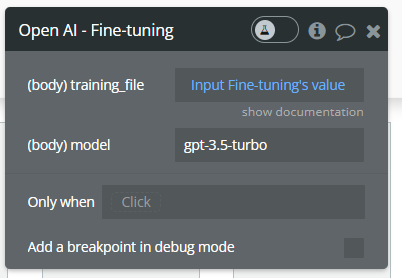
Fields:
Name | Description | Type |
training_file | The ID of an uploaded file that contains training data.
See upload file action.
Your dataset must be formatted as a JSONL file. Additionally, you must upload your file with the purpose of fine-tune.
See the fine-tuning guide for more details. | Text |
model | The name of the model to fine-tune. You can select one of the supported models. | Text |
Return values:
Name | Description | Type |
fine_tune_id | Fine-tuning job ID | Text |
status | Initial job status (e.g. pending, running) | Text |
raw_output | Full OpenAI response | JSON |
error_message | Error message, if the request fails | Text |
Upload file
Upload a file that can be used across various endpoints. The size of all the files uploaded by one organization can be up to 100 GB.
The size of individual files can be a maximum of 512 MB. See the Assistants Tools guide to learn more about the types of files supported.
The Fine-tuning API only supports
.jsonl files.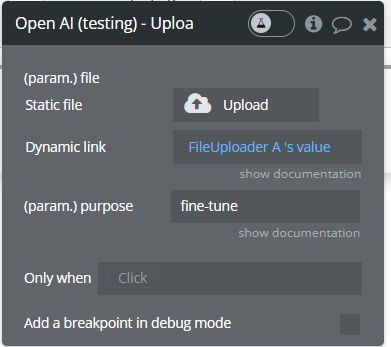
Fields:
Name | Description | Type |
file | The File object (not file name) to be uploaded. | file |
purpose | The intended purpose of the uploaded file.
Use "fine-tune" for Fine-tuning and "assistants" for Assistants and Messages. This allows us to validate the format of the uploaded file is correct for fine-tuning. | Text |
Return values:
Name | Description | Type |
file_id | Unique ID of the uploaded file | Text |
filename | File name | Text |
purpose | Purpose assigned to the uploaded file | Text |
raw_output | Full OpenAI response | JSON |
error_message | Error message, if the upload fails | Text |
Text to speech.
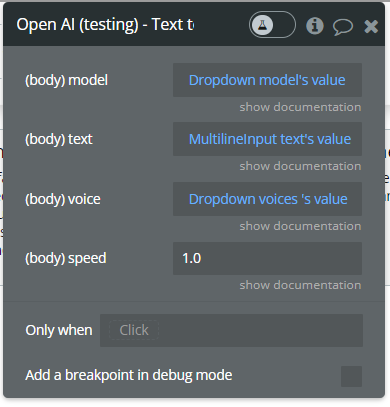
This action generates audio output from input text using OpenAI Text-to-Speech (TTS) models.
You can control the voice, audio format, and playback speed.
Fields:
Name | Description | Type |
model | Text | |
input | The text to generate audio for. The maximum length is 4096 characters. | Text |
voice | The voice to use when generating the audio. Supported voices are alloy, echo, fable, onyx, nova, and shimmer. Previews of the voices are available in the Text to speech guide. | Text |
response_format | The format to audio in. Supported formats are mp3, opus, aac, and flac. | String
Optional
Defaults to “mp3” |
speed | The speed of the generated audio. Select a value from 0.25 to 4.0. 1.0 is the default. | number |
Return Values
Name | Description | Type |
audio_url | URL-ul fișierului audio generat | Text |
raw_output | Răspunsul complet OpenAI | JSON |
Audio Transcription
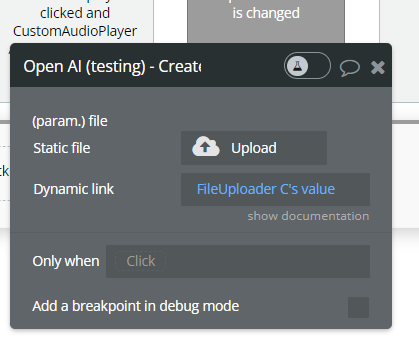
Transcribes audio into the input language.
Fields:
Name | Description | Type |
file | The audio file object (not file name) to transcribe, in one of these formats: flac, mp3, mp4, mpeg, mpga, m4a, ogg, wav, or webm. | file |
Return Values:
Name | Description | Type |
transcription | Transcribed text | Text |
raw_output | Verbose transcription object | JSON |
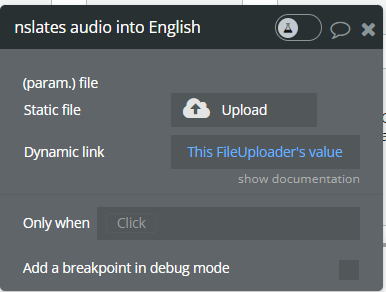
Create translates audio into English.
Translates audio into English.
Param Name | Description | Type |
file | The audio file object (not file name) to transcribe, in one of these formats: flac, mp3, mp4, mpeg, mpga, m4a, ogg, wav, or webm. | file |
Vision - Image understanding.
This action processes an image and answers questions based on its visual content.
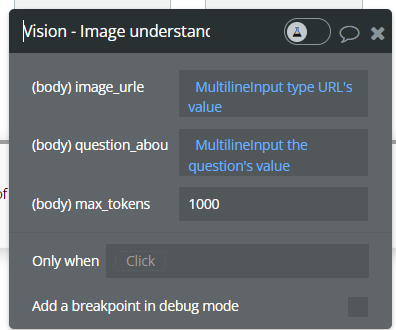
Fields:
Name | Description | Type |
image | URL sau fișier imagine | File / URL |
prompt | Întrebarea despre imagine | Text |
Return Values:
Name | Description | Type |
answer | Răspunsul generat | Text |
raw_output | Răspuns complet OpenAI | JSON |
Create Assistants (Beta)
Build assistants that can call models and use tools to perform tasks.
Represents an
assistant that can call the model and use tools.
Create an assistant with a model and instructions.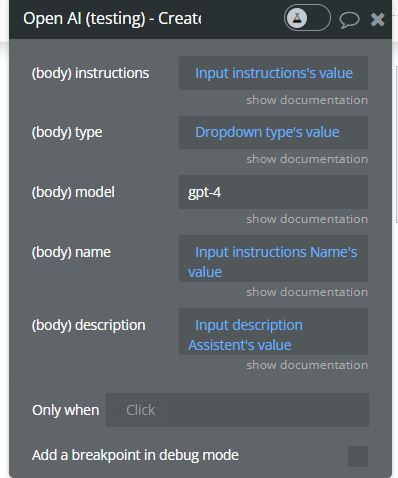
Fields:
Name | Description | Type |
instructions | The system instructions that the assistant uses. The maximum length is 32768 characters. | Text |
types | A list of tool enabled on the assistant. There can be a maximum of 128 tools per assistant. Tools can be of types code_interpreter, retrieval, or function. | Text |
description | The description of the assistant. The maximum length is 512 characters. | Text |
name | The name of the assistant. The maximum length is 256 characters. | Text |
model | ID of the model to use. You can use the List models API to see all of your available models, or see our Model overview for descriptions of them. | Text |
Return Values:
Name | Description | Type |
assistant_id | Unique assistant ID | Text |
raw_output | Assistant object | JSON |
Modify assistant (Beta).
This action allows you to update an existing Assistant by modifying its instructions, model, name, description, or enabled tool type. You must provide the Assistant ID, and only the fields you want to update need to be filled.
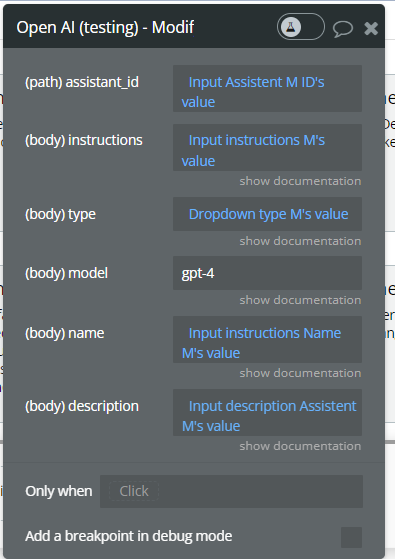
Fields:
Name | Description | Type |
assistant_id | The ID of the assistant to modify. | Text |
instructions | The system instructions that the assistant uses. The maximum length is 32768 characters. | Text |
types | A list of tool enabled on the assistant. There can be a maximum of 128 tools per assistant. Tools can be of types code_interpreter, retrieval, or function. | Text |
description | The description of the assistant. The maximum length is 512 characters. | Text |
name | The name of the assistant. The maximum length is 256 characters. | Text |
model | ID of the model to use. You can use the List models API to see all of your available models, or see our Model overview for descriptions of them. | Text |
Return Values:
Name | Description | Type |
assistant_id | ID of the modified assistant | Text |
name | Assistant name | Text |
model | Model currently used by the assistant | Text |
tools | Enabled tools for the assistant | JSON |
raw_output | Full OpenAI Assistant object | JSON |
Create Assistant (function) (Beta)
Create an assistant with a model and instructions(function tool)
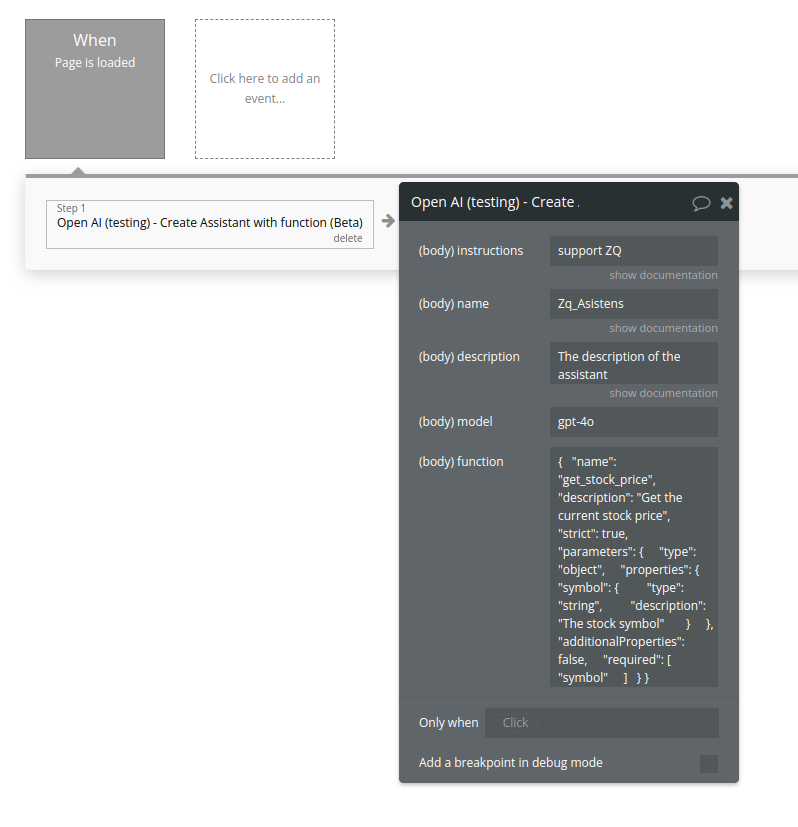
Fields:
Name | Description | Type |
Instructions | The system instructions that the assistant uses. The maximum length is 32768 characters. | Text |
Name | The name of the assistant. The maximum length is 256 characters. | Text |
Description | The description of the assistant. The maximum length is 512 characters. | Text |
Model | ID of the model to use. You can use the List models API to see all of your available models, or see our Model overview for descriptions of them. | Text |
Function | description
string
Optional
A description of what the function does, used by the model to choose when and how to call the function.
name
string
Required
The name of the function to be called. Must be a-z, A-Z, 0-9, or contain underscores and dashes, with a maximum length of 64.
parameters
object
Optional
The parameters the functions accepts, described as a JSON Schema object. See the guide for examples, and the JSON Schema reference for documentation about the format.
Omitting parameters defines a function with an empty parameter list.
strict
boolean or null
Optional
Defaults to false
Whether to enable strict schema adherence when generating the function call. If set to true, the model will follow the exact schema defined in the parameters field. Only a subset of JSON Schema is supported when strict is true. Learn more about Structured Outputs in the function calling guide. | Text |
Return Values:
Name | Description | Type |
id | Unique assistant ID | Text |
object | Always "assistant" | Text |
name | Assistant name | Text |
description | Assistant description | Text |
instructions | System instructions | Text |
model | Model assigned to assistant | Text |
tools | List of tools/functions available | List |
created_at | Unix timestamp of creation | Number |
metadata | Optional metadata | Object |
Modify assistant (function) (Beta)
Updates an existing Assistant and allows modifying its instructions, model, name, description, and registered functions (tools).
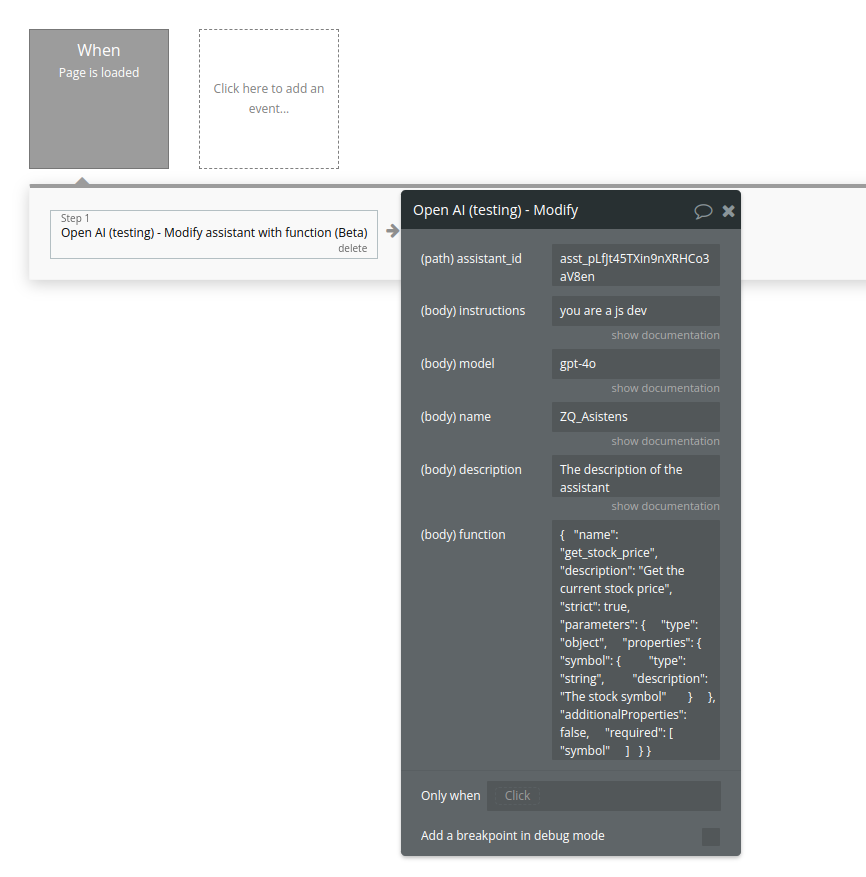
Fields:
Name | Description | Type |
Assistant_id | The ID of the assistant to modify. | Text |
Instructions | The system instructions that the assistant uses. The maximum length is 32768 characters. | Text |
Model | ID of the model to use. You can use the List models API to see all of your available models, or see our Model overview for descriptions of them. | Text |
Name | The name of the assistant. The maximum length is 256 characters. | Text |
Description | The description of the assistant. The maximum length is 512 characters. | Text |
Function | Please see the call above for description | Text |
Return Values:
Name | Description | Type |
id | Assistant ID | Text |
object | Always "assistant" | Text |
name | Assistant name | Text |
description | Assistant description | Text |
instructions | System instructions | Text |
model | Model used | Text |
tools | Registered tools/functions | List |
created_at | Creation timestamp | Number |
metadata | Optional metadata | Object |
Create Assistant (Code interpreter) (Beta)
Creates a new Assistant with Code Interpreter enabled and attaches a file.
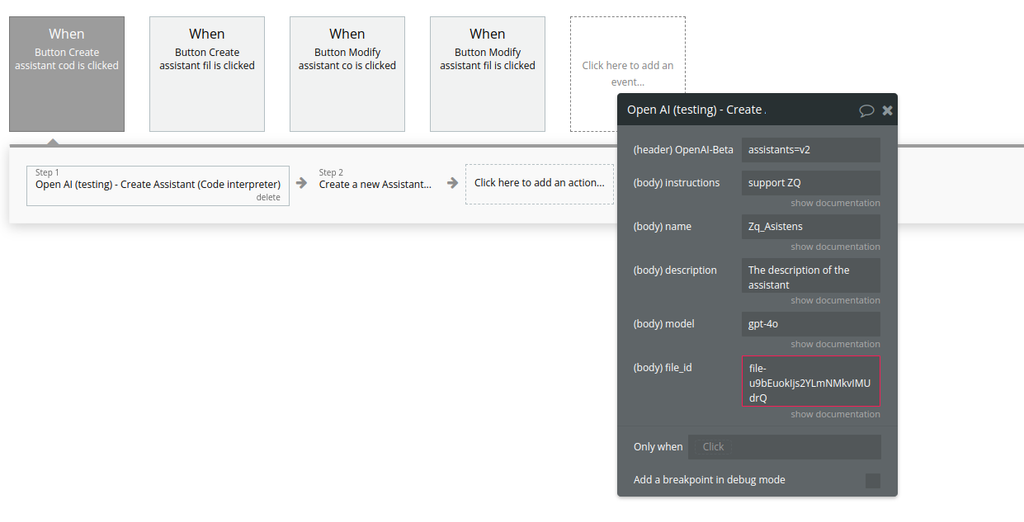
Fields:
Name | Description | Type |
Instructions | The system instructions that the assistant uses. The maximum length is 32768 characters. | Text |
Name | The name of the assistant. The maximum length is 256 characters. | Text |
Description | The description of the assistant. The maximum length is 512 characters. | Text |
Model | ID of the model to use. You can use the List models API to see all of your available models, or see our Model overview for descriptions of them. | Text |
File_id | A list of file IDs made available to the code_interpreter tool. There can be a maximum of 20 files associated with the tool. | Text |
Return Values:
Name | Description | Type |
id | Unique assistant ID | Text |
object | Always "assistant" | Text |
name | Assistant name | Text |
description | Assistant description | Text |
instructions | System instructions | Text |
model | Assigned model | Text |
tools | Enabled tools (Code Interpreter) | List |
file_ids | Attached files | List |
created_at | Unix timestamp | Number |
metadata | Optional metadata | Object |
Modify assistant (Code interpreter) (Beta)
Modifies an existing Assistant (updates instructions, model, metadata, attached file).
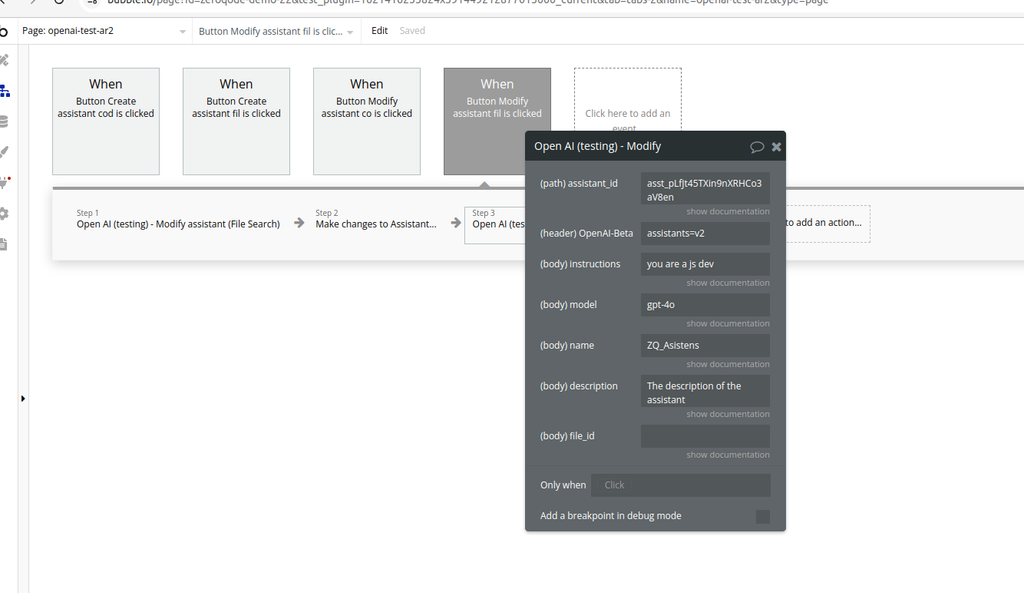
Fields:
Name | Description | Type |
Assistant_id | The ID of the assistant to modify. | Text |
Instructions | The system instructions that the assistant uses. The maximum length is 32768 characters. | Text |
Model | ID of the model to use. You can use the List models API to see all of your available models, or see our Model overview for descriptions of them. | Text |
Name | The name of the assistant. The maximum length is 256 characters. | Text |
Description | The description of the assistant. The maximum length is 512 characters. | Text |
File_id | A list of file IDs made available to the code_interpreter tool. There can be a maximum of 20 files associated with the tool. | Text |
Return values:
Name | Description | Type |
id | Assistant ID | Text |
object | Always "assistant" | Text |
name | Assistant name | Text |
description | Assistant description | Text |
instructions | System instructions | Text |
model | Assigned model | Text |
tools | Enabled tools (file_search / code_interpreter) | List |
file_ids | Attached files | List |
created_at | Creation timestamp | Number |
metadata | Optional metadata | Object |
Create Assistant (File Search) (Beta)
This action creates a new Assistant and connects it to a Vector Store for File Search.
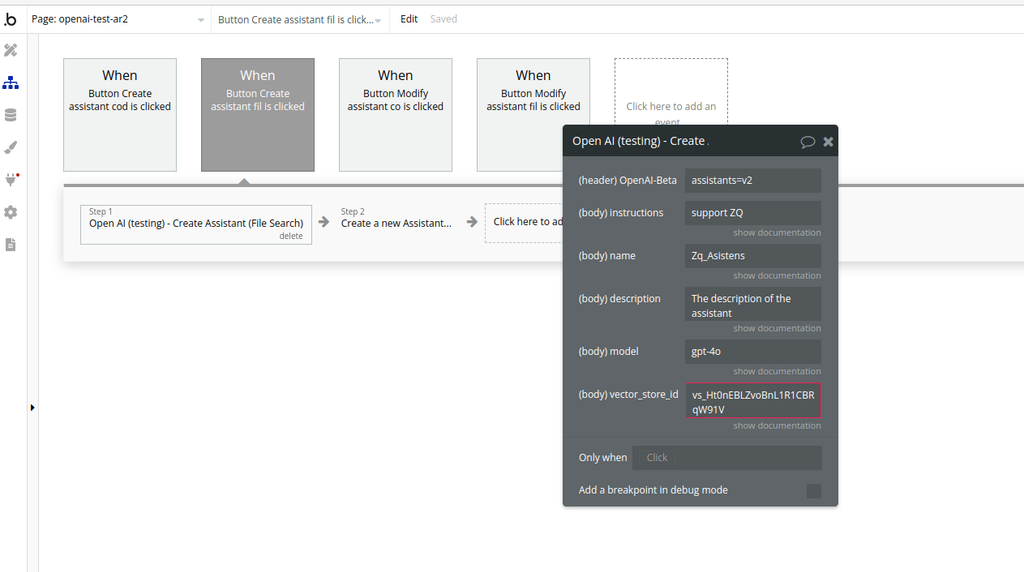
Fields:
Name | Description | Type |
Instructions | The system instructions that the assistant uses. The maximum length is 32768 characters. | Text |
Name | The name of the assistant. The maximum length is 256 characters. | Text |
Description | The description of the assistant. The maximum length is 512 characters. | Text |
Model | ID of the model to use. You can use the List models API to see all of your available models, or see our Model overview for descriptions of them. | Text |
Vector_store_ids | The vector store attached to this assistant. There can be a maximum of 1 vector store attached to the assistant. | Text |
Return values:
Field | Description | Type |
id | Unique assistant ID | Text |
object | Always "assistant" | Text |
name | Assistant name | Text |
description | Assistant description | Text |
instructions | System instructions | Text |
model | Model assigned to assistant | Text |
tools | Enabled tools (file_search) | List |
vector_store_ids | Attached vector store IDs | List |
created_at | Unix timestamp | Number |
metadata | Optional metadata | Object |
Modify assistant (File Search) (Beta)
This action updates an existing Assistant, including its metadata, instructions, model, and File Search configuration.
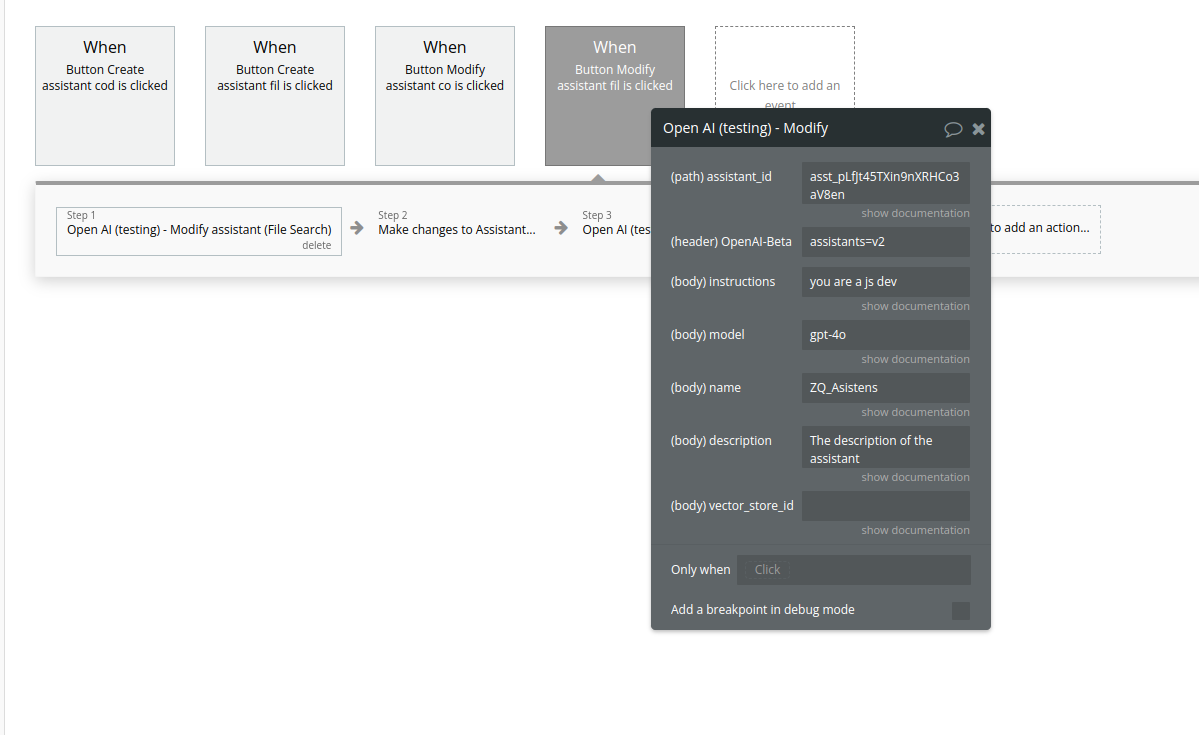
Fields:
Name | Description | Type |
Assistant_id | The ID of the assistant to modify. | Text |
Instructions | The system instructions that the assistant uses. The maximum length is 32768 characters. | Text |
Model | ID of the model to use. You can use the List models API to see all of your available models, or see our Model overview for descriptions of them. | Text |
Name | The name of the assistant. The maximum length is 256 characters. | Text |
Description | The description of the assistant. The maximum length is 512 characters. | Text |
Vector_store_ids | The vector store attached to this assistant. There can be a maximum of 1 vector store attached to the assistant. | Text |
Return values:
Field | Description | Type |
id | Assistant ID (same as input) | Text |
object | Always "assistant" | Text |
name | Updated assistant name | Text |
description | Updated assistant description | Text |
instructions | Updated system instructions | Text |
model | Model assigned to assistant | Text |
tools | Enabled tools (e.g. file_search) | List |
vector_store_ids | Attached Vector Store IDs | List |
updated_at | Unix timestamp | Number |
metadata | Optional metadata | Object |
List assistants (Beta).
This action retrieves a list of all assistants available in your OpenAI account.
It is commonly used as a data source for a Repeating Group in Bubble to display existing assistants and manage them (view, edit, delete, select).
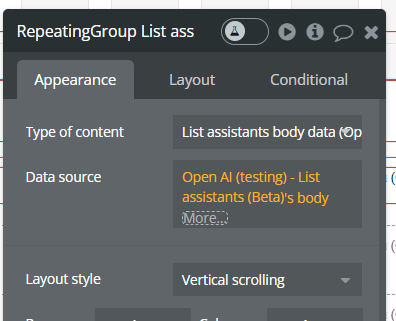
Returned Fields:
Name | Description | Type |
id | Unique assistant ID | Text |
name | Assistant name | Text |
description | Assistant description | Text |
model | Model used by the assistant | Text |
instructions | System instructions | Text |
tools | Enabled tools (code interpreter, retrieval, function) | JSON |
created_at | Creation timestamp | Number |
Delete assistants (Beta).
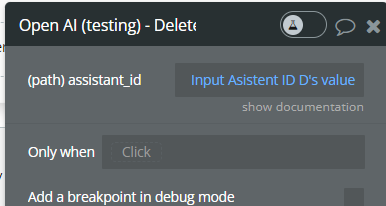
Param Name | Description | Type |
assistant_id | The ID of the assistant to modify | Text |
Retrieve assistant (Beta).
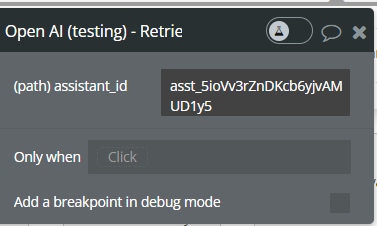
Fields:
Name | Description | Type |
assistant_id | The ID of the assistant to modify | Text |
Return values:
Name | Description | Type |
id | Assistant unique identifier | Text |
name | Assistant name | Text |
description | Assistant description | Text |
instructions | System instructions used by the assistant | Text |
model | Model used by the assistant | Text |
tools | Enabled tools (code interpreter, retrieval, function) | JSON |
created_at | Assistant creation timestamp | Number |
raw_output | Full OpenAI API response | JSON |
Create thread (Beta).
This action creates a new conversation thread that an Assistant can interact with.
A thread represents a persistent conversation context and is required before sending messages or running an assistant.
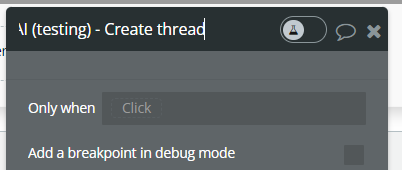
Return Values:
Name | Description | Type |
id | Unique thread ID | Text |
created_at | Thread creation timestamp | Number |
raw_output | Full OpenAI API response | JSON |
Create messages (Beta).
This action creates a new message inside an existing thread.
Messages represent user input (or system content) that will later be processed by an Assistant when a Run is created.
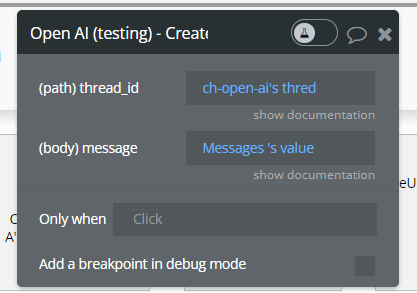
Fields:
Name | Description | Type |
thread_id | The thread ID that this message belongs to. | Text |
message | The content of the message in array of text and/or images. | Text |
Return Values:
Name | Description | Type |
id | Unique message ID | Text |
role | Message role ( user) | Text |
content | Message content | Text |
created_at | Message creation timestamp | Number |
raw_output | Full OpenAI API response | JSON |
Create message (Beta) Text and image (Beta).
This action creates a new message inside an existing thread that contains both text and an image.
It allows Assistants to process visual context together with text, enabling use cases such as image analysis, explanations, or visual Q&A.
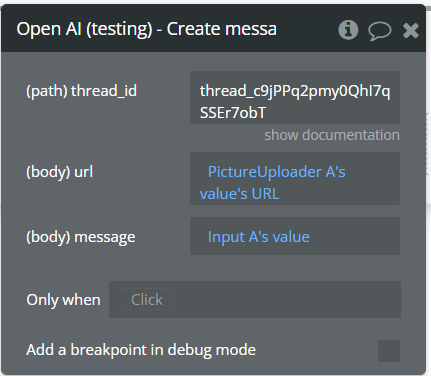
Fields:
Name | Description | Type |
Thread_id | The thread ID that this message belongs to. | Text |
Message | The content of the message in array of text and/or images. | Text |
URL | The external URL of the image, must be a supported image types: jpeg, jpg, png, gif, webp. | Text |
Return Values:
Name | Description | Type |
id | Unique message ID | Text |
role | Message role ( user) | Text |
content | Message text and image reference | JSON |
created_at | Message creation timestamp | Number |
raw_output | Full OpenAI API response | JSON |
Create message (Beta) Text and and Image File (Beta).
This action creates a new message inside an existing thread that includes text content and an image uploaded as a File.
Unlike the image URL variant, this action uses a File ID, allowing you to reference images that were previously uploaded to OpenAI with purpose set to vision.
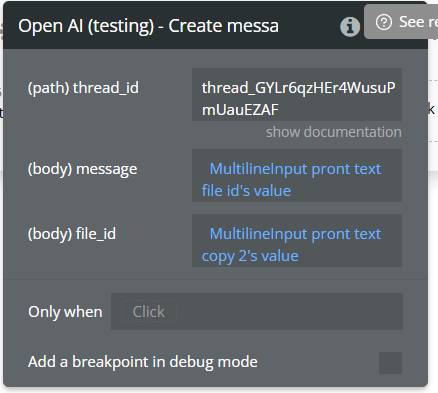
Fields:
Name | Description | Type |
Thread_id | The thread ID that this message belongs to. | Text |
Message | The content of the message in array of text and/or images. | Text |
File id | The File ID of the image in the message content. Set purpose="vision" when uploading the File if you need to later display the file content. | Text |
Return Values:
Name | Description | Type |
id | Unique message ID | Text |
role | Message role ( user) | Text |
content | Message content (text + image reference) | JSON |
created_at | Message creation timestamp | Number |
raw_output | Full OpenAI API response | JSON |
Retrieve message (Beta).
This action retrieves a specific message from a thread using its message_id.
It is typically used to read a single message, such as an assistant reply or a previously sent user message.
This action is useful when you already know both the thread ID and the message ID.
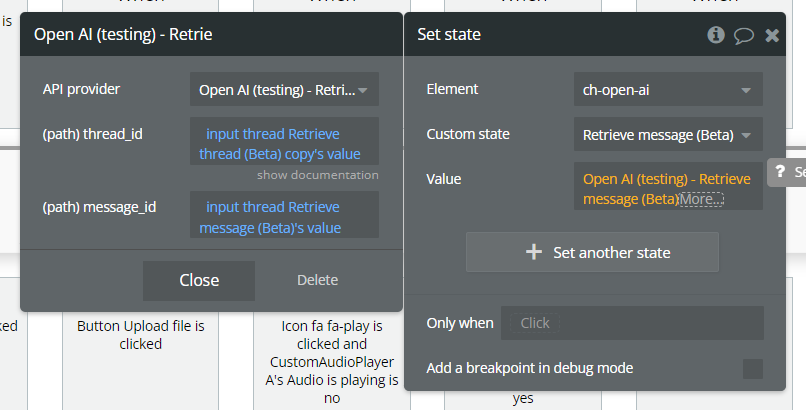
Fields:
Name | Description | Type |
thread_id | The thread ID that this message belongs to. | Text |
message_id | The content of the message in array of text and/or images. | Text |
Return Values:
Name | Description | Type |
id | Message unique identifier | Text |
role | Message role ( user or assistant) | Text |
content | Message content (text and/or image) | JSON |
created_at | Message creation timestamp | Number |
raw_output | Full OpenAI API response | JSON |
Retrieve messages list (Beta).
This action retrieves all messages from a specific thread.
It returns a list of message objects, ordered by creation time, and is commonly used to display a conversation history in a Repeating Group or store messages in a custom state.
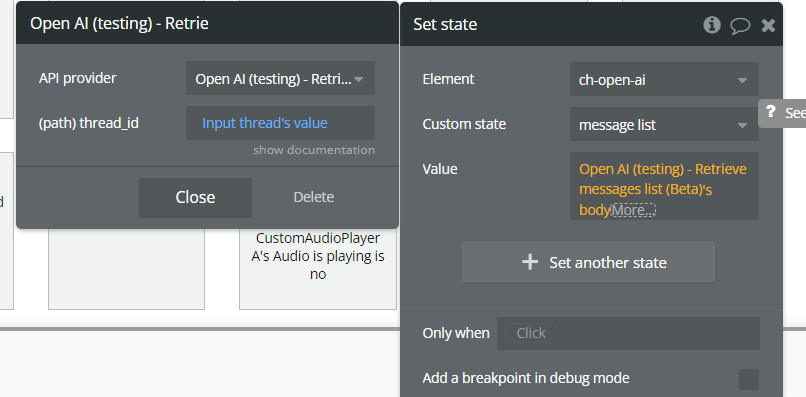
Fields:
Name | Description | Type |
thread_id | The thread ID that this message belongs to. | Text |
Return Values:
Name | Description | Type |
body | List of message objects | List |
raw_output | Full OpenAI API response | JSON |
Create run (Beta).
This action creates an execution run for a specific Assistant on a given thread.
A run tells OpenAI to process the messages in the thread using the selected assistant and generate a response.
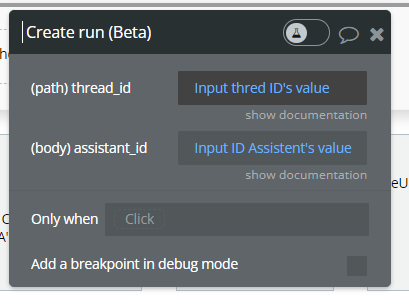
Fields:
Name | Description | Type |
thread_id | The thread ID that this message belongs to. | Text |
assistant_id | The ID of the assistant used for execution of this run. | Text |
Return Values:
Name | Description | Type |
id | Unique run ID | Text |
status | Run status ( queued, in_progress, completed, failed) | Text |
assistant_id | Assistant used for execution | Text |
thread_id | Thread ID | Text |
created_at | Run creation timestamp | Number |
raw_output | Full OpenAI API response | JSON |
Retrieve run (Beta).
This action retrieves the current status and details of a specific execution run for an assistant on a thread.
It is used to check whether a run is still processing, completed, or failed before attempting to read the assistant’s messages.
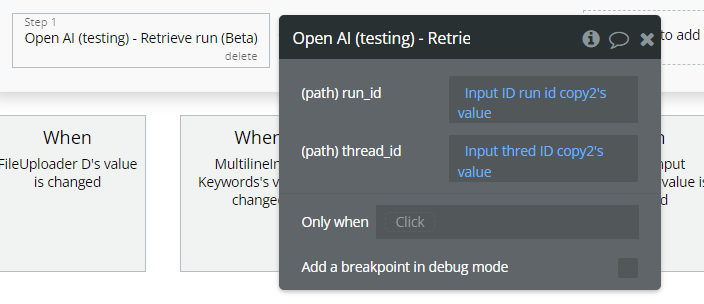
Fields:
Param Name | Description | Type |
thread_id | The thread ID that this message belongs to. | Text |
run_id | The ID of the run to retrieve. | Text |
Return Values:
Name | Description | Type |
id | Unique run ID | Text |
status | Current run status | Text |
thread_id | Thread ID | Text |
assistant_id | Assistant used for execution | Text |
created_at | Run creation timestamp | Number |
completed_at | Completion timestamp (if finished) | Number |
last_error | Error details (if failed) | JSON |
raw_output | Full OpenAI API response | JSON |
Moderations
Given some input text, outputs if the model classifies it as potentially harmful across several categories.
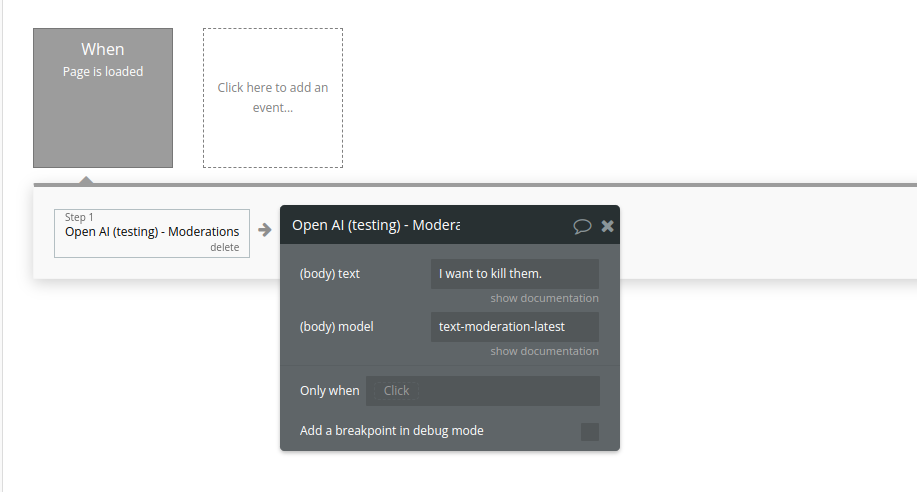
Fields:
Name | Description | Type |
Text | The input text to classify | Text |
Model | Two content moderations models are available: text-moderation-stable and text-moderation-latest.
The default is text-moderation-latest which will be automatically upgraded over time. This ensures you are always using our most accurate model. If you use text-moderation-stable, we will provide advanced notice before updating the model. Accuracy of text-moderation-stable may be slightly lower than for text-moderation-latest. | Text |
Return Values:
Name | Description | Type |
id | Unique identifier of the moderation request. | Text |
model | The moderation model used to generate the results. | Text |
results | List containing moderation analysis results. | List |
Transcription in Verbose JSON format
Transcribes audio into the input language.
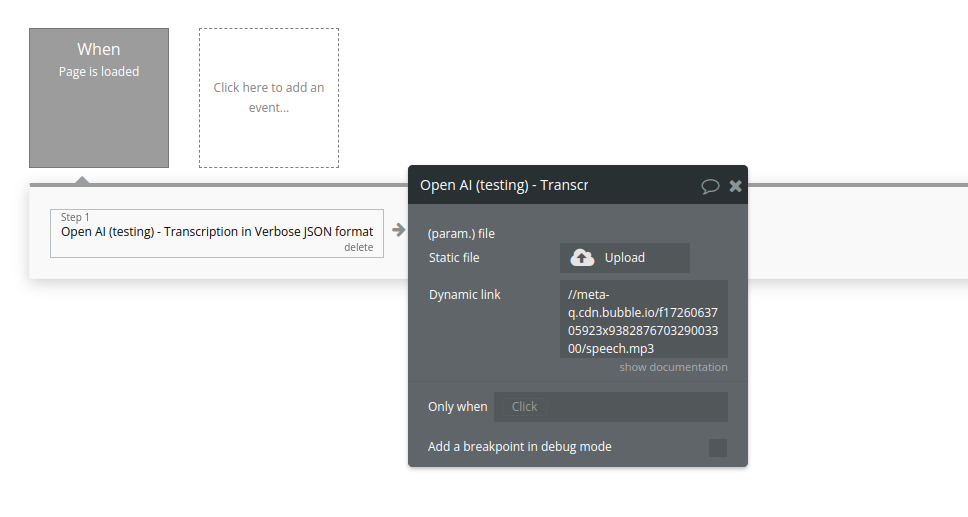
Fields:
Name | Description | Type |
File | The audio file object (not file name) to transcribe, in one of these formats: flac, mp3, mp4, mpeg, mpga, m4a, ogg, wav, or webm. | Text |
Return Values:
Name | Description | Type |
text | Full transcribed text from the audio file. | Text |
language | Detected language of the audio. | Text |
duration | Duration of the audio file (seconds). | Number |
segments | List of transcription segments with timing and metadata. | List |
Detecting the language
Detects the language of the provided text input.
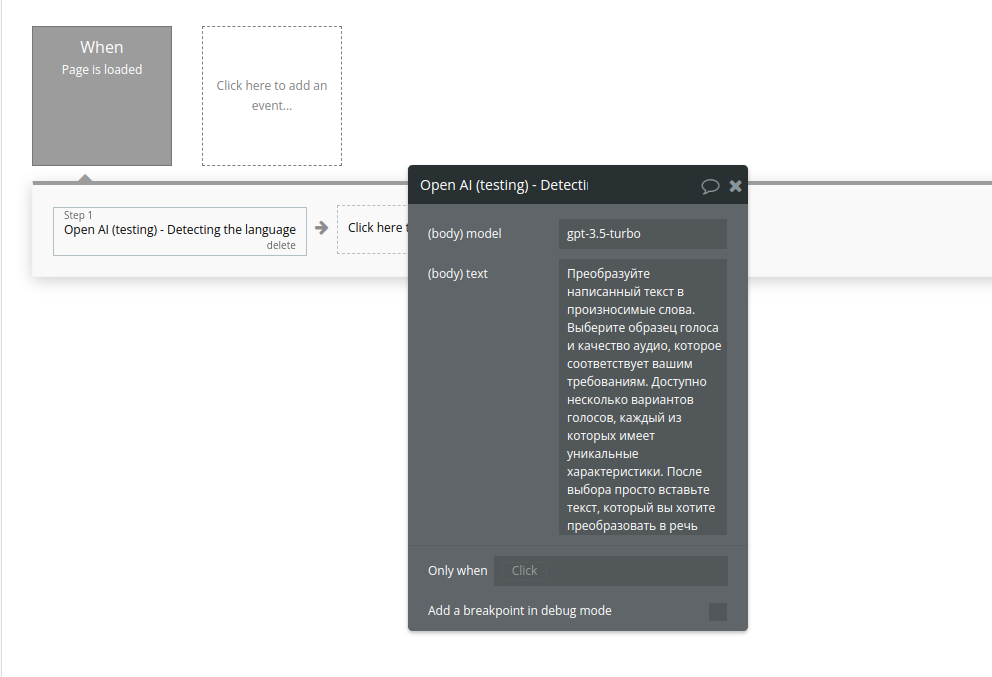
Fields:
Name | Description | Type |
Model | ID of the model to use. See the model endpoint compatibility table for details on which models work with the Chat API. | Text |
Text | The content to detect language | Text |
Return Values:
Name | Description | Type |
choices | List containing the model’s response. | List |
Create Vector Store
Vector stores are used to store files for use by the
file_search tool.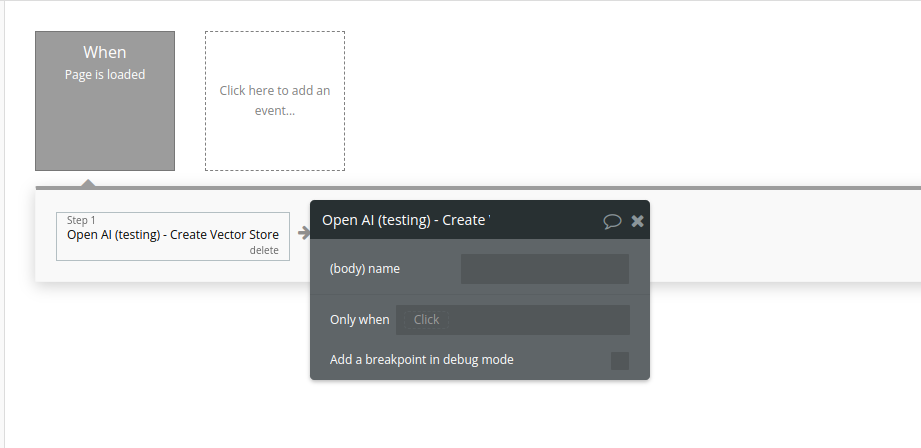
Fields:
Name | Description | Type |
Name | The name of the vector store. | Text |
Return Values:
Name | Description | Type |
id | Unique identifier of the created vector store. | Text |
object | Type of the returned object ( vector_store). | Text |
name | Name of the vector store. | Text |
created_at | Timestamp when the vector store was created. | Number |
Retrieve File
Retrieves metadata and information about an existing uploaded file using its unique File ID.
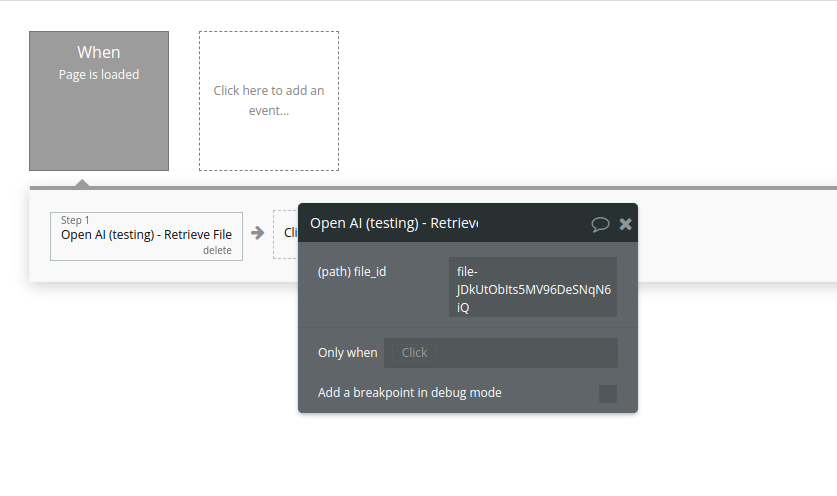
Fields:
Name | Description | Type |
File_id | The ID of the file to use for this request. | Text |
Return Values:
Name | Description | Type |
id | Unique identifier of the file. | Text |
object | Object type returned ( file). | Text |
filename | Original name of the uploaded file. | Text |
purpose | The intended purpose of the file (e.g. fine-tune, assistants, vision). | Text |
bytes | File size in bytes. | Number |
created_at | Unix timestamp indicating when the file was uploaded. | Number |
status | Current status of the file (e.g. uploaded, processed). | Text |
List files
This action retrieves all files available in the OpenAI account (organization scope).
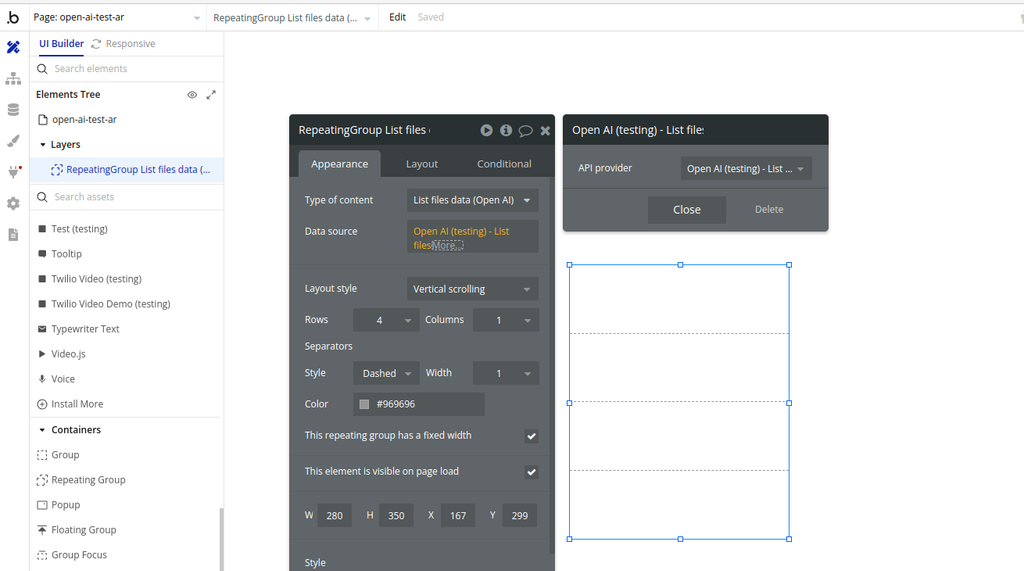
Return Values:
Name | Description | Type |
id | Unique identifier of the file | Text |
object | Object type (always "file") | Text |
bytes | File size in bytes | Number |
created_at | Unix timestamp when the file was uploaded | Number |
filename | Original name of the file | Text |
purpose | Purpose of the file (e.g. fine-tune, assistants, vision) | Text |
status | Current processing status of the file | Text |
status_details | Additional status details (if available) | Text (optional) |
Delete file
This action deletes a file from a Vector Store context using its File ID.
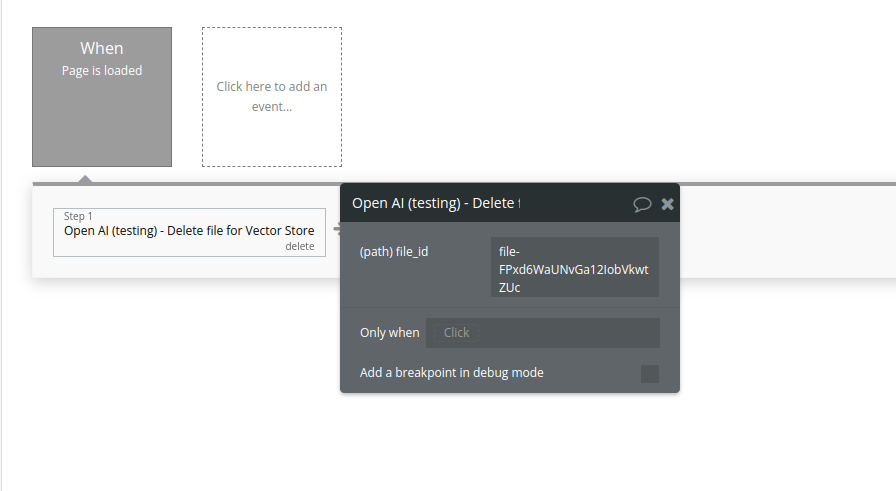
Fields:
Name | Description | Type |
File_id | The ID of the file to use for this request. | Text |
Return Values:
Name | Description | Type |
id | The ID of the deleted file | Text |
object | Object type (always "file") | Text |
deleted | Indicates whether the file was successfully deleted | Yes/No (Boolean) |
Retrieve vector store
Retrieves a vector store.
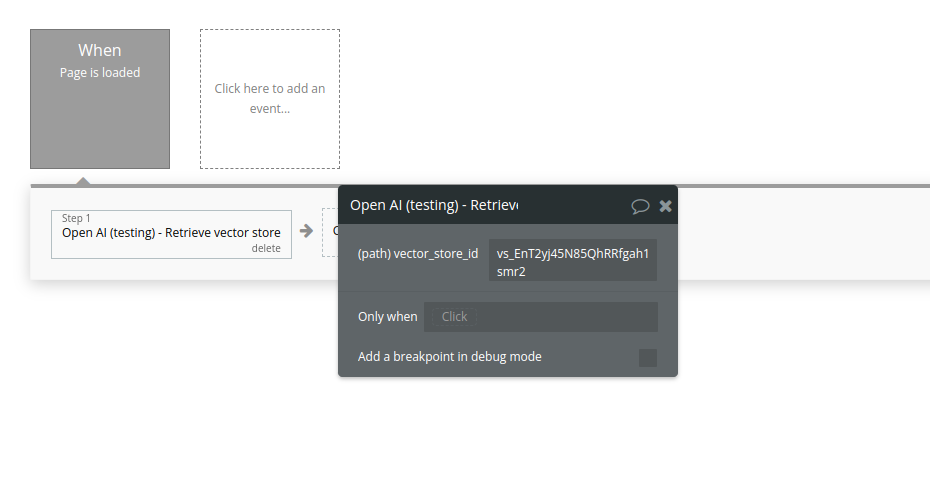
Fields:
Name | Description | Type |
Vector_store_id | The ID of the vector store to retrieve. | Text |
Return Values:
Name | Description | Type |
id | Unique ID of the vector store | Text |
object | Object type (always "vector_store") | Text |
name | Name of the vector store | Text |
created_at | Unix timestamp when the vector store was created | Number |
status | Current status of the vector store (e.g. completed) | Text |
file_counts | Information about files attached to the vector store | Object |
Modify vector store
Modifies a vector store.
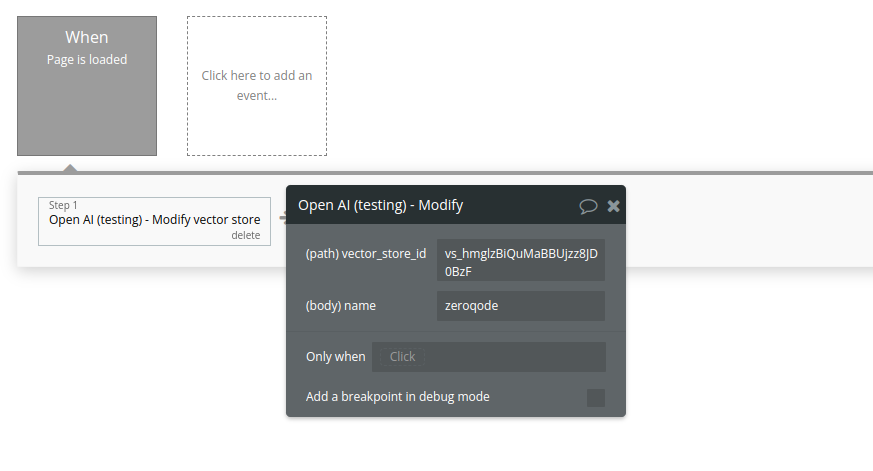
Fields:
Name | Description | Type |
Vector_store_id | The ID of the vector store to modify. | Text |
Name | The name of the vector store. | Text |
Return Values:
Name | Description | Type |
id | Unique ID of the vector store | Text |
object | Object type (always "vector_store") | Text |
name | Updated name of the vector store | Text |
created_at | Unix timestamp when the vector store was created | Number |
status | Current status of the vector store | Text |
file_counts | Information about files attached to the vector store | Object |
Delete vector store
Delete a vector store.
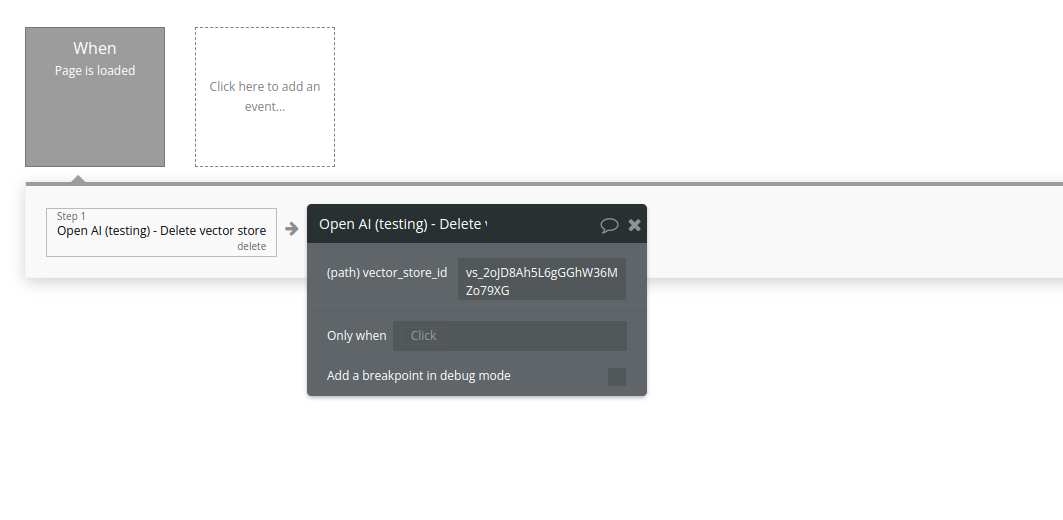
Fields:
Name | Description | Type |
Vector_store_id | The ID of the vector store to delete. | Text |
Return Values:
Name | Description | Type |
id | The ID of the deleted vector store | Text |
object | Object type, always "vector_store" | Text |
deleted | Indicates whether the vector store was successfully deleted | Boolean |
Create vector store file
Create a vector store file by attaching a File to a vector store.
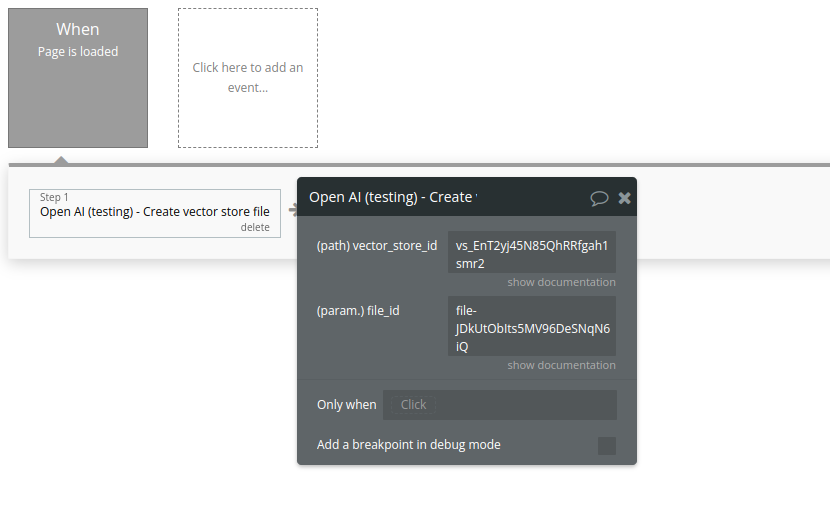
Fields:
Name | Description | Type |
File_id | A File ID that the vector store should use. Useful for tools like file_search that can access files. | Text |
Vector_store_id | The ID of the vector store for which to create a File. | Text |
Return Values:
Name | Description | Type |
id | The ID of the vector store file | Text |
object | Object type, always "vector_store.file" | Text |
vector_store_id | The ID of the vector store the file belongs to | Text |
status | Processing status of the file ( in_progress, completed, failed) | Text |
created_at | Unix timestamp when the file was attached | Number |
file_id | The ID of the original uploaded file | Text |
Delete vector store file
Delete a vector store file. This will remove the file from the vector store but the file itself will not be deleted.
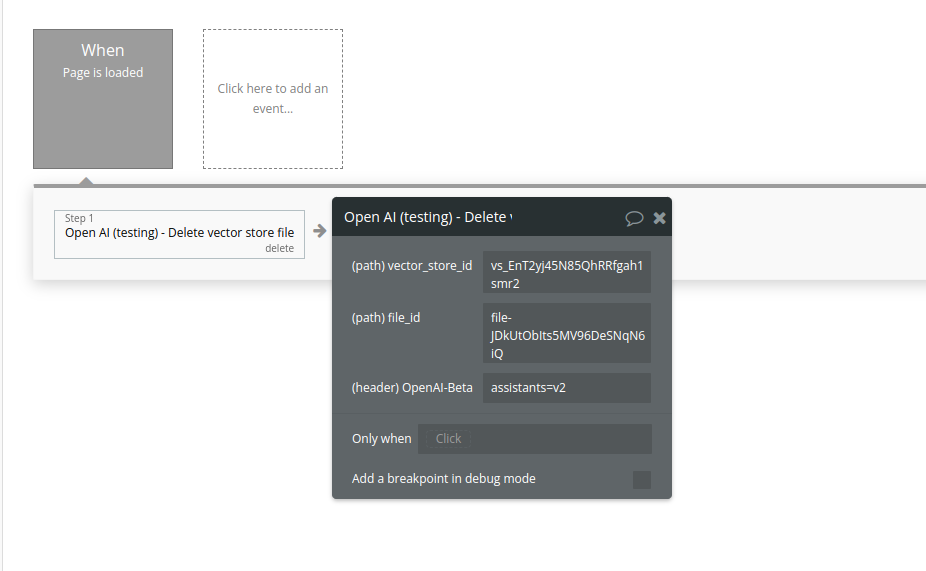
Fields:
Name | Description | Type |
Vector_store_id | The ID of the vector store that the file belongs to. | Text |
File_id | The ID of the file to delete. | Text |
Return Values:
Name | Description | Type |
id | The ID of the vector store file that was deleted | Text |
object | Object type, always "vector_store.file.deleted" | Text |
deleted | Indicates whether the deletion was successful | Boolean |
List vector store files
Returns a list of vector store files.
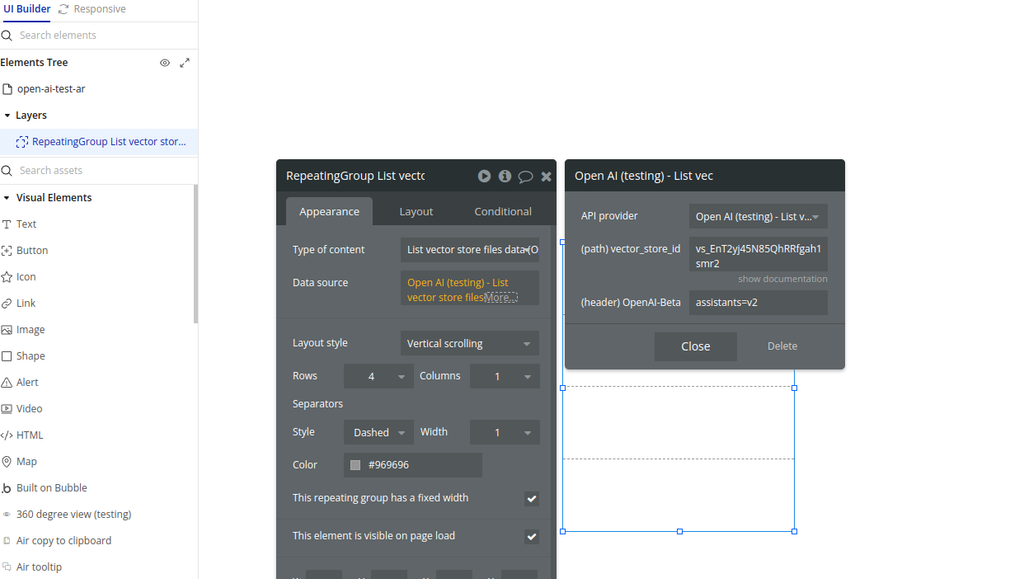
Fields:
Name | Description | Type |
Vector_store_id | The ID of the vector store that the files belong to. | Text |
Return Values:
Name | Description | Type |
id | Unique ID of the vector store file | Text |
object | Object type, always "vector_store.file" | Text |
vector_store_id | ID of the vector store this file belongs to | Text |
file_id | ID of the original uploaded file | Text |
status | Current status of the file ( in_progress, completed, failed) | Text |
created_at | Unix timestamp when the file was added to the vector store | Number |
last_error | Error details if processing failed | Object / null |
Retrieve vector store file.
Retrieves a single file attached to a specific vector store.
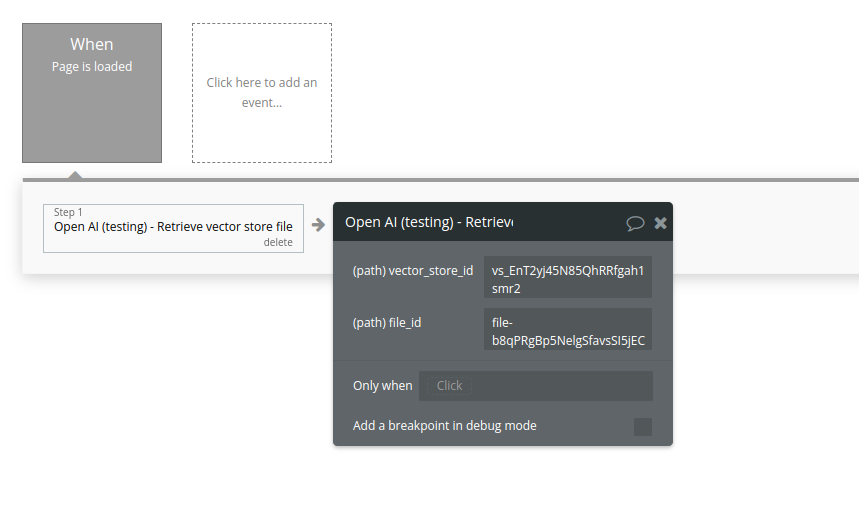
Fields:
Name | Description | Type |
Vector_store_id | The ID of the vector store that the file belongs to. | Text |
File_id | The ID of the file being retrieved. | Text |
Return Values:
Name | Description | Type |
id | Unique ID of the vector store file | Text |
object | Object type, always "vector_store.file" | Text |
vector_store_id | ID of the vector store | Text |
file_id | ID of the original uploaded file | Text |
status | Processing status ( in_progress, completed, failed) | Text |
created_at | Unix timestamp when the file was attached | Number |
last_error | Error information if processing failed | Object / null |
Web Search Preview
The Web Search Preview action allows you to send a natural-language instruction to OpenAI and receive a response that simulates a lightweight web search context.
It is useful for previewing answers that require recent or real-world information, such as weather, news, or general factual lookups, without building a full browsing system.
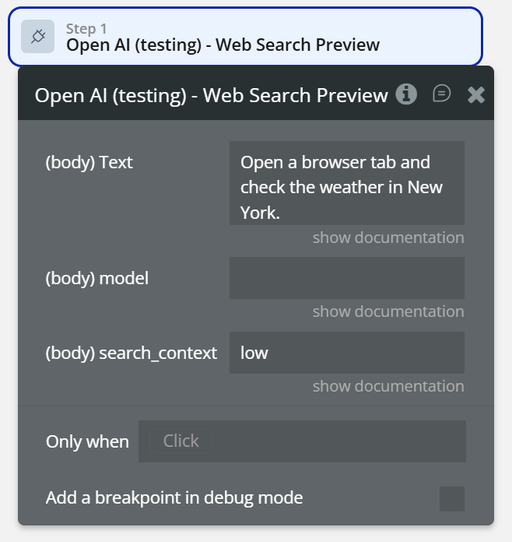
Fields:
name | Description | Type |
Text | The instruction or query to be interpreted as a web-search-style request. Example: “Check the weather in New York.” | Text |
model | The OpenAI model used to process the request. If empty, the default model configured in the plugin is used. | Text |
search_context | Controls how much external context is used for the search. Typical values: low, medium, high. | Text |
Return Values:
Name | Description | Type |
output_text | The generated response based on the simulated web search. | Text |
model_used | The model that processed the request. | Text |
search_context_used | The context level applied during processing. | Text |
created_at | Timestamp of the response generation. | Date |
request_id | Unique identifier of the request. | Text |
Prompt simplu (text only)
The Prompt simplu (text only) action sends a plain text prompt to an OpenAI model and returns a generated text response.
It is the simplest and fastest way to interact with OpenAI when you only need text input and text output, without images, files, tools, or assistants.
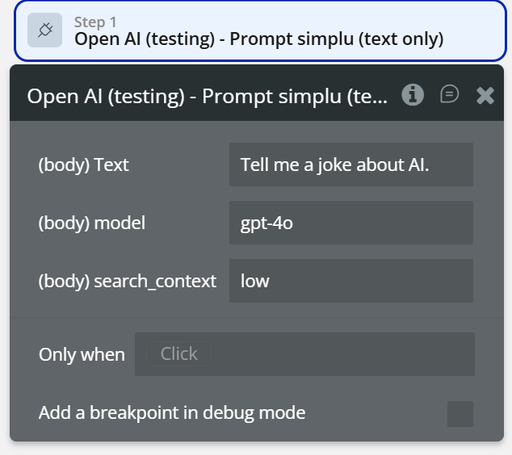
Fields:
name | Description | Type |
Text | The prompt sent to the AI. Example: “Tell me a joke about AI.” | Text |
model | The OpenAI model used to generate the response (e.g. gpt-4o). | Text |
search_context | Controls how much external context is considered. Typical values: low, medium, high. | Text |
Return Values:
Field name | Description | Type |
Text | The prompt sent to the AI. Example: “Tell me a joke about AI.” | Text |
model | The OpenAI model used to generate the response (e.g. gpt-4o). | Text |
search_context | Controls how much external context is considered. Typical values: low, medium, high. | Text |
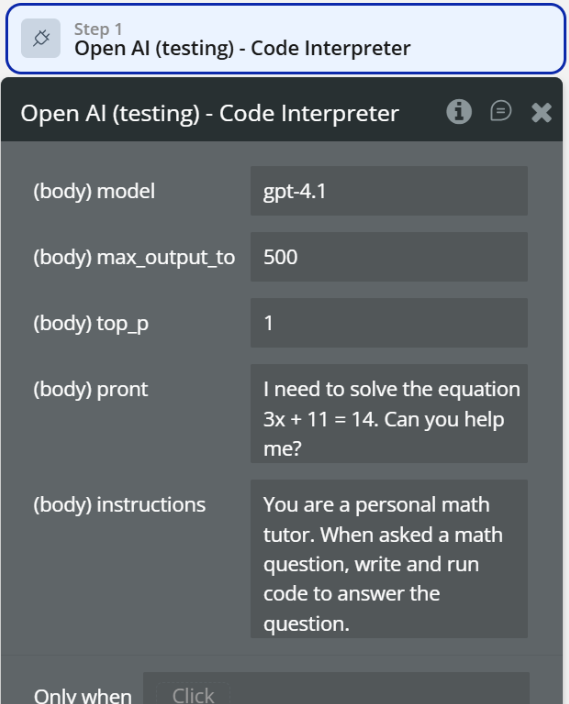
Code Interpreter
The Code Interpreter action allows the AI to write, execute, and reason over code in order to solve problems.
Unlike simple text prompts, this action enables programmatic problem-solving, such as math calculations, data processing, logic execution, and algorithmic reasoning.
Fields:
Name | Description | Type |
model | The OpenAI model used to run the code interpreter (e.g. gpt-4.1). | Text |
max_output_to | Maximum length of the generated output. | Number |
top_p | Controls randomness of the output (1 = default). | Number |
prompt | The problem or task to be solved (e.g. math equation, logic problem). | Text |
instructions | System-level instructions defining how the AI should behave. | Text |
Return Values:
Field name | Description | Type |
model | The OpenAI model used to run the code interpreter (e.g. gpt-4.1). | Text |
max_output_to | Maximum length of the generated output. | Number |
top_p | Controls randomness of the output (1 = default). | Number |
prompt | The problem or task to be solved (e.g. math equation, logic problem). | Text |
instructions | System-level instructions defining how the AI should behave. | Text |
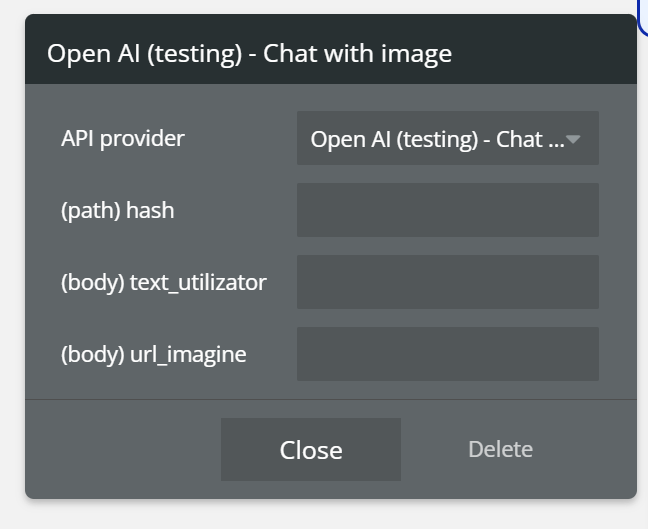
Chat with Image
The Chat with Image action allows you to send a text prompt together with an image URL to the OpenAI Chat endpoint.
It enables multimodal interactions, where the AI can analyze the provided image and respond based on both the image content and the user’s text.
Fields:
name | Description | Type |
hash | A dynamic value (e.g. current timestamp) used to ensure the request is always treated as unique and not cached | Text |
text | The user’s text prompt that describes what the AI should do with the image | Text |
url_imagine | Publicly accessible image URL that will be analyzed by the AI | Text (URL) |
Return Values:
Field | Description | Type |
id | Unique identifier of the chat response | Text |
object | Response object type | Text |
created | Unix timestamp when the response was generated | Number |
model | Model used to generate the response | Text |
choices | List of generated messages | List |
choices.message.content | AI-generated response text | Text |
usage | Token usage information | Object |
Workflow example
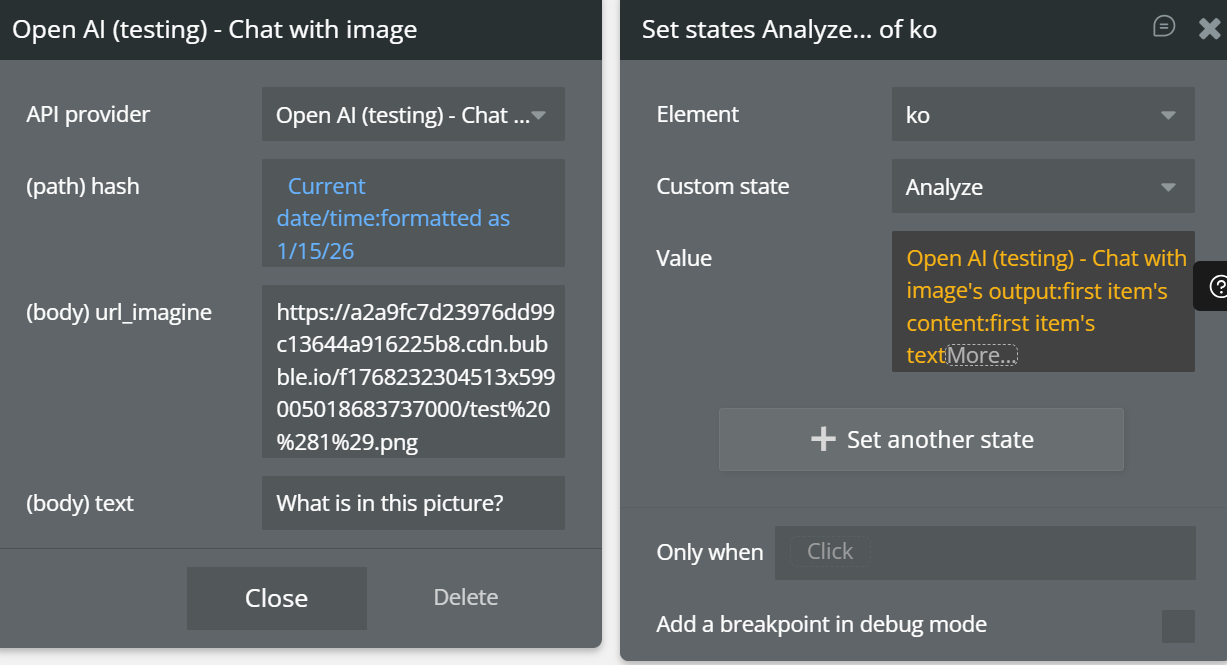
How do I analyze an image?
- When Button “Analyze image” is clicked
- Open AI (testing) – Chat with image
hash→ Current date/timetext→ “Describe what you see in this image”url_imagine→ Image URL (from uploader or input)- Set state
image_analysis_result= Result’s content
- Show result
- Text element displays AI response
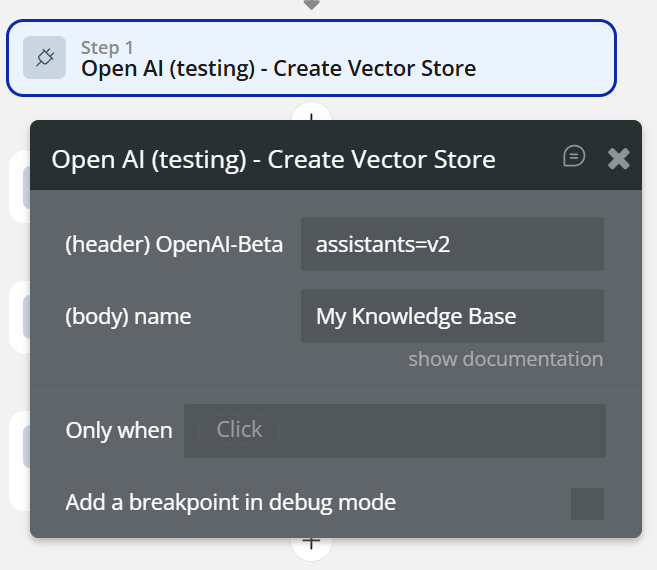
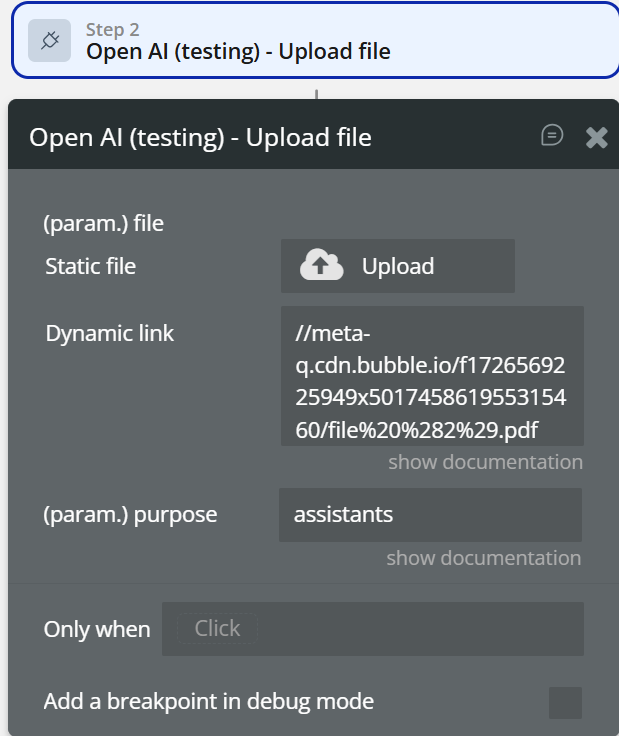
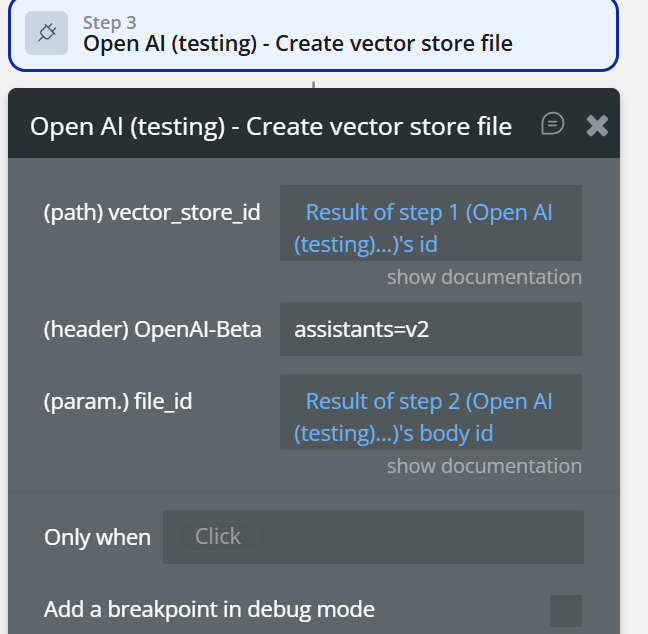
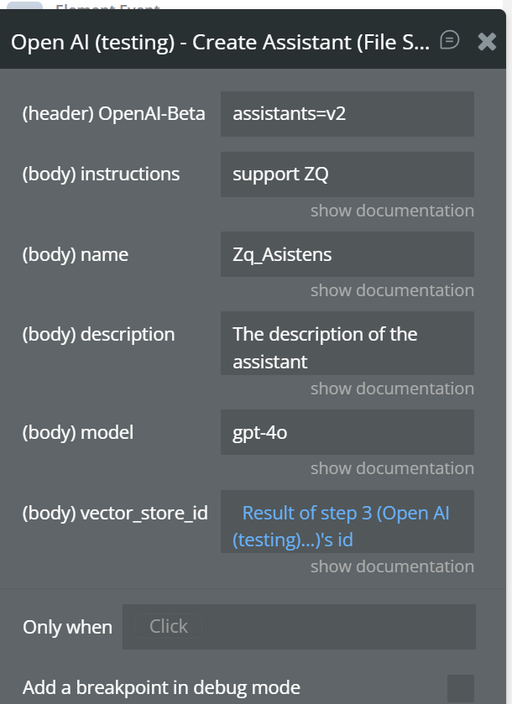
How do I create an Assistant with knowledge files?
- When Button “Create assistant with files” is clicked
- Create Vector Store
name→ “My Knowledge Base”- Upload File
- Save
file_id vector_store_id→ from step 1- Create Vector Store File
file_id→ from step 2- Create Assistant (File Search)
instructions→ “Answer using uploaded documents”model→ gpt-4ovector_store_id→ from step 1
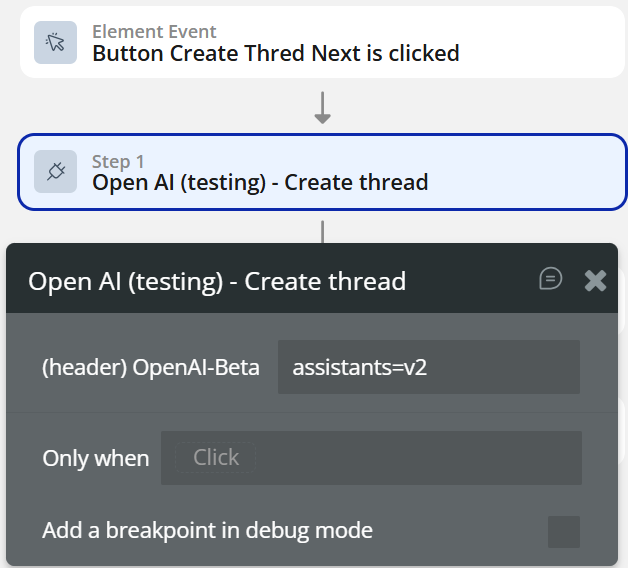
How do I run an assistant conversation?
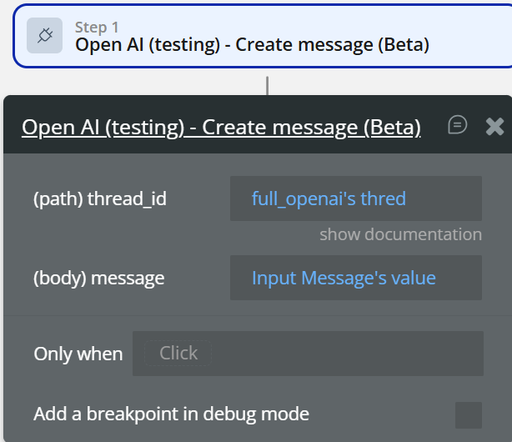
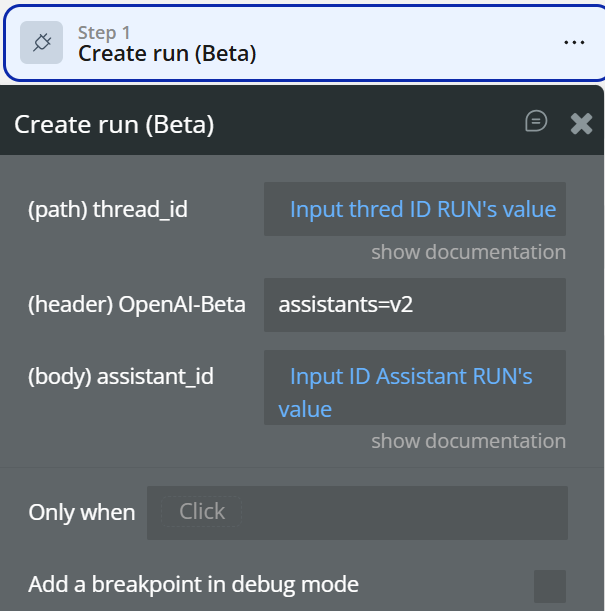
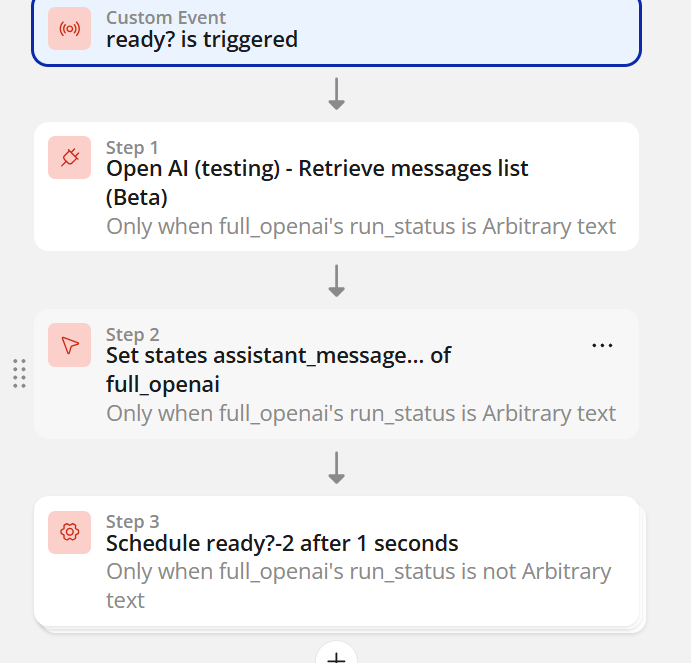
- When Button “Ask assistant” is clicked
- Create Thread
- Create Message
thread_id→ from step 1message→ Input value- Create Run
thread_idassistant_id- Retrieve Run (loop / scheduled)
- Wait until status = completed
- Retrieve Messages List
- Show assistant reply
How do I moderate user input?
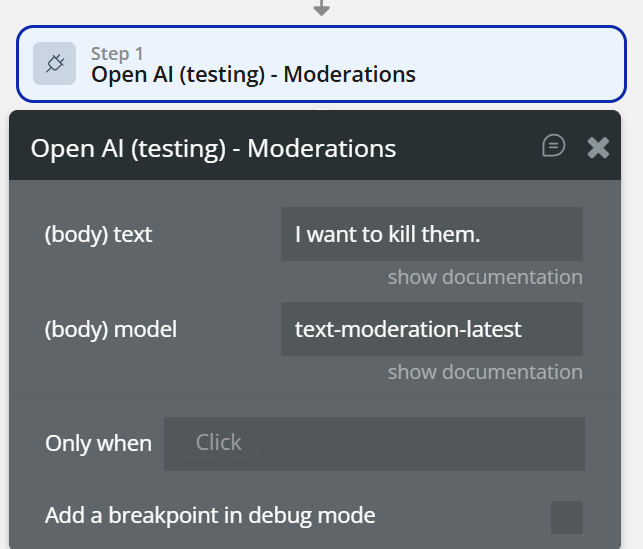
- When Input Prompt’s value is changed
- Open AI (testing) – Moderations
text→ Input valuemodel→ text-moderation-latest- Only when
flagged is no→ continue AI requestflagged is yes→ show warning
Can I just send one prompt, no assistant?
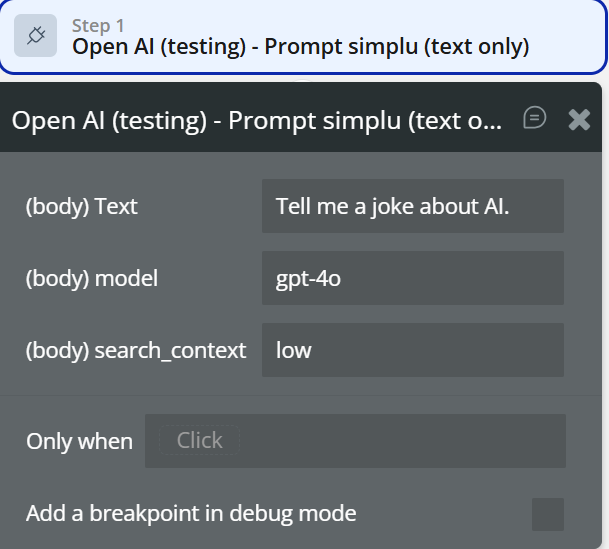
- When Button “Quick prompt” is clicked
- Prompt simplu (text only)
Text→ Input valuemodel→ gpt-4osearch_context→ low- Show result

Changelogs
Update 30.04.26 - Version 1.54.0
- Add realtime voice session element.
Update 25.02.26 - Version 1.53.0
- Upgraded API call for “Image Editor” feature.
Update 27.01.26 - Version 1.52.0
- Bubble Plugin Page Update (FAQ).
Update 27.01.26 - Version 1.51.0
- Bubble Plugin Page Update (API Calls).
Update 27.01.26 - Version 1.50.0
- Bubble Plugin Page Update (Description).
Update 27.01.26 - Version 1.49.0
- Bubble Plugin Page Update (Description and Name).
Update 16.01.26 - Version 1.48.0
- Updated to the New OpenAI API (Extended Changes Across Fields and Actions).
Update 24.09.25 - Version 1.47.0
- Minor fix.
Update 09.09.25 - Version 1.46.0
- Bubble Plugin Page Update (Forum).
Update 16.07.25 - Version 1.45.0
- New features have been added: Web Search Preview, Simple Prompt (text only), and Code Interpreter.
Update 10.06.25 - Version 1.44.0
- Marketing update (minor change).
Update 09.06.25 - Version 1.43.0
- Marketing update (minor change).
Update 26.02.25 - Version 1.42.0
- Minor update(Marketing update)
Update 06.02.25 - Version 1.41.0
- Minor update(Marketing update)
Update 30.01.25 - Version 1.40.0
- Added new actions: "Create Image with Text" and "Create Message with Image ID"
Update 24.10.24 - Version 1.39.0
- Minor update (Marketing update).
Update 21.10.24 - Version 1.38.0
- Minor update (Marketing update).
Update 27.09.24 - Version 1.37.0
- Files and vector stores added to Assistant calls.
Update 24.09.24 - Version 1.36.0
- Was added Vector Store actions and Moderations.
Update 30.08.24 - Version 1.35.0
- Assistant API calls upgraded to V2.
Update 23.07.24 - Version 1.34.0
- Minor update.
Update 16.07.24 - Version 1.33.0
- Minor update (Marketing update).
Update 24.06.24 - Version 1.32.0
- Fixed keys.
Update 19.06.24 - Version 1.31.0
- Minor update.
Update 10.06.24 - Version 1.30.0
- Updated demo/service links.
Update 10.06.24 - Version 1.29.0
- Minor update.
Update 06.06.24 - Version 1.28.0
- Minor update.
Update 17.05.24 - Version 1.27.0
- Plugins upgrade for model "gpt-4o".
Update 14.05.24 - Version 1.26.0
- Was added new actions "Retrieve message (Beta)", "Retrieve messages list (Beta)", "Retrieve run (Beta)”
Update 03.04.24 - Version 1.25.0
- updated description.
Update 15.02.24 - Version 1.24.0
- minor fix.
Update 24.01.24 - Version 1.23.0
- updated description.
Update 16.01.24 - Version 1.22.0
- minor fix.
Update 29.12.23 - Version 1.21.0
- updated description.
Update 27.12.23 - Version 1.20.0
- updated endpoint.
Update 27.11.23 - Version 1.19.0
- "Added Retrieve Run API Call. Fixed Сreate completion, Grammar correction API Calls".
Update 17.11.23 - Version 1.18.0
- updated description.
Update 17.11.23 - Version 1.17.0
- Add new actions "Assistant API", "Fine tuning API', "Vision API", "Text to speech API", "speech to text API.
Update 16.11.23 - Version 1.16.0
- Add new actions "Assistant API", "Fine tuning API', "Vision API", "Text to speech API", "speech to text API".
Update 10.11.23 - Version 1.15.0
- Updated "Model".
Update 18.10.23 - Version 1.14.0
- Updated description.
Update 19.09.23 - Version 1.13.0
- updated plugin's name.
Update 15.09.23 - Version 1.12.0
- updated description.
Update 12.09.23 - Version 1.11.0
- minor updates.
Update 11.07.23 - Version 1.10.0
- updated description.
Update 19.06.23 - Version 1.9.0
- Updated the description .
Update 10.05.23 - Version 1.8.0
- The 'image generator' action has been reinitialized.
Update 14.04.23 - Version 1.7.0
- added new action 'gpt-3.5-turbo'.
Update 07.04.23 - Version 1.6.0
- updated the demo link.
Update 30.03.23 - Version 1.5.0
- fixed the plugin name and description.
Update 23.02.23 - Version 1.4.0
- deleted the icons.
Update 04.02.22 - Version 1.3.0
- Key input fields were changed.
Update 13.01.22 - Version 1.2.0
- Minor updates.
Update 30.05.21 - Version 1.1.0
- Updated description.
Update 25.05.21 - Version 1.0.0
- Initial Release.