
✅
Demo to preview the plugin:
Introduction
Generate context-aware text from images, audio, documents, or text input. It combines direct API connectivity for advanced use cases so you can move from setup to production quickly. Use it to reduce custom development time, keep configuration flexible, and ship a polished experience faster.
Prerequisites
- You must have an Google Cloud account.
- A project on Google Cloud.

How to setup
Step 1 - Install the Plugin
- Open your Bubble Editor
- Navigate to the Plugins tab
- Click Add Plugins
- Search for Gemini API
- Click Install
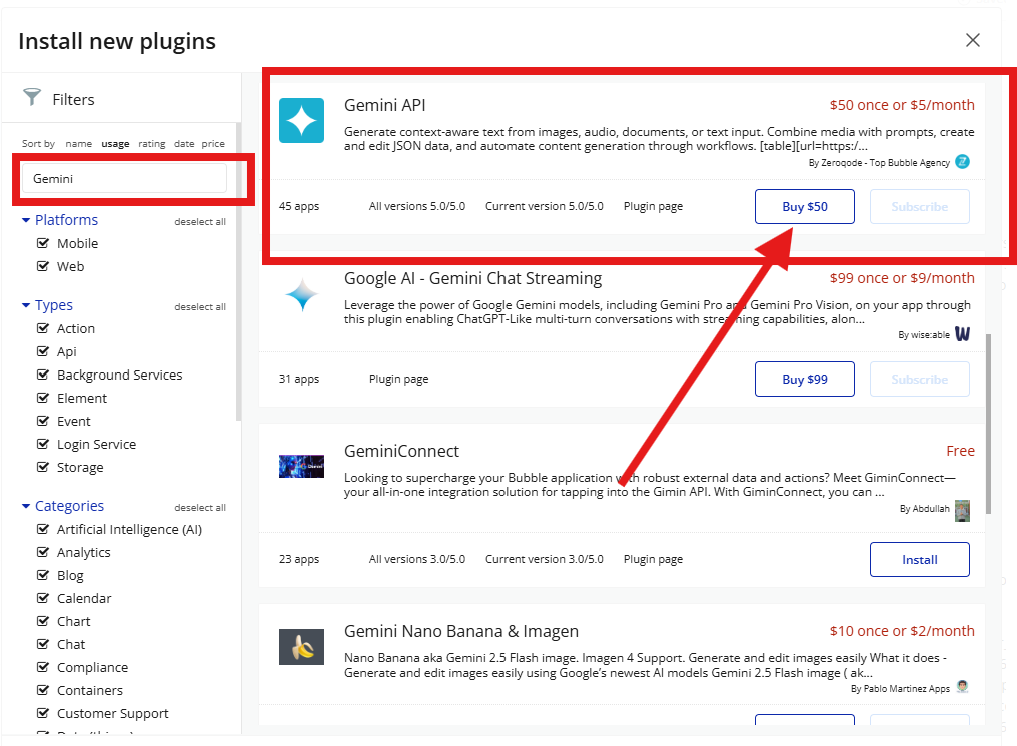
- Install/Buy
- If the plugin is free, click Install to add it to your application.
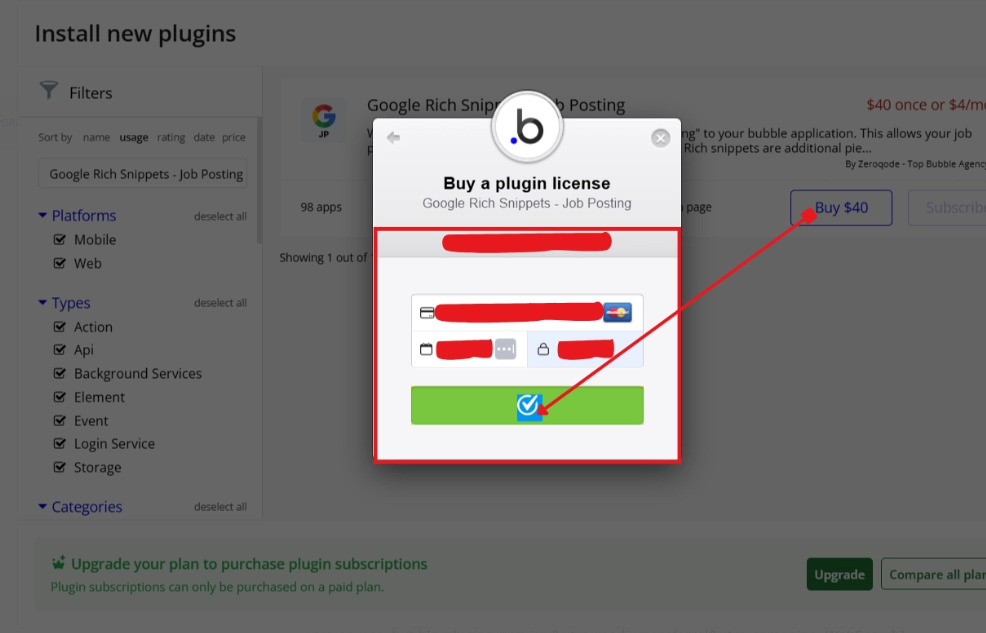
- For a paid plugin, click Buy and follow the purchase instructions.
- Payment Information (For Paid Plugins)
- If the plugin is a paid one, fill in your payment details and make payment.
- Charges will be added to your Bubble billing account.
- Remember, if you unsubscribe from the plugin shortly after installation, charges will be prorated based on the days used.
Step 2 - Configure Key
- Create a project in the Google Cloud Console
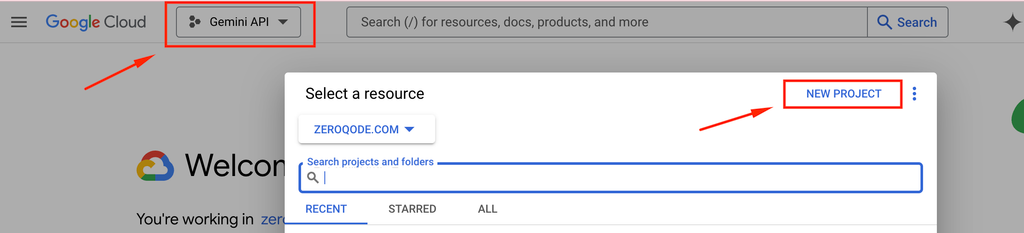
- Navigate to the API Library in the Cloud Console.
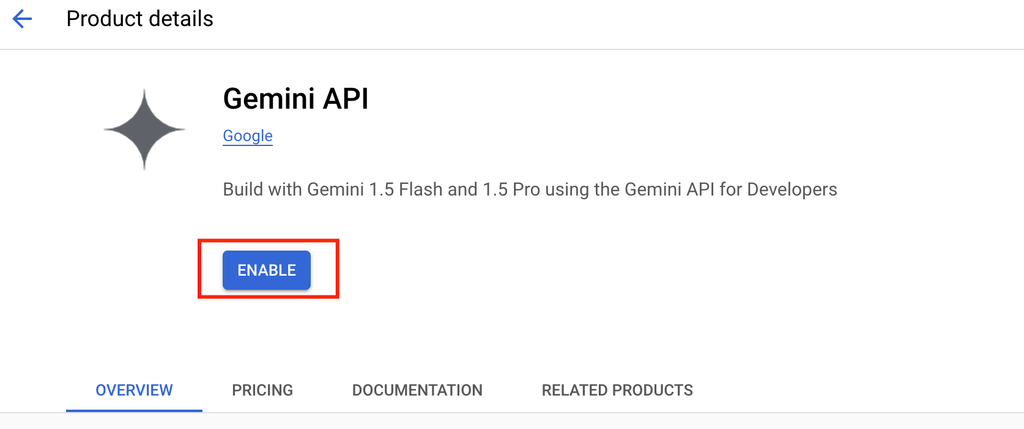
- Search for the relevant AI Models API ( “Gemini API” ).
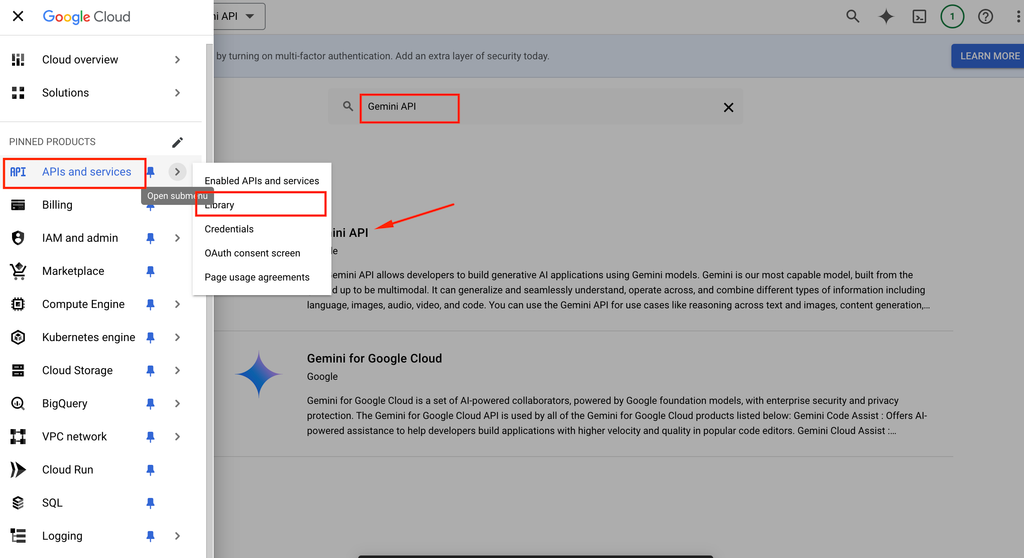
- Enable the API for your project.
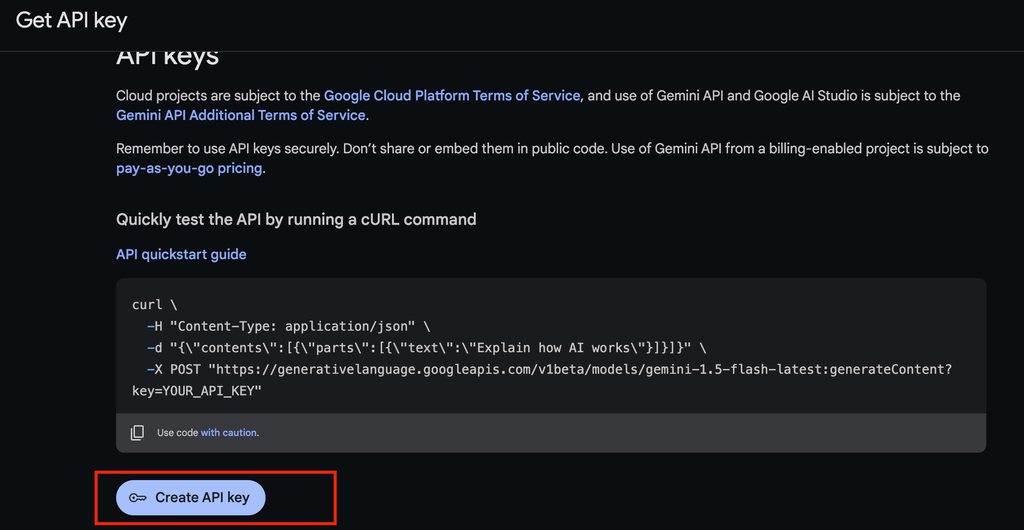
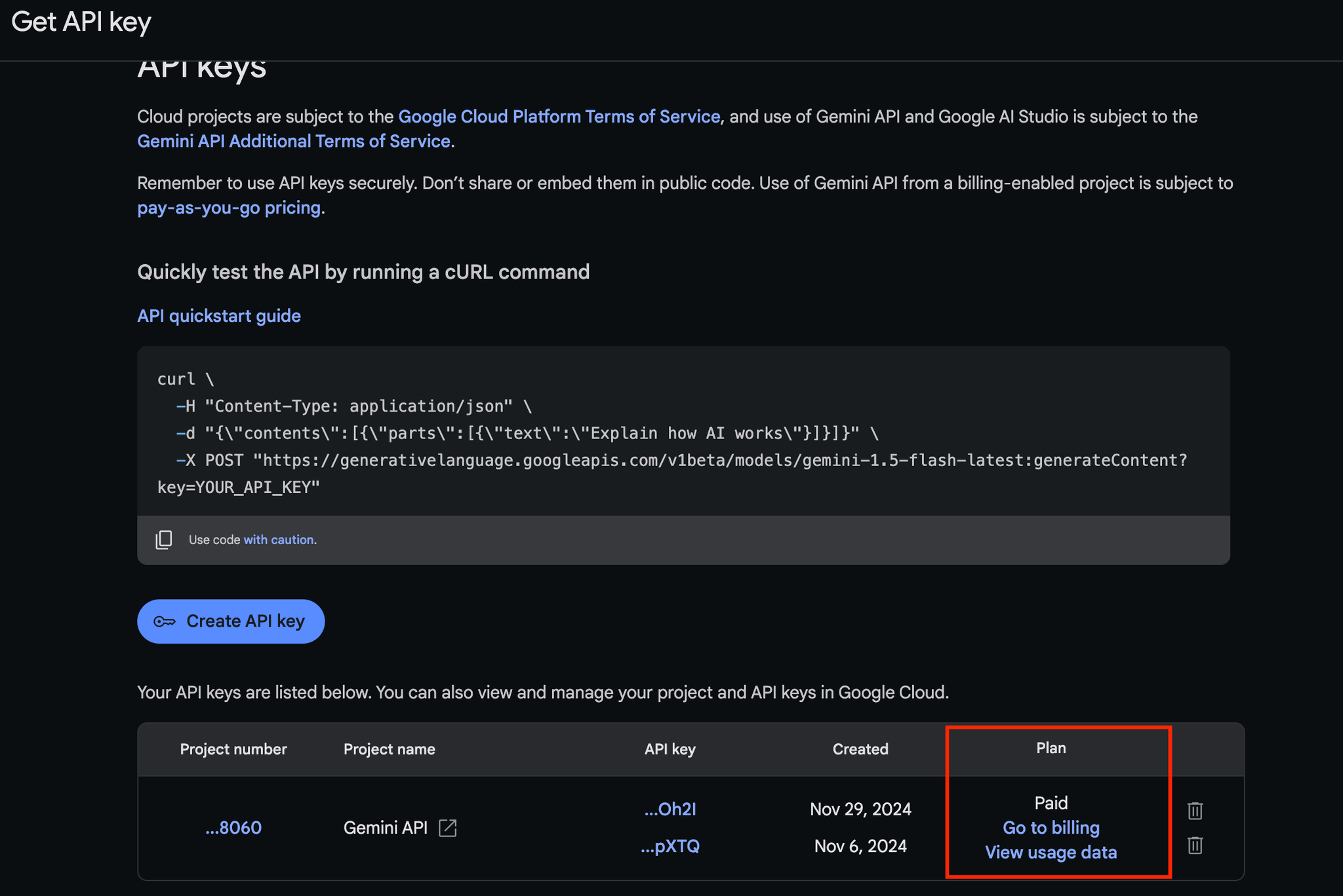
- Create Google AI Studio API Key (may not be available in you region - check regions)
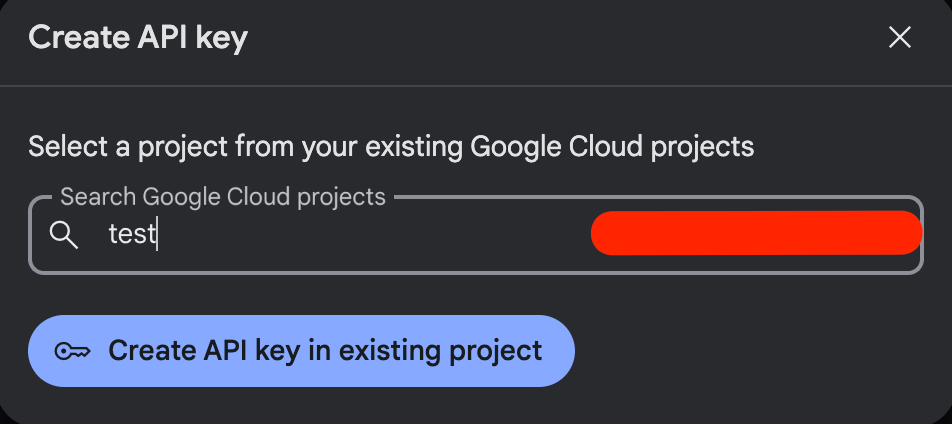
- Choose your created project from the list
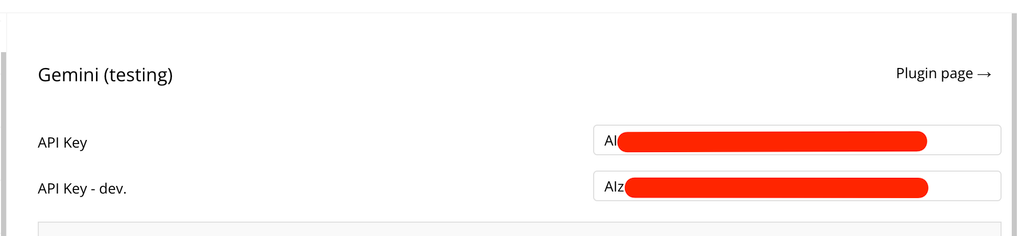
- Add the key in plugin settings
About billing
Billing for the Gemini API is based on two pricing tiers: free of charge (or free) and pay-as-you-go (or paid). Pricing and rate limits differ between these tiers and also vary by model. For current prices and rate limits, see Pricing. For a model-by-model breakdown of capabilities, see the Gemini models page.
💡
You can use the Gemini API for free with limited access, including rate limits and restricted features depending on the model. For higher usage or full access, a pay-as-you-go plan is available.
For giving full capabilities to the api key, connect billing to the created api key in the Google AI Studio.
Step 3 - Add Workflow Logic
- Go to the Workflow tab
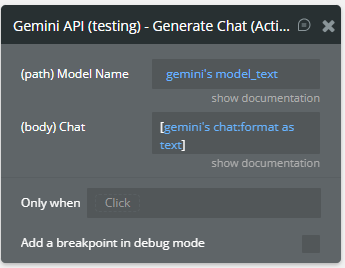
- Use API calls such as: Get Model (Data), Get Model (Action), List Models List (Data), …
- Connect input values dynamically from page/app data
Plugin Data/Action Calls
List Models List (Data)
Lists the
Models available through the Gemini API.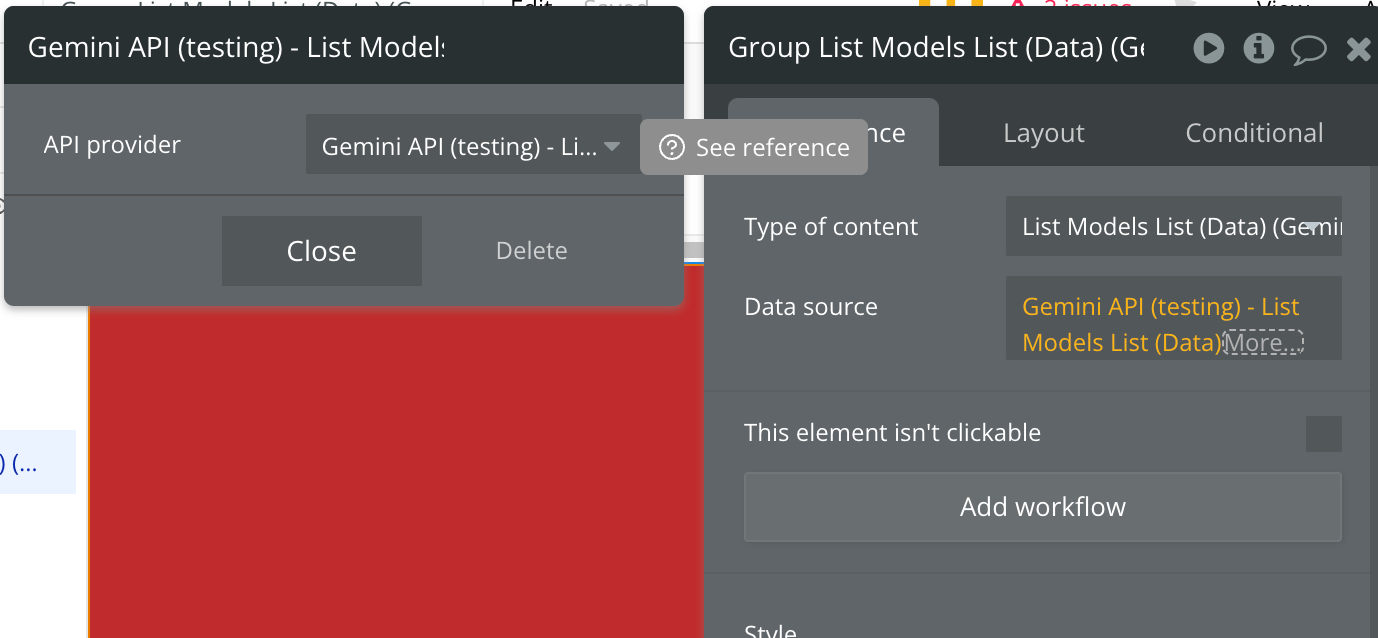
Returned Values:
Name | Description | Type |
Model Name | The resource name of the Model.
Example:
• models/gemini-1.5-flash-001 | Text |
Model Version | The version number of the model.
This represents the major version ( 1.0 or 1.5) | Text |
Model Display Name | The human-readable name of the model. E.g. "Gemini 1.5 Flash".
The name can be up to 128 characters long and can consist of any UTF-8 characters. | Text |
Model Description | A short description of the model. | Text |
Model Input Token Limit | Maximum number of input tokens allowed for this model. | Number |
Model Output Token Limit | Maximum number of output tokens available for this model. | Number |
Model Supported Generation Methods | The model's supported generation methods.
The corresponding API method names are defined as Pascal case strings, such as generateMessage and generateContent. | Text List |
Model Temperature | Controls the randomness of the output.
Values can range over [0.0,maxTemperature], inclusive. A higher value will produce responses that are more varied, while a value closer to 0.0 will typically result in less surprising responses from the model. This value specifies default to be used by the backend while making the call to the model. | Number |
Model TopP | For Nucleus sampling.
Nucleus sampling considers the smallest set of tokens whose probability sum is at least topP. This value specifies default to be used by the backend while making the call to the model. | Number |
Model TopK | For Top-k sampling.
Top-k sampling considers the set of topK most probable tokens. This value specifies default to be used by the backend while making the call to the model. If empty, indicates the model doesn't use top-k sampling, and topK isn't allowed as a generation parameter. | Number |
Model Max Temperature | The maximum temperature this model can use. | Number |
Get Model (Data)
Gets information about a specific
Model such as its version number, token limits, parameters and other metadata. Refer to the Gemini models guide for detailed model information.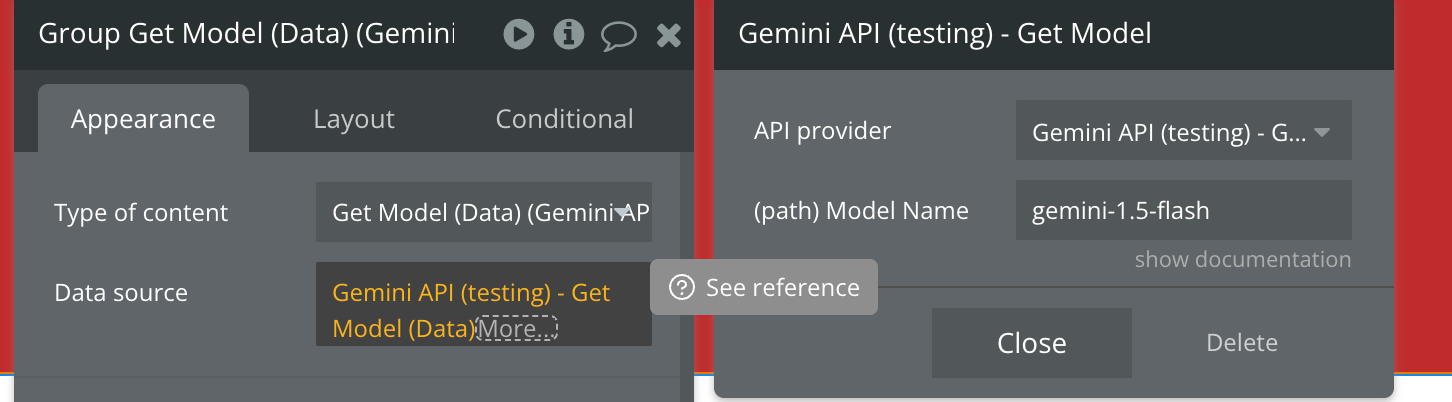
Fields:
Name | Description | Type |
Model Name | The resource name of the model. This name should match a model name returned by the "Get Models List".
Ex: gemini-1.5-flash | Text |
Returned Values:
Name | Description | Type |
Model Name | The resource name of the Model.
Example:
• models/gemini-1.5-flash-001 | Text |
Model Version | The version number of the model.
This represents the major version ( 1.0 or 1.5) | Text |
Model Display Name | The human-readable name of the model. E.g. "Gemini 1.5 Flash".
The name can be up to 128 characters long and can consist of any UTF-8 characters. | Text |
Model Description | A short description of the model. | Text |
Model Input Token Limit | Maximum number of input tokens allowed for this model. | Number |
Model Output Token Limit | Maximum number of output tokens available for this model. | Number |
Model Supported Generation Methods | The model's supported generation methods.
The corresponding API method names are defined as Pascal case strings, such as generateMessage and generateContent. | Text List |
Model Temperature | Controls the randomness of the output.
Values can range over [0.0,maxTemperature], inclusive. A higher value will produce responses that are more varied, while a value closer to 0.0 will typically result in less surprising responses from the model. This value specifies default to be used by the backend while making the call to the model. | Number |
Model TopP | For Nucleus sampling.
Nucleus sampling considers the smallest set of tokens whose probability sum is at least topP. This value specifies default to be used by the backend while making the call to the model. | Number |
Model TopK | For Top-k sampling.
Top-k sampling considers the set of topK most probable tokens. This value specifies default to be used by the backend while making the call to the model. If empty, indicates the model doesn't use top-k sampling, and topK isn't allowed as a generation parameter. | Number |
Model Max Temperature | The maximum temperature this model can use. | Number |
Get File (Data)
Gets the metadata for the given
File.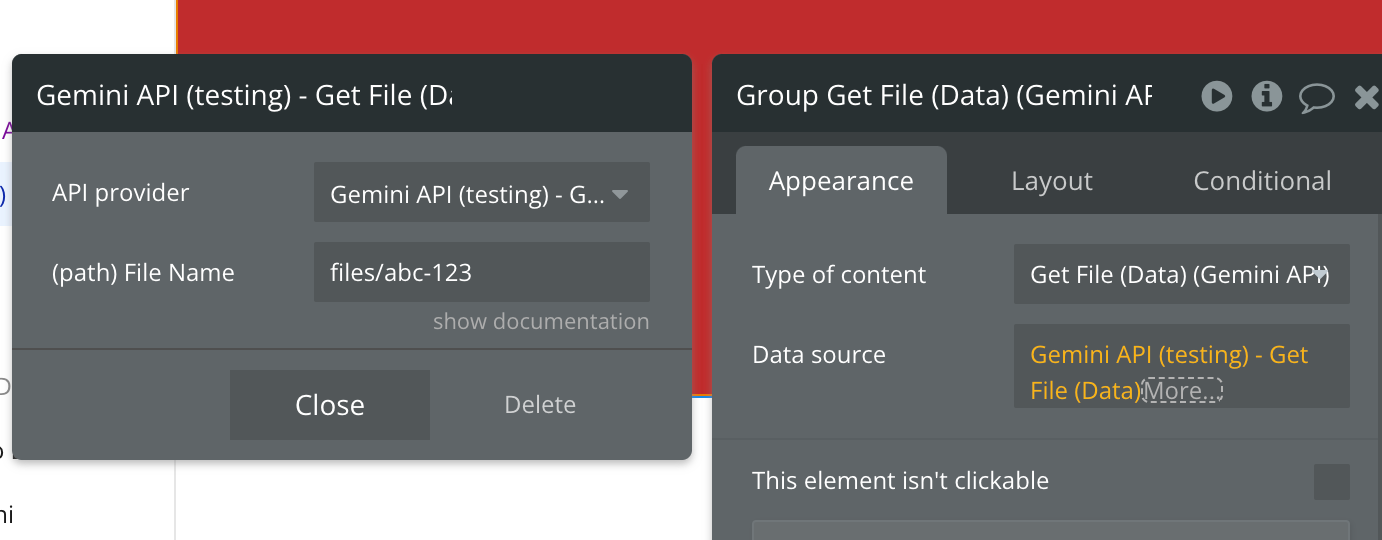
Fields:
Name | Description | Type |
File Name | The name of the File to get. Generated when the file first was uploaded from the “Upload Media (Action)” api call.
Example: files/abc-123 | Text |
Returned Values:
Name | Description | Type |
File Name | The File resource name. The ID (name excluding the "files/" prefix) can contain up to 40 characters that are lowercase alphanumeric or dashes (-). The ID cannot start or end with a dash. If the name is empty on create, a unique name will be generated. Example: files/123-456 | Text |
File MIME Type | The MIME type of a file indicates its format or content type, helping browsers and servers determine how to handle the file (e.g. image/png). | Text |
File Size Bytes | Size of the file in bytes. | Text |
File Create Time | The timestamp of when the File was created.
A timestamp in RFC3339 UTC "Zulu" format, with nanosecond resolution and up to nine fractional digits. Examples: "2014-10-02T15:01:23Z" and "2014-10-02T15:01:23.045123456Z". | Text |
File Update Time | The timestamp of when the File was last updated.
A timestamp in RFC3339 UTC "Zulu" format, with nanosecond resolution and up to nine fractional digits. Examples: "2014-10-02T15:01:23Z" and "2014-10-02T15:01:23.045123456Z". | Text |
File Expiration Time | The timestamp of when the File will be deleted. Only set if the File is scheduled to expire.
A timestamp in RFC3339 UTC "Zulu" format, with nanosecond resolution and up to nine fractional digits. Examples: "2014-10-02T15:01:23Z" and "2014-10-02T15:01:23.045123456Z". | Text |
File sha256Hash | SHA-256 hash of the uploaded bytes.
The SHA-256 hash is a cryptographic function that generates a 256-bit (32-byte) unique string, representing the content of a file. It is commonly used to verify the integrity of data and ensure that the content has not been altered. | Text |
File uri | The URI (Uniform Resource Identifier) of a file is a reference to its location, which can be used to access or identify the file on a network or system. It is commonly used in web technologies to point to resources such as files or media. | Text |
File state | The Status type defines a logical error model that is suitable for different programming environments, including REST APIs and RPC APIs. It is used by gRPC. Each Status message contains three pieces of data: error code, error message, and error details. | enum(State) |
List Files (Data)
Lists the metadata for
Files owned by the requesting project.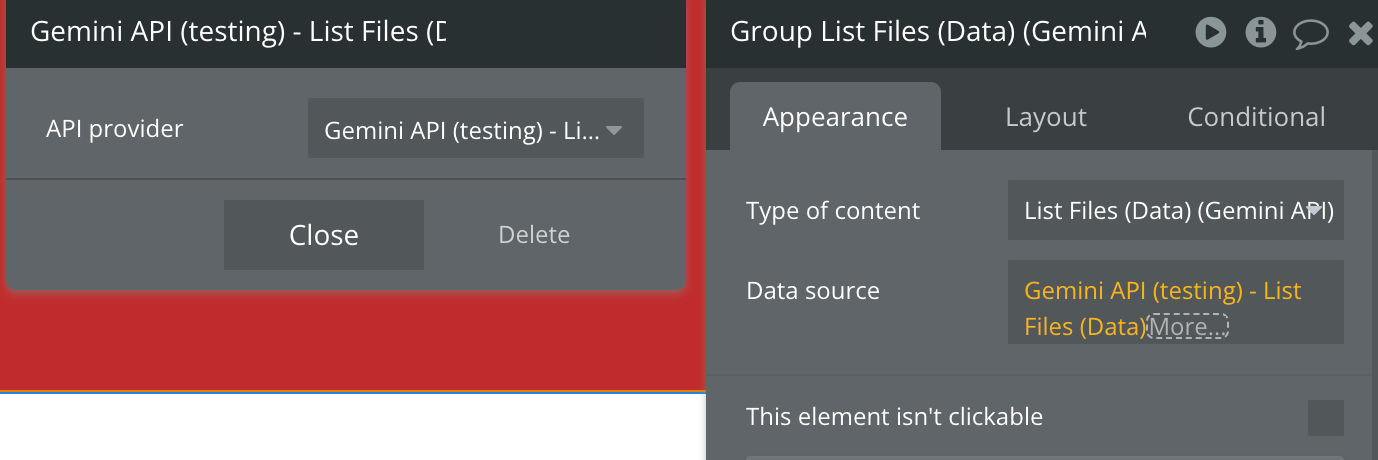
Returned Values:
Name | Description | Type |
File Name | The File resource name. The ID (name excluding the "files/" prefix) can contain up to 40 characters that are lowercase alphanumeric or dashes (-). The ID cannot start or end with a dash. If the name is empty on create, a unique name will be generated. Example: files/123-456 | Text |
File MIME Type | The MIME type of a file indicates its format or content type, helping browsers and servers determine how to handle the file (e.g. image/png). | Text |
File Size Bytes | Size of the file in bytes. | Text |
File Create Time | The timestamp of when the File was created.
A timestamp in RFC3339 UTC "Zulu" format, with nanosecond resolution and up to nine fractional digits. Examples: "2014-10-02T15:01:23Z" and "2014-10-02T15:01:23.045123456Z". | Text |
File Update Time | The timestamp of when the File was last updated.
A timestamp in RFC3339 UTC "Zulu" format, with nanosecond resolution and up to nine fractional digits. Examples: "2014-10-02T15:01:23Z" and "2014-10-02T15:01:23.045123456Z". | Text |
File Expiration Time | The timestamp of when the File will be deleted. Only set if the File is scheduled to expire.
A timestamp in RFC3339 UTC "Zulu" format, with nanosecond resolution and up to nine fractional digits. Examples: "2014-10-02T15:01:23Z" and "2014-10-02T15:01:23.045123456Z". | Text |
File sha256Hash | SHA-256 hash of the uploaded bytes.
The SHA-256 hash is a cryptographic function that generates a 256-bit (32-byte) unique string, representing the content of a file. It is commonly used to verify the integrity of data and ensure that the content has not been altered. | Text |
File uri | The URI (Uniform Resource Identifier) of a file is a reference to its location, which can be used to access or identify the file on a network or system. It is commonly used in web technologies to point to resources such as files or media. | Text |
File state | The Status type defines a logical error model that is suitable for different programming environments, including REST APIs and RPC APIs. It is used by gRPC. Each Status message contains three pieces of data: error code, error message, and error details. | enum(State) |
Generate Content From Text (Data)
Generates high-quality text content based on your provided content, enabling tasks like drafting, summarization, and creative writing. It leverages advanced AI to produce contextually relevant and coherent responses tailored to your needs.
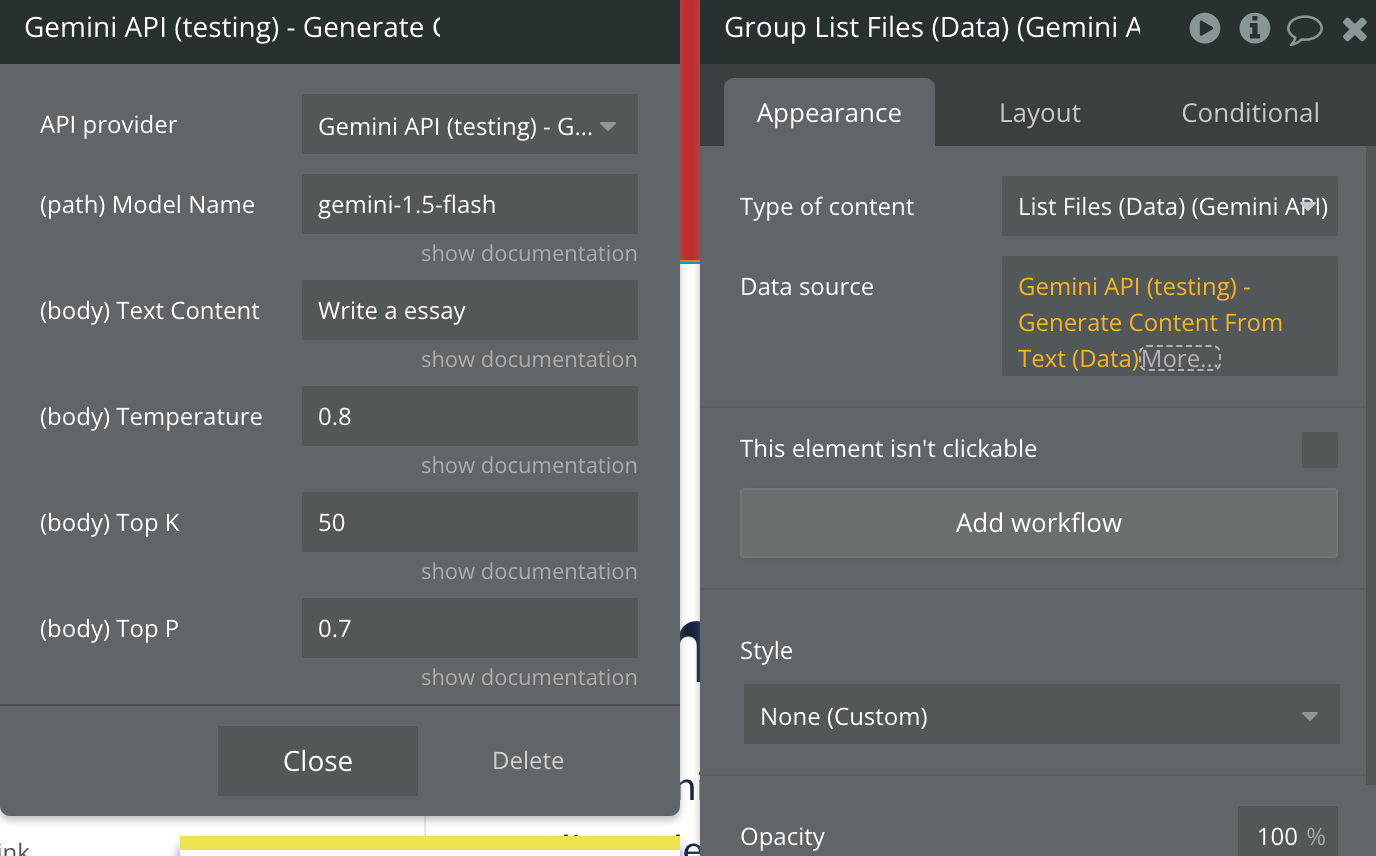
Fields:
Name | Description | Type |
Model Name | The resource name of the model. This name should match a model name returned by the "Get Models List".
Ex: gemini-1.5-flash | Text |
Text Content | It’s the main input that the model will use to base its output on. This input should be clear, concise, and relevant to the information or response you're seeking. | Text |
Temperature | Affects creativity and randomness in output. Lower values (e.g., 0.2) produce focused, repetitive responses; higher values (e.g., 0.8) add variation.
Min: 0.0 (focused and predictable)
Max: 1.0 (more random and creative)
Example: 0.7 | Text |
Top K | Limits the model to the top-K likely tokens for each output. Lower values create focused results, while higher values (e.g., 50) add diversity.
Min: 1 (most focused)
Max: (no hard limit, generally use values up to 100)
Example: 50 | Text |
Top P | Sets the probability threshold for token selection. Lower values produce more focused responses; higher values (e.g., 0.85) yield variety.
Min: 0.0 (only the top choice is selected)
Max: 1.0 (no restrictions)
Example: 0.9 | Text |
Generate Content From File and Text (Data)
This action processes files and text inputs to generate meaningful, AI-powered content.
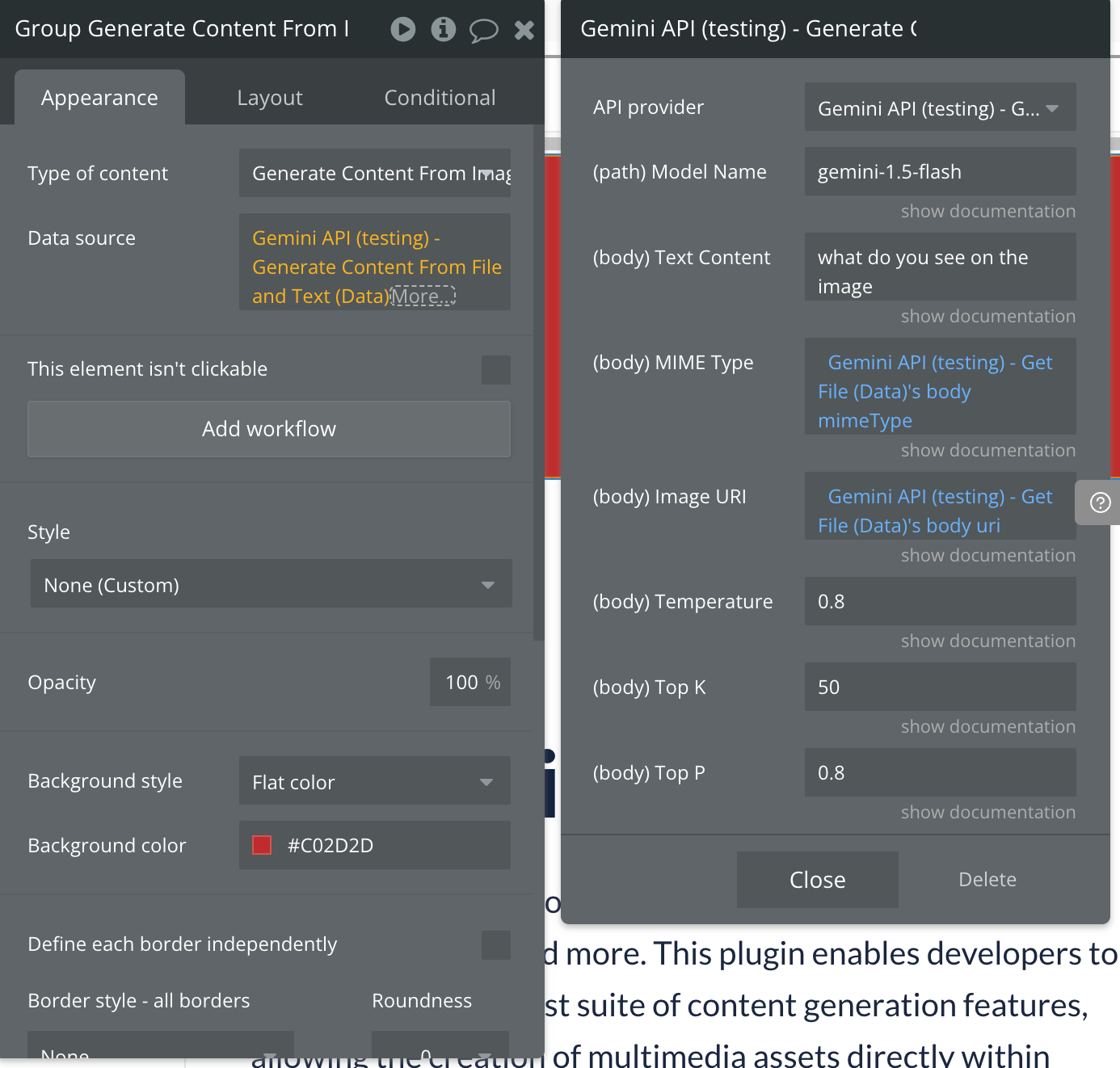
Fields:
Name | Description | Type |
Model Name | The resource name of the model. This name should match a model name returned by the "Get Models List".
Ex: gemini-1.5-flash | Text |
Text Content | Holds the main textual content for the model to process.
Example: "Describe this image.” | Text |
MIME Type | Specifies the file's MIME type, indicating its format (e.g., "image/webp").
Get it from “Upload Media (Action)” response. | Text |
Image URI | URI pointing to the file's location. Get it from “Upload Media (Action)” response.
A URI pointing to a file that has been uploaded to Google Cloud through the upload action. Once uploaded, the file is stored on Google Cloud and can be accessed via the returned URI. | Text |
Temperature | Affects creativity and randomness in output. Lower values (e.g., 0.2) produce focused, repetitive responses; higher values (e.g., 0.8) add variation.
Min: 0.0 (focused and predictable)
Max: 1.0 (more random and creative)
Example: 0.7 | Text |
Top K | Limits the model to the top-K likely tokens for each output. Lower values create focused results, while higher values (e.g., 50) add diversity.
Min: 1 (most focused)
Max: (no hard limit, generally use values up to 100)
Example: 50 | Text |
Top P | Sets the probability threshold for token selection. Lower values produce more focused responses; higher values (e.g., 0.85) yield variety.
Min: 0.0 (only the top choice is selected)
Max: 1.0 (no restrictions)
Example: 0.9 | Text |
Generate Json (Data)
This action processes input text and generates a json based on it.
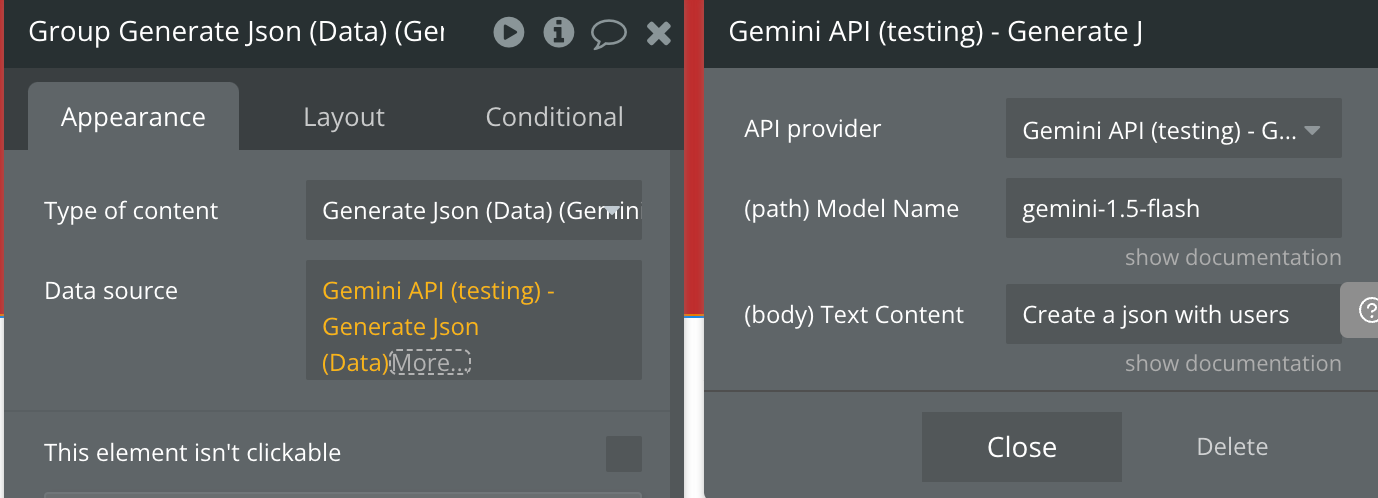
Fields:
Name | Description | Type |
Model Name | The resource name of the model. This name should match a model name returned by the "Get Models List".
Ex: gemini-1.5-flash | Text |
Text Content | Holds the main textual content for the model to process to create a Json.
Example: "List 5 popular cookie recipes.” | Text |
Generate Chat (Data)
This action uses Google's Chat API to generate AI-driven conversational responses, perfect for creating interactive and engaging chat experiences.
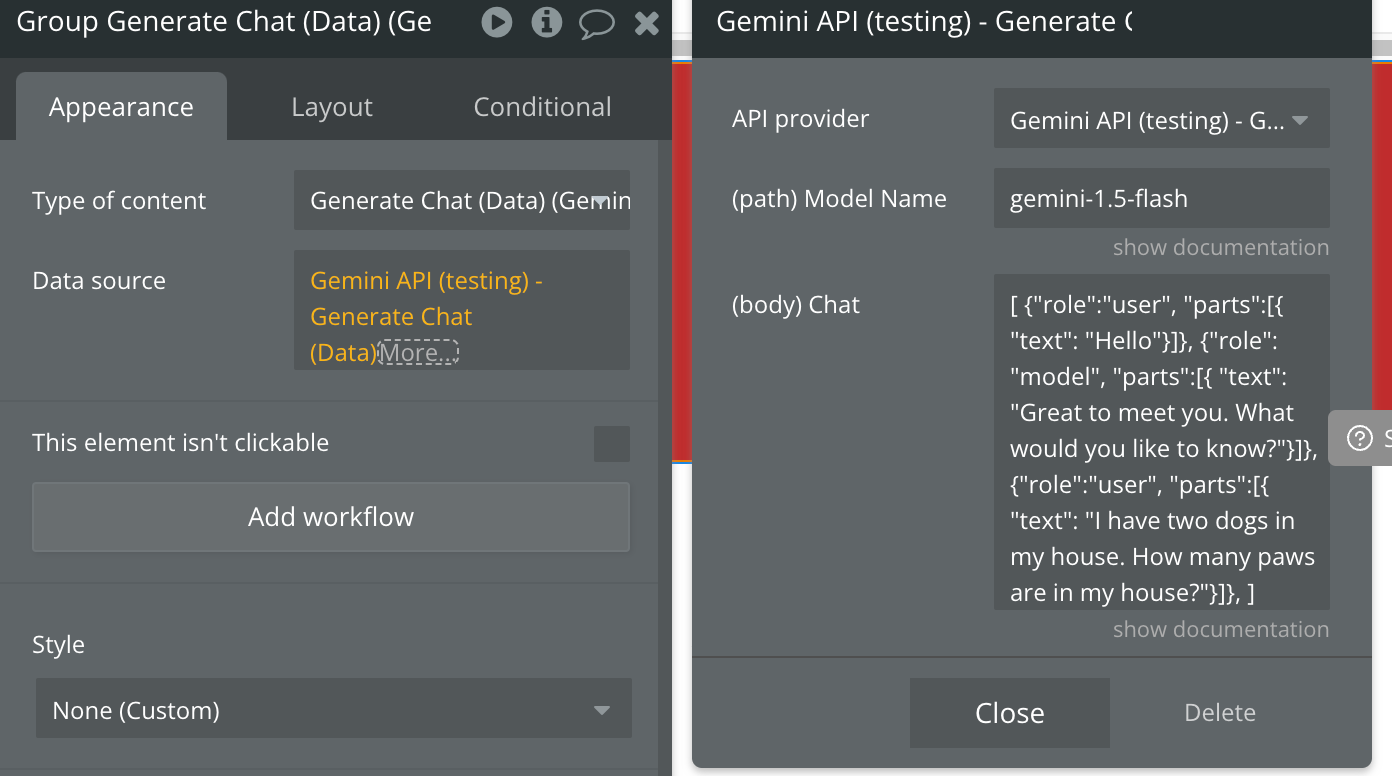
Fields:
Name | Description | Type |
Model Name | The resource name of the model. This name should match a model name returned by the "Get Models List".
Ex: gemini-1.5-flash | Text |
Chat | The chat based on which should be generated a new response from the model.
Please follow the strict structure of the example.
Set the existing chat if there was a context already, if not then set only your user first message with role set to "user".
"user": This role represents the person interacting with the system or model (you, the user).
"model": This role represents the system or AI that responds to the user's input.
Exmaple: [
{"role":"user",
"parts":[{
"text": "Hello"}]},
{"role": "model",
"parts":[{
"text": "Great to meet you. What would you like to know?"}]},
{"role":"user",
"parts":[{
"text": "I have two dogs in my house. How many paws are in my house?"}]},
] | Text |
List Models List (Action)
Lists the
Models available through the Gemini API.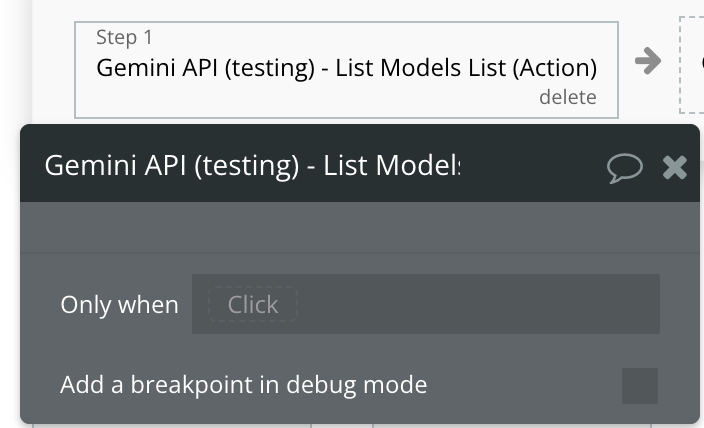
Returned Values:
Name | Description | Type |
Model Name | The resource name of the Model.
Example:
• models/gemini-1.5-flash-001 | Text |
Model Version | The version number of the model.
This represents the major version ( 1.0 or 1.5) | Text |
Model Display Name | The human-readable name of the model. E.g. "Gemini 1.5 Flash".
The name can be up to 128 characters long and can consist of any UTF-8 characters. | Text |
Model Description | A short description of the model. | Text |
Model Input Token Limit | Maximum number of input tokens allowed for this model. | Number |
Model Output Token Limit | Maximum number of output tokens available for this model. | Number |
Model Supported Generation Methods | The model's supported generation methods.
The corresponding API method names are defined as Pascal case strings, such as generateMessage and generateContent. | Text List |
Model Temperature | Controls the randomness of the output.
Values can range over [0.0,maxTemperature], inclusive. A higher value will produce responses that are more varied, while a value closer to 0.0 will typically result in less surprising responses from the model. This value specifies default to be used by the backend while making the call to the model. | Number |
Model TopP | For Nucleus sampling.
Nucleus sampling considers the smallest set of tokens whose probability sum is at least topP. This value specifies default to be used by the backend while making the call to the model. | Number |
Model TopK | For Top-k sampling.
Top-k sampling considers the set of topK most probable tokens. This value specifies default to be used by the backend while making the call to the model. If empty, indicates the model doesn't use top-k sampling, and topK isn't allowed as a generation parameter. | Number |
Model Max Temperature | The maximum temperature this model can use. | Number |
Get Model (Action)
Gets information about a specific
Model such as its version number, token limits, parameters and other metadata. Refer to the Gemini models guide for detailed model information.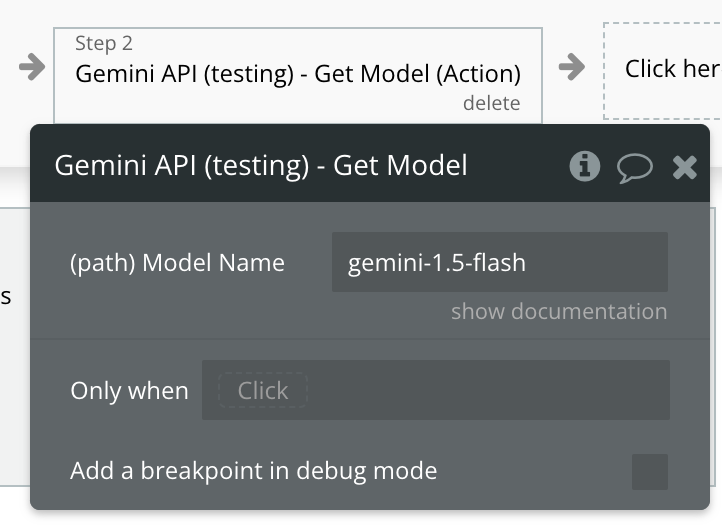
Fields:
Name | Description | Type |
Model Name | The resource name of the model. This name should match a model name returned by the "Get Models List".
Ex: gemini-1.5-flash | Text |
Returned Values:
Name | Description | Type |
Model Name | The resource name of the Model.
Example:
• models/gemini-1.5-flash-001 | Text |
Model Version | The version number of the model.
This represents the major version ( 1.0 or 1.5) | Text |
Model Display Name | The human-readable name of the model. E.g. "Gemini 1.5 Flash".
The name can be up to 128 characters long and can consist of any UTF-8 characters. | Text |
Model Description | A short description of the model. | Text |
Model Input Token Limit | Maximum number of input tokens allowed for this model. | Number |
Model Output Token Limit | Maximum number of output tokens available for this model. | Number |
Model Supported Generation Methods | The model's supported generation methods.
The corresponding API method names are defined as Pascal case strings, such as generateMessage and generateContent. | Text List |
Model Temperature | Controls the randomness of the output.
Values can range over [0.0,maxTemperature], inclusive. A higher value will produce responses that are more varied, while a value closer to 0.0 will typically result in less surprising responses from the model. This value specifies default to be used by the backend while making the call to the model. | Number |
Model TopP | For Nucleus sampling.
Nucleus sampling considers the smallest set of tokens whose probability sum is at least topP. This value specifies default to be used by the backend while making the call to the model. | Number |
Model TopK | For Top-k sampling.
Top-k sampling considers the set of topK most probable tokens. This value specifies default to be used by the backend while making the call to the model. If empty, indicates the model doesn't use top-k sampling, and topK isn't allowed as a generation parameter. | Number |
Model Max Temperature | The maximum temperature this model can use. | Number |
Upload Media (Action)
Facilitates the upload of files into the Generative Language API ecosystem, enabling seamless integration of your custom data into generative AI workflows.
Makes it possible generating content from files.
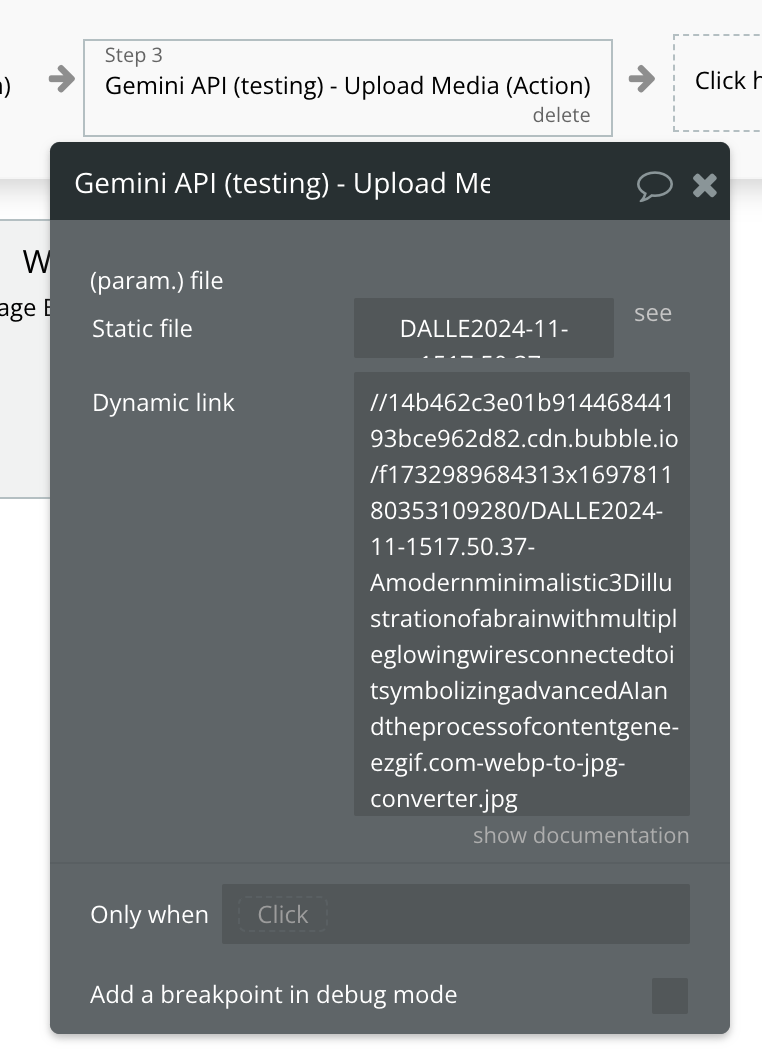
Fields:
Name | Description | Type |
file | The File object (not file name) to be uploaded.
The file URI generated after uploading a file is typically valid for a limited time. However, the exact duration for which the file URI remains valid isn't explicitly mentioned in Google's documentation. | File |
Get File (Action)
Gets the metadata for the given
File.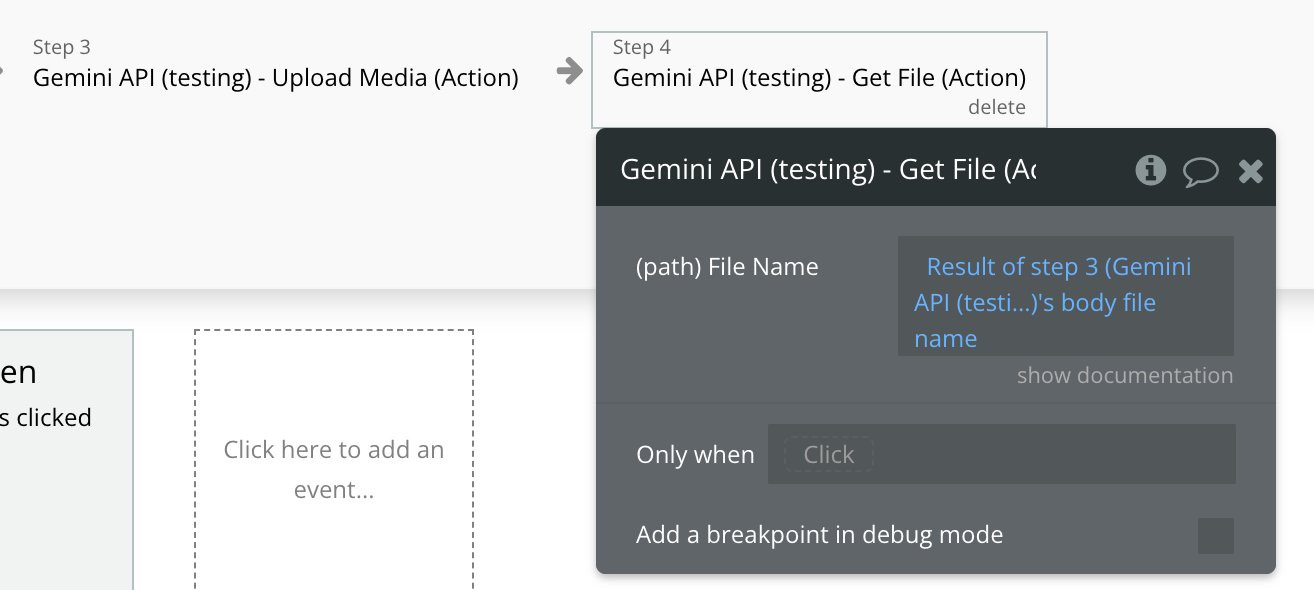
Fields:
Name | Description | Type |
File Name | The name of the File to get. Generated when the file first was uploaded from the “Upload Media (Action)” api call.
Example: files/abc-123 | Text |
Returned Values:
Name | Description | Type |
File Name | The File resource name. The ID (name excluding the "files/" prefix) can contain up to 40 characters that are lowercase alphanumeric or dashes (-). The ID cannot start or end with a dash. If the name is empty on create, a unique name will be generated. Example: files/123-456 | Text |
File MIME Type | The MIME type of a file indicates its format or content type, helping browsers and servers determine how to handle the file (e.g. image/png). | Text |
File Size Bytes | Size of the file in bytes. | Text |
File Create Time | The timestamp of when the File was created.
A timestamp in RFC3339 UTC "Zulu" format, with nanosecond resolution and up to nine fractional digits. Examples: "2014-10-02T15:01:23Z" and "2014-10-02T15:01:23.045123456Z". | Text |
File Update Time | The timestamp of when the File was last updated.
A timestamp in RFC3339 UTC "Zulu" format, with nanosecond resolution and up to nine fractional digits. Examples: "2014-10-02T15:01:23Z" and "2014-10-02T15:01:23.045123456Z". | Text |
File Expiration Time | The timestamp of when the File will be deleted. Only set if the File is scheduled to expire.
A timestamp in RFC3339 UTC "Zulu" format, with nanosecond resolution and up to nine fractional digits. Examples: "2014-10-02T15:01:23Z" and "2014-10-02T15:01:23.045123456Z". | Text |
File sha256Hash | SHA-256 hash of the uploaded bytes.
The SHA-256 hash is a cryptographic function that generates a 256-bit (32-byte) unique string, representing the content of a file. It is commonly used to verify the integrity of data and ensure that the content has not been altered. | Text |
File uri | The URI (Uniform Resource Identifier) of a file is a reference to its location, which can be used to access or identify the file on a network or system. It is commonly used in web technologies to point to resources such as files or media. | Text |
File state | The Status type defines a logical error model that is suitable for different programming environments, including REST APIs and RPC APIs. It is used by gRPC. Each Status message contains three pieces of data: error code, error message, and error details. | enum(State) |
List Files (Action)
Lists the metadata for
Files owned by the requesting project.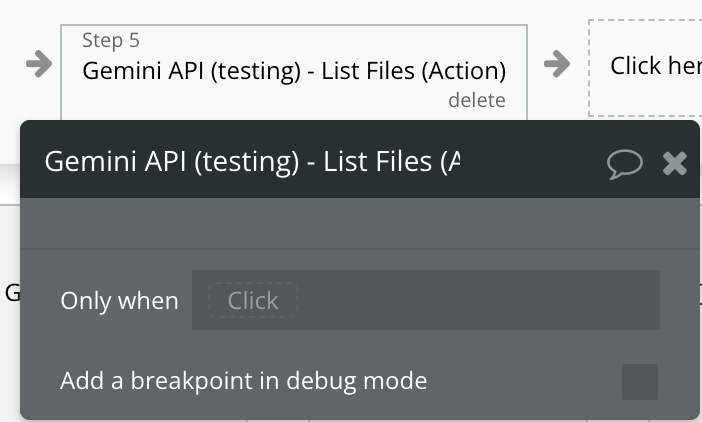
Returned Values:
Name | Description | Type |
File Name | The File resource name. The ID (name excluding the "files/" prefix) can contain up to 40 characters that are lowercase alphanumeric or dashes (-). The ID cannot start or end with a dash. If the name is empty on create, a unique name will be generated. Example: files/123-456 | Text |
File MIME Type | The MIME type of a file indicates its format or content type, helping browsers and servers determine how to handle the file (e.g. image/png). | Text |
File Size Bytes | Size of the file in bytes. | Text |
File Create Time | The timestamp of when the File was created.
A timestamp in RFC3339 UTC "Zulu" format, with nanosecond resolution and up to nine fractional digits. Examples: "2014-10-02T15:01:23Z" and "2014-10-02T15:01:23.045123456Z". | Text |
File Update Time | The timestamp of when the File was last updated.
A timestamp in RFC3339 UTC "Zulu" format, with nanosecond resolution and up to nine fractional digits. Examples: "2014-10-02T15:01:23Z" and "2014-10-02T15:01:23.045123456Z". | Text |
File Expiration Time | The timestamp of when the File will be deleted. Only set if the File is scheduled to expire.
A timestamp in RFC3339 UTC "Zulu" format, with nanosecond resolution and up to nine fractional digits. Examples: "2014-10-02T15:01:23Z" and "2014-10-02T15:01:23.045123456Z". | Text |
File sha256Hash | SHA-256 hash of the uploaded bytes.
The SHA-256 hash is a cryptographic function that generates a 256-bit (32-byte) unique string, representing the content of a file. It is commonly used to verify the integrity of data and ensure that the content has not been altered. | Text |
File uri | The URI (Uniform Resource Identifier) of a file is a reference to its location, which can be used to access or identify the file on a network or system. It is commonly used in web technologies to point to resources such as files or media. | Text |
File state | The Status type defines a logical error model that is suitable for different programming environments, including REST APIs and RPC APIs. It is used by gRPC. Each Status message contains three pieces of data: error code, error message, and error details. | enum(State) |
Delete File (Action)
Deletes the
File.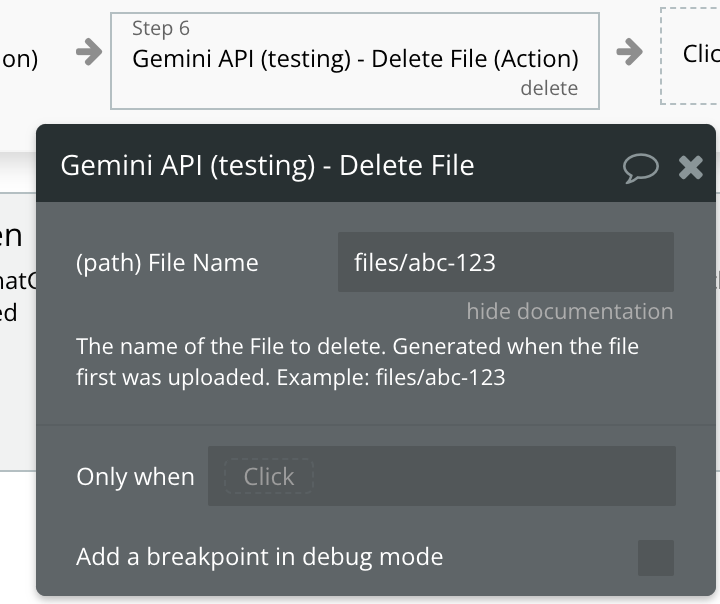
Fields:
Name | Description | Type |
File Name | The name of the File to delete. Generated when the file first was uploaded. Example: files/abc-123 | Text |
Generate Content From Text (Action)
Generates high-quality text content based on your provided content, enabling tasks like drafting, summarization, and creative writing. It leverages advanced AI to produce contextually relevant and coherent responses tailored to your needs.
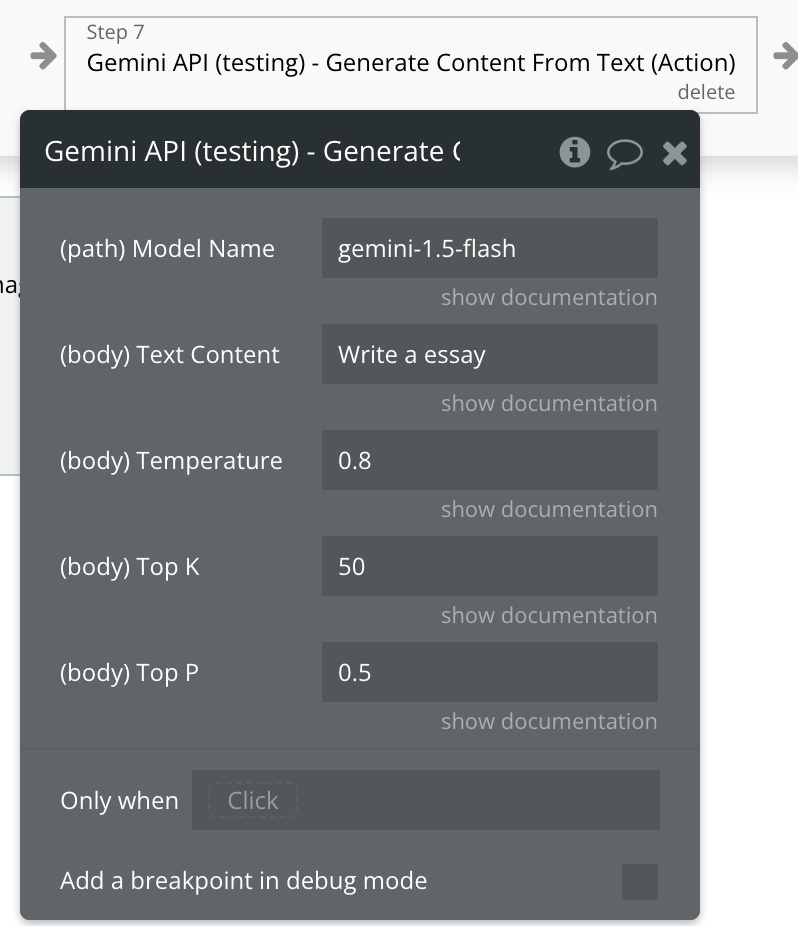
Fields:
Name | Description | Type |
Model Name | The resource name of the model. This name should match a model name returned by the "Get Models List".
Ex: gemini-1.5-flash | Text |
Text Content | It’s the main input that the model will use to base its output on. This input should be clear, concise, and relevant to the information or response you're seeking. | Text |
Temperature | Affects creativity and randomness in output. Lower values (e.g., 0.2) produce focused, repetitive responses; higher values (e.g., 0.8) add variation.
Min: 0.0 (focused and predictable)
Max: 1.0 (more random and creative)
Example: 0.7 | Text |
Top K | Limits the model to the top-K likely tokens for each output. Lower values create focused results, while higher values (e.g., 50) add diversity.
Min: 1 (most focused)
Max: (no hard limit, generally use values up to 100)
Example: 50 | Text |
Top P | Sets the probability threshold for token selection. Lower values produce more focused responses; higher values (e.g., 0.85) yield variety.
Min: 0.0 (only the top choice is selected)
Max: 1.0 (no restrictions)
Example: 0.9 | Text |
Generate Content From File and Text (Action)
This action processes files and text inputs to generate meaningful, AI-powered content.
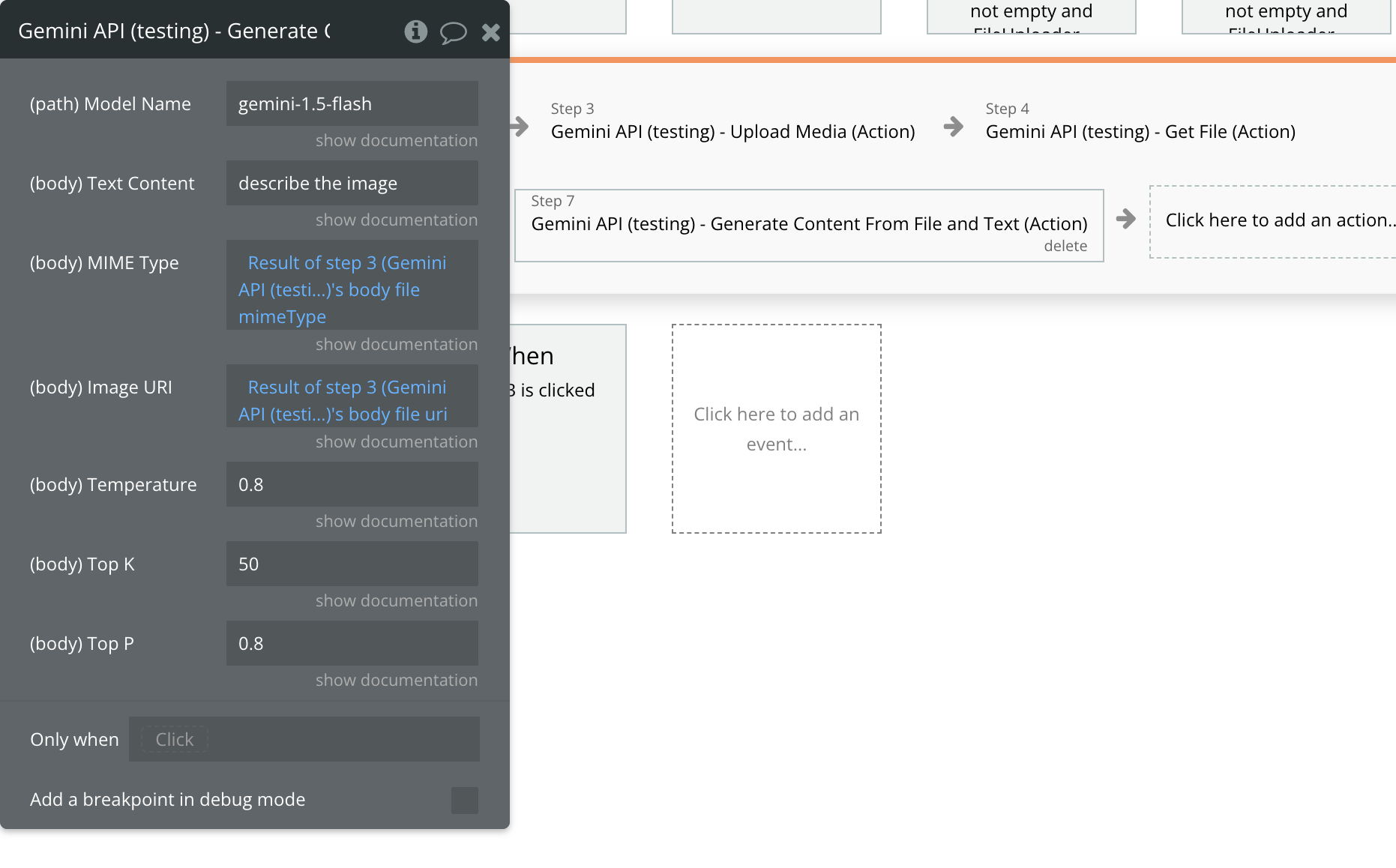
Fields:
Name | Description | Type |
Model Name | The resource name of the model. This name should match a model name returned by the "Get Models List".
Ex: gemini-1.5-flash | Text |
Text Content | Holds the main textual content for the model to process.
Example: "Describe this image.” | Text |
MIME Type | Specifies the file's MIME type, indicating its format (e.g., "image/webp").
Get it from “Upload Media (Action)” response. | Text |
Image URI | URI pointing to the file's location. Get it from “Upload Media (Action)” response.
A URI pointing to a file that has been uploaded to Google Cloud through the upload action. Once uploaded, the file is stored on Google Cloud and can be accessed via the returned URI. | Text |
Temperature | Affects creativity and randomness in output. Lower values (e.g., 0.2) produce focused, repetitive responses; higher values (e.g., 0.8) add variation.
Min: 0.0 (focused and predictable)
Max: 1.0 (more random and creative)
Example: 0.7 | Text |
Top K | Limits the model to the top-K likely tokens for each output. Lower values create focused results, while higher values (e.g., 50) add diversity.
Min: 1 (most focused)
Max: (no hard limit, generally use values up to 100)
Example: 50 | Text |
Top P | Sets the probability threshold for token selection. Lower values produce more focused responses; higher values (e.g., 0.85) yield variety.
Min: 0.0 (only the top choice is selected)
Max: 1.0 (no restrictions)
Example: 0.9 | Text |
Generate Json (Action)
This action processes input text and generates a json based on it.
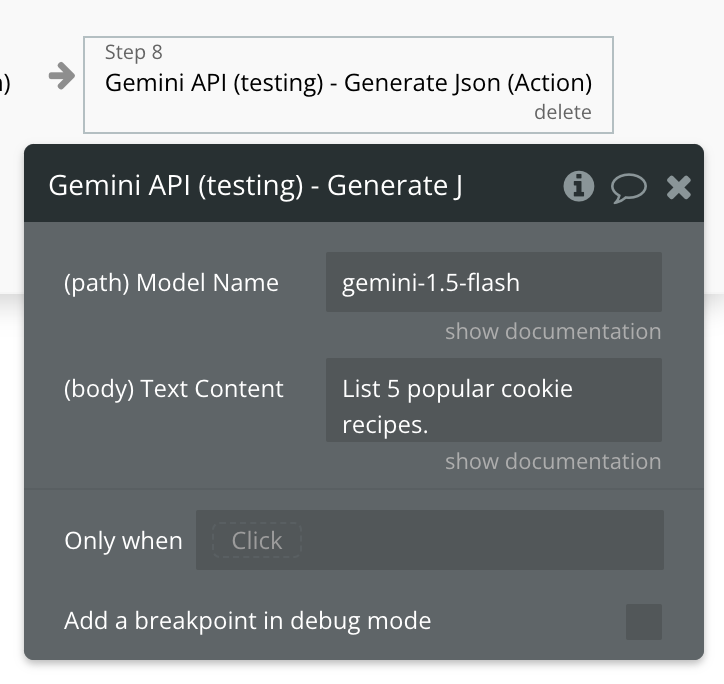
Fields:
Name | Description | Type |
Model Name | The resource name of the model. This name should match a model name returned by the "Get Models List".
Ex: gemini-1.5-flash | Text |
Text Content | Holds the main textual content for the model to process to create a Json.
Example: "List 5 popular cookie recipes.” | Text |
Generate Chat (Action)
This action uses Google's Chat API to generate AI-driven conversational responses, perfect for creating interactive and engaging chat experiences.
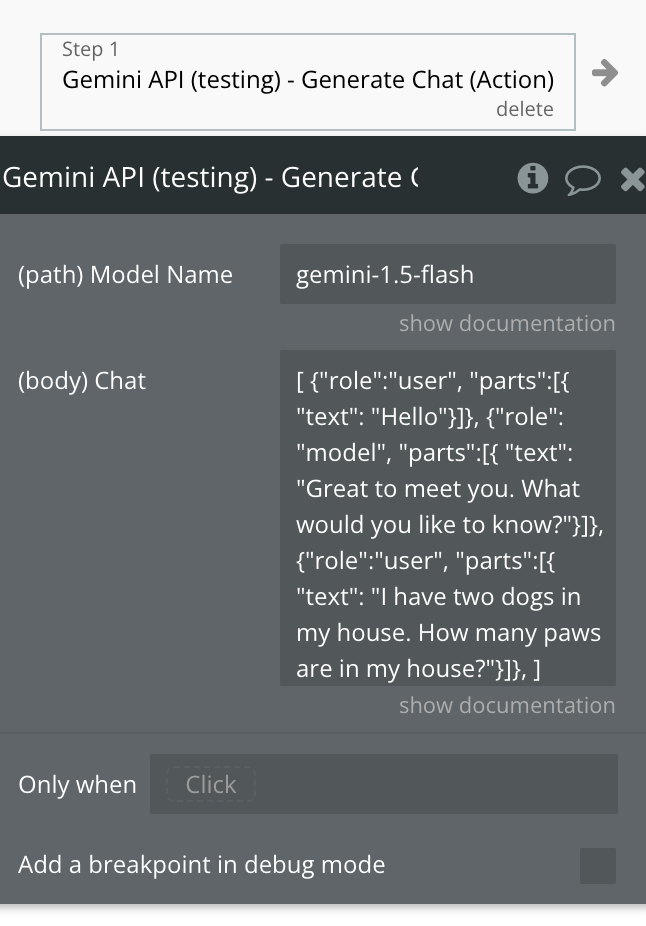
Fields:
Name | Description | Type |
Model Name | The resource name of the model. This name should match a model name returned by the "Get Models List".
Ex: gemini-1.5-flash | Text |
Chat | The chat based on which should be generated a new response from the model.
Please follow the strict structure of the example.
Set the existing chat if there was a context already, if not then set only your user first message with role set to "user".
"user": This role represents the person interacting with the system or model (you, the user).
"model": This role represents the system or AI that responds to the user's input.
Exmaple: [
{"role":"user",
"parts":[{
"text": "Hello"}]},
{"role": "model",
"parts":[{
"text": "Great to meet you. What would you like to know?"}]},
{"role":"user",
"parts":[{
"text": "I have two dogs in my house. How many paws are in my house?"}]},
] | Text |
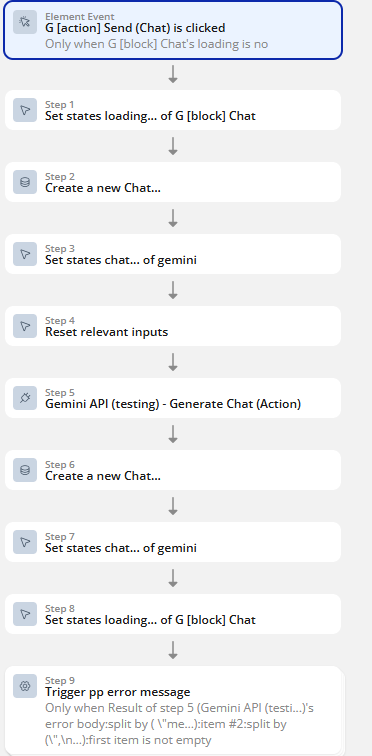
Workflow example
Create a Chat
Step 1 — Set loading ON
Action: Set state
is_loading = yes
error_text = ""(clear)
Step 2 — Ensure you have a Chat (create if missing)
Action: Only when page chat is empty → Create a new Chat
user = Current User
title = "Chat " + Current date/time(or first message preview)
Step 3 — Store Chat into state
Action: Set state
chat = Result of Step 2
(If you already had a chat, skip Step 2 and keep the existing state.)
Step 4 — Create message (user)
Action: Create a new Chat Message
chat = page chat
role = "user"
content = Input Message's value
Step 5 — Reset input
Action: Reset relevant inputs (or set input value empty)
Step 6 — Call AI action
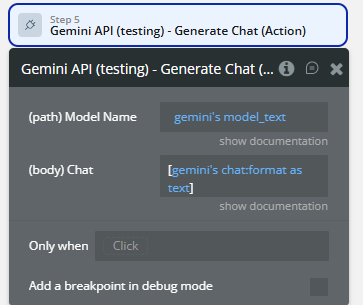
Action: Gemini API – Generate Chat (Action)
Inputs (typical):
chat_id = page chat's unique id(or just send messages list)
message = Result of Step 4's content
- (Optional)
history = Search for Chat Messages where chat = page chat :sorted
Step 7 — Create message (assistant) — only if response is not empty
Action: Only when Result of Step 6’s reply is not empty → Create a new Chat Message
content = Result of Step 6’s reply
chat = page chat
role = "assistant"
Step 8 — Set loading OFF
Action: Set state
is_loading = no
Step 9 — Error handling (optional but recommended)
If plugin returns an error string:
Action: Only when Result of Step 6’s error is not empty
- Set state
error_text = Result of Step 6’s error
- Set state
is_loading = no
- (Optional) show alert / trigger event

Changelogs
Update 27.08.26 - Version 2.1.0
- Bubble Plugin Page Update (Sorting).
Update 11.03.26 - Version 2.0.0
- Bubble Plugin Page Update (Doc).
Update 06.03.26 - Version 1.7.0
- Bubble Plugin Page Update (Category).
Update 10.02.26 - Version 1.6.0
- added toolUsePromptTokenCount, thoughtsTokenCount and cachedContentTokenCount fields in response.
Update 09.09.25 - Version 1.5.0
- Bubble Plugin Page Update (Forum).
Update 18.07.25 - Version 1.4.0
- Bubble Plugin Page Update (Logo).
Update 13.06.25 - Version 1.3.0
- Marketing update (minor change).
Update 10.01.25 - Version 1.2.0
- Minor update(Marketing update).
Update 31.12.24 - Version 1.1.0
- Minor update(Marketing update).
Update 26.12.24 - Version 1.0.0
- Initial plugin release.