
Demo to preview the plugin:
Introduction
Air Cloudinary’s Uploader widget is a complete, interactive user interface that enables your users to upload files from a variety of sources to your website or application.

How to setup
- Add the element to the page
- In the Bubble editor, go to the Design tab.
- Drag and drop the Cloudinary Uploader element onto your page.
- This element doesn’t need to be visible. It serves as the controller for triggering the upload widget and handling events.
- Open the uploader widget
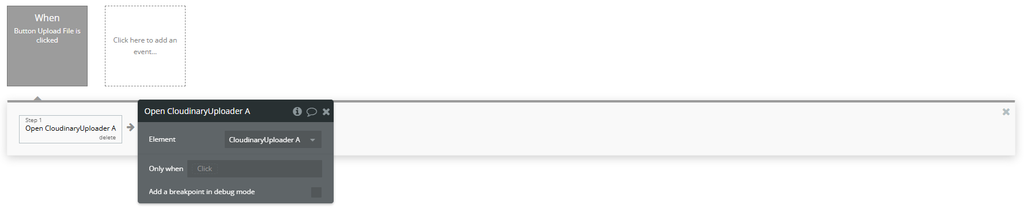
- Go to the Workflow tab.
- Create a new workflow for a button click (e.g., "Upload File").
- Add the action: Open A Cloudinary Uploader.
- Select the
Cloudinary Uploaderelement.
To allow users to upload files:
Plugin Element Properties
Cloudinary Uploader
Fields:
Title | Description | Type |
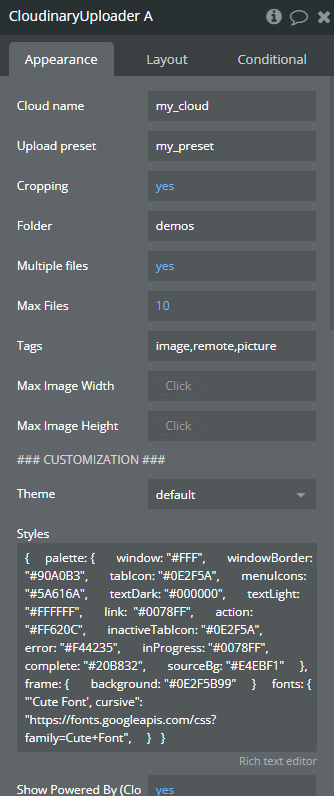
Cloud name | A “cloud name” in a software plugin or API refers to a unique identifier or label assigned to a specific cloud storage service or provider. | Text |
Upload preset | An “upload preset” is a predefined set of configurations that streamlines the process of uploading files or data through a software plugin or API by specifying parameters such as file format, size, and destination. | Text |
Cropping | “Cropping” is the process of selecting and removing unwanted parts of an image or video to focus on a specific area of interest. | Checkbox (yes/no) |
Folder | In the context of a software plugin or API, a “Folder” is a virtual container used to organize and store files or data within a hierarchical structure. | Text |
Multiple files | “Multiple files” refers to the ability of a software plugin or API to handle and process more than one file simultaneously. | Checkbox (yes/no) |
Max Files | “Max Files” refers to the maximum number of files that can be processed or stored by a software plugin or API. | Number (optional) |
Tags | “Tags” are metadata labels used to categorize and organize content within a software plugin or API. | Text (optional) |
Max Image Width | “Max Image Width” refers to the maximum allowable width in pixels for images that can be uploaded or displayed within the software plugin or API. | Number (optional) |
Max Image Height | “Max Image Height” refers to the maximum allowable vertical dimension of an image within a software plugin or API. | Number (optional) |
### CUSTOMIZATION ### | ||
Theme | In the context of a software plugin or API, a “theme” refers to a set of predefined styles and templates that control the visual appearance of an application or website. Available options: default, white, minimal, purple | Dropdown (optional) |
Styles | In the context of a software plugin or API, “Styles” refer to predefined sets of visual attributes such as fonts, colors, and spacing that can be applied to elements to maintain consistent design across an application. | Text (optional) |
Show Powered By (Cloudinary) | Display the ‘Powered By Cloudinary’ attribution using this software plugin or API. | Checkbox (yes/no) (optional) |
### SOURCES ### | ||
Local | “Local” refers to data or resources that are specific to the user’s device or environment within a software plugin or API. | Checkbox (yes/no) |
URL | A “URL (Uniform Resource Locator)” is a reference to a web resource that specifies its location on the internet, typically consisting of a protocol, domain name, and path. | Checkbox (yes/no) |
Camera | A “camera” in the context of a software plugin or API refers to a component that enables capturing, processing, or manipulating visual data from a camera device connected to a computer or mobile device. | Checkbox (yes/no) |
Dropbox | “Dropbox” is a cloud-based file hosting service that allows users to store and share files and folders online. | Checkbox (yes/no) |
Image Search | Image search in a software plugin or API refers to the functionality that allows users to find and retrieve images based on specified criteria or keywords. | Checkbox (yes/no) |
Shutterstock | Shutterstock is a popular stock photography platform that offers an API for developers to integrate access to its vast collection of images, videos, and music into their applications. | Checkbox (yes/no) |
Getty Images | Getty Images is a popular digital media company offering a vast collection of high-quality stock photos, videos, and music for licensing through their API for integration into software applications. | Checkbox (yes/no) |
IStock | IStock is a stock photography platform that provides an API for developers to access and integrate with their applications for accessing and using stock images. | Checkbox (yes/no) |
Unsplash | Unsplash is a free stock photo platform that provides an API for developers to access high-quality images for use in their applications. | Checkbox (yes/no) |
Google Drive | Google Drive is a cloud storage service provided by Google that allows users to store, access, and share files and folders online. | Checkbox (yes/no) |
Element Actions
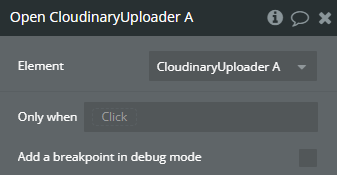
Open
“Open” in the context of a software plugin or API typically refers to the ability of the plugin or API to be accessed, modified, or extended by developers without restrictions.
Close
“Close” refers to the action of terminating a connection, session, or file in a software plugin or API.
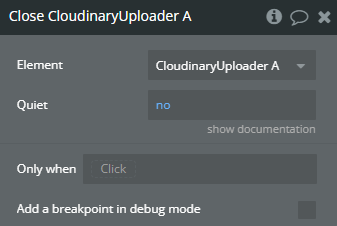
Title | Description | Type |
Quiet | When yes, skips the confirmation box if the widget is closed while still uploading assets. Default: no. | Checkbox (yes/no) |
Exposed states
Title | Description | Type |
Files | Files refer to digital data stored on a computer system that can be accessed, manipulated, and managed by a software plugin or API. | File |
Raw JSONs | Raw JSONs refer to unprocessed JSON data structures in their original form within a software plugin or API. | Text |
Element Events
Title | Description |
File Uploaded | “File Uploaded” refers to the successful transfer of a file from a local device to a remote server or storage location within a software plugin or API. |
Uploader Closed | “Uploader Closed” indicates that the file uploader component or feature has been terminated or disabled within the software plugin or API. |
Queues End | “Queues End” refers to the termination point of a queue in a software plugin or API where items are no longer processed. |
Queues Start | “Queues Start” refers to the initiation of queue processing in a software plugin or API, where tasks or messages are processed in a sequential manner. |
Plugin Actions
Create upload preset
Creating an upload preset involves defining specific settings and configurations for uploading files within a software plugin or API.
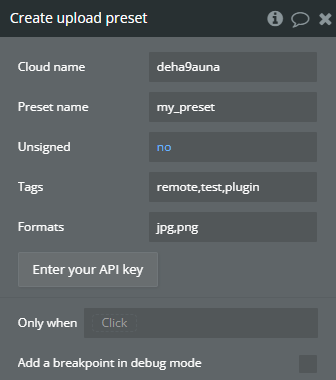
Title | Description | Type |
Cloud name | A “cloud name” refers to a unique identifier for a cloud-based resource or service within a software plugin or API. | Text |
Preset name | A “preset name” refers to a user-defined label or identifier used to store and recall specific configurations or settings in a software plugin or API. | Text |
Unsigned | “Unsigned” refers to a data type that can only represent positive values or zero, without a sign bit to represent negative numbers. | Checkbox (yes/no) |
Tags | In the context of a software plugin or API, “Tags” refer to keywords or labels assigned to content for organization, search, or categorization purposes. | Text (optional) |
Formats | “Formats” refer to the structure or arrangement of data within a software plugin or API, specifying how information is organized and displayed. | Text (optional) |
Return Values:
Title | Description | Type |
Message | In the context of a software plugin or API, a “message” refers to a unit of data or information exchanged between different components or systems. | Text |
Name | In the context of a software plugin or API, “Name” refers to a variable or identifier used to represent a specific entity, function, or value within the code. | Text |
Rate limit allowed | “Rate limit allowed” refers to the maximum number of requests that can be made to an API within a specified time period. | Number |
Rate limit reset at | “Rate limit reset at” refers to the specific time when the rate limit for accessing a particular API or service is reset, allowing for a new quota of requests to be made. | Date |
Rate limit remaining | “Rate limit remaining” refers to the number of additional requests that can be made within a specified time frame before hitting the rate limit. | Number |
Delete upload preset
Deleting an upload preset in a software plugin or API removes the predefined configuration for uploading files.
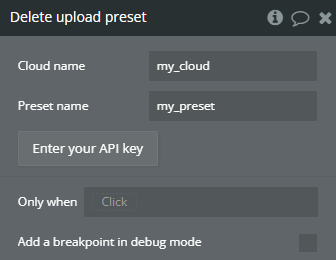
Title | Description | Type |
Cloud name | A “cloud name” in the context of a software plugin or API refers to a unique identifier or label assigned to a specific cloud service or environment. | Text |
Preset name | In the context of a software plugin or API, “Preset name” refers to a predefined configuration or setting that can be easily applied to the software to achieve a specific desired state or functionality. | Text |
Return Values:
Title | Description | Type |
Message | In the context of a software plugin or API, a “message” refers to a unit of data or information exchanged between different components or systems. | Text |
Rate limit allowed | “Rate limit allowed” refers to the maximum number of requests or actions that can be made within a specified time period, enforced by the software plugin or API to prevent abuse or overload. | Number |
Rate limit reset at | “Rate limit reset at” refers to the specific time when the rate limit for accessing an API or service is reset, allowing for a new quota of requests to be made. | Date |
Rate limit remaining | “Rate limit remaining” refers to the number of additional API requests or actions that can be made within a specified time frame before hitting the rate limit. | Number |
