
✅
Demo to preview the plugin:
✅
Introduction
The MetaMask & Web3 & Wallet Connect plugin brings seamless blockchain integration to your Bubble applications. With this plugin, your users can connect crypto wallets, interact with Ethereum - based smart contracts, and perform secure blockchain operations directly within your app.
This plugin supports MetaMask, Web3 utilities, and WalletConnect, giving developers the tools they need to build fully functional decentralized applications (dApps) without leaving Bubble.
Key Features
- Connect MetaMask Wallets → Allow users to authenticate and access their MetaMask Ethereum wallets directly from your app.
- Full Ethereum Blockchain Interactions → Fetch blockchain data, read contract states, send transactions, access transaction receipts, logs, allowances, and more.
- WalletConnect Support (Multiple Wallet Types) → Users can connect with various mobile and hardware wallets through WalletConnect—ideal for dApps requiring broader compatibility.
- Sign Messages & Transactions → Supports cryptographic signing for authentication, verification, and secure on-chain or off-chain interactions.
- Network Switching & Token Management → Users can switch blockchain networks (e.g., Mainnet, Testnets) and manage or add tokens to their wallets.
- Smart Contract Read/Write Support → Interact with ERC-20, ERC-721, and custom smart contracts using ABI definitions making it easy to build real dApps in Bubble.
For setup and detailed configuration, please refer to each provider’s official documentation:
- MetaMask: documentation
- WalletConnect: documentation
- Web3: documentation

How to setup
Step 1 – Install the Plugin
- Go to the Plugin Tab
- Open your Bubble Editor.
- Navigate to the Plugins tab on the left panel.
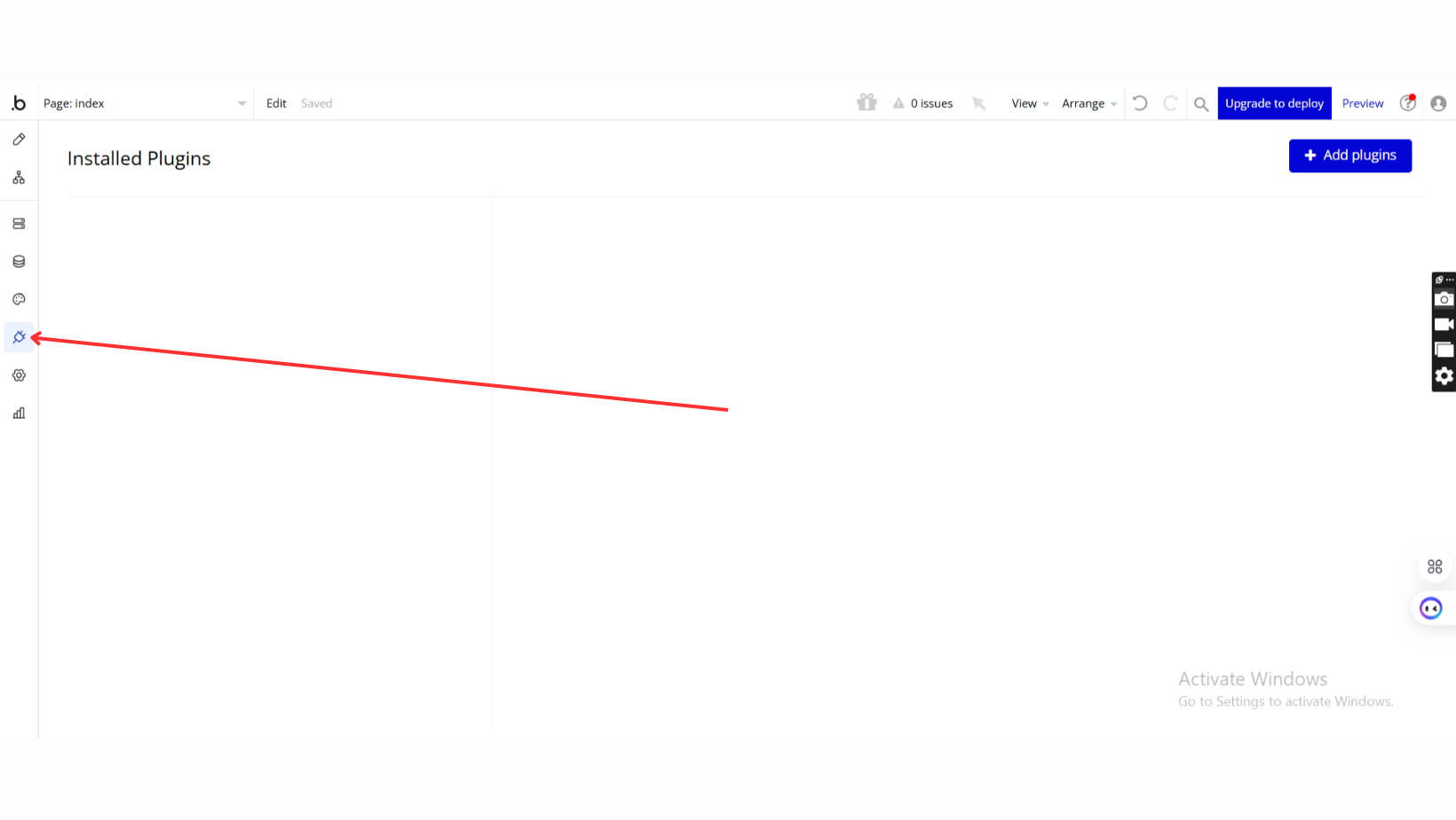
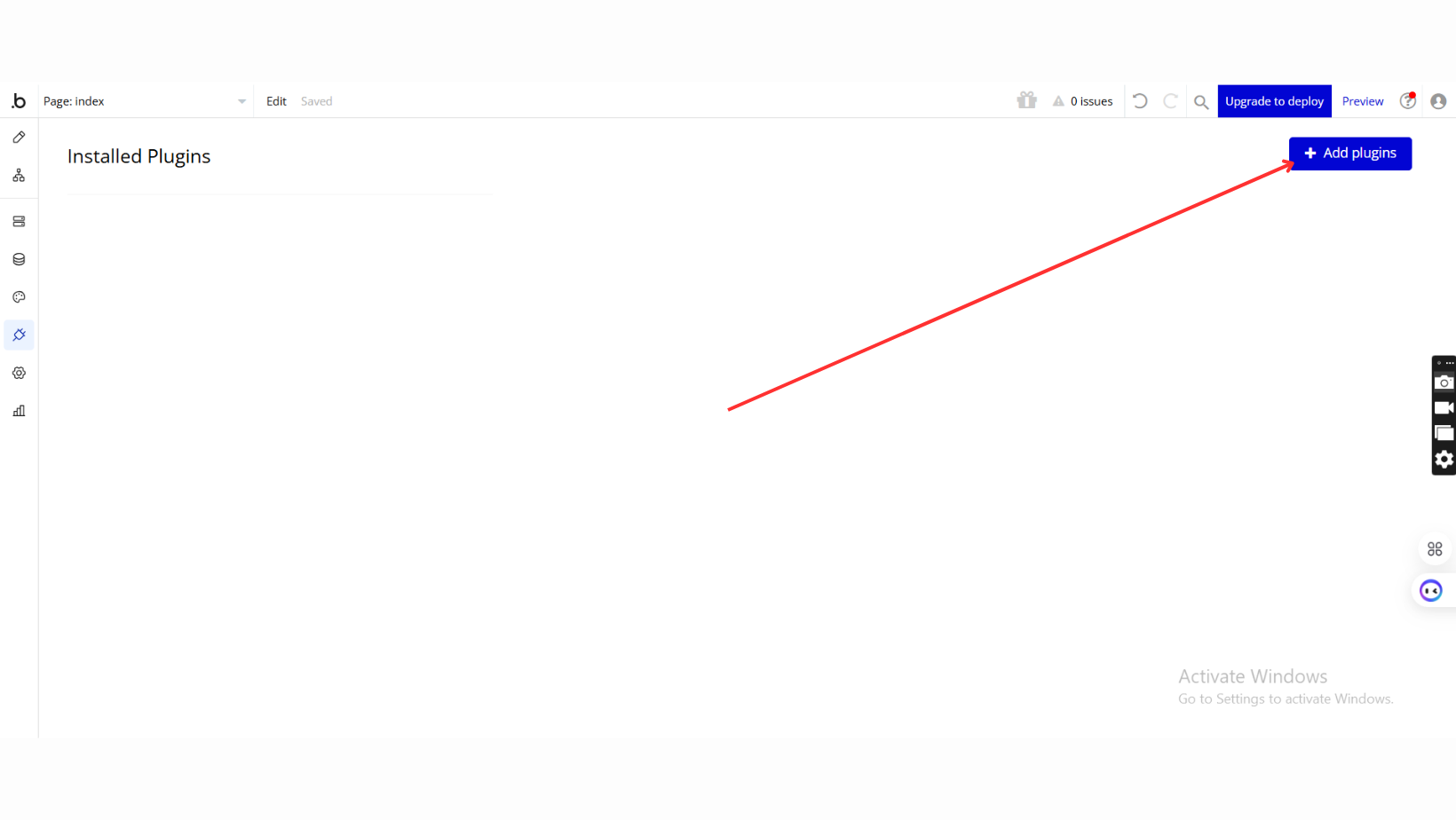
- Add Plugins
- Once in the Plugins tab, click the Add Plugins button.
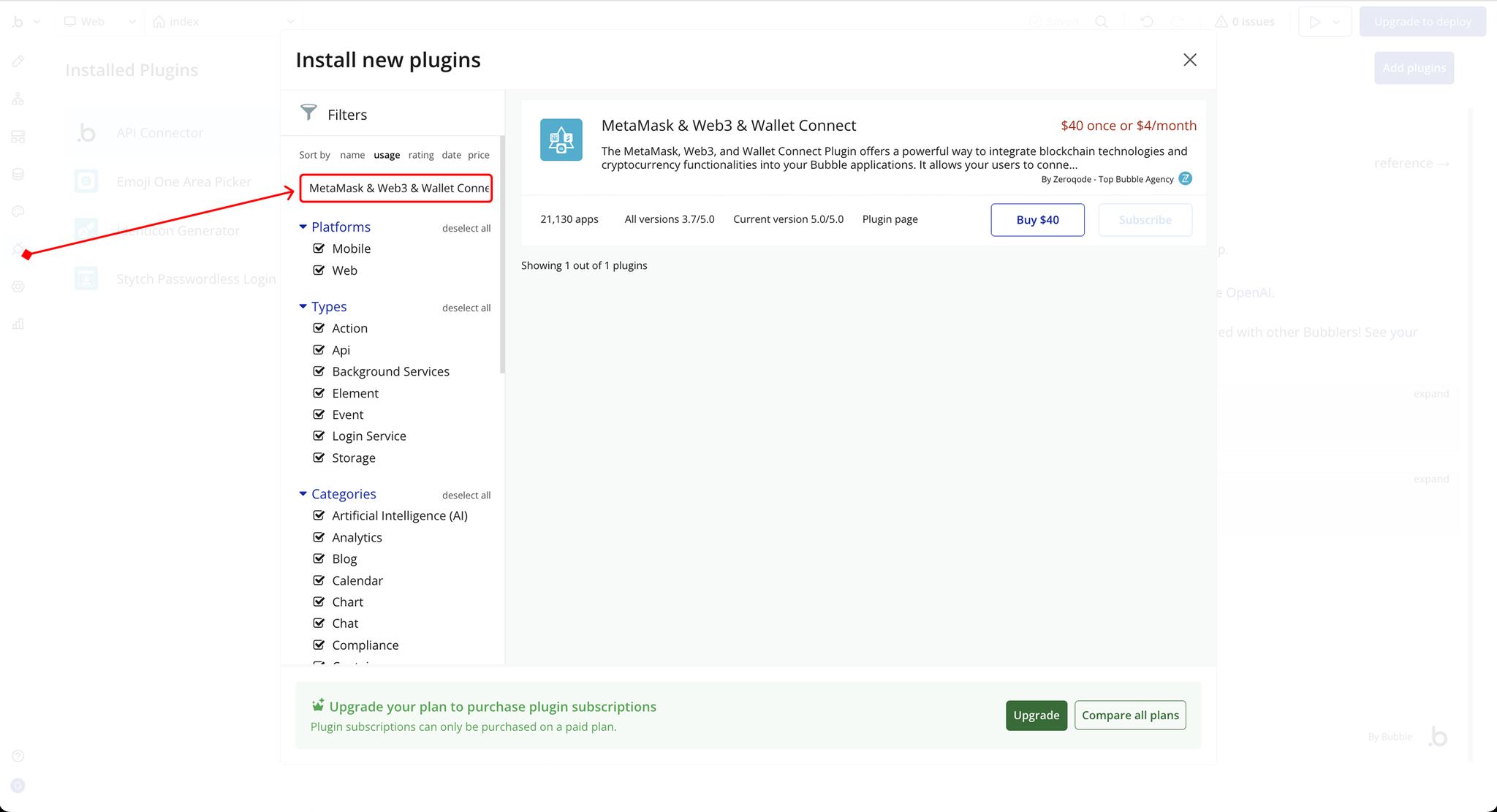
- Search for the Plugin
- Use the search bar to type MetaMask & Web3 & Wallet Connect.
- Locate the plugin in the search results.
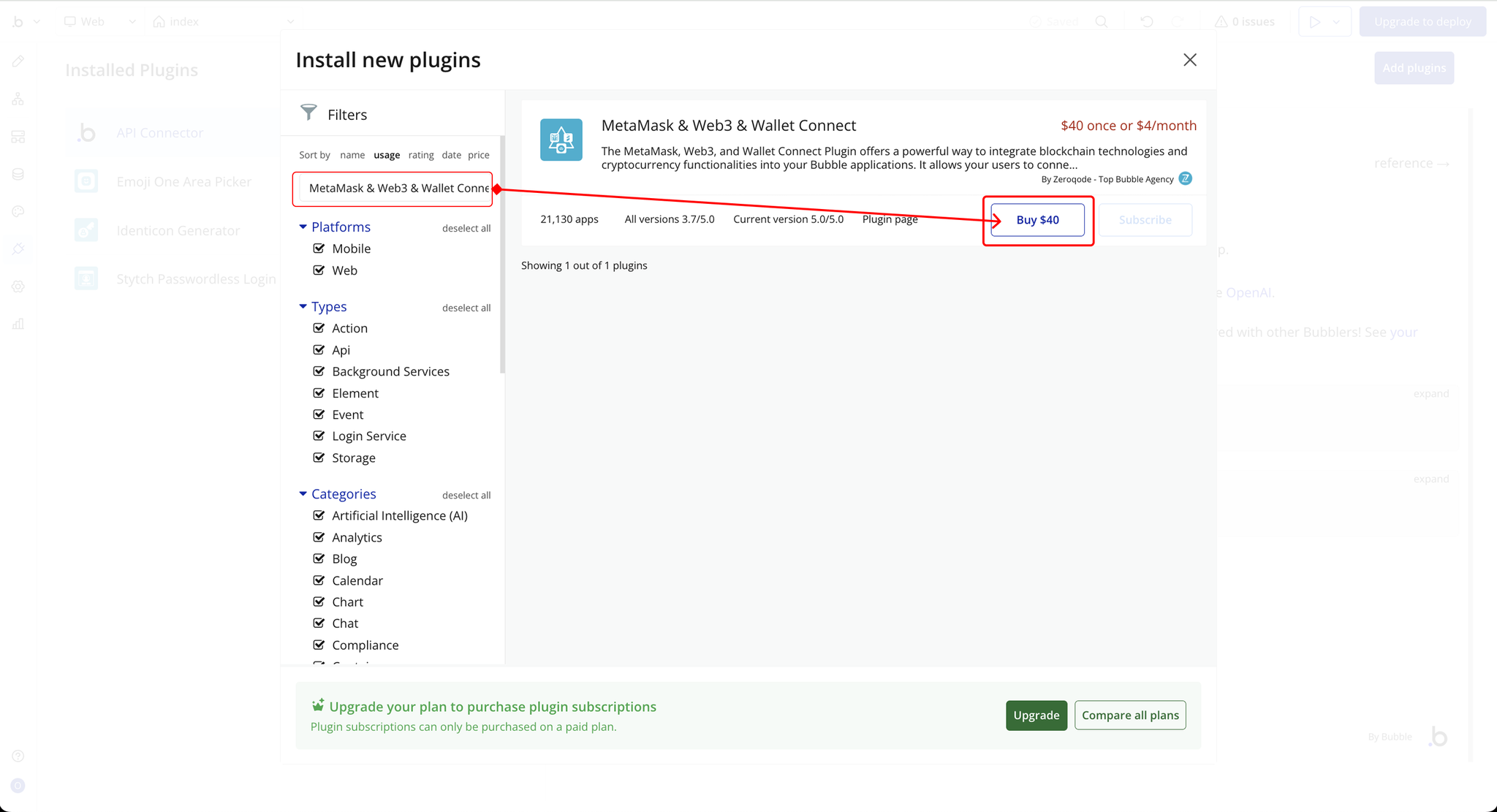
- Install/Buy
- If the plugin is free, click Install to add it to your application.
- For a paid plugin, click Buy and follow the purchase instructions.
- Payment Information (For Paid Plugins)
- If the plugin is a paid one, fill in your payment details and make payment.
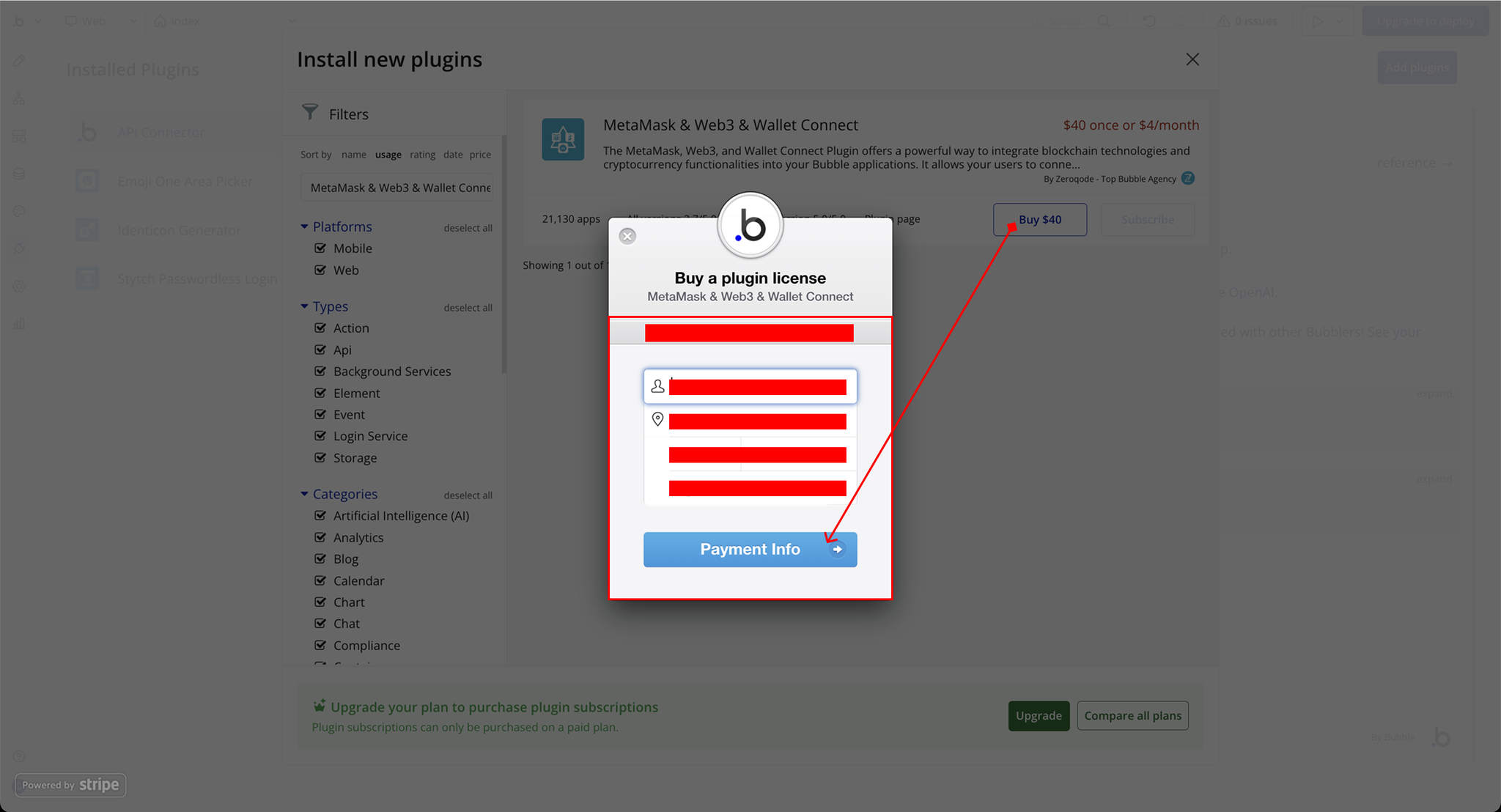
- Charges will be added to your Bubble billing account.
- Remember, if you unsubscribe from the plugin shortly after installation, charges will be prorated based on the days used.
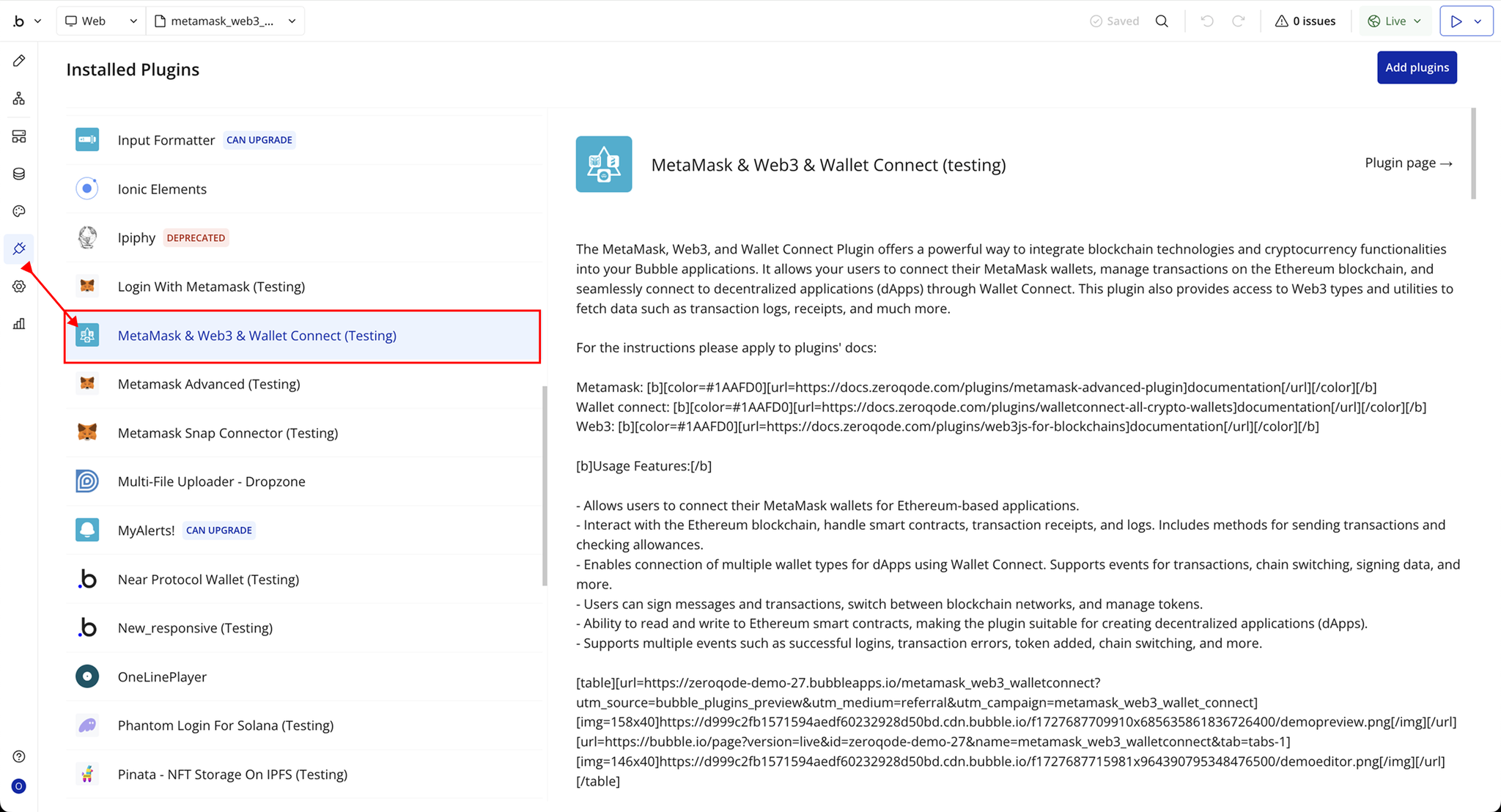
- Plugin Installed
- Once installed, the plugin will appear under the Installed Plugins list in your Bubble Editor.
Step 2 – Add the Plugin Element to Your Page (Metamask)
- Open the Design tab in your Bubble editor.
- Search for the Metamask element in the Elements panel.
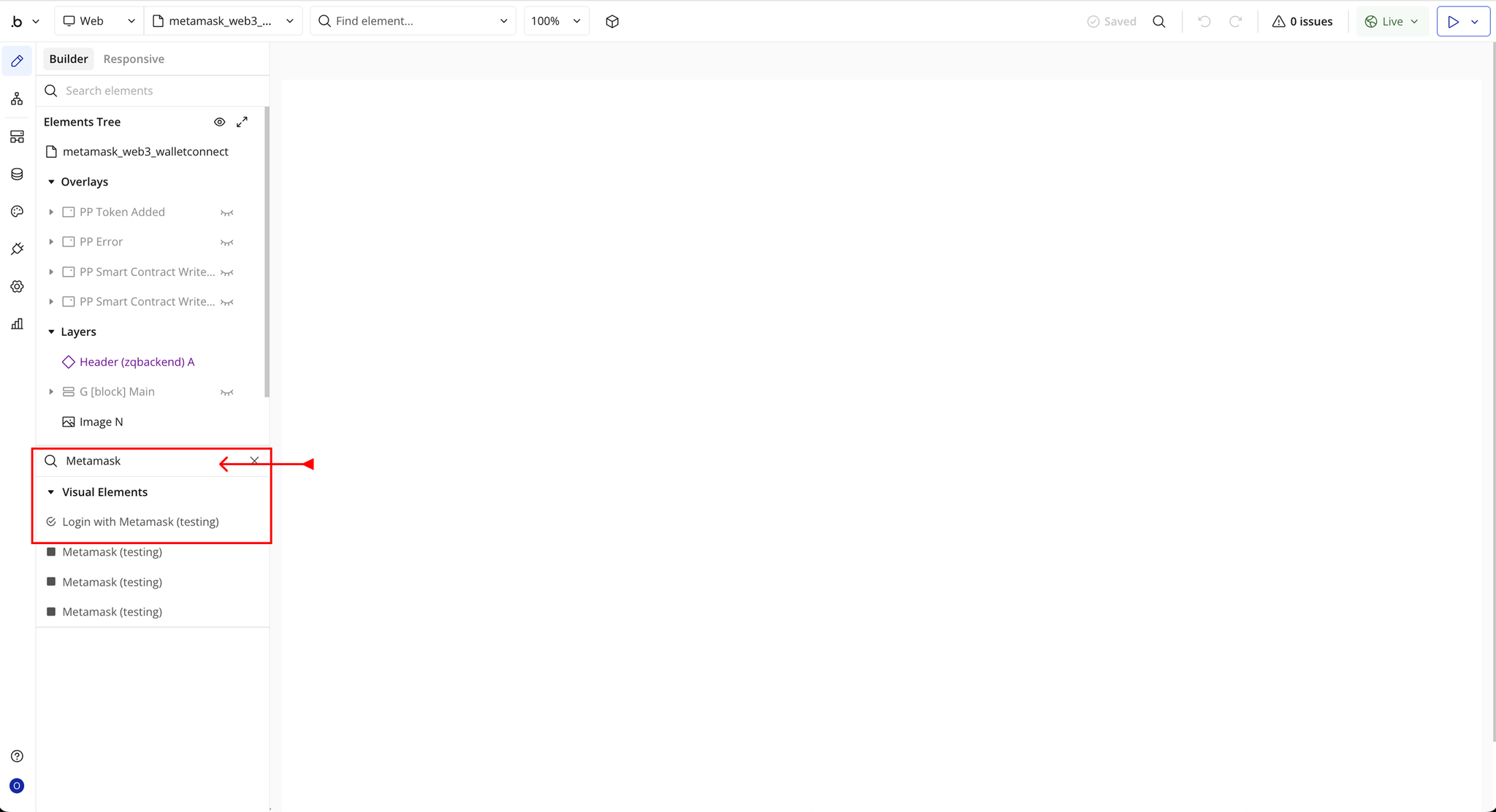
- You’ll see one option:
- Metamask
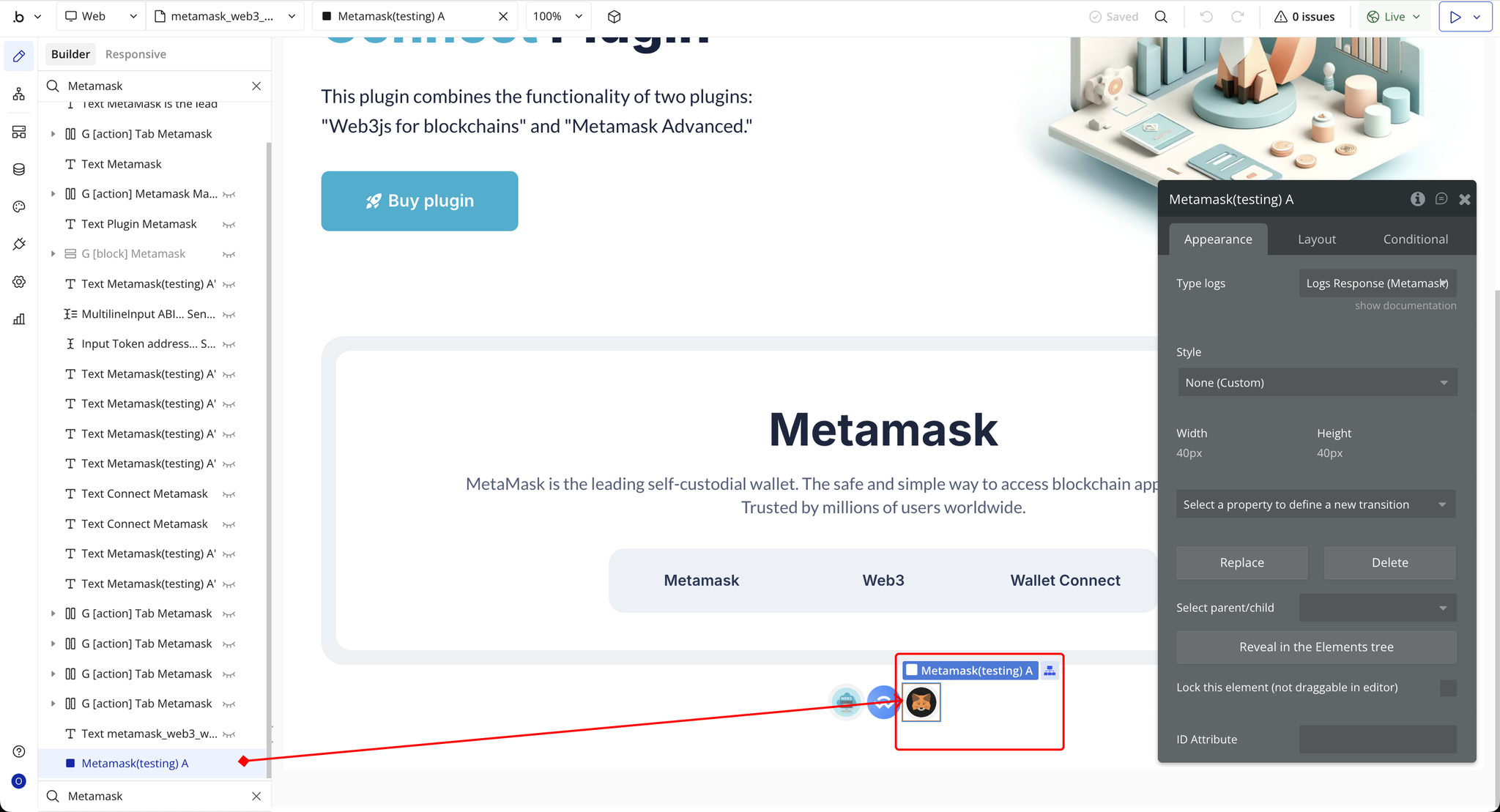
- Drag and drop the element onto your page.
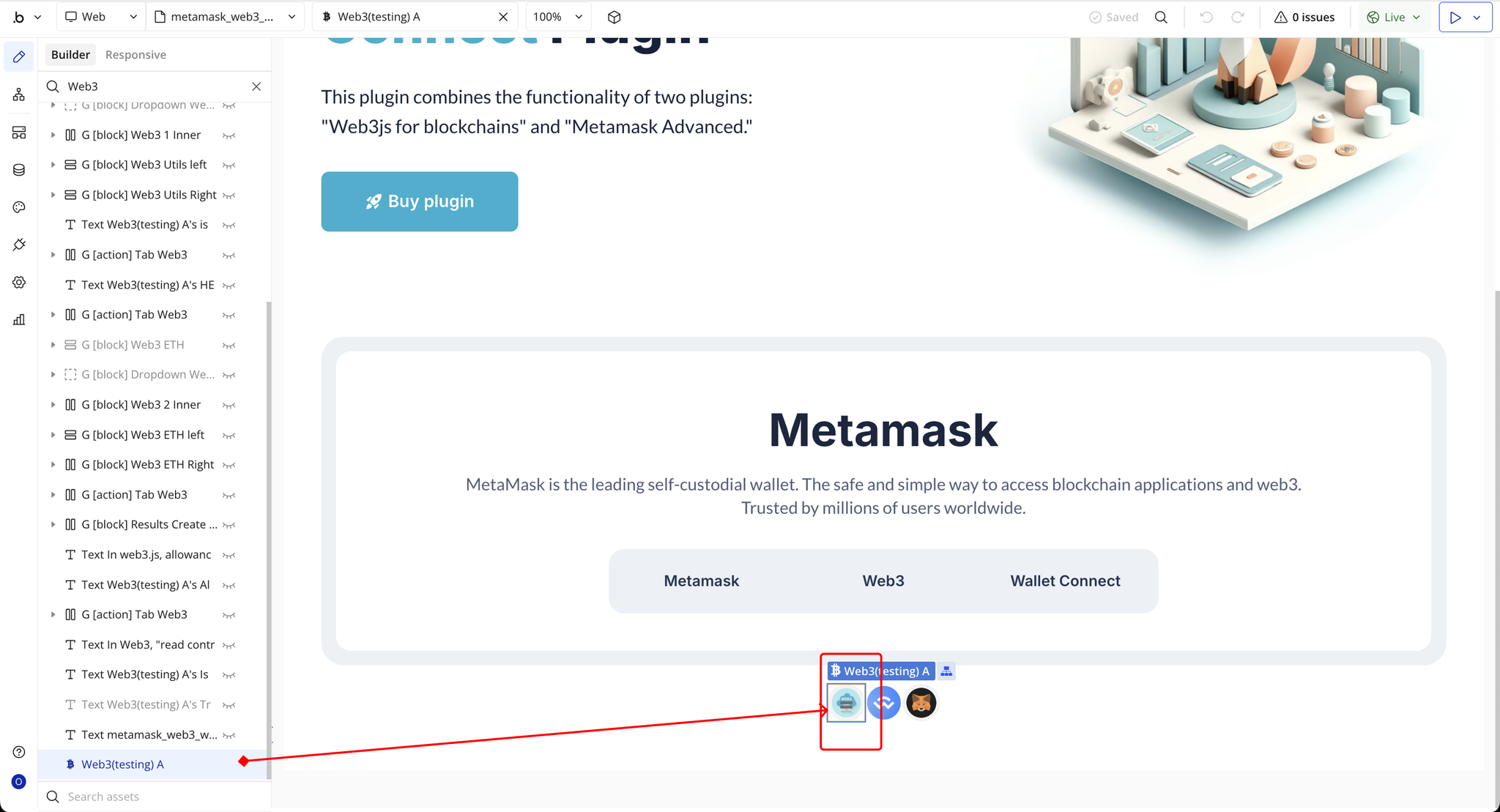
Step 3 – Add the Plugin Element to Your Page (Web3)
- Open the Design tab in your Bubble editor.
- Search for the Web3 element in the Elements panel.
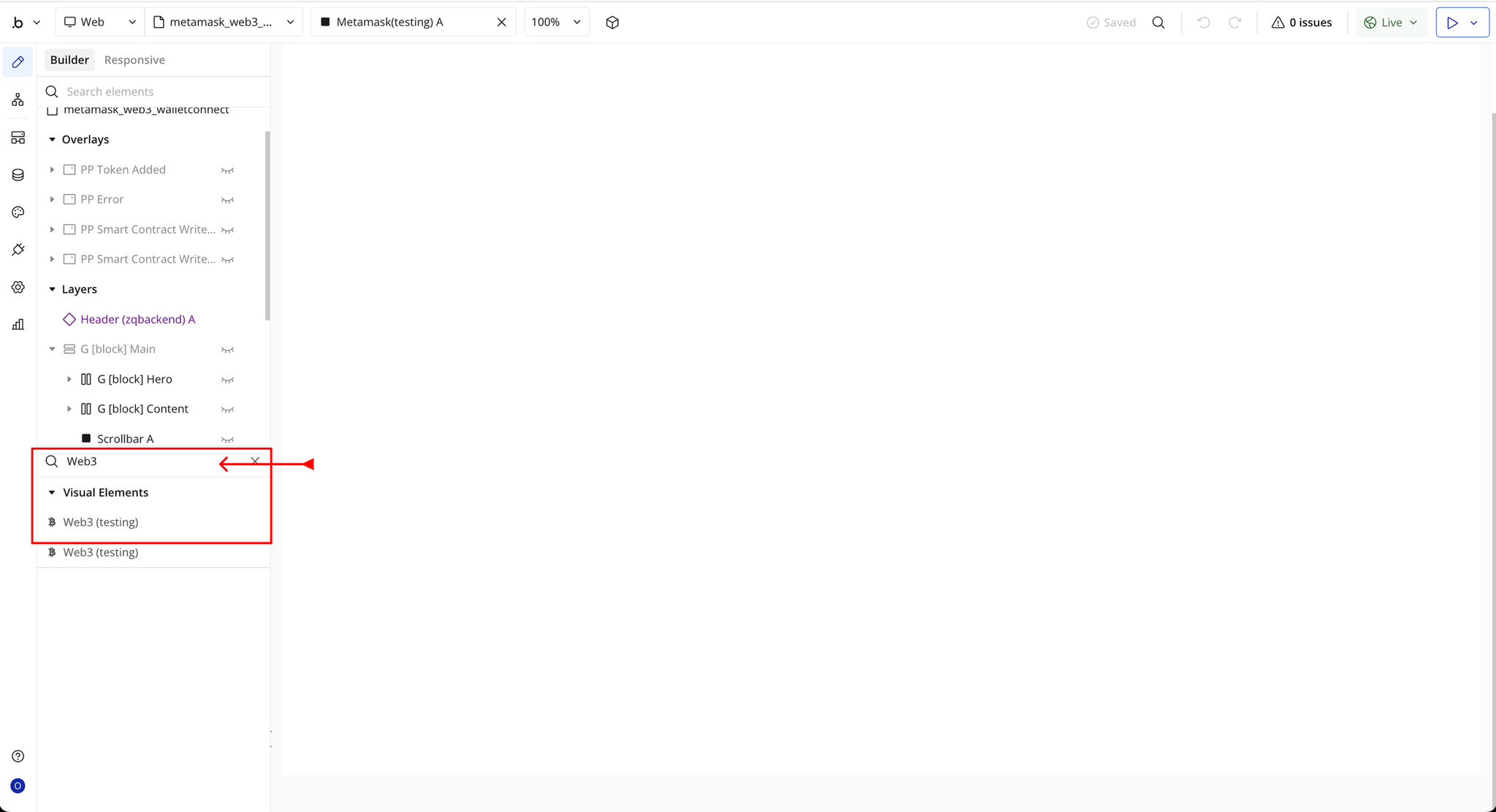
- You’ll see one option:
- Web3
- Drag and drop the element onto your page.
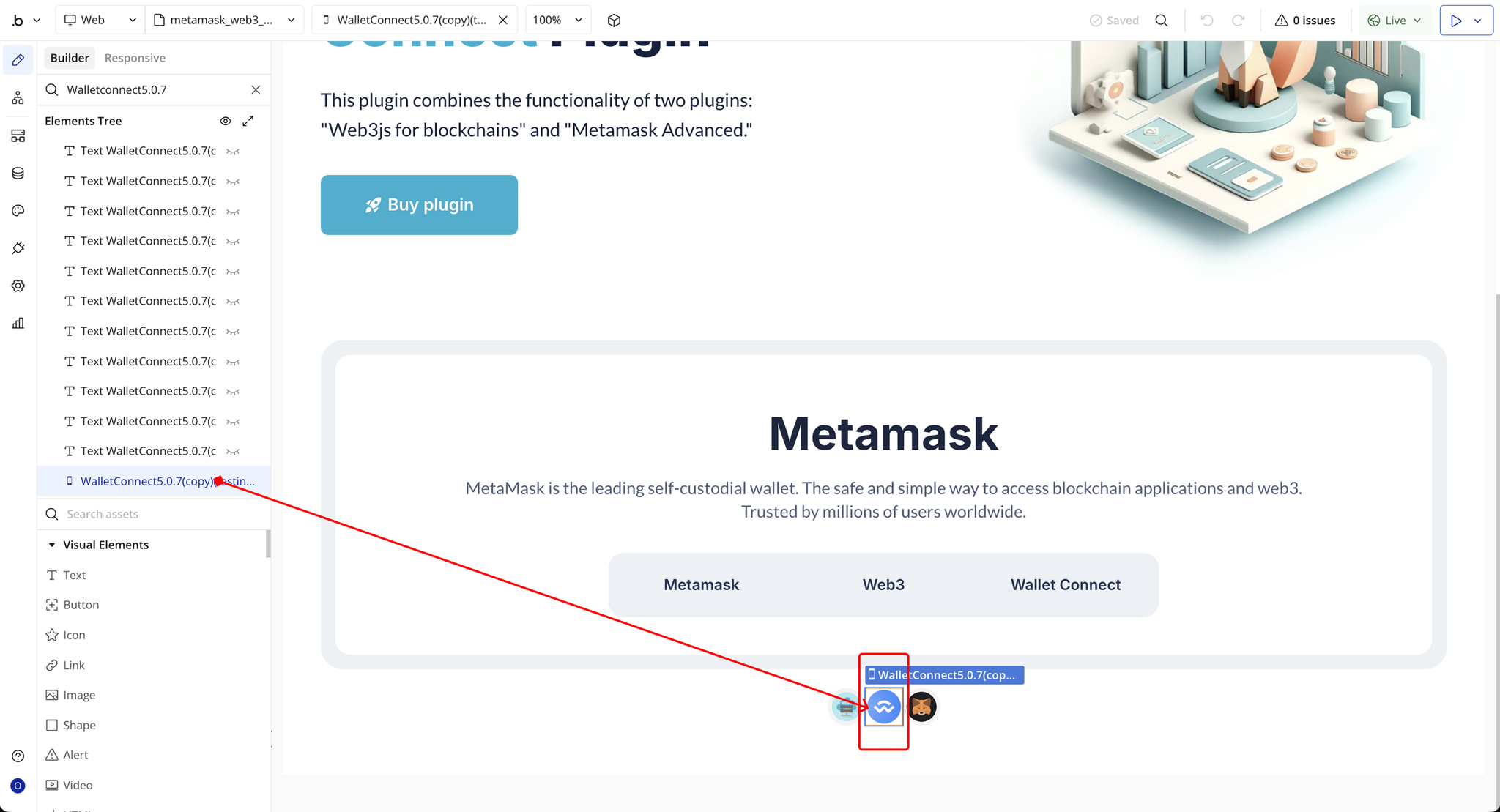
Step 4 – Add the Plugin Element to Your Page (Wallet Connect 5.0.7)
- Open the Design tab in your Bubble editor.
- Search for the Wallet Connect 5.0.7 element in the Elements panel.
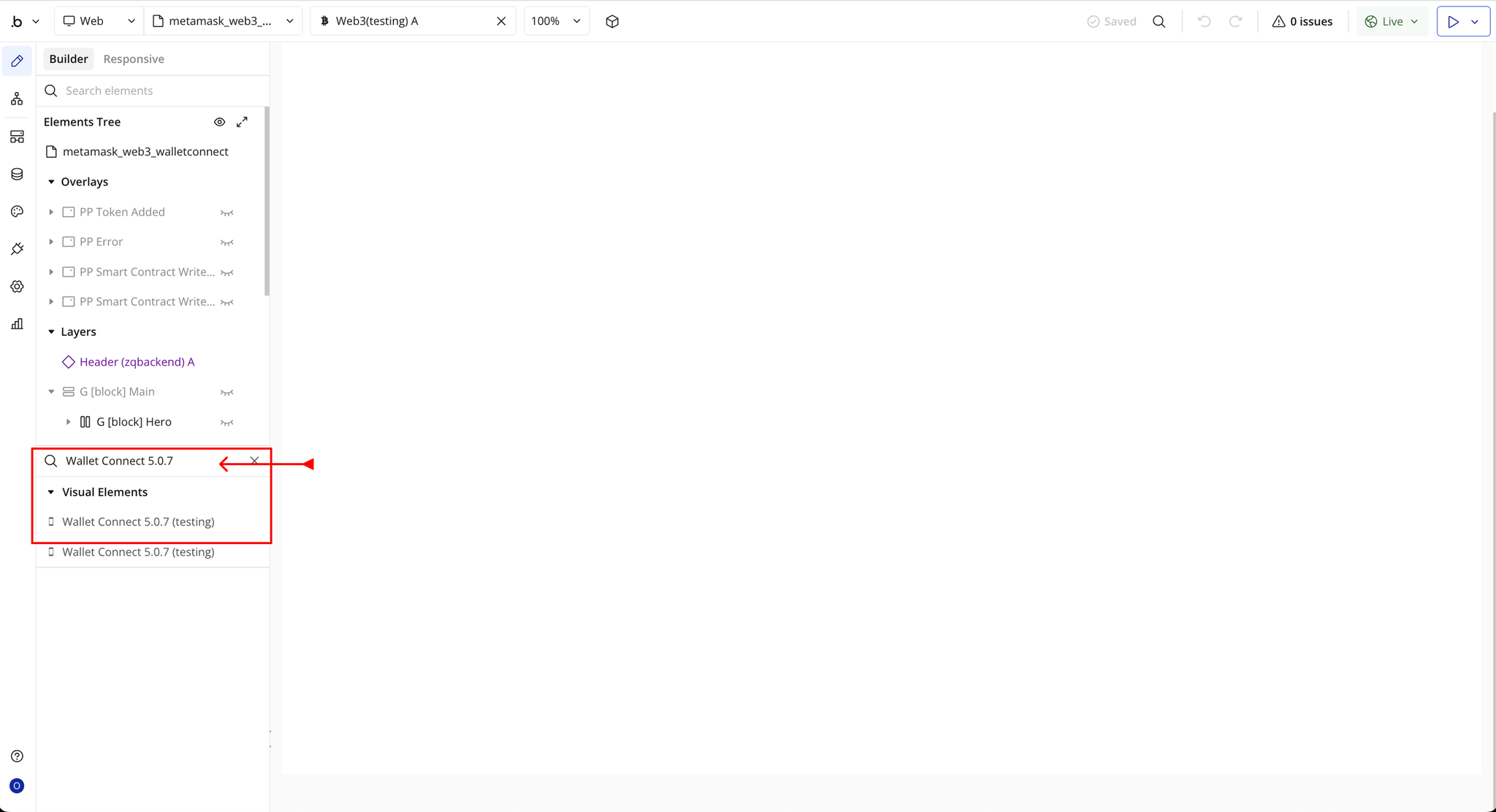
- You’ll see one option:
- Wallet Connect 5.0.7
- Drag and drop the element onto your page.
Plugin Element Properties - Metamask
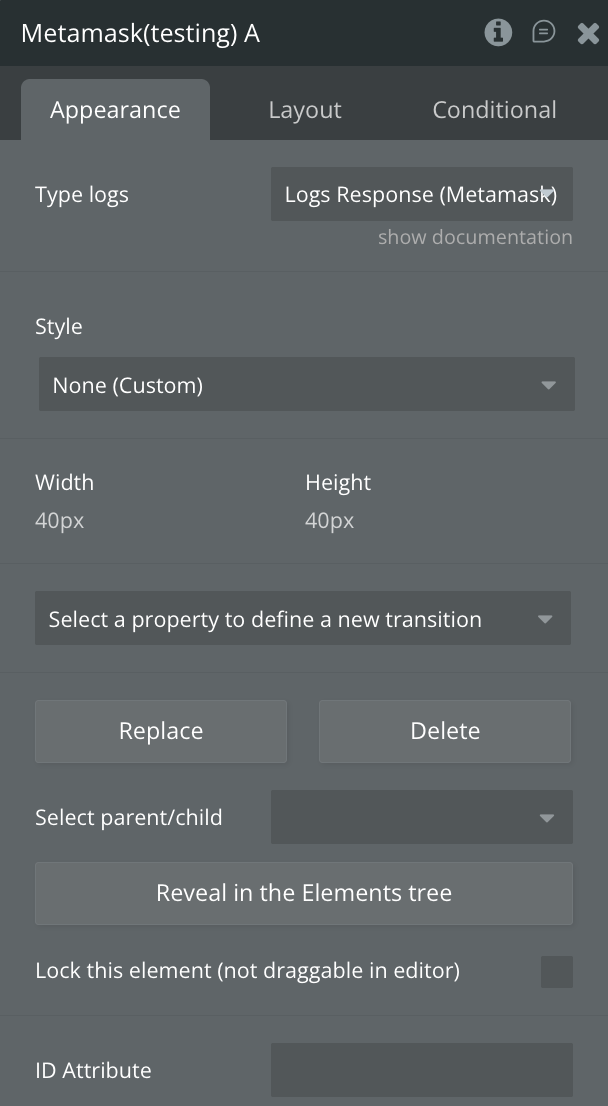
Fields
Title | Description | Type |
Type logs | Select “Logs Response (MetaMask)” to define the expected response format for MetaMask log data. | App Type |
Element Actions
- Get accounts - Returns a list of addresses for the accounts owned.
- Login - Login the user.
- Get Permission - Get the users permissions.
- Get chain ID - Get the current chain ID.
- Send Transaction - Creates new message call transaction or a contract creation.
Title | Description | Type |
Sender address | The hex-encoded Ethereum address of the sender. Must match the currently connected wallet address. | Text |
Recipient’s address | The hex-encoded Ethereum address of the recipient. Required for all transactions except contract creation. | Text |
Value | The amount of the network’s native currency to send, encoded in hex. | Text (optional) |
Data | Used for smart contract creation or calling contract methods (with parameters). For contract creation, leave “Recipient’s address” empty. | Text (optional) |
Gas | Gas limit for the transaction, encoded in Wei (hex). | Text (optional) |
Gas price | Gas price for the transaction, encoded in Wei (hex). | Text (optional) |
- Request permission - Request additional permissions from the user.
- Get Balance - Returns Ether balance of a given or account or contract.
Title | Description | Type |
Address | The Ethereum address of the account or smart contract whose balance you want to retrieve. | Text |
Block Number | The specific block number at which the balance should be checked. | Text |
- Get Logs - Returns an array of all logs matching a given filter object.
Title | Description | Type |
From Block | The block number to start scanning from. Accepts a hex-encoded block height or keywords: "latest" (most recent block), "pending" (pending transactions), or "earliest" (genesis block). | Text (optional) |
To Block | The block number to stop scanning at. Accepts a hex-encoded block height or keywords: "latest", "pending", or "earliest". | Text (optional) |
Address (optional) | A list of contract addresses to filter and monitor events from. Leave empty to listen for events from all sources. | Text (optional) |
- Add Custom Token - Adds the custom Token in Metamask.
Title | Description | Type |
Address | The contract address of the token you want to add. | Text |
Symbol | The token’s ticker symbol or shorthand (maximum of 5 characters). | Text |
Image | A URL string pointing to the token’s logo image. | Text (optional) |
Decimals | The number of decimal places the token uses (e.g., ETH = 18). | Number |
- Switch chain - Allows Ethereum applications (‘dapps’) to request that the wallet switches its active Ethereum chain.
Title | Description | Type |
Chain ID | You must specify the blockchain network’s ID, either as a hexadecimal string or a decimal number (as used by the eth_chainId RPC method). | Text |
- Sign Type Data - Use this method to request the most human-readable signatures that are efficient to process on-chain. We recommend this for most use cases.
Title | Description | Type |
Address | A hex-encoded Ethereum address. Must match the user’s currently active wallet address. | Text |
Chain ID | The ID of the blockchain network, provided as a hexadecimal string or decimal number according to the eth_chainId RPC method. | Number |
Name | The human-readable name of the application or domain requesting the signed data (used in EIP-712 typed data signing). | Text |
Verifying Contract | The Ethereum contract address responsible for verifying the signed message (part of the EIP-712 domain). | Text |
Version | The version number of the signing domain or application (e.g., "1"), required for EIP-712 typed structured data. | Text |
Message Body | The actual JSON object containing the structured message data that the user is being asked to sign. | Text |
Primary Type | The root type of the EIP-712 typed data structure (e.g., Mail, Order, Bid). Defines how the message body should be interpreted. | Text |
Types | A JSON object describing all type definitions used in the EIP-712 typed structured message (fields, names, and data types). | Text |
- Personal Sign - Use this method for the easiest way to request human-readable signatures that don’t need to be efficiently processed on-chain.
Title | Description | Type |
Address | A hex-encoded Ethereum address. Must match the user’s active wallet address. | Text |
Data | Hex-encoded call data used when interacting with smart contracts. Typically includes the function selector and encoded parameters. Leave empty for simple balance or state queries. | Text (optional) |
- Add chain - Creates a confirmation asking the user to add the specified chain to MetaMask. The user may choose to switch to the chain once it has been added.
Title | Description | Type |
Chain ID | The unique ID of the blockchain network. Must be provided as a hexadecimal string or a decimal number, following the eth_chainId RPC standard. | Text |
ChainName | The human-readable name of the blockchain network (e.g., Ethereum Mainnet, Polygon, BNB Chain). | Text |
RpcUrl | The RPC endpoint URL used to communicate with the blockchain. Only one RPC URL can be provided. | Text |
BlockExplorerUrl (optional) | The URL of the chain’s block explorer (e.g., https://etherscan.io). Only one URL is allowed. | Text (optional) |
Native Currency | ||
Name | The full name of the native currency of the chain (e.g., Ether, MATIC, BNB). | Text |
Symbol | The currency symbol, typically 2–6 characters (e.g., ETH, MATIC, BNB). | Text |
Decimals | The number of decimal places for the native token. This plugin currently supports only 18 decimals. | Number |
- Send Transaction with Contract Address - Sends a transaction to a specific smart contract address using the provided ABI and parameters. This action allows you to call contract functions (such as transferring tokens, approving allowances, or executing custom contract methods) directly from the connected wallet. It uses the user’s active wallet address to sign and broadcast the transaction on the selected blockchain network.
Title | Description | Type |
From | A hex-encoded Ethereum address. Must match the user’s currently connected wallet address. | Text |
To | A hex-encoded Ethereum address. Required for transactions that involve a recipient (all transactions except contract creation). | Text |
Gas | The maximum amount of gas the sender is willing to use, expressed in Wei. | Text (optional) |
Amount | The value of the chain’s native currency to send, encoded as hexadecimal. | Text (optional) |
ABI Contract | The ABI (Application Binary Interface) of the smart contract you want to interact with. Defines available contract methods and parameter structures. | Text |
Token Address | The smart contract address of the token you want to interact with (e.g., an ERC-20 or ERC-721 contract). | Text |
GasPrice | The gas price the sender is willing to pay per unit of gas, expressed in Wei. | Text (optional) |
- Disconnect - Disconnects the currently connected wallet. This action revokes the session, preventing further transactions or interactions with the blockchain until the user reconnects their wallet. It ensures that the user’s wallet is no longer linked to the app for security and privacy purposes.
Exposed States
Title | Description | Type |
Public user ID | The Ethereum address ID of the currently connected user. | Text |
List of Accounts | List of all Ethereum accounts available to the user. The first account is considered the current active account. | Text |
Permissions ID | Unique ID associated with each capability document (except the target). | Text |
Permission Invoker | References one or more cryptographic keys that are granted authority to use a capability. | Text |
Permission Parent Capability | The parent capability associated with the current permission. | Text |
Current chain ID | The current blockchain network ID in hexadecimal format. | Text |
Transaction hash | Keccak-256 hash of the RLP-encoded transaction. | Text |
Coinbase address | The default address used for mining rewards or system transactions. | Text |
Block Number | Hexadecimal representation of the block height. | Text |
Balance | User's account balance in decimal format. | Number |
Logs | List of blockchain logs related to the account or transaction. | Type Logs |
Current Chain ID (number) | The current blockchain network ID as a numeric value. | Number |
IsBraveWallet | Indicates if the user is using Brave Wallet. | Checkbox (yes/no) |
Is Connected | Checks if MetaMask (or compatible extension) is installed in the browser. | Checkbox (yes/no) |
Is logged In? | Checks if MetaMask is currently enabled on the page. | Checkbox (yes/no) |
IsMetaMask | Indicates whether the connected wallet is MetaMask. | Checkbox (yes/no) |
IsOperaWallet | Indicates whether the connected wallet is Opera Wallet. | Checkbox (yes/no) |
Sign Signature | The signature generated after signing a message with the wallet. | Text |
Personal Sign Result | The result of the personal sign operation. | Text |
MetaMask Error | Any error message returned by MetaMask during operations. | Text |
Transaction Status | Status of the transaction (e.g., pending, confirmed, failed). | Text |
Element Events
Title | Description |
Logged in successful | Triggered when the user successfully logs in to MetaMask or another connected wallet. |
Login Failed | Triggered when the user fails to log in. |
Logs are empty | Triggered when there are no logs available for the account or transaction. |
Switch chain rejected | Triggered when the user rejects a request to switch blockchain networks. |
Add chain rejected | Triggered when the user rejects a request to add a new blockchain network. |
Transaction rejected | Triggered when the user rejects a transaction. |
Account changed | Triggered when the user changes the active account in the wallet. |
Chain added | Triggered when a new blockchain network is successfully added. |
Token added | Triggered when a token is successfully added to the wallet. |
Type Data Signed | Triggered when typed data is successfully signed. |
Switch chain Success | Triggered when the user successfully switches to a new blockchain network. |
Personal Signed | Triggered when a personal message is successfully signed. |
MetaMask Error | Triggered when there is an error from MetaMask. |
Account Disconnect | Triggered when the user disconnects their wallet. |
Transaction send | Triggered when a transaction is successfully sent. |
Plugin Element Properties - Web3
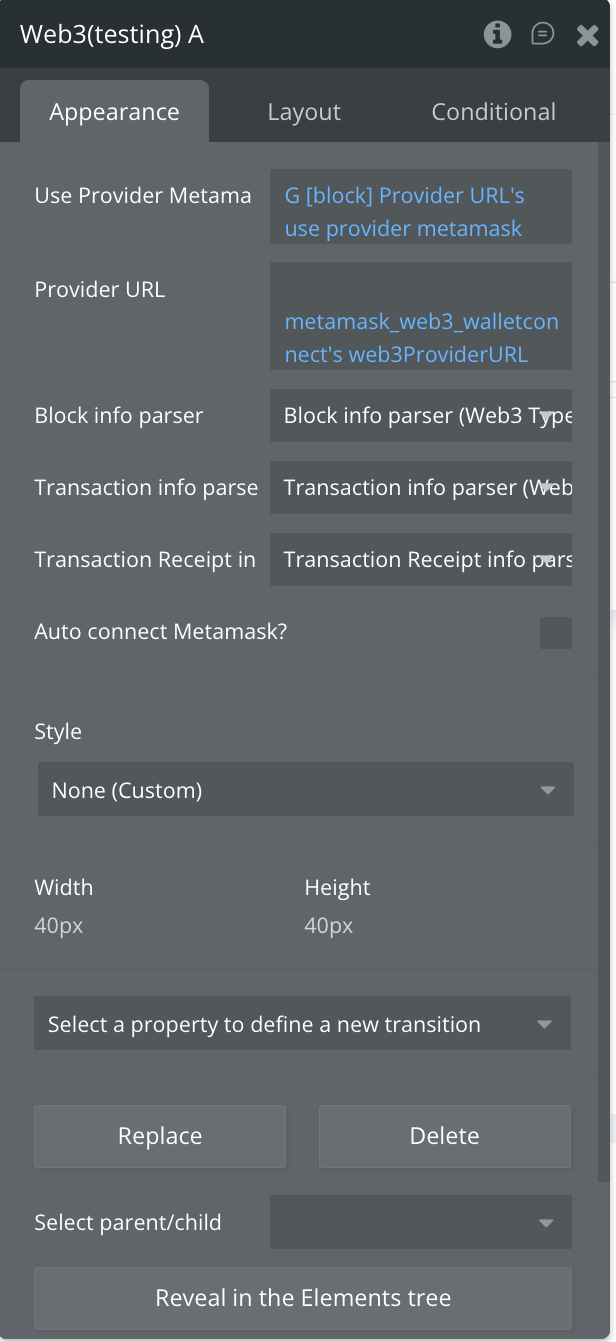
Fields
Title | Description | Type |
Use Provider Metamask? | Enable this to use MetaMask as the Web3 provider for blockchain interactions. | Checkbox (yes/no) |
Provider URL | Optional custom RPC URL for connecting to a blockchain network if not using MetaMask. | Text (optional) |
Block info parser | Optional app type that defines how block data should be parsed and processed. | App Type (optional) |
Transaction info parser | Optional app type that defines how transaction data should be parsed and processed. | App Type (optional) |
Transaction Receipt info parser | Optional app type that defines how transaction receipts should be parsed and processed. | App Type (optional) |
Auto connect Metamask? | Enable this to automatically prompt MetaMask connection when the page loads. | Checkbox (yes/no) |
Element Actions
- Number To Wei - Converts any ether value value into wei.
Title | Description | Type |
Number | The numeric value of Ether to convert to Wei. | Text |
Unit | The Ether unit to convert from (defaults to “ether”). | Text |
- Padding - Adds a padding on the left or right of a string, Useful for adding paddings to HEX strings.
Title | Description | Type |
String | The text string to which padding will be added. | Text |
Number | The total number of characters the padded string should have. | Number |
Direction | The direction of the padding. Options: left or right. | Dropdown |
- Utf8 To HEX - Returns the HEX representation of a given UTF-8 string.
Title | Description | Type |
UTF8 string | Any string in UTF8 format. | Text |
- Number To Hex - Returns the Hex representation of a given Number value.
Title | Description | Type |
Number | The numeric value to be used or converted. | Text |
- Web3.ETH: Create Wallet - Generates one or more accounts in the wallet. If wallets already exist they will not be overridden.
- Random Hex - To generate cryptographically strong pseudo-random HEX strings from a given byte size.
Title | Description | Type |
Size | The byte size for the HEX string. For example, 32 bytes will result in a 32-byte HEX string (64 characters) prefixed with “0x”. | Number |
- Web3.ETH: Get Balance - Get ethereum balance for any address.
Title | Description | Type |
Account address | The Ethereum address for which to retrieve the balance. | Text |
Block Number | The block number at which to request the balance. Pre-defined values like “earliest”, “latest”, or “pending” can also be used. | Text |
- sha3 - Will calculate the sha3 of the input.
Title | Description | Type |
Data to convert | The string that will be hashed. | Text |
- Web3.ETH: Get Encoded ABI Transaction - Encodes the created contract with ABI method for transaction.
Title | Description | Type |
Token contract address | The Ethereum address of the token contract. | Text |
Receiver Address | The Ethereum address that will receive the tokens. | Text |
Value | The amount of tokens to send. | Text |
- Is Ethereum address? - Checks if a given string is a valid Ethereum address.
Title | Description | Type |
Address | The Ethereum address or general address string. | Text |
- Convert to Hex - Convert any data to Hex.
Title | Description | Type |
Data | Any data that you want to convert. | Text |
- Web3.ETH: Get Block Number - Returns the current block number.
- Hex To Number - Returns the number representation of a given HEX value.
Title | Description | Type |
HEX | The HEX value that you want to convert. | Text |
- Web3.ETH: Get Block info by ID - Get all info about block by ID.
Title | Description | Type |
Block number | The block number, block hash, or a predefined string: “earliest”, “latest”, or “pending” (as used in default block parameters). | Text |
- Hex To Utf8 - Returns the UTF-8 string representation of a given HEX value.
Title | Description | Type |
HEX | The HEX string that you want to convert. | Text |
- Web3.ETH: Get transaction - Returns a transaction matching the given transaction hash.
Title | Description | Type |
Transaction Hash | The hash of the transaction you want to reference. | Text |
- Hex To ASCII - Returns the ASCII string representation of a given HEX value.
Title | Description | Type |
HEX | The HEX value to convert into ASCII format. | Text |
- Web3.ETH: Get Chain ID - Returns the chain ID of the current connected node as described in the EIP-695.
- Web3.ETH: Send Transaction - Sends a transaction to the network.
Title | Description | Type |
From | The address of the sending account. Uses web3.eth.defaultAccount if not specified, or an address/index from web3.eth.accounts.wallet. | Text |
To | The destination address of the message. Leave undefined for contract-creation transactions. | Text (optional) |
Data | ABI byte string containing function call data, or initialization code for contract-creation transactions. | Text (optional) |
Value | Value transferred in wei for the transaction, or endowment for contract creation. | Number (optional) |
Gas | Amount of gas to use for the transaction. | Number (optional) |
GasPrice | Gas price in wei for this transaction. Defaults to web3.eth.gasPrice. | Number (optional) |
Max Fee Per Gas | Maximum total fee per gas the transaction is willing to pay. | Number (optional) |
Type | Positive unsigned 8-bit number (0 to 0x7f) representing the transaction type. | Number (optional) |
- Web3.ETH: Create New Account - Creates a new account.
Title | Description | Type |
Entropy | Optional: A random string to increase entropy. Must be at least 32 characters if provided. If not provided, a random string will be generated using randomhex. | Text |
- Web3.ETH: Check address - Check if the entered address is a smart contract.
Title | Description | Type |
Address | A valid address to check | Text |
- Web3.ETH: Approve - Will send a transaction to the smart contract and execute its method.
Title | Description | Type |
Token address | The address of the token contract | Text |
Spender | The address authorized to transfer tokens on behalf of the owner | Text |
Amount | The number of tokens to transfer | Text |
From address | The address of the token owner | Text |
- Get Gas Price - Returns the current gas price oracle. The gas price is determined by the last few blocks median gas price.
- Web3.ETH: Check Allowance - Checks how many tokens a spender is allowed to transfer on behalf of the owner for a specific token contract, typically using the ERC-20
allowancefunction.
Title | Description | Type |
ABI | The Application Binary Interface of the smart contract, used to interact with its methods | Text |
Token address | The Ethereum address of the token contract that defines its behavior (e.g., ERC-20 token) | Text |
Owner Address | The Ethereum address of the token owner, used for sending and receiving ETH or tokens | Text |
Spender Address | The Ethereum address authorized to spend the owner’s tokens, usually via the ERC-20 allowance function | Text |
- Web3.ETH: Smart Contract - Read - Reads data from a smart contract on the Ethereum blockchain without making any state changes. This is typically used to call
vieworpurefunctions of a contract to retrieve information such as balances, token metadata, or other on-chain data.
Title | Description | Type |
Contract address | The Ethereum address of the smart contract you want to interact with. | Text |
ABI | The contract’s ABI (Application Binary Interface), which defines the functions, events, and variables of the smart contract. This is required to interact with the contract. | Text |
Action name | The name of the contract function you want to call. | Text |
- Web3.ETH: Smart Contract - Write - Allows you to send a transaction to a smart contract to execute a function that modifies the contract’s state on the blockchain.
Title | Description | Type |
Contract address | Smart Contract Address | Text |
ABI | The Contract ABI specifies the structure and types of functions, events, and variables in a smart contract. It serves as the interface for interacting with the contract and calling its functions from external applications or smart contracts. | Text |
Action name | The name of the smart contract function you want to call for writing data. | Text |
Parameter №1 | The first parameter required by the smart contract function (if applicable). | Text (optional) |
Parameter №2 | The second parameter required by the smart contract function (if applicable). | Text (optional) |
- Web3.ETH: Get transaction Receipt - Returns the receipt of a previously submitted Ethereum transaction, including details such as status, gas used, block number, and logs, allowing you to verify and track the outcome of the transaction.
Title | Description | Type |
Transaction Hash | The unique hash identifier of the Ethereum transaction for which the receipt will be retrieved. | Text |
- Disconnect - Disconnects the current wallet connection from the dApp, effectively logging the user out and preventing further interactions until reconnected.
Exposed states
Title | Description | Type |
Web3 Version | The current version of the Web3 library being used. | Text |
Random HEX | Generates a random hexadecimal string. | Text |
Sha3 | Computes the SHA3 (Keccak-256) hash of the given input. | Text |
IsAddress | Checks if a given string is a valid Ethereum address. | Checkbox (yes/no) |
String to HEX | Converts a UTF-8 string to its hexadecimal representation. | Text |
HEX to Number | Converts a hexadecimal string into a numeric value. | Number |
HEX to UTF8 | Converts a hexadecimal string into a UTF-8 string. | Text |
HEX to Ascii | Converts a hexadecimal string into an ASCII string. | Text |
Number to Wei | Converts an ether value into wei (smallest Ethereum unit). | Text |
Padding left | Adds left padding to a string to reach a specified length. | Text |
UTF8 to HEX | Converts a UTF-8 string into hexadecimal format. | Text |
Number to HEX | Converts a numeric value into hexadecimal format. | Text |
Current Chain ID (numb) | Returns the current chain ID as a number. | Text |
Current Chain ID | Returns the current chain ID in hex or decimal format. | Text |
Current address | The active Ethereum address currently connected. | Text |
New Wallet Address | The address of a newly created Ethereum wallet. | Text |
New Wallet PrivateKey | The private key of a newly created Ethereum wallet. | Text |
Balance | The current balance of an address in wei. | Text |
ABI | The contract ABI for interacting with a smart contract. | Text |
Block Number | The specific block number to query. | Text |
Block Info | Details of a specific blockchain block. | Text (block_info_parse) |
Transaction info | Information about a transaction. | Text (as transaction_info_parser) |
TransactionHash | The hash of a transaction. | Text |
Receipt | Transaction receipt details after execution. | Text |
Confirmation Number | The number of confirmations for a transaction. | Text |
New Account Address | Address of a newly generated Ethereum account. | Text |
Accounts | List of accounts available in the connected wallet. | Text |
Is This Smart Contract? | Checks if a given address is a smart contract. | Checkbox (yes/no) |
Transaction Sent? | Indicates whether a transaction was successfully sent. | Checkbox (yes/no) |
Data from smart contract read | Output data read from a smart contract. | Text |
Gas Price | The gas price used for a transaction in wei. | Text |
Web3 Error | Any error returned by Web3 operations. | Text |
Allowance | Remaining token allowance approved for a spender. | Number |
Transaction Receipt Info | Detailed receipt information from a transaction. | Text |
Current Chain Name | The name of the currently connected blockchain network. | Text |
New Account Private Key | Private key for a newly generated account. | Text |
Element Events
Title | Description |
Chain Changed | Triggered when the connected blockchain network changes. |
Approved | Triggered when a token allowance or permission is successfully approved. |
Transaction Send | Triggered when a transaction is successfully submitted to the blockchain. |
Smart Contract Write Success | Triggered when writing data to a smart contract completes successfully. |
Smart Contract Write Error | Triggered when an error occurs while writing to a smart contract. |
Web3 Error | Triggered when a Web3 operation encounters an error. |
Web3 Allowance Checked | Triggered after checking the allowance of a token for a spender. |
Web3 Disconnect | Triggered when the wallet disconnects from the application. |
Wallet Connect 5.0.7
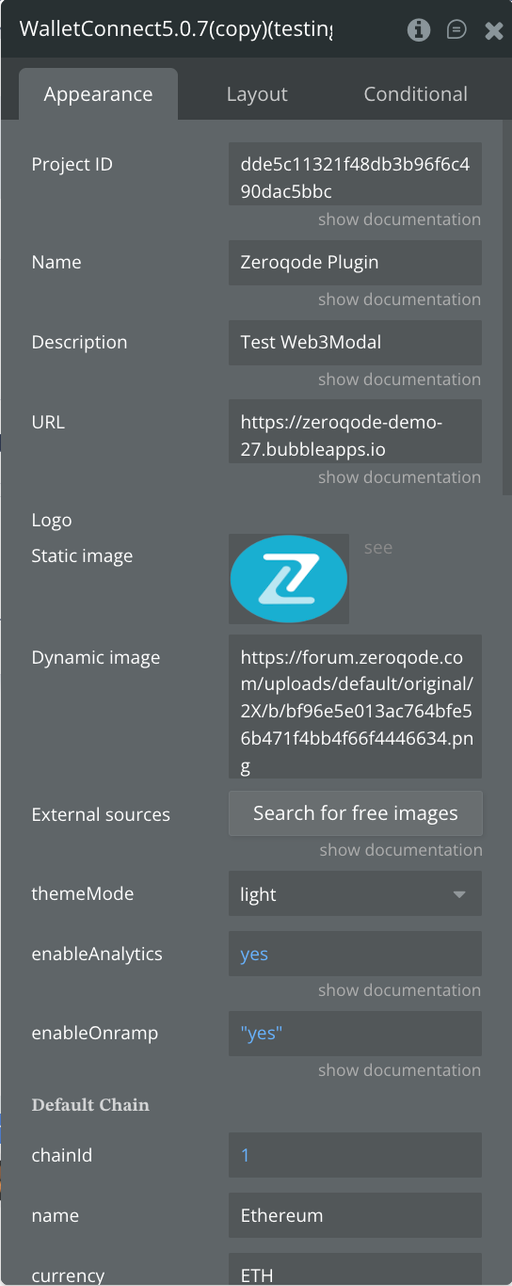
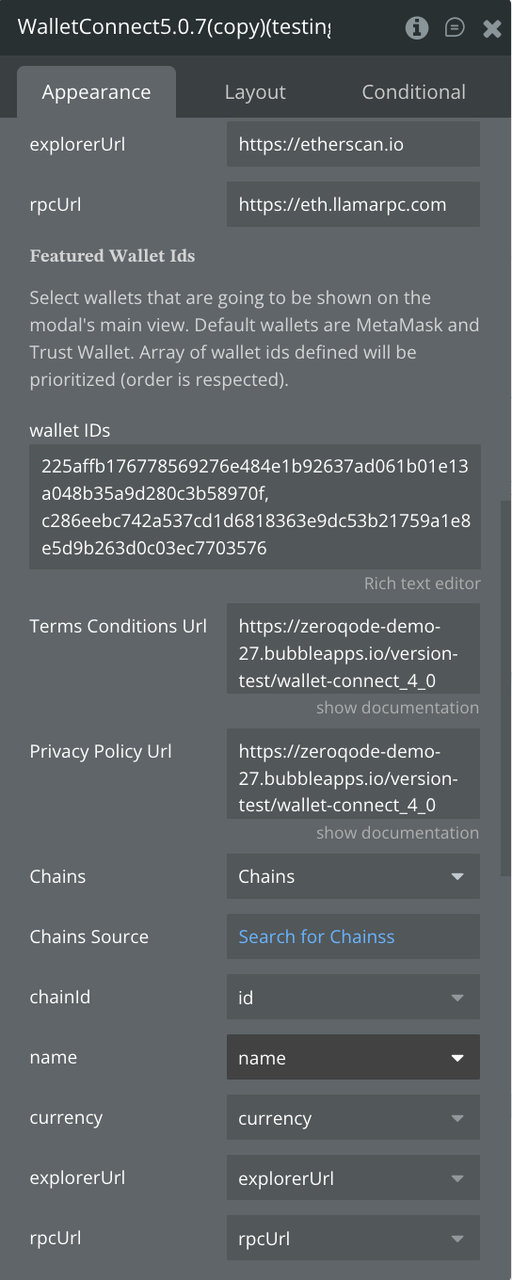
Fields:
Title | Description | Type |
Project ID | Your WalletConnect Project ID, required to access WalletConnect Cloud. | Text |
Name | The name of your dapp or wallet. | Text |
Description | A short description of your dapp/wallet. | Text |
URL | The public URL of your dapp/wallet. | Text |
Logo | A URL pointing to your project's logo or icon. | Image |
ThemeMode | The UI theme for the modal. Options: light, dark. | Text |
EnableAnalytics | Enables analytics in WalletConnect Cloud to track user activity. | Checkbox (yes/no) |
EnableOnramp | Enables Coinbase Pay for buying crypto with fiat. Default is false. | Checkbox (yes/no) |
𝐃𝐞𝐟𝐚𝐮𝐥𝐭 𝐂𝐡𝐚𝐢𝐧 | ||
ChainId | The default chain ID the dapp should use when connecting (e.g., 1 for Ethereum). | Number |
Name | The name of the default chain (e.g., Ethereum, Polygon). | Text |
Currency | The native currency symbol of the chain (e.g., ETH, MATIC). | Text |
ExplorerUrl | URL to the chain’s block explorer. | Text |
RpcUrl | The RPC endpoint used to interact with the default chain. | Text |
𝐅𝐞𝐚𝐭𝐮𝐫𝐞𝐝 𝐖𝐚𝐥𝐥𝐞𝐭 𝐈𝐝𝐬 | ||
Wallets shown first in the modal; defaults include MetaMask and Trust Wallet. The provided array is prioritized and ordered. | ||
Wallet IDs | A list of wallet identifiers to feature in the modal. Example: ['metamask', 'trust']. | Text |
Terms Conditions Url | Optional — URL to your Terms & Conditions page. | Text (optional) |
Privacy Policy Url | Optional — URL to your Privacy Policy page. | Text (optional) |
Chains | A list of chain objects defining all supported networks. | App Type (optional) |
Chains Source | Dynamic Bubble data source that provides the list of chain objects. | Item representing Chains (optional) |
ChainId | Chain ID extracted from each chain item. | Field of Chains → Number |
Name | Chain name extracted from each chain item. | Field of Chains → Text/Image/File |
Currency | Native currency extracted from each chain item. | Field of Chains → Text/Image/File |
ExplorerUrl | Block explorer URL extracted from each chain item. | Field of Chains → Text/Image/File |
RpcUrl | RPC endpoint extracted from each chain item. | Field of Chains → Text/Image/File |
𝐄𝐦𝐚𝐢𝐥 & 𝐒𝐨𝐜𝐢𝐚𝐥𝐬 | ||
Email | Enables email login. Default: true. | Checkbox (yes/no) |
Socials | A list of social platforms to enable for login. Example: ['google', 'x', 'github', 'discord', 'apple']. | Text |
ShowWallets | If true, wallets appear on the first screen. If false, they appear on a secondary screen. Default: true. | Checkbox (yes/no) |
WalletFeatures | Enables built-in wallet features like viewing balances, sending/receiving crypto, and buying assets. Default: true. | Checkbox (yes/no) |
Element Actions
- Modal Account - Open modal with the data of the connected user.
Title | Description | Type |
Open Modal | Opens the WalletConnect modal and displays the data of the currently connected user (wallet address, chain, session details). | Action |
- Modal AllWallets - Shows the list of all available wallets
Title | Description | Type |
Modal AllWallets | Shows a modal containing the full list of all available wallets that users can connect with. | Action |
- Modal Networks - List of available networks - you can select and target a specific network before connecting
Title | Description | Type |
Modal Networks | Displays a list of all available blockchain networks, allowing the user to choose and target a specific network before connecting. | Action |
- Modal Connect - Сreate a request to connect to the wallet via modal or directly
- eth_sendTransaction - Creates new message call transaction or a contract creation, if the data field contains code.
Title | Description | Type |
From | DATA, 20 bytes — The address the transaction is sent from. | Text |
To | DATA, 20 bytes — (Optional for contract creation) The address the transaction is directed to. | Text (optional) |
Data | DATA — The compiled contract code or the encoded method signature with parameters for invoking a contract function. | Text (optional) |
Gas_price | QUANTITY — (Optional, default: 90000) The maximum amount of gas the sender is willing to pay for transaction execution. Unused gas is returned. | Text (optional) |
Gas | QUANTITY — (Optional, default determined automatically) The amount of gas allocated for the transaction. | Text (optional) |
Value | QUANTITY — (Optional) The amount of cryptocurrency (in wei) sent with the transaction. | Text (optional) |
Nonce | (Optional) Integer representing the transaction nonce. Used to prevent replay attacks and overwrite pending transactions with the same nonce. | Text (optional) |
- Modal WhatIsANetwork - “What is a network” onboarding view
Title | Description | Type |
WhatIsANetwork | Displays the “What is a network?” onboarding modal, helping users understand blockchain networks before connecting. | — |
- Modal WhatIsAWallet - “What is a wallet” onboarding view
Title | Description | Type |
WhatIsAWallet | Displays the “What is a wallet?” onboarding modal, explaining what crypto wallets are and how they are used. | — |
- Close Modal - Closes the currently opened WalletConnect modal, dismissing any active onboarding, wallet list, or network selection view. This action simply closes the interface without performing any additional operations.
- eth_Approve - Allows a token owner to grant permission to a specific spender address to transfer a specified amount of their ERC-20 tokens. This action sets the allowance for the spender, enabling them to interact with the owner’s tokens up to the approved limit.
Title | Description | Type |
Token address | The Ethereum address of the ERC-20 token contract you want to approve spending for. | Text |
Spender | The Ethereum address of the account authorized to spend the tokens on behalf of the owner. | Text |
Amount | The amount of tokens to approve for the spender. | Text |
From address | The Ethereum address of the token owner granting the approval. | Text |
Gas | (Optional) The maximum amount of gas to use for this transaction. | Text (optional) |
GasPrice | (Optional) The price per unit of gas to pay for this transaction, in Wei. | Text (optional) |
- eth_sendRawTransaction (doesn’t work everywhere) - Creates new message call transaction or a contract creation for signed transactions.
Title | Description | Type |
DATA | The raw signed transaction data that can be submitted to the Ethereum network. | Text |
- Disconnect - Disconnect the connected account from Dapps
- personal_sign - The sign method calculates an Ethereum specific signature with:sign(keccak256(“19Ethereum Signed Message:” + len(message) + message))).
Title | Description | Type |
Message to sign | The message data (N bytes) that will be signed by the wallet. | Text |
Address | The Ethereum address (20 bytes) used to sign the message. | Text |
- Send Transaction with Contract Address - Sends a transaction to a specified Ethereum contract address, optionally including token transfers, gas limits, and custom nonce values. This action allows interaction with smart contracts or sending native currency to a contract.
Title | Description | Type |
From | A hex-encoded Ethereum address. Must match the user’s active address. | Text |
To | A hex-encoded Ethereum address. Required for transactions with a recipient (all transactions except for contract creation). | Text |
Gas | The gas limit provided by the sender in Wei. | Text (optional) |
Amount | Hex-encoded value of the network’s native currency to send. | Text (optional) |
Token Address | The address of the ERC-20 token contract being used in the transaction. | Text |
Gas Price | The gas price (in Wei) that the sender is willing to pay per unit of gas. | Text |
Nonce (Optional) | A unique number to allow overwriting pending transactions from the same sender; increments per transaction. | Text (optional) |
- eth_sign - The sign method calculates an Ethereum specific signature with: sign(keccak256(“19Ethereum Signed Message:” + len(message) + message))).
Title | Description | Type |
Address | The Ethereum address that will sign the message (20-byte hex format). | Text |
Message to sign | The message data to be signed, in bytes (N-byte length). | Text |
- eth_signTypedData - Calculates an Ethereum-specific signature in the form of keccak256(“19Ethereum Signed Message:” + len(message) + message))
Title | Description | Type |
Address | The Ethereum address (20-byte hex) that will sign the message. | Text |
Message to sign | The message to be signed, including type information, domain separator, and data, in bytes (N-byte length). | Text |
- Estimate Gas and getGasPrice - Calculates the estimated amount of gas required to execute a transaction and retrieves the current gas price from the network. This helps ensure that transactions are executed efficiently without overpaying for gas.
Title | Description | Type |
From | The Ethereum address sending the transaction. | Text |
To | The Ethereum address receiving the transaction. | Text |
Amount | The amount of the network’s native currency to send, in Wei. | Text |
Token address (Optional) | The token contract address if estimating gas for a token transfer; leave blank for native currency. | Text (optional) |
- Switch chain - Changes the connected wallet’s active blockchain network to a specified chain ID. This allows users to interact with different networks (e.g., Ethereum mainnet, testnets, or other EVM-compatible chains) without reconnecting their wallet.
Title | Description | Type |
Chain ID | The blockchain network ID to switch to. Provide as an integer in hexadecimal or decimal format, following the eth_chainId Ethereum RPC standard. | Text |
- Check Allowance - This action allows you to verify the amount of tokens that a given spender is authorized to transfer on behalf of a token owner. It queries the smart contract to return the current allowance set for the spender.
Title | Description | Type |
Token address | The Ethereum address of the token’s smart contract (e.g., an ERC-20 token). | Text |
Owner Address | The Ethereum address of the token owner whose allowance you want to check. | Text |
Spender Address | The Ethereum address authorized to spend the owner’s tokens. | Text |
Exposed states
Title | Description | Type |
Sign Transaction Hash | The hash returned after signing a transaction locally. | Text |
Send Transaction Hash | The hash of a transaction that has been broadcast to the network. | Text |
SendRawTransaction Hash | The hash of a raw, signed transaction sent directly to the network. | Text |
Connected To | The wallet or network the user is currently connected to. | Text |
Chain ID | The ID of the connected blockchain network. | Number |
Address ID | The active Ethereum address of the connected wallet. | Text |
Personal sign hash | The hash generated from a personal message signature. | Text |
Eth sign hash | The hash generated from an Ethereum-standard message signature. | Text |
Eth signTypedData hash | The hash generated from a typed data signature according to EIP-712. | Text |
Error | Any error returned during transactions or signing operations. | Text |
IsConnected | Indicates whether the wallet is currently connected. | Checkbox (yes/no) |
Modal Is Open? | Indicates whether the WalletConnect modal is open (true) or closed (false). | Checkbox (yes/no) |
Status | Current status of the wallet or transaction process. | Text |
Gas Price (Gwei) | The gas price for transactions in Gwei. | Number |
Estimate Gas | Estimated gas required for a transaction. | Number |
Approve Transaction Hash | The transaction hash for an approved token transaction. | Text |
Allowance | The allowed token amount that a spender can transfer on behalf of the owner. | Number |
Event Name | The name of the blockchain event triggered. | Text |
Element Events
Title | Description |
Disconnected | Triggered when the wallet disconnects from the dApp. |
Connected | Triggered when the wallet successfully connects to the dApp. |
Updated | Triggered when wallet details (e.g., accounts or chain) are updated. |
Modal closed | Triggered when the WalletConnect modal is closed by the user. |
Sign transaction success | Triggered when a transaction is successfully signed. |
Sign transaction error | Triggered when there is an error signing a transaction. |
Send transaction success | Triggered when a transaction is successfully sent to the network. |
Send transaction error | Triggered when there is an error sending a transaction. |
sendRawTransaction success | Triggered when a raw transaction is successfully sent to the network. |
sendRawtransaction error | Triggered when there is an error sending a raw transaction. |
Init | Triggered when the WalletConnect instance is initialized. |
personal sign success | Triggered when a personal message is successfully signed. |
personal sign error | Triggered when there is an error signing a personal message. |
eth sign success | Triggered when an Ethereum-standard message is successfully signed. |
eth sign error | Triggered when there is an error signing an Ethereum-standard message. |
eth_signTypedData success | Triggered when typed data is successfully signed according to EIP-712. |
eth_signTypedData error | Triggered when there is an error signing typed data. |
Modal open | Triggered when the WalletConnect modal is opened. |
Approved Success | Triggered when a token approval transaction is successfully processed. |
Estimate Gas Success | Triggered when gas estimation for a transaction is successfully completed. |
Switch chain Success | Triggered when the wallet successfully switches to a new blockchain network. |
Switch chain Rejected | Triggered when the user rejects a request to switch chains. |
Allowance Checked | Triggered when a token allowance is successfully verified. |
Allowance Checked Error | Triggered when there is an error checking a token allowance. |
New Event | Triggered when a new blockchain event is detected. |
Connect Error | Triggered when there is an error connecting the wallet to the dApp. |
Plugin Data Calls
Block info parser
Parses blockchain block data from the connected network and returns structured information such as block number, hash, miner, timestamp, transactions, and other metadata. Useful for analyzing or displaying block details in your application.
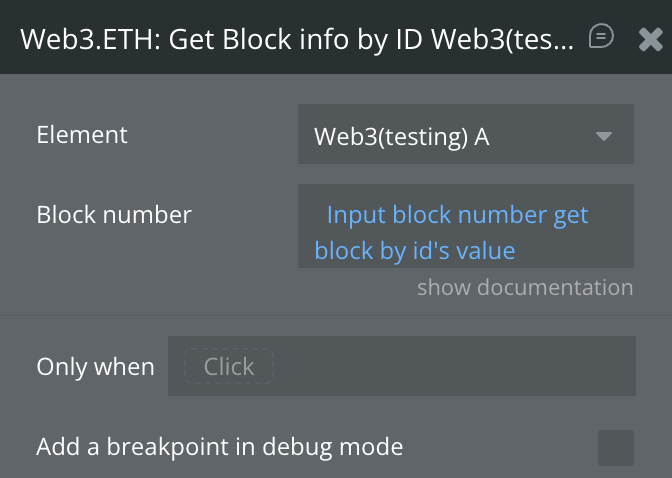
Return Values:
Return type: JSON
json{
  "baseFeePerGas": "number",
  "difficulty": "text",
  "extraData": "text",
  "gasLimit": "number",
  "gasUsed": "number",
  "hash": "text",
  "logsBloom": "text",
  "miner": "text",
  "mixHash": "text",
  "nonce": "text",
  "number": "number",
  "parentHash": "text",
  "receiptsRoot": "text",
  "sha3Uncles": "text",
  "size": "number",
  "stateRoot": "text",
  "timestamp": "number",
  "totalDifficulty": "text",
  "transactions": "text",
  "transactionsRoot": "text",
  "uncles": "text"
}
Transaction info parser
Parses blockchain transaction data from the connected network and returns structured information such as sender, recipient, value, gas used, transaction status, and other relevant metadata. Useful for monitoring and displaying transaction details in your application.
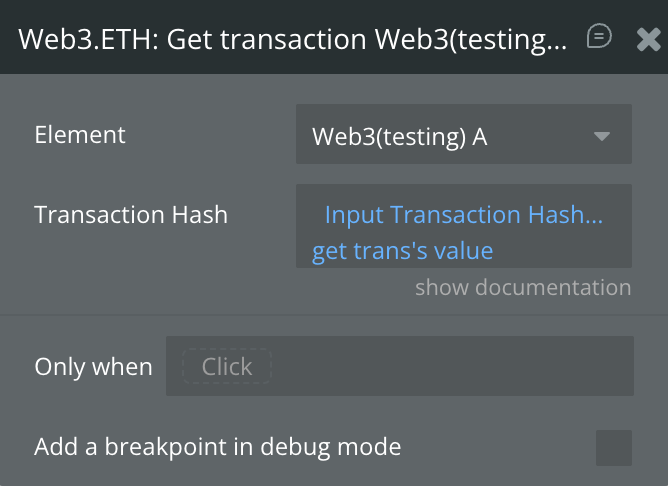
Return Values:
Return type: JSON
json{
  "blockHash": "text",
  "blockNumber": "number",
  "from": "text",
  "gas": "number",
  "gasPrice": "text",
  "hash": "text",
  "input": "text",
  "nonce": "number",
  "r": "text",
  "s": "text",
  "to": "text",
  "transactionIndex": "number",
  "type": "number",
  "v": "text",
  "value": "text"
}
Transaction Receipt info parser
Parses the receipt of a blockchain transaction, providing structured details including transaction hash, block number, gas used, logs, status, and other confirmation data. Useful for verifying transaction outcomes and monitoring smart contract interactions.
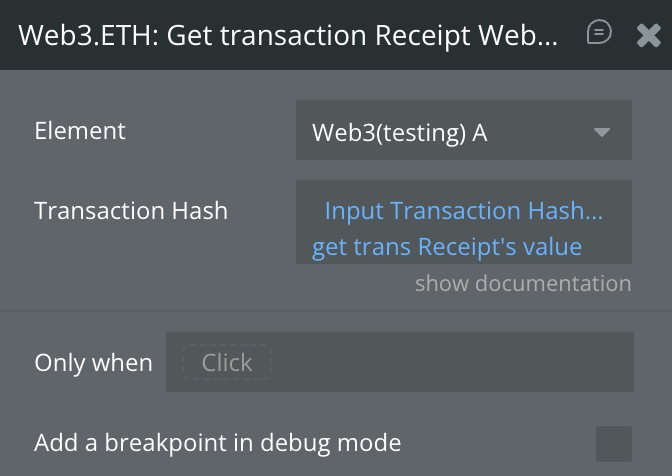
Return Values:
Return type: JSON
json{
  "status": "yes/no",
  "transactionHash": "text",
  "transactionIndex": "number",
  "blockHash": "text",
  "blockNumber": "number",
  "contractAddress": "text",
  "cumulativeGasUsed": "text",
  "gasUsed": "text",
  "effectiveGasPrice": "text",
  "logs": {
    "address": "text",
    "blockHash": "text",
    "blockNumber": "text",
    "data": "text",
    "logIndex": "text",
    "removed": "yes/no",
    "topics": "text",
    "transactionHash": "text",
    "transactionIndex": "text"
  }
}
Logs (Metamask)
Retrieves the event logs related to blockchain transactions from the connected MetaMask wallet. These logs can include emitted events from smart contracts, transaction confirmations, and other on-chain activity relevant to the user’s account.
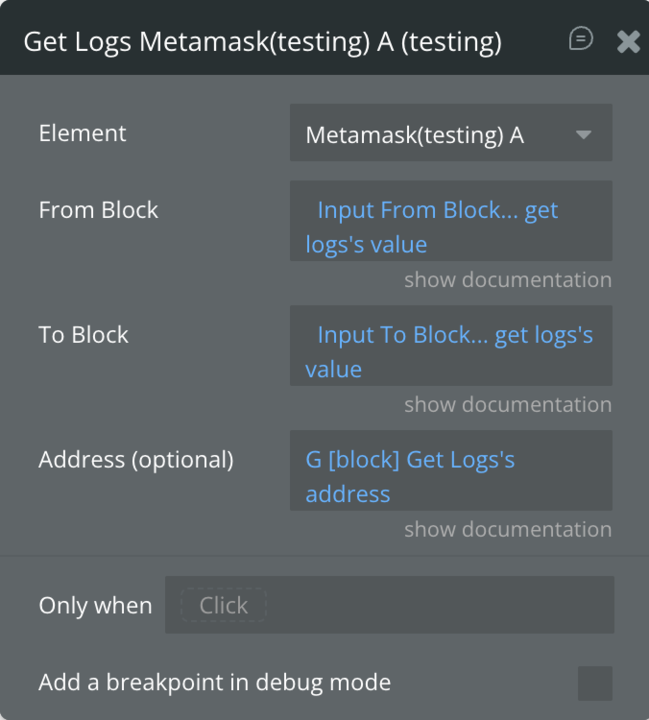
Return Values:
Return type: empty

Changelogs
Update 18.03.26 - Version 1.50.0
- migrated to v4.
Update 09.09.25 - Version 1.49.0
- Bubble Plugin Page Update (Forum).
Update 08.07.25 - Version 1.48.0
- Bubble Plugin Page Update (Logo).
Update 17.06.25 - Version 1.47.0
- Marketing update (minor change).
Update 25.03.25 - Version 1.46.0
- Fixed "Amount" field in "Send Transaction with Contract" action - WalletConnect.
Update 27.01.25 - Version 1.45.0
- Fixed “Eth Sign type data” and “Send Transaction with Contract Address” actions - WalletConnect.
Update 15.01.25 - Version 1.44.0
- Fixed "Socials" field - WalletConnect.
Update 14.11.24 - Version 1.43.0
- Minor update (Marketing update).
Update 24.10.24 - Version 1.42.0
- Minor update (Marketing update).
Update 04.09.24 - Version 1.41.0
- Added "Provider URL" field in Web3 element and fixed bugs in some actions.
Update 13.08.24 - Version 1.40.0
- Removed "Wallet connect" element, added "Wallet connect 5.0.7" element.
Update 13.08.24 - Version 1.39.0
- Changes to plugin terms and conditions.
Update 23.07.24 - Version 1.38.0
- Minor update.
Update 17.07.24 - Version 1.37.0
- Minor update (Marketing update).
Update 11.06.24 - Version 1.36.0
- Updated demo/service links.
Update 06.06.24 - Version 1.35.0
- Minor update.
Update 04.04.24 - Version 1.34.0
- updated description.
Update 12.03.24 - Version 1.33.0
- Minor improvements.
Update 08.03.24 - Version 1.32.0
- Minor update.
Update 26.02.24 - Version 1.31.0
- Added "Auto connect Metamask?" field.
Update 13.02.24 - Version 1.30.0
- Added "Decimals" field in "Add Custom Token" action.
Update 30.01.24 - Version 1.29.0
- Added "Show QR Modal" checkbox in "Connect 2.0" action - WalletConnect.
Update 24.01.24 - Version 1.28.0
- updated description.
Update 27.12.23 - Version 1.27.0
- updated description.
Update 28.11.23 - Version 1.26.0
- Minor fixes.
Update 22.11.23 - Version 1.25.0
- Fixed the transaction status updates.
Update 10.11.23 - Version 1.24.0
- Fixed Wallet Connect.
Update 18.10.23 - Version 1.23.0
- Updated description.
Update 05.10.23 - Version 1.22.0
- Minor improvements.
Update 04.10.23 - Version 1.21.0
- minor updates.
Update 01.10.23 - Version 1.20.0
- Minor updates.
Update 26.09.23 - Version 1.19.0
- Minor improvements.
Update 15.09.23 - Version 1.18.0
- updated description.
Update 12.09.23 - Version 1.17.0
- minor updates.
Update 06.09.23 - Version 1.16.0
- Obfuscation.
Update 04.09.23 - Version 1.15.0
- Bug fixes.
Update 18.07.23 - Version 1.14.0
- updated description.
Update 12.07.23 - Version 1.13.0
- updated the icon.
Update 12.07.23 - Version 1.12.0
- updated description.
Update 28.06.23 - Version 1.11.0
- Minor update.
Update 23.06.23 - Version 1.10.0
- updated description.
Update 19.06.23 - Version 1.9.0
- Updated the description .
Update 03.04.23 - Version 1.8.0
- updated the description.
Update 23.02.23 - Version 1.7.0
- deleted the icons.
Update 22.02.23 - Version 1.6.0
- updated the description.
Update 31.01.23 - Version 1.5.0
- Updated service link.
Update 10.01.23 - Version 1.4.0
- Added "Chain ID" state.
Update 28.01.22 - Version 1.3.0
- Updated icon.
Update 25.01.22 - Version 1.2.0
- Added forum thread in common part.
Update 29.12.21 - Version 1.1.0
- Updated description.
Update 29.12.21 - Version 1.0.0
- Initial Release.