
✅
Link to the plugin page: https://zeroqode.com/plugin/1532954439934x166203544838078460
Demo to preview the plugin:
✅
Introduction
How about the possibility to utilize Google AI to analyze the spam and toxicity rate of a conversation? This no-code plugin simplifies the process of hosting better conversations.
The API employs machine learning models to evaluate the potential impact a message may have on a conversation. Developers and publishers can utilize this score to provide real-time feedback to commenters, assist moderators in their tasks, or enable readers to easily find relevant information.

How to setup
- Generate API Key.
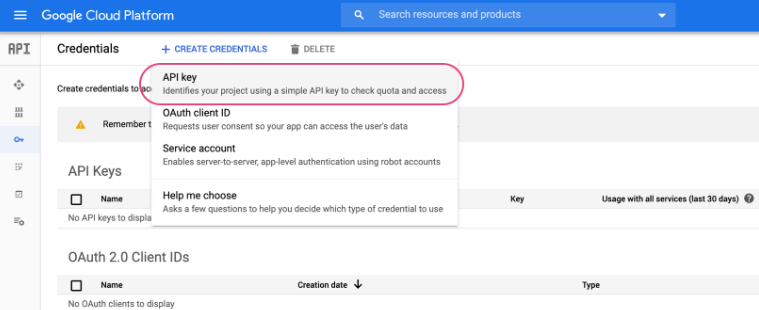
- Go to the Google API credentials page, and click "+ Create credentials."
- Choose "API Key" in the credentials dropdown.
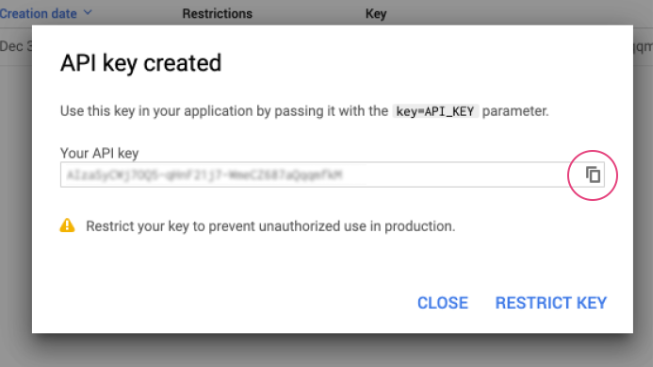
- View and copy API Key.
- Enable the API in Google Cloud.
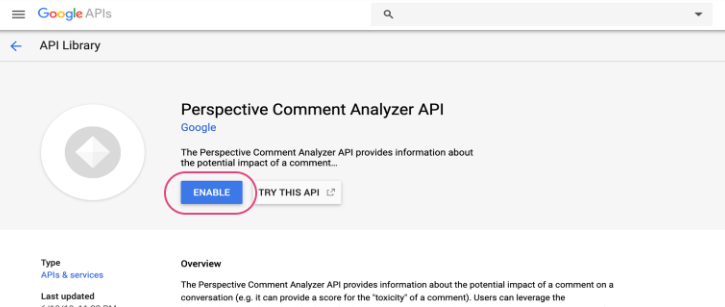
- In the Google Cloud Console, go to APIs & Services > Library.
- Search for Perspective API and enable it if it’s not already activated.
- Configure the API Key in Bubble.
- In Bubble, go to the Plugins tab and select Google Perspective API Plugin.
- Paste the API key into the plugin configuration field.

- Use the Plugin in Bubble.
- Open the Workflows tab in Bubble Editor.
- Add an event (e.g., "When a button is clicked").
- Choose a Google Perspective action, such as:
- Get Toxicity (Analyzes toxicity)
- Get Spam (Detects spam)
- Get ALL (Returns all available scores)
- In the action input, provide the text to analyze.
Plugin Data Calls
Get ALL data
Retrieves all available content moderation scores from the Google Perspective API based on a given text input. It analyzes multiple attributes such as toxicity, spam, incoherence, inflammatory language, and more.
Name | Description | Type |
Comment | The text to be analyzed for content moderation. | Text |
Language | The language of the text (e.g., "en" for English). If omitted, the API attempts to detect the language automatically. | Text |
Return Values:
Return type: JSON
json{
  "attributeScores ATTACK_ON_AUTHOR spanScores": {
    "begin": "number",
    "end": "number",
    "score value": "number",
    "score type": "text"
  },
  "attributeScores ATTACK_ON_AUTHOR summaryScore value": "number",
  "attributeScores ATTACK_ON_AUTHOR summaryScore type": "text",
  "attributeScores SPAM spanScores": {
    "begin": "number",
    "end": "number",
    "score value": "number",
    "score type": "text"
  },
  "attributeScores SPAM summaryScore value": "number",
  "attributeScores SPAM summaryScore type": "text",
  "attributeScores INCOHERENT spanScores": {
    "begin": "number",
    "end": "number",
    "score value": "number",
    "score type": "text"
  },
  "attributeScores INCOHERENT summaryScore value": "number",
  "attributeScores INCOHERENT summaryScore type": "text",
  "attributeScores ATTACK_ON_COMMENTER spanScores": {
    "begin": "number",
    "end": "number",
    "score value": "number",
    "score type": "text"
  },
  "attributeScores ATTACK_ON_COMMENTER summaryScore value": "number",
  "attributeScores ATTACK_ON_COMMENTER summaryScore type": "text",
  "attributeScores UNSUBSTANTIAL spanScores": {
    "begin": "number",
    "end": "number",
    "score value": "number",
    "score type": "text"
  },
  "attributeScores UNSUBSTANTIAL summaryScore value": "number",
  "attributeScores UNSUBSTANTIAL summaryScore type": "text",
  "attributeScores LIKELY_TO_REJECT spanScores": {
    "begin": "number",
    "end": "number",
    "score value": "number",
    "score type": "text"
  },
  "attributeScores LIKELY_TO_REJECT summaryScore value": "number",
  "attributeScores LIKELY_TO_REJECT summaryScore type": "text",
  "attributeScores OBSCENE spanScores": {
    "begin": "number",
    "end": "number",
    "score value": "number",
    "score type": "text"
  },
  "attributeScores OBSCENE summaryScore value": "number",
  "attributeScores OBSCENE summaryScore type": "text",
  "attributeScores TOXICITY spanScores": {
    "begin": "number",
    "end": "number",
    "score value": "number",
    "score type": "text"
  },
  "attributeScores TOXICITY summaryScore value": "number",
  "attributeScores TOXICITY summaryScore type": "text",
  "attributeScores INFLAMMATORY spanScores": {
    "begin": "number",
    "end": "number",
    "score value": "number",
    "score type": "text"
  },
  "attributeScores INFLAMMATORY summaryScore value": "number",
  "attributeScores INFLAMMATORY summaryScore type": "text",
  "languages": "undefined"
}
Plugin Action Calls
Get Toxicity
Analyzes the given text and returns a toxicity score, indicating how likely the text is to be perceived as toxic or offensive. The score ranges from 0 to 1, where values closer to 1 indicate a higher likelihood of toxicity.
Name | Description | Type |
Comment | The text input to be analyzed for toxicity. | Text |
Language | The language of the text (e.g., "en" for English). If omitted, the API attempts to detect the language automatically. | Text |
Return Values:
Return type: JSON
json{
  "attributeScores TOXICITY spanScores": {
    "begin": "number",
    "end": "number",
    "score value": "number",
    "score type": "text"
  },
  "attributeScores TOXICITY summaryScore value": "number",
  "attributeScores TOXICITY summaryScore type": "text",
  "languages": "undefined"
}
Get Author Attack
Analyzes the given text to determine if it contains an attack directed at the author of a discussion or content. This helps detect hostile or offensive language aimed at the original poster.
Name | Description | Type |
Comment | The text input to be analyzed for attacks on the author. | Text |
Language | The language of the text (e.g., "en" for English). If omitted, the API attempts to detect the language automatically. | Text |
Return Values:
Return type: JSON
json{
  "attributeScores ATTACK_ON_AUTHOR spanScores": {
    "begin": "number",
    "end": "number",
    "score value": "number",
    "score type": "text"
  },
  "attributeScores ATTACK_ON_AUTHOR summaryScore value": "number",
  "attributeScores ATTACK_ON_AUTHOR summaryScore type": "text",
  "languages": "undefined"
}
Get Commenter Attack
Analyzes the given text to determine if it contains an attack directed at another commenter in a discussion. This helps detect hostile or offensive language aimed at participants in an online conversation.
Name | Description | Type |
Comment | The text input to be analyzed for attacks on other commenters. | Text |
Language | he language of the text (e.g., "en" for English). If omitted, the API attempts to detect the language automatically. | Text |
Return Values:
Return type: JSON
json{
  "attributeScores ATTACK_ON_COMMENTER spanScores": {
    "begin": "number",
    "end": "number",
    "score value": "number",
    "score type": "text"
  },
  "attributeScores ATTACK_ON_COMMENTER summaryScore value": "number",
  "attributeScores ATTACK_ON_COMMENTER summaryScore type": "text",
  "languages": "undefined"
}
Get Incoherent
Analyzes the given text to determine whether it is incoherent or difficult to understand. This can be useful for detecting nonsensical, confusing, or gibberish comments.
Name | Description | Type |
Comment | The text input to be analyzed for incoherence. | Text |
Language | The language of the text (e.g., "en" for English). If omitted, the API attempts to detect the language automatically. | Text |
Return Values:
Return type: JSON
json{
  "attributeScores INCOHERENT spanScores": {
    "begin": "number",
    "end": "number",
    "score value": "number",
    "score type": "text"
  },
  "attributeScores INCOHERENT summaryScore value": "number",
  "attributeScores INCOHERENT summaryScore type": "text",
  "languages": "undefined"
}
Get Inflammatory
Analyzes the given text to determine whether it contains inflammatory language. This helps identify comments that may provoke or escalate conflicts in discussions.
Name | Description | Type |
Comment | The text input to be analyzed for inflammatory content. | Text |
Language | The language of the text (e.g., "en" for English). If omitted, the API attempts to detect the language automatically. | Text |
Return Values:
Return type: JSON
json{
  "attributeScores INFLAMMATORY spanScores": {
    "begin": "number",
    "end": "number",
    "score value": "number",
    "score type": "text"
  },
  "attributeScores INFLAMMATORY summaryScore value": "number",
  "attributeScores INFLAMMATORY summaryScore type": "text",
  "languages": "undefined"
}
Get Likely To Reject
Analyzes the given text to determine whether it is likely to be rejected based on common moderation criteria. This helps identify comments that might be flagged or removed due to inappropriate content, such as toxicity, spam, or offensive language.
Name | Description | Type |
Comment | The text input to be analyzed for likelihood of rejection. | Text |
Language | The language of the text (e.g., "en" for English). If omitted, the API attempts to detect the language automatically. | Text |
Return Values:
Return type: JSON
json{
  "attributeScores LIKELY_TO_REJECT spanScores": {
    "begin": "number",
    "end": "number",
    "score value": "number",
    "score type": "text"
  },
  "attributeScores LIKELY_TO_REJECT summaryScore value": "number",
  "attributeScores LIKELY_TO_REJECT summaryScore type": "text",
  "languages": "undefined"
}
Get Obscene
Analyzes the given text to determine whether it contains obscene language. This helps identify offensive, inappropriate, or vulgar content that may violate community guidelines.
Name | Description | Type |
Comment | The text input to be analyzed for obscene content. | Text |
Language | The language of the text (e.g., "en" for English). If omitted, the API attempts to detect the language automatically. | Text |
Return Values:
Return type: JSON
json{
  "attributeScores OBSCENE spanScores": {
    "begin": "number",
    "end": "number",
    "score value": "number",
    "score type": "text"
  },
  "attributeScores OBSCENE summaryScore value": "number",
  "attributeScores OBSCENE summaryScore type": "text",
  "languages": "undefined"
}
Get Spam
Analyzes the given text to determine whether it contains spam-like characteristics, such as repetitive, promotional, or irrelevant content. This helps filter out unwanted or low-quality messages.
Name | Description | Type |
Comment | The text input to be analyzed for spam. | Text |
Language | The language of the text (e.g., "en" for English). If omitted, the API attempts to detect the language automatically. | Text |
Return Values:
Return type: JSON
json{
  "attributeScores SPAM spanScores": {
    "begin": "number",
    "end": "number",
    "score value": "number",
    "score type": "text"
  },
  "attributeScores SPAM summaryScore value": "number",
  "attributeScores SPAM summaryScore type": "text",
  "languages": "undefined"
}
Get Unsubstantial
Analyzes the given text to determine whether it lacks meaningful content or is insubstantial. This can be useful for identifying low-value comments that do not contribute to a discussion.
Name | Description | Type |
Comment | The text input to be analyzed for substance. | Text |
Language | The language of the text (e.g., "en" for English). If omitted, the API attempts to detect the language automatically. | Text |
Return Values:
Return type: JSON
json{
  "attributeScores UNSUBSTANTIAL spanScores": {
    "begin": "number",
    "end": "number",
    "score value": "number",
    "score type": "text"
  },
  "attributeScores UNSUBSTANTIAL summaryScore value": "number",
  "attributeScores UNSUBSTANTIAL summaryScore type": "text",
  "languages": "undefined"
}
Get ALL
Analyzes the given text and retrieves all available attribute scores from the Perspective API. This includes metrics for toxicity, spam, incoherence, inflammatory language, obscenity, and more. The results can be used to assess content quality, filter harmful messages, or moderate discussions.
Name | Description | Type |
Comment | The text input to be analyzed for multiple attributes. | Text |
Language | The language of the text (e.g., "en" for English). If omitted, the API attempts to detect the language automatically. | Text |
Return Values:
Return type: JSON
json{
  "attributeScores INFLAMMATORY spanScores": {
    "begin": "number",
    "end": "number",
    "score value": "number",
    "score type": "text"
  },
  "attributeScores INFLAMMATORY summaryScore value": "number",
  "attributeScores INFLAMMATORY summaryScore type": "text",
  "attributeScores SPAM spanScores": {
    "begin": "number",
    "end": "number",
    "score value": "number",
    "score type": "text"
  },
  "attributeScores SPAM summaryScore value": "number",
  "attributeScores SPAM summaryScore type": "text",
  "attributeScores ATTACK_ON_AUTHOR spanScores": {
    "begin": "number",
    "end": "number",
    "score value": "number",
    "score type": "text"
  },
  "attributeScores ATTACK_ON_AUTHOR summaryScore value": "number",
  "attributeScores ATTACK_ON_AUTHOR summaryScore type": "text",
  "attributeScores INCOHERENT spanScores": {
    "begin": "number",
    "end": "number",
    "score value": "number",
    "score type": "text"
  },
  "attributeScores INCOHERENT summaryScore value": "number",
  "attributeScores INCOHERENT summaryScore type": "text",
  "attributeScores ATTACK_ON_COMMENTER spanScores": {
    "begin": "number",
    "end": "number",
    "score value": "number",
    "score type": "text"
  },
  "attributeScores ATTACK_ON_COMMENTER summaryScore value": "number",
  "attributeScores ATTACK_ON_COMMENTER summaryScore type": "text",
  "attributeScores UNSUBSTANTIAL spanScores": {
    "begin": "number",
    "end": "number",
    "score value": "number",
    "score type": "text"
  },
  "attributeScores UNSUBSTANTIAL summaryScore value": "number",
  "attributeScores UNSUBSTANTIAL summaryScore type": "text",
  "attributeScores LIKELY_TO_REJECT spanScores": {
    "begin": "number",
    "end": "number",
    "score value": "number",
    "score type": "text"
  },
  "attributeScores LIKELY_TO_REJECT summaryScore value": "number",
  "attributeScores LIKELY_TO_REJECT summaryScore type": "text",
  "attributeScores OBSCENE spanScores": {
    "begin": "number",
    "end": "number",
    "score value": "number",
    "score type": "text"
  },
  "attributeScores OBSCENE summaryScore value": "number",
  "attributeScores OBSCENE summaryScore type": "text",
  "attributeScores TOXICITY spanScores": {
    "begin": "number",
    "end": "number",
    "score value": "number",
    "score type": "text"
  },
  "attributeScores TOXICITY summaryScore value": "number",
  "attributeScores TOXICITY summaryScore type": "text",
  "languages": "undefined"
}

Changelogs
Update 15.09.26 - Version 1.16.0
- Update Bubble API version.
Update 13.06.25 - Version 1.15.0
- Marketing update (minor change).
Update 30.05.25 - Version 1.14.0
- Minor update (Marketing update).
Update 17.05.25 - Version 1.13.0
- Minor update (Marketing update).
Update 25.07.24 - Version 1.12.0
- Minor update .
Update 24.06.24 - Version 1.11.0
- Updated demo/service links.
Update 19.10.23 - Version 1.10.0
- Updated description.
Update 18.09.23 - Version 1.9.0
- updated description.
Update 13.09.23 - Version 1.8.0
- minor updates.
Update 06.09.23 - Version 1.7.0
- Obfuscation.
Update 11.07.23 - Version 1.6.0
- updated description.
Update 19.06.23 - Version 1.5.0
- Updated the description .
Update 23.02.23 - Version 1.4.0
- deleted the icons.
Update 22.02.23 - Version 1.3.0
- updated the description.
Update 19.07.21 - Version 1.2.0
- Updated icon.
Update 23.02.21 - Version 1.1.0
- Updated icon.
Update 30.07.18 - Version 1.0.0
- Initial Build.