
✅
Demo to preview the settings
✅
Introduction
Effortlessly integrate time slot availability into your app's UI with our plugin. With just a single element, you can access available time slots as a date range list, effortlessly handling time zones. No complex setup or reliance on third-party tools. Enjoy unlimited bookable calendars and seamless scheduling across time zones. Customize your UI to fit your app's design seamlessly.

Step-by-Step Video Tutorial
How to setup
Step 1 – Install the Plugin
- Go to the Plugin Tab
- Open your Bubble Editor.
- Navigate to the Plugins tab on the left panel.
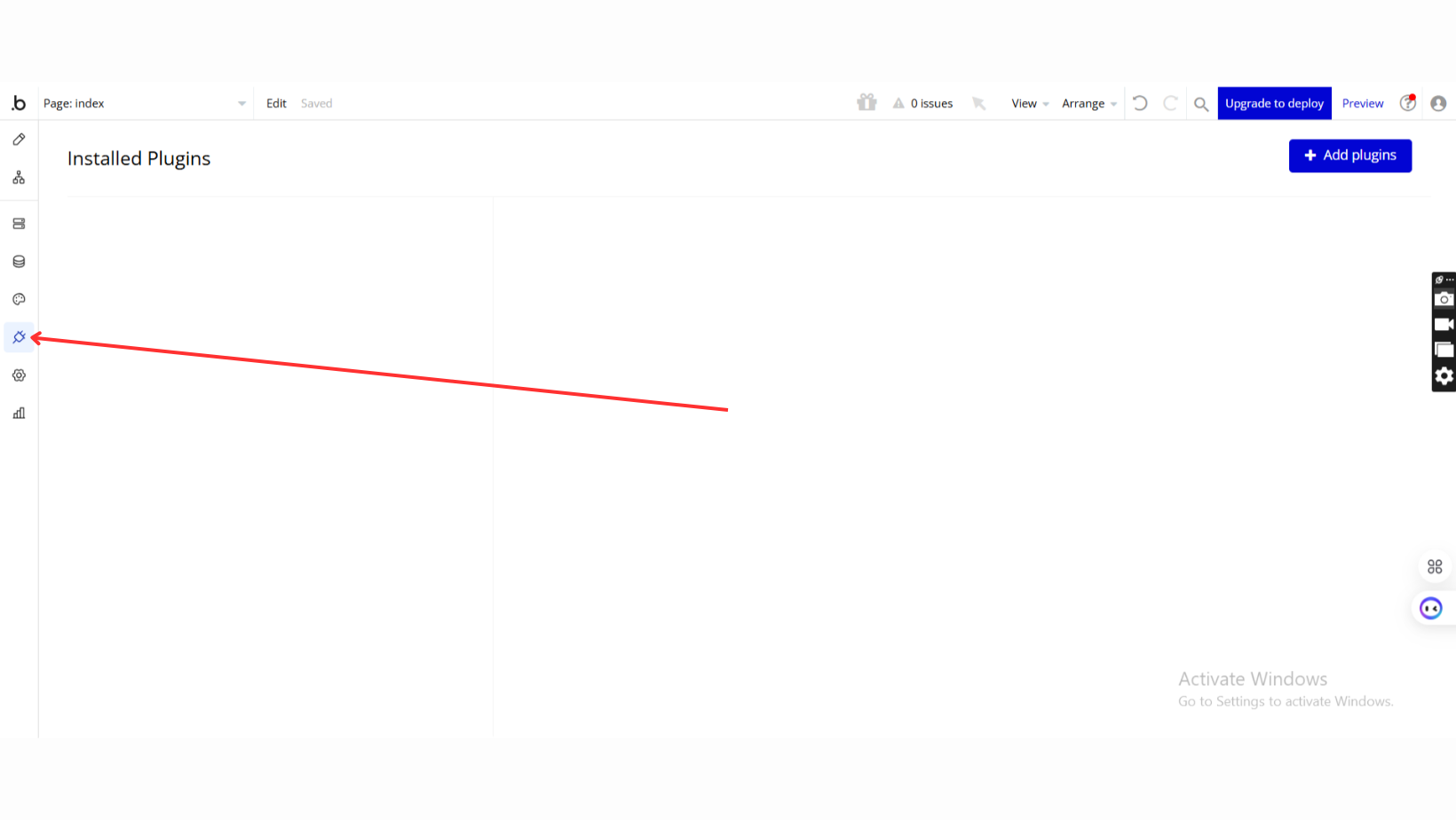
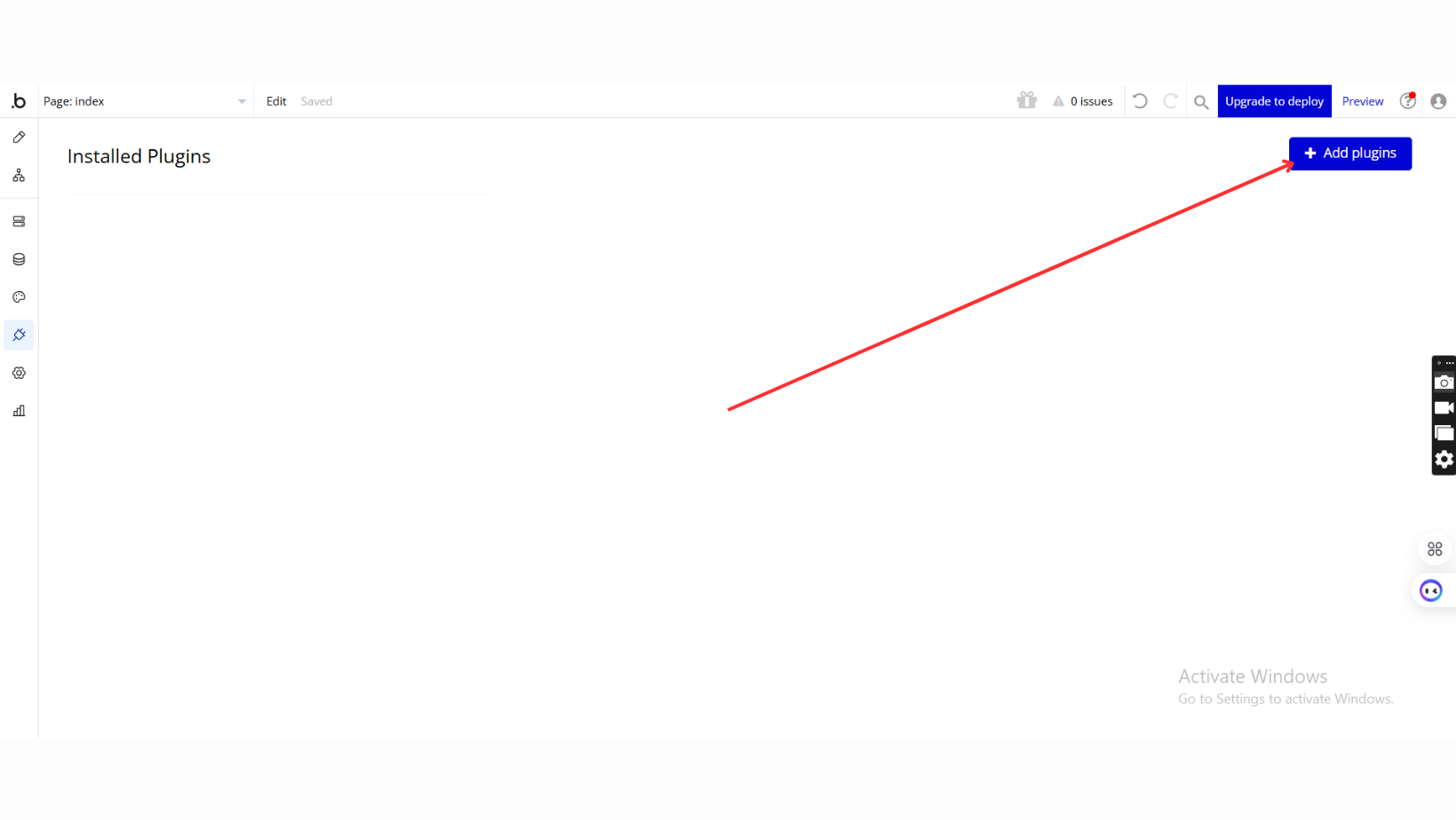
- Add Plugins
- Once in the Plugins tab, click the Add Plugins button.
- Search for the Plugin
- Use the search bar to type Calendar Booking & Time Slots
- Locate the plugin in the search results.
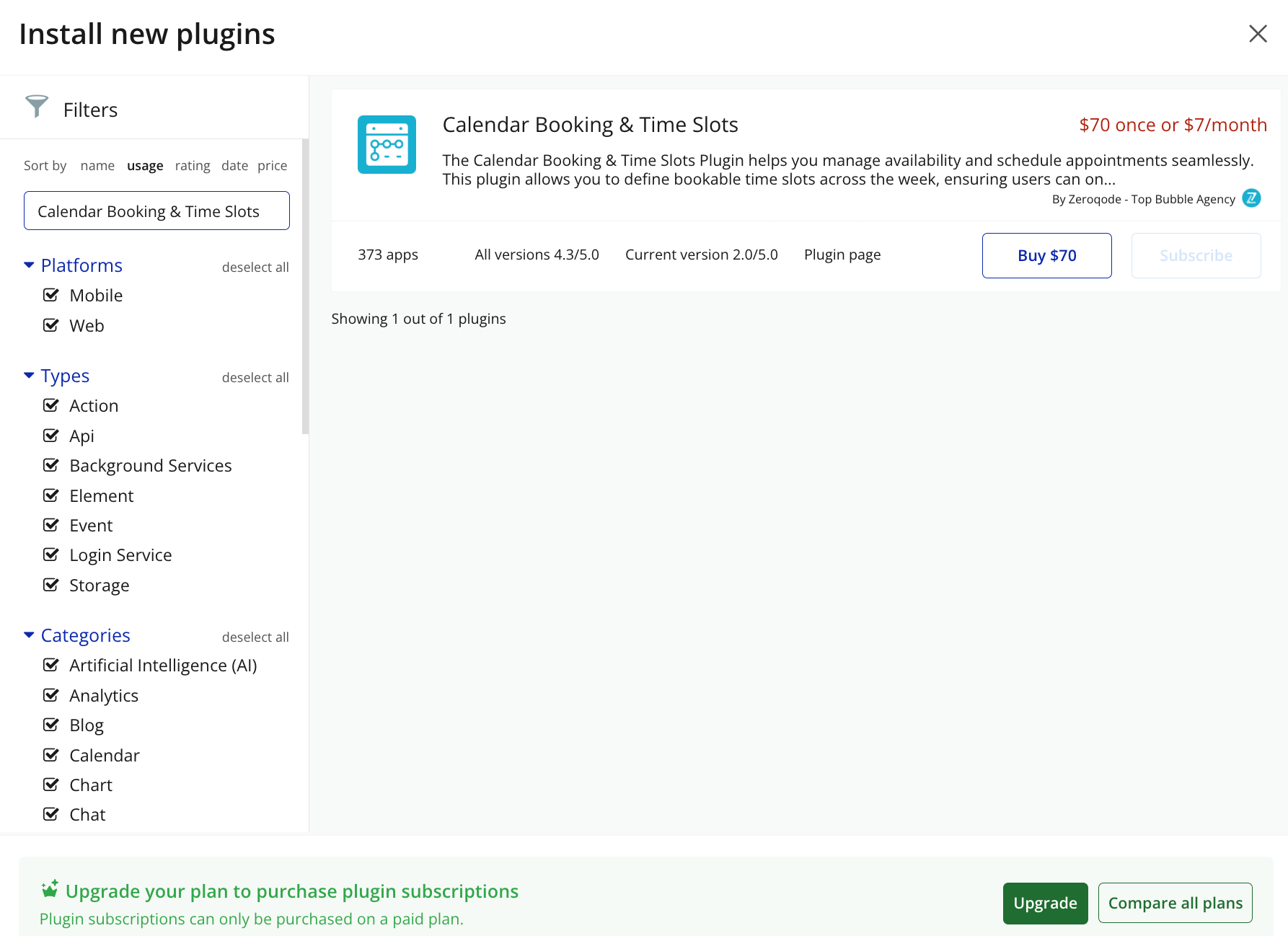
- Install/Buy
- click Buy and follow the purchase instructions.
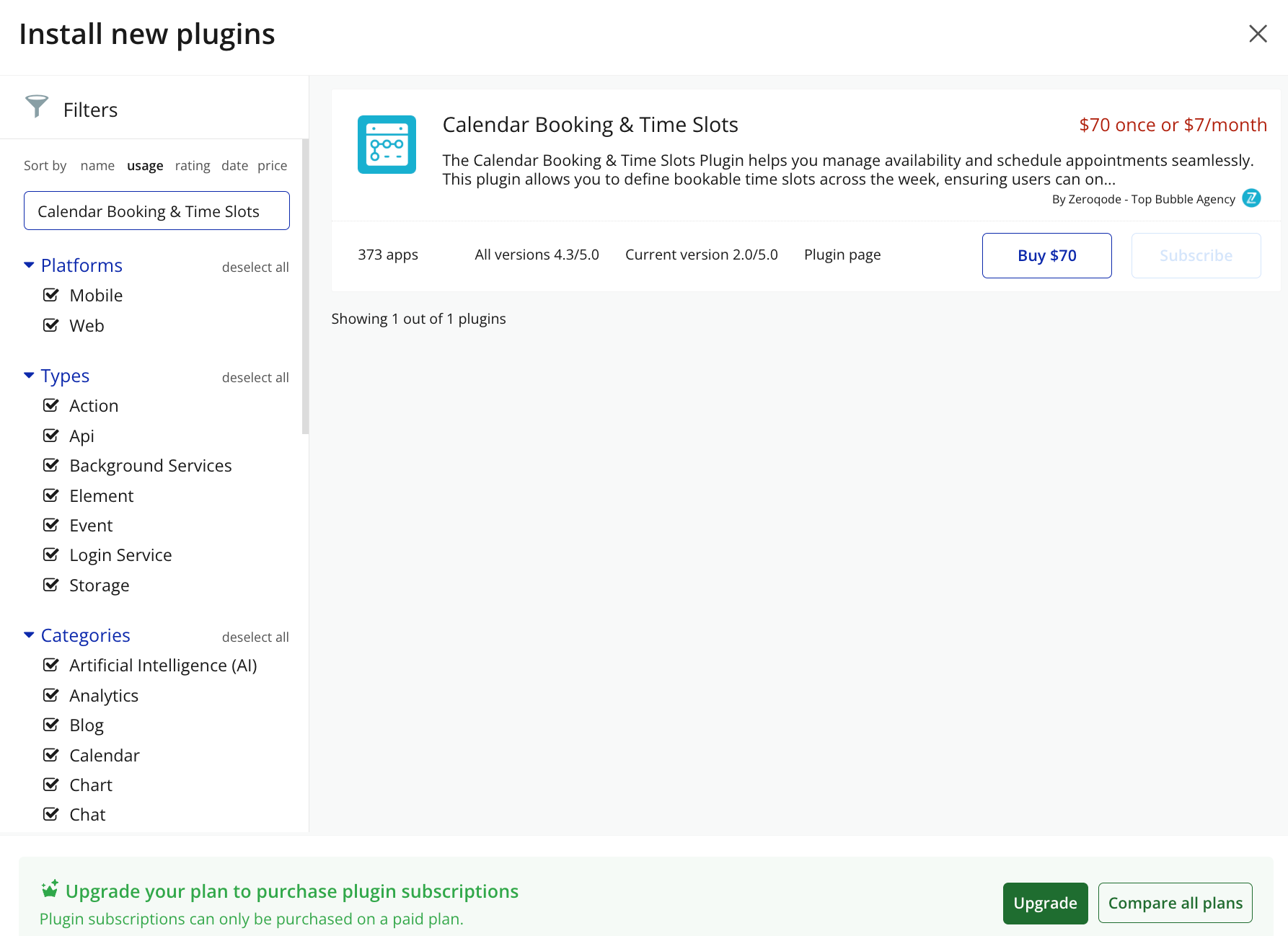
- Payment Information (For Paid Plugins)
- If the plugin is a paid one, fill in your payment details and make payment.
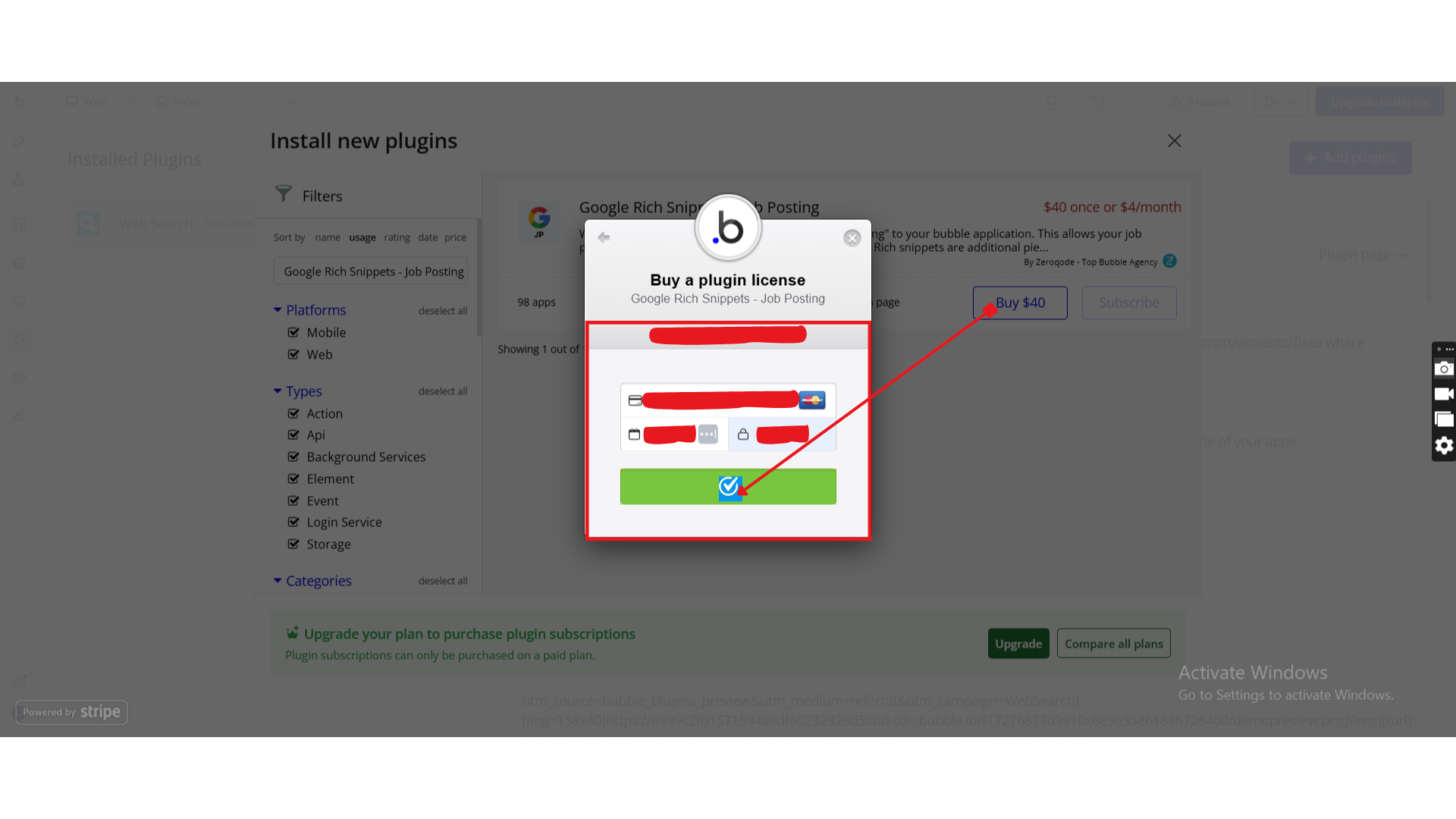
- Charges will be added to your Bubble billing account.
- Remember, if you unsubscribe from the plugin shortly after installation, charges will be prorated based on the days used.
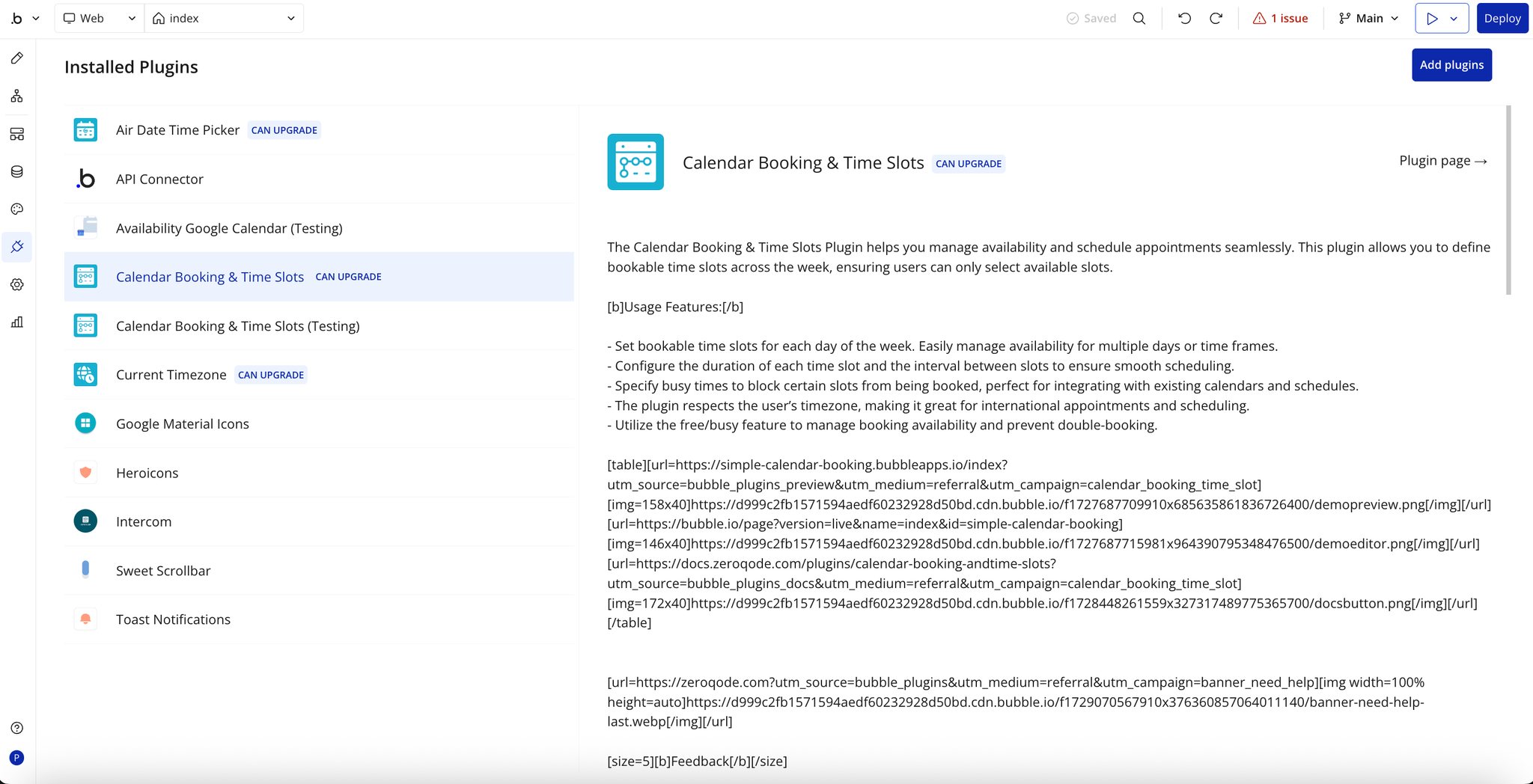
- Plugin Installed
- Once installed, the plugin will appear under the Installed Plugins list in your Bubble Editor.
Step 2 – Add the Plugin Element to Your Page
- Open the Design tab in your Bubble editor.
- Search for the Available Slots element in the Elements panel.
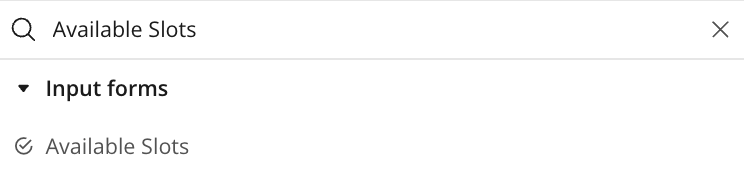
- Drag and drop the element onto your page. This is a small element without a UI, so place it wherever you'd like.
Step 3 – Configure Properties
Select the element and configure its properties in the Property Editor.
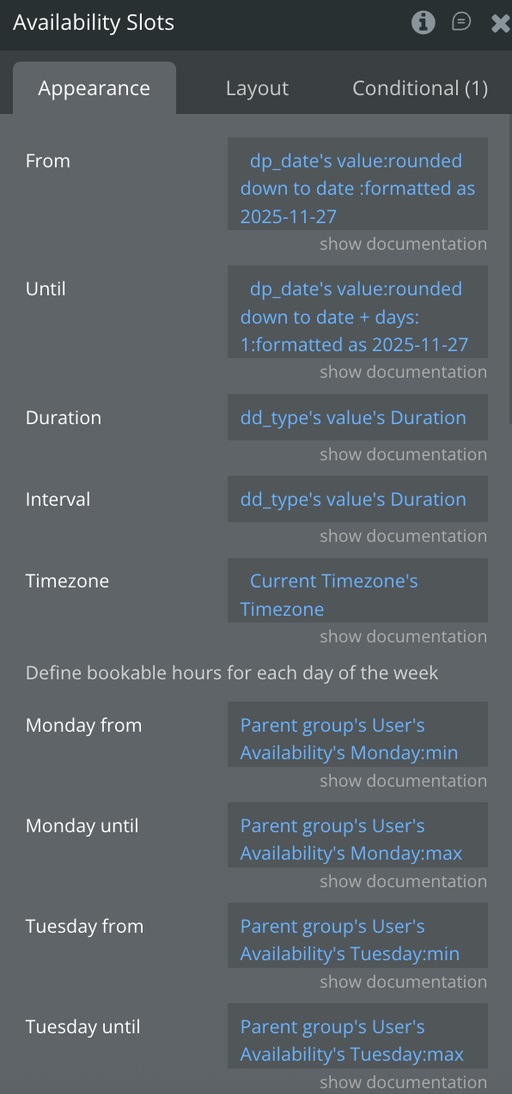
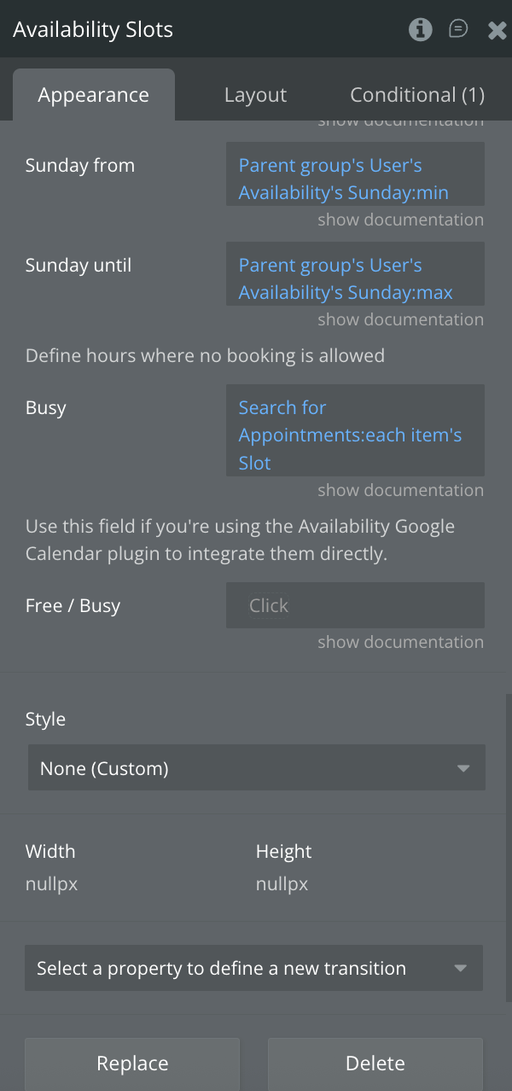
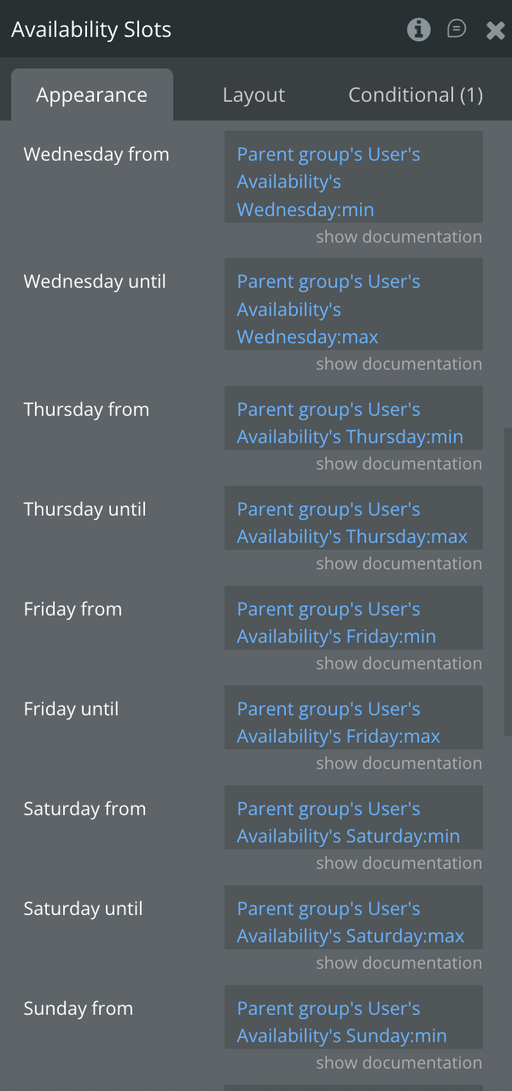
Plugin Element - Available Slots
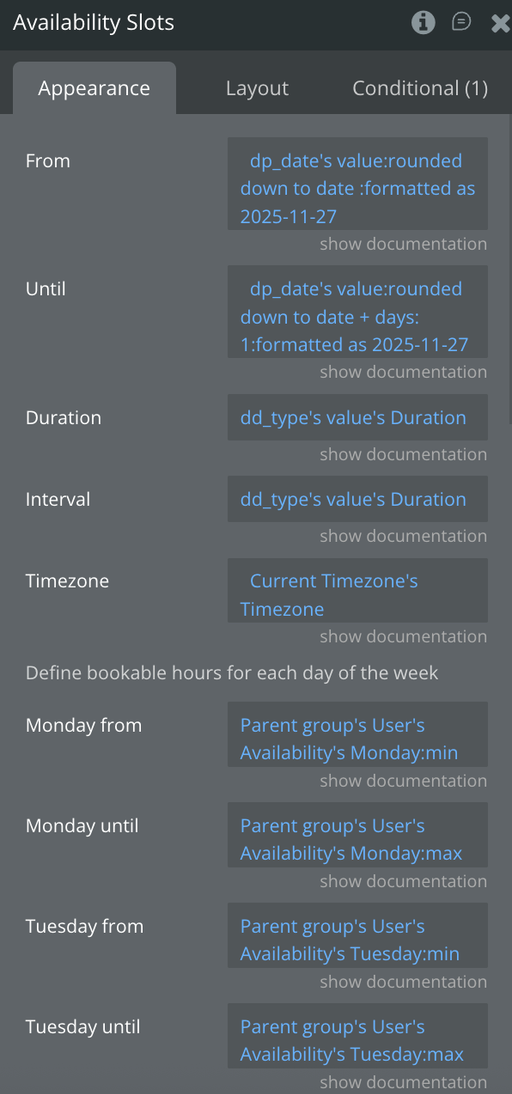
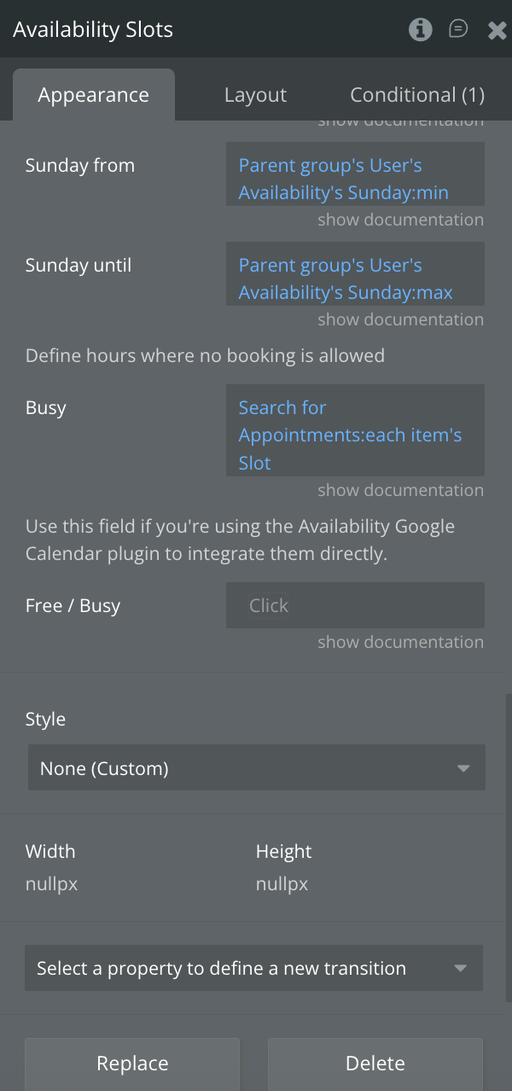
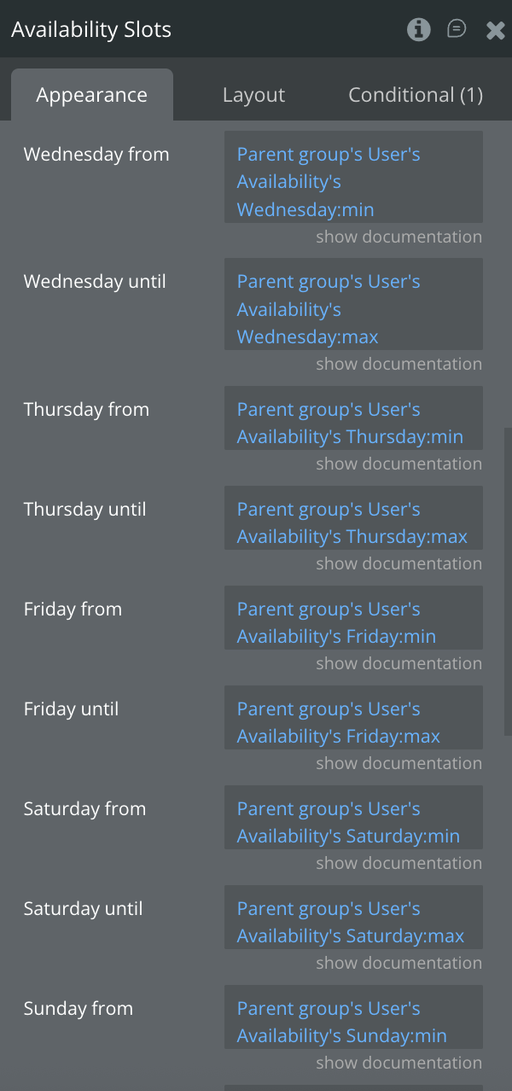
Fields
Title | Description | Type |
From | From what date to start to consider the slots.
Format as YYYY-MM-DD.
Ex: 2021-11-18 | Text |
Until | At what date to stop getting the slots.
Format as YYYY-MM-DD.
Ex: 2021-11-19 | Text |
Duration | The length of each time slot in minutes. | Number |
Interval | The interval between each time slot in minutes. | Number |
Timezone | Timezone name formatted according to iana timezone database: https://www.iana.org/time-zones | Text |
Monday from | Bookable from hour (0 - 24) | Number |
Monday until | Bookable from hour (0 - 24) | Number |
Tuesday from | Bookable from hour (0 - 24) | Number |
Tuesday until | Bookable from hour (0 - 24) | Number |
Wednesday from | Bookable from hour (0 - 24) | Number |
Wednesday until | Bookable from hour (0 - 24) | Number |
Thursday from | Bookable from hour (0 - 24) | Number |
Thursday until | Bookable from hour (0 - 24) | Number |
Friday from | Bookable from hour (0 - 24) | Number |
Friday until | Bookable from hour (0 - 24) | Number |
Saturday from | Bookable from hour (0 - 24) | Number |
Saturday until | Bookable from hour (0 - 24) | Number |
Sunday from | Bookable from hour (0 - 24) | Number |
Sunday until | Bookable from hour (0 - 24) | Number |
Busy | Slots that are already busy. Accepts a list of date ranges. | Date Range List |
Free / Busy | The JSON response in text format returned by the AFree / Busy API call. Only parses the times of the first calendar in the returned list.
{
"kind": "calendar#freeBusy",
"timeMin": "2021-12-01T09:25:23.000Z",
"timeMax": "2021-12-31T09:25:23.000Z",
"calendars": {
"primary": {
"busy": []
}
}
} | Text |

Exposed states
Title | Description | Type |
Available Slots | The available slots | Returns the list with available time slots |
Plugin Data/Action Calls (API Calls only)
Create a Calendar Event
This api call lets you create a new event in a Google Calendar.
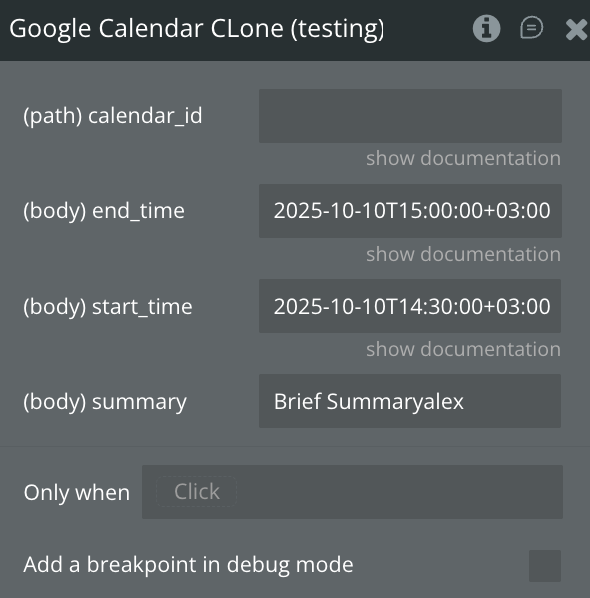
Fields:
Name | Description | Type |
calendar_id | Calendar identifier. To retrieve calendar IDs call the calendarList.list method. If you want to access the primary calendar of the currently logged in user, use the "primary" keyword. | Text |
end_time | The (exclusive) end time of the event. For a recurring event, this is the end time of the first instance. | Text |
start_time | The (inclusive) start time of the event. For a recurring event, this is the start time of the first instance. | Text |
summary | Title of the event. | Text |
Return values:
Name | Description | Type |
id | Unique identifier for the event | Text |
status | Status of the event (confirmed, tentative, etc.) | Text |
htmlLink | URL to view the event in Google Calendar | Text |
created | Timestamp when the event was created | Text (RFC3339 timestamp) |
updated | Timestamp when the event was last updated | Text (RFC3339 timestamp) |
summary | Title of the event | Text |
description | Description or notes for the event | Text |
location | Location of the event | Text |
creator | Information about the event creator | Object |
organizer | Information about the event organizer | Object |
start | Event start time | Object (date/dateTime/timeZone) |
end | Event end time | Object (date/dateTime/timeZone) |
recurrence | Recurrence rules (RRULE) | Array of Text |
attendees | List of attendees | Array of Objects |
reminders | Event reminders configuration | Object |
conferenceData | Video-conference details (e.g., Google Meet) | Object |
hangoutLink | Link to a generated Google Meet session | Text |
transparency | Whether the event blocks time (opaque/transparent) | Text |
visibility | Visibility of the event (default, public, private) | Text |
iCalUID | Stable unique event identifier across copies | Text |
sequence | Revision number of the event | Integer |
kind | The resource type (always "calendar#event") | Text |
etag | Version tag for the event resource | Text |
Update a Calendar Event
This api call lets you update an existing event in a Google Calendar by ID.
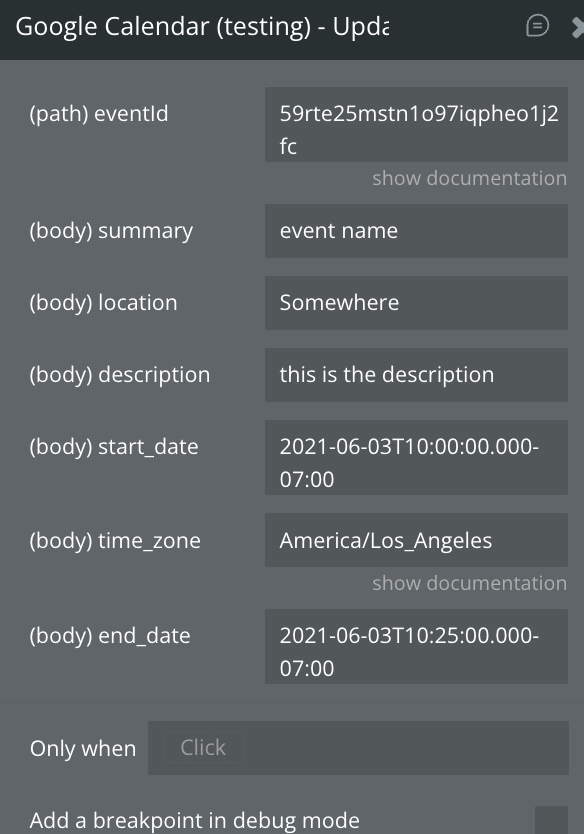
Fields:
Name | Description | Type |
calendar_id | Calendar identifier. To retrieve calendar IDs call the calendarList.list method. If you want to access the primary calendar of the currently logged in user, use the "primary" keyword. | Text |
event_id | Event identifier/ID | Text |
end_time | The (exclusive) end time of the event. For a recurring event, this is the end time of the first instance. | Text |
start_time | The (inclusive) start time of the event. For a recurring event, this is the start time of the first instance. | Text |
location | Geographic location of the event as free-form text. Optional. | Text |
summary | Title of the event. | Text |
event_description | Description of the event. Can contain HTML. Optional. | Text |
Return values:
Name | Description | Type |
id | Unique identifier for the updated event | Text |
status | Status of the event (confirmed, tentative, etc.) | Text |
htmlLink | URL to view the event in Google Calendar | Text |
created | Timestamp when the event was originally created | Text (RFC3339 timestamp) |
updated | Timestamp when the event was last modified | Text (RFC3339 timestamp) |
summary | Title of the event | Text |
description | Description or notes for the event | Text |
location | Event location | Text |
creator | Information about the event creator | Object |
organizer | Information about the event organizer | Object |
start | Event start time | Object (date/dateTime/timeZone) |
end | Event end time | Object (date/dateTime/timeZone) |
recurrence | Recurrence rules (RRULE) | Array of Text |
attendees | List of attendees | Array of Objects |
reminders | Reminder settings | Object |
conferenceData | Video-conference details (e.g., Google Meet) | Object |
hangoutLink | Link to the Google Meet conference (if created) | Text |
transparency | Whether the event blocks time (opaque/transparent) | Text |
visibility | Event visibility (default, public, private) | Text |
iCalUID | Stable event ID across calendars | Text |
sequence | Revision number of the event (increments on updates) | Integer |
kind | Resource type (always "calendar#event") | Text |
etag | Version tag for the resource | Text |
Delete a Calendar Event
This api call lets you delete an existing event in a Google Calendar by ID.
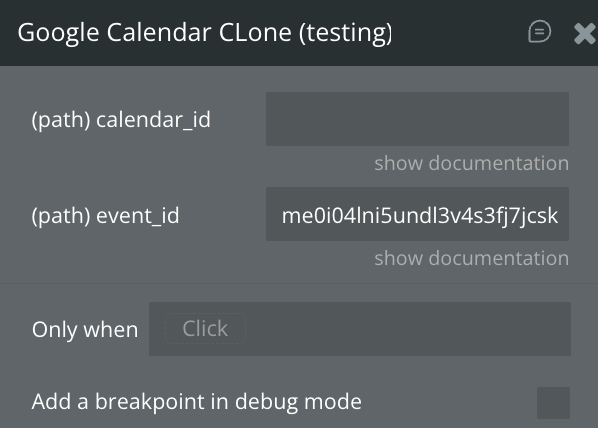
Fields:
Name | Description | Type |
calendar_id | Calendar identifier. To retrieve calendar IDs call the calendarList.list method. If you want to access the primary calendar of the currently logged in user, use the "primary" keyword. | Text |
event_id | Event identifier/ID | Text |
Return values: none
Action Get Free / Busy
The api lets you check when calendars are busy or free within a specified time range.
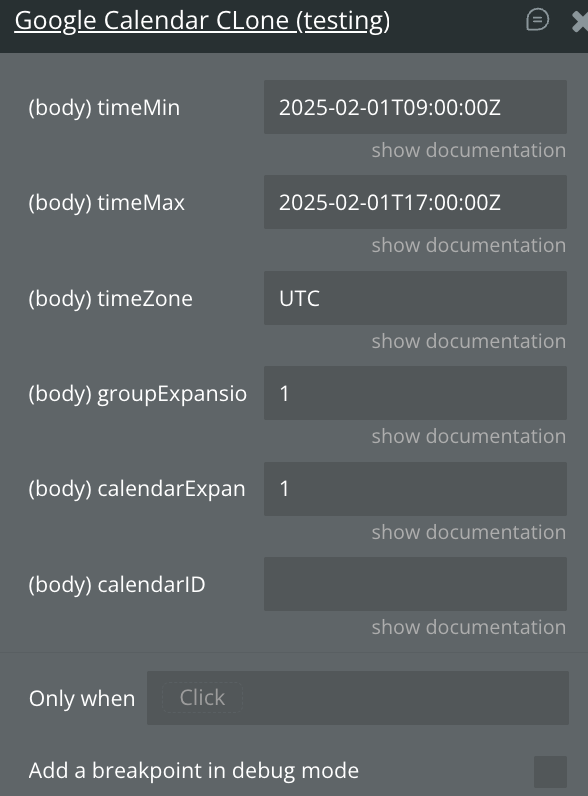
Fields:
Name | Description | Type |
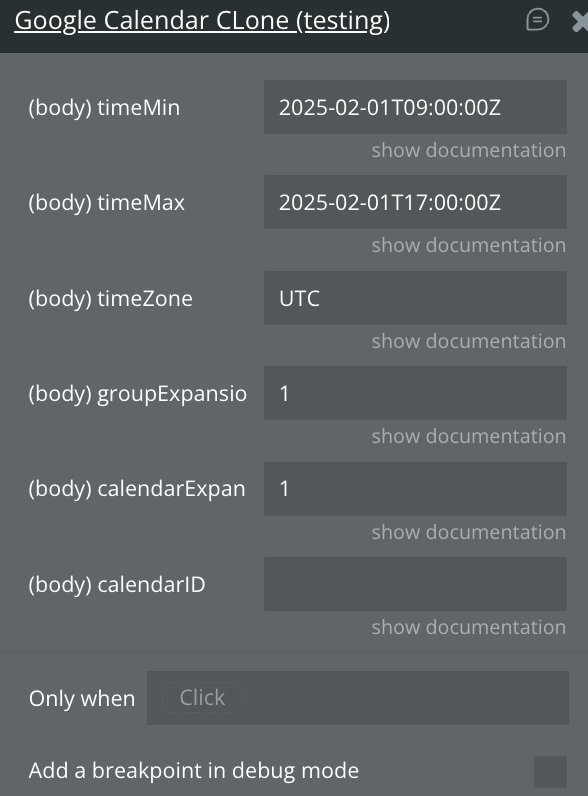
timeMin | The start of the interval for the query formatted as per RFC3339. | Text |
timeMax | The end of the interval for the query formatted as per RFC3339. | Text |
timeZone | Time zone used in the response. Optional. The default is UTC. | Text |
groupExpansionMax | Maximal number of calendar identifiers to be provided for a single group. Optional. An error is returned for a group with more members than this value. Maximum value is 100. | Number |
calendarExpansionMax | Maximal number of calendars for which FreeBusy information is to be provided. Optional. Maximum value is 50. | Number |
calendarID | The identifier of a calendar or a group. | Text |
Return values:
CalendarFreeBusy
Field | Description | Type |
busy | The list of time periods during which the calendar is busy. | Array of Objects { start, end } |
errors | Errors related to that specific calendar (if any). | Array of Objects |
GroupFreeBusy
Field | Description | Type |
calendars | List of calendars that are part of the group. | Array of Text |
errors | Errors related to that group. | Array of Objects |
Data Get Free / Busy
The api lets you check when calendars are busy or free within a specified time range.
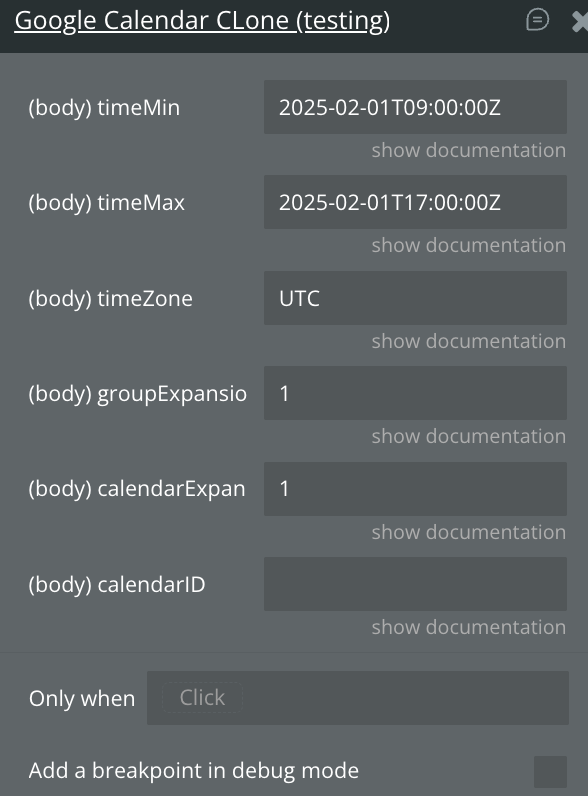
Fields:
Name | Description | Type |
timeMin | The start of the interval for the query formatted as per RFC3339. | Text |
timeMax | The end of the interval for the query formatted as per RFC3339. | Text |
timeZone | Time zone used in the response. Optional. The default is UTC. | Text |
groupExpansionMax | Maximal number of calendar identifiers to be provided for a single group. Optional. An error is returned for a group with more members than this value. Maximum value is 100. | Number |
calendarExpansionMax | Maximal number of calendars for which FreeBusy information is to be provided. Optional. Maximum value is 50. | Number |
calendarID | The identifier of a calendar or a group. | Text |
Return values:
CalendarFreeBusy
Field | Description | Type |
busy | The list of time periods during which the calendar is busy. | Array of Objects { start, end } |
errors | Errors related to that specific calendar (if any). | Array of Objects |
GroupFreeBusy
Field | Description | Type |
calendars | List of calendars that are part of the group. | Array of Text |
errors | Errors related to that group. | Array of Objects |
Retrieve Calendar Events
Retrieves all events from a given calendar, optionally filtered by time range, query text, pagination, or sync tokens. It returns a paginated collection of event resources, making it useful for displaying calendar contents or syncing event data.
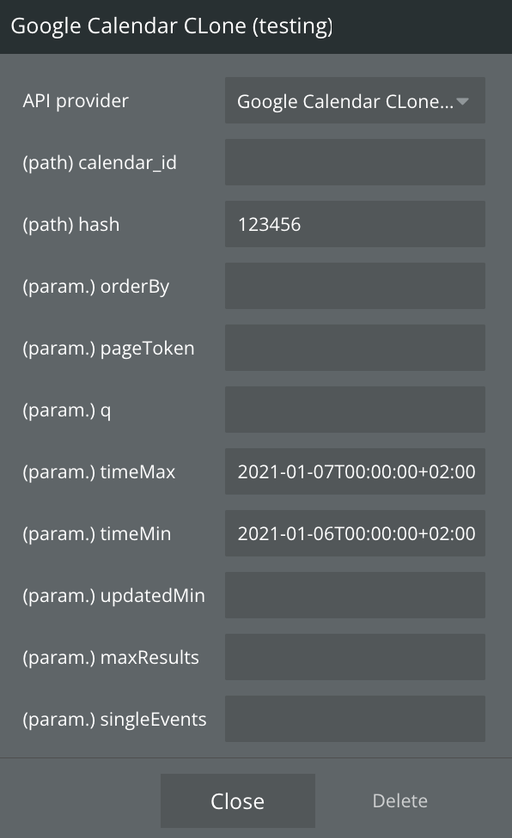
Fields:
Name | Description | Type |
calendar_id | Calendar identifier. To retrieve calendar IDs call the calendarList.list method. If you want to access the primary calendar of the currently logged in user, use the "primary" keyword. | Text |
hash | The random number | Text |
orderBy | The order of the events returned in the result. Optional. The default is an unspecified, stable order.Acceptable values are:
•
“startTime”: Order by the start date/time (ascending). This is only available when querying single events (i.e. the parameter singleEvents is True)
•
“updated”: Order by last modification time (ascending). | Text |
pageToken | Token specifying which result page to return. Optional. | Text |
q | Free text search terms to find events that match these terms in the following fields: summary, description, location, attendee’s displayName, attendee’s email. Optional. | Text |
timeMax | Upper bound (exclusive) for an event's start time to filter by. Optional. The default is not to filter by start time. Must be an RFC3339 timestamp with mandatory time zone offset, for example, 2011-06-03T10:00:00-07:00, 2011-06-03T10:00:00Z. Milliseconds may be provided but are ignored. If timeMin is set, timeMax must be greater than timeMin. | Text |
timeMin | Lower bound (exclusive) for an event’s end time to filter by. Optional. The default is not to filter by end time. Must be an RFC3339 timestamp with mandatory time zone offset, for example, 2011-06-03T10:00:00-07:00, 2011-06-03T10:00:00Z. Milliseconds may be provided but are ignored. If timeMax is set, timeMin must be smaller than timeMax. | Text |
updatedMin | Lower bound for an event’s last modification time (as a RFC3339 timestamp) to filter by. When specified, entries deleted since this time will always be included regardless of showDeleted. Optional. The default is not to filter by last modification time. | Text |
maxResults | Maximum number of events returned on one result page. The number of events in the resulting page may be less than this value, or none at all, even if there are more events matching the query. Incomplete pages can be detected by a non-empty nextPageToken field in the response. By default the value is 250 events. The page size can never be larger than 2500 events. Optional. | Text |
singleEvents | Whether to expand recurring events into instances and only return single one-off events and instances of recurring events, but not the underlying recurring events themselves. Optional. The default is False. | Text |
Return values:
Name | Description | Type |
kind | Identifies this as an events collection ("calendar#events"). | Text |
etag | Version tag for the entire events collection. | Text |
summary | Title of the calendar from which events are listed. | Text |
description | Description of the calendar. | Text |
updated | Timestamp of last calendar update. | Text (RFC3339 timestamp) |
timeZone | The calendar’s time zone. | Text |
accessRole | The user’s access level for this calendar. | Text |
items | The array of event objects returned. | Array of Objects (Event resources) |
nextPageToken | Token for fetching the next page of results. | Text |
nextSyncToken | Token used for incremental syncs. | Text |
defaultReminders | The default reminders for events on this calendar. | Array of Objects |
nextLink | Deprecated pagination link (may appear if enabled). | Text |
Get Calendar Event
Retrieves a single event from a specific calendar using its event ID. It returns the full Event resource, including times, attendees, reminders, conference data, and other metadata. This call is commonly used to fetch event details for display, editing, or synchronization.
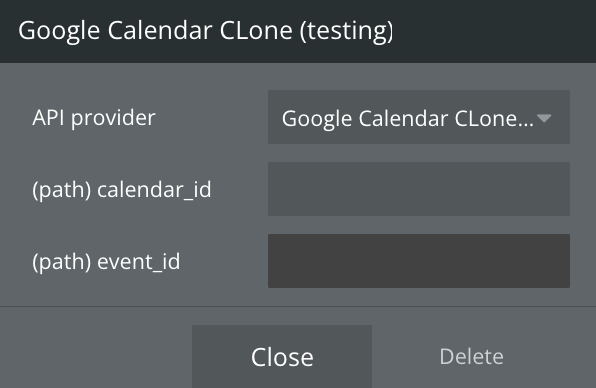
Fields:
Name | Description | Type |
calendar_id | Calendar identifier. To retrieve calendar IDs call the calendarList.list method. If you want to access the primary calendar of the currently logged in user, use the "primary" keyword. | Text |
event_id | The id of the event to retrive information | Text |
Return values:
Name | Description | Type |
kind | Identifies this as an event ("calendar#event"). | Text |
etag | Version tag for the event. | Text |
id | Unique identifier for the event. | Text |
status | Event status (confirmed, tentative, etc.). | Text |
htmlLink | URL to view the event in Google Calendar. | Text |
created | Timestamp when the event was created. | Text (RFC3339 timestamp) |
updated | Timestamp when the event was last modified. | Text (RFC3339 timestamp) |
summary | Event title. | Text |
description | Event description or notes. | Text |
location | Event location. | Text |
colorId | Calendar color applied to the event (if set). | Text |
creator | Information about the event creator. | Object |
organizer | Information about the event organizer. | Object |
start | Event start time details. | Object (date, dateTime, timeZone) |
end | Event end time details. | Object (date, dateTime, timeZone) |
endTimeUnspecified | Whether the end time is unspecified. | Boolean |
recurrence | Recurrence rules (RRULE). | Array of Text |
recurringEventId | ID of the recurring series this instance belongs to. | Text |
originalStartTime | Start time of the recurring instance before overrides. | Object |
transparency | Indicates if event blocks time (opaque / transparent). | Text |
visibility | Visibility of the event (default, public, private). | Text |
iCalUID | Stable unique identifier used across calendars. | Text |
sequence | Revision number of the event (increases after changes). | Integer |
attendees | List of attendees with their statuses. | Array of Objects |
attendeesOmitted | Whether some attendees are omitted from the response. | Boolean |
extendedProperties | Custom private and shared properties. | Object |
hangoutLink | Deprecated Google Meet link (if generated). | Text |
conferenceData | Structured Google Meet/conference info. | Object |
gadget | Deprecated gadget data. | Object |
anyoneCanAddSelf | Whether anyone can join the event. | Boolean |
guestsCanInviteOthers | Whether guests can invite others. | Boolean |
guestsCanModify | Whether guests can modify the event. | Boolean |
guestsCanSeeOtherGuests | Whether guests can see other guests. | Boolean |
privateCopy | Indicates that this event is a private copy. | Boolean |
locked | Whether the event is locked for editing. | Boolean |
reminders | Reminder settings for the event. | Object |
source | Source link if imported from another system. | Object |
attachments | Files attached to the event. | Array of Objects |
Get User Profile Info
Returns basic profile information about the authenticated user associated with the provided access token.
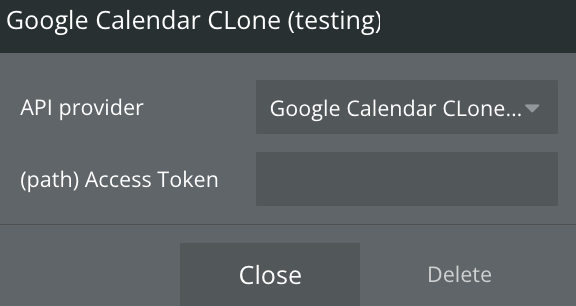
Fields:
Name | Description | Type |
Access Token | Example: access_token=YOUR_TOKEN. You need to set the token if you manually get the refresh and access token. If you use Sign in with Social Media, leave blank | Text |
Return values:
Name | Description | Type |
id | The user’s unique Google ID. | Text |
email | The user’s primary email address. | Text |
verified_email | Whether Google has verified this email address. | Boolean |
name | The user’s full display name. | Text |
given_name | The user’s first (given) name. | Text |
family_name | The user’s last (family) name. | Text |
picture | URL of the user’s profile picture. | Text |
locale | The user’s locale (e.g. en, en-GB). | Text |
hd | Hosted domain of the user’s Google Workspace account (if applicable). | Text |
Workflow example
Using the Get Free/Buy Api Call
The
Calendar Booking plugin can also be used in combination with the Google Calendar API Calls. The apis allow you to retrieve the users' occupied times in a day. These time slots can be inserted into the Available Slot busy property. These times will then be filtered out from the rest of the available slots.In order to insert the data from the API make use of the free/busy field. Here you can make a call to an external API, select the
Google Calendar Get free/busy option and then select it's body. Make sure to fill in the parameters according to your needs.If you are using the Free/Busy property, the other busy parameter will be ignored.
Set up the scheduling properties
The
From and Until properties define from what starting date up to what end date the available slots will be returned. Formatted as YYYY-MM-DD.If the fields are filled in incorrectly, these fields will automatically be assigned another value.
Interval defines the time between each time slot in minutes.Duration defines the duration of each slot in minutes.💡
A
Duration of 30 with an Interval of 60 means you have one 30 minute meeting available every hour.With
x day from and x day until you specify the bookable hours for each day of the week. Specify a number from 0 - 24 to set the hour of the day on a 24-hour clock.With
Timezone you can specify in which timezone the bookable hours should be interpreted.💡
What time zone should you use?
Let's say
Alice is a coach in your app with a bookable calendar for coaching.
Bob from London wants to schedule a session with Alice who lives in Tokyo.
In this scenario you should use Asia/Tokyo as the timezone.
As for Bob, when he is booking a time, the available slots will be converted to London's timezone, so that Bob can see the times in his local time.Busy lets you exclude specific time slots from the calendar from booking. Use this to exclude slots that are already busy, or specific times in the day like lunch. The Busy property expects a list of date range items.To reset the component just use the
Reset relevant inputs action provided by Bubble.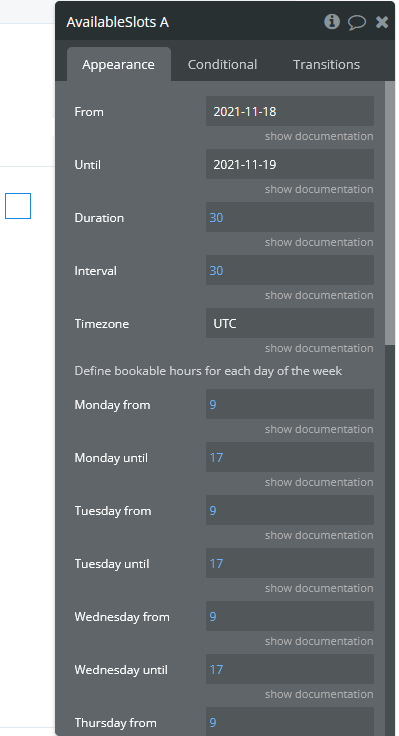

Changelogs
Update 26.05.26 - Version 1.11.0
- Bubble Plugin Page Update (Tutorials).
Update 01.12.25 - Version 1.10.0
- Included Google Calendar API Calls.
Update 16.07.25 - Version 1.9.0
- Bubble Plugin Page Update (Logo).
Update 11.06.25 - Version 1.8.0
- Marketing update (minor change).
Update 24.10.24 - Version 1.7.0
- Minor update (Marketing update).
Update 20.07.24 - Version 1.6.0
- Minor update.
Update 19.06.24 - Version 1.5.0
- Minor update.
Update 10.06.24 - Version 1.4.0
- Updated demo/service links.
Update 26.02.24 - Version 1.3.0
- updated description.
Update 17.02.24 - Version 1.2.0
- minor updates.
Update 12.02.24 - Version 1.1.0
- updated description.
Update 13.11.23 - Version 1.0.7
- fix errors, add logging.
Update 13.11.23 - Version 1.0.6
- update v4.
Update 14.06.23 - Version 1.0.5
- Updated plugin name.
Update 30.11.22 - Version 1.0.4
- Delete unnecesary logging, check for dependencies.
Update 13.10.22 - Version 1.0.3
- update plugin version.
Update 13.04.22 - Version 1.0.2
- fix issue related to timezone conversion.
Update 28.01.22 - Version 1.0.1
- Updated description.
Update 27.01.22 - Version 1.0.0
- Calendar booking release.
Update 18.11.21 - Version 0.0.3
- update.
Update 27.05.21 - Version 0.0.2
- added the ability to reset.
Update 21.05.21 - Version 0.0.1
- init.