Update 11.03.26 - Version 2.0.0
- Bubble Plugin Page Update (Docs).
Update 02.02.26 - Version 1.56.0
Update 19.11.25 - Version 1.55.0
Update 09.07.25 - Version 1.54.0
- Bubble Plugin Page Update (Logo).
Update 23.06.25 - Version 1.53.0
- Bubble Plugin Page Update (Logo).
Update 14.06.25 - Version 1.52.0
- Migrated "Autocomplete" element..
Update 12.06.25 - Version 1.51.0
- Marketing update (minor change).
Update 22.11.24 - Version 1.50.0
- Minor update(Marketing update).
Update 14.11.24 - Version 1.49.0
- Minor update (Marketing update).
Update 28.10.24 - Version 1.48.0
- Minor update (Marketing update).
Update 24.10.24 - Version 1.47.0
- Removing keys from the plugin.
Update 23.07.24 - Version 1.46.0
Update 10.06.24 - Version 1.45.0
- Updated demo/service links.
Update 13.03.24 - Version 1.44.0
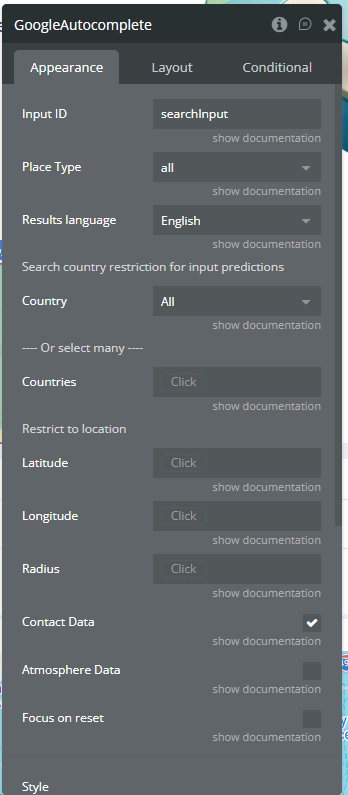
- Added "Focus on reset" field..
Update 06.02.24 - Version 1.43.0
Update 26.01.24 - Version 1.42.0
- Added element resizing functionality.
Update 17.01.24 - Version 1.41.0
Update 15.01.24 - Version 1.40.0
Update 15.01.24 - Version 1.39.0
Update 19.10.23 - Version 1.38.0
Update 18.09.23 - Version 1.37.0
Update 13.09.23 - Version 1.36.0
Update 06.09.23 - Version 1.35.0
Update 11.07.23 - Version 1.34.0
Update 17.06.23 - Version 1.33.0
- Updated the description .
Update 23.02.23 - Version 1.32.0
Update 21.02.23 - Version 1.31.0
Update 02.02.23 - Version 1.30.0
Update 20.01.23 - Version 1.29.0
Update 19.09.22 - Version 1.28.0
Update 29.08.22 - Version 1.27.0
Update 03.07.22 - Version 1.26.0
- added waiting for page loading.
Update 07.06.22 - Version 1.25.0
Update 03.06.22 - Version 1.24.0
Update 27.05.22 - Version 1.23.0
- "Removed outdated statutes that caused the error message".
Update 28.07.21 - Version 1.22.0
Update 19.07.21 - Version 1.21.0
Update 30.04.21 - Version 1.20.0
- Added new states to display all details of a place.
Update 09.04.21 - Version 1.19.0
- Added the ability to enable/disable some details about the place.
Update 09.02.21 - Version 1.18.0
Update 19.01.21 - Version 1.17.0
- Fixed issue with focus to null.
Update 11.08.20 - Version 1.16.0
- Updated API Keys and fixed bugs.
Update 18.02.20 - Version 1.15.0
- Update - enforce users to use bubble standard map to ensure good work of plugin..
Update 23.01.20 - Version 1.14.0
- Update - autocoplete input with location name only full address doesn't contains it..
Update 22.01.20 - Version 1.13.0
- Update - added Reset action, returning full name and full address in search input.
Update 17.01.20 - Version 1.12.0
- Fixes - return entire selected address for the bubble input element used..
Update 10.10.19 - Version 1.11.0
- Improvement - Added action to fetch place data by its ID, also added a couple of new useful states.
Update 12.08.19 - Version 1.10.0
- Fixed the issue with multiple countries filter.
Update 06.06.19 - Version 1.9.0
Update 04.06.19 - Version 1.8.0
Update 27.05.19 - Version 1.7.0
Update 19.01.19 - Version 1.6.0
Update 15.01.19 - Version 1.5.0
Update 12.01.19 - Version 1.4.0
- Added ability to set location (latitude and longitude) and set the radius ( in metres ) to search. 2. Support of multiply inputs, insert id of each input separated by a comma. .
Update 07.01.19 - Version 1.3.0
Update 19.12.18 - Version 1.2.0
- Added Place ID state. 2) Added Place Photo url State. 3) Added select language for results 4) Predictions can be disabled from input and shown in state 5) Added oportunity to restrict search to a specific country or a list of countries..
Update 17.12.18 - Version 1.1.0
Update 13.12.18 - Version 1.0.0