
✅
Demo to preview the plugin:
✅
Introduction
The Calendly Plugin for Bubble enables seamless integration of Calendly’s scheduling system into your application, allowing users to book meetings without leaving your app. It supports embedding scheduling widgets (inline or popup), retrieving event and invitee data, and handling real-time updates through webhooks when meetings are created or canceled. This makes it suitable for building booking systems, consultation platforms, or any workflow that requires automated scheduling and event tracking.
Key Features
- Supports both inline and popup Calendly scheduling widgets.
- Receive instant notifications for new bookings and cancellations.
- Retrieve detailed information about scheduled events and invitees.
- Adjust widget appearance including colors and background.
- Populate user details like name and email automatically in the scheduler.
Prerequisites
Before setting up the plugin, make sure you have the following ready:
- A Bubble account and app where the plugin will be installed
- A Calendly account, if you do not have one create one here https://calendly.com/signup
- You must be on the Calendly Professional plan in order to utilize webhooks.
- You must be on the Bubble Personal plan or higher in order to access Backend Workflows to use webhooks.
How to setup
Step 1 – Install the Plugin
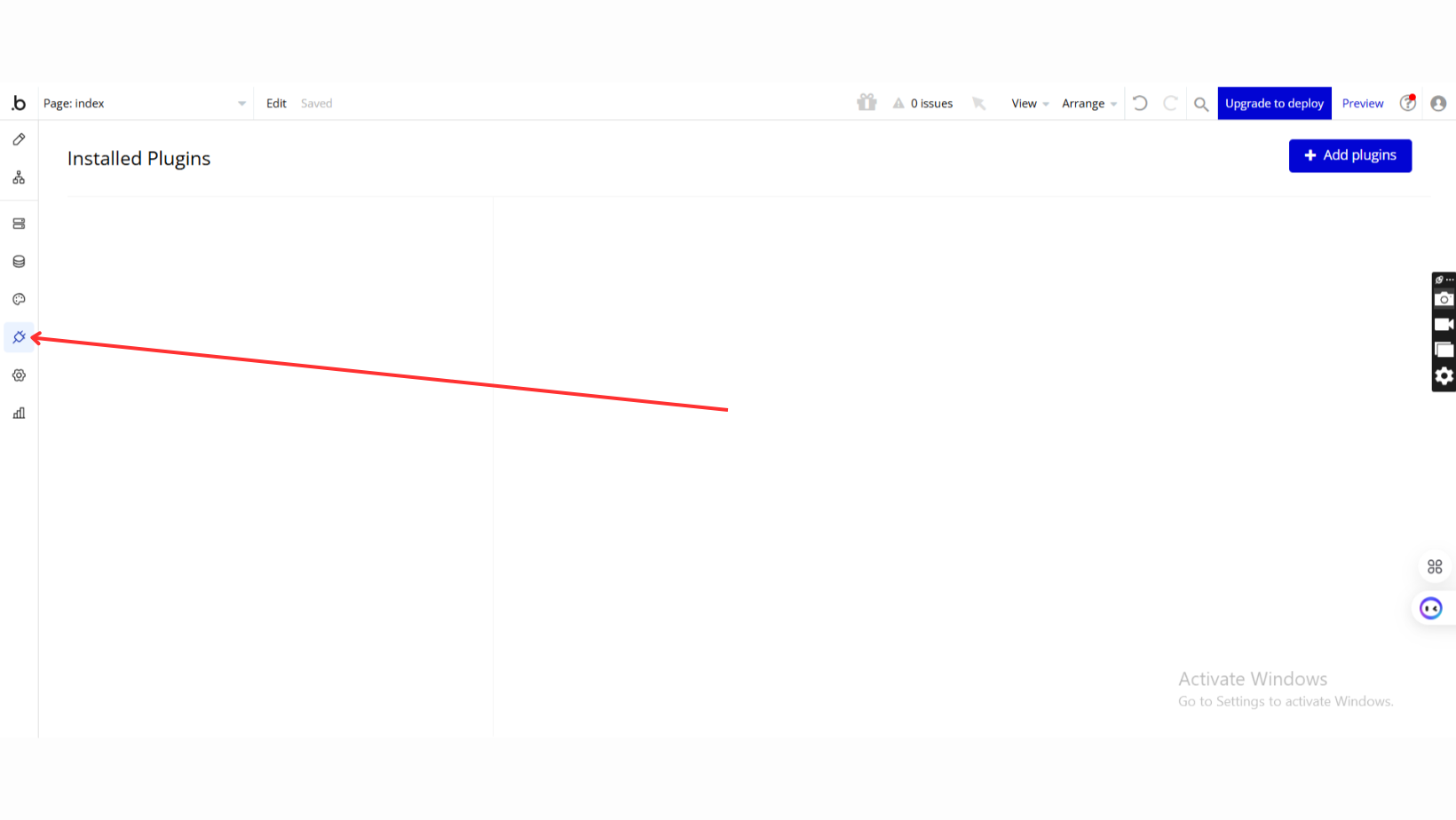
- Go to the Plugin Tab
- Open your Bubble Editor.
- Navigate to the Plugins tab on the left panel.
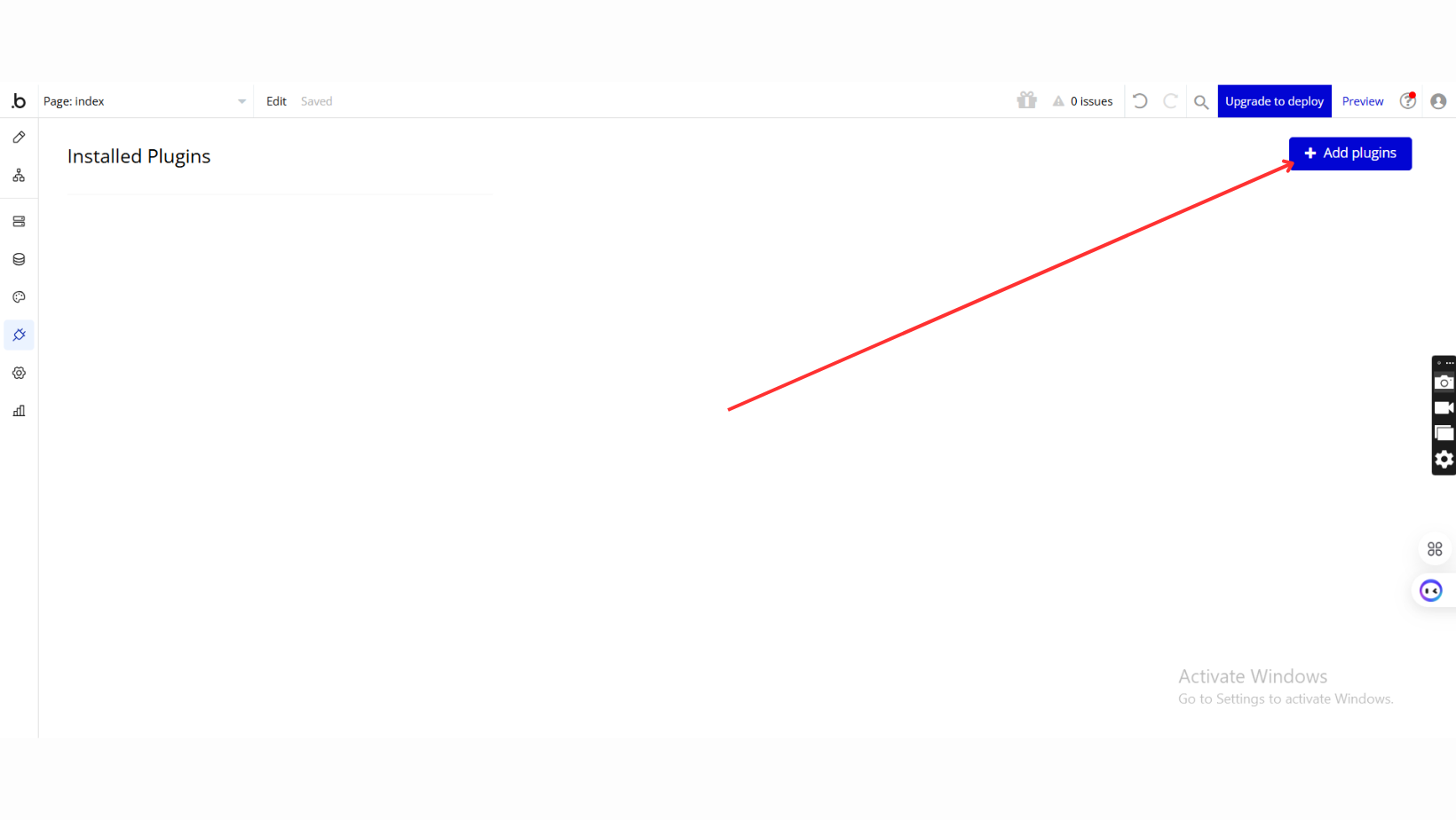
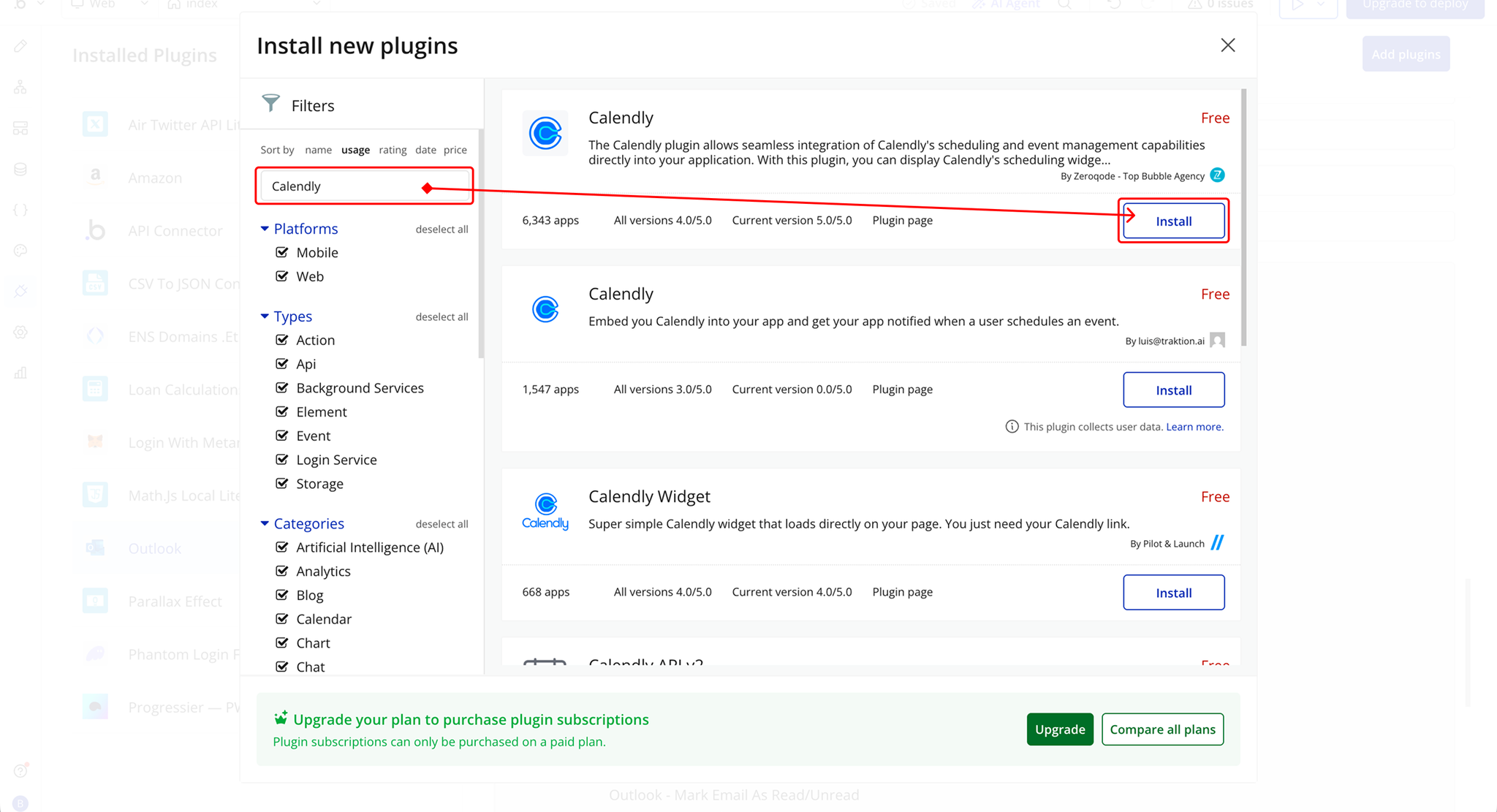
- Add Plugins
- Once in the Plugins tab, click the Add Plugins button.
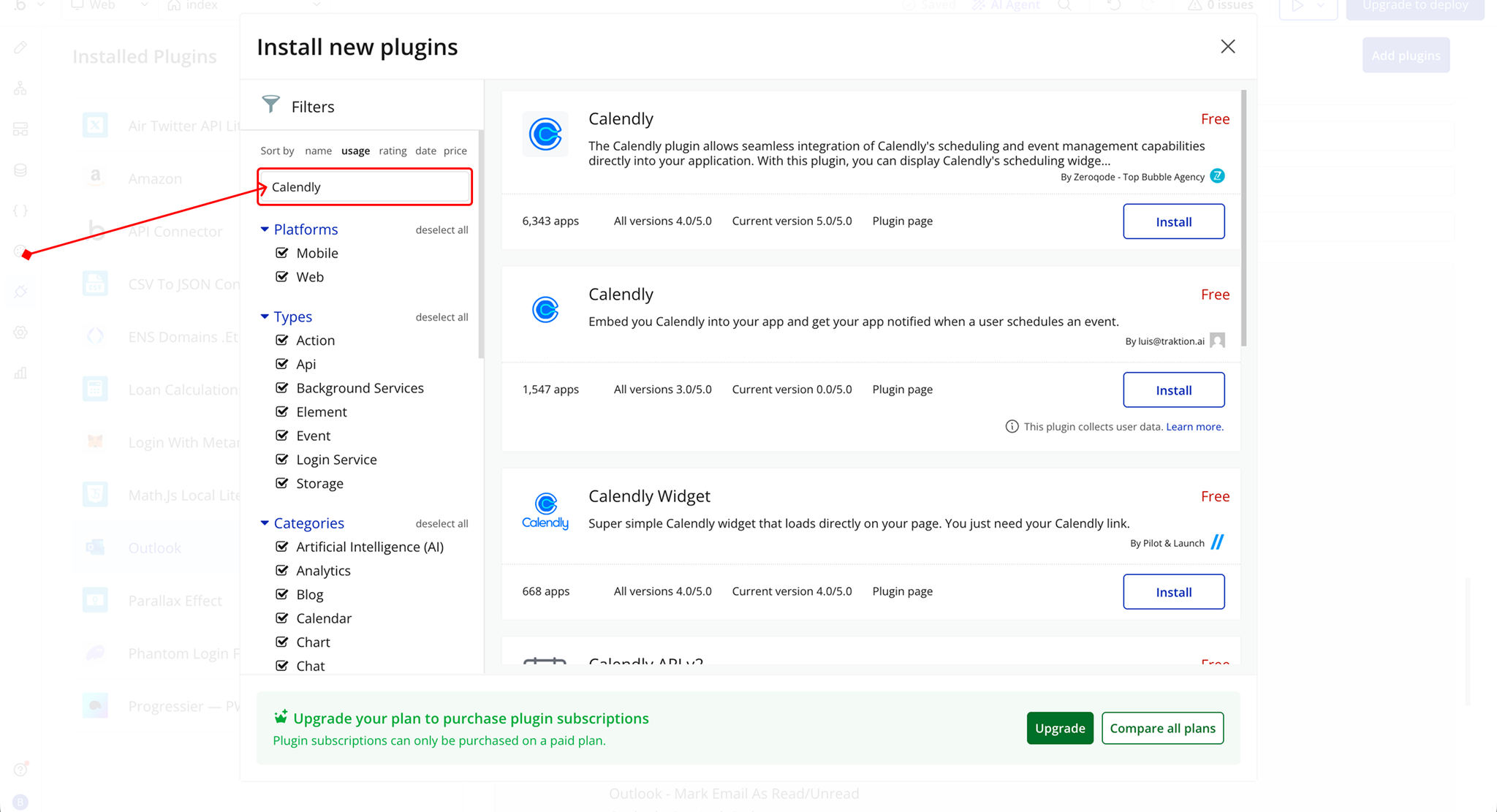
- Search for the Plugin
- Use the search bar to type Calendly.
- Locate the plugin in the search results.
- Install/Buy
- If the plugin is free, click Install to add it to your application.
- For a paid plugin, click Buy and follow the purchase instructions.
- Payment Information (For Paid Plugins)
- If the plugin is a paid one, fill in your payment details and make payment.
- Charges will be added to your Bubble billing account.
- Remember, if you unsubscribe from the plugin shortly after installation, charges will be prorated based on the days used.
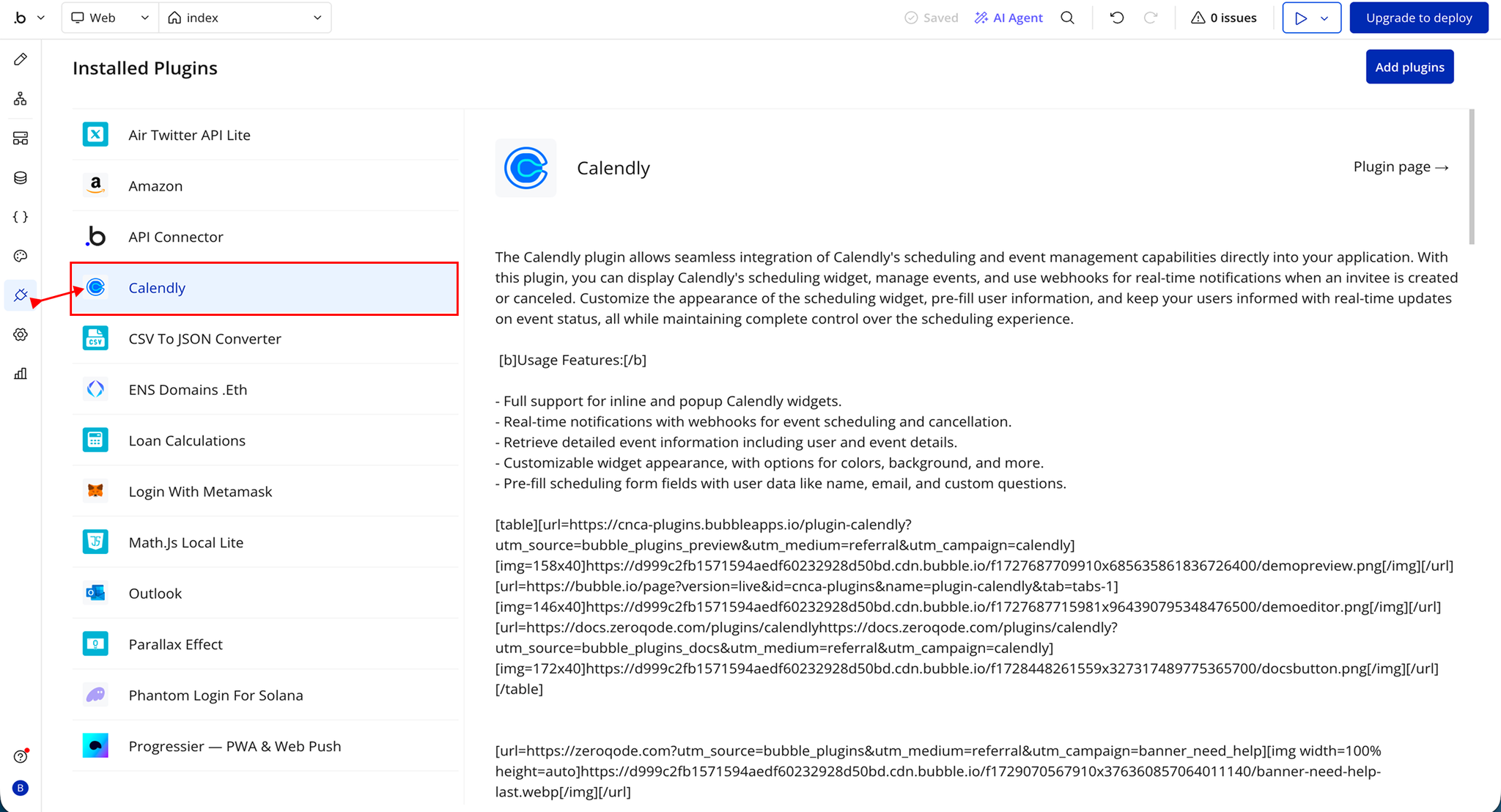
- Plugin Installed
- Once installed, the plugin will appear under the Installed Plugins list in your Bubble Editor.
Step 2 – Add the Plugin Element to Your Page
- Open the Design tab in your Bubble editor.
- Search for the Calendly Widget element in the Elements panel.
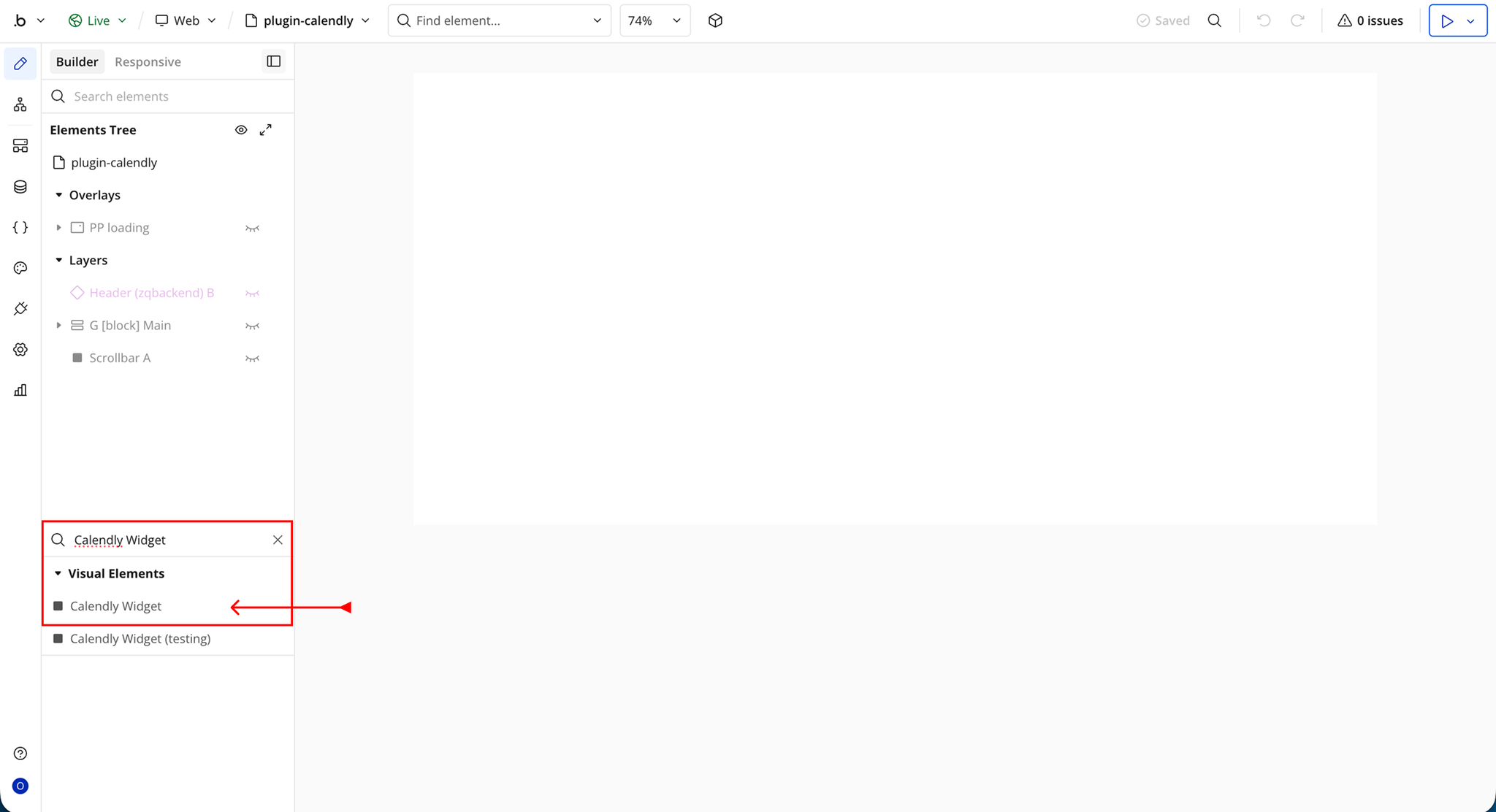
- You’ll see one option:
- Calendly Widget
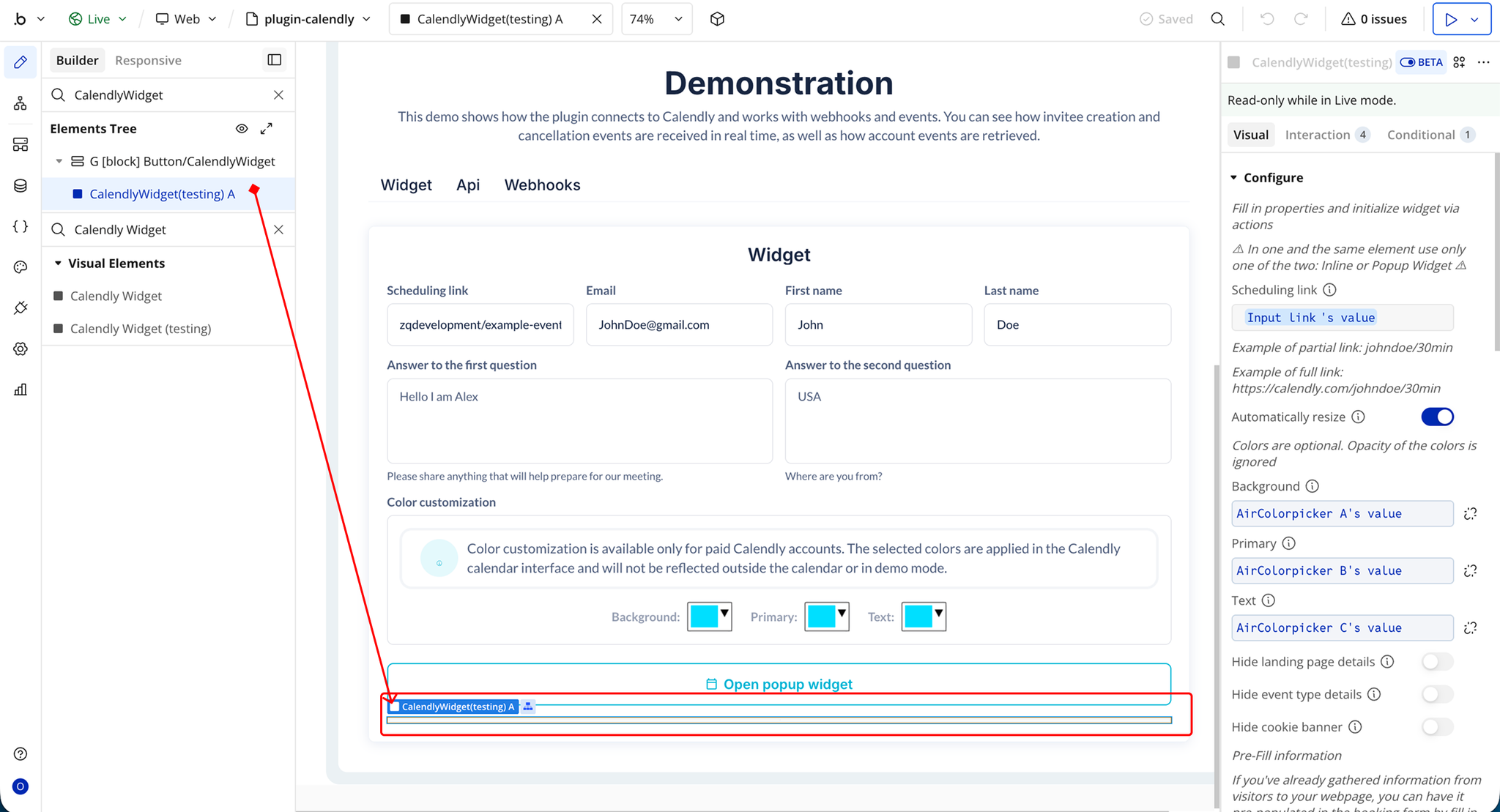
- Drag and drop the element onto your page.
Step 3 – Get Calendly API Keys
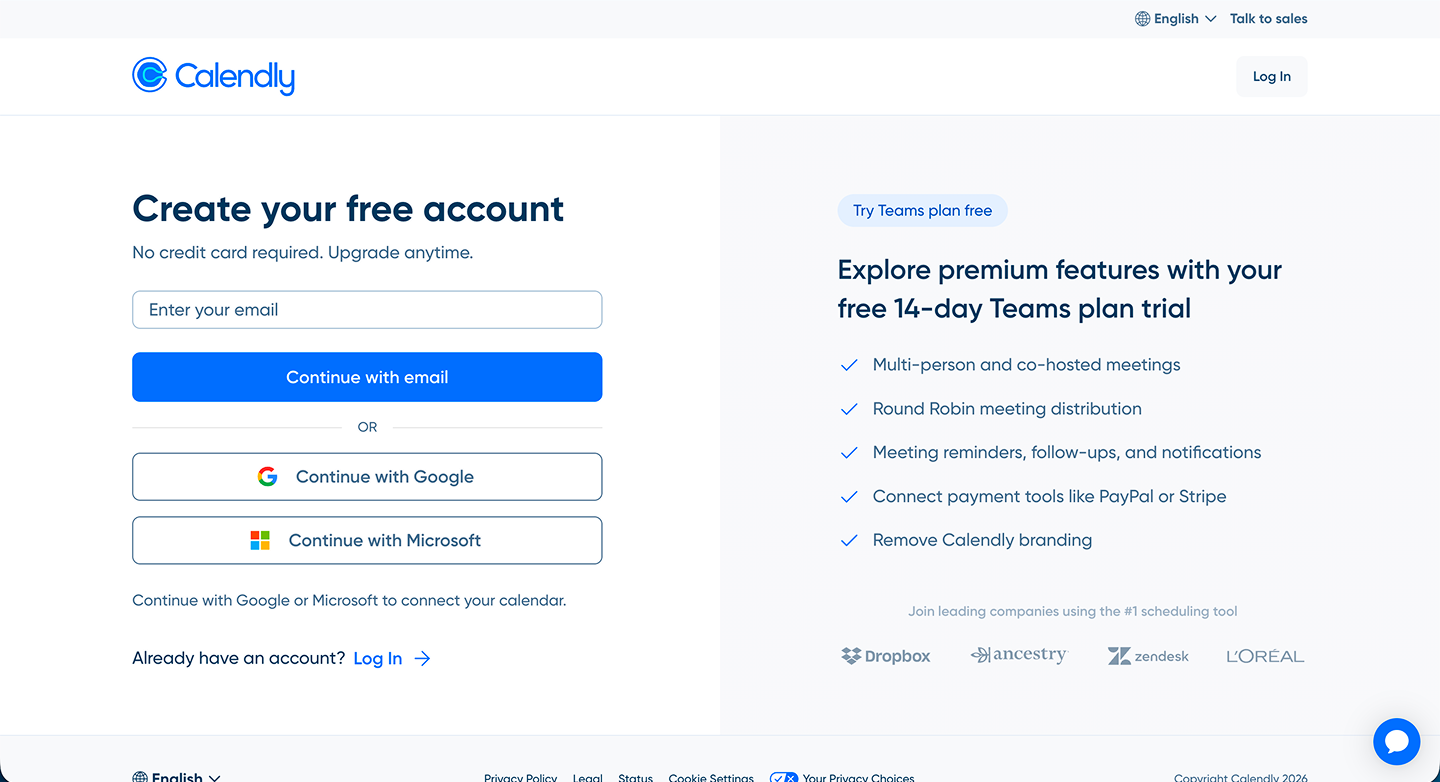
- Go to the Calendly website
- Sign up or log in to your account
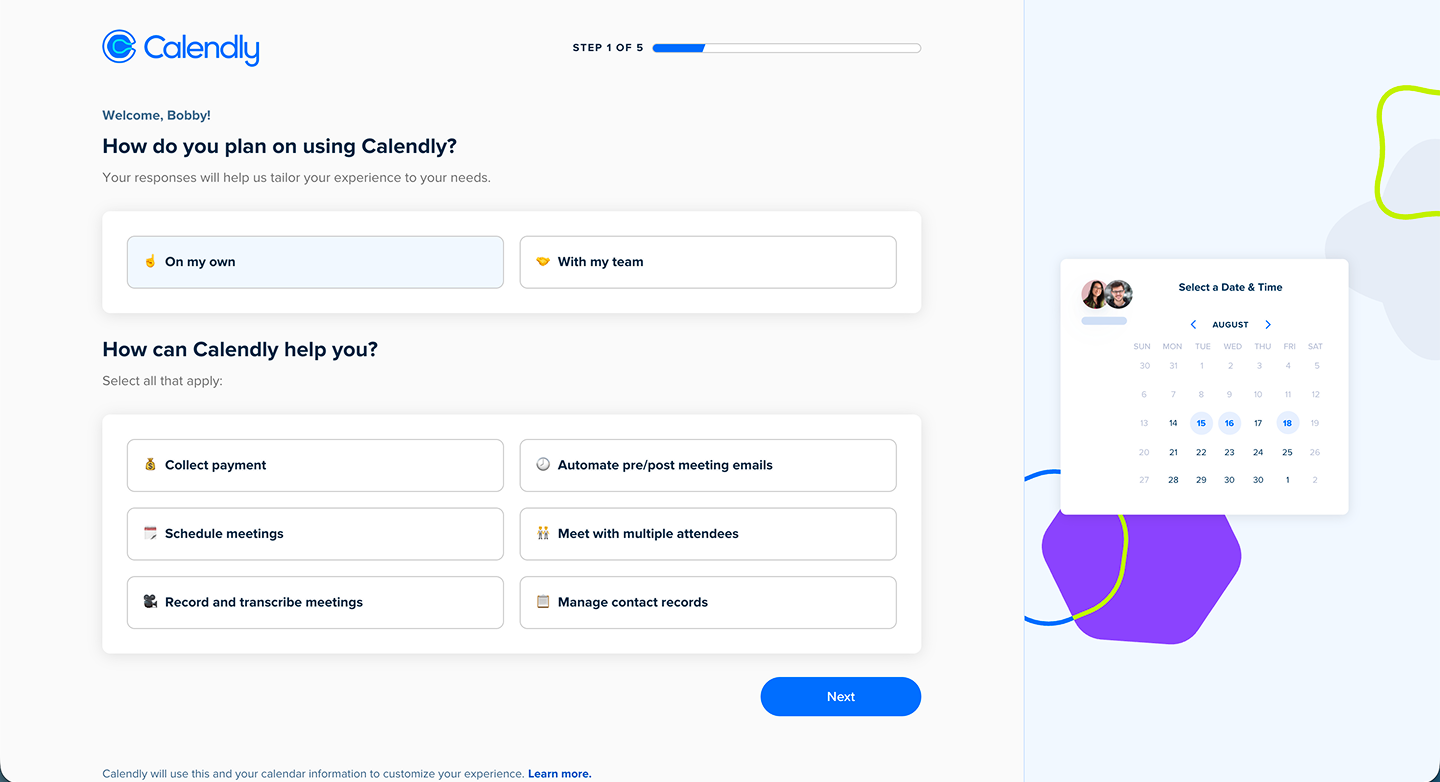
- Complete the onboarding process if required
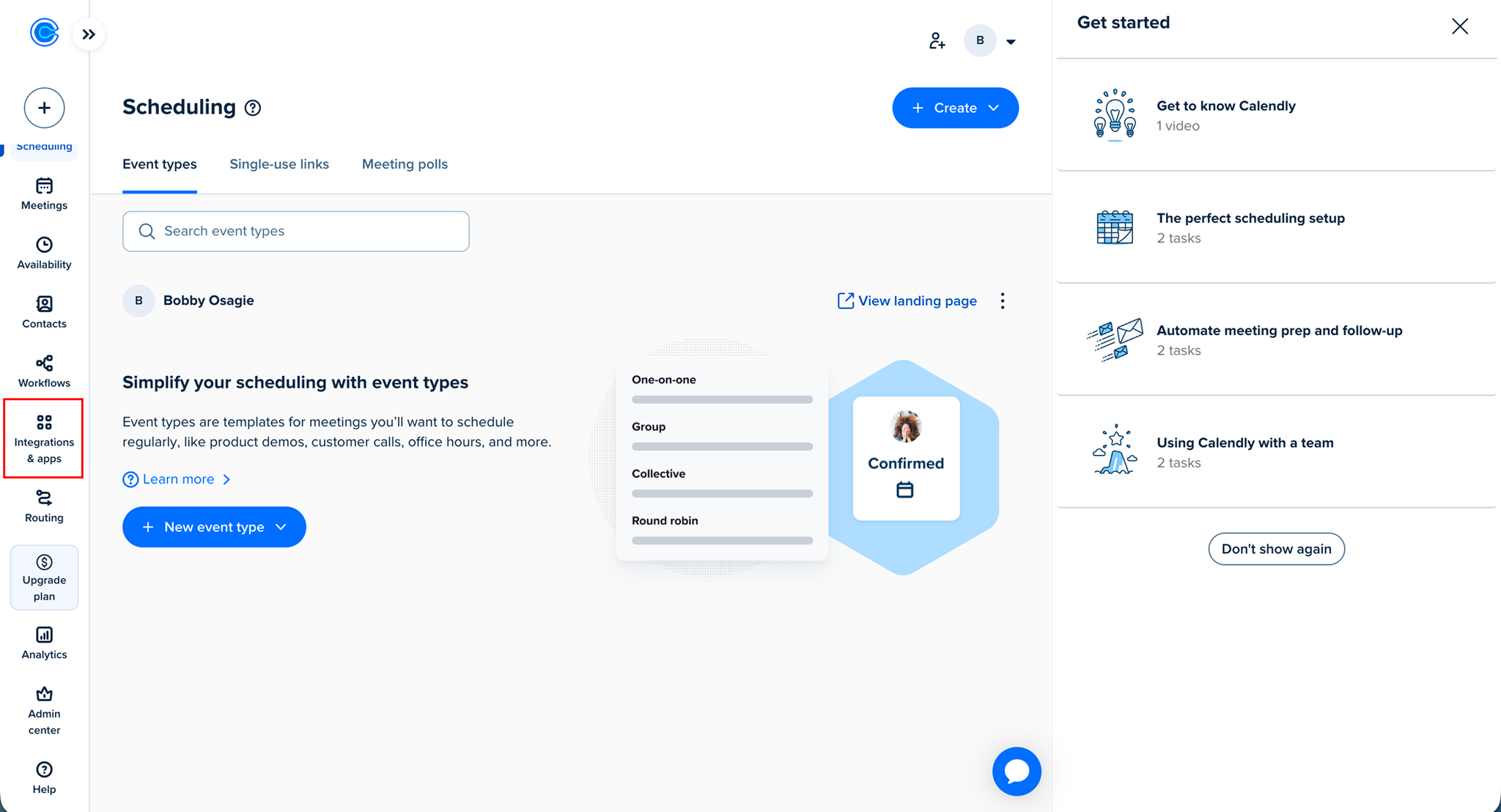
- From your dashboard, navigate to Integrations & Apps
- Search for API & Webhooks and open it
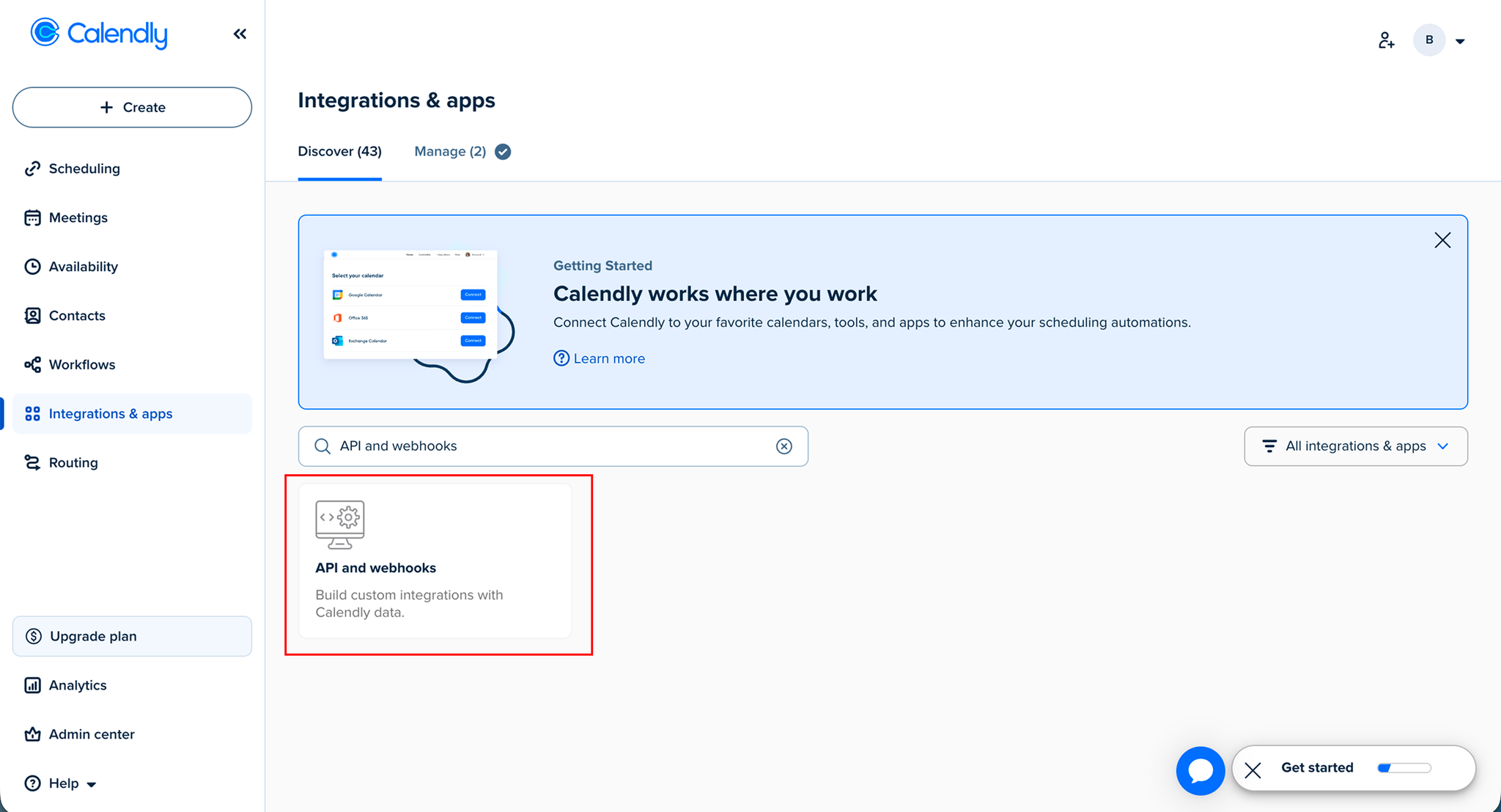
- In the API & Webhooks section:
- Locate Personal Access Token
- Click Get Token
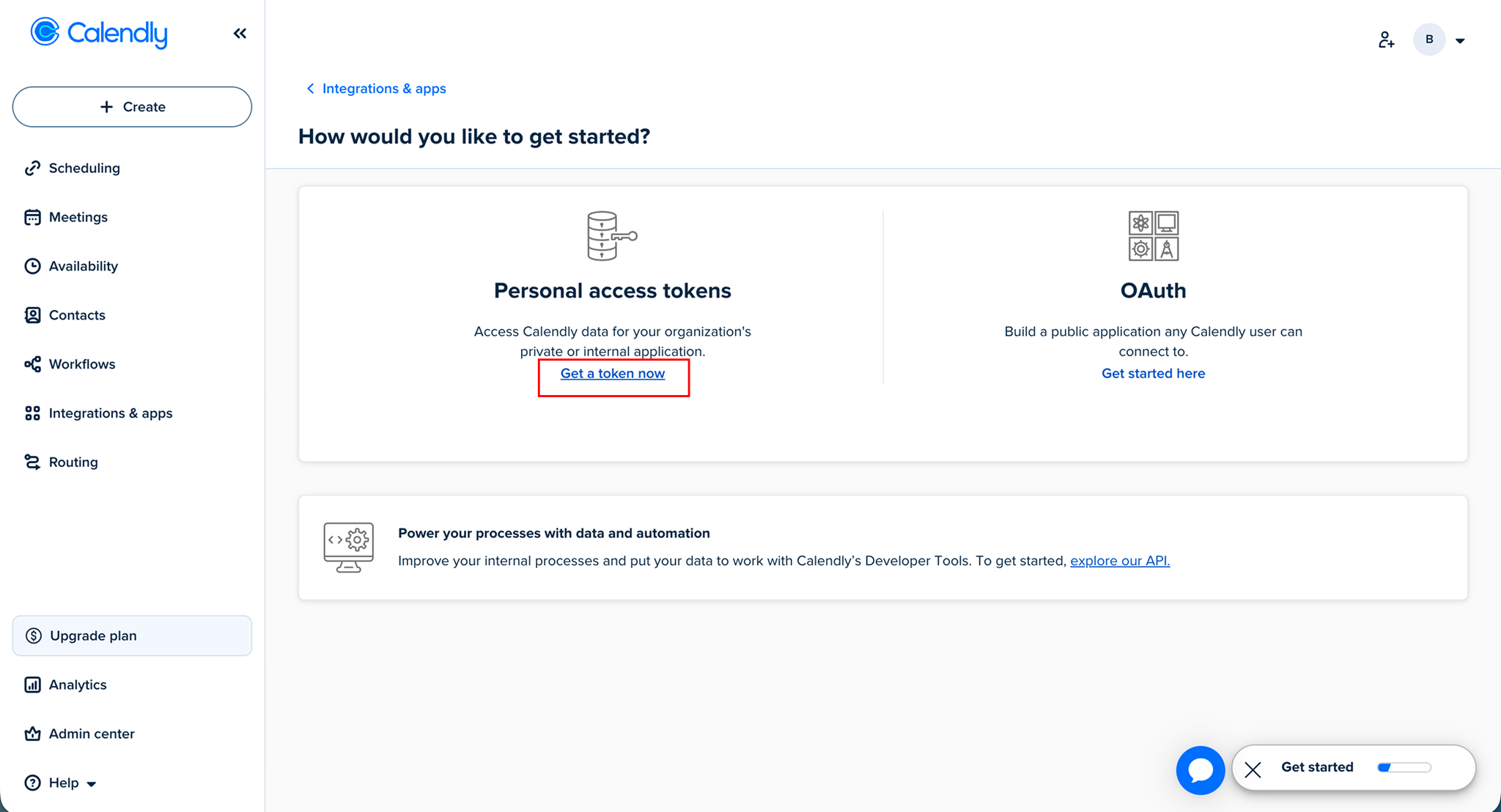
- In the modal:
- Enter a name for your token
- Select the required scopes
- Click Next
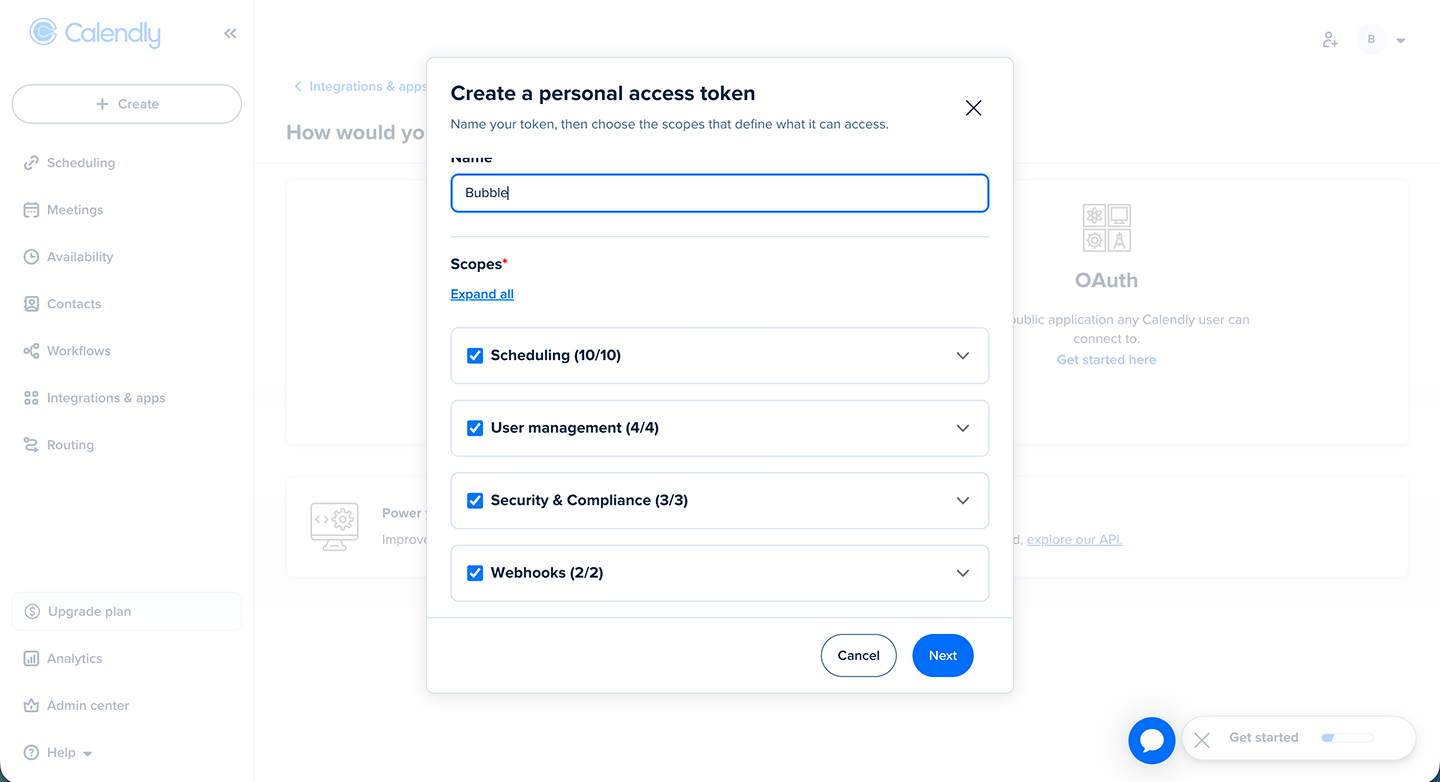
- After generating the token:
- Copy the token
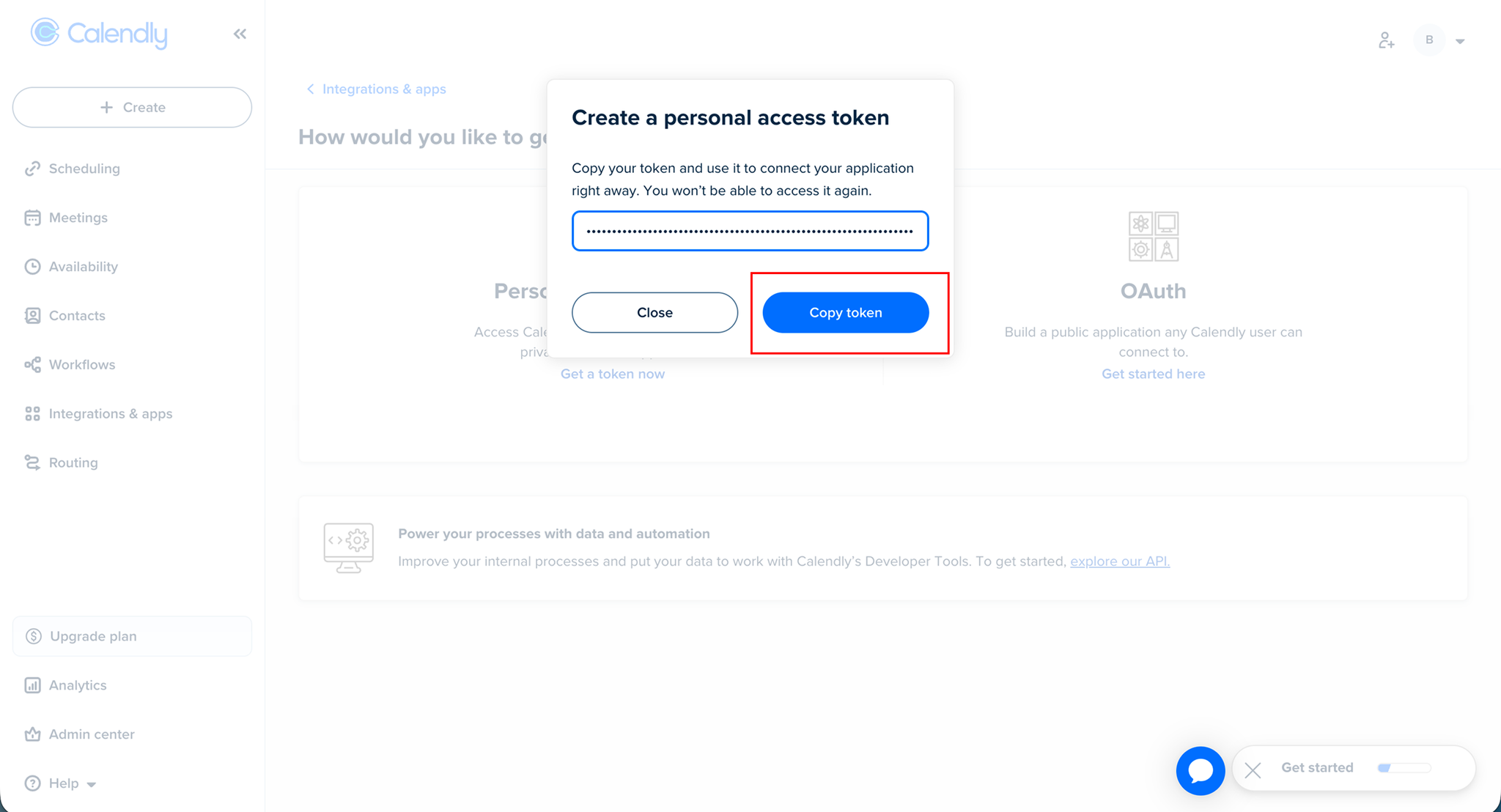
- Go back to your Bubble app
- Open the Calendly plugin settings
- Paste the token into the API Key field
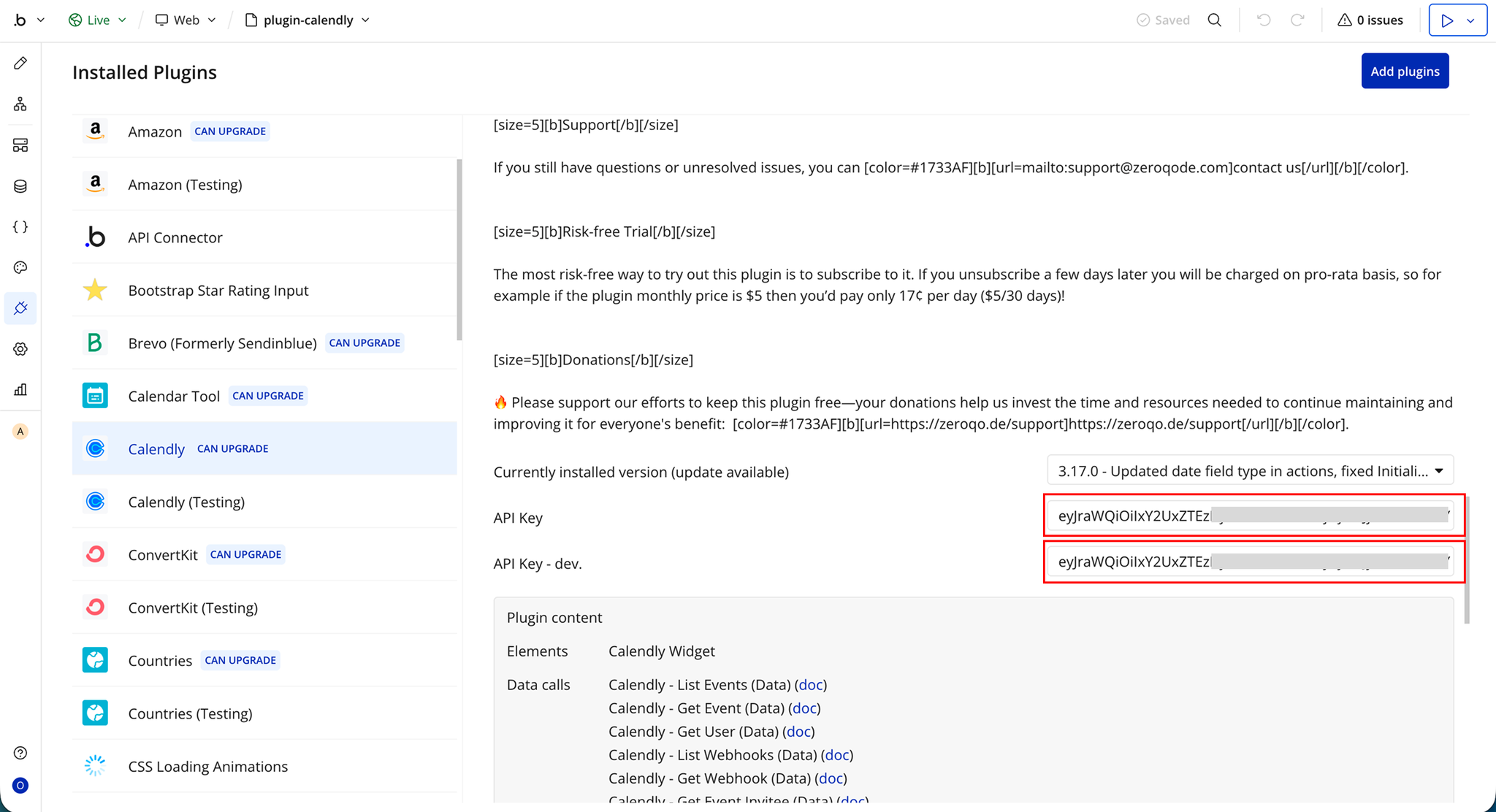
Plugin Element - Calendly Widget
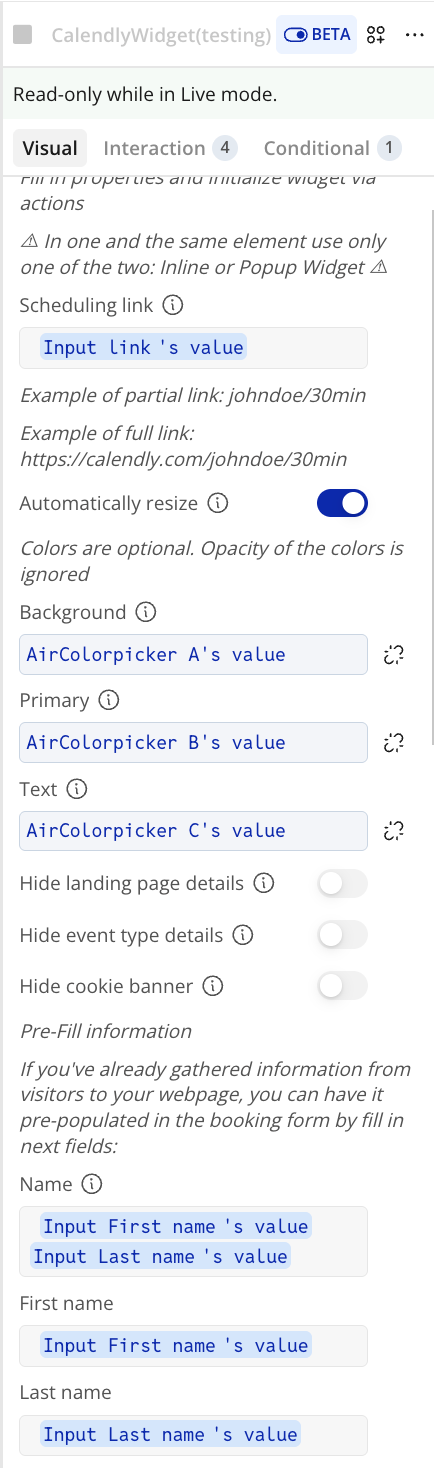
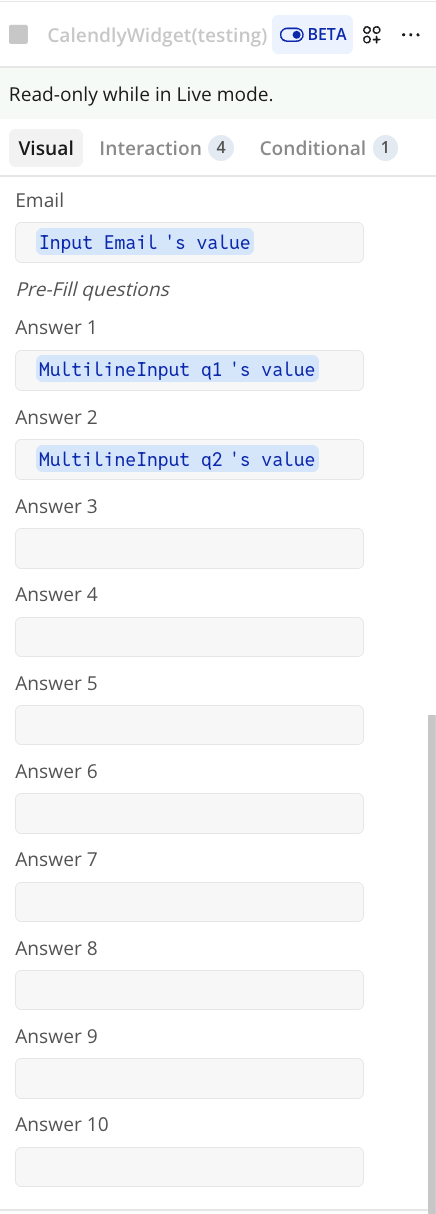
Fields
General Settings
Name | Description | Type |
Scheduling Link | Calendly event link (partial or full) | Text |
Automatically Resize | Adjusts widget height automatically instead of using a fixed scrollable view | yes/no |
Colors
Name | Description | Type |
Background | Background color of the widget | Color |
Primary | Primary color used for buttons and links | Color |
Text | Text color of the widget | Color |
Display Options
Name | Description | Type |
Hide Landing Page Details | Hides confirmation details after booking | yes/no |
Hide Event Type Details | Hides profile, event info, and description in the widget | yes/no |
Hide Cookie Banner | Hides the cookie banner in the widget | yes/no |
Pre-Fill Information
Name | Description | Type |
Name | Full name of the invitee | Text |
First Name | Invitee’s first name | Text |
Last Name | Invitee’s last name | Text |
Email | Invitee’s email address | Text |
Pre-Fill Questions
Name | Description | Type |
Answer 1 | Response to custom question 1 | Text |
Answer 2 | Response to custom question 2 | Text |
Answer 3 | Response to custom question 3 | Text |
Answer 4 | Response to custom question 4 | Text |
Answer 5 | Response to custom question 5 | Text |
Answer 6 | Response to custom question 6 | Text |
Answer 7 | Response to custom question 7 | Text |
Answer 8 | Response to custom question 8 | Text |
Answer 9 | Response to custom question 9 | Text |
Answer 10 | Response to custom question 10 | Text |
Exposed States
Name | Description | Type |
Event ID | Unique identifier of the scheduled event | Text |
Invitee ID | Unique identifier of the invitee | Text |
Element Events
Name | Description | Type |
Event Type Viewed | Triggered when the event type page is viewed | Event |
Date and Time Selected | Triggered when a date and time is selected | Event |
Event Scheduled | Triggered when a meeting is successfully booked | Event |
Popup Closed | Triggered when the popup is closed by the user | Event |
Element Actions
Initialize Inline
Initialize Inline is a plugin action that runs inside a Bubble workflow. It uses the input values you configure, executes the plugin logic, and returns data that can be used in your app. This action is typically used to set up or initialize the plugin when a page loads or when a specific event is triggered dynamically.
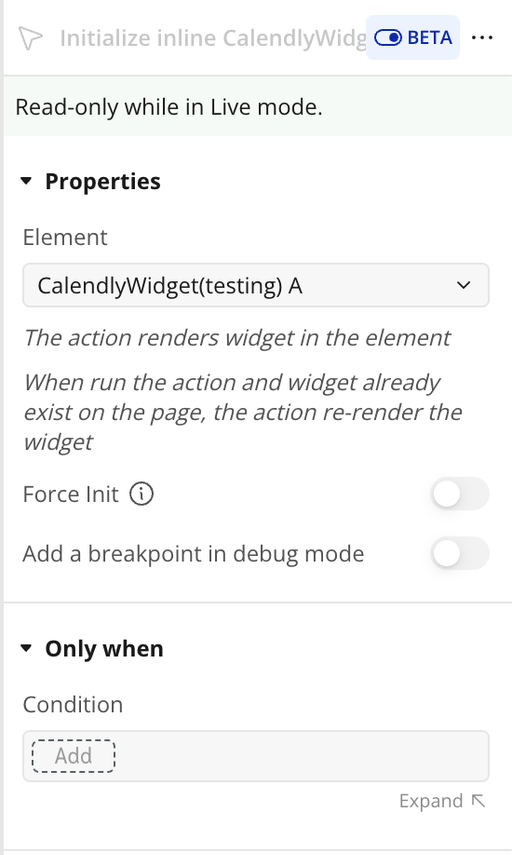
Name | Description | Type |
Force Init | Calendly widget is waiting until the element is visible in the viewport before loading or initializing, this is a behavior designed to optimize performance and loading times of web pages. However, if you prefer that the widget content loads immediately when the page loads, regardless of whether the widget is in the viewport, you’ll need to check this checkbox to override this lazy loading behavior. | yes/no |
Close
Close runs this plugin action inside a Bubble workflow. It takes the configured inputs, executes the request or plugin logic, and returns the result so it can be used elsewhere in your app. This is useful when you need to trigger the action dynamically from Bubble.
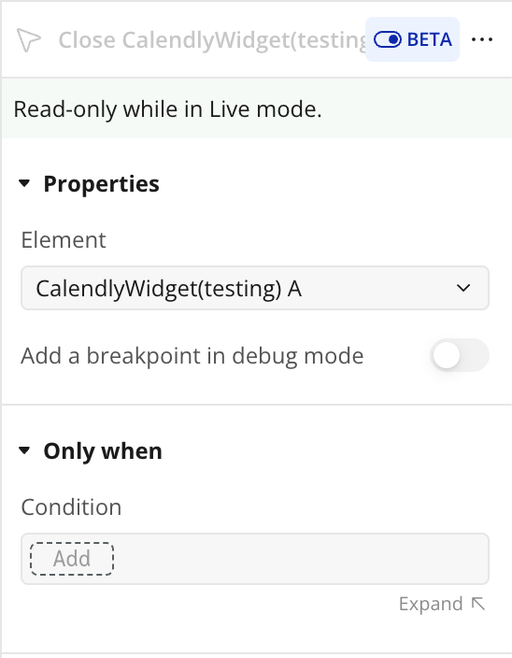
Initialize popup
Initialize popup runs this plugin action inside a Bubble workflow. It takes the configured inputs, executes the request or plugin logic, and returns the result so it can be reused in your app. This is useful when you need to trigger the popup behavior dynamically from Bubble.
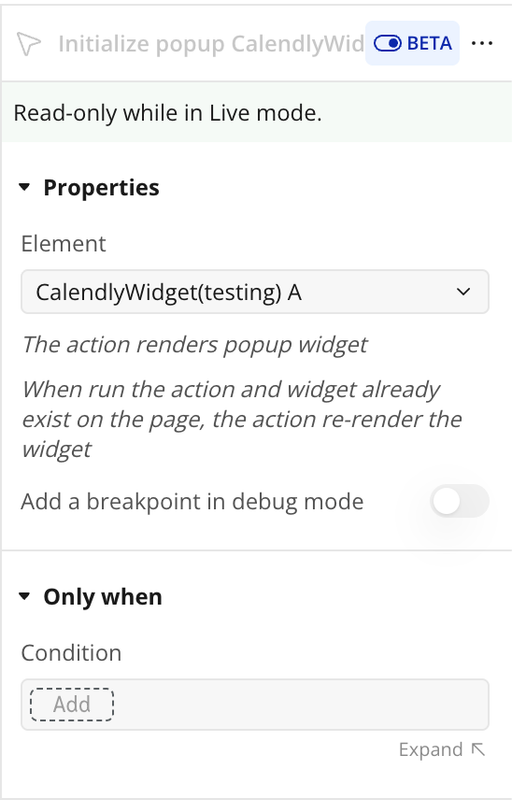
Reset states
Reset states runs this plugin action inside a Bubble workflow. It takes the configured inputs, executes the plugin logic, and returns the result so it can be reused in your app. This is useful when you need to reset states dynamically from Bubble.
Plugin Data/Action Calls
List Events (Data)
List Events (Data) is an API call exposed by the plugin for Bubble workflows or data sources. It helps the client send or retrieve data related to this integration without building the request manually. The call returns structured values that can be reused inside the app. It is useful when the client needs this specific operation as part of the plugin workflow.
Parameters:
Name | Description | Type |
organization | Full URI for organization. Example:. | Text |
Response:
Name | Description | Type |
collection | collection returned by the API call. | Text |
pagination count | pagination count returned by the API call. | Text |
pagination next_page | pagination next_page returned by the API call. | Text |
pagination next_page_token | pagination next_page_token returned by the API call. | Text |
pagination previous_page | pagination previous_page returned by the API call. | Text |
pagination previous_page_token | pagination previous_page_token returned by the API call. | Text |
Get User (Data)
Get User (Data) is an API call exposed by the plugin for Bubble workflows or data sources. It helps the client send or retrieve data related to this integration without building the request manually. The call returns structured values that can be reused inside the app. It is useful when the client needs this specific operation as part of the plugin workflow.
Response:
Name | Description | Type |
resource avatar_url | resource avatar_url returned by the API call. | Text |
resource created_at | resource created_at returned by the API call. | Text |
resource current_organization | resource current_organization returned by the API call. | Text |
resource email | resource email returned by the API call. | Text |
resource name | resource name returned by the API call. | Text |
resource scheduling_url | resource scheduling_url returned by the API call. | Text |
resource slug | resource slug returned by the API call. | Text |
resource timezone | resource timezone returned by the API call. | Text |
resource updated_at | resource updated_at returned by the API call. | Text |
resource uri | resource uri returned by the API call. | Text |
Create Webhook - Invitee Created
Create Webhook - Invitee Created is an API call exposed by the plugin for Bubble workflows or data sources. It helps the client send or retrieve data related to this integration without building the request manually. The call returns structured values that can be reused inside the app. It is useful when the client needs this specific operation as part of the plugin workflow.
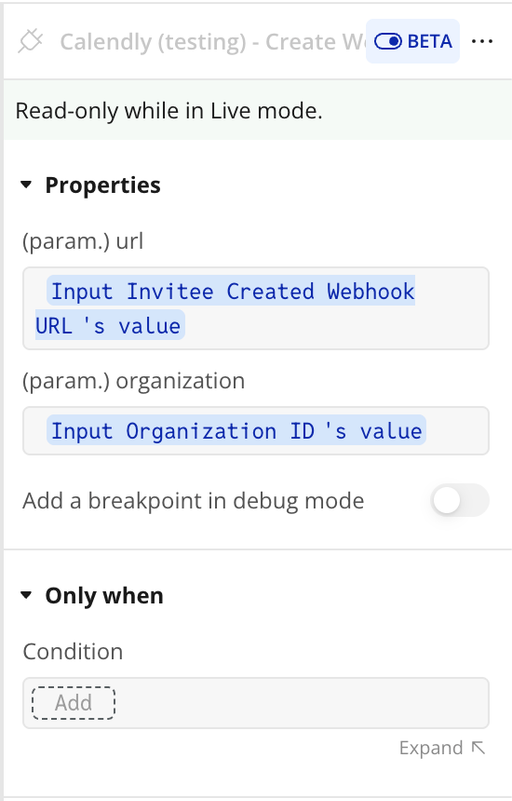
Parameters:
Name | Description | Type |
url | Endpoint URL to one of your app’s backend workflows. Make sure to create one with “initialize” at the end of the URL and one without. | Text |
organization | Full URI for organization. Example:. | Text |
scope | Allowed values: organization or user. | Text |
events[] | Parameter accepted by this API call. | Text |
Response:
Name | Description | Type |
resource callback_url | resource callback_url returned by the API call. | Text |
resource created_at | resource created_at returned by the API call. | Text |
resource creator | resource creator returned by the API call. | Text |
resource events | resource events returned by the API call. | Text |
resource organization | resource organization returned by the API call. | Text |
resource retry_started_at | resource retry_started_at returned by the API call. | Text |
resource scope | resource scope returned by the API call. | Text |
resource state | resource state returned by the API call. | Text |
resource updated_at | resource updated_at returned by the API call. | Text |
resource uri | resource uri returned by the API call. | Text |
resource user | resource user returned by the API call. | Text |
Create Webhook - Invitee Canceled
Create Webhook - Invitee Canceled is an API call exposed by the plugin for Bubble workflows or data sources. It helps the client send or retrieve data related to this integration without building the request manually. The call returns structured values that can be reused inside the app. It is useful when the client needs this specific operation as part of the plugin workflow.
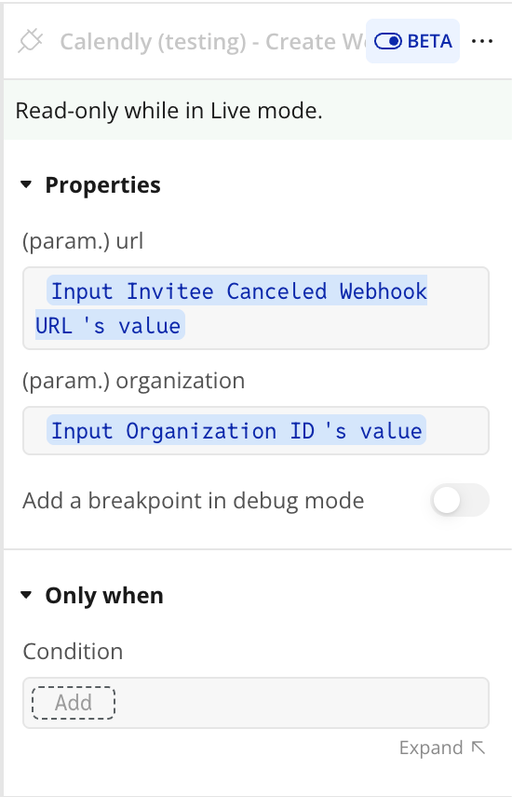
Parameters:
Name | Description | Type |
url | Endpoint URL to one of your app’s backend workflows. Make sure to create one with “initialize” at the end of the URL and one without. | Text |
organization | Full URI for organization. Example:. | Text |
scope | Allowed values: organization or user. | Text |
events[] | Parameter accepted by this API call. | Text |
Response:
Name | Description | Type |
resource callback_url | resource callback_url returned by the API call. | Text |
resource created_at | resource created_at returned by the API call. | Text |
resource creator | resource creator returned by the API call. | Text |
resource events | resource events returned by the API call. | Text |
resource organization | resource organization returned by the API call. | Text |
resource retry_started_at | resource retry_started_at returned by the API call. | Text |
resource scope | resource scope returned by the API call. | Text |
resource state | resource state returned by the API call. | Text |
resource updated_at | resource updated_at returned by the API call. | Text |
resource uri | resource uri returned by the API call. | Text |
resource user | resource user returned by the API call. | Text |
List Webhooks (Data)
List Webhooks (Data) is an API call exposed by the plugin for Bubble workflows or data sources. It helps the client send or retrieve data related to this integration without building the request manually. The call returns structured values that can be reused inside the app. It is useful when the client needs this specific operation as part of the plugin workflow.
Parameters:
Name | Description | Type |
organization | Full URI for organization. Example:. | Text |
scope | Allowed values: organization or user. | Text |
Response:
Name | Description | Type |
collection | collection returned by the API call. | Text |
pagination count | pagination count returned by the API call. | Text |
pagination next_page | pagination next_page returned by the API call. | Text |
pagination next_page_token | pagination next_page_token returned by the API call. | Text |
pagination previous_page | pagination previous_page returned by the API call. | Text |
pagination previous_page_token | pagination previous_page_token returned by the API call. | Text |
Get Webhook (Data)
Get Webhook (Data) is an API call exposed by the plugin for Bubble workflows or data sources. It helps the client send or retrieve data related to this integration without building the request manually. The call returns structured values that can be reused inside the app. It is useful when the client needs this specific operation as part of the plugin workflow.
Response:
Name | Description | Type |
resource callback_url | resource callback_url returned by the API call. | Text |
resource created_at | resource created_at returned by the API call. | Text |
resource creator | resource creator returned by the API call. | Text |
resource events | resource events returned by the API call. | Text |
resource organization | resource organization returned by the API call. | Text |
resource retry_started_at | resource retry_started_at returned by the API call. | Text |
resource scope | resource scope returned by the API call. | Text |
resource state | resource state returned by the API call. | Text |
resource updated_at | resource updated_at returned by the API call. | Text |
resource uri | resource uri returned by the API call. | Text |
resource user | resource user returned by the API call. | Text |
Delete Webhook
Delete Webhook is an API call exposed by the plugin for Bubble workflows or data sources. It helps the client send or retrieve data related to this integration without building the request manually. The call returns structured values that can be reused inside the app. It is useful when the client needs this specific operation as part of the plugin workflow.
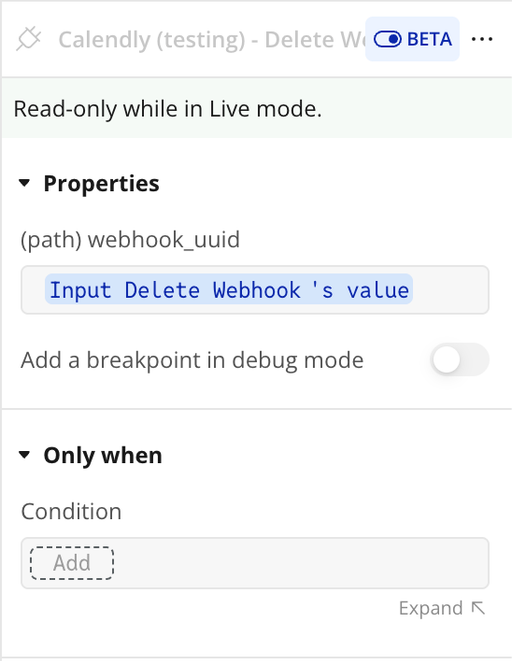
Parameters:
Name | Description | Type |
webhook_uuid | unique identifier for the webhook used to trigger or track the workflow execution. | Text |
Response:
Name | Description | Type |
data | data returned by the API call. | Text |
Get Event (Data)
Get Event (Data) is an API call exposed by the plugin for Bubble workflows or data sources. It helps the client send or retrieve data related to this integration without building the request manually. The call returns structured values that can be reused inside the app. It is useful when the client needs this specific operation as part of the plugin workflow.
Response:
Name | Description | Type |
resource uri | resource uri returned by the API call. | Text |
resource name | resource name returned by the API call. | Text |
resource meeting_notes_plain | resource meeting_notes_plain returned by the API call. | Text |
resource meeting_notes_html | resource meeting_notes_html returned by the API call. | Text |
resource status | resource status returned by the API call. | Text |
resource booking_method | resource booking_method returned by the API call. | Text |
resource start_time | resource start_time returned by the API call. | Text |
resource end_time | resource end_time returned by the API call. | Text |
resource event_type | resource event_type returned by the API call. | Text |
resource location type | resource location type returned by the API call. | Text |
resource location location | resource location location returned by the API call. | Text |
resource location additional_info | resource location additional_info returned by the API call. | Text |
resource invitees_counter total | resource invitees_counter total returned by the API call. | Text |
resource invitees_counter active | resource invitees_counter active returned by the API call. | Text |
resource invitees_counter limit | resource invitees_counter limit returned by the API call. | Text |
resource created_at | resource created_at returned by the API call. | Text |
resource updated_at | resource updated_at returned by the API call. | Text |
resource event_memberships | resource event_memberships returned by the API call. | Text |
resource event_guests | resource event_guests returned by the API call. | Text |
resource calendar_event kind | resource calendar_event kind returned by the API call. | Text |
resource calendar_event external_id | resource calendar_event external_id returned by the API call. | Text |
Get Event Invitee (Data)
Get Event Invitee (Data) is an API call exposed by the plugin for Bubble workflows or data sources. It helps the client send or retrieve data related to this integration without building the request manually. The call returns structured values that can be reused inside the app. It is useful when the client needs this specific operation as part of the plugin workflow.
Response:
Name | Description | Type |
body resource cancel_url | body resource cancel_url returned by the API call. | Text |
body resource created_at | body resource created_at returned by the API call. | Text |
body resource email | body resource email returned by the API call. | Text |
body resource rescheduled | body resource rescheduled returned by the API call. | Text |
body resource reschedule_url | body resource reschedule_url returned by the API call. | Text |
body resource event | body resource event returned by the API call. | Text |
body resource name | body resource name returned by the API call. | Text |
body resource first_name | body resource first_name returned by the API call. | Text |
body resource last_name | body resource last_name returned by the API call. | Text |
body resource new_invitee | body resource new_invitee returned by the API call. | Text |
body resource old_invitee | body resource old_invitee returned by the API call. | Text |
body resource status | body resource status returned by the API call. | Text |
body resource text_reminder_number | body resource text_reminder_number returned by the API call. | Text |
body resource timezone | body resource timezone returned by the API call. | Text |
body resource tracking utm_campaign | body resource tracking utm_campaign returned by the API call. | Text |
body resource tracking utm_source | body resource tracking utm_source returned by the API call. | Text |
body resource tracking utm_medium | body resource tracking utm_medium returned by the API call. | Text |
body resource tracking utm_content | body resource tracking utm_content returned by the API call. | Text |
body resource tracking utm_term | body resource tracking utm_term returned by the API call. | Text |
body resource tracking salesforce_uuid | body resource tracking salesforce_uuid returned by the API call. | Text |
body resource updated_at | body resource updated_at returned by the API call. | Text |
body resource uri | body resource uri returned by the API call. | Text |
body resource questions_and_answers | body resource questions_and_answers returned by the API call. | Text |
body resource routing_form_submission | body resource routing_form_submission returned by the API call. | Text |
body resource payment external_id | body resource payment external_id returned by the API call. | Text |
body resource payment provider | body resource payment provider returned by the API call. | Text |
body resource payment amount | body resource payment amount returned by the API call. | Text |
body resource payment currency | body resource payment currency returned by the API call. | Text |
body resource payment terms | body resource payment terms returned by the API call. | Text |
body resource payment successful | body resource payment successful returned by the API call. | Text |
body resource no_show | body resource no_show returned by the API call. | Text |
body resource reconfirmation created_at | body resource reconfirmation created_at returned by the API call. | Text |
body resource reconfirmation confirmed_at | body resource reconfirmation confirmed_at returned by the API call. | Text |
body resource scheduling_method | body resource scheduling_method returned by the API call. | Text |
body resource invitee_scheduled_by | body resource invitee_scheduled_by returned by the API call. | Text |
error status_code | error status_code returned by the API call. | Text |
error status_message | error status_message returned by the API call. | Text |
error body | error body returned by the API call. | Text |
returned_an_error | returned_an_error returned by the API call. | Text |
Get Event Invitee (action)
Get Event Invitee (action) is an API call exposed by the plugin for Bubble workflows or data sources. It helps the client send or retrieve data related to this integration without building the request manually. The call returns structured values that can be reused inside the app. It is useful when the client needs this specific operation as part of the plugin workflow.
Response:
Name | Description | Type |
body resource cancel_url | body resource cancel_url returned by the API call. | Text |
body resource created_at | body resource created_at returned by the API call. | Text |
body resource email | body resource email returned by the API call. | Text |
body resource rescheduled | body resource rescheduled returned by the API call. | Text |
body resource reschedule_url | body resource reschedule_url returned by the API call. | Text |
body resource event | body resource event returned by the API call. | Text |
body resource name | body resource name returned by the API call. | Text |
body resource first_name | body resource first_name returned by the API call. | Text |
body resource last_name | body resource last_name returned by the API call. | Text |
body resource new_invitee | body resource new_invitee returned by the API call. | Text |
body resource old_invitee | body resource old_invitee returned by the API call. | Text |
body resource status | body resource status returned by the API call. | Text |
body resource text_reminder_number | body resource text_reminder_number returned by the API call. | Text |
body resource timezone | body resource timezone returned by the API call. | Text |
body resource tracking utm_campaign | body resource tracking utm_campaign returned by the API call. | Text |
body resource tracking utm_source | body resource tracking utm_source returned by the API call. | Text |
body resource tracking utm_medium | body resource tracking utm_medium returned by the API call. | Text |
body resource tracking utm_content | body resource tracking utm_content returned by the API call. | Text |
body resource tracking utm_term | body resource tracking utm_term returned by the API call. | Text |
body resource tracking salesforce_uuid | body resource tracking salesforce_uuid returned by the API call. | Text |
body resource updated_at | body resource updated_at returned by the API call. | Text |
body resource uri | body resource uri returned by the API call. | Text |
body resource questions_and_answers | body resource questions_and_answers returned by the API call. | Text |
body resource routing_form_submission | body resource routing_form_submission returned by the API call. | Text |
body resource payment external_id | body resource payment external_id returned by the API call. | Text |
body resource payment provider | body resource payment provider returned by the API call. | Text |
body resource payment amount | body resource payment amount returned by the API call. | Text |
body resource payment currency | body resource payment currency returned by the API call. | Text |
body resource payment terms | body resource payment terms returned by the API call. | Text |
body resource payment successful | body resource payment successful returned by the API call. | Text |
body resource no_show | body resource no_show returned by the API call. | Text |
body resource reconfirmation created_at | body resource reconfirmation created_at returned by the API call. | Text |
body resource reconfirmation confirmed_at | body resource reconfirmation confirmed_at returned by the API call. | Text |
body resource scheduling_method | body resource scheduling_method returned by the API call. | Text |
body resource invitee_scheduled_by | body resource invitee_scheduled_by returned by the API call. | Text |
error status_code | error status_code returned by the API call. | Text |
error status_message | error status_message returned by the API call. | Text |
error body | error body returned by the API call. | Text |
returned_an_error | returned_an_error returned by the API call. | Text |
Get Webhook (Action)
Get Webhook (Action) is an API call exposed by the plugin for Bubble workflows or data sources. It helps the client send or retrieve data related to this integration without building the request manually. The call returns structured values that can be reused inside the app. It is useful when the client needs this specific operation as part of the plugin workflow.
Response:
Name | Description | Type |
resource callback_url | resource callback_url returned by the API call. | Text |
resource created_at | resource created_at returned by the API call. | Text |
resource creator | resource creator returned by the API call. | Text |
resource events | resource events returned by the API call. | Text |
resource organization | resource organization returned by the API call. | Text |
resource retry_started_at | resource retry_started_at returned by the API call. | Text |
resource scope | resource scope returned by the API call. | Text |
resource state | resource state returned by the API call. | Text |
resource updated_at | resource updated_at returned by the API call. | Text |
resource uri | resource uri returned by the API call. | Text |
resource user | resource user returned by the API call. | Text |
List Webhooks (Action)
List Webhooks (Action) is an API call exposed by the plugin for Bubble workflows or data sources. It helps the client send or retrieve data related to this integration without building the request manually. The call returns structured values that can be reused inside the app. It is useful when the client needs this specific operation as part of the plugin workflow.
Parameters:
Name | Description | Type |
organization | Full URI for organization. Example:. | Text |
scope | Allowed values: organization or user. | Text |
Response:
Name | Description | Type |
collection | collection returned by the API call. | Text |
pagination count | pagination count returned by the API call. | Text |
pagination next_page | pagination next_page returned by the API call. | Text |
pagination next_page_token | pagination next_page_token returned by the API call. | Text |
pagination previous_page | pagination previous_page returned by the API call. | Text |
pagination previous_page_token | pagination previous_page_token returned by the API call. | Text |
Get User (Action)
Get User (Action) is an API call exposed by the plugin for Bubble workflows or data sources. It helps the client send or retrieve data related to this integration without building the request manually. The call returns structured values that can be reused inside the app. It is useful when the client needs this specific operation as part of the plugin workflow.
Response:
Name | Description | Type |
resource avatar_url | resource avatar_url returned by the API call. | Text |
resource created_at | resource created_at returned by the API call. | Text |
resource current_organization | resource current_organization returned by the API call. | Text |
resource email | resource email returned by the API call. | Text |
resource name | resource name returned by the API call. | Text |
resource scheduling_url | resource scheduling_url returned by the API call. | Text |
resource slug | resource slug returned by the API call. | Text |
resource timezone | resource timezone returned by the API call. | Text |
resource updated_at | resource updated_at returned by the API call. | Text |
resource uri | resource uri returned by the API call. | Text |
Get Event (Action)
Get Event (Action) is an API call exposed by the plugin for Bubble workflows or data sources. It helps the client send or retrieve data related to this integration without building the request manually. The call returns structured values that can be reused inside the app. It is useful when the client needs this specific operation as part of the plugin workflow.
Response:
Name | Description | Type |
resource uri | resource uri returned by the API call. | Text |
resource name | resource name returned by the API call. | Text |
resource meeting_notes_plain | resource meeting_notes_plain returned by the API call. | Text |
resource meeting_notes_html | resource meeting_notes_html returned by the API call. | Text |
resource status | resource status returned by the API call. | Text |
resource booking_method | resource booking_method returned by the API call. | Text |
resource start_time | resource start_time returned by the API call. | Text |
resource end_time | resource end_time returned by the API call. | Text |
resource event_type | resource event_type returned by the API call. | Text |
resource location type | resource location type returned by the API call. | Text |
resource location location | resource location location returned by the API call. | Text |
resource location additional_info | resource location additional_info returned by the API call. | Text |
resource invitees_counter total | resource invitees_counter total returned by the API call. | Text |
resource invitees_counter active | resource invitees_counter active returned by the API call. | Text |
resource invitees_counter limit | resource invitees_counter limit returned by the API call. | Text |
resource created_at | resource created_at returned by the API call. | Text |
resource updated_at | resource updated_at returned by the API call. | Text |
resource event_memberships | resource event_memberships returned by the API call. | Text |
resource event_guests | resource event_guests returned by the API call. | Text |
resource calendar_event kind | resource calendar_event kind returned by the API call. | Text |
resource calendar_event external_id | resource calendar_event external_id returned by the API call. | Text |
List Events (Action)
List Events (Action) is an API call exposed by the plugin for Bubble workflows or data sources. It helps the client send or retrieve data related to this integration without building the request manually. The call returns structured values that can be reused inside the app. It is useful when the client needs this specific operation as part of the plugin workflow.
Parameters:
Name | Description | Type |
organization | Full URI for organization. Example:. | Text |
Response:
Name | Description | Type |
collection | collection returned by the API call. | Text |
pagination count | pagination count returned by the API call. | Text |
pagination next_page | pagination next_page returned by the API call. | Text |
pagination next_page_token | pagination next_page_token returned by the API call. | Text |
pagination previous_page | pagination previous_page returned by the API call. | Text |
pagination previous_page_token | pagination previous_page_token returned by the API call. | Text |
Workflow example
Initialize Calendar Widget
- Place an Open Popup Widget button on the page
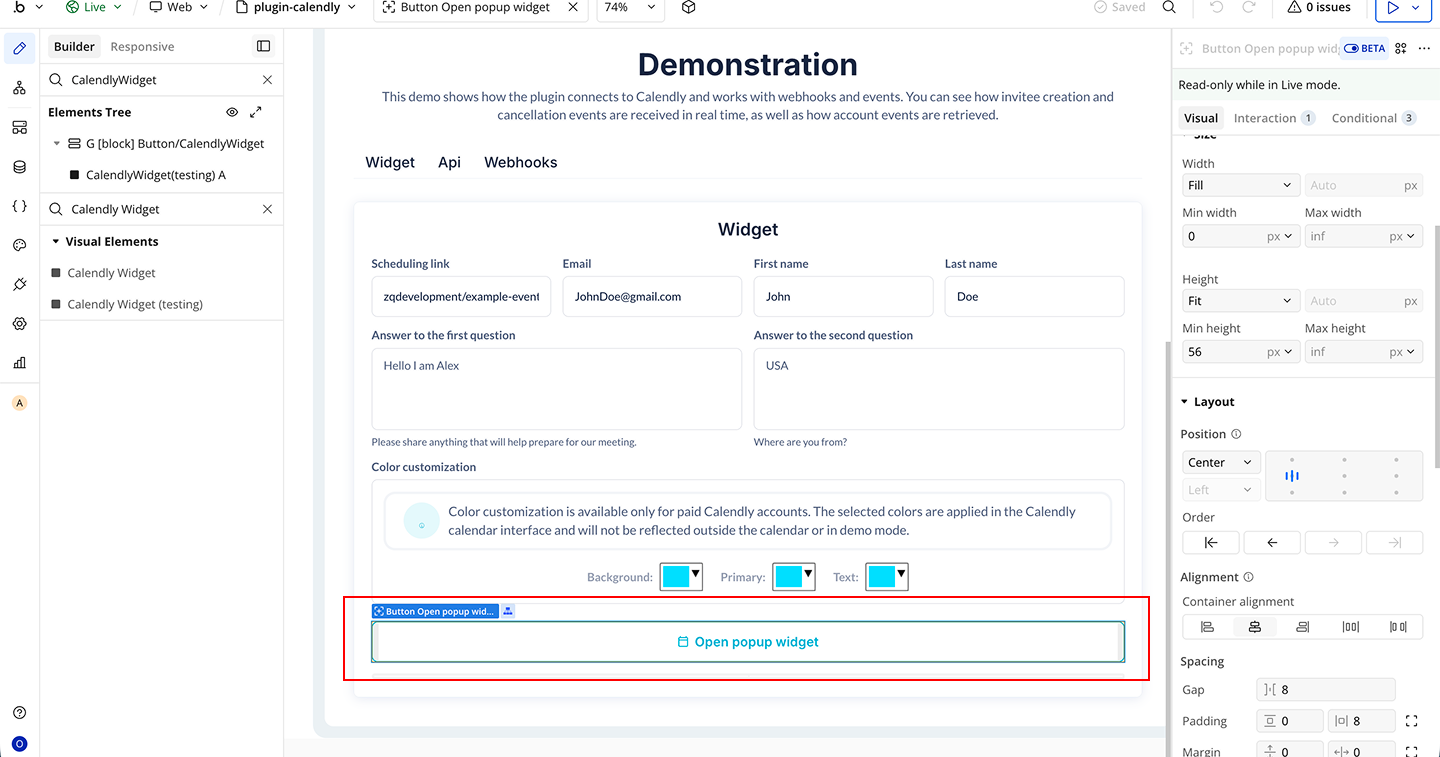
- Start a workflow on the Open Popup Widget button
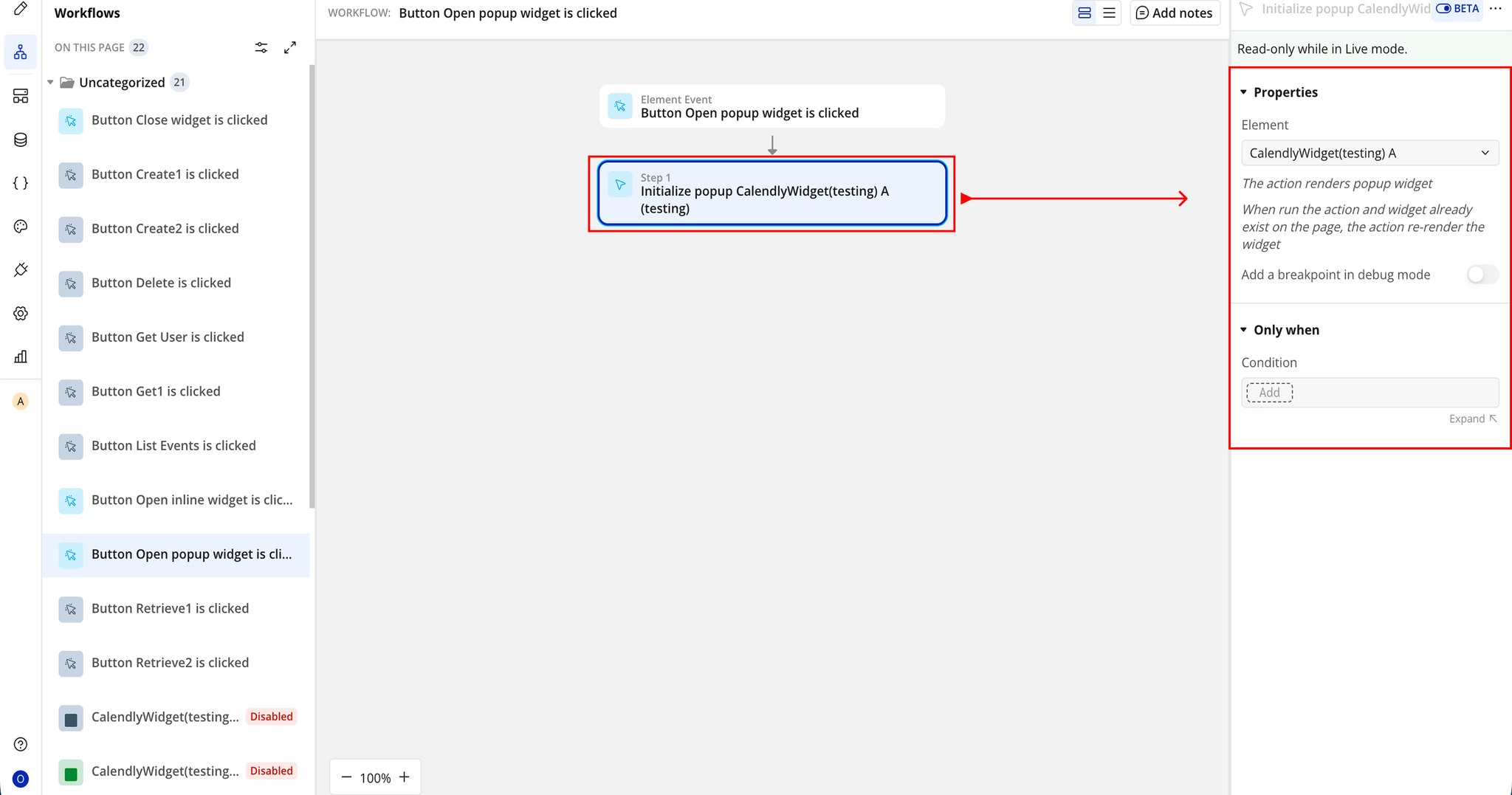
- Click Add an Event → When Open Popup Widget button is clicked
- Then Add the Plugin Action → Initialize Popup Calendly Widget
Close Calendar Widget
- Place a Close Widget button on the page
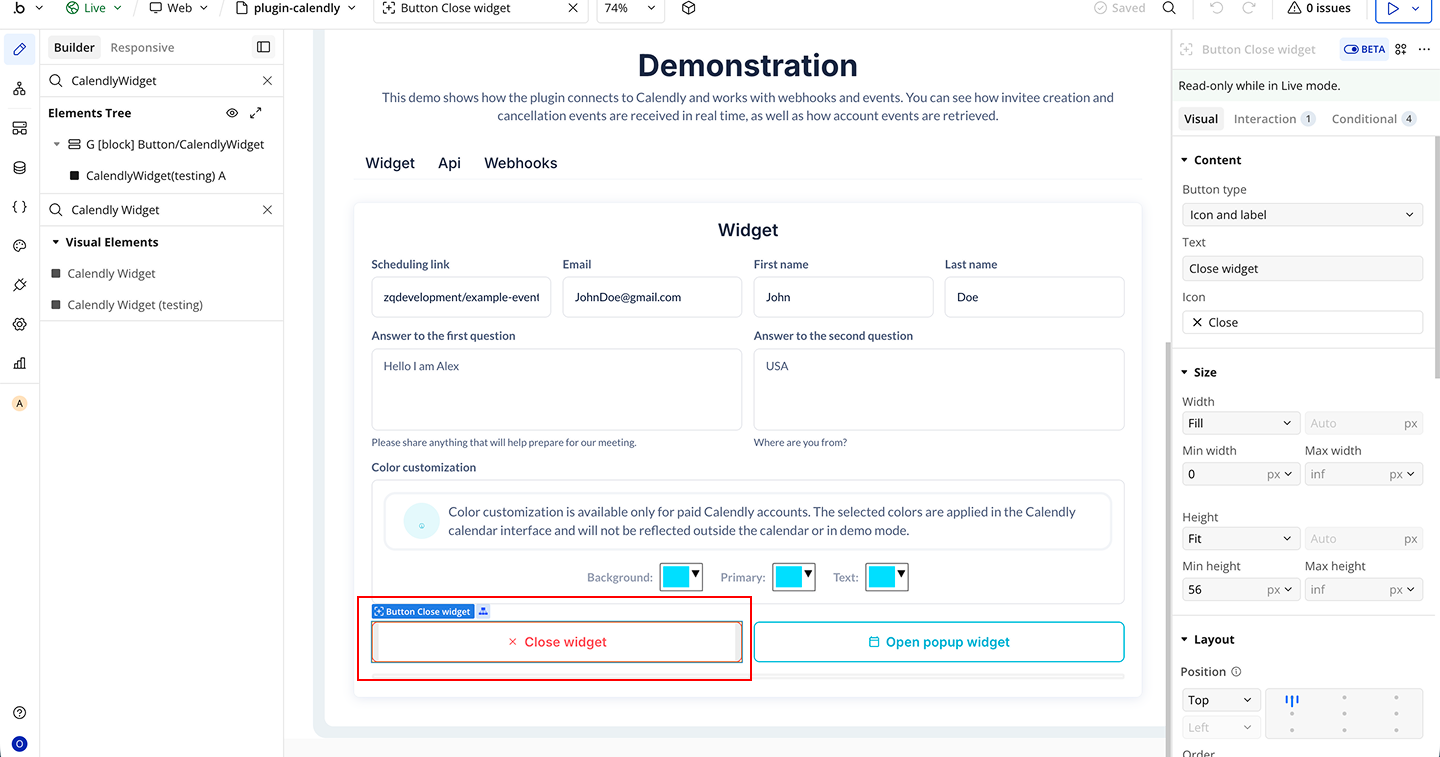
- Start a workflow on the Close Widget button
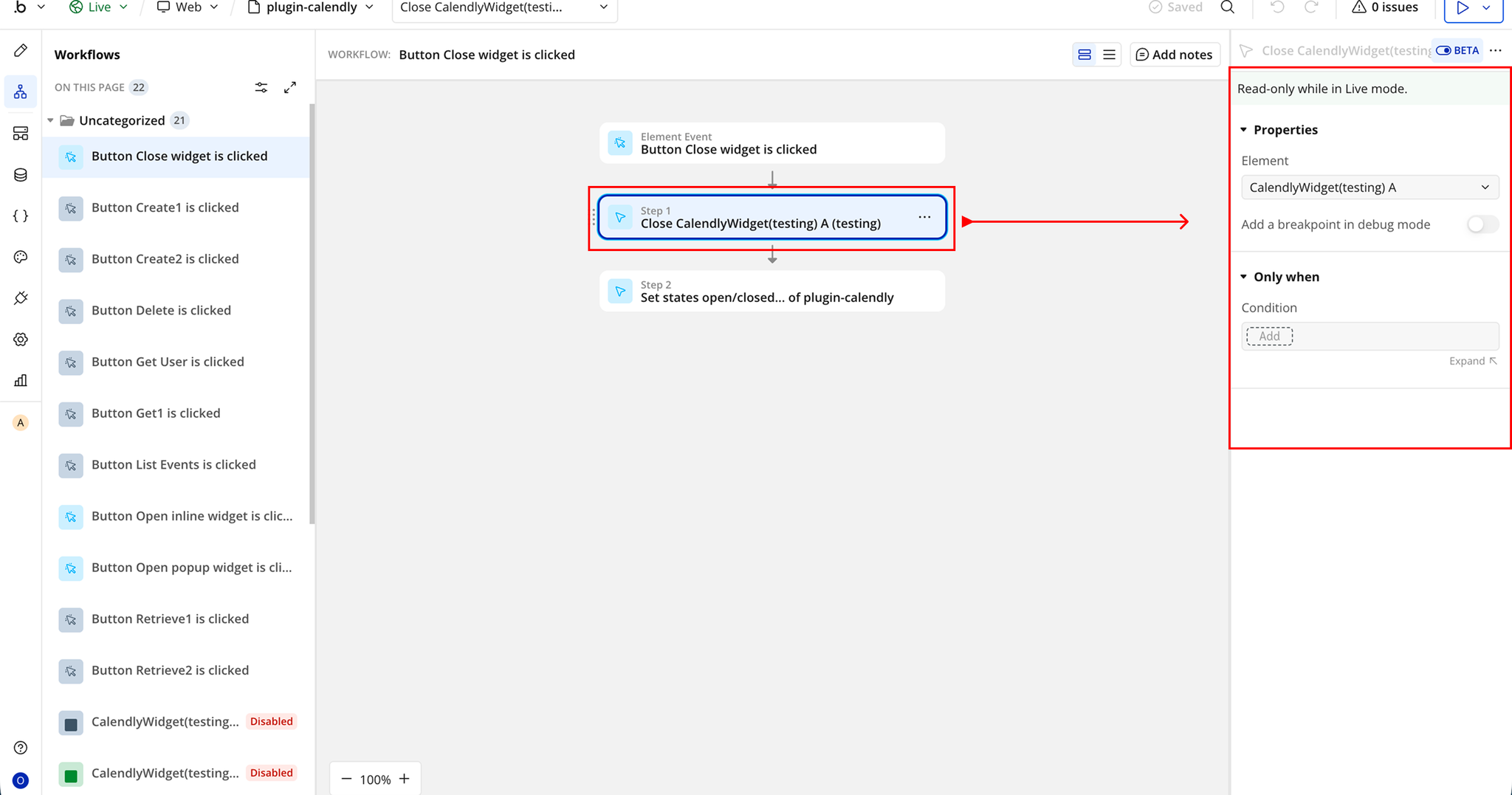
- Click Add an Event → When Close Widget button is clicked
- Then Add the Plugin Action → Close Calendly Widget
Changelogs
Update 16.07.25 - Version 1.17.0
- Bubble Plugin Page Update (Logo).
Update 12.06.25 - Version 1.16.0
- Marketing update (minor change).
Update 08.04.25 - Version 1.15.0
- Minor update (Marketing update).
Update 07.04.25 - Version 1.14.0
- Minor update (Marketing update).
Update 20.07.24 - Version 1.13.0
- Minor update.
Update 03.06.24 - Version 1.12.0
- Updated demo/service links.
Update 24.11.23 - Version 1.11.0
- updated description.
Update 18.10.23 - Version 1.10.0
- Updated description.
Update 15.09.23 - Version 1.9.0
- updated description.
Update 12.09.23 - Version 1.8.0
- minor updates.
Update 06.09.23 - Version 1.7.0
- Obfuscation.
Update 18.07.23 - Version 1.6.0
- updated description.
Update 18.07.23 - Version 1.5.0
- updated description.
Update 22.11.22 - Version 1.4.0
- description update.
Update 31.10.22 - Version 1.3.0
- description update.
Update 27.10.22 - Version 1.2.0
- Demo preview update.
Update 17.06.21 - Version 1.1.2
- Description update .
Update 25.01.21 - Version 1.1.1
- Minor improvements.
Update 21.01.21 - Version 1.1.0
- Detect if multiple tabs were opened.
Update 16.01.21 - Version 1.0.0
- Release.