
✅
Demo to preview the plugin:
✅
Introduction
Get paid faster and manage cash flow efficiently by integrating QuickBooks into your Bubble app. This no-code plugin allows you to connect a single company account and stay authenticated for up to 100 days using OAuth 2.0 with automatic token renewal.
Key Features
- Manage accounting records
- Convert report data
- Financial reporting
- Workflow integration
Prerequisites
Before using the QuickBooks plugin in your Bubble app, ensure the following requirements are met:
- Create a developer account on Intuit Developer
- A Bubble app where the plugin will be installed
- Basic understanding of Bubble workflows and input/output fields

How to setup
Step 1 – Install the Plugin
- Go to the Plugin Tab
- Open your Bubble Editor.
- Navigate to the Plugins tab on the left panel.
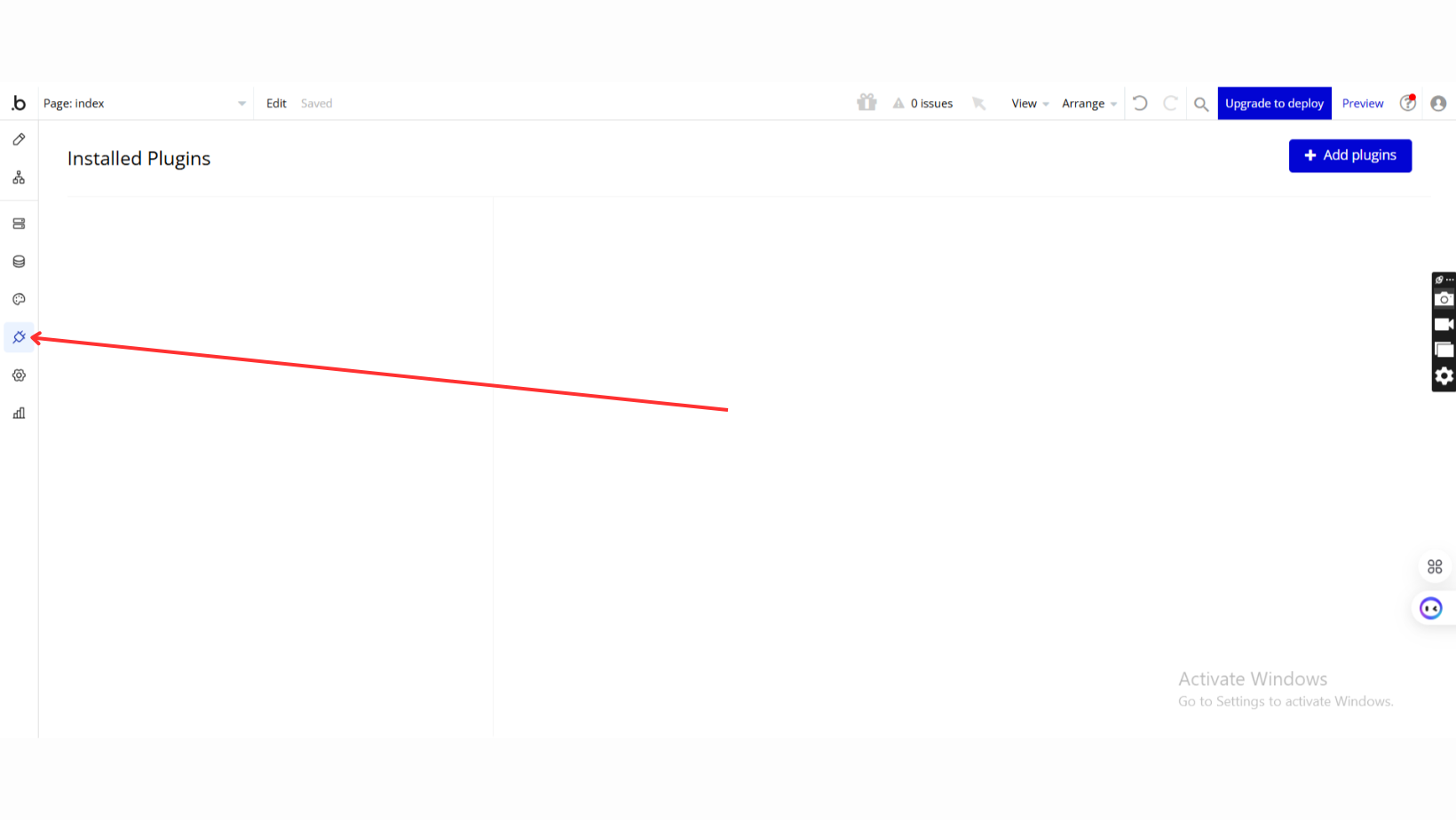
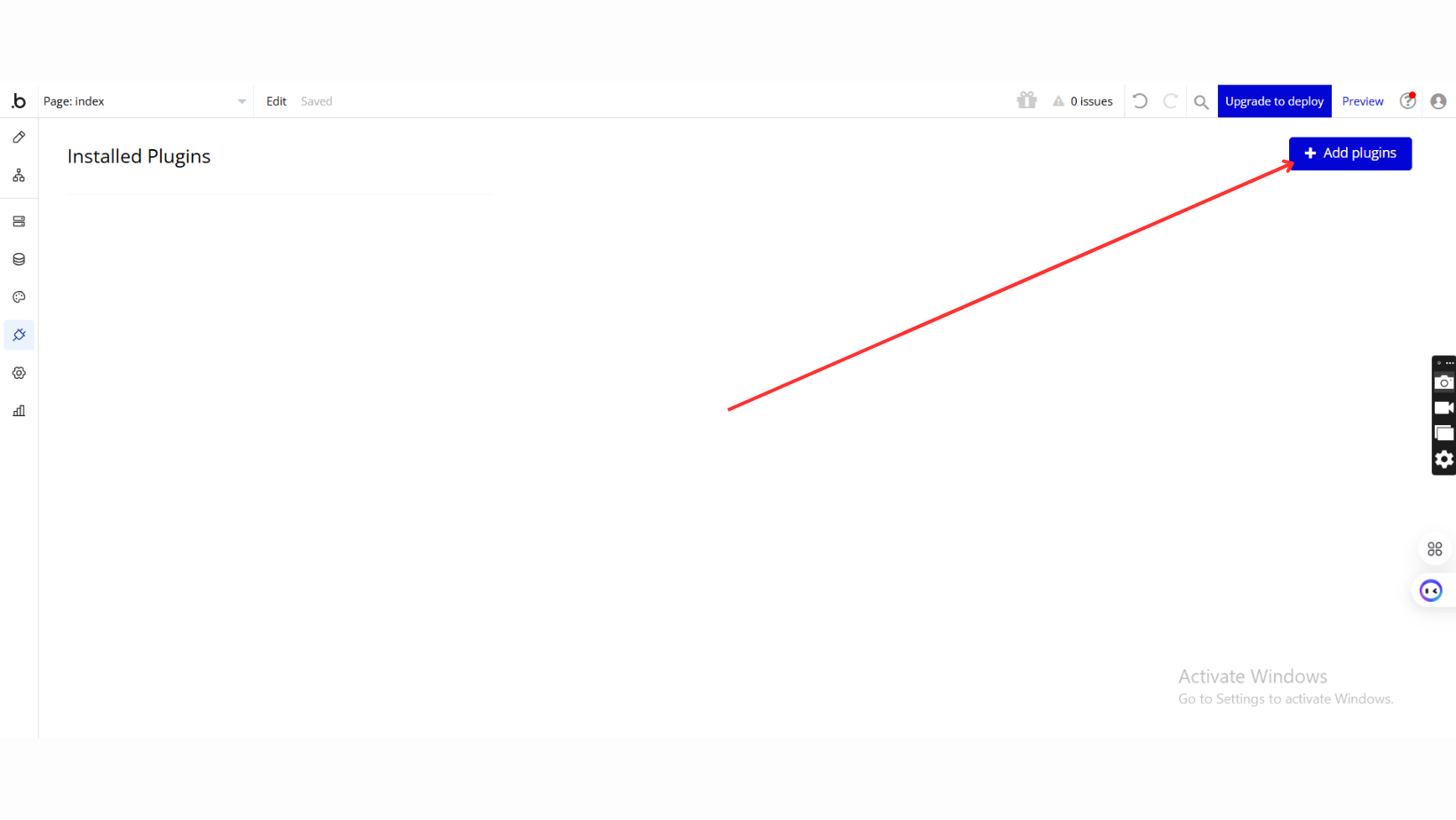
- Add Plugins
- Once in the Plugins tab, click the Add Plugins button.
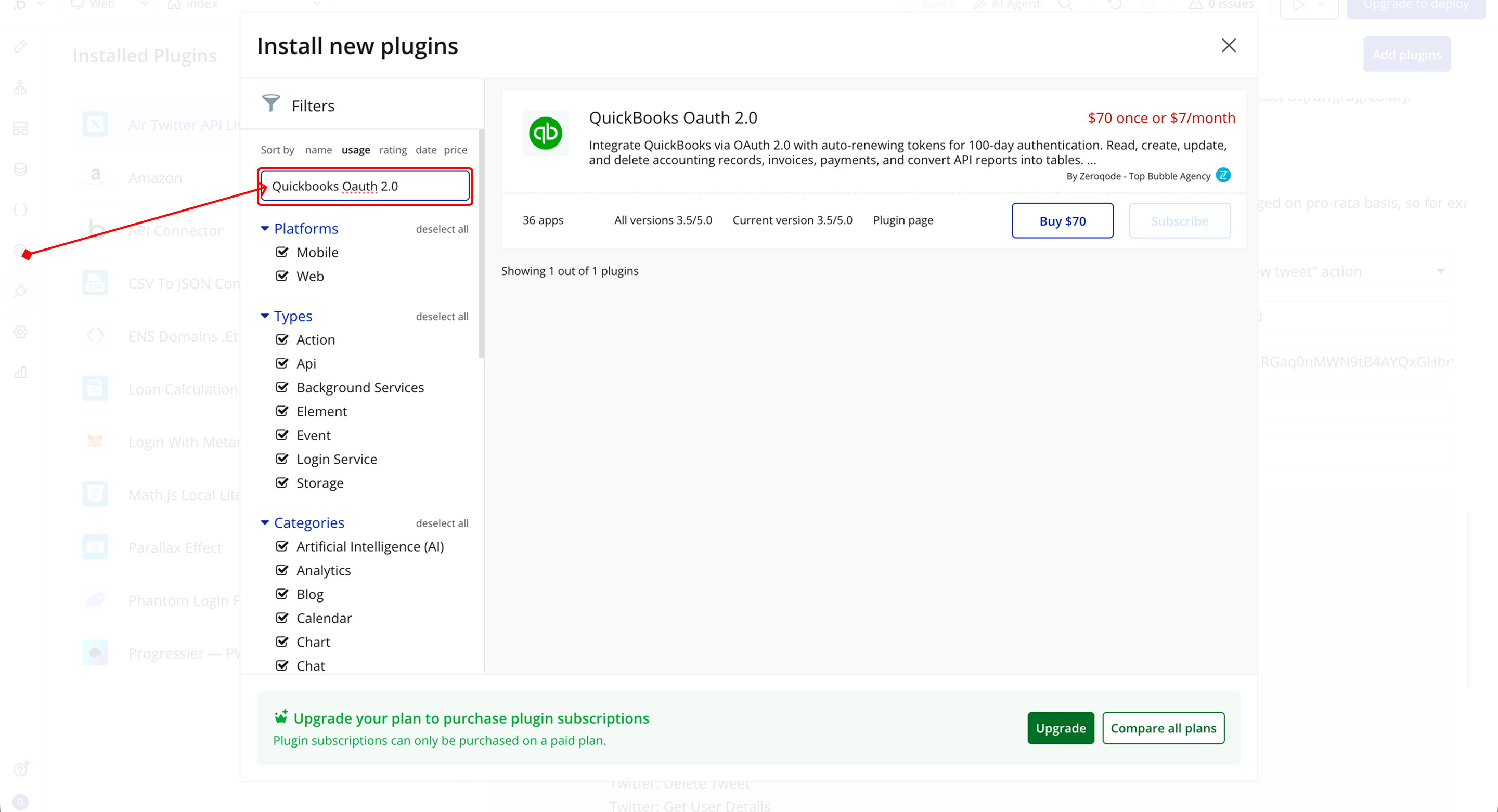
- Search for the Plugin
- Use the search bar to type Quickbooks Oauth 2.0.
- Locate the plugin in the search results.
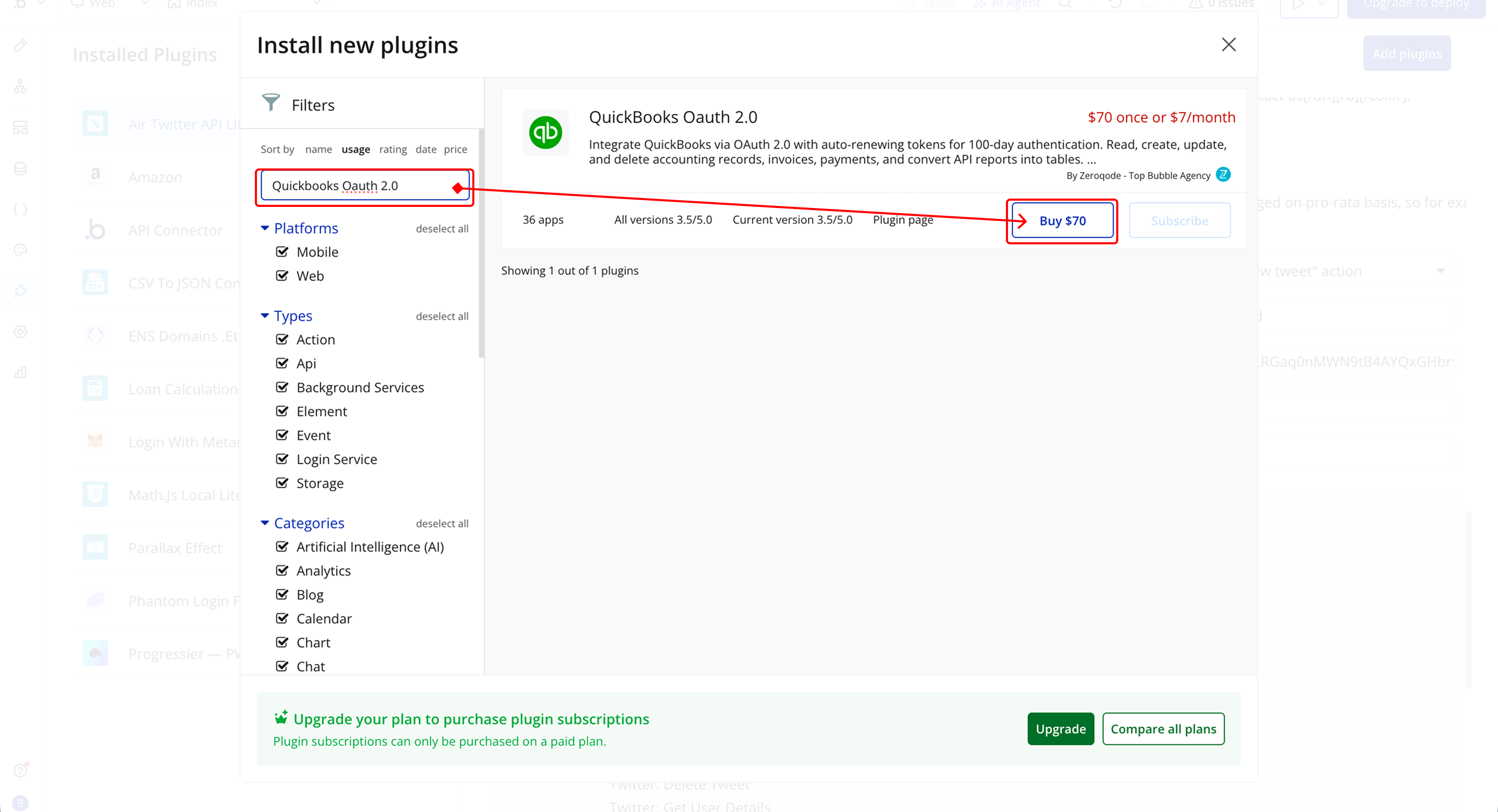
- Install/Buy
- If the plugin is free, click Install to add it to your application.
- For a paid plugin, click Buy and follow the purchase instructions.
- Payment Information (For Paid Plugins)
- If the plugin is a paid one, fill in your payment details and make payment.
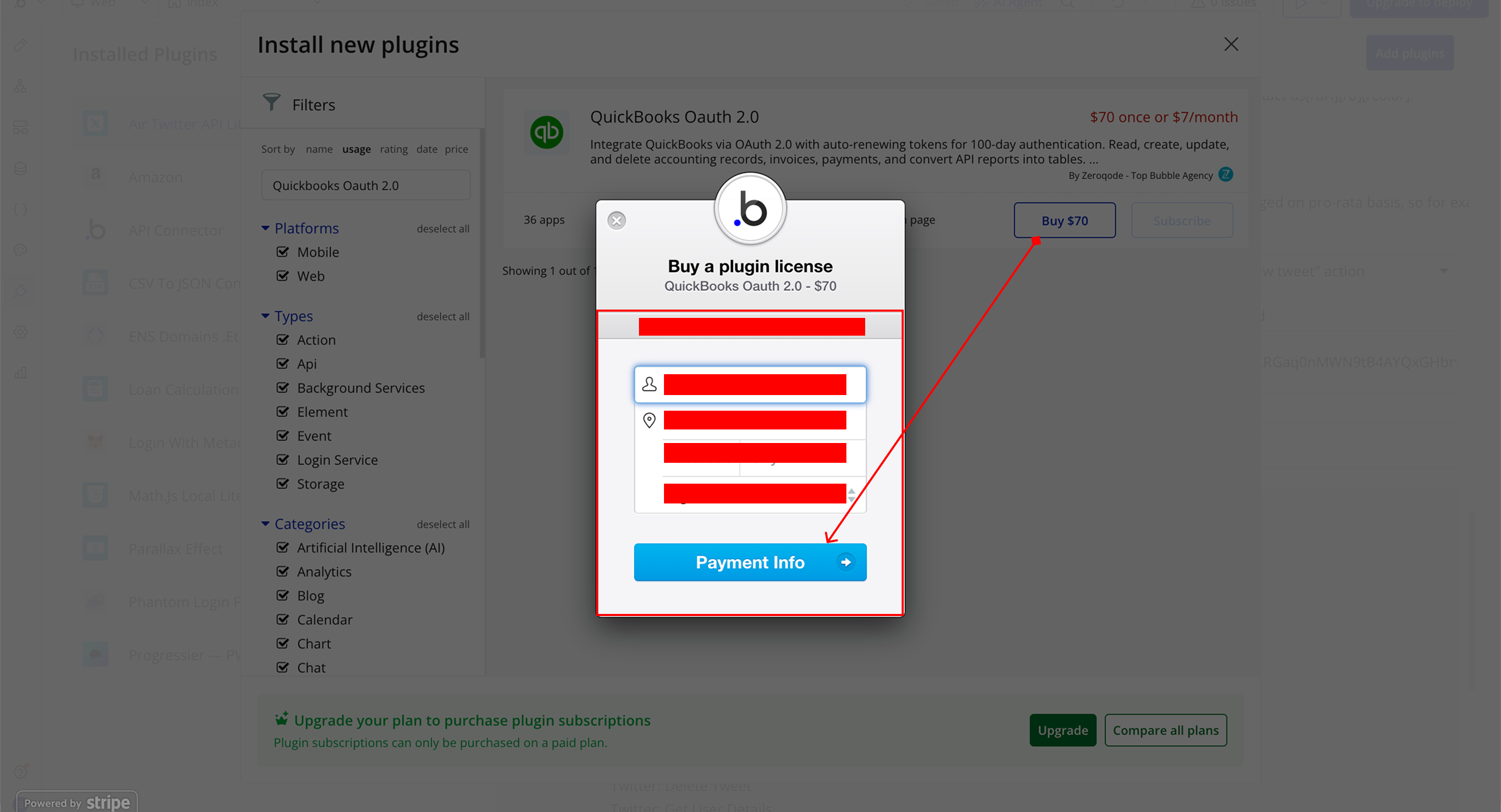
- Charges will be added to your Bubble billing account.
- Remember, if you unsubscribe from the plugin shortly after installation, charges will be prorated based on the days used.
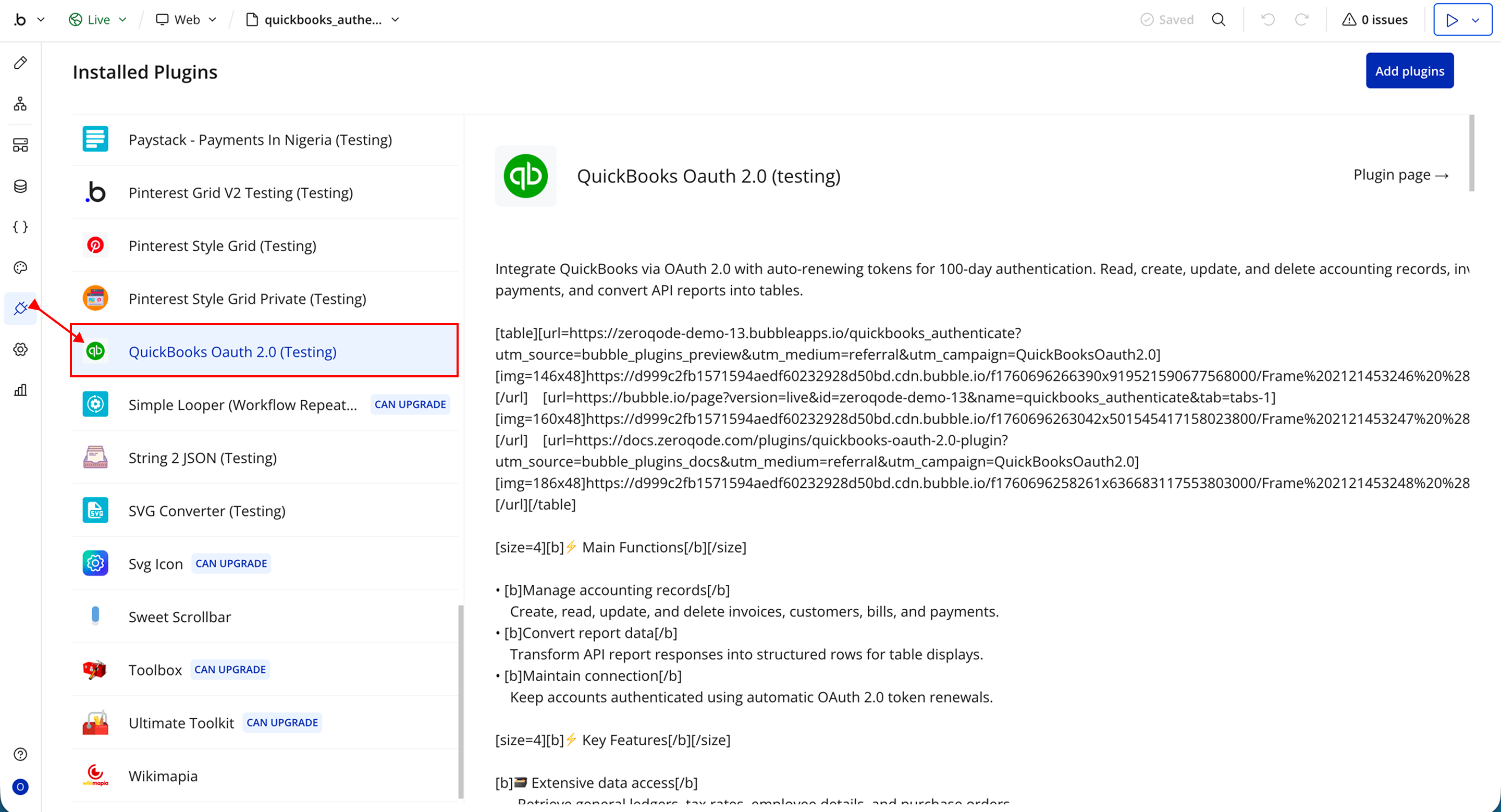
- Plugin Installed
- Once installed, the plugin will appear under the Installed Plugins list in your Bubble Editor.
Step 2 – Add the Plugin Element to Your Page
- Open the Design tab in your Bubble editor.
- Search for the QuickBooks Converter element in the Elements panel.
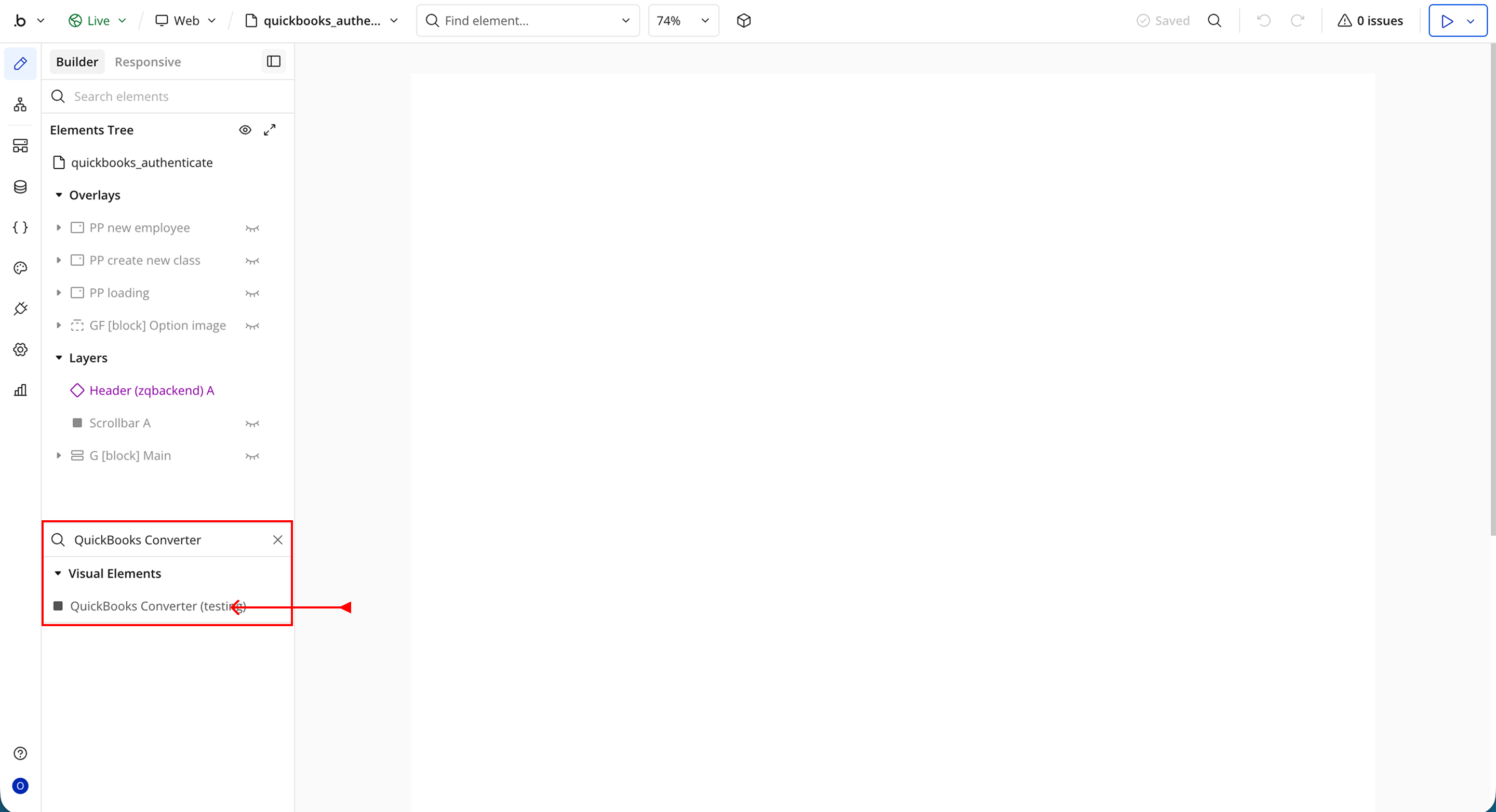
- You’ll see one option:
- QuickBooks Converter
Step 3 – QuickBooks Setup
- Go to the https://accounts.intuit.com/app/sign-in website
- Sign in or create an account
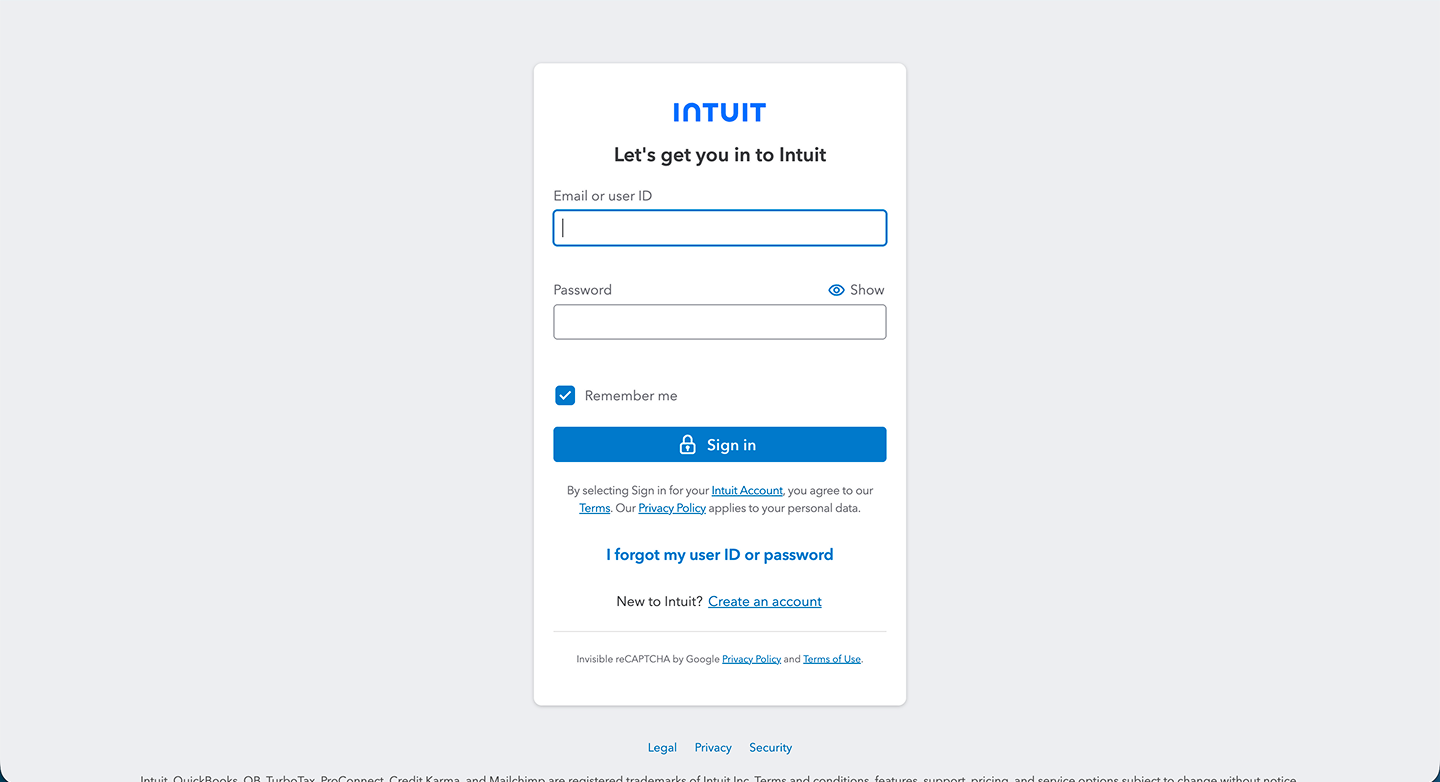
- Once logged in, navigate to your Dashboard/Home
- Go to Workspaces
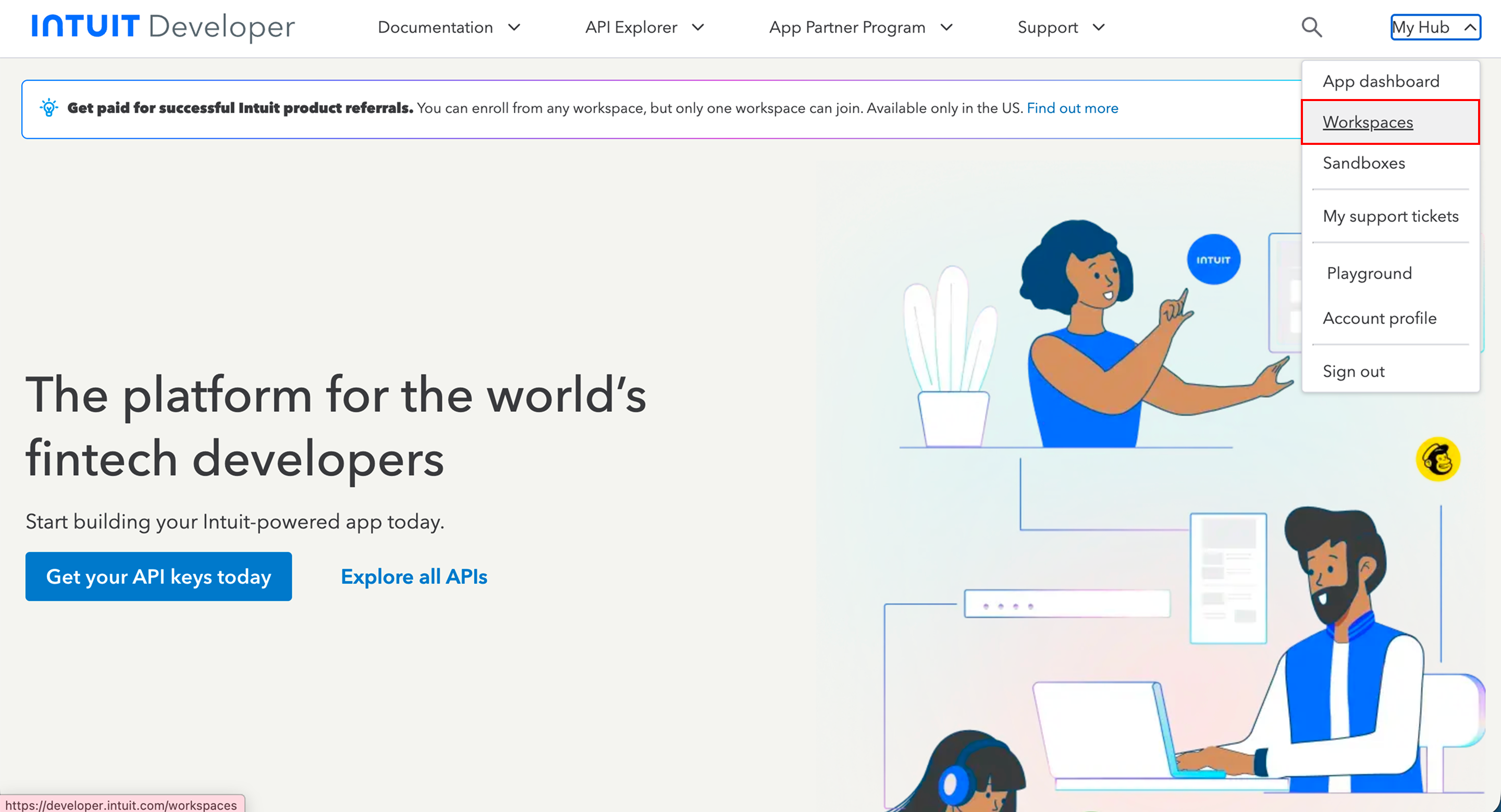
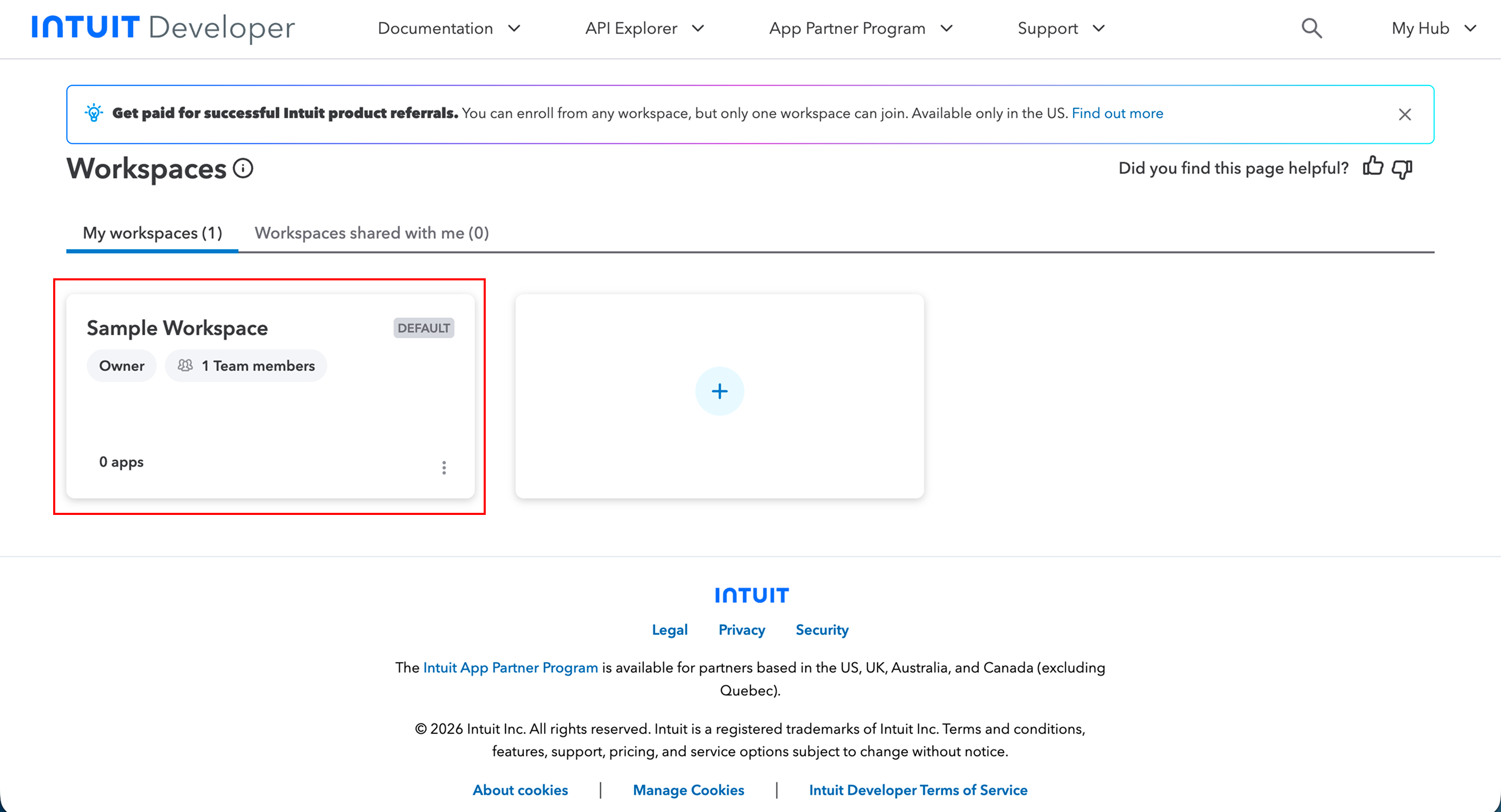
- In Workspaces:
- Create a new workspace or use an existing/sample one
- Follow the setup process to complete workspace creation
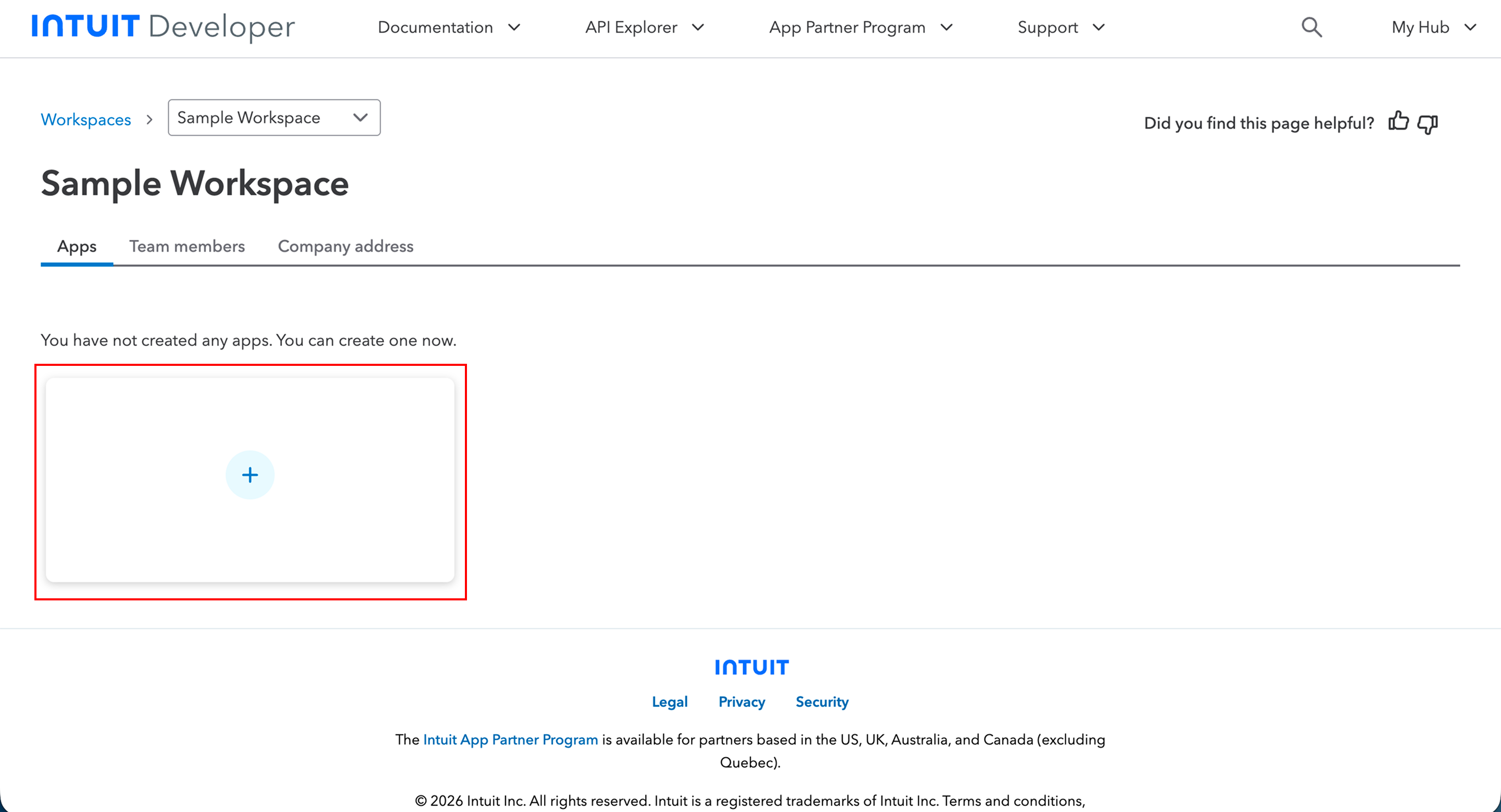
- After setting up your workspace:
- Create a new app inside the workspace
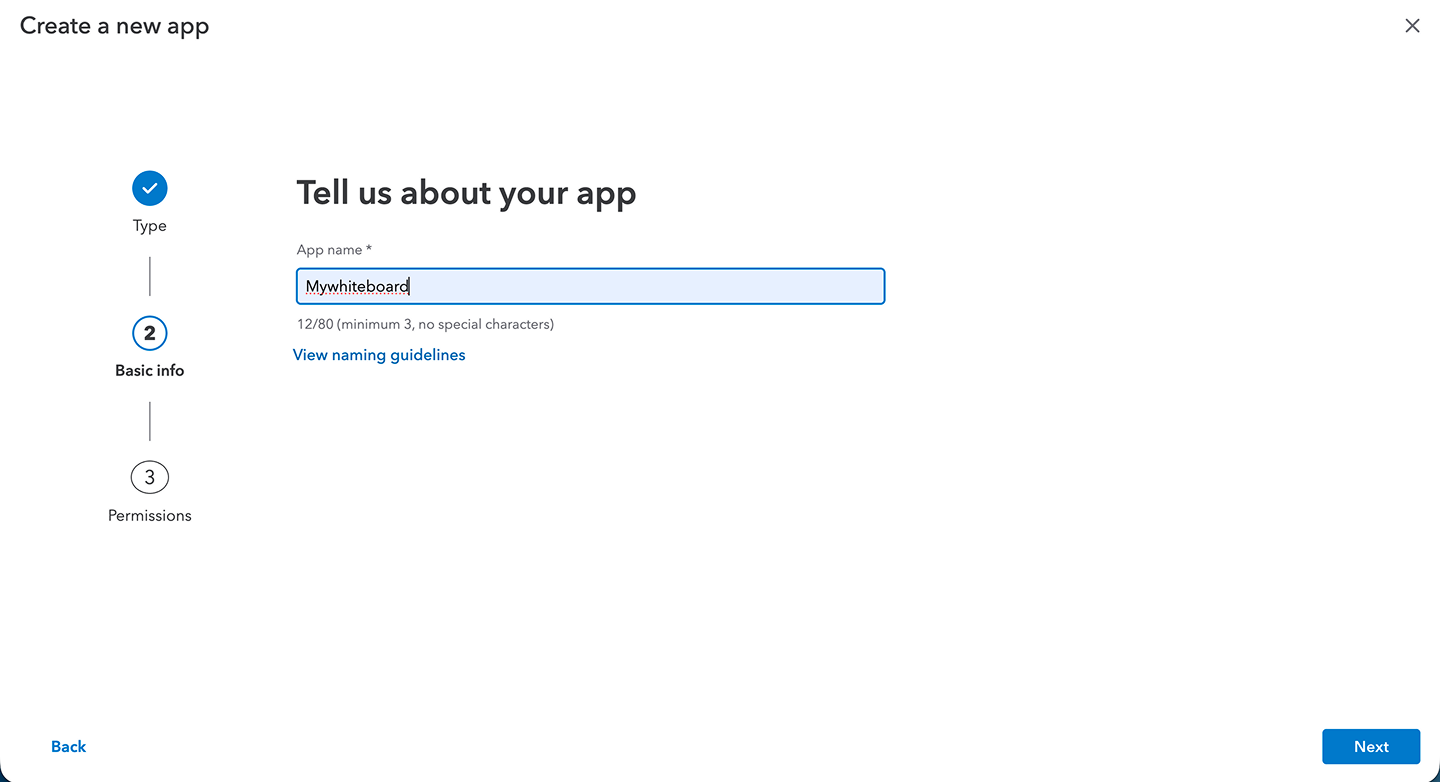
- Follow the steps provided:
- Enter app details
- Configure required permissions (scopes)
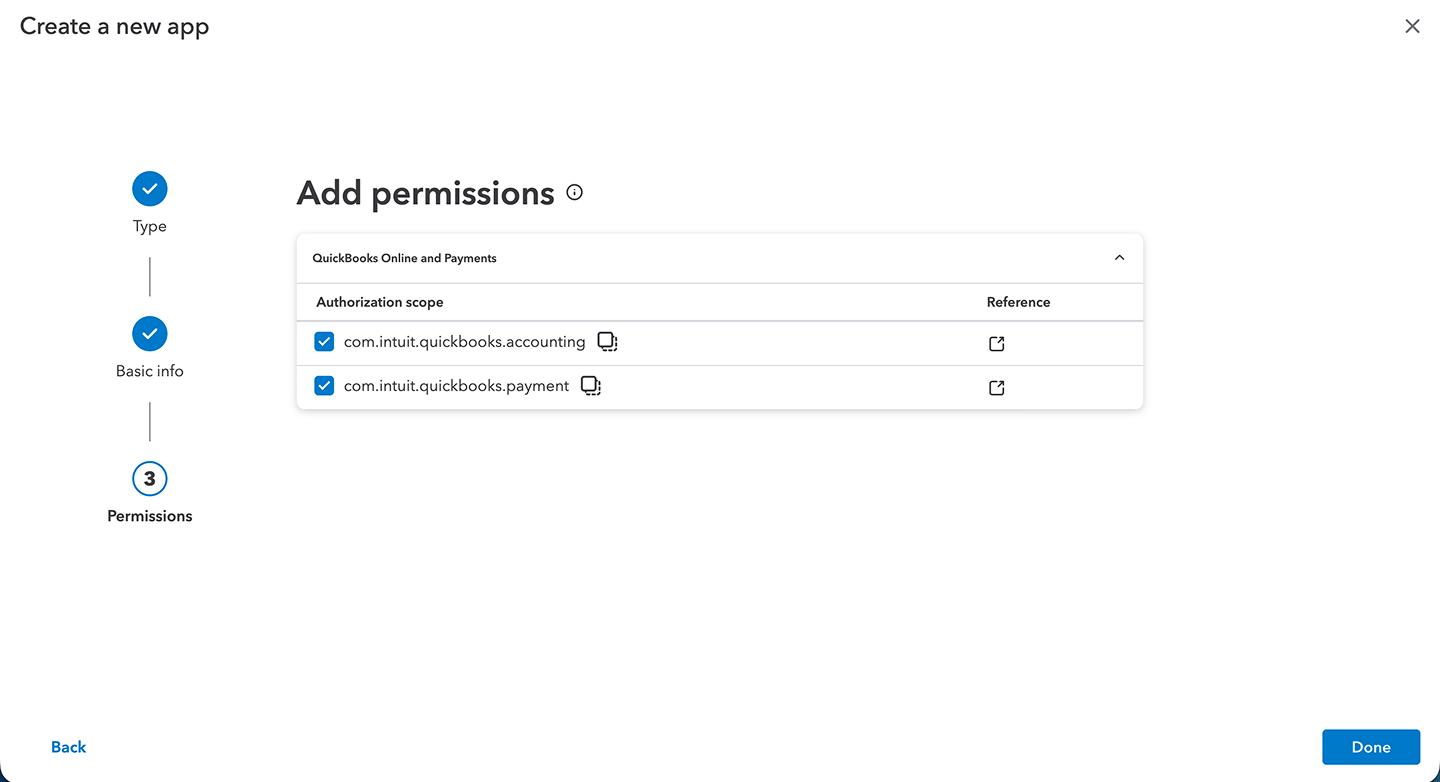
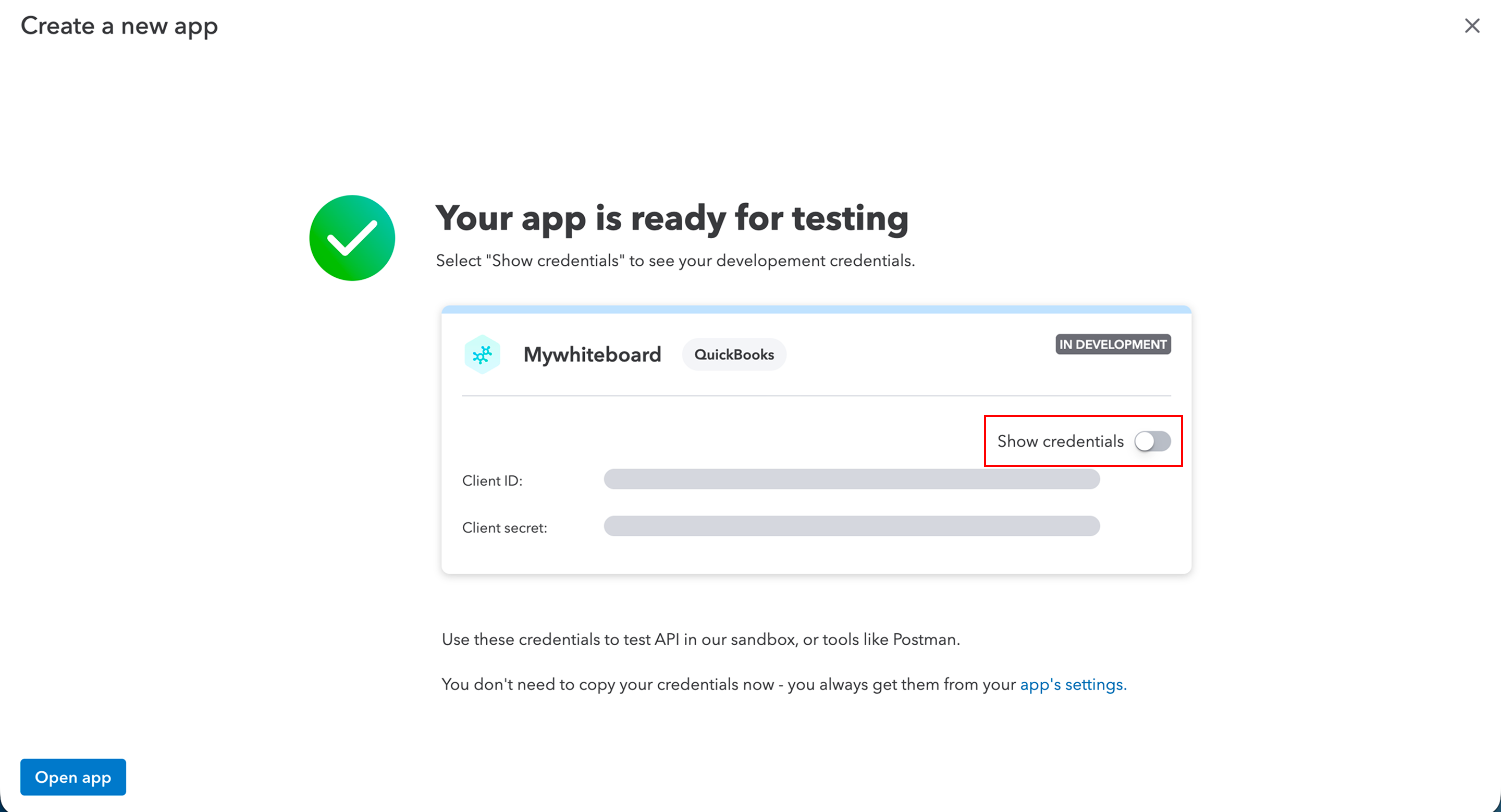
- Once the app is created:
- Click Show Credentials
- Copy your Client ID (Client Key)
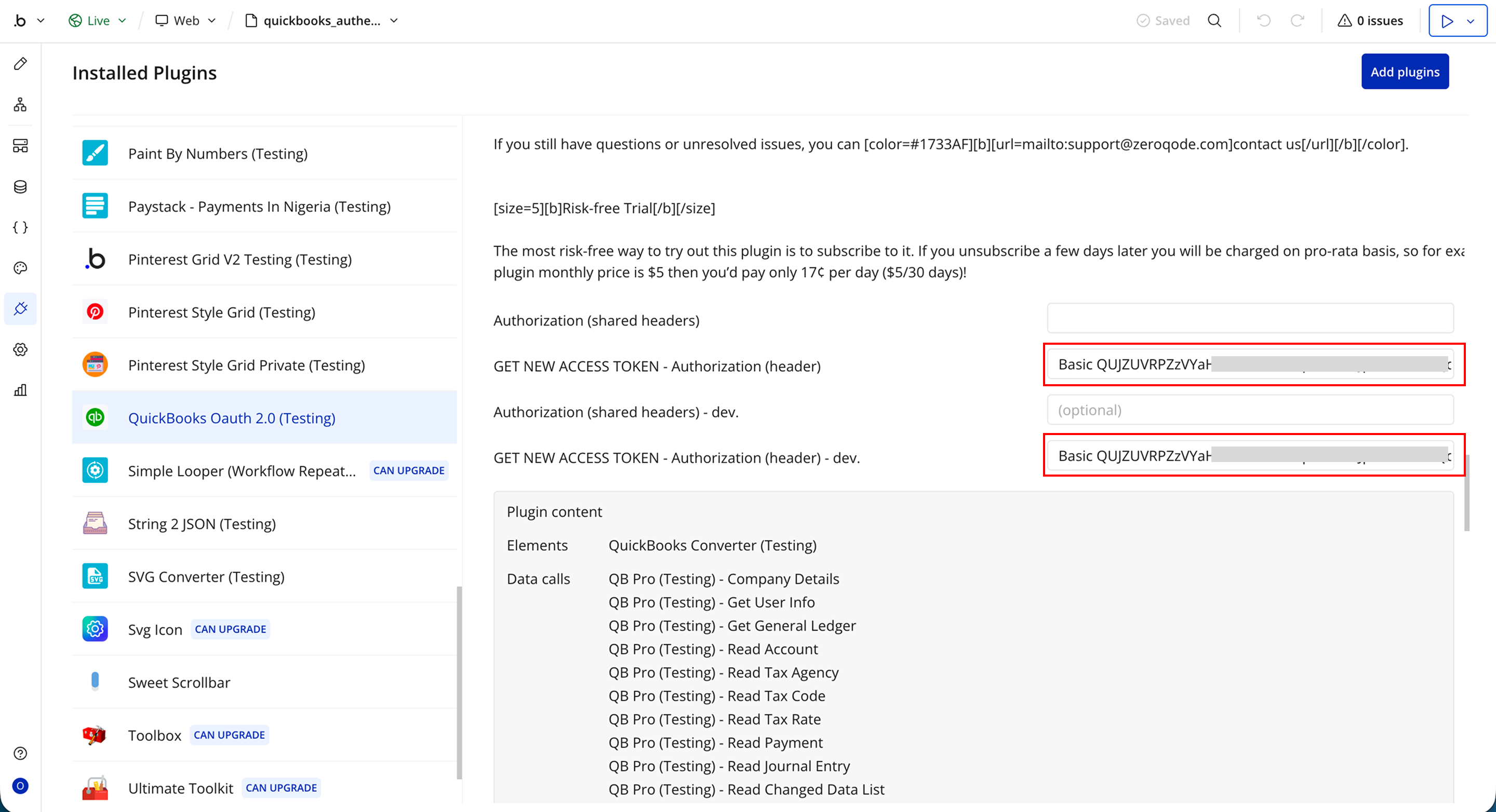
- Go back to your Bubble app
- Open the QuickBooks plugin settings
- Paste the Client ID into the Access Token field
Plugin Element - QuickBooks Converter
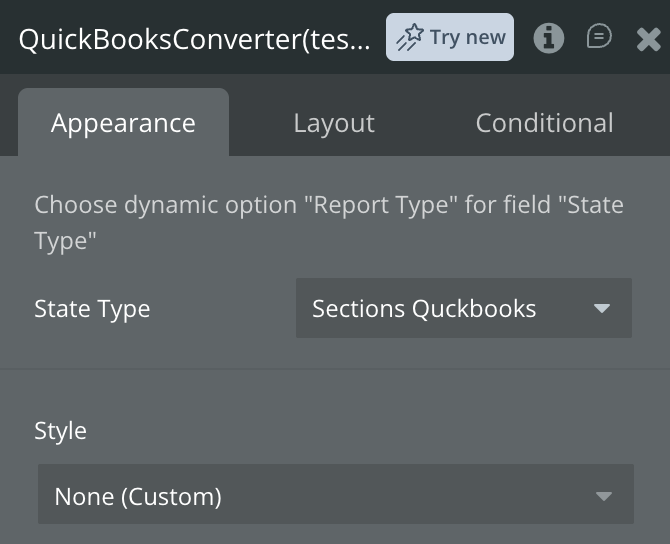
Fields
Name | Description | Type |
Choose dynamic option “Report Type” for field “State Type” | ||
State Type | Specifies the type of state/report to be processed or returned by the action. | Text |
Exposed States
Name | Description | Type |
Header Titles | List of column headers returned from the report data. | Text |
Body Rows | Structured row data returned from the report. | Text |
Error type | Type of error returned if the request fails. | Text |
Error message | Detailed error message returned by the element. | Text |
Header and Body Rows | Combined header and row data formatted for easy table display. | Text |
Element Actions
Convert to Rows
Convert to Rows is a plugin action that runs inside a Bubble workflow. It is used to transform QuickBooks report data into a structured, row-based format that can be easily displayed in your app.
When triggered, it takes the raw report response and converts it into header titles and body rows, making it suitable for use in tables, repeating groups, or data displays.
It is useful when you need to present financial reports (such as Profit & Loss or Sales reports) in a clean, readable format without manually parsing the API response.
Name | Description | Type |
Action converts report API response to rows, that can be used in tables. | Informational field describing that this action converts report data into table-ready rows. | Text |
Data | Raw response from any QuickBooks report API call to be transformed into rows. | Text |
Reset States
Reset States is a plugin action that runs inside a Bubble workflow. It is used to clear or reset the element’s current data and states.
When triggered, it removes previously stored values such as report data, headers, rows, or error messages, allowing the element to return to its default (empty) state.
Plugin Data/Action Calls
Company Details
Company Details is an API call exposed by the plugin for Bubble workflows or data sources. It allows your app to retrieve detailed information about the connected QuickBooks company without manually building API requests.
When executed, it fetches structured company data that can be directly used inside your Bubble app, such as displaying company profiles, settings, or accounting context.
Response:
Name | Description | Type |
CompanyInfo CompanyName | Name of the QuickBooks company. | Text |
CompanyInfo LegalName | Official legal business name of the company. | Text |
CompanyInfo CompanyAddr Id | Unique ID of the company address record. | Text |
CompanyInfo CompanyAddr Line1 | Primary address line of the company. | Text |
CompanyInfo CompanyAddr City | City of the company address. | Text |
CompanyInfo CompanyAddr CountrySubDivisionCode | State or region code of the company address. | Text |
CompanyInfo CompanyAddr PostalCode | Postal or ZIP code of the company address. | Text |
CompanyInfo CompanyAddr Lat | Latitude of the company address. | Text |
CompanyInfo CompanyAddr Long | Longitude of the company address. | Text |
CompanyInfo CustomerCommunicationAddr Id | ID of customer communication address. | Text |
CompanyInfo CustomerCommunicationAddr Line1 | First line of customer communication address. | Text |
CompanyInfo CustomerCommunicationAddr City | City of customer communication address. | Text |
CompanyInfo CustomerCommunicationAddr CountrySubDivisionCode | State or region of customer communication address. | Text |
CompanyInfo CustomerCommunicationAddr PostalCode | Postal code of customer communication address. | Text |
CompanyInfo CustomerCommunicationAddr Lat | Latitude of customer communication address. | Text |
CompanyInfo CustomerCommunicationAddr Long | Longitude of customer communication address. | Text |
CompanyInfo LegalAddr Id | Unique ID of legal address record. | Text |
CompanyInfo LegalAddr Line1 | First line of legal address. | Text |
CompanyInfo LegalAddr City | City of legal address. | Text |
CompanyInfo LegalAddr CountrySubDivisionCode | State or region of legal address. | Text |
CompanyInfo LegalAddr PostalCode | Postal code of legal address. | Text |
CompanyInfo LegalAddr Lat | Latitude of legal address. | Text |
CompanyInfo LegalAddr Long | Longitude of legal address. | Text |
CompanyInfo CustomerCommunicationEmailAddr Address | Email address used for customer communication. | Text |
CompanyInfo CompanyStartDate | Date the company started using QuickBooks. | Text |
CompanyInfo FiscalYearStartMonth | Month when the fiscal year begins. | Text |
CompanyInfo Country | Country where the company is registered. | Text |
CompanyInfo Email Address | Primary company email address. | Text |
CompanyInfo SupportedLanguages | Languages supported by the company profile. | Text |
CompanyInfo NameValue | Additional name-value metadata field. | Text |
CompanyInfo domain | Company domain information. | Text |
CompanyInfo sparse | Indicates sparse object response format. | Text |
CompanyInfo Id | Unique company identifier. | Text |
CompanyInfo SyncToken | Token used for data synchronization/versioning. | Text |
CompanyInfo MetaData CreateTime | Timestamp when the company record was created. | Text |
CompanyInfo MetaData LastUpdatedTime | Timestamp of last update to company record. | Text |
time | API response timestamp. | Text |
Create Account
Create Account is an API call exposed by the plugin for Bubble workflows or data sources. It allows your app to create a new account record in QuickBooks or retrieve the response of an account creation request without manually building the API call.
When executed, it sends the required account data to QuickBooks and returns a structured response that can be reused inside your Bubble app.
Response:
Name | Description | Type |
Account Name | Name of the created or retrieved QuickBooks account. | Text |
Account SubAccount | Indicates whether the account is a sub-account. | yes/no |
Account FullyQualifiedName | Full hierarchical name of the account. | Text |
Account Active | Indicates whether the account is active. | yes/no |
Account Classification | Classification category of the account. | Text |
Account AccountType | Type of account (e.g. Asset, Liability, Expense). | Text |
Account AccountSubType | Subtype of the account. | Text |
Account CurrentBalance | Current balance of the account. | Number |
Account CurrentBalanceWithSubAccounts | Combined balance including sub-accounts. | Number |
Account CurrencyRef value | Currency code used by the account. | Text |
Account CurrencyRef name | Currency name used by the account. | Text |
Account domain | Data domain of the account record. | Text |
Account sparse | Indicates sparse update format. | yes/no |
Account Id | Unique identifier of the account. | Text |
Account SyncToken | Token used for syncing and updates. | Text |
Account MetaData CreateTime | Timestamp when the account was created. | Text |
Account MetaData LastUpdatedTime | Timestamp of last update to the account. | Text |
time | Timestamp of API response. | Date |
Read Account
Read Account is an API call exposed by the plugin for Bubble workflows or data sources. It allows your app to retrieve detailed information about a specific QuickBooks account without manually constructing API requests. When executed, it fetches structured account data that can be reused inside your Bubble app, such as displaying account details, balances, or syncing financial records.
Response:
Name | Description | Type |
Account Name | Name of the QuickBooks account retrieved. | Text |
Account SubAccount | Indicates whether the account is a sub-account. | yes/no |
Account FullyQualifiedName | Full hierarchical name of the account. | Text |
Account Active | Indicates whether the account is currently active. | yes/no |
Account Classification | Classification type of the account. | Text |
Account AccountType | Main type of account (e.g. Asset, Expense, Liability). | Text |
Account AccountSubType | Subcategory of the account type. | Text |
Account CurrentBalance | Current balance of the account. | Number |
Account CurrentBalanceWithSubAccounts | Total balance including sub-accounts. | Number |
Account CurrencyRef value | Currency code used by the account. | Text |
Account CurrencyRef name | Currency name used by the account. | Text |
Account domain | Data domain associated with the account. | Text |
Account sparse | Indicates sparse representation of the object. | yes/no |
Account Id | Unique identifier of the account. | Text |
Account SyncToken | Sync token used for version control. | Text |
Account MetaData CreateTime | Timestamp when the account was created. | Text |
Account MetaData LastUpdatedTime | Timestamp when the account was last updated. | Text |
time | API response timestamp. | Date |
Update Account
Update Account is an API call exposed by the plugin for Bubble workflows or data sources. It allows your app to modify an existing QuickBooks account without manually building API requests. When executed, it sends updated account information to QuickBooks and returns the updated account response in a structured format that can be reused inside your Bubble app.
Response:
Name | Description | Type |
Account Name | Updated name of the QuickBooks account. | Text |
Account SubAccount | Indicates whether the account is a sub-account. | yes/no |
Account Description | Description of the account. | Text |
Account FullyQualifiedName | Full hierarchical name of the account. | Text |
Account Active | Indicates whether the account is active. | yes/no |
Account Classification | Classification type of the account. | Text |
Account AccountType | Type of account (e.g. Asset, Liability, Expense). | Text |
Account AccountSubType | Subtype of the account. | Text |
Account CurrentBalance | Current balance after update. | Number |
Account CurrentBalanceWithSubAccounts | Combined balance including sub-accounts. | Number |
Account CurrencyRef value | Currency code used by the account. | Text |
Account CurrencyRef name | Currency name used by the account. | Text |
Account domain | Data domain of the account. | Text |
Account sparse | Indicates sparse update format. | yes/no |
Account Id | Unique identifier of the account. | Text |
Account SyncToken | Updated sync token for version control. | Text |
Account MetaData CreateTime | Timestamp when the account was created. | Text |
Account MetaData LastUpdatedTime | Timestamp of last update. | Text |
time | API response timestamp. | Date |
Create Payment Method
Create Payment Method is an API call exposed by the plugin for Bubble workflows or data sources. It allows your app to create a new payment method in QuickBooks without manually constructing API requests.
When executed, it sends the required payment method details to QuickBooks and returns a structured response that can be reused inside your Bubble app.
Response:
Name | Description | Type |
PaymentMethod Name | Name of the created payment method. | Text |
PaymentMethod Active | Indicates whether the payment method is active. | yes/no |
PaymentMethod Type | Type of payment method (e.g. credit card, cash, bank transfer). | Text |
PaymentMethod domain | Data domain of the payment method record. | Text |
PaymentMethod sparse | Indicates sparse object representation. | yes/no |
PaymentMethod Id | Unique identifier of the payment method. | Text |
PaymentMethod SyncToken | Sync token used for updates and version control. | Text |
PaymentMethod MetaData CreateTime | Timestamp when the payment method was created. | Text |
PaymentMethod MetaData LastUpdatedTime | Timestamp when the payment method was last updated. | Text |
time | API response timestamp. | Date |
Read Payment Method
Read Payment Method is an API call exposed by the plugin for Bubble workflows or data sources. It allows your app to retrieve details of a specific payment method from QuickBooks without manually building API requests.
When executed, it fetches structured payment method data that can be reused inside your Bubble app, such as displaying payment options, syncing records, or managing billing preferences.
Response:
Name | Description | Type |
PaymentMethod Name | Name of the retrieved payment method. | Text |
PaymentMethod Active | Indicates whether the payment method is active. | yes/no |
PaymentMethod Type | Type of payment method (e.g. card, cash, bank transfer). | Text |
PaymentMethod domain | Data domain of the payment method record. | Text |
PaymentMethod sparse | Indicates sparse object format. | yes/no |
PaymentMethod Id | Unique identifier of the payment method. | Text |
PaymentMethod SyncToken | Sync token used for version tracking and updates. | Text |
PaymentMethod MetaData CreateTime | Timestamp when the payment method was created. | Text |
PaymentMethod MetaData LastUpdatedTime | Timestamp when the payment method was last updated. | Text |
time | API response timestamp. | Date |
Update Payment Method
Update Payment Method is an API call exposed by the plugin for Bubble workflows or data sources. It allows your app to modify an existing payment method in QuickBooks without manually building API requests.
When executed, it sends updated payment method details to QuickBooks and returns the updated record in a structured format that can be reused inside your Bubble app.
Response:
Name | Description | Type |
PaymentMethod Name | Name of the updated payment method. | Text |
PaymentMethod Active | Indicates whether the payment method is active. | yes/no |
PaymentMethod Type | Type of payment method (e.g. card, bank transfer, cash). | Text |
PaymentMethod domain | Data domain of the payment method record. | Text |
PaymentMethod sparse | Indicates sparse update format. | yes/no |
PaymentMethod Id | Unique identifier of the payment method. | Text |
PaymentMethod SyncToken | Sync token used for version control and updates. | Text |
PaymentMethod MetaData CreateTime | Timestamp when the payment method was created. | Text |
PaymentMethod MetaData LastUpdatedTime | Timestamp when the payment method was last updated. | Text |
time | API response timestamp. | Date |
Create Purchase Order
Create Purchase Order is an API call exposed by the plugin for Bubble workflows or data sources. It allows your app to create a new purchase order in QuickBooks without manually building API requests.
When executed, it sends purchase order details (such as vendor, items, quantities, and pricing) to QuickBooks and returns a structured response that can be reused inside your Bubble app.
Response:
Name | Description | Type |
PurchaseOrder VendorAddr Id | Vendor address ID returned by the API call. | Text |
PurchaseOrder VendorAddr Line1 | Vendor address line 1 returned by the API call. | Text |
PurchaseOrder VendorAddr City | Vendor city returned by the API call. | Text |
PurchaseOrder VendorAddr CountrySubDivisionCode | Vendor state/province code returned by the API call. | Text |
PurchaseOrder VendorAddr PostalCode | Vendor postal code returned by the API call. | Text |
PurchaseOrder ShipAddr Id | Shipping address ID returned by the API call. | Text |
PurchaseOrder ShipAddr Line1 | Shipping address line 1 returned by the API call. | Text |
PurchaseOrder ShipMethodRef value | Shipping method reference value returned by the API call. | Text |
PurchaseOrder ShipMethodRef name | Shipping method name returned by the API call. | Text |
PurchaseOrder POStatus | Purchase order status returned by the API call. | Text |
PurchaseOrder domain | Domain returned by the API call. | Text |
PurchaseOrder sparse | Sparse flag returned by the API call. | yes/no |
PurchaseOrder Id | Purchase order ID returned by the API call. | Text |
PurchaseOrder SyncToken | Sync token returned by the API call. | Text |
PurchaseOrder MetaData CreateTime | Creation timestamp returned by the API call. | Text |
PurchaseOrder MetaData LastUpdatedTime | Last updated timestamp returned by the API call. | Text |
PurchaseOrder CustomField | Custom field data returned by the API call. | Text |
PurchaseOrder DocNumber | Document number returned by the API call. | Text |
PurchaseOrder TxnDate | Transaction date returned by the API call. | Text |
PurchaseOrder DepartmentRef value | Department reference value returned by the API call. | Text |
PurchaseOrder DepartmentRef name | Department reference name returned by the API call. | Text |
PurchaseOrder CurrencyRef value | Currency reference value returned by the API call. | Text |
PurchaseOrder CurrencyRef name | Currency name returned by the API call. | Text |
PurchaseOrder ExchangeRate | Exchange rate returned by the API call. | Number |
PurchaseOrder PrivateNote | Private note returned by the API call. | Text |
PurchaseOrder Line | Line items returned by the API call. | Text |
PurchaseOrder VendorRef value | Vendor reference value returned by the API call. | Text |
PurchaseOrder VendorRef name | Vendor name returned by the API call. | Text |
PurchaseOrder APAccountRef value | Accounts payable reference value returned by the API call. | Text |
PurchaseOrder APAccountRef name | Accounts payable reference name returned by the API call. | Text |
PurchaseOrder TotalAmt | Total amount returned by the API call. | Number |
PurchaseOrder Memo | Memo returned by the API call. | Text |
time | Timestamp returned by the API call. | Date |
Read Purchase Order
Read Purchase Order is an API call exposed by the plugin for use in Bubble workflows or data sources. It allows the client to retrieve purchase order data from the integration without needing to manually construct API requests. The call returns structured data that can be directly used within the app for workflows, UI elements, or database storage. It is typically used when the application needs to fetch and display existing purchase order records as part of a workflow or automation process.
Response:
Name | Description | Type |
PurchaseOrder VendorAddr Id | Vendor address ID returned by the API call. | Text |
PurchaseOrder VendorAddr Line1 | Vendor address line 1 returned by the API call. | Text |
PurchaseOrder VendorAddr City | Vendor city returned by the API call. | Text |
PurchaseOrder VendorAddr CountrySubDivisionCode | Vendor state/province code returned by the API call. | Text |
PurchaseOrder VendorAddr PostalCode | Vendor postal code returned by the API call. | Text |
PurchaseOrder ShipAddr Id | Shipping address ID returned by the API call. | Text |
PurchaseOrder ShipAddr Line1 | Shipping address line 1 returned by the API call. | Text |
PurchaseOrder ShipMethodRef value | Shipping method reference value returned by the API call. | Text |
PurchaseOrder ShipMethodRef name | Shipping method name returned by the API call. | Text |
PurchaseOrder POStatus | Purchase order status returned by the API call. | Text |
PurchaseOrder domain | Domain returned by the API call. | Text |
PurchaseOrder sparse | Sparse flag returned by the API call. | yes/no |
PurchaseOrder Id | Purchase order ID returned by the API call. | Text |
PurchaseOrder SyncToken | Sync token returned by the API call. | Text |
PurchaseOrder MetaData CreateTime | Creation time returned by the API call. | Text |
PurchaseOrder MetaData LastUpdatedTime | Last updated time returned by the API call. | Text |
PurchaseOrder CustomField | Custom field data returned by the API call. | Text |
PurchaseOrder DocNumber | Document number returned by the API call. | Text |
PurchaseOrder TxnDate | Transaction date returned by the API call. | Text |
PurchaseOrder DepartmentRef value | Department reference value returned by the API call. | Text |
PurchaseOrder DepartmentRef name | Department reference name returned by the API call. | Text |
PurchaseOrder CurrencyRef value | Currency reference value returned by the API call. | Text |
PurchaseOrder CurrencyRef name | Currency name returned by the API call. | Text |
PurchaseOrder ExchangeRate | Exchange rate returned by the API call. | Number |
PurchaseOrder PrivateNote | Private note returned by the API call. | Text |
PurchaseOrder Line | Line items returned by the API call. | Text |
PurchaseOrder VendorRef value | Vendor reference value returned by the API call. | Text |
PurchaseOrder VendorRef name | Vendor name returned by the API call. | Text |
PurchaseOrder APAccountRef value | Accounts payable reference value returned by the API call. | Text |
PurchaseOrder APAccountRef name | Accounts payable reference name returned by the API call. | Text |
PurchaseOrder TotalAmt | Total amount returned by the API call. | Number |
PurchaseOrder Memo | Memo returned by the API call. | Text |
time | Timestamp returned by the API call. | Date |
Update Purchase Order
Update Purchase Order is an API call exposed by the plugin for use in Bubble workflows or data sources. It allows the client to modify existing purchase order records in the integration without needing to manually construct API requests. The call returns structured data that can be reused within the app, making it suitable for workflows that update, edit, or manage purchase order information dynamically as part of application logic.
Response:
Name | Description | Type |
PurchaseOrder VendorAddr Id | Vendor address ID returned by the API call. | Text |
PurchaseOrder VendorAddr Line1 | Vendor address line 1 returned by the API call. | Text |
PurchaseOrder VendorAddr City | Vendor city returned by the API call. | Text |
PurchaseOrder VendorAddr CountrySubDivisionCode | Vendor state/province code returned by the API call. | Text |
PurchaseOrder VendorAddr PostalCode | Vendor postal code returned by the API call. | Text |
PurchaseOrder ShipAddr Id | Shipping address ID returned by the API call. | Text |
PurchaseOrder ShipAddr Line1 | Shipping address line 1 returned by the API call. | Text |
PurchaseOrder ShipMethodRef value | Shipping method reference value returned by the API call. | Text |
PurchaseOrder ShipMethodRef name | Shipping method name returned by the API call. | Text |
PurchaseOrder POStatus | Purchase order status returned by the API call. | Text |
PurchaseOrder domain | Domain returned by the API call. | Text |
PurchaseOrder sparse | Sparse flag returned by the API call. | yes/no |
PurchaseOrder Id | Purchase order ID returned by the API call. | Text |
PurchaseOrder SyncToken | Sync token returned by the API call. | Text |
PurchaseOrder MetaData CreateTime | Creation timestamp returned by the API call. | Text |
PurchaseOrder MetaData LastUpdatedTime | Last updated timestamp returned by the API call. | Text |
PurchaseOrder CustomField | Custom field data returned by the API call. | Text |
PurchaseOrder DocNumber | Document number returned by the API call. | Text |
PurchaseOrder TxnDate | Transaction date returned by the API call. | Text |
PurchaseOrder DepartmentRef value | Department reference value returned by the API call. | Text |
PurchaseOrder DepartmentRef name | Department reference name returned by the API call. | Text |
PurchaseOrder CurrencyRef value | Currency reference value returned by the API call. | Text |
PurchaseOrder CurrencyRef name | Currency name returned by the API call. | Text |
PurchaseOrder ExchangeRate | Exchange rate returned by the API call. | Number |
PurchaseOrder PrivateNote | Private note returned by the API call. | Text |
PurchaseOrder Line | Line items returned by the API call. | Text |
PurchaseOrder VendorRef value | Vendor reference value returned by the API call. | Text |
PurchaseOrder VendorRef name | Vendor reference name returned by the API call. | Text |
PurchaseOrder APAccountRef value | Accounts payable reference value returned by the API call. | Text |
PurchaseOrder APAccountRef name | Accounts payable reference name returned by the API call. | Text |
PurchaseOrder TotalAmt | Total amount returned by the API call. | Number |
PurchaseOrder Memo | Memo returned by the API call. | Text |
time | Timestamp returned by the API call. | Date |
Create Customer
Create Customer is an API call exposed by the plugin for use in Bubble workflows or data sources. It allows the client to create a new customer record in the integration without needing to manually build the API request. The call returns structured customer data that can be reused within the app, making it useful for workflows that involve adding new customers and immediately using their details in other parts of the application.
Response:
Name | Description | Type |
Customer Taxable | Taxable status returned by the API call. | yes/no |
Customer BillAddr Id | Billing address ID returned by the API call. | Text |
Customer BillAddr Line1 | Billing address line 1 returned by the API call. | Text |
Customer BillAddr City | Billing city returned by the API call. | Text |
Customer BillAddr Country | Billing country returned by the API call. | Text |
Customer BillAddr CountrySubDivisionCode | Billing state/province code returned by the API call. | Text |
Customer BillAddr PostalCode | Billing postal code returned by the API call. | Text |
Customer Notes | Customer notes returned by the API call. | Text |
Customer Job | Job status returned by the API call. | yes/no |
Customer BillWithParent | Bill with parent flag returned by the API call. | yes/no |
Customer Balance | Customer balance returned by the API call. | Number |
Customer BalanceWithJobs | Balance with jobs returned by the API call. | Number |
Customer CurrencyRef value | Currency reference value returned by the API call. | Text |
Customer CurrencyRef name | Currency reference name returned by the API call. | Text |
Customer PreferredDeliveryMethod | Preferred delivery method returned by the API call. | Text |
Customer domain | Domain returned by the API call. | Text |
Customer sparse | Sparse flag returned by the API call. | yes/no |
Customer Id | Customer ID returned by the API call. | Text |
Customer SyncToken | Sync token returned by the API call. | Text |
Customer MetaData CreateTime | Creation timestamp returned by the API call. | Text |
Customer MetaData LastUpdatedTime | Last updated timestamp returned by the API call. | Text |
Customer Title | Title returned by the API call. | Text |
Customer GivenName | First name returned by the API call. | Text |
Customer MiddleName | Middle name returned by the API call. | Text |
Customer FamilyName | Last name returned by the API call. | Text |
Customer Suffix | Name suffix returned by the API call. | Text |
Customer FullyQualifiedName | Fully qualified name returned by the API call. | Text |
Customer CompanyName | Company name returned by the API call. | Text |
Customer DisplayName | Display name returned by the API call. | Text |
Customer PrintOnCheckName | Print-on-check name returned by the API call. | Text |
Customer Active | Active status returned by the API call. | yes/no |
Customer PrimaryPhone FreeFormNumber | Primary phone number returned by the API call. | Text |
Customer PrimaryEmailAddr Address | Primary email address returned by the API call. | Text |
time | Timestamp returned by the API call. | Date |
Read Customer
Read Customer is an API call exposed by the plugin for use in Bubble workflows or data sources. It allows the client to retrieve an existing customer record from the integration without needing to manually construct an API request. The call returns structured customer data that can be reused within the app, making it useful for workflows that display, edit, or process customer information dynamically inside the application.
Response:
Name | Description | Type |
Customer Taxable | Taxable status returned by the API call. | yes/no |
Customer BillAddr Id | Billing address ID returned by the API call. | Text |
Customer BillAddr Line1 | Billing address line 1 returned by the API call. | Text |
Customer BillAddr City | Billing city returned by the API call. | Text |
Customer BillAddr Country | Billing country returned by the API call. | Text |
Customer BillAddr CountrySubDivisionCode | Billing state/province code returned by the API call. | Text |
Customer BillAddr PostalCode | Billing postal code returned by the API call. | Text |
Customer Notes | Customer notes returned by the API call. | Text |
Customer Job | Job status returned by the API call. | yes/no |
Customer BillWithParent | Bill with parent flag returned by the API call. | yes/no |
Customer Balance | Customer balance returned by the API call. | Number |
Customer BalanceWithJobs | Balance with jobs returned by the API call. | Number |
Customer CurrencyRef value | Currency reference value returned by the API call. | Text |
Customer CurrencyRef name | Currency reference name returned by the API call. | Text |
Customer PreferredDeliveryMethod | Preferred delivery method returned by the API call. | Text |
Customer domain | Domain returned by the API call. | Text |
Customer sparse | Sparse flag returned by the API call. | yes/no |
Customer Id | Customer ID returned by the API call. | Text |
Customer SyncToken | Sync token returned by the API call. | Text |
Customer MetaData CreateTime | Creation timestamp returned by the API call. | Text |
Customer MetaData LastUpdatedTime | Last updated timestamp returned by the API call. | Text |
Customer Title | Title returned by the API call. | Text |
Customer GivenName | First name returned by the API call. | Text |
Customer MiddleName | Middle name returned by the API call. | Text |
Customer FamilyName | Last name returned by the API call. | Text |
Customer Suffix | Name suffix returned by the API call. | Text |
Customer FullyQualifiedName | Fully qualified name returned by the API call. | Text |
Customer CompanyName | Company name returned by the API call. | Text |
Customer DisplayName | Display name returned by the API call. | Text |
Customer PrintOnCheckName | Print-on-check name returned by the API call. | Text |
Customer Active | Active status returned by the API call. | yes/no |
Customer PrimaryPhone FreeFormNumber | Primary phone number returned by the API call. | Text |
Customer PrimaryEmailAddr Address | Primary email address returned by the API call. | Text |
time | Timestamp returned by the API call. | Date |
Update Customer
Update Customer is an API call exposed by the plugin for use in Bubble workflows or data sources. It allows the client to update an existing customer record in the integration without needing to manually construct the API request. The call returns structured customer data that can be reused within the app, making it useful for workflows that modify customer details and reflect those changes immediately across the application.
Response:
Name | Description | Type |
Customer Taxable | Taxable status returned by the API call. | yes/no |
Customer BillAddr Id | Billing address ID returned by the API call. | Text |
Customer BillAddr Line1 | Billing address line 1 returned by the API call. | Text |
Customer BillAddr City | Billing city returned by the API call. | Text |
Customer BillAddr Country | Billing country returned by the API call. | Text |
Customer BillAddr CountrySubDivisionCode | Billing state/province code returned by the API call. | Text |
Customer BillAddr PostalCode | Billing postal code returned by the API call. | Text |
Customer Notes | Customer notes returned by the API call. | Text |
Customer Job | Job status returned by the API call. | yes/no |
Customer BillWithParent | Bill with parent flag returned by the API call. | yes/no |
Customer Balance | Customer balance returned by the API call. | Number |
Customer BalanceWithJobs | Balance with jobs returned by the API call. | Number |
Customer CurrencyRef value | Currency reference value returned by the API call. | Text |
Customer CurrencyRef name | Currency reference name returned by the API call. | Text |
Customer PreferredDeliveryMethod | Preferred delivery method returned by the API call. | Text |
Customer domain | Domain returned by the API call. | Text |
Customer sparse | Sparse flag returned by the API call. | yes/no |
Customer Id | Customer ID returned by the API call. | Text |
Customer SyncToken | Sync token returned by the API call. | Text |
Customer MetaData CreateTime | Creation timestamp returned by the API call. | Text |
Customer MetaData LastUpdatedTime | Last updated timestamp returned by the API call. | Text |
Customer Title | Title returned by the API call. | Text |
Customer GivenName | First name returned by the API call. | Text |
Customer MiddleName | Middle name returned by the API call. | Text |
Customer FamilyName | Last name returned by the API call. | Text |
Customer Suffix | Name suffix returned by the API call. | Text |
Customer FullyQualifiedName | Fully qualified name returned by the API call. | Text |
Customer CompanyName | Company name returned by the API call. | Text |
Customer DisplayName | Display name returned by the API call. | Text |
Customer PrintOnCheckName | Print-on-check name returned by the API call. | Text |
Customer Active | Active status returned by the API call. | yes/no |
Customer PrimaryPhone FreeFormNumber | Primary phone number returned by the API call. | Text |
Customer PrimaryEmailAddr Address | Primary email address returned by the API call. | Text |
Customer DefaultTaxCodeRef value | Default tax code reference value returned by the API call. | Text |
time | Timestamp returned by the API call. | Date |
Create Account Class
Create Account Class is an API call exposed by the plugin for use in Bubble workflows or data sources. It allows the client to create a new account classification record in the integration without needing to manually construct the API request. The call returns structured data that can be reused within the app, making it useful for workflows that define, organize, or manage account categories dynamically inside the application.
Response:
Name | Description | Type |
Class Name | Class name returned by the API call. | Text |
Class SubClass | Subclass status returned by the API call. | yes/no |
Class FullyQualifiedName | Fully qualified class name returned by the API call. | Text |
Class Active | Active status returned by the API call. | yes/no |
Class domain | Domain returned by the API call. | Text |
Class sparse | Sparse flag returned by the API call. | yes/no |
Class Id | Class ID returned by the API call. | Text |
Class SyncToken | Sync token returned by the API call. | Text |
Class MetaData CreateTime | Creation timestamp returned by the API call. | Text |
Class MetaData LastUpdatedTime | Last updated timestamp returned by the API call. | Text |
time | Timestamp returned by the API call. | Date |
Read a Class
Read a Class is an API call exposed by the plugin for use in Bubble workflows or data sources. It allows the client to retrieve an existing account class record from the integration without needing to manually construct the API request. The call returns structured data that can be reused within the app, making it useful for workflows that display, use, or process class information dynamically inside the application.
Response:
Name | Description | Type |
Class Name | Class name returned by the API call. | Text |
Class SubClass | Subclass status returned by the API call. | yes/no |
Class FullyQualifiedName | Fully qualified class name returned by the API call. | Text |
Class Active | Active status returned by the API call. | yes/no |
Class domain | Domain returned by the API call. | Text |
Class sparse | Sparse flag returned by the API call. | yes/no |
Class Id | Class ID returned by the API call. | Text |
Class SyncToken | Sync token returned by the API call. | Text |
Class MetaData CreateTime | Creation timestamp returned by the API call. | Text |
Class MetaData LastUpdatedTime | Last updated timestamp returned by the API call. | Text |
time | Timestamp returned by the API call. | Date |
Update a Class
Update a Class is an API call exposed by the plugin for use in Bubble workflows or data sources. It allows the client to update an existing account class record in the integration without needing to manually construct the API request. The call returns structured data that can be reused within the app, making it useful for workflows that modify class details and immediately reflect those changes across the application.
Response:
Name | Description | Type |
Class Name | Class name returned by the API call. | Text |
Class SubClass | Subclass status returned by the API call. | yes/no |
Class FullyQualifiedName | Fully qualified class name returned by the API call. | Text |
Class Active | Active status returned by the API call. | yes/no |
Class domain | Domain returned by the API call. | Text |
Class sparse | Sparse flag returned by the API call. | yes/no |
Class Id | Class ID returned by the API call. | Text |
Class SyncToken | Sync token returned by the API call. | Text |
Class MetaData CreateTime | Creation timestamp returned by the API call. | Text |
Class MetaData LastUpdatedTime | Last updated timestamp returned by the API call. | Text |
time | Timestamp returned by the API call. | Date |
Create Employee
Create Employee is an API call exposed by the plugin for use in Bubble workflows or data sources. It allows the client to create a new employee record in the integration without needing to manually construct the API request. The call returns structured employee data that can be reused within the app, making it useful for workflows that add new employees and immediately use their details across different parts of the application.
Response:
Name | Description | Type |
Employee SSN | Employee SSN returned by the API call. | Text |
Employee PrimaryAddr Id | Primary address ID returned by the API call. | Text |
Employee PrimaryAddr Line1 | Primary address line 1 returned by the API call. | Text |
Employee PrimaryAddr City | Primary address city returned by the API call. | Text |
Employee PrimaryAddr CountrySubDivisionCode | Primary state/province code returned by the API call. | Text |
Employee PrimaryAddr PostalCode | Primary postal code returned by the API call. | Text |
Employee BillableTime | Billable time flag returned by the API call. | yes/no |
Employee domain | Domain returned by the API call. | Text |
Employee sparse | Sparse flag returned by the API call. | yes/no |
Employee Id | Employee ID returned by the API call. | Text |
Employee SyncToken | Sync token returned by the API call. | Text |
Employee MetaData CreateTime | Creation timestamp returned by the API call. | Text |
Employee MetaData LastUpdatedTime | Last updated timestamp returned by the API call. | Text |
Employee GivenName | First name returned by the API call. | Text |
Employee FamilyName | Last name returned by the API call. | Text |
Employee DisplayName | Display name returned by the API call. | Text |
Employee PrintOnCheckName | Print-on-check name returned by the API call. | Text |
Employee Active | Active status returned by the API call. | yes/no |
Employee PrimaryPhone FreeFormNumber | Primary phone number returned by the API call. | Text |
time | Timestamp returned by the API call. | Date |
Read Employee
Read Employee is an API call exposed by the plugin for use in Bubble workflows or data sources. It allows the client to retrieve an existing employee record from the integration without needing to manually construct the API request. The call returns structured employee data that can be reused within the app, making it useful for workflows that display, process, or use employee information dynamically across the application.
Response:
Name | Description | Type |
Employee SSN | Employee SSN returned by the API call. | Text |
Employee PrimaryAddr Id | Primary address ID returned by the API call. | Text |
Employee PrimaryAddr Line1 | Primary address line 1 returned by the API call. | Text |
Employee PrimaryAddr City | Primary address city returned by the API call. | Text |
Employee PrimaryAddr CountrySubDivisionCode | Primary state/province code returned by the API call. | Text |
Employee PrimaryAddr PostalCode | Primary postal code returned by the API call. | Text |
Employee BillableTime | Billable time flag returned by the API call. | yes/no |
Employee domain | Domain returned by the API call. | Text |
Employee sparse | Sparse flag returned by the API call. | yes/no |
Employee Id | Employee ID returned by the API call. | Text |
Employee SyncToken | Sync token returned by the API call. | Text |
Employee MetaData CreateTime | Creation timestamp returned by the API call. | Text |
Employee MetaData LastUpdatedTime | Last updated timestamp returned by the API call. | Text |
Employee GivenName | First name returned by the API call. | Text |
Employee FamilyName | Last name returned by the API call. | Text |
Employee DisplayName | Display name returned by the API call. | Text |
Employee PrintOnCheckName | Print-on-check name returned by the API call. | Text |
Employee Active | Active status returned by the API call. | yes/no |
Employee PrimaryPhone FreeFormNumber | Primary phone number returned by the API call. | Text |
time | Timestamp returned by the API call. | Date |
Update Employee
Update Employee is an API call exposed by the plugin for use in Bubble workflows or data sources. It allows the client to update an existing employee record in the integration without needing to manually construct the API request. The call returns structured employee data that can be reused within the app, making it useful for workflows that modify employee details and ensure updated information is reflected across the application.
Response:
Name | Description | Type |
Employee SSN | Employee SSN returned by the API call. | Text |
Employee PrimaryAddr Id | Primary address ID returned by the API call. | Text |
Employee PrimaryAddr Line1 | Primary address line 1 returned by the API call. | Text |
Employee PrimaryAddr City | Primary address city returned by the API call. | Text |
Employee PrimaryAddr CountrySubDivisionCode | Primary state/province code returned by the API call. | Text |
Employee PrimaryAddr PostalCode | Primary postal code returned by the API call. | Text |
Employee BillableTime | Billable time flag returned by the API call. | yes/no |
Employee domain | Domain returned by the API call. | Text |
Employee sparse | Sparse flag returned by the API call. | yes/no |
Employee Id | Employee ID returned by the API call. | Text |
Employee SyncToken | Sync token returned by the API call. | Text |
Employee MetaData CreateTime | Creation timestamp returned by the API call. | Text |
Employee MetaData LastUpdatedTime | Last updated timestamp returned by the API call. | Text |
Employee GivenName | First name returned by the API call. | Text |
Employee FamilyName | Last name returned by the API call. | Text |
Employee DisplayName | Display name returned by the API call. | Text |
Employee PrintOnCheckName | Print-on-check name returned by the API call. | Text |
Employee Active | Active status returned by the API call. | yes/no |
Employee PrimaryPhone FreeFormNumber | Primary phone number returned by the API call. | Text |
time | Timestamp returned by the API call. | Date |
Create Estimate
Create Estimate is an API call exposed by the plugin for Bubble workflows or data sources. It helps the client send or retrieve data related to this integration without building the request manually. The call returns structured values that can be reused inside the app. It is useful when the client needs this specific operation as part of the plugin workflow.
Response:
Name | Description | Type |
Estimate domain | Estimate domain returned by the API call. | Text |
Estimate sparse | Estimate sparse returned by the API call. | yes/no |
Estimate Id | Estimate Id returned by the API call. | Text |
Estimate SyncToken | Estimate SyncToken returned by the API call. | Text |
Estimate MetaData CreateTime | Estimate MetaData CreateTime returned by the API call. | Text |
Estimate MetaData LastUpdatedTime | Estimate MetaData LastUpdatedTime returned by the API call. | Text |
Estimate CustomField | Estimate CustomField returned by the API call. | Text |
Estimate DocNumber | Estimate DocNumber returned by the API call. | Text |
Estimate TxnDate | Estimate TxnDate returned by the API call. | Text |
Estimate CurrencyRef value | Estimate CurrencyRef value returned by the API call. | Text |
Estimate CurrencyRef name | Estimate CurrencyRef name returned by the API call. | Text |
Estimate ExchangeRate | Estimate ExchangeRate returned by the API call. | Number |
Estimate PrivateNote | Estimate PrivateNote returned by the API call. | Text |
Estimate TxnStatus | Estimate TxnStatus returned by the API call. | Text |
Estimate Line | Estimate Line returned by the API call. | Text |
Estimate CustomerRef value | Estimate CustomerRef value returned by the API call. | Text |
Estimate CustomerRef name | Estimate CustomerRef name returned by the API call. | Text |
Estimate CustomerMemo value | Estimate CustomerMemo value returned by the API call. | Text |
Estimate GlobalTaxCalculation | Estimate GlobalTaxCalculation returned by the API call. | Text |
Estimate TotalAmt | Estimate TotalAmt returned by the API call. | Number |
Estimate HomeTotalAmt | Estimate HomeTotalAmt returned by the API call. | Number |
Estimate PrintStatus | Estimate PrintStatus returned by the API call. | Text |
Estimate EmailStatus | Estimate EmailStatus returned by the API call. | Text |
Estimate BillEmail Address | Estimate BillEmail Address returned by the API call. | Text |
time | time returned by the API call. | Date |
Read Estimate
Read Estimate is an API call exposed by the plugin for Bubble workflows or data sources. It helps the client send or retrieve data related to this integration without building the request manually. The call returns structured values that can be reused inside the app. It is useful when the client needs this specific operation as part of the plugin workflow.
Response:
Name | Description | Type |
Estimate domain | Estimate domain returned by the API call. | Text |
Estimate sparse | Estimate sparse returned by the API call. | yes/no |
Estimate Id | Estimate Id returned by the API call. | Text |
Estimate SyncToken | Estimate SyncToken returned by the API call. | Text |
Estimate MetaData CreateTime | Estimate MetaData CreateTime returned by the API call. | Text |
Estimate MetaData LastUpdatedTime | Estimate MetaData LastUpdatedTime returned by the API call. | Text |
Estimate CustomField | Estimate CustomField returned by the API call. | Text |
Estimate DocNumber | Estimate DocNumber returned by the API call. | Text |
Estimate TxnDate | Estimate TxnDate returned by the API call. | Text |
Estimate CurrencyRef value | Estimate CurrencyRef value returned by the API call. | Text |
Estimate CurrencyRef name | Estimate CurrencyRef name returned by the API call. | Text |
Estimate ExchangeRate | Estimate ExchangeRate returned by the API call. | Number |
Estimate PrivateNote | Estimate PrivateNote returned by the API call. | Text |
Estimate TxnStatus | Estimate TxnStatus returned by the API call. | Text |
Estimate Line | Estimate Line returned by the API call. | Text |
Estimate CustomerRef value | Estimate CustomerRef value returned by the API call. | Text |
Estimate CustomerRef name | Estimate CustomerRef name returned by the API call. | Text |
Estimate CustomerMemo value | Estimate CustomerMemo value returned by the API call. | Text |
Estimate GlobalTaxCalculation | Estimate GlobalTaxCalculation returned by the API call. | Text |
Estimate TotalAmt | Estimate TotalAmt returned by the API call. | Number |
Estimate HomeTotalAmt | Estimate HomeTotalAmt returned by the API call. | Number |
Estimate PrintStatus | Estimate PrintStatus returned by the API call. | Text |
Estimate EmailStatus | Estimate EmailStatus returned by the API call. | Text |
Estimate BillEmail Address | Estimate BillEmail Address returned by the API call. | Text |
time | time returned by the API call. | Date |
Update Estimate
Update Estimate is an API call exposed by the plugin for Bubble workflows or data sources. It helps the client send or retrieve data related to this integration without building the request manually. The call returns structured values that can be reused inside the app. It is useful when the client needs this specific operation as part of the plugin workflow.
Response:
Name | Description | Type |
Estimate domain | Estimate domain returned by the API call. | Text |
Estimate sparse | Estimate sparse returned by the API call. | yes/no |
Estimate Id | Estimate Id returned by the API call. | Text |
Estimate SyncToken | Estimate SyncToken returned by the API call. | Text |
Estimate MetaData CreateTime | Estimate MetaData CreateTime returned by the API call. | Text |
Estimate MetaData LastUpdatedTime | Estimate MetaData LastUpdatedTime returned by the API call. | Text |
Estimate CustomField | Estimate CustomField returned by the API call. | Text |
Estimate DocNumber | Estimate DocNumber returned by the API call. | Text |
Estimate TxnDate | Estimate TxnDate returned by the API call. | Text |
Estimate CurrencyRef value | Estimate CurrencyRef value returned by the API call. | Text |
Estimate CurrencyRef name | Estimate CurrencyRef name returned by the API call. | Text |
Estimate ExchangeRate | Estimate ExchangeRate returned by the API call. | Number |
Estimate PrivateNote | Estimate PrivateNote returned by the API call. | Text |
Estimate TxnStatus | Estimate TxnStatus returned by the API call. | Text |
Estimate Line | Estimate Line returned by the API call. | Text |
Estimate CustomerRef value | Estimate CustomerRef value returned by the API call. | Text |
Estimate CustomerRef name | Estimate CustomerRef name returned by the API call. | Text |
Estimate CustomerMemo value | Estimate CustomerMemo value returned by the API call. | Text |
Estimate GlobalTaxCalculation | Estimate GlobalTaxCalculation returned by the API call. | Text |
Estimate TotalAmt | Estimate TotalAmt returned by the API call. | Number |
Estimate HomeTotalAmt | Estimate HomeTotalAmt returned by the API call. | Number |
Estimate PrintStatus | Estimate PrintStatus returned by the API call. | Text |
Estimate EmailStatus | Estimate EmailStatus returned by the API call. | Text |
Estimate BillEmail Address | Estimate BillEmail Address returned by the API call. | Text |
time | time returned by the API call. | Date |
Create Item
Create Item is an API call exposed by the plugin for Bubble workflows or data sources. It helps the client send or retrieve data related to this integration without building the request manually. The call returns structured values that can be reused inside the app. It is useful when the client needs this specific operation as part of the plugin workflow.
Response:
Name | Description | Type |
Item Name | Item Name returned by the API call. | Text |
Item Active | Item Active returned by the API call. | yes/no |
Item FullyQualifiedName | Item FullyQualifiedName returned by the API call. | Text |
Item Taxable | Item Taxable returned by the API call. | yes/no |
Item SalesTaxIncluded | Item SalesTaxIncluded returned by the API call. | yes/no |
Item UnitPrice | Item UnitPrice returned by the API call. | Number |
Item Type | Item Type returned by the API call. | Text |
Item IncomeAccountRef value | Item IncomeAccountRef value returned by the API call. | Text |
Item IncomeAccountRef name | Item IncomeAccountRef name returned by the API call. | Text |
Item PurchaseTaxIncluded | Item PurchaseTaxIncluded returned by the API call. | yes/no |
Item PurchaseCost | Item PurchaseCost returned by the API call. | Number |
Item TrackQtyOnHand | Item TrackQtyOnHand returned by the API call. | yes/no |
Item domain | Item domain returned by the API call. | Text |
Item sparse | Item sparse returned by the API call. | yes/no |
Item Id | Item Id returned by the API call. | Text |
Item SyncToken | Item SyncToken returned by the API call. | Text |
Item MetaData CreateTime | Item MetaData CreateTime returned by the API call. | Text |
Item MetaData LastUpdatedTime | Item MetaData LastUpdatedTime returned by the API call. | Text |
time | time returned by the API call. | Date |
Read Item
Read Item is an API call exposed by the plugin for Bubble workflows or data sources. It helps the client send or retrieve data related to this integration without building the request manually. The call returns structured values that can be reused inside the app. It is useful when the client needs this specific operation as part of the plugin workflow.
Response:
Name | Description | Type |
Item Name | Item Name returned by the API call. | Text |
Item Active | Item Active returned by the API call. | yes/no |
Item FullyQualifiedName | Item FullyQualifiedName returned by the API call. | Text |
Item Taxable | Item Taxable returned by the API call. | yes/no |
Item SalesTaxIncluded | Item SalesTaxIncluded returned by the API call. | yes/no |
Item UnitPrice | Item UnitPrice returned by the API call. | Number |
Item Type | Item Type returned by the API call. | Text |
Item IncomeAccountRef value | Item IncomeAccountRef value returned by the API call. | Text |
Item IncomeAccountRef name | Item IncomeAccountRef name returned by the API call. | Text |
Item PurchaseTaxIncluded | Item PurchaseTaxIncluded returned by the API call. | yes/no |
Item PurchaseCost | Item PurchaseCost returned by the API call. | Number |
Item TrackQtyOnHand | Item TrackQtyOnHand returned by the API call. | yes/no |
Item domain | Item domain returned by the API call. | Text |
Item sparse | Item sparse returned by the API call. | yes/no |
Item Id | Item Id returned by the API call. | Text |
Item SyncToken | Item SyncToken returned by the API call. | Text |
Item MetaData CreateTime | Item MetaData CreateTime returned by the API call. | Text |
Item MetaData LastUpdatedTime | Item MetaData LastUpdatedTime returned by the API call. | Text |
time | time returned by the API call. | Date |
Update Item
Update Item is an API call exposed by the plugin for Bubble workflows or data sources. It helps the client send or retrieve data related to this integration without building the request manually. The call returns structured values that can be reused inside the app. It is useful when the client needs this specific operation as part of the plugin workflow.
Response:
Name | Description | Type |
Item Name | Item Name returned by the API call. | Text |
Item Active | Item Active returned by the API call. | yes/no |
Item FullyQualifiedName | Item FullyQualifiedName returned by the API call. | Text |
Item Taxable | Item Taxable returned by the API call. | yes/no |
Item SalesTaxIncluded | Item SalesTaxIncluded returned by the API call. | yes/no |
Item UnitPrice | Item UnitPrice returned by the API call. | Number |
Item Type | Item Type returned by the API call. | Text |
Item IncomeAccountRef value | Item IncomeAccountRef value returned by the API call. | Text |
Item IncomeAccountRef name | Item IncomeAccountRef name returned by the API call. | Text |
Item PurchaseTaxIncluded | Item PurchaseTaxIncluded returned by the API call. | yes/no |
Item PurchaseCost | Item PurchaseCost returned by the API call. | Number |
Item TrackQtyOnHand | Item TrackQtyOnHand returned by the API call. | yes/no |
Item domain | Item domain returned by the API call. | Text |
Item sparse | Item sparse returned by the API call. | yes/no |
Item Id | Item Id returned by the API call. | Text |
Item SyncToken | Item SyncToken returned by the API call. | Text |
Item MetaData CreateTime | Item MetaData CreateTime returned by the API call. | Text |
Item MetaData LastUpdatedTime | Item MetaData LastUpdatedTime returned by the API call. | Text |
time | time returned by the API call. | Date |
Get Preferences
Get Preferences is an API call exposed by the plugin for Bubble workflows or data sources. It helps the client send or retrieve data related to this integration without building the request manually. The call returns structured values that can be reused inside the app. It is useful when the client needs this specific operation as part of the plugin workflow.
Response:
Name | Description | Type |
Preferences AccountingInfoPrefs TrackDepartments | Preferences AccountingInfoPrefs TrackDepartments returned by the API call. | yes/no |
Preferences AccountingInfoPrefs ClassTrackingPerTxn | Preferences AccountingInfoPrefs ClassTrackingPerTxn returned by the API call. | yes/no |
Preferences AccountingInfoPrefs ClassTrackingPerTxnLine | Preferences AccountingInfoPrefs ClassTrackingPerTxnLine returned by the API call. | yes/no |
Preferences AccountingInfoPrefs CustomerTerminology | Preferences AccountingInfoPrefs CustomerTerminology returned by the API call. | Text |
Preferences ProductAndServicesPrefs ForSales | Preferences ProductAndServicesPrefs ForSales returned by the API call. | yes/no |
Preferences ProductAndServicesPrefs ForPurchase | Preferences ProductAndServicesPrefs ForPurchase returned by the API call. | yes/no |
Preferences ProductAndServicesPrefs QuantityWithPriceAndRate | Preferences ProductAndServicesPrefs QuantityWithPriceAndRate returned by the API call. | yes/no |
Preferences ProductAndServicesPrefs QuantityOnHand | Preferences ProductAndServicesPrefs QuantityOnHand returned by the API call. | yes/no |
Preferences SalesFormsPrefs CustomField | Preferences SalesFormsPrefs CustomField returned by the API call. | Text |
Preferences SalesFormsPrefs CustomTxnNumbers | Preferences SalesFormsPrefs CustomTxnNumbers returned by the API call. | yes/no |
Preferences SalesFormsPrefs AllowDeposit | Preferences SalesFormsPrefs AllowDeposit returned by the API call. | yes/no |
Preferences SalesFormsPrefs AllowDiscount | Preferences SalesFormsPrefs AllowDiscount returned by the API call. | yes/no |
Preferences SalesFormsPrefs AllowEstimates | Preferences SalesFormsPrefs AllowEstimates returned by the API call. | yes/no |
Preferences SalesFormsPrefs ETransactionEnabledStatus | Preferences SalesFormsPrefs ETransactionEnabledStatus returned by the API call. | Text |
Preferences SalesFormsPrefs ETransactionAttachPDF | Preferences SalesFormsPrefs ETransactionAttachPDF returned by the API call. | yes/no |
Preferences SalesFormsPrefs ETransactionPaymentEnabled | Preferences SalesFormsPrefs ETransactionPaymentEnabled returned by the API call. | yes/no |
Preferences SalesFormsPrefs IPNSupportEnabled | Preferences SalesFormsPrefs IPNSupportEnabled returned by the API call. | yes/no |
Preferences SalesFormsPrefs AllowServiceDate | Preferences SalesFormsPrefs AllowServiceDate returned by the API call. | yes/no |
Preferences SalesFormsPrefs AllowShipping | Preferences SalesFormsPrefs AllowShipping returned by the API call. | yes/no |
Preferences SalesFormsPrefs DefaultTerms value | Preferences SalesFormsPrefs DefaultTerms value returned by the API call. | Text |
Preferences SalesFormsPrefs UsingPriceLevels | Preferences SalesFormsPrefs UsingPriceLevels returned by the API call. | yes/no |
Preferences EmailMessagesPrefs InvoiceMessage Subject | Preferences EmailMessagesPrefs InvoiceMessage Subject returned by the API call. | Text |
Preferences EmailMessagesPrefs InvoiceMessage Message | Preferences EmailMessagesPrefs InvoiceMessage Message returned by the API call. | Text |
Preferences EmailMessagesPrefs EstimateMessage Subject | Preferences EmailMessagesPrefs EstimateMessage Subject returned by the API call. | Text |
Preferences EmailMessagesPrefs EstimateMessage Message | Preferences EmailMessagesPrefs EstimateMessage Message returned by the API call. | Text |
Preferences EmailMessagesPrefs SalesReceiptMessage Subject | Preferences EmailMessagesPrefs SalesReceiptMessage Subject returned by the API call. | Text |
Preferences EmailMessagesPrefs SalesReceiptMessage Message | Preferences EmailMessagesPrefs SalesReceiptMessage Message returned by the API call. | Text |
Preferences EmailMessagesPrefs StatementMessage Subject | Preferences EmailMessagesPrefs StatementMessage Subject returned by the API call. | Text |
Preferences EmailMessagesPrefs StatementMessage Message | Preferences EmailMessagesPrefs StatementMessage Message returned by the API call. | Text |
Preferences VendorAndPurchasesPrefs TrackingByCustomer | Preferences VendorAndPurchasesPrefs TrackingByCustomer returned by the API call. | yes/no |
Preferences VendorAndPurchasesPrefs BillableExpenseTracking | Preferences VendorAndPurchasesPrefs BillableExpenseTracking returned by the API call. | yes/no |
Preferences VendorAndPurchasesPrefs POCustomField | Preferences VendorAndPurchasesPrefs POCustomField returned by the API call. | Text |
Preferences TimeTrackingPrefs UseServices | Preferences TimeTrackingPrefs UseServices returned by the API call. | yes/no |
Preferences TimeTrackingPrefs BillCustomers | Preferences TimeTrackingPrefs BillCustomers returned by the API call. | yes/no |
Preferences TimeTrackingPrefs ShowBillRateToAll | Preferences TimeTrackingPrefs ShowBillRateToAll returned by the API call. | yes/no |
Preferences TimeTrackingPrefs MarkTimeEntriesBillable | Preferences TimeTrackingPrefs MarkTimeEntriesBillable returned by the API call. | yes/no |
Preferences TaxPrefs UsingSalesTax | Preferences TaxPrefs UsingSalesTax returned by the API call. | yes/no |
Preferences CurrencyPrefs MultiCurrencyEnabled | Preferences CurrencyPrefs MultiCurrencyEnabled returned by the API call. | yes/no |
Preferences CurrencyPrefs HomeCurrency value | Preferences CurrencyPrefs HomeCurrency value returned by the API call. | Text |
Preferences ReportPrefs ReportBasis | Preferences ReportPrefs ReportBasis returned by the API call. | Text |
Preferences ReportPrefs CalcAgingReportFromTxnDate | Preferences ReportPrefs CalcAgingReportFromTxnDate returned by the API call. | yes/no |
Preferences OtherPrefs NameValue | Preferences OtherPrefs NameValue returned by the API call. | Text |
Preferences domain | Preferences domain returned by the API call. | Text |
Preferences sparse | Preferences sparse returned by the API call. | yes/no |
Preferences Id | Preferences Id returned by the API call. | Text |
Preferences SyncToken | Preferences SyncToken returned by the API call. | Text |
Preferences MetaData CreateTime | Preferences MetaData CreateTime returned by the API call. | Text |
Preferences MetaData LastUpdatedTime | Preferences MetaData LastUpdatedTime returned by the API call. | Text |
time | time returned by the API call. | Date |
Update Preferences
Update Preferences is an API call exposed by the plugin for Bubble workflows or data sources. It helps the client send or retrieve data related to this integration without building the request manually. The call returns structured values that can be reused inside the app. It is useful when the client needs this specific operation as part of the plugin workflow.
Response:
Name | Description | Type |
Preferences AccountingInfoPrefs TrackDepartments | Preferences AccountingInfoPrefs TrackDepartments returned by the API call. | yes/no |
Preferences AccountingInfoPrefs ClassTrackingPerTxn | Preferences AccountingInfoPrefs ClassTrackingPerTxn returned by the API call. | yes/no |
Preferences AccountingInfoPrefs ClassTrackingPerTxnLine | Preferences AccountingInfoPrefs ClassTrackingPerTxnLine returned by the API call. | yes/no |
Preferences AccountingInfoPrefs CustomerTerminology | Preferences AccountingInfoPrefs CustomerTerminology returned by the API call. | Text |
Preferences ProductAndServicesPrefs ForSales | Preferences ProductAndServicesPrefs ForSales returned by the API call. | yes/no |
Preferences ProductAndServicesPrefs ForPurchase | Preferences ProductAndServicesPrefs ForPurchase returned by the API call. | yes/no |
Preferences ProductAndServicesPrefs QuantityWithPriceAndRate | Preferences ProductAndServicesPrefs QuantityWithPriceAndRate returned by the API call. | yes/no |
Preferences ProductAndServicesPrefs QuantityOnHand | Preferences ProductAndServicesPrefs QuantityOnHand returned by the API call. | yes/no |
Preferences SalesFormsPrefs CustomField | Preferences SalesFormsPrefs CustomField returned by the API call. | Text |
Preferences SalesFormsPrefs CustomTxnNumbers | Preferences SalesFormsPrefs CustomTxnNumbers returned by the API call. | yes/no |
Preferences SalesFormsPrefs AllowDeposit | Preferences SalesFormsPrefs AllowDeposit returned by the API call. | yes/no |
Preferences SalesFormsPrefs AllowDiscount | Preferences SalesFormsPrefs AllowDiscount returned by the API call. | yes/no |
Preferences SalesFormsPrefs AllowEstimates | Preferences SalesFormsPrefs AllowEstimates returned by the API call. | yes/no |
Preferences SalesFormsPrefs ETransactionEnabledStatus | Preferences SalesFormsPrefs ETransactionEnabledStatus returned by the API call. | Text |
Preferences SalesFormsPrefs ETransactionAttachPDF | Preferences SalesFormsPrefs ETransactionAttachPDF returned by the API call. | yes/no |
Preferences SalesFormsPrefs ETransactionPaymentEnabled | Preferences SalesFormsPrefs ETransactionPaymentEnabled returned by the API call. | yes/no |
Preferences SalesFormsPrefs IPNSupportEnabled | Preferences SalesFormsPrefs IPNSupportEnabled returned by the API call. | yes/no |
Preferences SalesFormsPrefs AllowServiceDate | Preferences SalesFormsPrefs AllowServiceDate returned by the API call. | yes/no |
Preferences SalesFormsPrefs AllowShipping | Preferences SalesFormsPrefs AllowShipping returned by the API call. | yes/no |
Preferences SalesFormsPrefs UsingPriceLevels | Preferences SalesFormsPrefs UsingPriceLevels returned by the API call. | yes/no |
Preferences EmailMessagesPrefs InvoiceMessage Subject | Preferences EmailMessagesPrefs InvoiceMessage Subject returned by the API call. | Text |
Preferences EmailMessagesPrefs InvoiceMessage Message | Preferences EmailMessagesPrefs InvoiceMessage Message returned by the API call. | Text |
Preferences EmailMessagesPrefs EstimateMessage Subject | Preferences EmailMessagesPrefs EstimateMessage Subject returned by the API call. | Text |
Preferences EmailMessagesPrefs EstimateMessage Message | Preferences EmailMessagesPrefs EstimateMessage Message returned by the API call. | Text |
Preferences EmailMessagesPrefs SalesReceiptMessage Subject | Preferences EmailMessagesPrefs SalesReceiptMessage Subject returned by the API call. | Text |
Preferences EmailMessagesPrefs SalesReceiptMessage Message | Preferences EmailMessagesPrefs SalesReceiptMessage Message returned by the API call. | Text |
Preferences EmailMessagesPrefs StatementMessage Subject | Preferences EmailMessagesPrefs StatementMessage Subject returned by the API call. | Text |
Preferences EmailMessagesPrefs StatementMessage Message | Preferences EmailMessagesPrefs StatementMessage Message returned by the API call. | Text |
Preferences VendorAndPurchasesPrefs TrackingByCustomer | Preferences VendorAndPurchasesPrefs TrackingByCustomer returned by the API call. | yes/no |
Preferences VendorAndPurchasesPrefs BillableExpenseTracking | Preferences VendorAndPurchasesPrefs BillableExpenseTracking returned by the API call. | yes/no |
Preferences VendorAndPurchasesPrefs POCustomField | Preferences VendorAndPurchasesPrefs POCustomField returned by the API call. | Text |
Preferences TimeTrackingPrefs UseServices | Preferences TimeTrackingPrefs UseServices returned by the API call. | yes/no |
Preferences TimeTrackingPrefs BillCustomers | Preferences TimeTrackingPrefs BillCustomers returned by the API call. | yes/no |
Preferences TimeTrackingPrefs ShowBillRateToAll | Preferences TimeTrackingPrefs ShowBillRateToAll returned by the API call. | yes/no |
Preferences TimeTrackingPrefs MarkTimeEntriesBillable | Preferences TimeTrackingPrefs MarkTimeEntriesBillable returned by the API call. | yes/no |
Preferences TaxPrefs UsingSalesTax | Preferences TaxPrefs UsingSalesTax returned by the API call. | yes/no |
Preferences CurrencyPrefs MultiCurrencyEnabled | Preferences CurrencyPrefs MultiCurrencyEnabled returned by the API call. | yes/no |
Preferences CurrencyPrefs HomeCurrency value | Preferences CurrencyPrefs HomeCurrency value returned by the API call. | Text |
Preferences ReportPrefs ReportBasis | Preferences ReportPrefs ReportBasis returned by the API call. | Text |
Preferences ReportPrefs CalcAgingReportFromTxnDate | Preferences ReportPrefs CalcAgingReportFromTxnDate returned by the API call. | yes/no |
Preferences OtherPrefs NameValue | Preferences OtherPrefs NameValue returned by the API call. | Text |
Preferences domain | Preferences domain returned by the API call. | Text |
Preferences sparse | Preferences sparse returned by the API call. | yes/no |
Preferences Id | Preferences Id returned by the API call. | Text |
Preferences SyncToken | Preferences SyncToken returned by the API call. | Text |
Preferences MetaData CreateTime | Preferences MetaData CreateTime returned by the API call. | Text |
Preferences MetaData LastUpdatedTime | Preferences MetaData LastUpdatedTime returned by the API call. | Text |
time | time returned by the API call. | Date |
Create Transfer
Create Transfer is an API call exposed by the plugin for Bubble workflows or data sources. It helps the client send or retrieve data related to this integration without building the request manually. The call returns structured values that can be reused inside the app. It is useful when the client needs this specific operation as part of the plugin workflow.
Response:
Name | Description | Type |
Transfer FromAccountRef value | Transfer FromAccountRef value returned by the API call. | Text |
Transfer FromAccountRef name | Transfer FromAccountRef name returned by the API call. | Text |
Transfer ToAccountRef value | Transfer ToAccountRef value returned by the API call. | Text |
Transfer ToAccountRef name | Transfer ToAccountRef name returned by the API call. | Text |
Transfer Amount | Transfer Amount returned by the API call. | Number |
Transfer domain | Transfer domain returned by the API call. | Text |
Transfer sparse | Transfer sparse returned by the API call. | yes/no |
Transfer Id | Transfer Id returned by the API call. | Text |
Transfer SyncToken | Transfer SyncToken returned by the API call. | Text |
Transfer MetaData CreateTime | Transfer MetaData CreateTime returned by the API call. | Text |
Transfer MetaData LastUpdatedTime | Transfer MetaData LastUpdatedTime returned by the API call. | Text |
Transfer TxnDate | Transfer TxnDate returned by the API call. | Text |
Transfer CurrencyRef value | Transfer CurrencyRef value returned by the API call. | Text |
Transfer CurrencyRef name | Transfer CurrencyRef name returned by the API call. | Text |
time | time returned by the API call. | Date |
Update Transfer
Update Transfer is an API call exposed by the plugin for Bubble workflows or data sources. It helps the client send or retrieve data related to this integration without building the request manually. The call returns structured values that can be reused inside the app. It is useful when the client needs this specific operation as part of the plugin workflow.
Response:
Name | Description | Type |
Transfer FromAccountRef value | Transfer FromAccountRef value returned by the API call. | Text |
Transfer FromAccountRef name | Transfer FromAccountRef name returned by the API call. | Text |
Transfer ToAccountRef value | Transfer ToAccountRef value returned by the API call. | Text |
Transfer ToAccountRef name | Transfer ToAccountRef name returned by the API call. | Text |
Transfer Amount | Transfer Amount returned by the API call. | Number |
Transfer domain | Transfer domain returned by the API call. | Text |
Transfer sparse | Transfer sparse returned by the API call. | yes/no |
Transfer Id | Transfer Id returned by the API call. | Text |
Transfer SyncToken | Transfer SyncToken returned by the API call. | Text |
Transfer MetaData CreateTime | Transfer MetaData CreateTime returned by the API call. | Text |
Transfer MetaData LastUpdatedTime | Transfer MetaData LastUpdatedTime returned by the API call. | Text |
Transfer TxnDate | Transfer TxnDate returned by the API call. | Text |
Transfer CurrencyRef value | Transfer CurrencyRef value returned by the API call. | Text |
Transfer CurrencyRef name | Transfer CurrencyRef name returned by the API call. | Text |
Transfer ExchangeRate | Transfer ExchangeRate returned by the API call. | Number |
time | time returned by the API call. | Date |
Create Vendor
Create Vendor is an API call exposed by the plugin for Bubble workflows or data sources. It helps the client send or retrieve data related to this integration without building the request manually. The call returns structured values that can be reused inside the app. It is useful when the client needs this specific operation as part of the plugin workflow.
Response:
Name | Description | Type |
Vendor BillAddr Id | Vendor BillAddr Id returned by the API call. | Text |
Vendor BillAddr Line1 | Vendor BillAddr Line1 returned by the API call. | Text |
Vendor BillAddr Line2 | Vendor BillAddr Line2 returned by the API call. | Text |
Vendor BillAddr Line3 | Vendor BillAddr Line3 returned by the API call. | Text |
Vendor BillAddr City | Vendor BillAddr City returned by the API call. | Text |
Vendor BillAddr Country | Vendor BillAddr Country returned by the API call. | Text |
Vendor BillAddr CountrySubDivisionCode | Vendor BillAddr CountrySubDivisionCode returned by the API call. | Text |
Vendor BillAddr PostalCode | Vendor BillAddr PostalCode returned by the API call. | Text |
Vendor TaxIdentifier | Vendor TaxIdentifier returned by the API call. | Text |
Vendor Balance | Vendor Balance returned by the API call. | Number |
Vendor AcctNum | Vendor AcctNum returned by the API call. | Text |
Vendor Vendor1099 | Vendor Vendor1099 returned by the API call. | yes/no |
Vendor CurrencyRef value | Vendor CurrencyRef value returned by the API call. | Text |
Vendor CurrencyRef name | Vendor CurrencyRef name returned by the API call. | Text |
Vendor domain | Vendor domain returned by the API call. | Text |
Vendor sparse | Vendor sparse returned by the API call. | yes/no |
Vendor Id | Vendor Id returned by the API call. | Text |
Vendor SyncToken | Vendor SyncToken returned by the API call. | Text |
Vendor MetaData CreateTime | Vendor MetaData CreateTime returned by the API call. | Text |
Vendor MetaData LastUpdatedTime | Vendor MetaData LastUpdatedTime returned by the API call. | Text |
Vendor Title | Vendor Title returned by the API call. | Text |
Vendor GivenName | Vendor GivenName returned by the API call. | Text |
Vendor FamilyName | Vendor FamilyName returned by the API call. | Text |
Vendor Suffix | Vendor Suffix returned by the API call. | Text |
Vendor CompanyName | Vendor CompanyName returned by the API call. | Text |
Vendor DisplayName | Vendor DisplayName returned by the API call. | Text |
Vendor PrintOnCheckName | Vendor PrintOnCheckName returned by the API call. | Text |
Vendor Active | Vendor Active returned by the API call. | yes/no |
Vendor PrimaryPhone FreeFormNumber | Vendor PrimaryPhone FreeFormNumber returned by the API call. | Text |
Vendor Mobile FreeFormNumber | Vendor Mobile FreeFormNumber returned by the API call. | Text |
Vendor PrimaryEmailAddr Address | Vendor PrimaryEmailAddr Address returned by the API call. | Text |
Vendor WebAddr URI | Vendor WebAddr URI returned by the API call. | Text |
time | time returned by the API call. | Date |
Read Vendor
Read Vendor is an API call exposed by the plugin for Bubble workflows or data sources. It helps the client send or retrieve data related to this integration without building the request manually. The call returns structured values that can be reused inside the app. It is useful when the client needs this specific operation as part of the plugin workflow.
Response:
Name | Description | Type |
Vendor BillAddr Id | Vendor BillAddr Id returned by the API call. | Text |
Vendor BillAddr Line1 | Vendor BillAddr Line1 returned by the API call. | Text |
Vendor BillAddr City | Vendor BillAddr City returned by the API call. | Text |
Vendor BillAddr CountrySubDivisionCode | Vendor BillAddr CountrySubDivisionCode returned by the API call. | Text |
Vendor BillAddr PostalCode | Vendor BillAddr PostalCode returned by the API call. | Text |
Vendor Balance | Vendor Balance returned by the API call. | Number |
Vendor AcctNum | Vendor AcctNum returned by the API call. | Text |
Vendor Vendor1099 | Vendor Vendor1099 returned by the API call. | yes/no |
Vendor CurrencyRef value | Vendor CurrencyRef value returned by the API call. | Text |
Vendor CurrencyRef name | Vendor CurrencyRef name returned by the API call. | Text |
Vendor domain | Vendor domain returned by the API call. | Text |
Vendor sparse | Vendor sparse returned by the API call. | yes/no |
Vendor Id | Vendor Id returned by the API call. | Text |
Vendor SyncToken | Vendor SyncToken returned by the API call. | Text |
Vendor MetaData CreateTime | Vendor MetaData CreateTime returned by the API call. | Text |
Vendor MetaData LastUpdatedTime | Vendor MetaData LastUpdatedTime returned by the API call. | Text |
Vendor GivenName | Vendor GivenName returned by the API call. | Text |
Vendor FamilyName | Vendor FamilyName returned by the API call. | Text |
Vendor CompanyName | Vendor CompanyName returned by the API call. | Text |
Vendor DisplayName | Vendor DisplayName returned by the API call. | Text |
Vendor PrintOnCheckName | Vendor PrintOnCheckName returned by the API call. | Text |
Vendor Active | Vendor Active returned by the API call. | yes/no |
Vendor PrimaryPhone FreeFormNumber | Vendor PrimaryPhone FreeFormNumber returned by the API call. | Text |
Vendor PrimaryEmailAddr Address | Vendor PrimaryEmailAddr Address returned by the API call. | Text |
Vendor WebAddr URI | Vendor WebAddr URI returned by the API call. | Text |
time | time returned by the API call. | Date |
Update Vendor
Update Vendor is an API call exposed by the plugin for Bubble workflows or data sources. It helps the client send or retrieve data related to this integration without building the request manually. The call returns structured values that can be reused inside the app. It is useful when the client needs this specific operation as part of the plugin workflow.
Response:
Name | Description | Type |
Vendor BillAddr Id | Vendor BillAddr Id returned by the API call. | Text |
Vendor BillAddr Line1 | Vendor BillAddr Line1 returned by the API call. | Text |
Vendor BillAddr City | Vendor BillAddr City returned by the API call. | Text |
Vendor BillAddr CountrySubDivisionCode | Vendor BillAddr CountrySubDivisionCode returned by the API call. | Text |
Vendor BillAddr PostalCode | Vendor BillAddr PostalCode returned by the API call. | Text |
Vendor Balance | Vendor Balance returned by the API call. | Number |
Vendor AcctNum | Vendor AcctNum returned by the API call. | Text |
Vendor Vendor1099 | Vendor Vendor1099 returned by the API call. | yes/no |
Vendor CurrencyRef value | Vendor CurrencyRef value returned by the API call. | Text |
Vendor CurrencyRef name | Vendor CurrencyRef name returned by the API call. | Text |
Vendor domain | Vendor domain returned by the API call. | Text |
Vendor sparse | Vendor sparse returned by the API call. | yes/no |
Vendor Id | Vendor Id returned by the API call. | Text |
Vendor SyncToken | Vendor SyncToken returned by the API call. | Text |
Vendor MetaData CreateTime | Vendor MetaData CreateTime returned by the API call. | Text |
Vendor MetaData LastUpdatedTime | Vendor MetaData LastUpdatedTime returned by the API call. | Text |
Vendor GivenName | Vendor GivenName returned by the API call. | Text |
Vendor FamilyName | Vendor FamilyName returned by the API call. | Text |
Vendor CompanyName | Vendor CompanyName returned by the API call. | Text |
Vendor DisplayName | Vendor DisplayName returned by the API call. | Text |
Vendor PrintOnCheckName | Vendor PrintOnCheckName returned by the API call. | Text |
Vendor Active | Vendor Active returned by the API call. | yes/no |
Vendor PrimaryPhone FreeFormNumber | Vendor PrimaryPhone FreeFormNumber returned by the API call. | Text |
Vendor PrimaryEmailAddr Address | Vendor PrimaryEmailAddr Address returned by the API call. | Text |
Vendor WebAddr URI | Vendor WebAddr URI returned by the API call. | Text |
time | time returned by the API call. | Date |
Create Vendor Credit
Create Vendor Credit is an API call exposed by the plugin for Bubble workflows or data sources. It helps the client send or retrieve data related to this integration without building the request manually. The call returns structured values that can be reused inside the app. It is useful when the client needs this specific operation as part of the plugin workflow.
Response:
Name | Description | Type |
VendorCredit domain | VendorCredit domain returned by the API call. | Text |
VendorCredit sparse | VendorCredit sparse returned by the API call. | yes/no |
VendorCredit Id | VendorCredit Id returned by the API call. | Text |
VendorCredit SyncToken | VendorCredit SyncToken returned by the API call. | Text |
VendorCredit MetaData CreateTime | VendorCredit MetaData CreateTime returned by the API call. | Text |
VendorCredit MetaData LastUpdatedTime | VendorCredit MetaData LastUpdatedTime returned by the API call. | Text |
VendorCredit TxnDate | VendorCredit TxnDate returned by the API call. | Text |
VendorCredit CurrencyRef value | VendorCredit CurrencyRef value returned by the API call. | Text |
VendorCredit CurrencyRef name | VendorCredit CurrencyRef name returned by the API call. | Text |
VendorCredit PrivateNote | VendorCredit PrivateNote returned by the API call. | Text |
VendorCredit Line | VendorCredit Line returned by the API call. | Text |
VendorCredit VendorRef value | VendorCredit VendorRef value returned by the API call. | Text |
VendorCredit VendorRef name | VendorCredit VendorRef name returned by the API call. | Text |
VendorCredit APAccountRef value | VendorCredit APAccountRef value returned by the API call. | Text |
VendorCredit APAccountRef name | VendorCredit APAccountRef name returned by the API call. | Text |
VendorCredit TotalAmt | VendorCredit TotalAmt returned by the API call. | Number |
time | time returned by the API call. | Date |
Read Vendor Credit
Read Vendor Credit is an API call exposed by the plugin for Bubble workflows or data sources. It helps the client send or retrieve data related to this integration without building the request manually. The call returns structured values that can be reused inside the app. It is useful when the client needs this specific operation as part of the plugin workflow.
Response:
Name | Description | Type |
VendorCredit domain | VendorCredit domain returned by the API call. | Text |
VendorCredit sparse | VendorCredit sparse returned by the API call. | yes/no |
VendorCredit Id | VendorCredit Id returned by the API call. | Text |
VendorCredit SyncToken | VendorCredit SyncToken returned by the API call. | Text |
VendorCredit MetaData CreateTime | VendorCredit MetaData CreateTime returned by the API call. | Text |
VendorCredit MetaData LastUpdatedTime | VendorCredit MetaData LastUpdatedTime returned by the API call. | Text |
VendorCredit TxnDate | VendorCredit TxnDate returned by the API call. | Text |
VendorCredit CurrencyRef value | VendorCredit CurrencyRef value returned by the API call. | Text |
VendorCredit CurrencyRef name | VendorCredit CurrencyRef name returned by the API call. | Text |
VendorCredit PrivateNote | VendorCredit PrivateNote returned by the API call. | Text |
VendorCredit Line | VendorCredit Line returned by the API call. | Text |
VendorCredit VendorRef value | VendorCredit VendorRef value returned by the API call. | Text |
VendorCredit VendorRef name | VendorCredit VendorRef name returned by the API call. | Text |
VendorCredit APAccountRef value | VendorCredit APAccountRef value returned by the API call. | Text |
VendorCredit APAccountRef name | VendorCredit APAccountRef name returned by the API call. | Text |
VendorCredit TotalAmt | VendorCredit TotalAmt returned by the API call. | Number |
time | time returned by the API call. | Date |
Update Vendor Credit
Update Vendor Credit is an API call exposed by the plugin for Bubble workflows or data sources. It helps the client send or retrieve data related to this integration without building the request manually. The call returns structured values that can be reused inside the app. It is useful when the client needs this specific operation as part of the plugin workflow.
Response:
Name | Description | Type |
VendorCredit domain | VendorCredit domain returned by the API call. | Text |
VendorCredit sparse | VendorCredit sparse returned by the API call. | yes/no |
VendorCredit Id | VendorCredit Id returned by the API call. | Text |
VendorCredit SyncToken | VendorCredit SyncToken returned by the API call. | Text |
VendorCredit MetaData CreateTime | VendorCredit MetaData CreateTime returned by the API call. | Text |
VendorCredit MetaData LastUpdatedTime | VendorCredit MetaData LastUpdatedTime returned by the API call. | Text |
VendorCredit TxnDate | VendorCredit TxnDate returned by the API call. | Text |
VendorCredit CurrencyRef value | VendorCredit CurrencyRef value returned by the API call. | Text |
VendorCredit CurrencyRef name | VendorCredit CurrencyRef name returned by the API call. | Text |
VendorCredit ExchangeRate | VendorCredit ExchangeRate returned by the API call. | Number |
VendorCredit PrivateNote | VendorCredit PrivateNote returned by the API call. | Text |
VendorCredit Line | VendorCredit Line returned by the API call. | Text |
VendorCredit VendorRef value | VendorCredit VendorRef value returned by the API call. | Text |
VendorCredit VendorRef name | VendorCredit VendorRef name returned by the API call. | Text |
VendorCredit APAccountRef value | VendorCredit APAccountRef value returned by the API call. | Text |
VendorCredit APAccountRef name | VendorCredit APAccountRef name returned by the API call. | Text |
VendorCredit TotalAmt | VendorCredit TotalAmt returned by the API call. | Number |
time | time returned by the API call. | Date |
Create Journal Entry
Create Journal Entry is an API call exposed by the plugin for Bubble workflows or data sources. It helps the client send or retrieve data related to this integration without building the request manually. The call returns structured values that can be reused inside the app. It is useful when the client needs this specific operation as part of the plugin workflow.
Response:
Name | Description | Type |
JournalEntry Adjustment | JournalEntry Adjustment returned by the API call. | yes/no |
JournalEntry domain | JournalEntry domain returned by the API call. | Text |
JournalEntry sparse | JournalEntry sparse returned by the API call. | yes/no |
JournalEntry Id | JournalEntry Id returned by the API call. | Text |
JournalEntry SyncToken | JournalEntry SyncToken returned by the API call. | Text |
JournalEntry MetaData CreateTime | JournalEntry MetaData CreateTime returned by the API call. | Text |
JournalEntry MetaData LastUpdatedTime | JournalEntry MetaData LastUpdatedTime returned by the API call. | Text |
JournalEntry DocNumber | JournalEntry DocNumber returned by the API call. | Text |
JournalEntry TxnDate | JournalEntry TxnDate returned by the API call. | Text |
JournalEntry CurrencyRef value | JournalEntry CurrencyRef value returned by the API call. | Text |
JournalEntry CurrencyRef name | JournalEntry CurrencyRef name returned by the API call. | Text |
JournalEntry ExchangeRate | JournalEntry ExchangeRate returned by the API call. | Number |
JournalEntry Line | JournalEntry Line returned by the API call. | Text |
time | time returned by the API call. | Date |
Read Journal Entry
Read Journal Entry is an API call exposed by the plugin for Bubble workflows or data sources. It helps the client send or retrieve data related to this integration without building the request manually. The call returns structured values that can be reused inside the app. It is useful when the client needs this specific operation as part of the plugin workflow.
Response:
Name | Description | Type |
JournalEntry Adjustment | JournalEntry Adjustment returned by the API call. | yes/no |
JournalEntry domain | JournalEntry domain returned by the API call. | Text |
JournalEntry sparse | JournalEntry sparse returned by the API call. | yes/no |
JournalEntry Id | JournalEntry Id returned by the API call. | Text |
JournalEntry SyncToken | JournalEntry SyncToken returned by the API call. | Text |
JournalEntry MetaData CreateTime | JournalEntry MetaData CreateTime returned by the API call. | Text |
JournalEntry MetaData LastUpdatedTime | JournalEntry MetaData LastUpdatedTime returned by the API call. | Text |
JournalEntry DocNumber | JournalEntry DocNumber returned by the API call. | Text |
JournalEntry TxnDate | JournalEntry TxnDate returned by the API call. | Text |
JournalEntry CurrencyRef value | JournalEntry CurrencyRef value returned by the API call. | Text |
JournalEntry CurrencyRef name | JournalEntry CurrencyRef name returned by the API call. | Text |
JournalEntry ExchangeRate | JournalEntry ExchangeRate returned by the API call. | Number |
JournalEntry Line | JournalEntry Line returned by the API call. | Text |
time | time returned by the API call. | Date |
Update Journal Entry
Update Journal Entry is an API call exposed by the plugin for Bubble workflows or data sources. It helps the client send or retrieve data related to this integration without building the request manually. The call returns structured values that can be reused inside the app. It is useful when the client needs this specific operation as part of the plugin workflow.
Response:
Name | Description | Type |
JournalEntry Adjustment | JournalEntry Adjustment returned by the API call. | yes/no |
JournalEntry domain | JournalEntry domain returned by the API call. | Text |
JournalEntry sparse | JournalEntry sparse returned by the API call. | yes/no |
JournalEntry Id | JournalEntry Id returned by the API call. | Text |
JournalEntry SyncToken | JournalEntry SyncToken returned by the API call. | Text |
JournalEntry MetaData CreateTime | JournalEntry MetaData CreateTime returned by the API call. | Text |
JournalEntry MetaData LastUpdatedTime | JournalEntry MetaData LastUpdatedTime returned by the API call. | Text |
JournalEntry DocNumber | JournalEntry DocNumber returned by the API call. | Text |
JournalEntry TxnDate | JournalEntry TxnDate returned by the API call. | Text |
JournalEntry CurrencyRef value | JournalEntry CurrencyRef value returned by the API call. | Text |
JournalEntry CurrencyRef name | JournalEntry CurrencyRef name returned by the API call. | Text |
JournalEntry ExchangeRate | JournalEntry ExchangeRate returned by the API call. | Number |
JournalEntry Line | JournalEntry Line returned by the API call. | Text |
time | time returned by the API call. | Date |
Delete Something
Delete Something is an API call exposed by the plugin for Bubble workflows or data sources. It helps the client send or retrieve data related to this integration without building the request manually. The call returns structured values that can be reused inside the app. It is useful when the client needs this specific operation as part of the plugin workflow.
Response:
Name | Description | Type |
Estimate domain | Estimate domain returned by the API call. | Text |
Estimate status | Estimate status returned by the API call. | Text |
Estimate Id | Estimate Id returned by the API call. | Text |
time | time returned by the API call. | Date |
Create Attachable
Create Attachable is an API call exposed by the plugin for Bubble workflows or data sources. It helps the client send or retrieve data related to this integration without building the request manually. The call returns structured values that can be reused inside the app. It is useful when the client needs this specific operation as part of the plugin workflow.
Response:
Name | Description | Type |
Attachable Note | Attachable Note returned by the API call. | Text |
Attachable domain | Attachable domain returned by the API call. | Text |
Attachable sparse | Attachable sparse returned by the API call. | yes/no |
Attachable Id | Attachable Id returned by the API call. | Text |
Attachable SyncToken | Attachable SyncToken returned by the API call. | Text |
Attachable MetaData CreateTime | Attachable MetaData CreateTime returned by the API call. | Text |
Attachable MetaData LastUpdatedTime | Attachable MetaData LastUpdatedTime returned by the API call. | Text |
Attachable AttachableRef | Attachable AttachableRef returned by the API call. | Text |
time | time returned by the API call. | Date |
Read Attachable
Read Attachable is an API call exposed by the plugin for Bubble workflows or data sources. It helps the client send or retrieve data related to this integration without building the request manually. The call returns structured values that can be reused inside the app. It is useful when the client needs this specific operation as part of the plugin workflow.
Response:
Name | Description | Type |
Attachable Note | Attachable Note returned by the API call. | Text |
Attachable domain | Attachable domain returned by the API call. | Text |
Attachable sparse | Attachable sparse returned by the API call. | yes/no |
Attachable Id | Attachable Id returned by the API call. | Text |
Attachable SyncToken | Attachable SyncToken returned by the API call. | Text |
Attachable MetaData CreateTime | Attachable MetaData CreateTime returned by the API call. | Text |
Attachable MetaData LastUpdatedTime | Attachable MetaData LastUpdatedTime returned by the API call. | Text |
Attachable AttachableRef | Attachable AttachableRef returned by the API call. | Text |
time | time returned by the API call. | Date |
Update Attachable
Update Attachable is an API call exposed by the plugin for Bubble workflows or data sources. It helps the client send or retrieve data related to this integration without building the request manually. The call returns structured values that can be reused inside the app. It is useful when the client needs this specific operation as part of the plugin workflow.
Response:
Name | Description | Type |
Attachable Note | Attachable Note returned by the API call. | Text |
Attachable domain | Attachable domain returned by the API call. | Text |
Attachable sparse | Attachable sparse returned by the API call. | yes/no |
Attachable Id | Attachable Id returned by the API call. | Text |
Attachable SyncToken | Attachable SyncToken returned by the API call. | Text |
Attachable MetaData CreateTime | Attachable MetaData CreateTime returned by the API call. | Text |
Attachable MetaData LastUpdatedTime | Attachable MetaData LastUpdatedTime returned by the API call. | Text |
Attachable AttachableRef | Attachable AttachableRef returned by the API call. | Text |
time | time returned by the API call. | Date |
Create Payment
Create Payment is an API call exposed by the plugin for Bubble workflows or data sources. It helps the client send or retrieve data related to this integration without building the request manually. The call returns structured values that can be reused inside the app. It is useful when the client needs this specific operation as part of the plugin workflow.
Response:
Name | Description | Type |
Payment CustomerRef value | Payment CustomerRef value returned by the API call. | Text |
Payment CustomerRef name | Payment CustomerRef name returned by the API call. | Text |
Payment DepositToAccountRef value | Payment DepositToAccountRef value returned by the API call. | Text |
Payment TotalAmt | Payment TotalAmt returned by the API call. | Number |
Payment UnappliedAmt | Payment UnappliedAmt returned by the API call. | Number |
Payment ProcessPayment | Payment ProcessPayment returned by the API call. | yes/no |
Payment domain | Payment domain returned by the API call. | Text |
Payment sparse | Payment sparse returned by the API call. | yes/no |
Payment Id | Payment Id returned by the API call. | Text |
Payment SyncToken | Payment SyncToken returned by the API call. | Text |
Payment MetaData CreateTime | Payment MetaData CreateTime returned by the API call. | Text |
Payment MetaData LastUpdatedTime | Payment MetaData LastUpdatedTime returned by the API call. | Text |
Payment TxnDate | Payment TxnDate returned by the API call. | Text |
Payment CurrencyRef value | Payment CurrencyRef value returned by the API call. | Text |
Payment CurrencyRef name | Payment CurrencyRef name returned by the API call. | Text |
Payment ExchangeRate | Payment ExchangeRate returned by the API call. | Number |
time | time returned by the API call. | Date |
Read Payment
Read Payment is an API call exposed by the plugin for Bubble workflows or data sources. It helps the client send or retrieve data related to this integration without building the request manually. The call returns structured values that can be reused inside the app. It is useful when the client needs this specific operation as part of the plugin workflow.
Response:
Name | Description | Type |
Payment CustomerRef value | Payment CustomerRef value returned by the API call. | Text |
Payment CustomerRef name | Payment CustomerRef name returned by the API call. | Text |
Payment DepositToAccountRef value | Payment DepositToAccountRef value returned by the API call. | Text |
Payment TotalAmt | Payment TotalAmt returned by the API call. | Number |
Payment UnappliedAmt | Payment UnappliedAmt returned by the API call. | Number |
Payment ProcessPayment | Payment ProcessPayment returned by the API call. | yes/no |
Payment domain | Payment domain returned by the API call. | Text |
Payment sparse | Payment sparse returned by the API call. | yes/no |
Payment Id | Payment Id returned by the API call. | Text |
Payment SyncToken | Payment SyncToken returned by the API call. | Text |
Payment MetaData CreateTime | Payment MetaData CreateTime returned by the API call. | Text |
Payment MetaData LastUpdatedTime | Payment MetaData LastUpdatedTime returned by the API call. | Text |
Payment TxnDate | Payment TxnDate returned by the API call. | Text |
Payment CurrencyRef value | Payment CurrencyRef value returned by the API call. | Text |
Payment CurrencyRef name | Payment CurrencyRef name returned by the API call. | Text |
Payment Line | Payment Line returned by the API call. | Text |
time | time returned by the API call. | Date |
Create Tax Agency
Create Tax Agency is an API call exposed by the plugin for Bubble workflows or data sources. It helps the client send or retrieve data related to this integration without building the request manually. The call returns structured values that can be reused inside the app. It is useful when the client needs this specific operation as part of the plugin workflow.
Response:
Name | Description | Type |
TaxAgency TaxTrackedOnPurchases | TaxAgency TaxTrackedOnPurchases returned by the API call. | yes/no |
TaxAgency TaxTrackedOnSales | TaxAgency TaxTrackedOnSales returned by the API call. | yes/no |
TaxAgency domain | TaxAgency domain returned by the API call. | Text |
TaxAgency sparse | TaxAgency sparse returned by the API call. | yes/no |
TaxAgency Id | TaxAgency Id returned by the API call. | Text |
TaxAgency SyncToken | TaxAgency SyncToken returned by the API call. | Text |
TaxAgency MetaData CreateTime | TaxAgency MetaData CreateTime returned by the API call. | Text |
TaxAgency MetaData LastUpdatedTime | TaxAgency MetaData LastUpdatedTime returned by the API call. | Text |
TaxAgency DisplayName | TaxAgency DisplayName returned by the API call. | Text |
time | time returned by the API call. | Date |
Read Tax Agency
Read Tax Agency is an API call exposed by the plugin for Bubble workflows or data sources. It helps the client send or retrieve data related to this integration without building the request manually. The call returns structured values that can be reused inside the app. It is useful when the client needs this specific operation as part of the plugin workflow.
Response:
Name | Description | Type |
Account Name | Account Name returned by the API call. | Text |
Account SubAccount | Account SubAccount returned by the API call. | yes/no |
Account FullyQualifiedName | Account FullyQualifiedName returned by the API call. | Text |
Account Active | Account Active returned by the API call. | yes/no |
Account Classification | Account Classification returned by the API call. | Text |
Account AccountType | Account AccountType returned by the API call. | Text |
Account AccountSubType | Account AccountSubType returned by the API call. | Text |
Account CurrentBalance | Account CurrentBalance returned by the API call. | Number |
Account CurrentBalanceWithSubAccounts | Account CurrentBalanceWithSubAccounts returned by the API call. | Number |
Account CurrencyRef value | Account CurrencyRef value returned by the API call. | Text |
Account CurrencyRef name | Account CurrencyRef name returned by the API call. | Text |
Account domain | Account domain returned by the API call. | Text |
Account sparse | Account sparse returned by the API call. | yes/no |
Account Id | Account Id returned by the API call. | Text |
Account SyncToken | Account SyncToken returned by the API call. | Text |
Account MetaData CreateTime | Account MetaData CreateTime returned by the API call. | Text |
Account MetaData LastUpdatedTime | Account MetaData LastUpdatedTime returned by the API call. | Text |
time | time returned by the API call. | Date |
Read Tax Code
Read Tax Code is an API call exposed by the plugin for Bubble workflows or data sources. It helps the client send or retrieve data related to this integration without building the request manually. The call returns structured values that can be reused inside the app. It is useful when the client needs this specific operation as part of the plugin workflow.
Response:
Name | Description | Type |
Account Name | Account Name returned by the API call. | Text |
Account SubAccount | Account SubAccount returned by the API call. | yes/no |
Account FullyQualifiedName | Account FullyQualifiedName returned by the API call. | Text |
Account Active | Account Active returned by the API call. | yes/no |
Account Classification | Account Classification returned by the API call. | Text |
Account AccountType | Account AccountType returned by the API call. | Text |
Account AccountSubType | Account AccountSubType returned by the API call. | Text |
Account CurrentBalance | Account CurrentBalance returned by the API call. | Number |
Account CurrentBalanceWithSubAccounts | Account CurrentBalanceWithSubAccounts returned by the API call. | Number |
Account CurrencyRef value | Account CurrencyRef value returned by the API call. | Text |
Account CurrencyRef name | Account CurrencyRef name returned by the API call. | Text |
Account domain | Account domain returned by the API call. | Text |
Account sparse | Account sparse returned by the API call. | yes/no |
Account Id | Account Id returned by the API call. | Text |
Account SyncToken | Account SyncToken returned by the API call. | Text |
Account MetaData CreateTime | Account MetaData CreateTime returned by the API call. | Text |
Account MetaData LastUpdatedTime | Account MetaData LastUpdatedTime returned by the API call. | Text |
time | time returned by the API call. | Date |
Read Tax Rate
Read Tax Rate is an API call exposed by the plugin for Bubble workflows or data sources. It helps the client send or retrieve data related to this integration without building the request manually. The call returns structured values that can be reused inside the app. It is useful when the client needs this specific operation as part of the plugin workflow.
Response:
Name | Description | Type |
Account Name | Account Name returned by the API call. | Text |
Account SubAccount | Account SubAccount returned by the API call. | yes/no |
Account FullyQualifiedName | Account FullyQualifiedName returned by the API call. | Text |
Account Active | Account Active returned by the API call. | yes/no |
Account Classification | Account Classification returned by the API call. | Text |
Account AccountType | Account AccountType returned by the API call. | Text |
Account AccountSubType | Account AccountSubType returned by the API call. | Text |
Account CurrentBalance | Account CurrentBalance returned by the API call. | Number |
Account CurrentBalanceWithSubAccounts | Account CurrentBalanceWithSubAccounts returned by the API call. | Number |
Account CurrencyRef value | Account CurrencyRef value returned by the API call. | Text |
Account CurrencyRef name | Account CurrencyRef name returned by the API call. | Text |
Account domain | Account domain returned by the API call. | Text |
Account sparse | Account sparse returned by the API call. | yes/no |
Account Id | Account Id returned by the API call. | Text |
Account SyncToken | Account SyncToken returned by the API call. | Text |
Account MetaData CreateTime | Account MetaData CreateTime returned by the API call. | Text |
Account MetaData LastUpdatedTime | Account MetaData LastUpdatedTime returned by the API call. | Text |
time | time returned by the API call. | Date |
Create Deposit
Create Deposit is an API call exposed by the plugin for Bubble workflows or data sources. It helps the client send or retrieve data related to this integration without building the request manually. The call returns structured values that can be reused inside the app. It is useful when the client needs this specific operation as part of the plugin workflow.
Response:
Name | Description | Type |
Deposit DepositToAccountRef value | Deposit DepositToAccountRef value returned by the API call. | Text |
Deposit DepositToAccountRef name | Deposit DepositToAccountRef name returned by the API call. | Text |
Deposit TotalAmt | Deposit TotalAmt returned by the API call. | Number |
Deposit domain | Deposit domain returned by the API call. | Text |
Deposit sparse | Deposit sparse returned by the API call. | yes/no |
Deposit Id | Deposit Id returned by the API call. | Text |
Deposit SyncToken | Deposit SyncToken returned by the API call. | Text |
Deposit MetaData CreateTime | Deposit MetaData CreateTime returned by the API call. | Text |
Deposit MetaData LastUpdatedTime | Deposit MetaData LastUpdatedTime returned by the API call. | Text |
Deposit TxnDate | Deposit TxnDate returned by the API call. | Text |
Deposit CurrencyRef value | Deposit CurrencyRef value returned by the API call. | Text |
Deposit CurrencyRef name | Deposit CurrencyRef name returned by the API call. | Text |
Deposit ExchangeRate | Deposit ExchangeRate returned by the API call. | Number |
Deposit Line | Deposit Line returned by the API call. | Text |
time | time returned by the API call. | Date |
Read Deposit
Read Deposit is an API call exposed by the plugin for Bubble workflows or data sources. It helps the client send or retrieve data related to this integration without building the request manually. The call returns structured values that can be reused inside the app. It is useful when the client needs this specific operation as part of the plugin workflow.
Response:
Name | Description | Type |
Deposit DepositToAccountRef value | Deposit DepositToAccountRef value returned by the API call. | Text |
Deposit DepositToAccountRef name | Deposit DepositToAccountRef name returned by the API call. | Text |
Deposit TotalAmt | Deposit TotalAmt returned by the API call. | Number |
Deposit domain | Deposit domain returned by the API call. | Text |
Deposit sparse | Deposit sparse returned by the API call. | yes/no |
Deposit Id | Deposit Id returned by the API call. | Text |
Deposit SyncToken | Deposit SyncToken returned by the API call. | Text |
Deposit MetaData CreateTime | Deposit MetaData CreateTime returned by the API call. | Text |
Deposit MetaData LastUpdatedTime | Deposit MetaData LastUpdatedTime returned by the API call. | Text |
Deposit TxnDate | Deposit TxnDate returned by the API call. | Text |
Deposit CurrencyRef value | Deposit CurrencyRef value returned by the API call. | Text |
Deposit CurrencyRef name | Deposit CurrencyRef name returned by the API call. | Text |
Deposit ExchangeRate | Deposit ExchangeRate returned by the API call. | Number |
Deposit PrivateNote | Deposit PrivateNote returned by the API call. | Text |
Deposit Line | Deposit Line returned by the API call. | Text |
time | time returned by the API call. | Date |
Update Deposit
Update Deposit is an API call exposed by the plugin for Bubble workflows or data sources. It helps the client send or retrieve data related to this integration without building the request manually. The call returns structured values that can be reused inside the app. It is useful when the client needs this specific operation as part of the plugin workflow.
Response:
Name | Description | Type |
Deposit DepositToAccountRef value | Deposit DepositToAccountRef value returned by the API call. | Text |
Deposit DepositToAccountRef name | Deposit DepositToAccountRef name returned by the API call. | Text |
Deposit TotalAmt | Deposit TotalAmt returned by the API call. | Number |
Deposit domain | Deposit domain returned by the API call. | Text |
Deposit sparse | Deposit sparse returned by the API call. | yes/no |
Deposit Id | Deposit Id returned by the API call. | Text |
Deposit SyncToken | Deposit SyncToken returned by the API call. | Text |
Deposit MetaData CreateTime | Deposit MetaData CreateTime returned by the API call. | Text |
Deposit MetaData LastUpdatedTime | Deposit MetaData LastUpdatedTime returned by the API call. | Text |
Deposit TxnDate | Deposit TxnDate returned by the API call. | Text |
Deposit CurrencyRef value | Deposit CurrencyRef value returned by the API call. | Text |
Deposit CurrencyRef name | Deposit CurrencyRef name returned by the API call. | Text |
Deposit ExchangeRate | Deposit ExchangeRate returned by the API call. | Number |
Deposit Line | Deposit Line returned by the API call. | Text |
time | time returned by the API call. | Date |
Read Changed Data List
Read Changed Data List is an API call exposed by the plugin for Bubble workflows or data sources. It helps the client send or retrieve data related to this integration without building the request manually. The call returns structured values that can be reused inside the app. It is useful when the client needs this specific operation as part of the plugin workflow.
Parameters:
Name | Description | Type |
entities | Parameter accepted by this API call. | Text |
changedSince | Parameter accepted by this API call. | Text |
Response:
Name | Description | Type |
CDCResponse | CDCResponse returned by the API call. | Text |
time | time returned by the API call. | Date |
Read Transfer
Read Transfer is an API call exposed by the plugin for Bubble workflows or data sources. It helps the client send or retrieve data related to this integration without building the request manually. The call returns structured values that can be reused inside the app. It is useful when the client needs this specific operation as part of the plugin workflow.
Response:
Name | Description | Type |
Transfer FromAccountRef value | Transfer FromAccountRef value returned by the API call. | Text |
Transfer FromAccountRef name | Transfer FromAccountRef name returned by the API call. | Text |
Transfer ToAccountRef value | Transfer ToAccountRef value returned by the API call. | Text |
Transfer ToAccountRef name | Transfer ToAccountRef name returned by the API call. | Text |
Transfer Amount | Transfer Amount returned by the API call. | Number |
Transfer domain | Transfer domain returned by the API call. | Text |
Transfer sparse | Transfer sparse returned by the API call. | yes/no |
Transfer Id | Transfer Id returned by the API call. | Text |
Transfer SyncToken | Transfer SyncToken returned by the API call. | Text |
Transfer MetaData CreateTime | Transfer MetaData CreateTime returned by the API call. | Text |
Transfer MetaData LastUpdatedTime | Transfer MetaData LastUpdatedTime returned by the API call. | Text |
Transfer TxnDate | Transfer TxnDate returned by the API call. | Text |
Transfer CurrencyRef value | Transfer CurrencyRef value returned by the API call. | Text |
Transfer CurrencyRef name | Transfer CurrencyRef name returned by the API call. | Text |
time | time returned by the API call. | Date |
Get General Ledger
Get General Ledger is an API call exposed by the plugin for Bubble workflows or data sources. It helps the client send or retrieve data related to this integration without building the request manually. The call returns structured values that can be reused inside the app. It is useful when the client needs this specific operation as part of the plugin workflow.
Response:
Name | Description | Type |
Header Time | Header Time returned by the API call. | Text |
Header ReportName | Header ReportName returned by the API call. | Text |
Header DateMacro | Header DateMacro returned by the API call. | Text |
Header ReportBasis | Header ReportBasis returned by the API call. | Text |
Header StartPeriod | Header StartPeriod returned by the API call. | Text |
Header EndPeriod | Header EndPeriod returned by the API call. | Text |
Header Currency | Header Currency returned by the API call. | Text |
Header Option | Header Option returned by the API call. | Text |
Columns Column | Columns Column returned by the API call. | Text |
Rows Row | Rows Row returned by the API call. | Text |
Get User Info
Get User Info is an API call exposed by the plugin for Bubble workflows or data sources. It helps the client send or retrieve data related to this integration without building the request manually. The call returns structured values that can be reused inside the app. It is useful when the client needs this specific operation as part of the plugin workflow.
Response:
Name | Description | Type |
sub | sub returned by the API call. | Text |
givenName | givenName returned by the API call. | Text |
familyName | familyName returned by the API call. | Text |
email | email returned by the API call. | Text |
emailVerified | emailVerified returned by the API call. | yes/no |
phoneNumber | phoneNumber returned by the API call. | Text |
phoneNumberVerified | phoneNumberVerified returned by the API call. | yes/no |
Create Invoice
Create Invoice is an API call exposed by the plugin for Bubble workflows or data sources. It helps the client send or retrieve data related to this integration without building the request manually. The call returns structured values that can be reused inside the app. It is useful when the client needs this specific operation as part of the plugin workflow.
Response:
Name | Description | Type |
Invoice AllowIPNPayment | Invoice AllowIPNPayment returned by the API call. | yes/no |
Invoice AllowOnlinePayment | Invoice AllowOnlinePayment returned by the API call. | yes/no |
Invoice AllowOnlineCreditCardPayment | Invoice AllowOnlineCreditCardPayment returned by the API call. | yes/no |
Invoice AllowOnlineACHPayment | Invoice AllowOnlineACHPayment returned by the API call. | yes/no |
Invoice domain | Invoice domain returned by the API call. | Text |
Invoice sparse | Invoice sparse returned by the API call. | yes/no |
Invoice Id | Invoice Id returned by the API call. | Text |
Invoice SyncToken | Invoice SyncToken returned by the API call. | Text |
Invoice MetaData CreateTime | Invoice MetaData CreateTime returned by the API call. | Text |
Invoice MetaData LastUpdatedTime | Invoice MetaData LastUpdatedTime returned by the API call. | Text |
Invoice CustomField | Invoice CustomField returned by the API call. | Text |
Invoice DocNumber | Invoice DocNumber returned by the API call. | Text |
Invoice TxnDate | Invoice TxnDate returned by the API call. | Text |
Invoice CurrencyRef value | Invoice CurrencyRef value returned by the API call. | Text |
Invoice CurrencyRef name | Invoice CurrencyRef name returned by the API call. | Text |
Invoice Line | Invoice Line returned by the API call. | Text |
Invoice TxnTaxDetail TotalTax | Invoice TxnTaxDetail TotalTax returned by the API call. | Number |
Invoice CustomerRef value | Invoice CustomerRef value returned by the API call. | Text |
Invoice CustomerRef name | Invoice CustomerRef name returned by the API call. | Text |
Invoice BillAddr Id | Invoice BillAddr Id returned by the API call. | Text |
Invoice BillAddr Line1 | Invoice BillAddr Line1 returned by the API call. | Text |
Invoice BillAddr City | Invoice BillAddr City returned by the API call. | Text |
Invoice BillAddr CountrySubDivisionCode | Invoice BillAddr CountrySubDivisionCode returned by the API call. | Text |
Invoice BillAddr PostalCode | Invoice BillAddr PostalCode returned by the API call. | Text |
Invoice BillAddr Lat | Invoice BillAddr Lat returned by the API call. | Text |
Invoice BillAddr Long | Invoice BillAddr Long returned by the API call. | Text |
Invoice ShipAddr Id | Invoice ShipAddr Id returned by the API call. | Text |
Invoice ShipAddr Line1 | Invoice ShipAddr Line1 returned by the API call. | Text |
Invoice ShipAddr City | Invoice ShipAddr City returned by the API call. | Text |
Invoice ShipAddr CountrySubDivisionCode | Invoice ShipAddr CountrySubDivisionCode returned by the API call. | Text |
Invoice ShipAddr PostalCode | Invoice ShipAddr PostalCode returned by the API call. | Text |
Invoice ShipAddr Lat | Invoice ShipAddr Lat returned by the API call. | Text |
Invoice ShipAddr Long | Invoice ShipAddr Long returned by the API call. | Text |
Invoice DueDate | Invoice DueDate returned by the API call. | Text |
Invoice TotalAmt | Invoice TotalAmt returned by the API call. | Number |
Invoice ApplyTaxAfterDiscount | Invoice ApplyTaxAfterDiscount returned by the API call. | yes/no |
Invoice PrintStatus | Invoice PrintStatus returned by the API call. | Text |
Invoice EmailStatus | Invoice EmailStatus returned by the API call. | Text |
Invoice Balance | Invoice Balance returned by the API call. | Number |
time | time returned by the API call. | Date |
Read Accounts
Read Accounts is an API call exposed by the plugin for Bubble workflows or data sources. It helps the client send or retrieve data related to this integration without building the request manually. The call returns structured values that can be reused inside the app. It is useful when the client needs this specific operation as part of the plugin workflow.
Response:
Name | Description | Type |
QueryResponse Account | QueryResponse Account returned by the API call. | Text |
QueryResponse startPosition | QueryResponse startPosition returned by the API call. | Number |
QueryResponse maxResults | QueryResponse maxResults returned by the API call. | Number |
time | time returned by the API call. | Date |
Create Bill
Create Bill is an API call exposed by the plugin for Bubble workflows or data sources. It helps the client send or retrieve data related to this integration without building the request manually. The call returns structured values that can be reused inside the app. It is useful when the client needs this specific operation as part of the plugin workflow.
Response:
Name | Description | Type |
Bill DueDate | Bill DueDate returned by the API call. | Text |
Bill Balance | Bill Balance returned by the API call. | Number |
Bill domain | Bill domain returned by the API call. | Text |
Bill sparse | Bill sparse returned by the API call. | yes/no |
Bill Id | Bill Id returned by the API call. | Text |
Bill SyncToken | Bill SyncToken returned by the API call. | Text |
Bill MetaData CreateTime | Bill MetaData CreateTime returned by the API call. | Text |
Bill MetaData LastUpdatedTime | Bill MetaData LastUpdatedTime returned by the API call. | Text |
Bill TxnDate | Bill TxnDate returned by the API call. | Text |
Bill CurrencyRef value | Bill CurrencyRef value returned by the API call. | Text |
Bill CurrencyRef name | Bill CurrencyRef name returned by the API call. | Text |
Bill Line | Bill Line returned by the API call. | Text |
Bill VendorRef value | Bill VendorRef value returned by the API call. | Text |
Bill VendorRef name | Bill VendorRef name returned by the API call. | Text |
Bill APAccountRef value | Bill APAccountRef value returned by the API call. | Text |
Bill APAccountRef name | Bill APAccountRef name returned by the API call. | Text |
Bill TotalAmt | Bill TotalAmt returned by the API call. | Number |
time | time returned by the API call. | Date |
Create Credit Card Account
Create Credit Card Account is an API call exposed by the plugin for Bubble workflows or data sources. It helps the client send or retrieve data related to this integration without building the request manually. The call returns structured values that can be reused inside the app. It is useful when the client needs this specific operation as part of the plugin workflow.
Response:
Name | Description | Type |
Account Name | Account Name returned by the API call. | Text |
Account SubAccount | Account SubAccount returned by the API call. | yes/no |
Account FullyQualifiedName | Account FullyQualifiedName returned by the API call. | Text |
Account Active | Account Active returned by the API call. | yes/no |
Account Classification | Account Classification returned by the API call. | Text |
Account AccountType | Account AccountType returned by the API call. | Text |
Account AccountSubType | Account AccountSubType returned by the API call. | Text |
Account CurrentBalance | Account CurrentBalance returned by the API call. | Number |
Account CurrentBalanceWithSubAccounts | Account CurrentBalanceWithSubAccounts returned by the API call. | Number |
Account CurrencyRef value | Account CurrencyRef value returned by the API call. | Text |
Account CurrencyRef name | Account CurrencyRef name returned by the API call. | Text |
Account domain | Account domain returned by the API call. | Text |
Account sparse | Account sparse returned by the API call. | yes/no |
Account Id | Account Id returned by the API call. | Text |
Account SyncToken | Account SyncToken returned by the API call. | Text |
Account MetaData CreateTime | Account MetaData CreateTime returned by the API call. | Text |
Account MetaData LastUpdatedTime | Account MetaData LastUpdatedTime returned by the API call. | Text |
time | time returned by the API call. | Date |
Pay Bill
Pay Bill is an API call exposed by the plugin for Bubble workflows or data sources. It helps the client send or retrieve data related to this integration without building the request manually. The call returns structured values that can be reused inside the app. It is useful when the client needs this specific operation as part of the plugin workflow.
Response:
Name | Description | Type |
BillPayment VendorRef value | BillPayment VendorRef value returned by the API call. | Text |
BillPayment VendorRef name | BillPayment VendorRef name returned by the API call. | Text |
BillPayment PayType | BillPayment PayType returned by the API call. | Text |
BillPayment CreditCardPayment CCAccountRef value | BillPayment CreditCardPayment CCAccountRef value returned by the API call. | Text |
BillPayment CreditCardPayment CCAccountRef name | BillPayment CreditCardPayment CCAccountRef name returned by the API call. | Text |
BillPayment TotalAmt | BillPayment TotalAmt returned by the API call. | Number |
BillPayment domain | BillPayment domain returned by the API call. | Text |
BillPayment sparse | BillPayment sparse returned by the API call. | yes/no |
BillPayment Id | BillPayment Id returned by the API call. | Text |
BillPayment SyncToken | BillPayment SyncToken returned by the API call. | Text |
BillPayment MetaData CreateTime | BillPayment MetaData CreateTime returned by the API call. | Text |
BillPayment MetaData LastUpdatedTime | BillPayment MetaData LastUpdatedTime returned by the API call. | Text |
BillPayment TxnDate | BillPayment TxnDate returned by the API call. | Text |
BillPayment CurrencyRef value | BillPayment CurrencyRef value returned by the API call. | Text |
BillPayment CurrencyRef name | BillPayment CurrencyRef name returned by the API call. | Text |
BillPayment PrivateNote | BillPayment PrivateNote returned by the API call. | Text |
BillPayment Line | BillPayment Line returned by the API call. | Text |
time | time returned by the API call. | Date |
Create Tax Rate
Create Tax Rate is an API call exposed by the plugin for Bubble workflows or data sources. It helps the client send or retrieve data related to this integration without building the request manually. The call returns structured values that can be reused inside the app. It is useful when the client needs this specific operation as part of the plugin workflow.
Response:
Name | Description | Type |
TaxCode | TaxCode returned by the API call. | Text |
TaxCodeId | TaxCodeId returned by the API call. | Text |
TaxRateDetails | TaxRateDetails returned by the API call. | Text |
GET NEW ACCESS TOKEN
GET NEW ACCESS TOKEN is an API call exposed by the plugin for Bubble workflows or data sources. It helps the client send or retrieve data related to this integration without building the request manually. The call returns structured values that can be reused inside the app. It is useful when the client needs this specific operation as part of the plugin workflow.
Response:
Name | Description | Type |
x_refresh_token_expires_in | x_refresh_token_expires_in returned by the API call. | Text |
expires_in | expires_in returned by the API call. | Text |
access_token | access_token returned by the API call. | Text |
refresh_token | refresh_token returned by the API call. | Text |
token_type | token_type returned by the API call. | Text |
Query Deposit
Query Deposit is an API call exposed by the plugin for Bubble workflows or data sources. It helps the client send or retrieve data related to this integration without building the request manually. The call returns structured values that can be reused inside the app. It is useful when the client needs this specific operation as part of the plugin workflow.
Parameters:
Name | Description | Type |
minorversion | Parameter accepted by this API call. | Text |
Response:
Name | Description | Type |
QueryResponse Deposit | QueryResponse Deposit returned by the API call. | Text |
QueryResponse startPosition | QueryResponse startPosition returned by the API call. | Number |
QueryResponse maxResults | QueryResponse maxResults returned by the API call. | Number |
QueryResponse totalCount | QueryResponse totalCount returned by the API call. | Number |
time | time returned by the API call. | Date |
Query Taxcode
Query Taxcode is an API call exposed by the plugin for Bubble workflows or data sources. It helps the client send or retrieve data related to this integration without building the request manually. The call returns structured values that can be reused inside the app. It is useful when the client needs this specific operation as part of the plugin workflow.
Parameters:
Name | Description | Type |
minorversion | Parameter accepted by this API call. | Text |
Response:
Name | Description | Type |
QueryResponse TaxCode | QueryResponse TaxCode returned by the API call. | Text |
QueryResponse startPosition | QueryResponse startPosition returned by the API call. | Number |
QueryResponse maxResults | QueryResponse maxResults returned by the API call. | Number |
QueryResponse totalCount | QueryResponse totalCount returned by the API call. | Number |
time | time returned by the API call. | Date |
Query Purchase Order
Query Purchase Order is an API call exposed by the plugin for Bubble workflows or data sources. It helps the client send or retrieve data related to this integration without building the request manually. The call returns structured values that can be reused inside the app. It is useful when the client needs this specific operation as part of the plugin workflow.
Parameters:
Name | Description | Type |
minorversion | Parameter accepted by this API call. | Text |
Response:
Name | Description | Type |
QueryResponse PurchaseOrder | QueryResponse PurchaseOrder returned by the API call. | Text |
QueryResponse startPosition | QueryResponse startPosition returned by the API call. | Number |
QueryResponse maxResults | QueryResponse maxResults returned by the API call. | Number |
QueryResponse totalCount | QueryResponse totalCount returned by the API call. | Number |
time | time returned by the API call. | Date |
Query Invoice
Query Invoice is an API call exposed by the plugin for Bubble workflows or data sources. It helps the client send or retrieve data related to this integration without building the request manually. The call returns structured values that can be reused inside the app. It is useful when the client needs this specific operation as part of the plugin workflow.
Parameters:
Name | Description | Type |
minorversion | Parameter accepted by this API call. | Text |
Response:
Name | Description | Type |
body QueryResponse Invoice | body QueryResponse Invoice returned by the API call. | Text |
body QueryResponse startPosition | body QueryResponse startPosition returned by the API call. | Number |
body QueryResponse maxResults | body QueryResponse maxResults returned by the API call. | Number |
body QueryResponse totalCount | body QueryResponse totalCount returned by the API call. | Number |
body time | body time returned by the API call. | Text |
error status_code | error status_code returned by the API call. | Number |
error status_message | error status_message returned by the API call. | Text |
error body | error body returned by the API call. | Text |
returned_an_error | returned_an_error returned by the API call. | yes/no |
Query Payment
Query Payment is an API call exposed by the plugin for Bubble workflows or data sources. It helps the client send or retrieve data related to this integration without building the request manually. The call returns structured values that can be reused inside the app. It is useful when the client needs this specific operation as part of the plugin workflow.
Parameters:
Name | Description | Type |
minorversion | Parameter accepted by this API call. | Text |
Response:
Name | Description | Type |
QueryResponse Payment | QueryResponse Payment returned by the API call. | Text |
QueryResponse startPosition | QueryResponse startPosition returned by the API call. | Number |
QueryResponse maxResults | QueryResponse maxResults returned by the API call. | Number |
time | time returned by the API call. | Date |
Query Journal Entry
Query Journal Entry is an API call exposed by the plugin for Bubble workflows or data sources. It helps the client send or retrieve data related to this integration without building the request manually. The call returns structured values that can be reused inside the app. It is useful when the client needs this specific operation as part of the plugin workflow.
Parameters:
Name | Description | Type |
minorversion | Parameter accepted by this API call. | Text |
Response:
Name | Description | Type |
QueryResponse JournalEntry | QueryResponse JournalEntry returned by the API call. | Text |
QueryResponse startPosition | QueryResponse startPosition returned by the API call. | Number |
QueryResponse maxResults | QueryResponse maxResults returned by the API call. | Number |
QueryResponse totalCount | QueryResponse totalCount returned by the API call. | Number |
time | time returned by the API call. | Date |
Query Estimate
Query Estimate is an API call exposed by the plugin for Bubble workflows or data sources. It helps the client send or retrieve data related to this integration without building the request manually. The call returns structured values that can be reused inside the app. It is useful when the client needs this specific operation as part of the plugin workflow.
Parameters:
Name | Description | Type |
minorversion | Parameter accepted by this API call. | Text |
Response:
Name | Description | Type |
QueryResponse Estimate | QueryResponse Estimate returned by the API call. | Text |
QueryResponse startPosition | QueryResponse startPosition returned by the API call. | Number |
QueryResponse maxResults | QueryResponse maxResults returned by the API call. | Number |
time | time returned by the API call. | Date |
Query Vendor Credit
Query Vendor Credit is an API call exposed by the plugin for Bubble workflows or data sources. It helps the client send or retrieve data related to this integration without building the request manually. The call returns structured values that can be reused inside the app. It is useful when the client needs this specific operation as part of the plugin workflow.
Parameters:
Name | Description | Type |
minorversion | Parameter accepted by this API call. | Text |
Response:
Name | Description | Type |
QueryResponse VendorCredit | QueryResponse VendorCredit returned by the API call. | Text |
QueryResponse startPosition | QueryResponse startPosition returned by the API call. | Number |
QueryResponse maxResults | QueryResponse maxResults returned by the API call. | Number |
QueryResponse totalCount | QueryResponse totalCount returned by the API call. | Number |
time | time returned by the API call. | Date |
Query Item
Query Item is an API call exposed by the plugin for Bubble workflows or data sources. It helps the client send or retrieve data related to this integration without building the request manually. The call returns structured values that can be reused inside the app. It is useful when the client needs this specific operation as part of the plugin workflow.
Parameters:
Name | Description | Type |
minorversion | Parameter accepted by this API call. | Text |
Response:
Name | Description | Type |
QueryResponse Item | QueryResponse Item returned by the API call. | Text |
QueryResponse startPosition | QueryResponse startPosition returned by the API call. | Number |
QueryResponse maxResults | QueryResponse maxResults returned by the API call. | Number |
time | time returned by the API call. | Date |
Query Transfer
Query Transfer is an API call exposed by the plugin for Bubble workflows or data sources. It helps the client send or retrieve data related to this integration without building the request manually. The call returns structured values that can be reused inside the app. It is useful when the client needs this specific operation as part of the plugin workflow.
Parameters:
Name | Description | Type |
minorversion | Parameter accepted by this API call. | Text |
Response:
Name | Description | Type |
QueryResponse Transfer | QueryResponse Transfer returned by the API call. | Text |
QueryResponse startPosition | QueryResponse startPosition returned by the API call. | Number |
QueryResponse maxResults | QueryResponse maxResults returned by the API call. | Number |
QueryResponse totalCount | QueryResponse totalCount returned by the API call. | Number |
time | time returned by the API call. | Date |
Query Employee
Query Employee is an API call exposed by the plugin for Bubble workflows or data sources. It helps the client send or retrieve data related to this integration without building the request manually. The call returns structured values that can be reused inside the app. It is useful when the client needs this specific operation as part of the plugin workflow.
Parameters:
Name | Description | Type |
minorversion | Parameter accepted by this API call. | Text |
Response:
Name | Description | Type |
QueryResponse Employee | QueryResponse Employee returned by the API call. | Text |
QueryResponse startPosition | QueryResponse startPosition returned by the API call. | Number |
QueryResponse maxResults | QueryResponse maxResults returned by the API call. | Number |
time | time returned by the API call. | Date |
Query Customer
Query Customer is an API call exposed by the plugin for Bubble workflows or data sources. It helps the client send or retrieve data related to this integration without building the request manually. The call returns structured values that can be reused inside the app. It is useful when the client needs this specific operation as part of the plugin workflow.
Parameters:
Name | Description | Type |
minorversion | Parameter accepted by this API call. | Text |
Response:
Name | Description | Type |
QueryResponse Customer | QueryResponse Customer returned by the API call. | Text |
QueryResponse startPosition | QueryResponse startPosition returned by the API call. | Number |
QueryResponse maxResults | QueryResponse maxResults returned by the API call. | Number |
time | time returned by the API call. | Date |
Query Attachable
Query Attachable is an API call exposed by the plugin for Bubble workflows or data sources. It helps the client send or retrieve data related to this integration without building the request manually. The call returns structured values that can be reused inside the app. It is useful when the client needs this specific operation as part of the plugin workflow.
Parameters:
Name | Description | Type |
minorversion | Parameter accepted by this API call. | Text |
Response:
Name | Description | Type |
QueryResponse Attachable | QueryResponse Attachable returned by the API call. | Text |
QueryResponse startPosition | QueryResponse startPosition returned by the API call. | Number |
QueryResponse maxResults | QueryResponse maxResults returned by the API call. | Number |
time | time returned by the API call. | Date |
Query Sales Receipt
Query Sales Receipt is an API call exposed by the plugin for Bubble workflows or data sources. It helps the client send or retrieve data related to this integration without building the request manually. The call returns structured values that can be reused inside the app. It is useful when the client needs this specific operation as part of the plugin workflow.
Parameters:
Name | Description | Type |
minorversion | Parameter accepted by this API call. | Text |
Response:
Name | Description | Type |
QueryResponse SalesReceipt | QueryResponse SalesReceipt returned by the API call. | Text |
QueryResponse startPosition | QueryResponse startPosition returned by the API call. | Number |
QueryResponse maxResults | QueryResponse maxResults returned by the API call. | Number |
time | time returned by the API call. | Date |
Undefined
Undefined is an API call exposed by the plugin for Bubble workflows or data sources. It helps the client send or retrieve data related to this integration without building the request manually. The call returns structured values that can be reused inside the app. It is useful when the client needs this specific operation as part of the plugin workflow.
Query Class
Query Class is an API call exposed by the plugin for Bubble workflows or data sources. It helps the client send or retrieve data related to this integration without building the request manually. The call returns structured values that can be reused inside the app. It is useful when the client needs this specific operation as part of the plugin workflow.
Parameters:
Name | Description | Type |
minorversion | Parameter accepted by this API call. | Text |
Response:
Name | Description | Type |
QueryResponse Class | QueryResponse Class returned by the API call. | Text |
QueryResponse startPosition | QueryResponse startPosition returned by the API call. | Number |
QueryResponse maxResults | QueryResponse maxResults returned by the API call. | Number |
QueryResponse totalCount | QueryResponse totalCount returned by the API call. | Number |
time | time returned by the API call. | Date |
Query Invoice (copy)
Query Invoice (copy) is an API call exposed by the plugin for Bubble workflows or data sources. It helps the client send or retrieve data related to this integration without building the request manually. The call returns structured values that can be reused inside the app. It is useful when the client needs this specific operation as part of the plugin workflow.
Parameters:
Name | Description | Type |
minorversion | Parameter accepted by this API call. | Text |
Response:
Name | Description | Type |
body QueryResponse Invoice | body QueryResponse Invoice returned by the API call. | Text |
body QueryResponse startPosition | body QueryResponse startPosition returned by the API call. | Number |
body QueryResponse maxResults | body QueryResponse maxResults returned by the API call. | Number |
body QueryResponse totalCount | body QueryResponse totalCount returned by the API call. | Number |
body time | body time returned by the API call. | Text |
error status_code | error status_code returned by the API call. | Number |
error status_message | error status_message returned by the API call. | Text |
error body | error body returned by the API call. | Text |
returned_an_error | returned_an_error returned by the API call. | yes/no |
Update Invoice
Update Invoice is an API call exposed by the plugin for Bubble workflows or data sources. It helps the client send or retrieve data related to this integration without building the request manually. The call returns structured values that can be reused inside the app. It is useful when the client needs this specific operation as part of the plugin workflow.
Response:
Name | Description | Type |
Invoice AllowIPNPayment | Invoice AllowIPNPayment returned by the API call. | yes/no |
Invoice AllowOnlinePayment | Invoice AllowOnlinePayment returned by the API call. | yes/no |
Invoice AllowOnlineCreditCardPayment | Invoice AllowOnlineCreditCardPayment returned by the API call. | yes/no |
Invoice AllowOnlineACHPayment | Invoice AllowOnlineACHPayment returned by the API call. | yes/no |
Invoice InvoiceLink | Invoice InvoiceLink returned by the API call. | Text |
Invoice domain | Invoice domain returned by the API call. | Text |
Invoice sparse | Invoice sparse returned by the API call. | yes/no |
Invoice Id | Invoice Id returned by the API call. | Text |
Invoice SyncToken | Invoice SyncToken returned by the API call. | Text |
Invoice MetaData CreateTime | Invoice MetaData CreateTime returned by the API call. | Text |
Invoice MetaData LastModifiedByRef value | Invoice MetaData LastModifiedByRef value returned by the API call. | Text |
Invoice MetaData LastUpdatedTime | Invoice MetaData LastUpdatedTime returned by the API call. | Text |
Invoice CustomField | Invoice CustomField returned by the API call. | Text |
Invoice DocNumber | Invoice DocNumber returned by the API call. | Text |
Invoice TxnDate | Invoice TxnDate returned by the API call. | Text |
Invoice CurrencyRef value | Invoice CurrencyRef value returned by the API call. | Text |
Invoice CurrencyRef name | Invoice CurrencyRef name returned by the API call. | Text |
Invoice Line | Invoice Line returned by the API call. | Text |
Invoice TxnTaxDetail TotalTax | Invoice TxnTaxDetail TotalTax returned by the API call. | Number |
Invoice CustomerRef value | Invoice CustomerRef value returned by the API call. | Text |
Invoice CustomerRef name | Invoice CustomerRef name returned by the API call. | Text |
Invoice BillAddr Id | Invoice BillAddr Id returned by the API call. | Text |
Invoice BillAddr Line1 | Invoice BillAddr Line1 returned by the API call. | Text |
Invoice BillAddr City | Invoice BillAddr City returned by the API call. | Text |
Invoice BillAddr CountrySubDivisionCode | Invoice BillAddr CountrySubDivisionCode returned by the API call. | Text |
Invoice BillAddr PostalCode | Invoice BillAddr PostalCode returned by the API call. | Text |
Invoice BillAddr Lat | Invoice BillAddr Lat returned by the API call. | Text |
Invoice BillAddr Long | Invoice BillAddr Long returned by the API call. | Text |
Invoice ShipAddr Id | Invoice ShipAddr Id returned by the API call. | Text |
Invoice ShipAddr Line1 | Invoice ShipAddr Line1 returned by the API call. | Text |
Invoice ShipAddr City | Invoice ShipAddr City returned by the API call. | Text |
Invoice ShipAddr CountrySubDivisionCode | Invoice ShipAddr CountrySubDivisionCode returned by the API call. | Text |
Invoice ShipAddr PostalCode | Invoice ShipAddr PostalCode returned by the API call. | Text |
Invoice ShipAddr Lat | Invoice ShipAddr Lat returned by the API call. | Text |
Invoice ShipAddr Long | Invoice ShipAddr Long returned by the API call. | Text |
Invoice FreeFormAddress | Invoice FreeFormAddress returned by the API call. | yes/no |
Invoice DueDate | Invoice DueDate returned by the API call. | Text |
Invoice TotalAmt | Invoice TotalAmt returned by the API call. | Number |
Invoice ApplyTaxAfterDiscount | Invoice ApplyTaxAfterDiscount returned by the API call. | yes/no |
Invoice PrintStatus | Invoice PrintStatus returned by the API call. | Text |
Invoice EmailStatus | Invoice EmailStatus returned by the API call. | Text |
Invoice BillEmail Address | Invoice BillEmail Address returned by the API call. | Text |
Invoice Balance | Invoice Balance returned by the API call. | Number |
time | time returned by the API call. | Date |
Send an Invoice
Send an invoice is an API call exposed by the plugin for Bubble workflows or data sources. It helps the client send or retrieve data related to this integration without building the request manually. The call returns structured values that can be reused inside the app. It is useful when the client needs this specific operation as part of the plugin workflow.
Response:
Name | Description | Type |
Invoice AllowIPNPayment | Invoice AllowIPNPayment returned by the API call. | yes/no |
Invoice AllowOnlinePayment | Invoice AllowOnlinePayment returned by the API call. | yes/no |
Invoice AllowOnlineCreditCardPayment | Invoice AllowOnlineCreditCardPayment returned by the API call. | yes/no |
Invoice AllowOnlineACHPayment | Invoice AllowOnlineACHPayment returned by the API call. | yes/no |
Invoice domain | Invoice domain returned by the API call. | Text |
Invoice sparse | Invoice sparse returned by the API call. | yes/no |
Invoice Id | Invoice Id returned by the API call. | Text |
Invoice SyncToken | Invoice SyncToken returned by the API call. | Text |
Invoice MetaData CreateTime | Invoice MetaData CreateTime returned by the API call. | Text |
Invoice MetaData LastUpdatedTime | Invoice MetaData LastUpdatedTime returned by the API call. | Text |
Invoice CustomField | Invoice CustomField returned by the API call. | Text |
Invoice DocNumber | Invoice DocNumber returned by the API call. | Text |
Invoice TxnDate | Invoice TxnDate returned by the API call. | Text |
Invoice CurrencyRef value | Invoice CurrencyRef value returned by the API call. | Text |
Invoice CurrencyRef name | Invoice CurrencyRef name returned by the API call. | Text |
Invoice Line | Invoice Line returned by the API call. | Text |
Invoice TxnTaxDetail TotalTax | Invoice TxnTaxDetail TotalTax returned by the API call. | Number |
Invoice CustomerRef value | Invoice CustomerRef value returned by the API call. | Text |
Invoice CustomerRef name | Invoice CustomerRef name returned by the API call. | Text |
Invoice BillAddr Id | Invoice BillAddr Id returned by the API call. | Text |
Invoice BillAddr Line1 | Invoice BillAddr Line1 returned by the API call. | Text |
Invoice BillAddr City | Invoice BillAddr City returned by the API call. | Text |
Invoice BillAddr CountrySubDivisionCode | Invoice BillAddr CountrySubDivisionCode returned by the API call. | Text |
Invoice BillAddr PostalCode | Invoice BillAddr PostalCode returned by the API call. | Text |
Invoice BillAddr Lat | Invoice BillAddr Lat returned by the API call. | Text |
Invoice BillAddr Long | Invoice BillAddr Long returned by the API call. | Text |
Invoice ShipAddr Id | Invoice ShipAddr Id returned by the API call. | Text |
Invoice ShipAddr Line1 | Invoice ShipAddr Line1 returned by the API call. | Text |
Invoice ShipAddr Line2 | Invoice ShipAddr Line2 returned by the API call. | Text |
Invoice ShipAddr Line3 | Invoice ShipAddr Line3 returned by the API call. | Text |
Invoice ShipAddr Line4 | Invoice ShipAddr Line4 returned by the API call. | Text |
Invoice DueDate | Invoice DueDate returned by the API call. | Text |
Invoice TotalAmt | Invoice TotalAmt returned by the API call. | Number |
Invoice ApplyTaxAfterDiscount | Invoice ApplyTaxAfterDiscount returned by the API call. | yes/no |
Invoice PrintStatus | Invoice PrintStatus returned by the API call. | Text |
Invoice EmailStatus | Invoice EmailStatus returned by the API call. | Text |
Invoice BillEmail Address | Invoice BillEmail Address returned by the API call. | Text |
Invoice Balance | Invoice Balance returned by the API call. | Number |
Invoice DeliveryInfo DeliveryType | Invoice DeliveryInfo DeliveryType returned by the API call. | Text |
Invoice DeliveryInfo DeliveryTime | Invoice DeliveryInfo DeliveryTime returned by the API call. | Text |
time | time returned by the API call. | Date |
Create a Purchase
Create a purchase is an API call exposed by the plugin for Bubble workflows or data sources. It helps the client send or retrieve data related to this integration without building the request manually. The call returns structured values that can be reused inside the app. It is useful when the client needs this specific operation as part of the plugin workflow.
Response:
Name | Description | Type |
Purchase AccountRef value | Purchase AccountRef value returned by the API call. | Text |
Purchase AccountRef name | Purchase AccountRef name returned by the API call. | Text |
Purchase PaymentType | Purchase PaymentType returned by the API call. | Text |
Purchase Credit | Purchase Credit returned by the API call. | yes/no |
Purchase TotalAmt | Purchase TotalAmt returned by the API call. | Number |
Purchase PurchaseEx any | Purchase PurchaseEx any returned by the API call. | Text |
Purchase domain | Purchase domain returned by the API call. | Text |
Purchase sparse | Purchase sparse returned by the API call. | yes/no |
Purchase Id | Purchase Id returned by the API call. | Text |
Purchase SyncToken | Purchase SyncToken returned by the API call. | Text |
Purchase MetaData CreateTime | Purchase MetaData CreateTime returned by the API call. | Text |
Purchase MetaData LastUpdatedTime | Purchase MetaData LastUpdatedTime returned by the API call. | Text |
Purchase TxnDate | Purchase TxnDate returned by the API call. | Text |
Purchase CurrencyRef value | Purchase CurrencyRef value returned by the API call. | Text |
Purchase CurrencyRef name | Purchase CurrencyRef name returned by the API call. | Text |
Purchase Line | Purchase Line returned by the API call. | Text |
time | time returned by the API call. | Date |
Delete a Purchase
Delete a purchase is an API call exposed by the plugin for Bubble workflows or data sources. It helps the client send or retrieve data related to this integration without building the request manually. The call returns structured values that can be reused inside the app. It is useful when the client needs this specific operation as part of the plugin workflow.
Response:
Name | Description | Type |
Purchase domain | Purchase domain returned by the API call. | Text |
Purchase status | Purchase status returned by the API call. | Text |
Purchase Id | Purchase Id returned by the API call. | Text |
time | time returned by the API call. | Date |
Read a purchase
Read a purchase is an API call exposed by the plugin for Bubble workflows or data sources. It helps the client send or retrieve data related to this integration without building the request manually. The call returns structured values that can be reused inside the app. It is useful when the client needs this specific operation as part of the plugin workflow.
Response:
Name | Description | Type |
Purchase AccountRef value | Purchase AccountRef value returned by the API call. | Text |
Purchase AccountRef name | Purchase AccountRef name returned by the API call. | Text |
Purchase PaymentType | Purchase PaymentType returned by the API call. | Text |
Purchase Credit | Purchase Credit returned by the API call. | yes/no |
Purchase TotalAmt | Purchase TotalAmt returned by the API call. | Number |
Purchase PurchaseEx any | Purchase PurchaseEx any returned by the API call. | Text |
Purchase domain | Purchase domain returned by the API call. | Text |
Purchase sparse | Purchase sparse returned by the API call. | yes/no |
Purchase Id | Purchase Id returned by the API call. | Text |
Purchase SyncToken | Purchase SyncToken returned by the API call. | Text |
Purchase MetaData CreateTime | Purchase MetaData CreateTime returned by the API call. | Text |
Purchase MetaData LastUpdatedTime | Purchase MetaData LastUpdatedTime returned by the API call. | Text |
Purchase TxnDate | Purchase TxnDate returned by the API call. | Text |
Purchase CurrencyRef value | Purchase CurrencyRef value returned by the API call. | Text |
Purchase CurrencyRef name | Purchase CurrencyRef name returned by the API call. | Text |
Purchase Line | Purchase Line returned by the API call. | Text |
time | time returned by the API call. | Date |
Full Update a Purchase
Full update a purchase is an API call exposed by the plugin for Bubble workflows or data sources. It helps the client send or retrieve data related to this integration without building the request manually. The call returns structured values that can be reused inside the app. It is useful when the client needs this specific operation as part of the plugin workflow.
Response:
Name | Description | Type |
Purchase AccountRef value | Purchase AccountRef value returned by the API call. | Text |
Purchase AccountRef name | Purchase AccountRef name returned by the API call. | Text |
Purchase PaymentType | Purchase PaymentType returned by the API call. | Text |
Purchase TotalAmt | Purchase TotalAmt returned by the API call. | Number |
Purchase PurchaseEx any | Purchase PurchaseEx any returned by the API call. | Text |
Purchase domain | Purchase domain returned by the API call. | Text |
Purchase sparse | Purchase sparse returned by the API call. | yes/no |
Purchase Id | Purchase Id returned by the API call. | Text |
Purchase SyncToken | Purchase SyncToken returned by the API call. | Text |
Purchase MetaData CreateTime | Purchase MetaData CreateTime returned by the API call. | Text |
Purchase MetaData LastUpdatedTime | Purchase MetaData LastUpdatedTime returned by the API call. | Text |
Purchase TxnDate | Purchase TxnDate returned by the API call. | Text |
Purchase CurrencyRef value | Purchase CurrencyRef value returned by the API call. | Text |
Purchase CurrencyRef name | Purchase CurrencyRef name returned by the API call. | Text |
Purchase PrivateNote | Purchase PrivateNote returned by the API call. | Text |
Purchase Line | Purchase Line returned by the API call. | Text |
time | time returned by the API call. | Date |
Get an Invoice as PDF
Get an invoice as PDF is an API call exposed by the plugin for Bubble workflows or data sources. It helps the client send or retrieve data related to this integration without building the request manually. The call returns structured values that can be reused inside the app. It is useful when the client needs this specific operation as part of the plugin workflow.
Profit and Loss Detail Report
Profit and loss detail report is an API call exposed by the plugin for Bubble workflows or data sources. It helps the client send or retrieve data related to this integration without building the request manually. The call returns structured values that can be reused inside the app. It is useful when the client needs this specific operation as part of the plugin workflow.
Parameters:
Name | Description | Type |
start_date | Optional The start date of the report, in the format YYYY-MM-DD. start_date must be less than end_date. Use if you want the report to cover an explicit date range; otherwise, use date_macro to cover a standard report date range. If not specified value of date_macro is used. | Text |
end_date | Optional The end date of the report, in the format YYYY-MM-DD. start_date must be less than end_date. Use if you want the report to cover an explicit date range; otherwise, use date_macro to cover a standard report date range. If not specified value of date_macro is used. | Text |
customer | Optional Filters report contents to include information for specified customers. Supported Values: One or more comma separated customer IDs as returned in the attribute, Customer.Id, of the Customer object response code. | Text |
account | Optional (source_account_type) Filters report contents to include information for specified accounts. Supported Values: One or more comma separated account IDs as returned in the attribute, Account.Id, of the Account object response code. | Text |
accounting_method | Optional The accounting method used in the report. Supported Values:Cash, Accrual. | Text |
date_macro | Optional Predefined date range. Use if you want the report to cover a standard report date range; otherwise, use the start_date and end_date to cover an explicit report date range. Supported Values: Today, Yesterday, This Week, Last Week, This Week-to-date, Last Week-to-date, Next Week, Next 4 Weeks, This Month, Last Month, This Month-to-date, Last Month-to-date, Next Month, This Fiscal Quarter, Last Fiscal Quarter, This Fiscal Quarter-to-date, Last Fiscal Quarter-to-date, Next Fiscal Quarter, This Fiscal Year, Last Fiscal Year, This Fiscal Year-to-date, Last Fiscal Year-to-date, Next Fiscal Year. | Text |
adjusted_gain_loss | Optional Specifies whether unrealized gain and losses are included in the report. Supported Values: true, false. | Text |
class | Optional Filters report contents to include information for specified classes if so configured in the company file. Supported Values: One or more comma separated class IDs as returned in the attribute, Class.Id, of the Class entity response code. | Text |
sort_by | Optional The sort order. Supported Values: ascend, descend. | Text |
payment_method | Optional Filters report contents based on payment method. Supported Values: Cash, Check, Dinners Club, American Express, Discover, MasterCard, Visa. | Text |
sort_order | Optional The sort order. Supported Values: ascend, descend. | Text |
employee | Optional Filters report contents to include information for specified employees. Supported Values: One or more comma separated account IDs as returned in the attribute, Employee.Id, of the Employee entity response code. | Text |
department | Optional Filters report contents to include information for specified departments if so configured in the company file. Supported Values: One or more comma separated department IDs as returned in the attribute, Department.Id of the Department object response code. | Text |
vendor | Optional Filters report contents to include information for specified vendors. Supported Values: One or more comma separated vendor IDs as returned in the attribute, Vendor.Id, of the Vendor object response code. | Text |
account_type | Optional Account type from which transactions are included in the report. Supported Values: AccountsPayable, AccountsReceivable, Bank, CostOfGoodsSold, CreditCard, Equity, Expense, FixedAsset, Income, LongTermLiability, NonPosting, OtherAsset, OtherCurrentAsset, OtherCurrentLiability, OtherExpense, OtherIncome. | Text |
columns | Optional Column types to be shown in the report. Supported Values: create_by, create_date, doc_num, last_mod_by, last_mod_date, memo, name, pmt_mthd, split_acc, tx_date, txn_type Additional columns with tax enabled: tax_code Additional columns with class tracking enabled: klass_name* Additional columns with location tracking enabled: dept_name*. | Text |
hash | Parameter accepted by this API call. | Text |
Response
Name | Description | Type |
body Header Time | body Header Time returned by the API call. | Text |
body Header ReportName | body Header ReportName returned by the API call. | Text |
body Header ReportBasis | body Header ReportBasis returned by the API call. | Text |
body Header StartPeriod | body Header StartPeriod returned by the API call. | Text |
body Header EndPeriod | body Header EndPeriod returned by the API call. | Text |
body Header Currency | body Header Currency returned by the API call. | Text |
body Header Option | body Header Option returned by the API call. | Text |
body Columns Column | body Columns Column returned by the API call. | Text |
body Rows Row | body Rows Row returned by the API call. | Text |
error status_code | error status_code returned by the API call. | Number |
error status_message | error status_message returned by the API call. | Text |
error body | error body returned by the API call. | Text |
returned_an_error | returned_an_error returned by the API call. | yes/no |
Sales by Customer Report
Sales by customer report is an API call exposed by the plugin for Bubble workflows or data sources. It helps the client send or retrieve data related to this integration without building the request manually. The call returns structured values that can be reused inside the app. It is useful when the client needs this specific operation as part of the plugin workflow.
Parameters:
Name | Description | Type |
start_date | Optional The start date of the report, in the format YYYY-MM-DD. start_date must be less than end_date. Use if you want the report to cover an explicit date range; otherwise, use date_macro to cover a standard report date range. If not specified value of date_macro is used. | Text |
end_date | Optional The end date of the report, in the format YYYY-MM-DD. start_date must be less than end_date. Use if you want the report to cover an explicit date range; otherwise, use date_macro to cover a standard report date range. If not specified value of date_macro is used. | Text |
customer | Optional Filters report contents to include information for specified customers. Supported Values: One or more comma separated customer IDs as returned in the attribute, Customer.Id, of the Customer object response code. | Text |
accounting_method | Optional The accounting method used in the report. Supported Values:Cash, Accrual. | Text |
date_macro | Optional Predefined date range. Use if you want the report to cover a standard report date range; otherwise, use the start_date and end_date to cover an explicit report date range. Supported Values: Today, Yesterday, This Week, Last Week, This Week-to-date, Last Week-to-date, Next Week, Next 4 Weeks, This Month, Last Month, This Month-to-date, Last Month-to-date, Next Month, This Fiscal Quarter, Last Fiscal Quarter, This Fiscal Quarter-to-date, Last Fiscal Quarter-to-date, Next Fiscal Quarter, This Fiscal Year, Last Fiscal Year, This Fiscal Year-to-date, Last Fiscal Year-to-date, Next Fiscal Year. | Text |
class | Optional Filters report contents to include information for specified classes if so configured in the company file. Supported Values: One or more comma separated class IDs as returned in the attribute, Class.Id, of the Class entity response code. | Text |
sort_by | Optional The sort order. Supported Values: ascend, descend. | Text |
payment_method | Optional Filters report contents based on payment method. Supported Values: Cash, Check, Dinners Club, American Express, Discover, MasterCard, Visa. | Text |
sort_order | Optional The sort order. Supported Values: ascend, descend. | Text |
department | Optional Filters report contents to include information for specified departments if so configured in the company file. Supported Values: One or more comma separated department IDs as returned in the attribute, Department.Id of the Department object response code. | Text |
qzurl | Optional Specifies whether Quick Zoom URL information should be generated for rows in the report. Quick Zoom URL is a hyperlink to another report containing further details about the particular column of data. Supported Values: true, false. | Text |
item | Optional Filters report contents to include information for specified items. Supported Values: One or more comma separated item IDs as returned in the attribute, Item.Id,of the Item entity response code. | Text |
summarize_column_by | Optional The criteria by which to group the report results. Supported Values: Total, Month, Week, Days, Quarter, Year, Customers, Vendors, Classes, Departments, Employees, ProductsAndServices. | Text |
department | Optional Filters report contents to include information for specified departments if so configured in the company file. Supported Values: One or more comma separated department IDs as returned in the attribute, Department.Id of the Department object response code. | Text |
hash | Parameter accepted by this API call. | Text |
Response
Name | Description | Type |
body Header Time | body Header Time returned by the API call. | Text |
body Header ReportName | body Header ReportName returned by the API call. | Text |
body Header ReportBasis | body Header ReportBasis returned by the API call. | Text |
body Header StartPeriod | body Header StartPeriod returned by the API call. | Text |
body Header EndPeriod | body Header EndPeriod returned by the API call. | Text |
body Header SummarizeColumnsBy | body Header SummarizeColumnsBy returned by the API call. | Text |
body Header Currency | body Header Currency returned by the API call. | Text |
body Header Option | body Header Option returned by the API call. | Text |
body Columns Column | body Columns Column returned by the API call. | Text |
body Rows Row | body Rows Row returned by the API call. | Text |
error status_code | error status_code returned by the API call. | Number |
error status_message | error status_message returned by the API call. | Text |
error body | error body returned by the API call. | Text |
returned_an_error | returned_an_error returned by the API call. | yes/no |
Profit and Loss Report
Profit and loss report is an API call exposed by the plugin for Bubble workflows or data sources. It helps the client send or retrieve data related to this integration without building the request manually. The call returns structured values that can be reused inside the app. It is useful when the client needs this specific operation as part of the plugin workflow.
Parameters:
Name | Description | Type |
start_date | Optional The start date of the report, in the format YYYY-MM-DD. start_date must be less than end_date. Use if you want the report to cover an explicit date range; otherwise, use date_macro to cover a standard report date range. If not specified value of date_macro is used. | Text |
end_date | Optional The end date of the report, in the format YYYY-MM-DD. start_date must be less than end_date. Use if you want the report to cover an explicit date range; otherwise, use date_macro to cover a standard report date range. If not specified value of date_macro is used. | Text |
customer | Optional Filters report contents to include information for specified customers. Supported Values: One or more comma separated customer IDs as returned in the attribute, Customer.Id, of the Customer object response code. | Text |
accounting_method | Optional The accounting method used in the report. Supported Values:Cash, Accrual. | Text |
date_macro | Optional Predefined date range. Use if you want the report to cover a standard report date range; otherwise, use the start_date and end_date to cover an explicit report date range. Supported Values: Today, Yesterday, This Week, Last Week, This Week-to-date, Last Week-to-date, Next Week, Next 4 Weeks, This Month, Last Month, This Month-to-date, Last Month-to-date, Next Month, This Fiscal Quarter, Last Fiscal Quarter, This Fiscal Quarter-to-date, Last Fiscal Quarter-to-date, Next Fiscal Quarter, This Fiscal Year, Last Fiscal Year, This Fiscal Year-to-date, Last Fiscal Year-to-date, Next Fiscal Year. | Text |
adjusted_gain_loss | Optional Specifies whether unrealized gain and losses are included in the report. Supported Values: true, false. | Text |
class | Optional Filters report contents to include information for specified classes if so configured in the company file. Supported Values: One or more comma separated class IDs as returned in the attribute, Class.Id, of the Class entity response code. | Text |
sort_order | Optional The sort order. Supported Values: ascend, descend. | Text |
department | Optional Filters report contents to include information for specified departments if so configured in the company file. Supported Values: One or more comma separated department IDs as returned in the attribute, Department.Id of the Department object response code. | Text |
vendor | Optional Filters report contents to include information for specified vendors. Supported Values: One or more comma separated vendor IDs as returned in the attribute, Vendor.Id, of the Vendor object response code. | Text |
account_type | Optional Account type from which transactions are included in the report. Supported Values: AccountsPayable, AccountsReceivable, Bank, CostOfGoodsSold, CreditCard, Equity, Expense, FixedAsset, Income, LongTermLiability, NonPosting, OtherAsset, OtherCurrentAsset, OtherCurrentLiability, OtherExpense, OtherIncome. | Text |
columns | Optional Column types to be shown in the report. Supported Values: create_by, create_date, doc_num, last_mod_by, last_mod_date, memo, name, pmt_mthd, split_acc, tx_date, txn_type Additional columns with tax enabled: tax_code Additional columns with class tracking enabled: klass_name* Additional columns with location tracking enabled: dept_name*. | Text |
qzurl | Optional Specifies whether Quick Zoom URL information should be generated for rows in the report. Quick Zoom URL is a hyperlink to another report containing further details about the particular column of data. Supported Values: true, false. | Text |
item | Optional Filters report contents to include information for specified items. Supported Values: One or more comma separated item IDs as returned in the attribute, Item.Id,of the Item entity response code. | Text |
summarize_column_by | Optional The criteria by which to group the report results. Supported Values: Total, Month, Week, Days, Quarter, Year, Customers, Vendors, Classes, Departments, Employees, ProductsAndServices. | Text |
hash | Parameter accepted by this API call. | Text |
Response
Name | Description | Type |
body Header Time | body Header Time returned by the API call. | Text |
body Header ReportName | body Header ReportName returned by the API call. | Text |
body Header ReportBasis | body Header ReportBasis returned by the API call. | Text |
body Header StartPeriod | body Header StartPeriod returned by the API call. | Text |
body Header EndPeriod | body Header EndPeriod returned by the API call. | Text |
body Header SummarizeColumnsBy | body Header SummarizeColumnsBy returned by the API call. | Text |
body Header Currency | body Header Currency returned by the API call. | Text |
body Header Option | body Header Option returned by the API call. | Text |
body Columns Column | body Columns Column returned by the API call. | Text |
body Rows Row | body Rows Row returned by the API call. | Text |
error status_code | error status_code returned by the API call. | Number |
error status_message | error status_message returned by the API call. | Text |
error body | error body returned by the API call. | Text |
returned_an_error | returned_an_error returned by the API call. | yes/no |
Ar Aging Detail Report
Ar aging detail report is an API call exposed by the plugin for Bubble workflows or data sources. It helps the client send or retrieve data related to this integration without building the request manually. The call returns structured values that can be reused inside the app. It is useful when the client needs this specific operation as part of the plugin workflow.
Parameters:
Name | Description | Type |
customer | Optional Filters report contents to include information for specified customers. Supported Values: One or more comma separated customer IDs as returned in the attribute, Customer.Id, of the Customer object response code. | Text |
shipvia | Optional Filter by the shipping method as stored in Invoice.ShipMethodRef.Name. Supported Values: Any shipping method as sent in the Invoice.ShipMethodRef.Name attribute at Invoice create- or update-time. | Text |
term | Optional Filters report contents based on term or terms supplied. Supported Values: One or more comma separated term IDs as returned in the attribute, Term.Id of the Term object response code. | Text |
end_duedate | Optional The range of dates over which receivables are due, in the format YYYY-MM-DD. start_duedate must be less than end_duedate. If not specified, all data is returned. | Text |
start_duedate | Optional The range of dates over which receivables are due, in the format YYYY-MM-DD. start_duedate must be less than end_duedate. If not specified, all data is returned. | Text |
custom1 | Optional Filter by the specified custom field as defined by the CustomField attribute in transaction entities where supported. Supported Values: Name of custom field. | Text |
custom2 | Optional Filter by the specified custom field as defined by the CustomField attribute in transaction entities where supported. Supported Values: Name of custom field. | Text |
custom3 | Optional Filter by the specified custom field as defined by the CustomField attribute in transaction entities where supported. Supported Values: Name of custom field. | Text |
report_date | Optional Start date to use for the report, in the format YYYY-MM-DD. | Text |
num_periods | Optional The number of periods to be shown in the report. Supported Values: A numeric value. | Text |
aging_method | Optional The date upon which aging is determined. Supported Values:Report_Date, Current. | Text |
past_due | Optional Filters report contents based on minimum days past due. Supported Values: Integer number of days. No filtering. | Text |
aging_period | Optional The number of days in the aging period. Supported Values: A numeric value. | Text |
columns | Optional Column types to be shown in the report. Supported Values: bill_addr, create_by, create_date, cust_bill_email, cust_comp_name, cust_msg, cust_msg, cust_msg, cust_name, deliv_addr, doc_num, due_date, last_mod_by, last_mod_date, memo, past_due, sale_sent_state, ship_addr, term_name, tx_date, txn_type* Additional columns with custom fields enabled: sales_cust1, sales_cust2, sales_cust3 Additional columns with location tracking enabled: dept_name*. | Text |
hash | Parameter accepted by this API call. | Text |
Response
Name | Description | Type |
body Header Time | body Header Time returned by the API call. | Text |
body Header ReportName | body Header ReportName returned by the API call. | Text |
body Header DateMacro | body Header DateMacro returned by the API call. | Text |
body Header StartPeriod | body Header StartPeriod returned by the API call. | Text |
body Header EndPeriod | body Header EndPeriod returned by the API call. | Text |
body Header Currency | body Header Currency returned by the API call. | Text |
body Header Option | body Header Option returned by the API call. | Text |
body Columns Column | body Columns Column returned by the API call. | Text |
body Rows Row | body Rows Row returned by the API call. | Text |
error status_code | error status_code returned by the API call. | Number |
error status_message | error status_message returned by the API call. | Text |
error body | error body returned by the API call. | Text |
returned_an_error | returned_an_error returned by the API call. | yes/no |
Report Type
Report Type is an API call exposed by the plugin for Bubble workflows or data sources. It helps the client send or retrieve data related to this integration without building the request manually. The call returns structured values that can be reused inside the app. It is useful when the client needs this specific operation as part of the plugin workflow.
Response:
Name | Description | Type |
column_1 | column_1 returned by the API call. | Text |
column_2 | column_2 returned by the API call. | Text |
column_3 | column_3 returned by the API call. | Text |
column_4 | column_4 returned by the API call. | Text |
column_5 | column_5 returned by the API call. | Text |
column_6 | column_6 returned by the API call. | Text |
column_7 | column_7 returned by the API call. | Text |
column_8 | column_8 returned by the API call. | Text |
column_9 | column_9 returned by the API call. | Text |
column_10 | column_10 returned by the API call. | Text |
column_11 | column_11 returned by the API call. | Text |
column_12 | column_12 returned by the API call. | Text |
column_13 | column_13 returned by the API call. | Text |
column_14 | column_14 returned by the API call. | Text |
column_15 | column_15 returned by the API call. | Text |
column_16 | column_16 returned by the API call. | Text |
column_17 | column_17 returned by the API call. | Text |
column_18 | column_18 returned by the API call. | Text |
column_19 | column_19 returned by the API call. | Text |
column_20 | column_20 returned by the API call. | Text |
column_21 | column_21 returned by the API call. | Text |
column_22 | column_22 returned by the API call. | Text |
column_23 | column_23 returned by the API call. | Text |
column_24 | column_24 returned by the API call. | Text |
column_25 | column_25 returned by the API call. | Text |
column_26 | column_26 returned by the API call. | Text |
column_27 | column_27 returned by the API call. | Text |
column_28 | column_28 returned by the API call. | Text |
column_29 | column_29 returned by the API call. | Text |
column_30 | column_30 returned by the API call. | Text |
column_31 | column_31 returned by the API call. | Text |
column_32 | column_32 returned by the API call. | Text |
Workflow example
Create Employee
- Add input fields for employee details:
- SSN
- First Name
- Family Name
- Country Code
- City
- Postal Code
- Address
- Phone Number
- Add a Create button
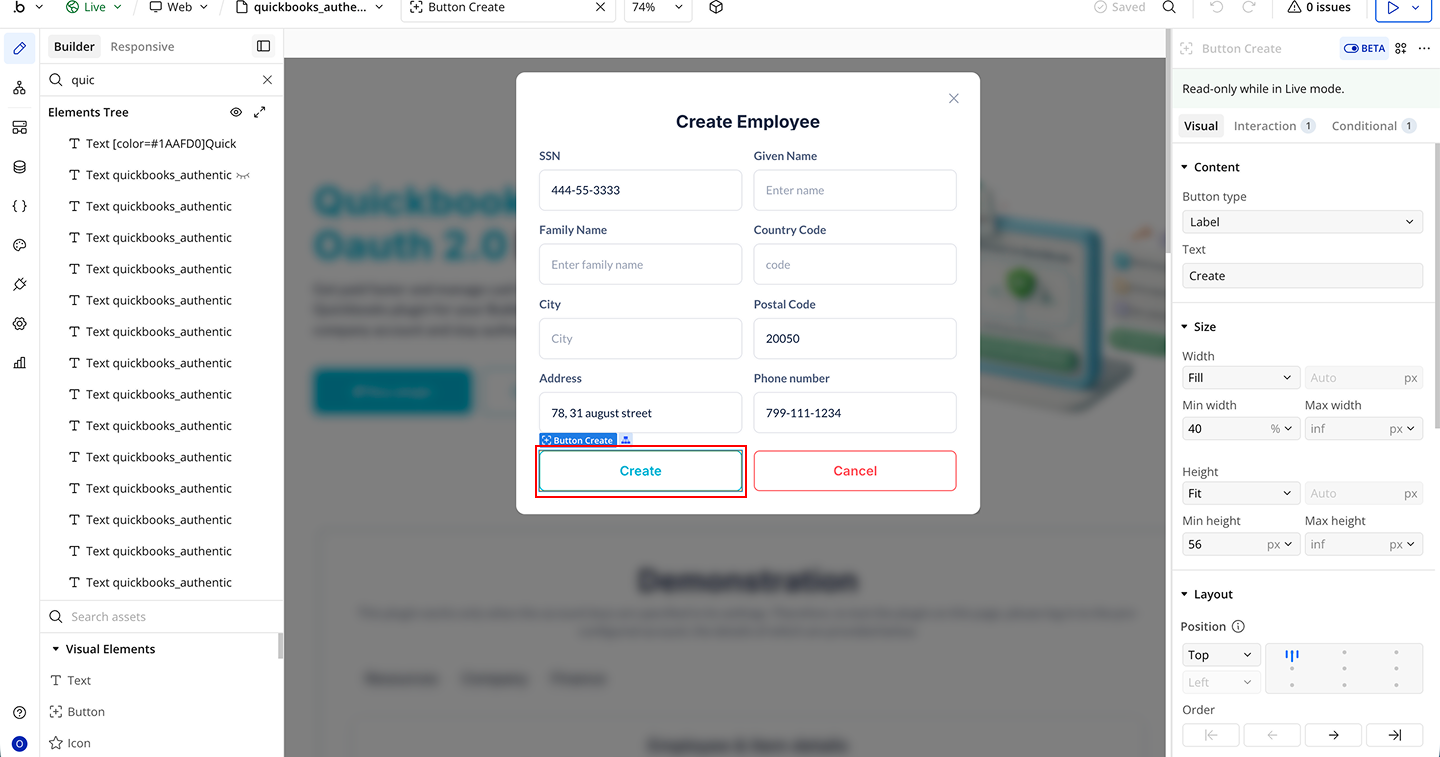
- Start a Workflow on the Create button
- Click Add an Event → When Create button is clicked
- Add the Plugin Action QB Pro (QuickBooks Pro) → Create Employee
- Map the input fields to the plugin action fields
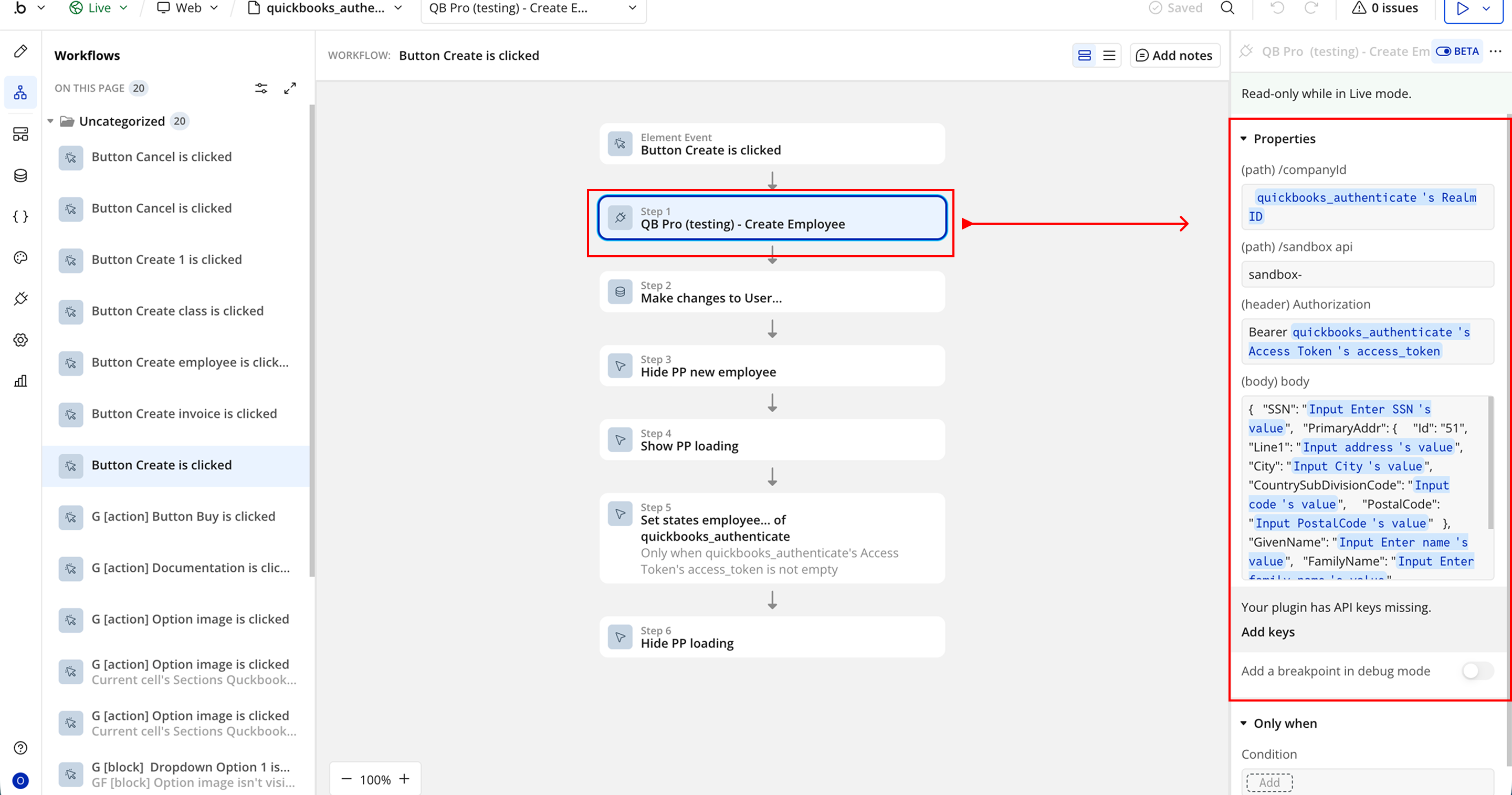
Create Invoice
- Add fields for invoice data (as required by your app design)
- Add a Create Invoice button
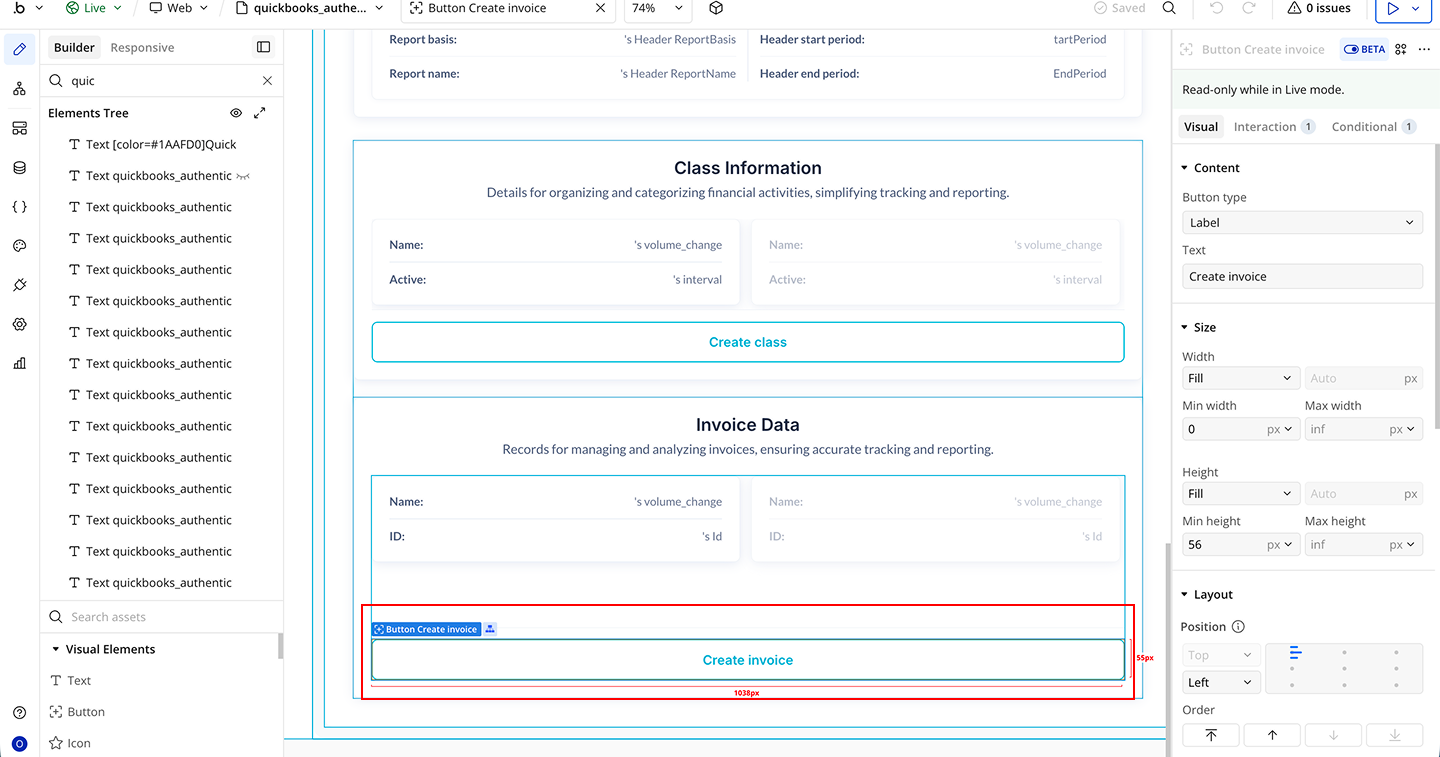
- Start a Workflow on the Create Invoice
- Click Add an Event → When Create Invoice button is clicked
- Add the Plugin Action QB Pro (QuickBooks Pro) → Create Invoice
- Map the input fields to the plugin action fields
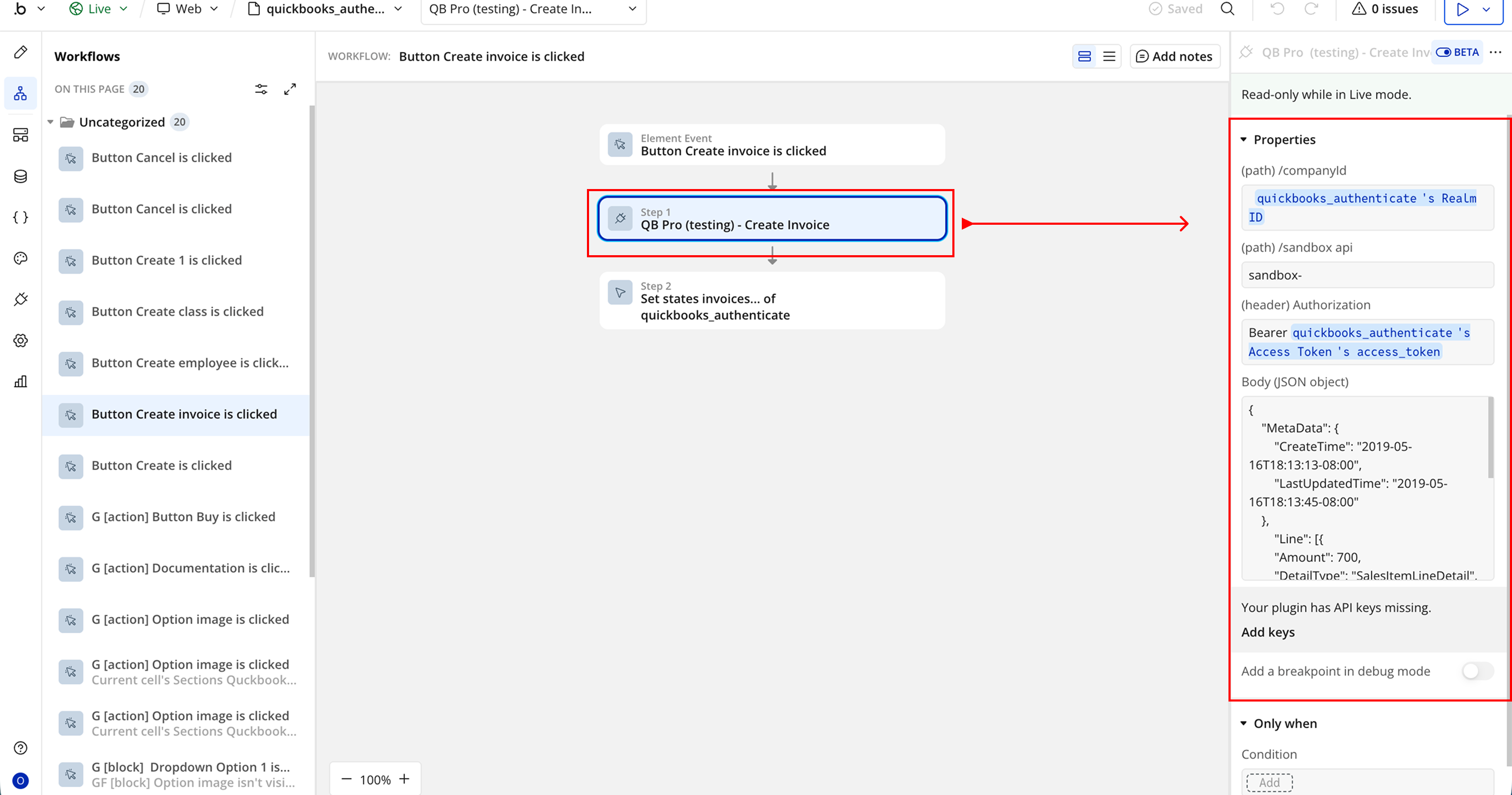

Changelogs
Update 31.03.26 - Version 1.32.0
- New Company Details action.
Update 18.06.25 - Version 1.31.0
- Bubble Plugin Page Update (Logo).
Update 22.04.25 - Version 1.30.0
- Minor Update (Marketing Update).
Update 18.04.25 - Version 1.29.0
- Minor Update (Marketing Update).
Update 24.07.24 - Version 1.28.0
- Minor update .
Update 19.06.24 - Version 1.27.0
- Updated demo/service links.
Update 11.03.24 - Version 1.26.0
- Fixed "Get new access token" API call..
Update 23.02.24 - Version 1.25.0
- Fixed "sandbox api" parameter.
Update 03.02.24 - Version 1.24.0
- added "Reset states" action.
Update 24.01.24 - Version 1.23.0
- Added "Ar aging detail API report" and element "QuickBooks Converter".
Update 24.01.24 - Version 1.22.0
- Added API calls "Profit and loss detail report", "Sales by customer report", "Profit and loss report".
Update 19.10.23 - Version 1.21.0
- Updated description.
Update 18.09.23 - Version 1.20.0
- updated description.
Update 12.09.23 - Version 1.19.0
- minor updates.
Update 06.09.23 - Version 1.18.0
- Obfuscation.
Update 11.07.23 - Version 1.17.0
- updated description.
Update 19.06.23 - Version 1.16.0
- Updated the description .
Update 14.03.23 - Version 1.15.0
- Added action "Get invoice as PDF".
Update 10.03.23 - Version 1.14.0
- Added new "Purchase" calls.
Update 22.02.23 - Version 1.13.0
- updated the description.
Update 16.10.22 - Version 1.12.0
- Updated title.
Update 12.10.22 - Version 1.11.0
- dded "Update Invoice" and "Send Invoice" actions.
Update 01.11.21 - Version 1.10.0
- Minor fixes.
Update 19.07.21 - Version 1.9.0
- Updated icon.
Update 18.02.21 - Version 1.8.0
- Updated icon.
Update 05.10.20 - Version 1.7.0
- Added new API Call 'Query Class'.
Update 10.08.20 - Version 1.6.0
- Updated API Calls.
Update 29.07.20 - Version 1.5.0
- Updated API Calls.
Update 08.11.19 - Version 1.4.0
- Updated description.
Update 24.05.19 - Version 1.3.0
- Minor Update.
Update 24.05.19 - Version 1.2.0
- Minor Fixes.
Update 20.05.19 - Version 1.1.0
- Minor Fixes.
Update 06.02.19 - Version 1.0.0
- Initial Release.