
✅
Demo to preview the plugin:
✅
✅
Introduction
The Outlook Plugin for Bubble allows users to authenticate with Microsoft accounts and interact with Outlook services such as email, contacts, and calendar data. It enables apps to send emails, manage messages, and handle scheduling and contacts directly within Bubble workflows.
Key Features
- Microsoft Authentication
- Email Management
- Contacts Management
- Calendar Management
- Organizational Data Access
Prerequisites
- You must have the Azure Portal account.
- A Bubble app where the plugin will be installed
- Basic understanding of Bubble workflows and input/output fields
How to setup
Step 1 – Install the Plugin
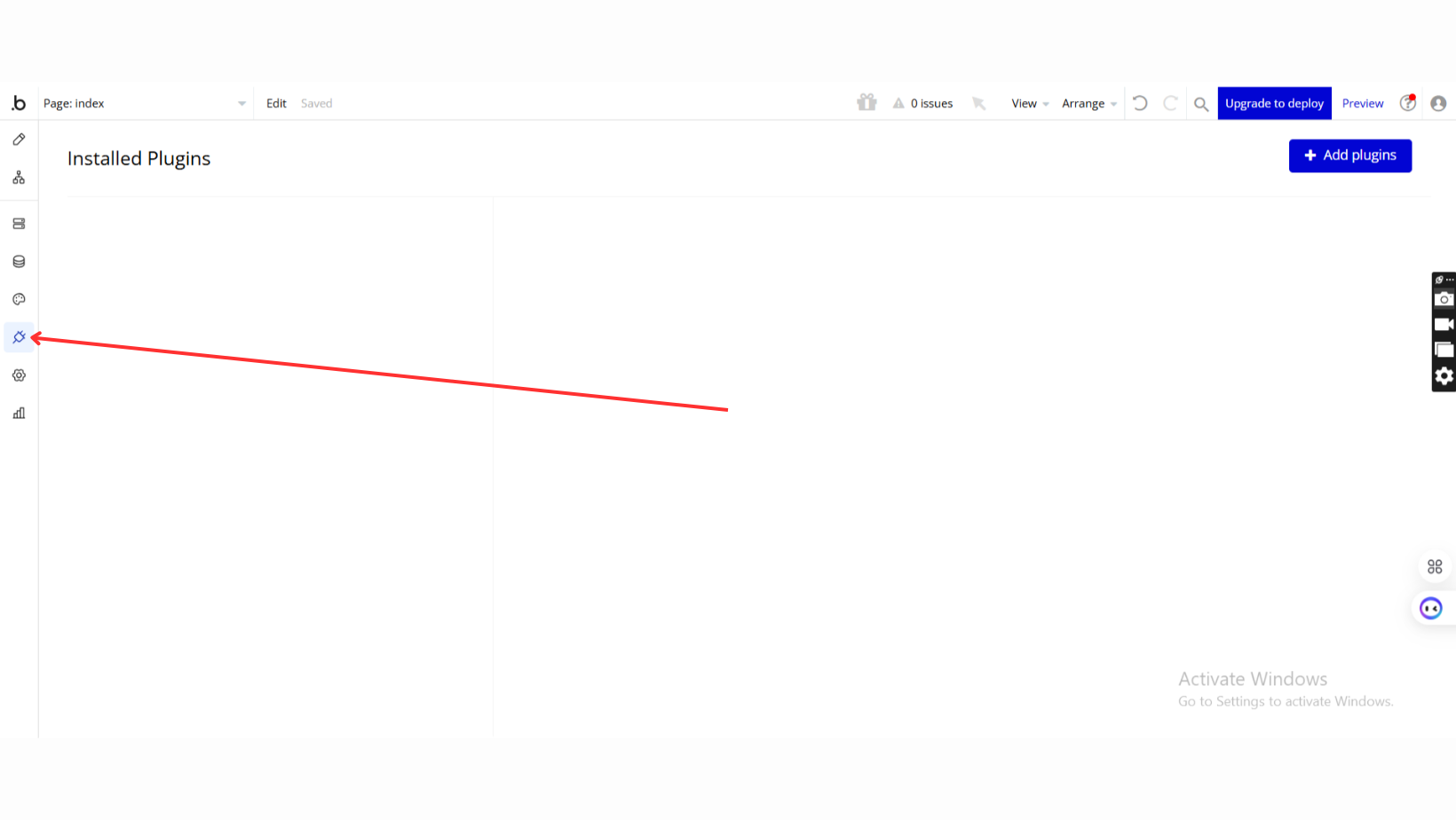
- Go to the Plugin Tab
- Open your Bubble Editor.
- Navigate to the Plugins tab on the left panel.
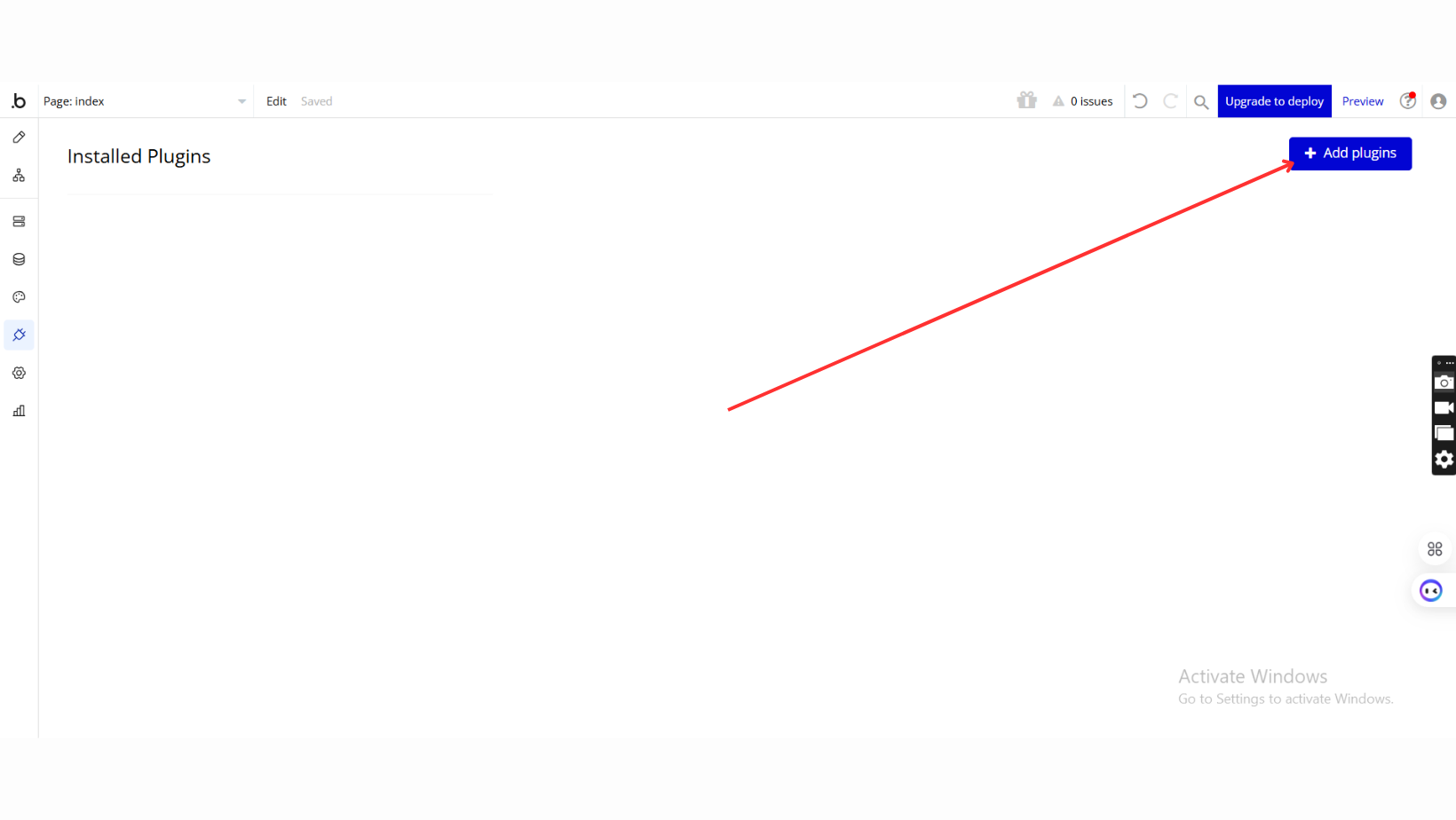
- Add Plugins
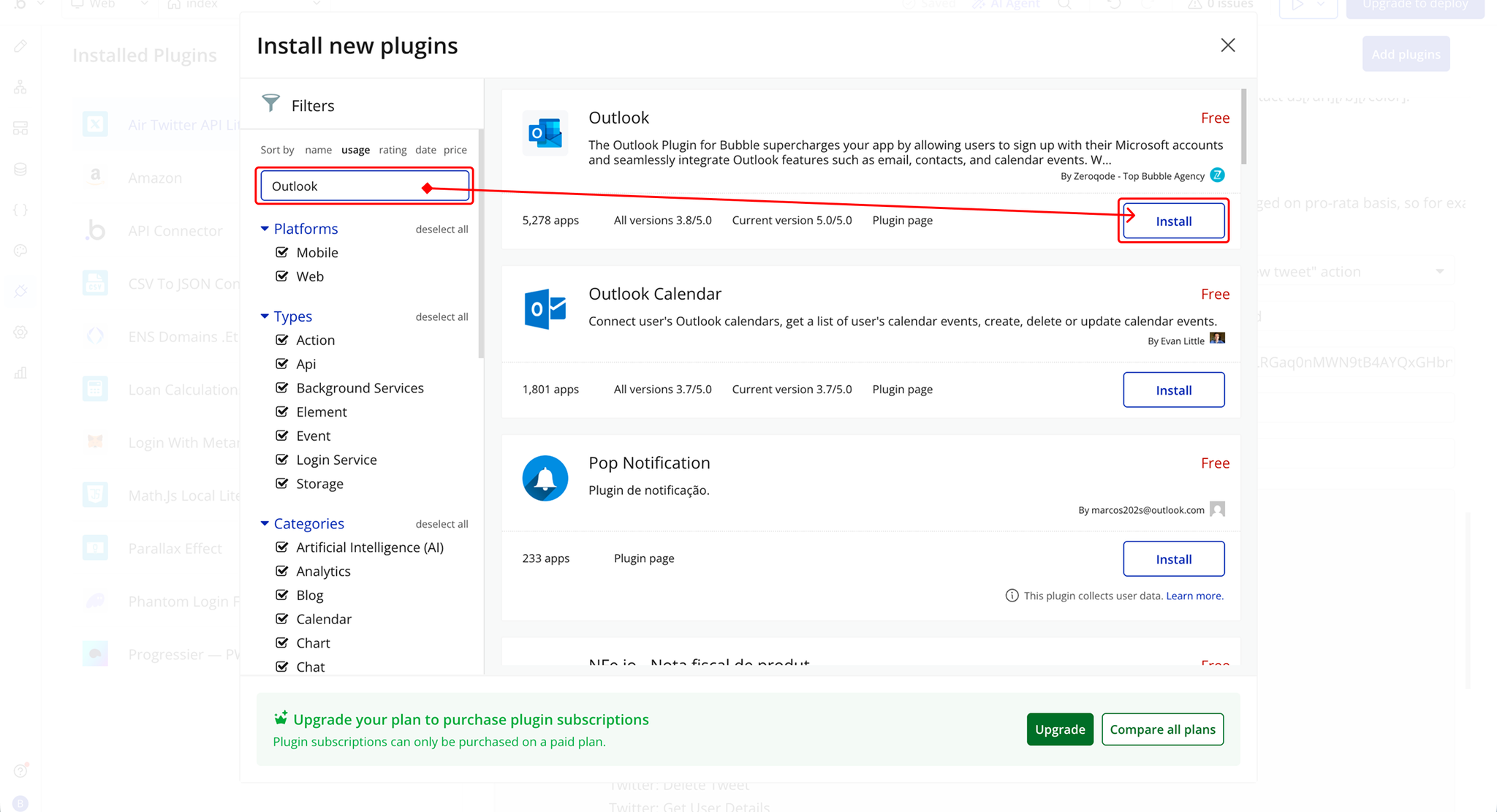
- Once in the Plugins tab, click the Add Plugins button.
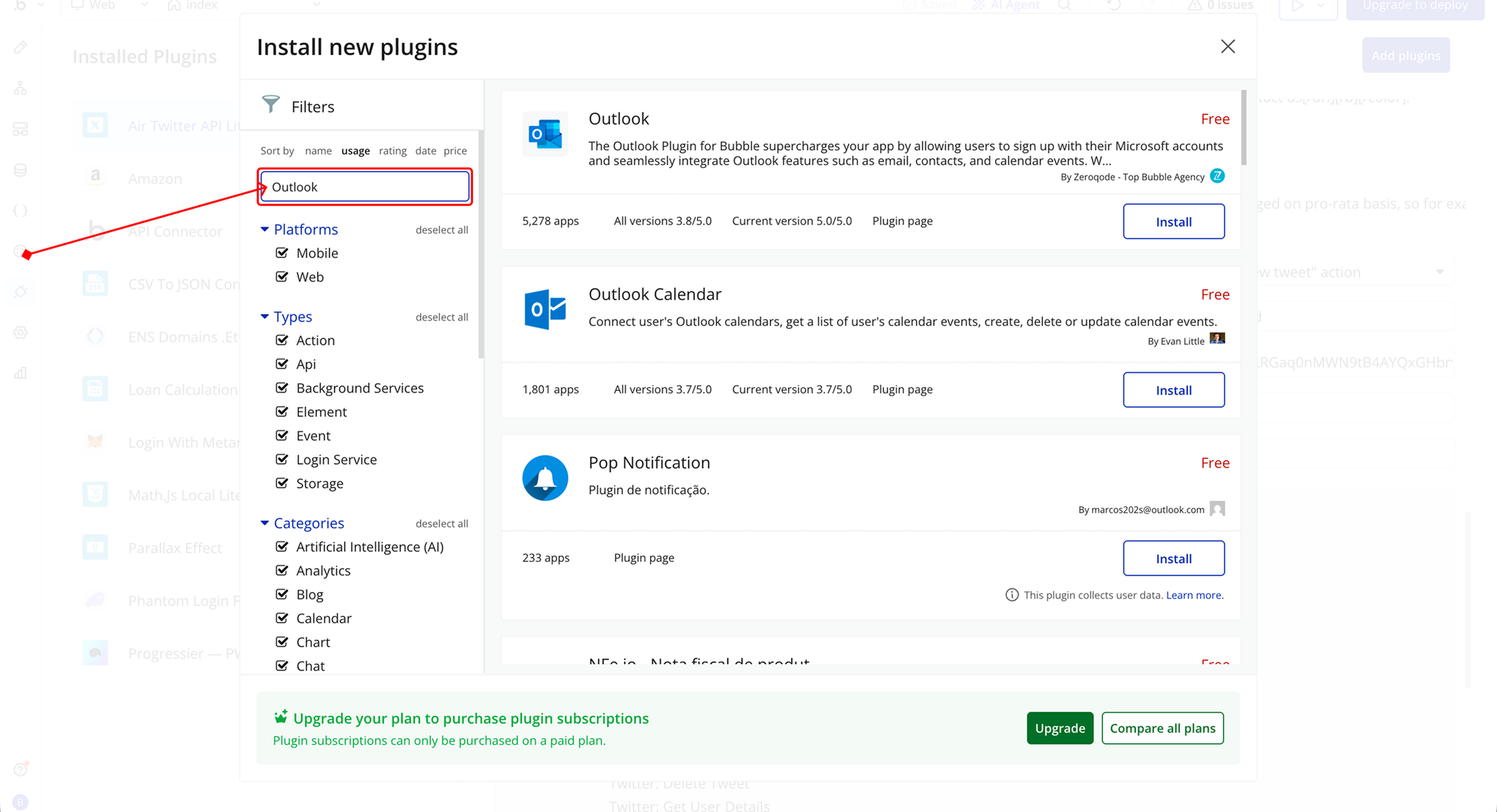
- Search for the Plugin
- Use the search bar to type Outlook.
- Locate the plugin in the search results.
- Install/Buy
- If the plugin is free, click Install to add it to your application.
- For a paid plugin, click Buy and follow the purchase instructions.
- Payment Information (For Paid Plugins)
- If the plugin is a paid one, fill in your payment details and make payment.
- Charges will be added to your Bubble billing account.
- Remember, if you unsubscribe from the plugin shortly after installation, charges will be prorated based on the days used.
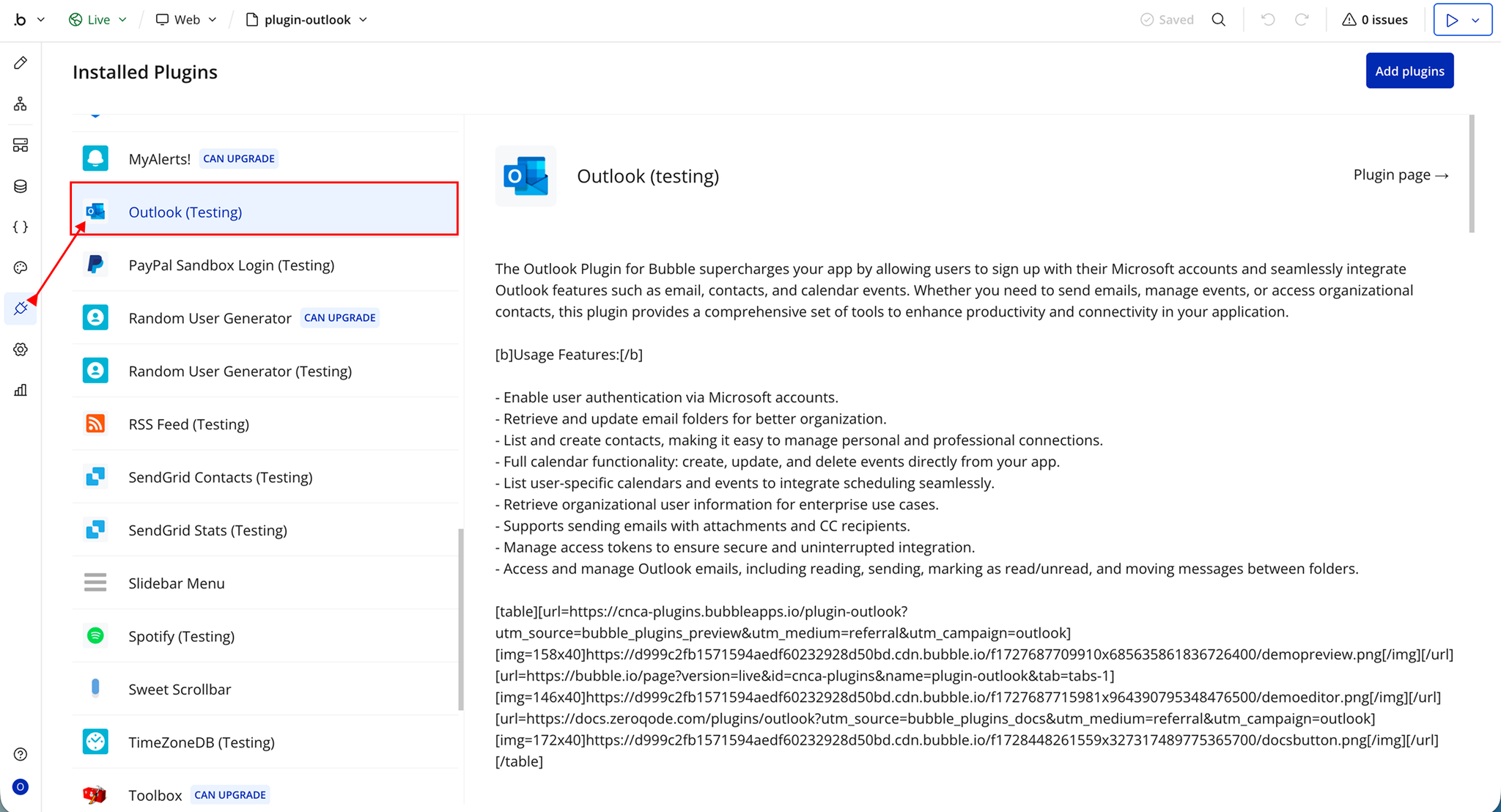
- Plugin Installed
- Once installed, the plugin will appear under the Installed Plugins list in your Bubble Editor.
Step 2 – Get Client and Secret Keys
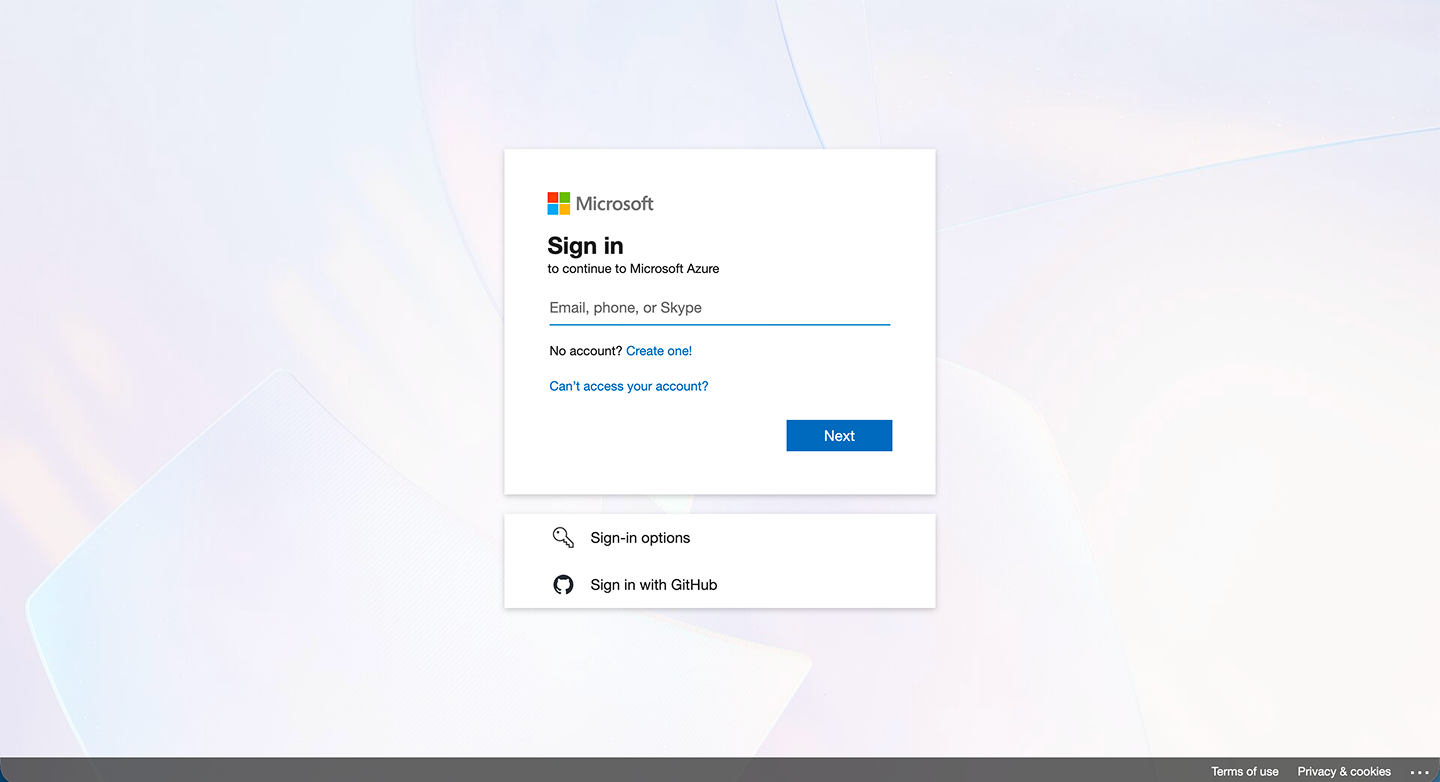
- Go to the Microsoft Azure Portal https://portal.azure.com/
- Create an account if you don’t have one
- Log in if you already have an account
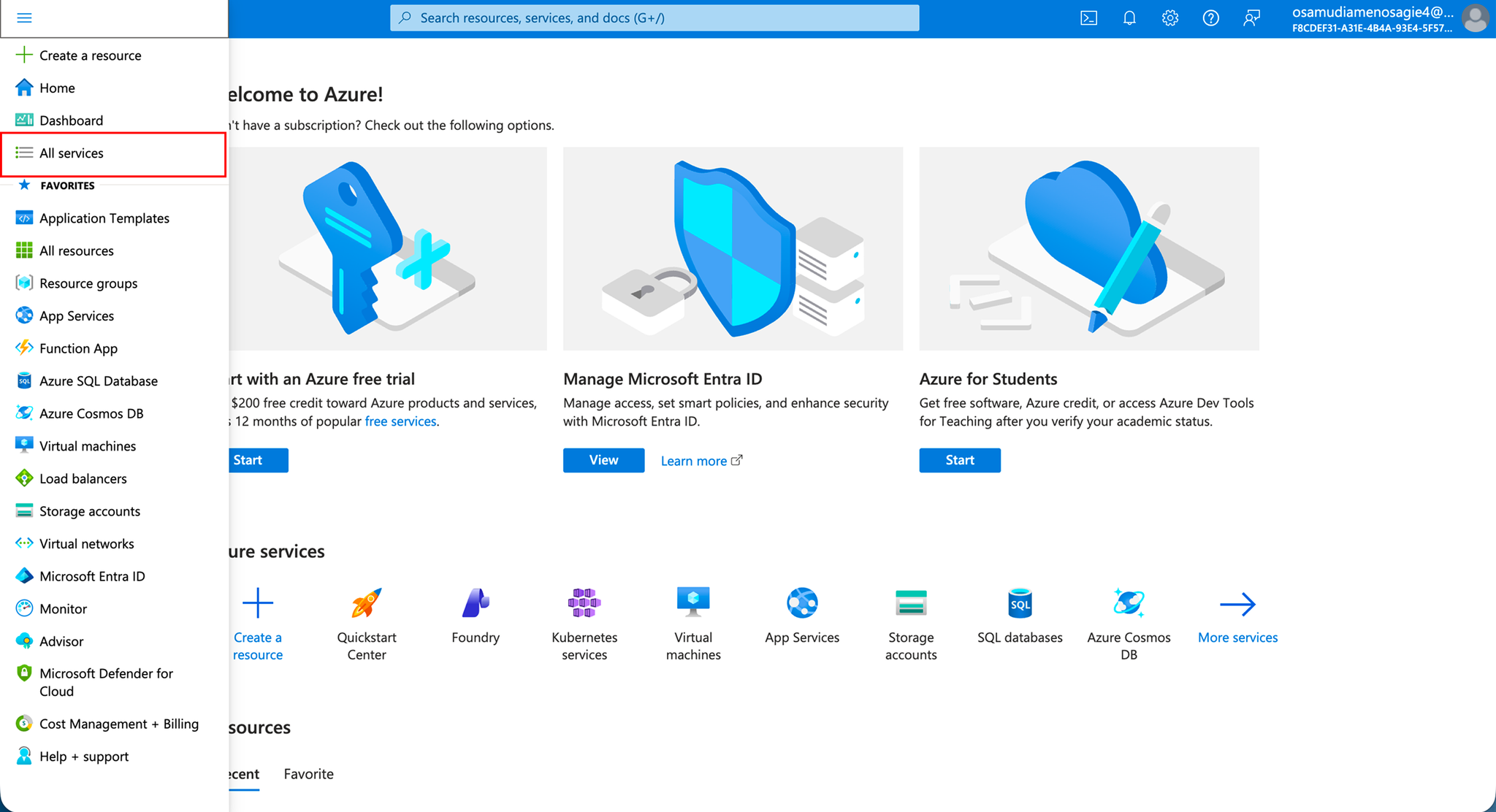
- Click the menu icon (☰) on the dashboard
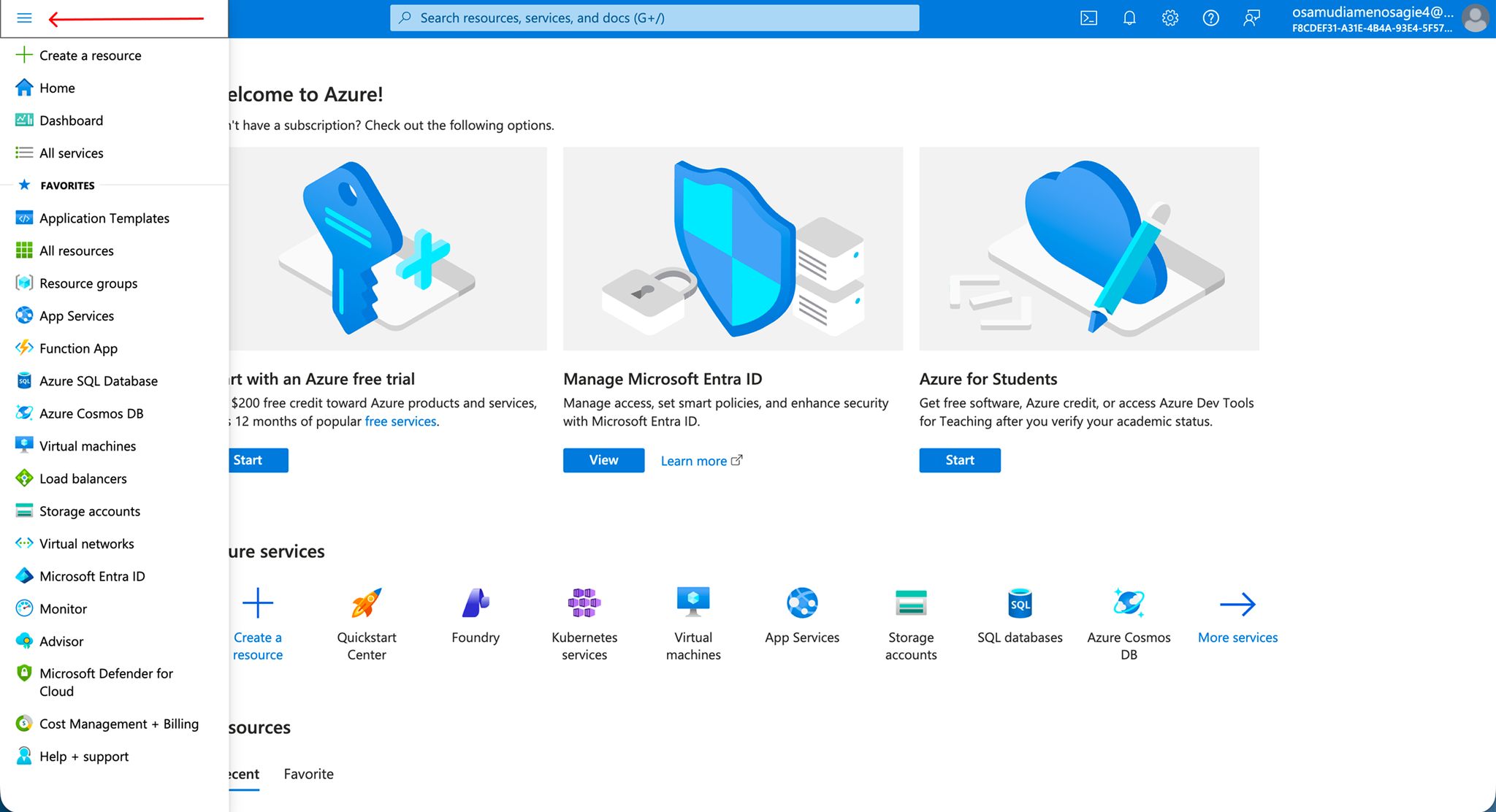
- Select All services
- Search for App Registrations
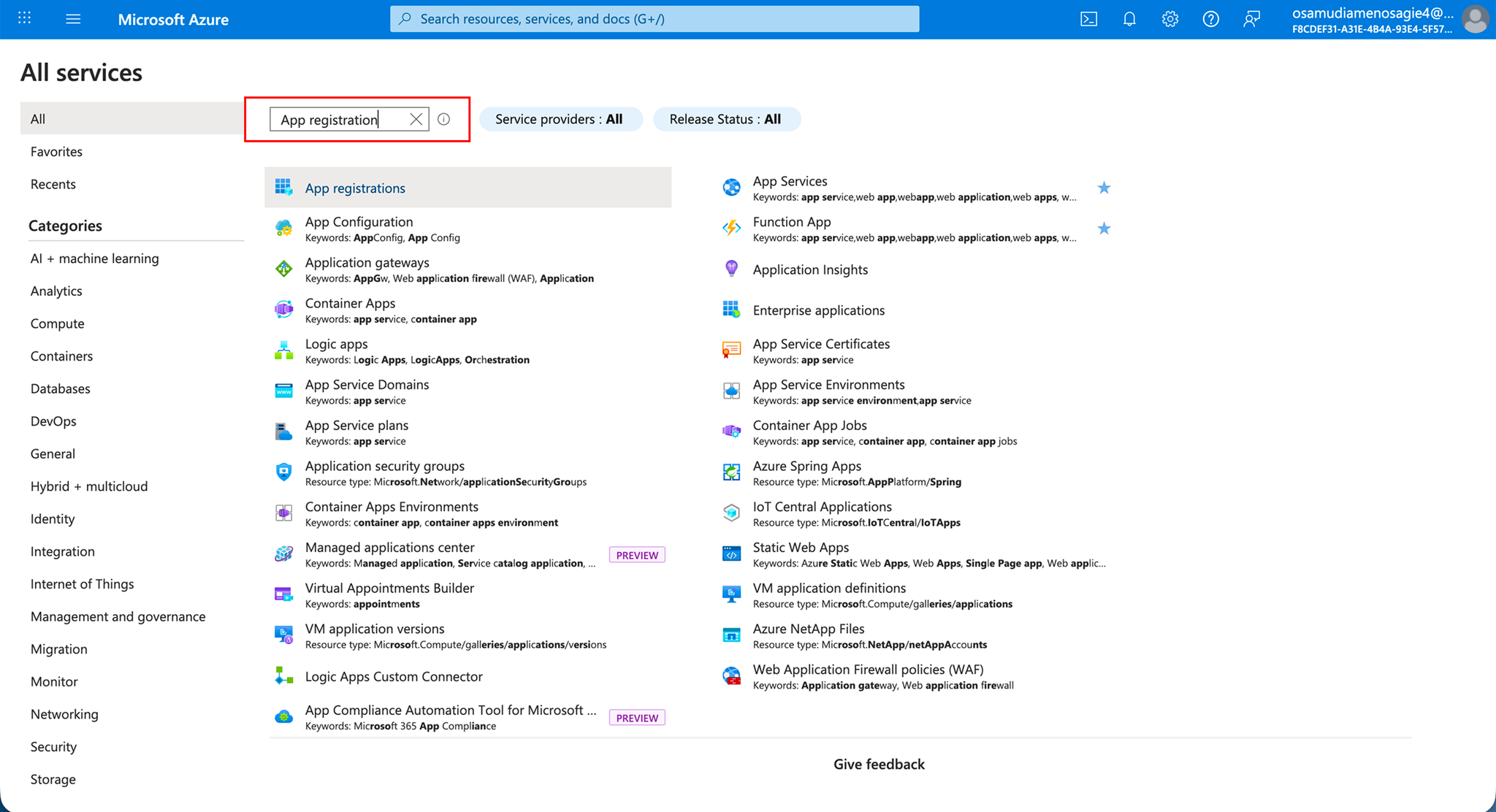
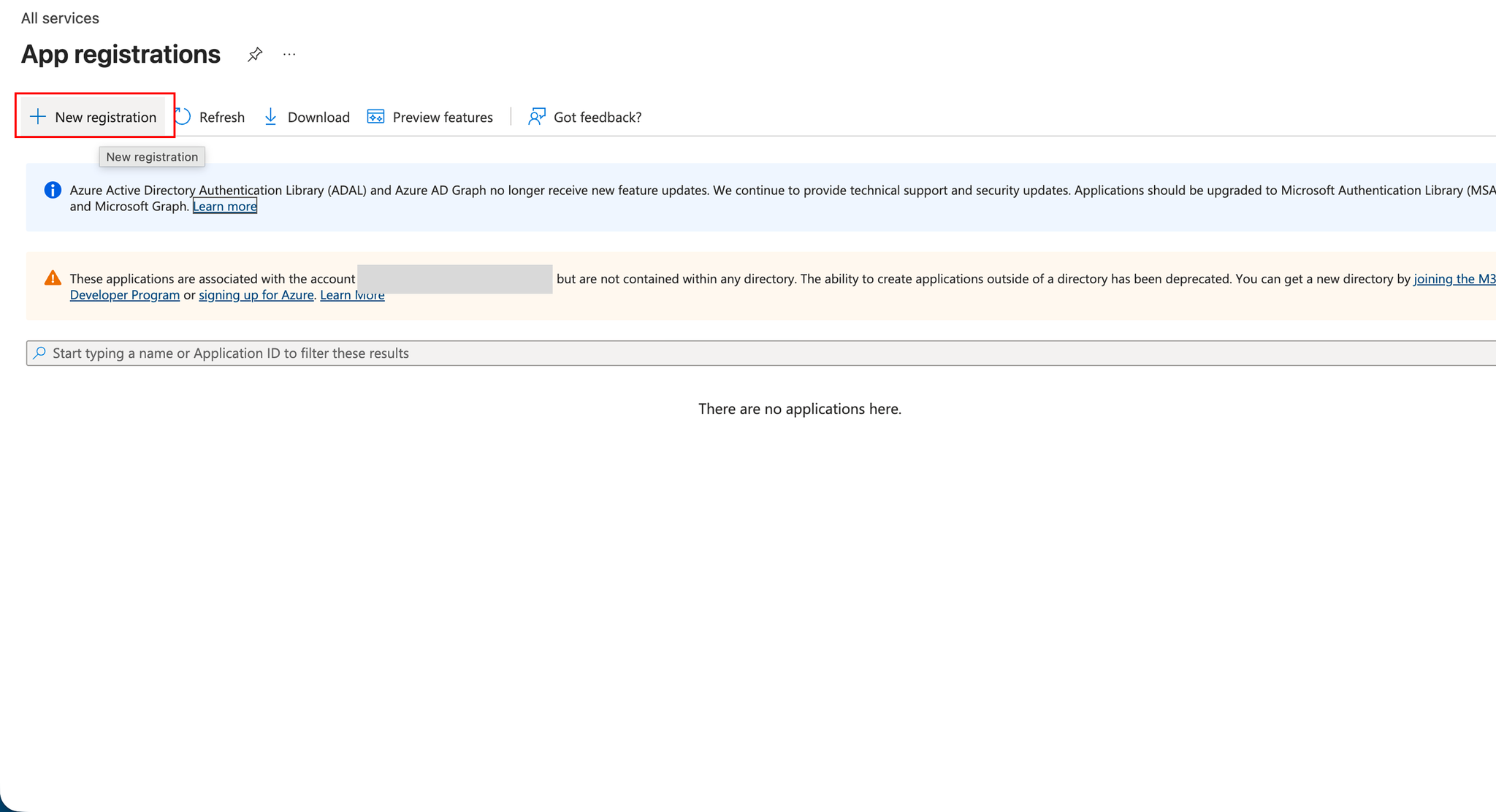
- Click on App Registrations
- Click New registration
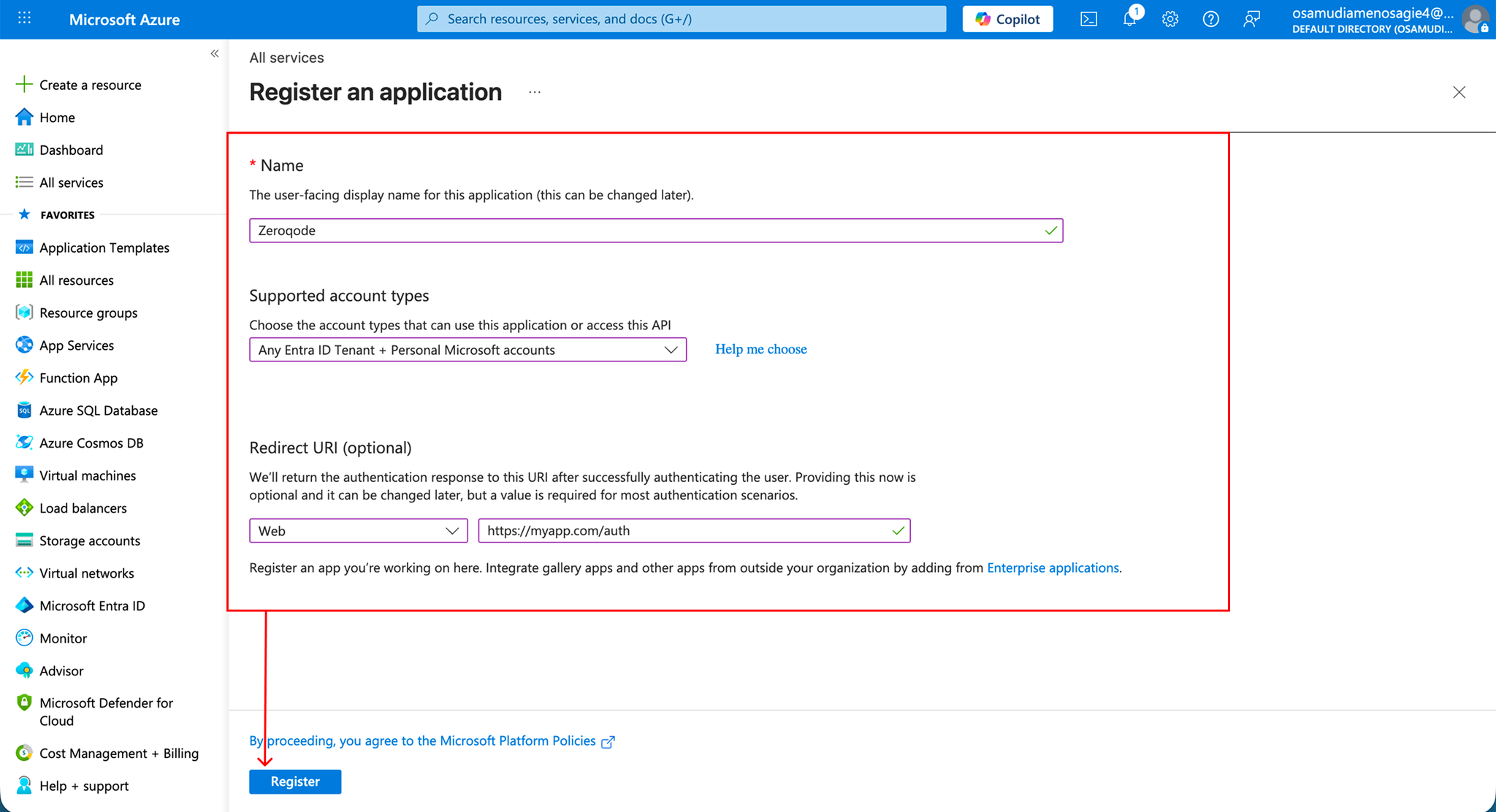
- Enter the required details:
- Application Name
- Supported Account Types
- Redirect URL (your Bubble app URL)
- Click Register
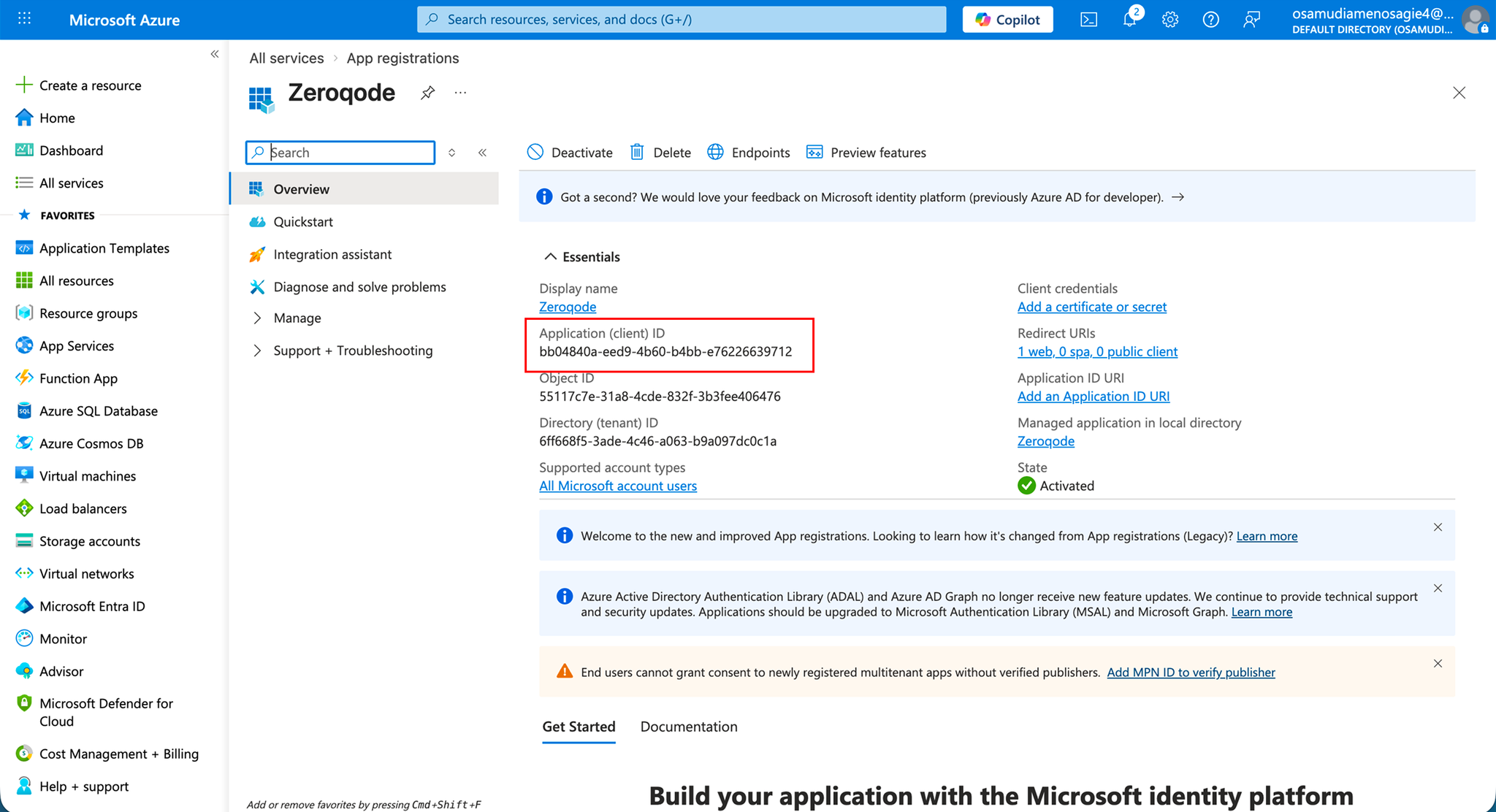
- After registration, on your application dashboard
- Locate Application (client) ID
- Copy it — this is your Client ID
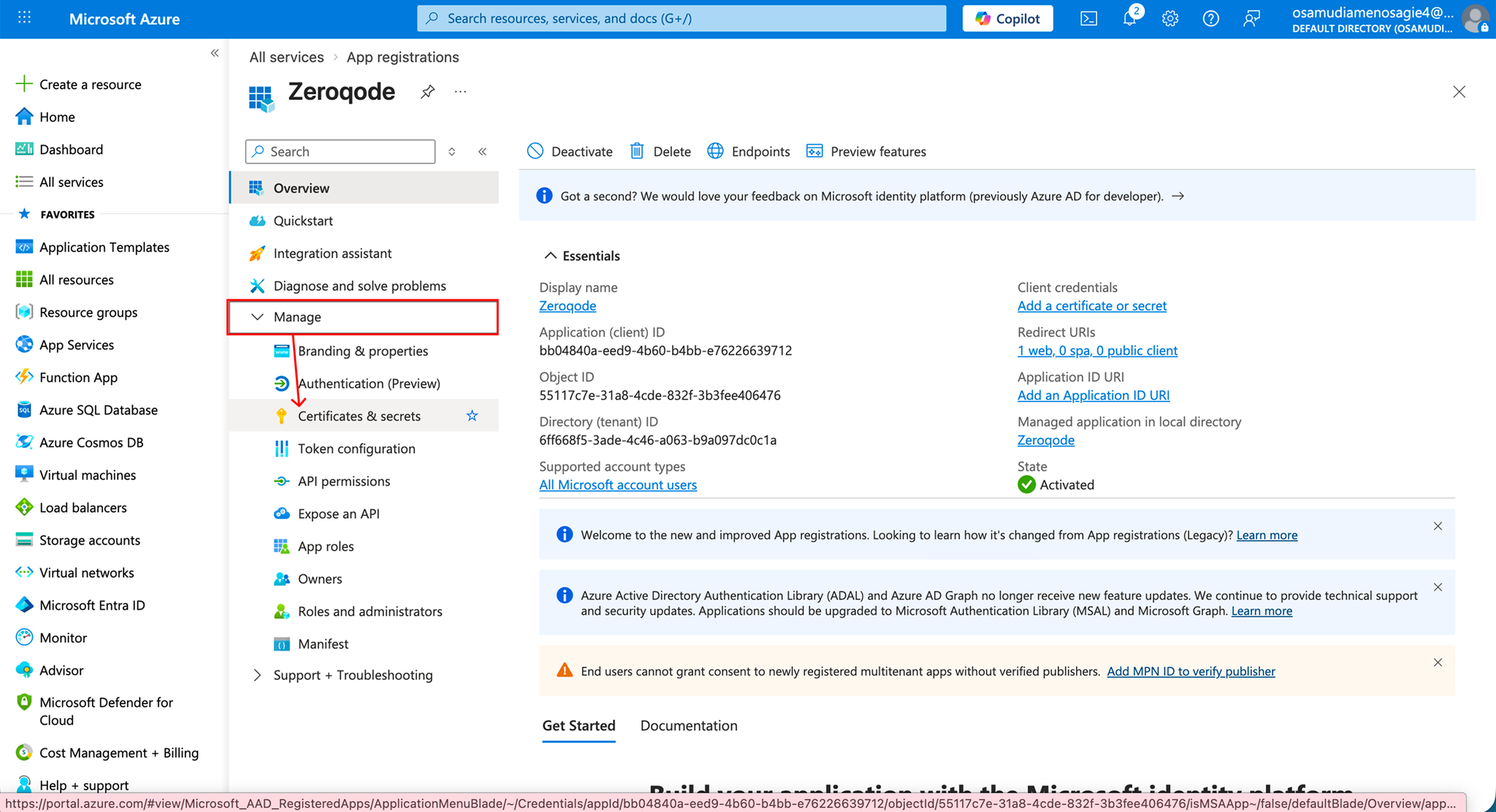
- Click on Manage
- Go to Certificates & secrets from the sidebar
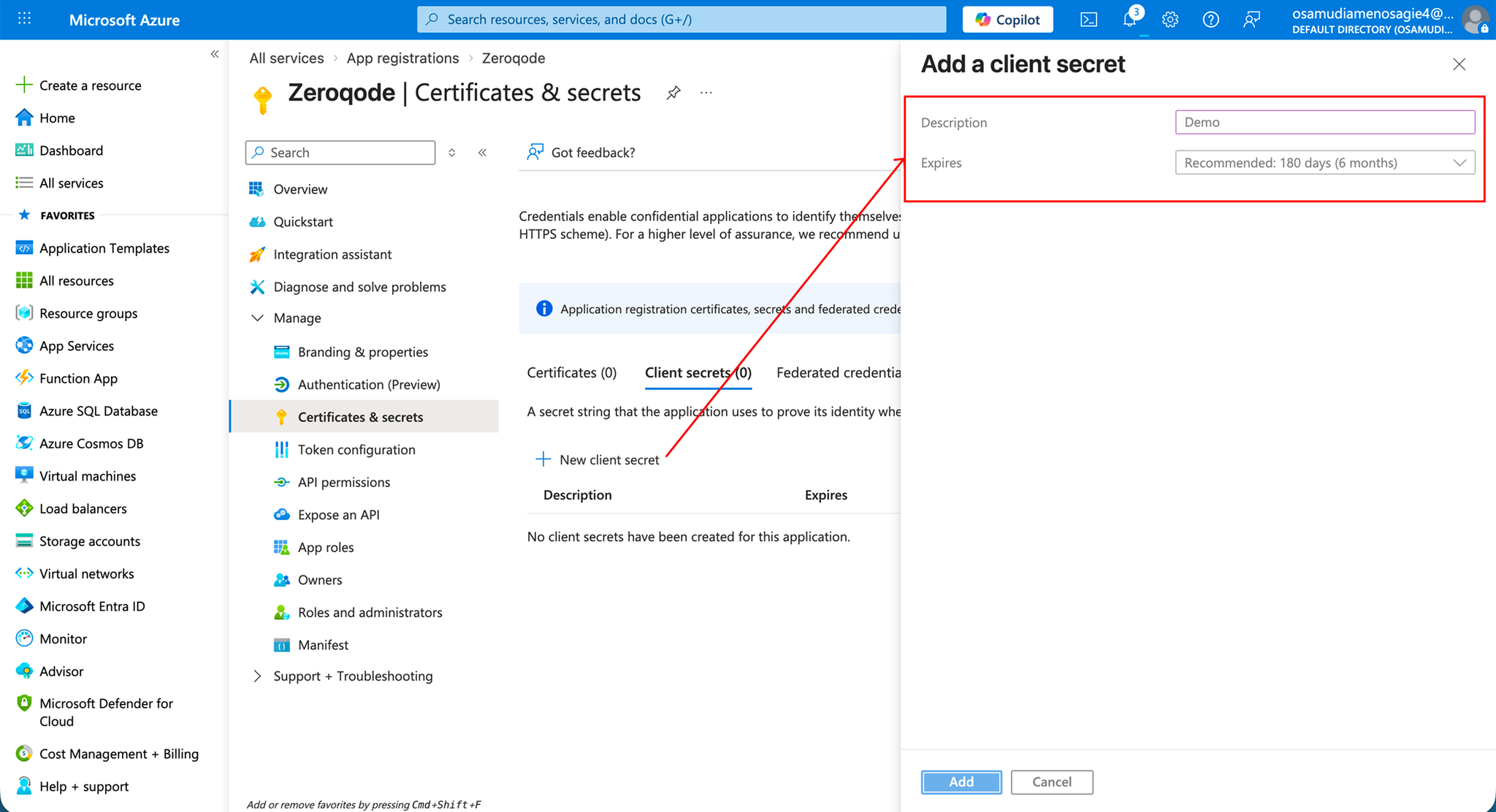
- Click New client secret
- Enter:
- Description
- Expiration period
- Click Add
- Copy the Secret ID immediately after creation
- Store it securely (it will not be shown again)
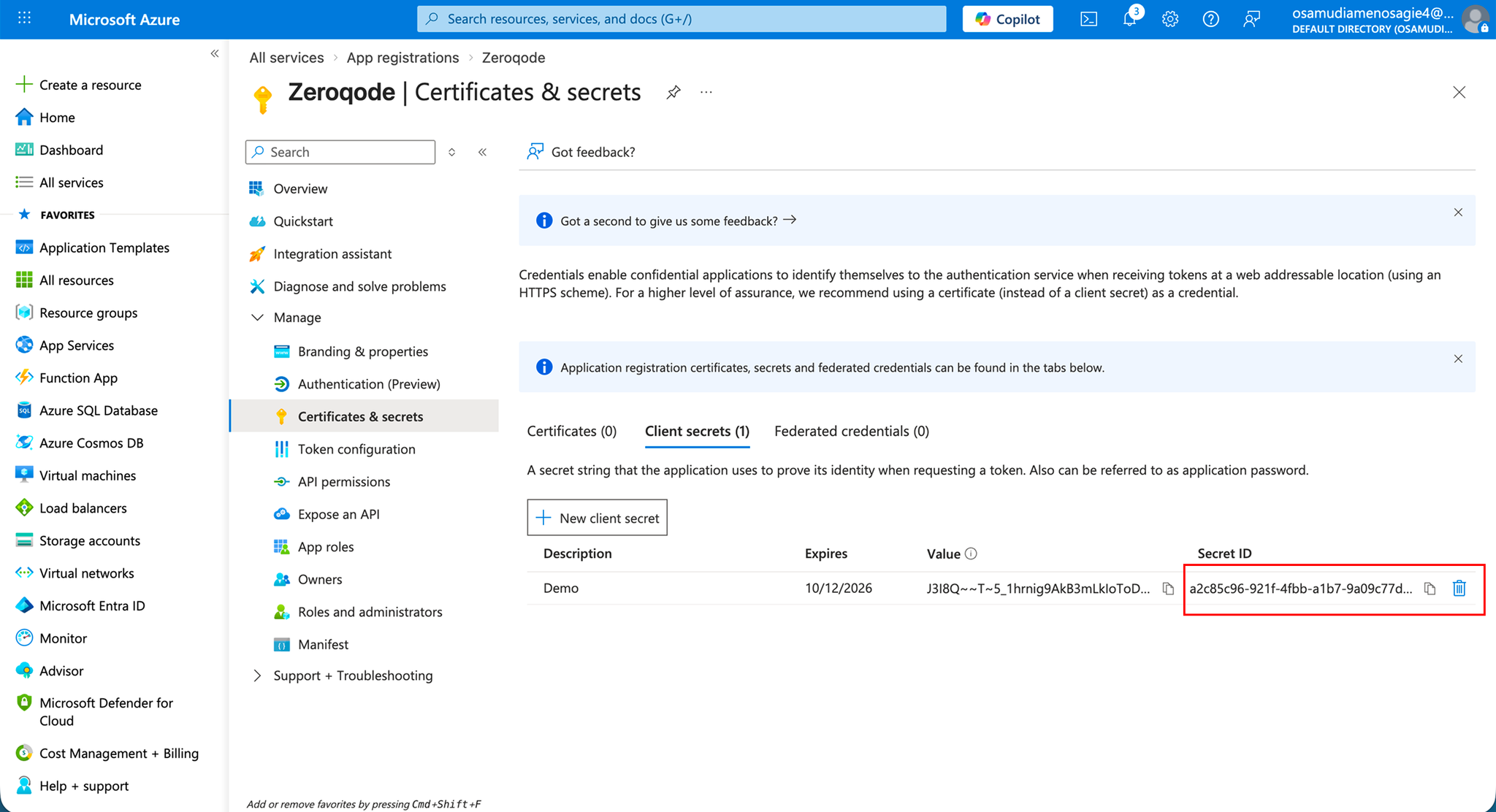
- Paste it into your Bubble plugin settings as Client Secret
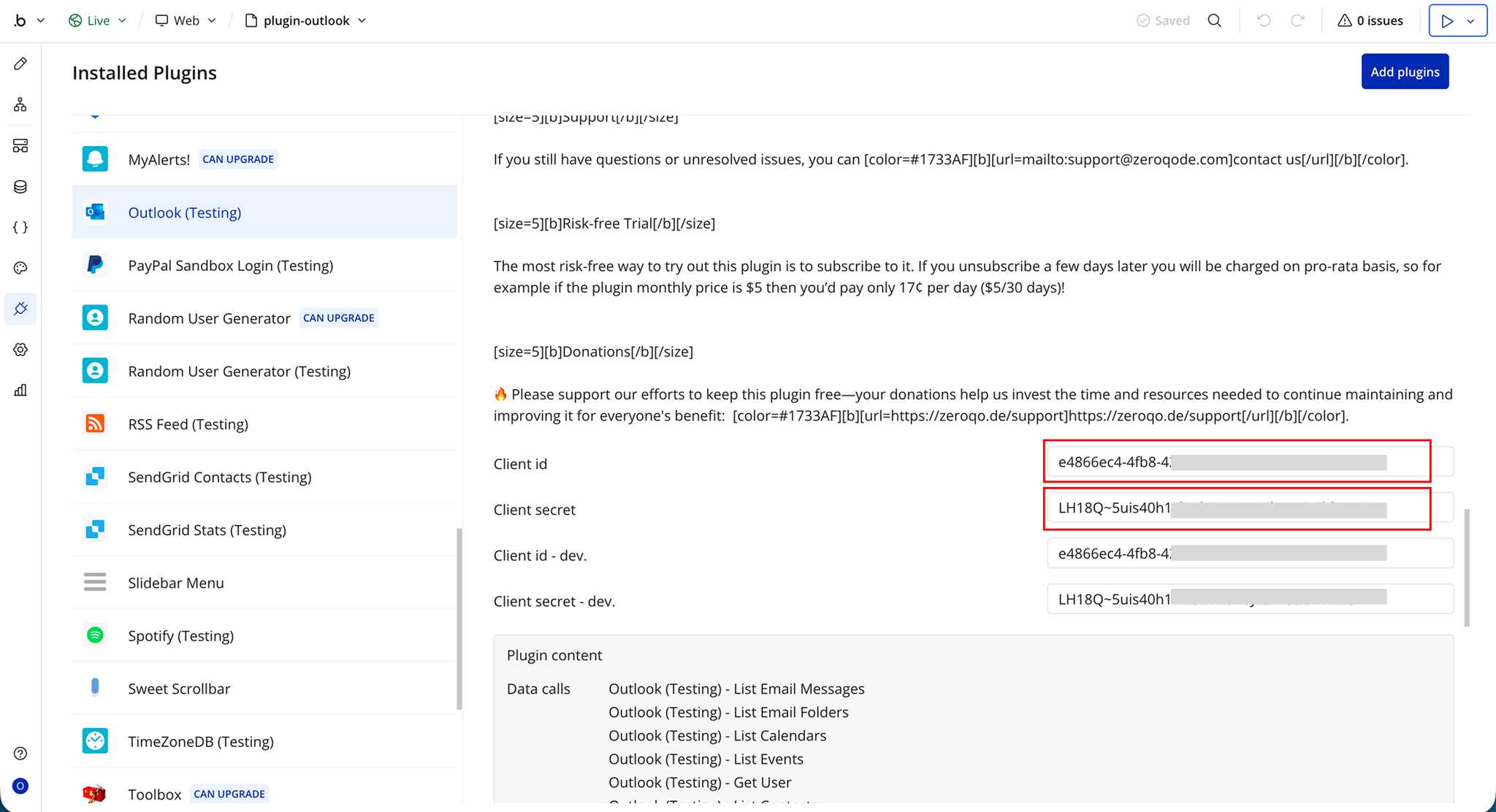
Plugin Data/Action Calls
List Email Messages
List Email Messages is an API call exposed by the plugin for Bubble workflows or data sources. It helps the client send or retrieve data related to this integration without building the request manually. The call returns structured values that can be reused inside the app. It is useful when the client needs this specific operation as part of the plugin workflow.
Parameters:
Name | Description | Type |
$skip | Enter the number of results you want to skip. E.g. “20” returns results starting at item 21. Default is 0. The response will contain a parameter for @odata:nextLink whose value is a URL with a skip parameter you can use to retrieve the next page of results. | Text |
$top | Enter the number of results to return per page. Default is 10. | Text |
Response:
Name | Description | Type |
@odata.context | @odata.context returned by the API call. | Text |
value | value returned by the API call. | Text |
List Email Folders
List Email Folders is an API call exposed by the plugin for Bubble workflows or data sources. It helps the client send or retrieve data related to this integration without building the request manually. The call returns structured values that can be reused inside the app. It is useful when the client needs this specific operation as part of the plugin workflow.
Parameters:
Name | Description | Type |
$skip | Enter the number of results you want to skip. E.g. “20” returns results starting at item 21. Default is 0. The response will contain a parameter for @odata:nextLink whose value is a URL with a skip parameter you can use to retrieve the next page of results. | Text |
$top | Enter the number of results to return per page. Default is 10. | Text |
Response:
Name | Description | Type |
@odata.context | @odata.context returned by the API call. | Text |
value | value returned by the API call. | Text |
List Calendars
List Calendars is an API call exposed by the plugin for Bubble workflows or data sources. It helps the client send or retrieve data related to this integration without building the request manually. The call returns structured values that can be reused inside the app. It is useful when the client needs this specific operation as part of the plugin workflow.
Parameters:
Name | Description | Type |
$skip | Enter the number of results you want to skip. E.g. “20” returns results starting at item 21. Default is 0. The response will contain a parameter for @odata:nextLink whose value is a URL with a skip parameter you can use to retrieve the next page of results. | Text |
$top | Enter the number of results to return per page. Default is 10. | Text |
Response:
Name | Description | Type |
@odata.context | @odata.context returned by the API call. | Text |
value | value returned by the API call. | Text |
List Events
List Events is an API call exposed by the plugin for Bubble workflows or data sources. It helps the client send or retrieve data related to this integration without building the request manually. The call returns structured values that can be reused inside the app. It is useful when the client needs this specific operation as part of the plugin workflow.
Parameters:
Name | Description | Type |
$skip | Enter the number of results you want to skip. E.g. “20” returns results starting at item 21. Default is 0. The response will contain a parameter for @odata:nextLink whose value is a URL with a skip parameter you can use to retrieve the next page of results. | Text |
$top | Enter the number of results to return per page. Default is 10. | Text |
Response:
Name | Description | Type |
@odata.context | @odata.context returned by the API call. | Text |
value | value returned by the API call. | Text |
Get User
Get User is an API call exposed by the plugin for Bubble workflows or data sources. It helps the client send or retrieve data related to this integration without building the request manually. The call returns structured values that can be reused inside the app. It is useful when the client needs this specific operation as part of the plugin workflow.
Response:
Name | Description | Type |
@odata.context | @odata.context returned by the API call. | Text |
userPrincipalName | userPrincipalName returned by the API call. | Text |
id | id returned by the API call. | Text |
displayName | displayName returned by the API call. | Text |
surname | surname returned by the API call. | Text |
givenName | givenName returned by the API call. | Text |
preferredLanguage | preferredLanguage returned by the API call. | Text |
mail | mail returned by the API call. | Text |
mobilePhone | mobilePhone returned by the API call. | Text |
jobTitle | jobTitle returned by the API call. | Text |
officeLocation | officeLocation returned by the API call. | Text |
List Contacts
List Contacts is an API call exposed by the plugin for Bubble workflows or data sources. It helps the client send or retrieve data related to this integration without building the request manually. The call returns structured values that can be reused inside the app. It is useful when the client needs this specific operation as part of the plugin workflow.
Parameters:
Name | Description | Type |
$skip | Enter the number of results you want to skip. E.g. “20” returns results starting at item 21. Default is 0. The response will contain a parameter for @odata:nextLink whose value is a URL with a skip parameter you can use to retrieve the next page of results. | Text |
$top | Enter the number of results to return per page. Default is 10. | Text |
Response:
Name | Description | Type |
@odata.context | @odata.context returned by the API call. | Text |
value | value returned by the API call. | Text |
List Users in Organization
List Users in Organization is an API call exposed by the plugin for Bubble workflows or data sources. It helps the client send or retrieve data related to this integration without building the request manually. The call returns structured values that can be reused inside the app. It is useful when the client needs this specific operation as part of the plugin workflow.
Response:
Name | Description | Type |
@odata.context | @odata.context returned by the API call. | Text |
value | value returned by the API call. | Text |
Search User in Organization by Email
Search User in Organization by Email is an API call exposed by the plugin for Bubble workflows or data sources. It helps the client send or retrieve data related to this integration without building the request manually. The call returns structured values that can be reused inside the app. It is useful when the client needs this specific operation as part of the plugin workflow.
Parameters:
Name | Description | Type |
$skip | Enter the number of results you want to skip. E.g. “20” returns results starting at item 21. Default is 0. The response will contain a parameter for @odata:nextLink whose value is a URL with a skip parameter you can use to retrieve the next page of results. | Text |
$top | Enter the number of results to return per page. Default is 10. | Text |
Response:
Name | Description | Type |
@odata.context | @odata.context returned by the API call. | Text |
userPrincipalName | userPrincipalName returned by the API call. | Text |
id | id returned by the API call. | Text |
displayName | displayName returned by the API call. | Text |
surname | surname returned by the API call. | Text |
givenName | givenName returned by the API call. | Text |
preferredLanguage | preferredLanguage returned by the API call. | Text |
mail | mail returned by the API call. | Text |
mobilePhone | mobilePhone returned by the API call. | Text |
jobTitle | jobTitle returned by the API call. | Text |
officeLocation | officeLocation returned by the API call. | Text |
Get Folder
Get Folder is an API call exposed by the plugin for Bubble workflows or data sources. It helps the client send or retrieve data related to this integration without building the request manually. The call returns structured values that can be reused inside the app. It is useful when the client needs this specific operation as part of the plugin workflow.
Response:
Name | Description | Type |
@odata.context | @odata.context returned by the API call. | Text |
id | id returned by the API call. | Text |
displayName | displayName returned by the API call. | Text |
parentFolderId | parentFolderId returned by the API call. | Text |
childFolderCount | childFolderCount returned by the API call. | Number |
unreadItemCount | unreadItemCount returned by the API call. | Number |
totalItemCount | totalItemCount returned by the API call. | Number |
sizeInBytes | sizeInBytes returned by the API call. | Number |
isHidden | isHidden returned by the API call. | yes/no |
Get Message Images
Get Message Images is an API call exposed by the plugin for Bubble workflows or data sources. It helps the client send or retrieve data related to this integration without building the request manually. The call returns structured values that can be reused inside the app. It is useful when the client needs this specific operation as part of the plugin workflow.
Response:
Name | Description | Type |
@odata.context | @odata.context returned by the API call. | Text |
value | value returned by the API call. | Text |
Create Folder
Create Folder is an API call exposed by the plugin for Bubble workflows or data sources. It helps the client send or retrieve data related to this integration without building the request manually. The call returns structured values that can be reused inside the app. It is useful when the client needs this specific operation as part of the plugin workflow.
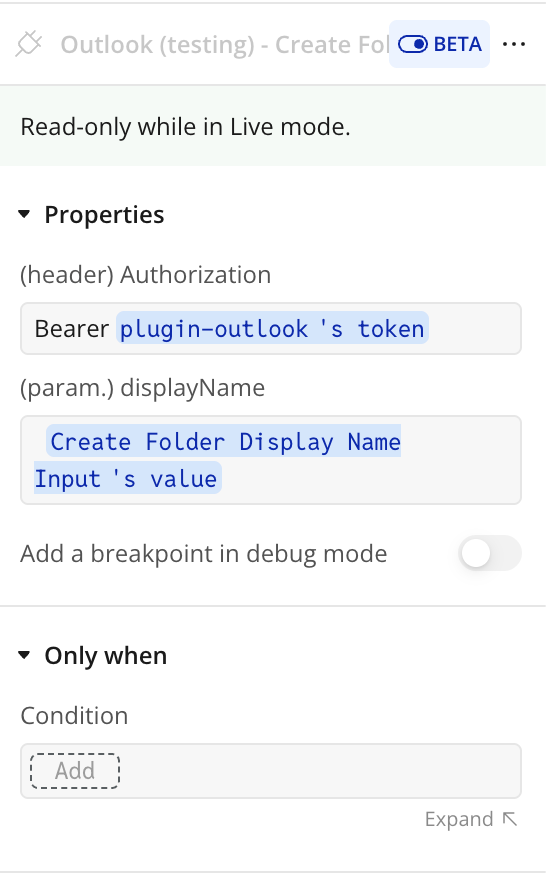
Parameters:
Name | Description | Type |
Authorization | Access token used to authenticate the request | Text |
displayName | Parameter accepted by this API call. | Text |
Response:
Name | Description | Type |
@odata.context | @odata.context returned by the API call. | Text |
id | id returned by the API call. | Text |
displayName | displayName returned by the API call. | Text |
parentFolderId | parentFolderId returned by the API call. | Text |
childFolderCount | childFolderCount returned by the API call. | Text |
unreadItemCount | unreadItemCount returned by the API call. | Text |
totalItemCount | totalItemCount returned by the API call. | Text |
sizeInBytes | sizeInBytes returned by the API call. | Number |
isHidden | isHidden returned by the API call. | yes/no |
Outlook: Get AuthCode
Outlook: Get AuthCode executes this plugin action inside a Bubble workflow. It accepts the configured input values, sends the request or runs the plugin logic, and returns data that can be reused in the app. It is useful when the client needs to trigger this behavior dynamically from Bubble.
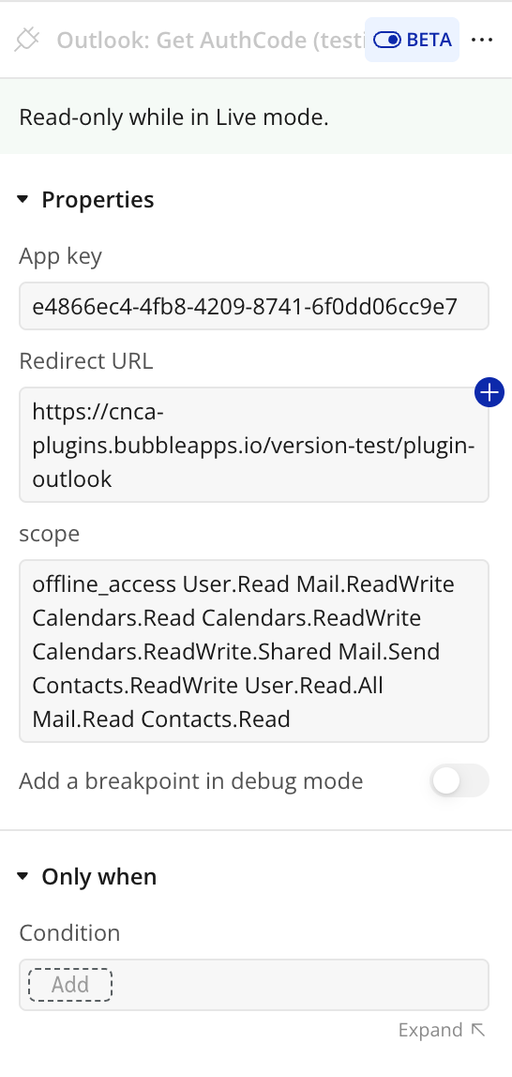
Name | Description | Type |
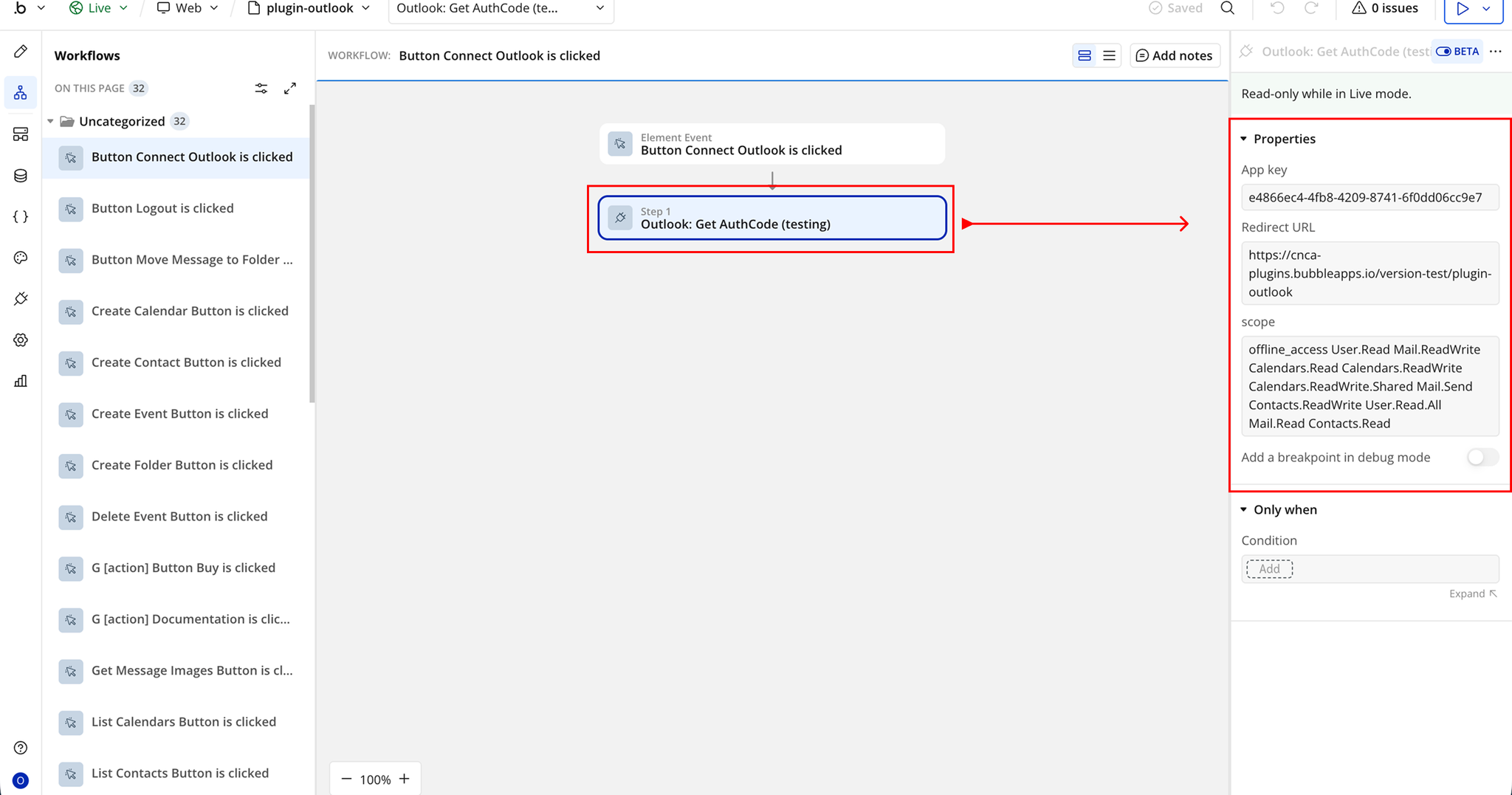
App Key | Application key used for authentication | Text |
Redirect URL | URL to redirect users after authentication | Text |
Scope | Permission scope requested from Microsoft | Text |
Outlook: Auth
Outlook: Auth executes this plugin action inside a Bubble workflow. It accepts the configured input values, sends the request or runs the plugin logic, and returns data that can be reused in the app. It is useful when the client needs to trigger this behavior dynamically from Bubble.
Name | Description | Type |
Auth code | Auth code input used by this action. | Text |
Redirect url | Redirect url input used by this action. | Text |
Return values:
Name | Description | Type |
access_token | access_token returned by the action. | Text |
error | error returned by the action. | Text |
refresh_token | refresh_token returned by the action. | Text |
expires_on | expires_on returned by the action. | Number |
session_id | session_id returned by the action. | Text |
service | service returned by the action. | Text |
Outlook: Remove OAuth URL Parameters
Outlook: Remove OAuth URL Parameters executes this plugin action inside a Bubble workflow. It accepts the configured input values, sends the request or runs the plugin logic, and returns data that can be reused in the app. It is useful when the client needs to trigger this behavior dynamically from Bubble.
Outlook: Renew Access Token
Outlook: Renew Access Token executes this plugin action inside a Bubble workflow. It accepts the configured input values, sends the request or runs the plugin logic, and returns data that can be reused in the app. It is useful when the client needs to trigger this behavior dynamically from Bubble.
Name | Description | Type |
Refresh token | Refresh token input used by this action. | Text |
Expires on | Expires on input used by this action. | Number |
Access token | Access token input used by this action. | Text |
Scope | Scope input used by this action. | Text |
Redirect URL | Redirect URL input used by this action. | Text |
Return values:
Name | Description | Type |
Access token | Access token returned by the action. | Text |
Refresh token | Refresh token returned by the action. | Text |
Error | Error returned by the action. | Text |
Expires on | Expires on returned by the action. | Number |
Service | Service returned by the action. | Text |
Send email with attachments
Send email with attachments executes this plugin action inside a Bubble workflow. It accepts the configured input values, sends the request or runs the plugin logic, and returns data that can be reused in the app. It is useful when the client needs to trigger this behavior dynamically from Bubble.
Name | Description | Type |
Access Token | A string representing the access token required to authenticate the user’s request to send an email. | Text |
Subject | A text that provides a brief overview or summary of the email’s content. | Text |
Content Type | Format of the email body content.
Accepts Text or HTML
Defaults to Text if left empty. | Text |
Body Content | A text representing the main content or body of the email to be sent. This can include the main message or information that the sender wants to communicate to the recipient. | Text |
Recipient Email | The email address of the recipient to whom the email will be sent. | Text |
Attachment File | A text representing the URL or file path of the attachment to be included in the email. This allows the sender to attach files such as documents, images, or other media to the email. Allows including only one file in the emali. If “Attachment Files” has a a value, this file value is not considered. | File |
or | or input used by this action. | Text |
Attachment Files | A list of texts representing the URLs or file paths of the attachment to be included in the email(fill this if you need to attach a list of files). Use for this field “Multi-File Uploader - Dropzone” bubble free plugin input value. | File |
Return values:
Name | Description | Type |
Response | Response returned by the action. | Text |
Create Calendar
Create Calendar is an API call exposed by the plugin for Bubble workflows or data sources. It helps the client send or retrieve data related to this integration without building the request manually. The call returns structured values that can be reused inside the app. It is useful when the client needs this specific operation as part of the plugin workflow.
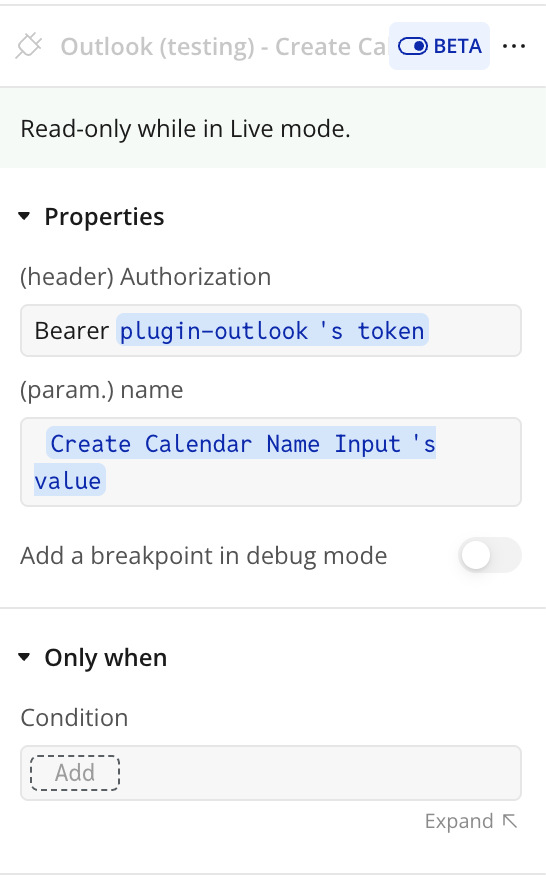
Parameters:
Name | Description | Type |
Authorization | Access token used to authenticate the request | Text |
Name | Calendar name to be created | Text |
Response:
Name | Description | Type |
@odata.context | @odata.context returned by the API call. | Text |
id | id returned by the API call. | Text |
name | name returned by the API call. | Text |
color | color returned by the API call. | Text |
hexColor | hexColor returned by the API call. | Text |
isDefaultCalendar | isDefaultCalendar returned by the API call. | yes/no |
changeKey | changeKey returned by the API call. | Text |
canShare | canShare returned by the API call. | yes/no |
canViewPrivateItems | canViewPrivateItems returned by the API call. | yes/no |
canEdit | canEdit returned by the API call. | yes/no |
allowedOnlineMeetingProviders | allowedOnlineMeetingProviders returned by the API call. | Text |
defaultOnlineMeetingProvider | defaultOnlineMeetingProvider returned by the API call. | Text |
isTallyingResponses | isTallyingResponses returned by the API call. | yes/no |
isRemovable | isRemovable returned by the API call. | yes/no |
owner name | owner name returned by the API call. | Text |
owner address | owner address returned by the API call. | Text |
Create Event
Create Event is an API call exposed by the plugin for Bubble workflows or data sources. It helps the client send or retrieve data related to this integration without building the request manually. The call returns structured values that can be reused inside the app. It is useful when the client needs this specific operation as part of the plugin workflow.
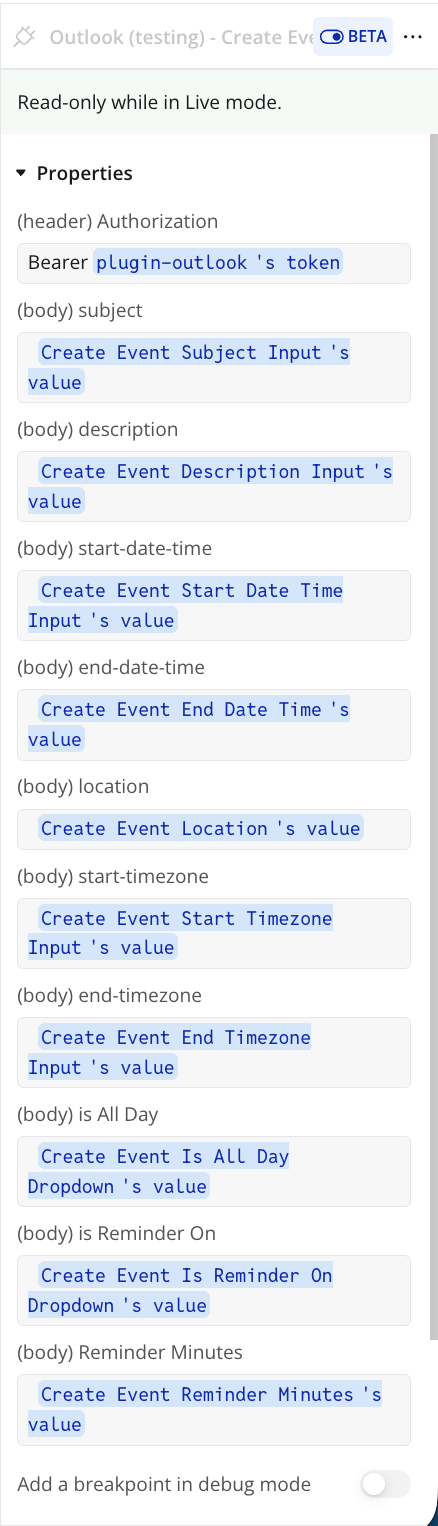
Name | Description | Type |
Authorization | Bearer token used to authenticate the request | Text |
subject | Event subject/title | Text |
description | Event description/details | Text |
start-date-time | Event start date and time | Text |
end-date-time | Event end date and time | Text |
location | Event location | Text |
start-timezone | Timezone for event start | Text |
end-timezone | Timezone for event end | Text |
is All Day | Indicates if event lasts all day | Boolean / Text |
is Reminder On | Indicates if reminder is enabled | Boolean / Text |
Reminder Minutes | Time before event to trigger reminder (minutes) | Number / Text |
Response:
Name | Description | Type |
@odata.context | @odata.context returned by the API call. | Text |
@odata.etag | @odata.etag returned by the API call. | Text |
id | id returned by the API call. | Text |
createdDateTime | createdDateTime returned by the API call. | Date |
lastModifiedDateTime | lastModifiedDateTime returned by the API call. | Date |
changeKey | changeKey returned by the API call. | Text |
transactionId | transactionId returned by the API call. | Text |
originalStartTimeZone | originalStartTimeZone returned by the API call. | Date |
originalEndTimeZone | originalEndTimeZone returned by the API call. | Date |
iCalUId | iCalUId returned by the API call. | Text |
reminderMinutesBeforeStart | reminderMinutesBeforeStart returned by the API call. | Number |
isReminderOn | isReminderOn returned by the API call. | yes/no |
hasAttachments | hasAttachments returned by the API call. | yes/no |
subject | subject returned by the API call. | Text |
bodyPreview | bodyPreview returned by the API call. | Text |
importance | importance returned by the API call. | Text |
sensitivity | sensitivity returned by the API call. | Text |
isAllDay | isAllDay returned by the API call. | yes/no |
isCancelled | isCancelled returned by the API call. | yes/no |
isOrganizer | isOrganizer returned by the API call. | yes/no |
responseRequested | responseRequested returned by the API call. | yes/no |
seriesMasterId | seriesMasterId returned by the API call. | Text |
showAs | showAs returned by the API call. | Text |
type | type returned by the API call. | Text |
webLink | webLink returned by the API call. | Text |
onlineMeetingUrl | onlineMeetingUrl returned by the API call. | Text |
isOnlineMeeting | isOnlineMeeting returned by the API call. | yes/no |
onlineMeetingProvider | onlineMeetingProvider returned by the API call. | Text |
allowNewTimeProposals | allowNewTimeProposals returned by the API call. | yes/no |
occurrenceId | occurrenceId returned by the API call. | Text |
isDraft | isDraft returned by the API call. | yes/no |
hideAttendees | hideAttendees returned by the API call. | yes/no |
responseStatus response | responseStatus response returned by the API call. | Text |
responseStatus time | responseStatus time returned by the API call. | Text |
body contentType | body contentType returned by the API call. | Text |
body content | body content returned by the API call. | Text |
start dateTime | start dateTime returned by the API call. | Date |
start timeZone | start timeZone returned by the API call. | Text |
end dateTime | end dateTime returned by the API call. | Date |
end timeZone | end timeZone returned by the API call. | Text |
location displayName | location displayName returned by the API call. | Text |
location locationType | location locationType returned by the API call. | Text |
location uniqueId | location uniqueId returned by the API call. | Text |
location uniqueIdType | location uniqueIdType returned by the API call. | Text |
locations | locations returned by the API call. | Text |
recurrence | recurrence returned by the API call. | Text |
organizer emailAddress name | organizer emailAddress name returned by the API call. | Text |
organizer emailAddress address | organizer emailAddress address returned by the API call. | Text |
onlineMeeting | onlineMeeting returned by the API call. | Text |
Create Contact
Create Contact is an API call exposed by the plugin for Bubble workflows or data sources. It helps the client send or retrieve data related to this integration without building the request manually. The call returns structured values that can be reused inside the app. It is useful when the client needs this specific operation as part of the plugin workflow.
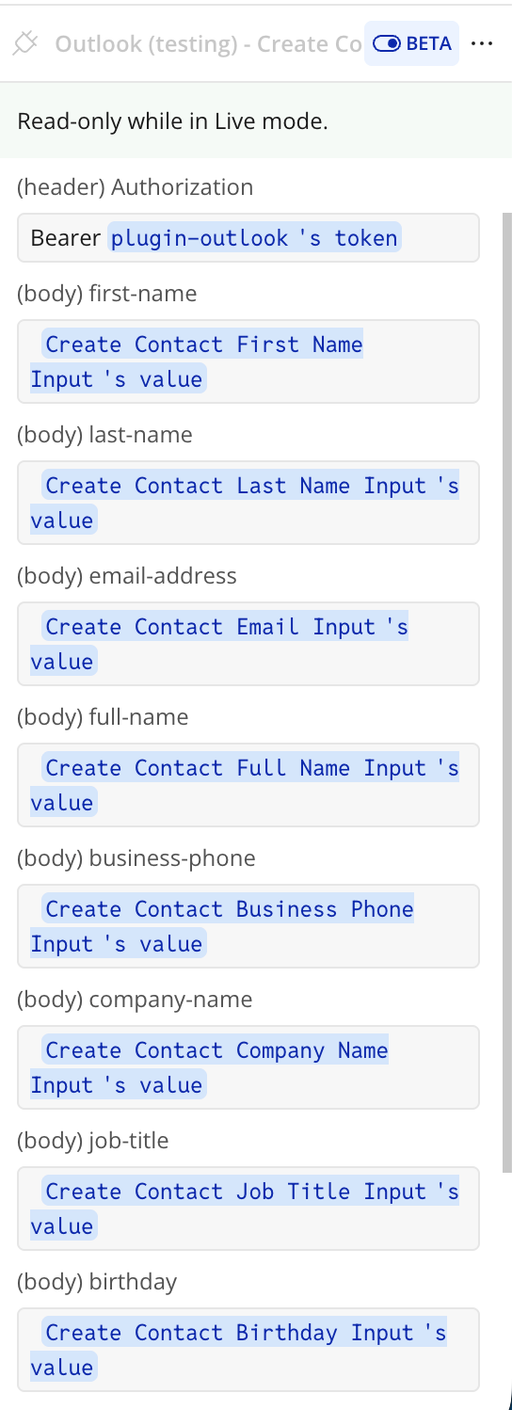
Name | Description | Type |
Authorization | Bearer token used to authenticate the request | Text |
first-name | Contact’s first name | Text |
last-name | Contact’s last name | Text |
email-address | Contact’s email address | Text |
full-name | Contact’s full name | Text |
business-phone | Contact’s business phone number | Text |
company-name | Contact’s company name | Text |
job-title | Contact’s job title | Text |
birthday | Contact’s date of birth | Text |
Response:
Name | Description | Type |
@odata.context | @odata.context returned by the API call. | Text |
@odata.etag | @odata.etag returned by the API call. | Text |
id | id returned by the API call. | Text |
createdDateTime | createdDateTime returned by the API call. | Date |
lastModifiedDateTime | lastModifiedDateTime returned by the API call. | Date |
changeKey | changeKey returned by the API call. | Text |
parentFolderId | parentFolderId returned by the API call. | Text |
birthday | birthday returned by the API call. | Date |
fileAs | fileAs returned by the API call. | Text |
displayName | displayName returned by the API call. | Text |
givenName | givenName returned by the API call. | Text |
initials | initials returned by the API call. | Text |
middleName | middleName returned by the API call. | Text |
nickName | nickName returned by the API call. | Text |
surname | surname returned by the API call. | Text |
title | title returned by the API call. | Text |
yomiGivenName | yomiGivenName returned by the API call. | Text |
yomiSurname | yomiSurname returned by the API call. | Text |
yomiCompanyName | yomiCompanyName returned by the API call. | Text |
generation | generation returned by the API call. | Text |
jobTitle | jobTitle returned by the API call. | Text |
companyName | companyName returned by the API call. | Text |
department | department returned by the API call. | Text |
officeLocation | officeLocation returned by the API call. | Text |
profession | profession returned by the API call. | Text |
businessHomePage | businessHomePage returned by the API call. | Text |
assistantName | assistantName returned by the API call. | Text |
manager | manager returned by the API call. | Text |
mobilePhone | mobilePhone returned by the API call. | Text |
businessPhones | businessPhones returned by the API call. | Text |
spouseName | spouseName returned by the API call. | Text |
personalNotes | personalNotes returned by the API call. | Text |
emailAddresses | emailAddresses returned by the API call. | Text |
Send Email
Send Email is an API call exposed by the plugin for Bubble workflows or data sources. It helps the client send or retrieve data related to this integration without building the request manually. The call returns structured values that can be reused inside the app. It is useful when the client needs this specific operation as part of the plugin workflow.
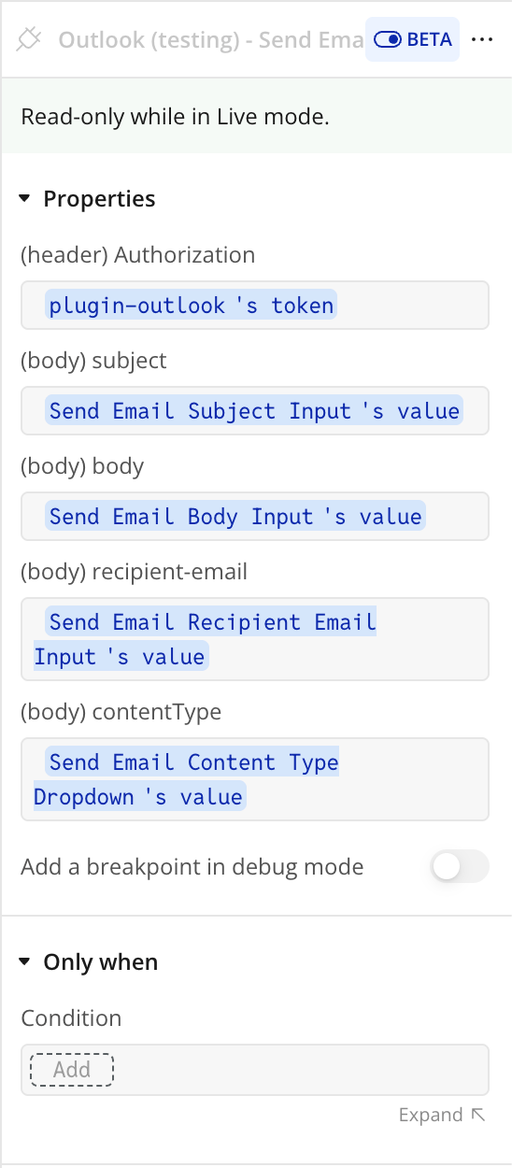
Name | Description | Type |
authorization | plugin-outlook's token used to authorize the API call. | Text |
subject | subject of the email from Send Email Subject Input. | Text |
body | email message content from Send Email Body Input. | Text |
recipient-email | recipient email address from Send Email Recipient Email Input. | Text |
contentType | content type of the email (e.g. text/plain or text/html) from dropdown. | Text |
Response:
Name | Description | Type |
error status_code | error status_code returned by the API call. | Number |
error status_message | error status_message returned by the API call. | Text |
error body | error body returned by the API call. | Text |
returned_an_error | returned_an_error returned by the API call. | yes/no |
headers cache-control | headers cache-control returned by the API call. | Text |
headers strict-transport-security | headers strict-transport-security returned by the API call. | Text |
headers request-id | headers request-id returned by the API call. | Text |
headers client-request-id | headers client-request-id returned by the API call. | Text |
headers x-ms-ags-diagnostic | headers x-ms-ags-diagnostic returned by the API call. | Text |
headers preference-applied | headers preference-applied returned by the API call. | Text |
headers date | headers date returned by the API call. | Text |
headers content-length | headers content-length returned by the API call. | Text |
Move Message to Folder
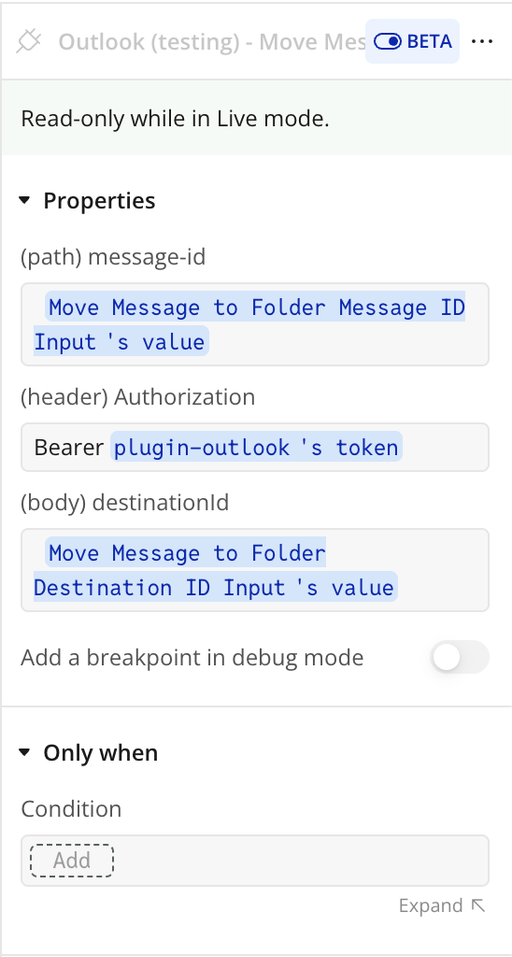
Move Message to Folder is an API call exposed by the plugin for Bubble workflows or data sources. It helps the client send or retrieve data related to this integration without building the request manually. The call returns structured values that can be reused inside the app. It is useful when the client needs this specific operation as part of the plugin workflow.
Response:
Name | Description | Type |
body @odata.context | OData context of the response body | Text |
body @odata.etag | ETag value for the message resource | Text |
body id | Unique message identifier | Text |
body createdDateTime | Date and time the message was created | Text |
body lastModifiedDateTime | Date and time the message was last modified | Text |
body changeKey | Version identifier for the message | Text |
body receivedDateTime | Date and time the message was received | Text |
body sentDateTime | Date and time the message was sent | Text |
body hasAttachments | Indicates if the message has attachments | yes/no |
body internetMessageId | Internet message identifier | Text |
body subject | Email subject line | Text |
body bodyPreview | Preview of the message content | Text |
body importance | Importance level of the message | Text |
body parentFolderId | ID of the parent folder | Text |
body conversationId | Conversation thread identifier | Text |
body conversationIndex | Position of the message in the conversation | Text |
body isDeliveryReceiptRequested | Indicates if a delivery receipt was requested | yes/no |
body isReadReceiptRequested | Indicates if a read receipt was requested | yes/no |
body isRead | Indicates if the message has been read | yes/no |
body isDraft | Indicates if the message is a draft | yes/no |
body webLink | Web link to access the message | Text |
body inferenceClassification | Classification of the message (focused/other) | Text |
body body contentType | Format of the message content (HTML/Text) | Text |
body body content | Full message content | Text |
body sender emailAddress name | Sender name | Text |
body sender emailAddress address | Sender email address | Text |
body from emailAddress name | From name | Text |
body from emailAddress address | From email address | Text |
body toRecipients | List of recipients | Text |
body flag flagStatus | Flag status of the message | Text |
headers cache-control | Cache control directive | Text |
headers transfer-encoding | Transfer encoding type | Text |
headers content-type | Content type of the response | Text |
headers content-encoding | Content encoding used | Text |
headers location | Resource location URL | Text |
headers vary | Vary header information | Text |
headers strict-transport-security | Security policy for HTTPS | Text |
headers request-id | Unique request identifier | Text |
headers client-request-id | Client-generated request identifier | Text |
headers x-ms-ags-diagnostic | Diagnostic information from Microsoft services | Text |
headers date | Response timestamp | Text |
Update Event
Update Event is an API call exposed by the plugin for Bubble workflows or data sources. It helps the client send or retrieve data related to this integration without building the request manually. The call returns structured values that can be reused inside the app. It is useful when the client needs this specific operation as part of the plugin workflow.
Response:
Name | Description | Type |
@odata.context | @odata.context returned by the API call. | Text |
@odata.etag | @odata.etag returned by the API call. | Text |
id | id returned by the API call. | Text |
createdDateTime | createdDateTime returned by the API call. | Text |
lastModifiedDateTime | lastModifiedDateTime returned by the API call. | Text |
changeKey | changeKey returned by the API call. | Text |
transactionId | transactionId returned by the API call. | Text |
originalStartTimeZone | originalStartTimeZone returned by the API call. | Text |
originalEndTimeZone | originalEndTimeZone returned by the API call. | Text |
iCalUId | iCalUId returned by the API call. | Text |
reminderMinutesBeforeStart | reminderMinutesBeforeStart returned by the API call. | Number |
isReminderOn | isReminderOn returned by the API call. | yes/no |
hasAttachments | hasAttachments returned by the API call. | yes/no |
subject | subject returned by the API call. | Text |
bodyPreview | bodyPreview returned by the API call. | Text |
importance | importance returned by the API call. | Text |
sensitivity | sensitivity returned by the API call. | Text |
isAllDay | isAllDay returned by the API call. | yes/no |
isCancelled | isCancelled returned by the API call. | yes/no |
isOrganizer | isOrganizer returned by the API call. | yes/no |
responseRequested | responseRequested returned by the API call. | yes/no |
seriesMasterId | seriesMasterId returned by the API call. | Text |
showAs | showAs returned by the API call. | Text |
type | type returned by the API call. | Text |
webLink | webLink returned by the API call. | Text |
onlineMeetingUrl | onlineMeetingUrl returned by the API call. | Text |
isOnlineMeeting | isOnlineMeeting returned by the API call. | yes/no |
onlineMeetingProvider | onlineMeetingProvider returned by the API call. | Text |
allowNewTimeProposals | allowNewTimeProposals returned by the API call. | yes/no |
occurrenceId | occurrenceId returned by the API call. | Text |
isDraft | isDraft returned by the API call. | yes/no |
hideAttendees | hideAttendees returned by the API call. | yes/no |
responseStatus response | responseStatus response returned by the API call. | Text |
responseStatus time | responseStatus time returned by the API call. | Text |
body contentType | body contentType returned by the API call. | Text |
body content | body content returned by the API call. | Text |
start dateTime | start dateTime returned by the API call. | Text |
start timeZone | start timeZone returned by the API call. | Text |
end dateTime | end dateTime returned by the API call. | Text |
end timeZone | end timeZone returned by the API call. | Text |
location displayName | location displayName returned by the API call. | Text |
location locationType | location locationType returned by the API call. | Text |
location uniqueId | location uniqueId returned by the API call. | Text |
location uniqueIdType | location uniqueIdType returned by the API call. | Text |
locations | locations returned by the API call. | Text |
recurrence | recurrence returned by the API call. | Text |
organizer emailAddress name | organizer emailAddress name returned by the API call. | Text |
organizer emailAddress address | organizer emailAddress address returned by the API call. | Text |
onlineMeeting | onlineMeeting returned by the API call. | Text |
Delete Event
Delete Event is an API call exposed by the plugin for Bubble workflows or data sources. It helps the client send or retrieve data related to this integration without building the request manually. The call returns structured values that can be reused inside the app. It is useful when the client needs this specific operation as part of the plugin workflow.
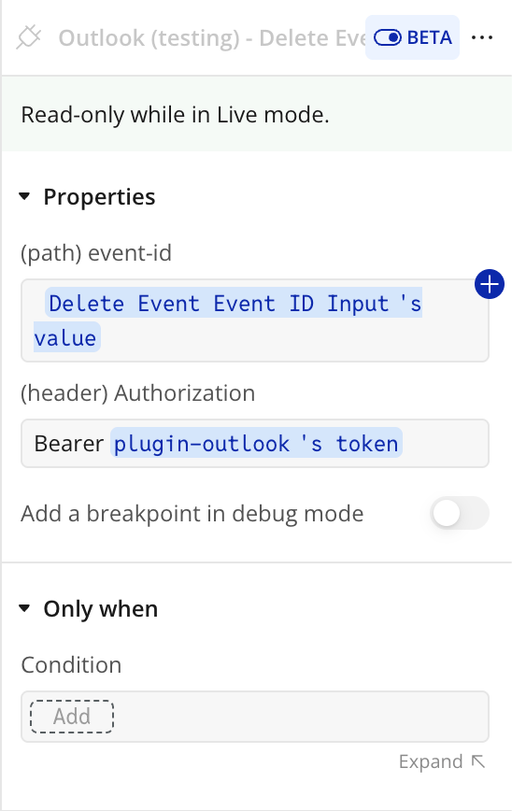
Name | Description | Type |
event-id | Unique identifier of the event to delete | Text |
Authorization | Bearer token used to authenticate the request | Text |
Response:
Name | Description | Type |
@odata.context | @odata.context returned by the API call. | Text |
@odata.etag | @odata.etag returned by the API call. | Text |
id | id returned by the API call. | Text |
createdDateTime | createdDateTime returned by the API call. | Date |
lastModifiedDateTime | lastModifiedDateTime returned by the API call. | Date |
changeKey | changeKey returned by the API call. | Text |
originalStartTimeZone | originalStartTimeZone returned by the API call. | Date |
originalEndTimeZone | originalEndTimeZone returned by the API call. | Date |
iCalUId | iCalUId returned by the API call. | Text |
reminderMinutesBeforeStart | reminderMinutesBeforeStart returned by the API call. | Number |
isReminderOn | isReminderOn returned by the API call. | yes/no |
hasAttachments | hasAttachments returned by the API call. | yes/no |
subject | subject returned by the API call. | Text |
bodyPreview | bodyPreview returned by the API call. | Text |
importance | importance returned by the API call. | Text |
sensitivity | sensitivity returned by the API call. | Text |
isAllDay | isAllDay returned by the API call. | yes/no |
isCancelled | isCancelled returned by the API call. | yes/no |
isOrganizer | isOrganizer returned by the API call. | yes/no |
responseRequested | responseRequested returned by the API call. | yes/no |
seriesMasterId | seriesMasterId returned by the API call. | Text |
showAs | showAs returned by the API call. | Text |
type | type returned by the API call. | Text |
webLink | webLink returned by the API call. | Text |
onlineMeetingUrl | onlineMeetingUrl returned by the API call. | Text |
recurrence | recurrence returned by the API call. | Text |
responseStatus response | responseStatus response returned by the API call. | Text |
responseStatus time | responseStatus time returned by the API call. | Text |
body contentType | body contentType returned by the API call. | Text |
body content | body content returned by the API call. | Text |
start dateTime | start dateTime returned by the API call. | Date |
start timeZone | start timeZone returned by the API call. | Text |
end dateTime | end dateTime returned by the API call. | Date |
end timeZone | end timeZone returned by the API call. | Text |
location displayName | location displayName returned by the API call. | Text |
location locationType | location locationType returned by the API call. | Text |
location uniqueId | location uniqueId returned by the API call. | Text |
location uniqueIdType | location uniqueIdType returned by the API call. | Text |
locations | locations returned by the API call. | Text |
organizer emailAddress name | organizer emailAddress name returned by the API call. | Text |
organizer emailAddress address | organizer emailAddress address returned by the API call. | Text |
Update Contact
Update Contact is an API call exposed by the plugin for Bubble workflows or data sources. It helps the client send or retrieve data related to this integration without building the request manually. The call returns structured values that can be reused inside the app. It is useful when the client needs this specific operation as part of the plugin workflow.
Response:
Name | Description | Type |
@odata.context | @odata.context returned by the API call. | Text |
@odata.etag | @odata.etag returned by the API call. | Text |
id | id returned by the API call. | Text |
createdDateTime | createdDateTime returned by the API call. | Text |
lastModifiedDateTime | lastModifiedDateTime returned by the API call. | Text |
changeKey | changeKey returned by the API call. | Text |
parentFolderId | parentFolderId returned by the API call. | Text |
birthday | birthday returned by the API call. | Text |
fileAs | fileAs returned by the API call. | Text |
displayName | displayName returned by the API call. | Text |
givenName | givenName returned by the API call. | Text |
initials | initials returned by the API call. | Text |
middleName | middleName returned by the API call. | Text |
nickName | nickName returned by the API call. | Text |
surname | surname returned by the API call. | Text |
title | title returned by the API call. | Text |
yomiGivenName | yomiGivenName returned by the API call. | Text |
yomiSurname | yomiSurname returned by the API call. | Text |
yomiCompanyName | yomiCompanyName returned by the API call. | Text |
generation | generation returned by the API call. | Text |
jobTitle | jobTitle returned by the API call. | Text |
companyName | companyName returned by the API call. | Text |
department | department returned by the API call. | Text |
officeLocation | officeLocation returned by the API call. | Text |
profession | profession returned by the API call. | Text |
businessHomePage | businessHomePage returned by the API call. | Text |
assistantName | assistantName returned by the API call. | Text |
manager | manager returned by the API call. | Text |
mobilePhone | mobilePhone returned by the API call. | Text |
businessPhones | businessPhones returned by the API call. | Text |
spouseName | spouseName returned by the API call. | Text |
personalNotes | personalNotes returned by the API call. | Text |
emailAddresses | emailAddresses returned by the API call. | Text |
Mark Email as Read/Unread
Mark Email as Read/Unread is an API call exposed by the plugin for Bubble workflows or data sources. It helps the client send or retrieve data related to this integration without building the request manually. The call returns structured values that can be reused inside the app. It is useful when the client needs this specific operation as part of the plugin workflow.
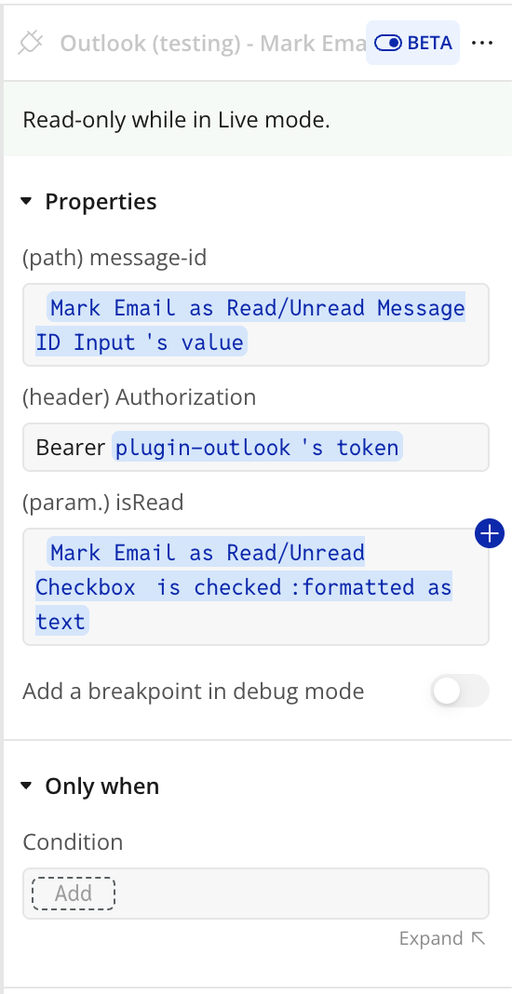
Name | Description | Type |
message-id | Unique identifier of the email message | Text |
Authorization | Bearer token used to authenticate the request | Text |
Parameters:
Name | Description | Type |
isRead | Parameter accepted by this API call. | Text |
Response:
Name | Description | Type |
@odata.context | @odata.context returned by the API call. | Text |
@odata.etag | @odata.etag returned by the API call. | Text |
id | id returned by the API call. | Text |
createdDateTime | createdDateTime returned by the API call. | Text |
lastModifiedDateTime | lastModifiedDateTime returned by the API call. | Text |
changeKey | changeKey returned by the API call. | Text |
receivedDateTime | receivedDateTime returned by the API call. | Text |
sentDateTime | sentDateTime returned by the API call. | Text |
hasAttachments | hasAttachments returned by the API call. | yes/no |
internetMessageId | internetMessageId returned by the API call. | Text |
subject | subject returned by the API call. | Text |
bodyPreview | bodyPreview returned by the API call. | Text |
importance | importance returned by the API call. | Text |
parentFolderId | parentFolderId returned by the API call. | Text |
conversationId | conversationId returned by the API call. | Text |
conversationIndex | conversationIndex returned by the API call. | Text |
isDeliveryReceiptRequested | isDeliveryReceiptRequested returned by the API call. | Text |
isReadReceiptRequested | isReadReceiptRequested returned by the API call. | yes/no |
isRead | isRead returned by the API call. | yes/no |
isDraft | isDraft returned by the API call. | yes/no |
webLink | webLink returned by the API call. | Text |
inferenceClassification | inferenceClassification returned by the API call. | Text |
body contentType | body contentType returned by the API call. | Text |
body content | body content returned by the API call. | Text |
sender emailAddress name | sender emailAddress name returned by the API call. | Text |
sender emailAddress address | sender emailAddress address returned by the API call. | Text |
from emailAddress name | from emailAddress name returned by the API call. | Text |
from emailAddress address | from emailAddress address returned by the API call. | Text |
toRecipients | toRecipients returned by the API call. | Text |
flag flagStatus | flag flagStatus returned by the API call. | Text |
Send Email with CC Recipient
Send Email with CC Recipient is an API call exposed by the plugin for Bubble workflows or data sources. It helps the client send or retrieve data related to this integration without building the request manually. The call returns structured values that can be reused inside the app. It is useful when the client needs this specific operation as part of the plugin workflow.
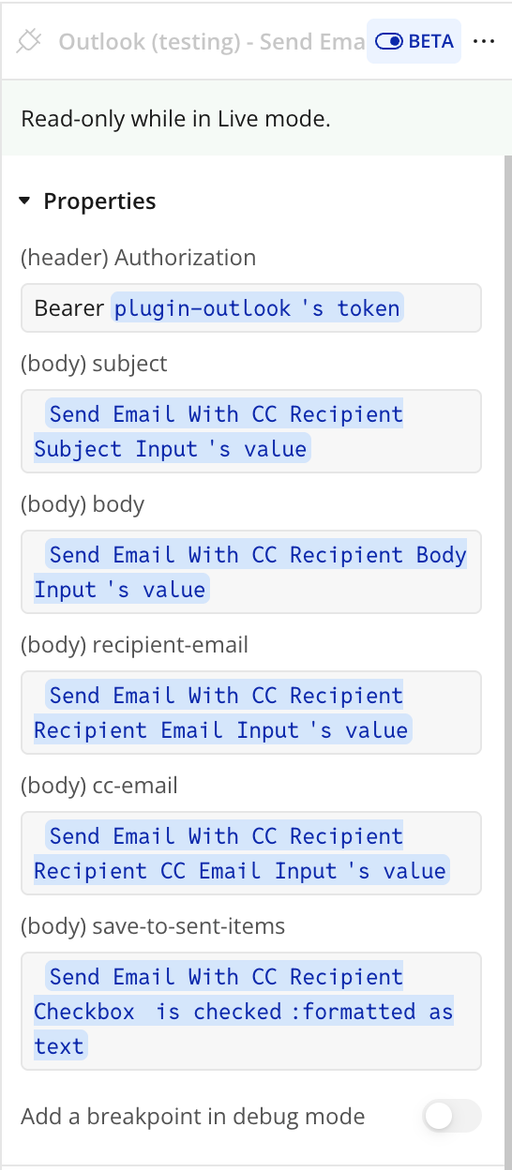
Name | Description | Type |
Authorization | Bearer token (plugin-outlook's token) used to authorize the API call. | Text |
subject | subject of the email from Send Email With CC Recipient Subject Input. | Text |
body | email message content from Send Email With CC Recipient Body Input. | Text |
recipient-email | primary recipient email address from Send Email With CC Recipient Recipient Email Input. | Text |
cc-email | CC recipient email address from Send Email With CC Recipient Recipient CC Email Input. | Text |
save-to-sent-items | determines if the email should be saved to sent items | Yes/No |
Content Type | Format of the email body content.
Accepts Text or HTML | Text |
Response:
Name | Description | Type |
headers cache-control | headers cache-control returned by the API call. | Text |
headers content-type | headers content-type returned by the API call. | Text |
headers request-id | headers request-id returned by the API call. | Text |
headers client-request-id | headers client-request-id returned by the API call. | Text |
headers x-ms-ags-diagnostic | headers x-ms-ags-diagnostic returned by the API call. | Text |
headers preference-applied | headers preference-applied returned by the API call. | Text |
headers strict-transport-security | headers strict-transport-security returned by the API call. | Text |
headers date | headers date returned by the API call. | Text |
headers content-length | headers content-length returned by the API call. | Text |
Workflow example
Connect Outlook
- Place a Button on the page (e.g., Connect Outlook)
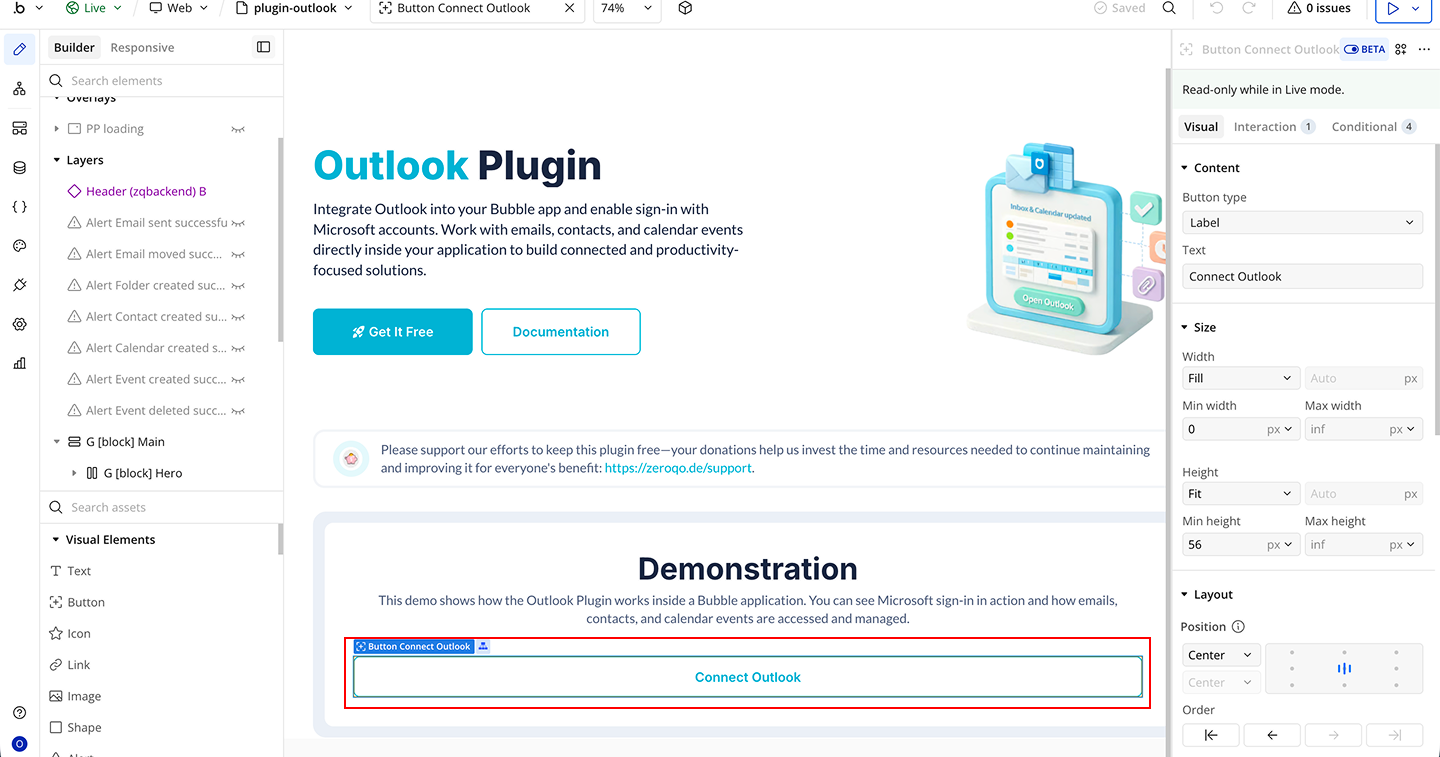
- Start a workflow on that button
- Click Add an Event → Button is clicked
- Click Add an Action
- Select Plugin Action → Outlook: Get AuthCode
Create Calendar
- Place an Input element on the page (for Calendar Name)
- Place a Button on the page (e.g., Create Calendar)
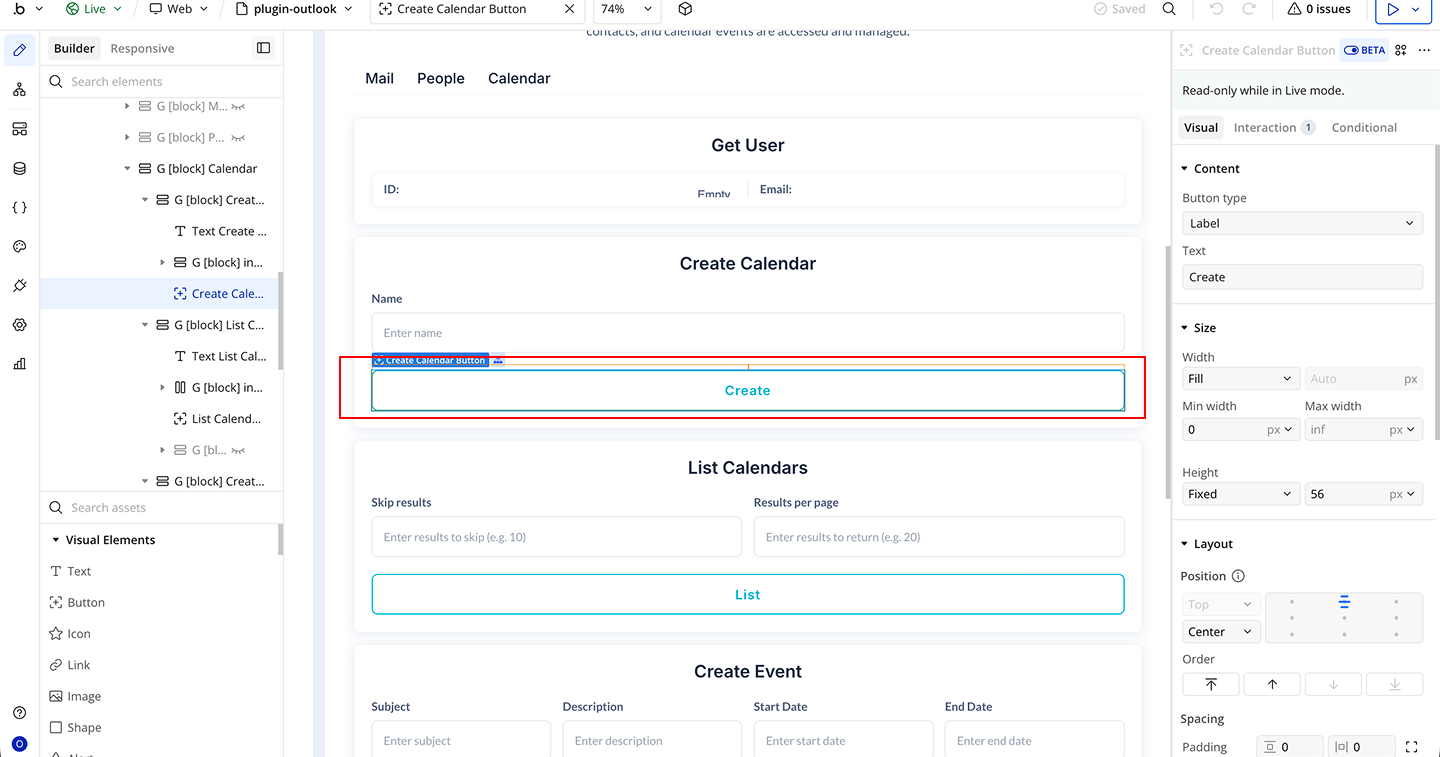
- Start a workflow on that button
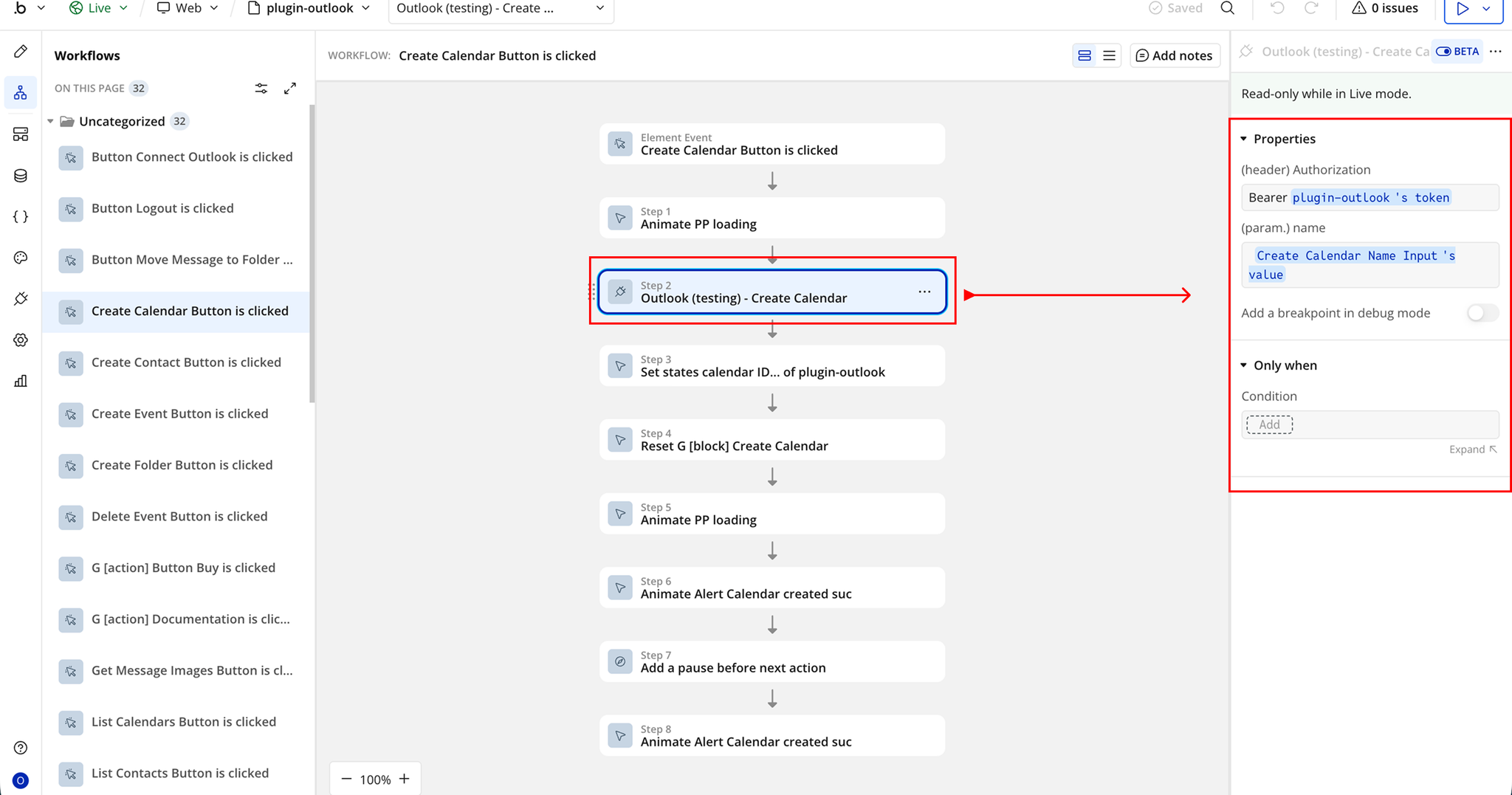
- Click Add an Event → Button is clicked
- Click Add an Action
- Select Plugin Action →Outlook - Create Calendar
- Set Authorization
- Set Name = Input Calendar Name’s value
Changelogs
Update 06.07.26 - Version 4.1.0
- Added Content-type field for Send Email (Attachments) and Send Email With CC Recipient.
Update 11.05.26 - Version 4.0.0
- Bubble Plugin Page Update (Docs).
Update 11.08.25 - Version 3.24.0
- Fixed "Send Email with Attachments" action .
Update 17.06.25 - Version 3.23.0
- Marketing update (minor change).
Update 28.01.25 - Version 3.22.0
- Updated API security.
Update 27.11.24 - Version 3.21.0
- Minor update(Marketing update).
Update 15.09.24 - Version 3.20.0
- Minor update (Marketing update).
Update 23.07.24 - Version 3.19.0
- Minor update.
Update 14.06.24 - Version 3.18.0
- Updated demo/service links.
Update 13.03.24 - Version 3.17.0
- internal updates.
Update 12.03.24 - Version 3.16.0
- Send email with attachments".
Update 12.03.24 - Version 3.15.0
- Send email with attachments.
Update 08.03.24 - Version 3.14.0
- Added "contentType" field to the Send Email action for HTML or Text emails..
Update 26.02.24 - Version 3.13.0
- fixed action Outlook: Auth.
Update 22.11.23 - Version 3.12.0
- updated description .
Update 20.10.23 - Version 3.11.0
- Upgrade to Verstion 4.
Update 19.10.23 - Version 3.10.0
- Updated description.
Update 18.10.23 - Version 3.9.0
- Added access token renewal. Fixed minor bugs.
Update 18.09.23 - Version 3.8.0
- updated description.
Update 13.09.23 - Version 3.7.0
- minor updates.
Update 05.09.23 - Version 3.6.0
- internal updates.
Update 04.09.23 - Version 3.5.0
- updated description.
Update 25.07.23 - Version 3.4.0
- updated description.
Update 09.06.22 - Version 3.3.0
- Updated Documentation.
Update 12.04.21 - Version 3.2.0
- Fixed bug for "List Events" action only.
Update 18.12.20 - Version 3.1.0
- Signup/login will now save the user's Microsoft email to the Bubble user record.
Update 14.09.20 - Version 3.0.0
- Updates made to reflect move to Azure. Please register your app at portal.azure.com before upgrading..
Update 01.11.19 - Version 2.0.0
- Separated "Send Email" actions: "Send Email" and "Send Email with CC Recipient". You must replace any existing "Send Email" actions that use the CC field with the new "Send Email with CC Recipient" action..
Update 12.09.19 - Version 1.9.1
- Bug fix for "Move Message to Folder" action.
Update 29.08.19 - Version 1.9.0
- Mark an email message as read or unread.
Update 23.07.19 - Version 1.8.0
- Added call to Update Contact.
Update 01.07.19 - Version 1.7.0
- Added call to search for a user in the organization by email.
Update 01.07.19 - Version 1.6.0
- Added call to get all users in organization.
Update 16.05.19 - Version 1.5.1
- Minor bug fix.
Update 24.04.19 - Version 1.5.0
- Added Update Event and Delete Event actions. You need to store the Event ID after creating in order to later update or delete with that ID..
Update 16.11.18 - Version 1.4.0
- Added pagination parameters to the List Events, Contacts, Messages, Calendars, and Folders data calls. Use "skip" to skip the first X number of results. Use "top" to request X number of results in a page. The response will contain a parameter for @odata:nextLink whose value is a URL with a skip parameter you can use to retrieve the next page of results..
Update 18.09.18 - Version 1.3.0
- Added calls: Create/List email folders, List email messages, Send email, Move message to folder, Get single folder.
Update 20.07.18 - Version 1.2.0
- Added All Day and Reminder fields to the Create Event call.
Update 09.09.17 - Version 1.1.0
- Added Create Contact.
Update 09.09.17 - Version 1.0.0
- Initial release.