
A Framer code component that renders an animated glowing border effect on hover. Works in two modes: Wrapper (wraps any content) and Standalone (overlays on an existing element).
Video Demo
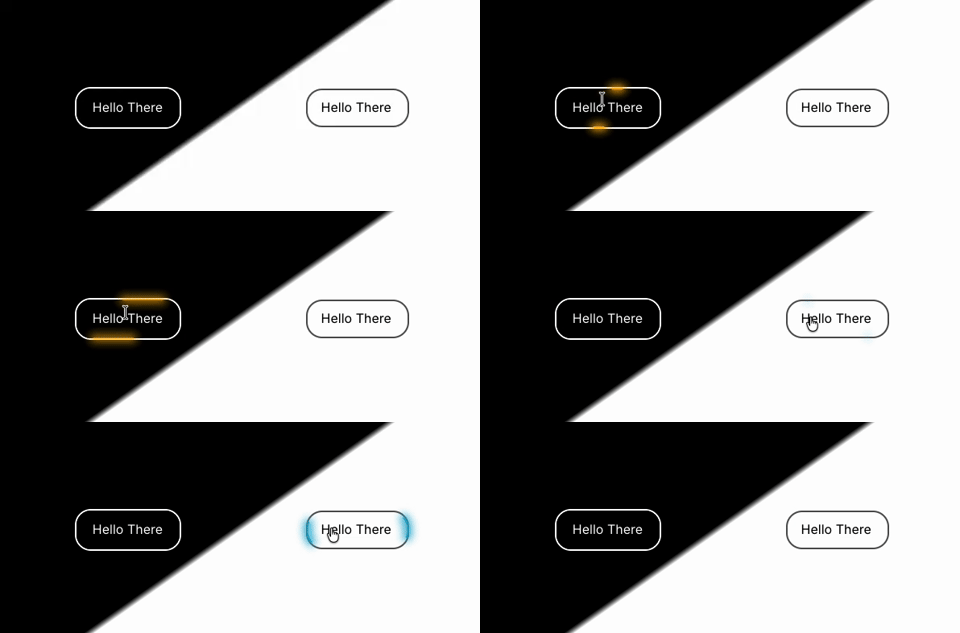
Introduction
GlowBorder draws an SVG rectangle with two layers — a blurred glow layer and a sharp line layer — that animate along the border path on hover. The animation uses
framer-motion controls for opacity and strokeDasharray transitions.Modes
Wrapper mode (default)
Place any content inside the component. The border and glow wrap around the children. Hover is detected internally.
plain text┌────────────────────────┐
│  [GlowBorder wrapper]  │
│  ┌──────────────────┐  │
│  │    children      │  │
│  └──────────────────┘  │
└────────────────────────┘
Standalone mode
The component sits on top of its parent element. Useful when you can't wrap the target (e.g. Framer native components). Hover is driven by the external Preview Hover toggle in the properties panel, or by wiring
isHoveredExternal from a parent interaction.How to Use
- Add the component to your Framer project.
- Wrapper mode: Drop content into the slot. Resize the component as needed — the border follows.
- Standalone mode: Place the component inside a Frame, set it to
Fill container. Toggle Preview Hover to test the animation in the canvas. Setoverflow visiblefo
Component Properties
Title | Description | Type | Default |
Mode | Wrapper — wraps children with hover detection. Standalone — overlays on parent, controlled externally. | Enum | Wrapper |
Children | Content slot (Wrapper mode only). | Slot | — |
Preview Hover | Manually triggers the hover animation (Standalone mode only). | Boolean | Off |
Glow Color | Color of the glowing stroke. | Color | #ffffff |
Blur Size | Thickness of the blurred glow layer in px. | Number (2–40) | 10 |
Line Length | Length of the animated dash as a percentage of the path (1–49). | Number (1–49) | 20 |
Speed (ms) | Duration of one full animation cycle in milliseconds. | Number (300–4000, step 100) | 1200 |
Radius | Border radius in px. Applied to both the outer border and the SVG rect. | Number (0–200) | 20 |
Border Color | Color of the static border. | Color | #ccd2e6 |
Border Width | Width of the static border in px. | Number (0–8) | 2 |