
Demo page
Introduction
This plugin allows you to add a live clock to your app as well as countdowns and start/stop timers.
Based upon https://github.com/objectivehtml/FlipClock under MIT License
Features
- Clock with the current time (including seconds)
- Countdown to a certain date (counting down)
- Countdown from a second date (counting up)
- Start/Stop Timer
- Minute and Seconds Countdown
- Minute and Seconds Countup
How to Setup
Simply drag your desired clock element onto your app editor.
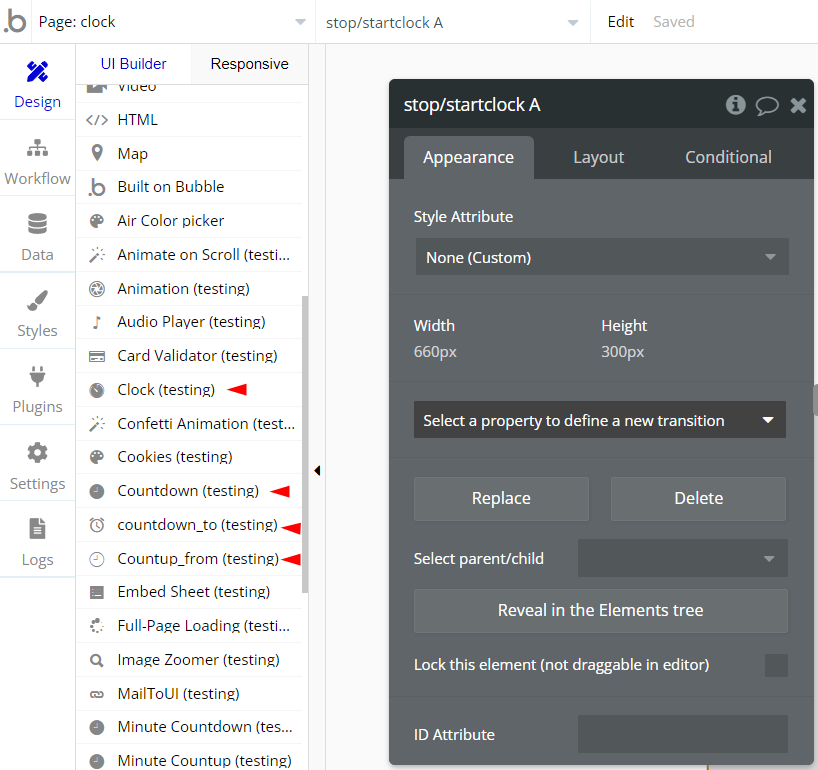
Depending on the element you have chosen, you will have to configure a date or a countdown time.
Countdown: Will count down from a specified number of seconds from page load.
Countup_from: Will count up from a certain date and time that you can specify
Coutdonwn_to: Will count down to a certain data and time that you can specify
Clock: Clock showing the current users time
Stop/Start Clock: A clock that can be controlled using an element action (start or stop) in a workflow.
Please note, currently this Plugin only supports one clock element for a page. Adding more than one clock element will break the Plugin.
The clock element has a fixed width and will be too wide for use on mobile
Frequently Asked Questions
Have a question, or suggestion, or encountered an issue? 🤷♂️
Please contact us by sending a mail to: support@rapidevelopers.com
Want to report a bug? Please follow this guideline!